Reliable video distribution is essential in conference rooms, whether you are connecting a presentation laptop to a distant display or sending one source to several screens. The best HDMI extenders help overcome cable-length limits while preserving clear video and dependable control.
This roundup covers wired CAT-based systems, wireless presentation kits, splitters, and compact HDMI extension options for meeting rooms of different sizes and layouts.
Best 10 Hdmi Extenders for Conference Rooms Picks for 2026
Best for Complex AV Routing

- Routes four sources to multiple local and remote displays
- 4K@60Hz transmission up to 230 feet over CAT cable
- Web GUI, RS232, IR, and Android control options
Best For: Large conference rooms with centralized, multi-display AV distribution
Best Wireless Presentation Kit

- Plug-and-play wireless mirroring up to 1080p@60Hz
- Includes mini HDMI and USB-C adapter accessories
- One receiver can pair with up to eight transmitters
Best For: Portable meetings and cable-free presentations in open room layouts
Best for Four-Screen Distribution

- Sends one HDMI source to four displays
- 4K@30Hz transmission reaches 165 feet over CAT cable
- PoC, HDMI loop-out, IR, and EDID management included
Best For: Fixed conference-room setups using one source across four screens
Best Long-Range Wireless Multi-Display

- Sends one source to two displays simultaneously
- Up to 500 feet in open environments; no Wi-Fi required
- 1080p@60Hz output with included micro and mini HDMI adapters
Best For: Wireless two-screen conference-room presentations across open spaces
Best Wired 4K Value

- Extends 1080p up to 230 feet
- Supports 4K@30Hz and 7.1-channel audio
- Adds loop out, IR, PoC, and EDID copy
Best For: Conference rooms needing a direct, long-distance CAT6 connection
Best Wireless Setup

- Reaches up to 165 feet indoors
- Outputs 1080p at 60Hz with 4K decoding
- Supports duplicate and extended display modes
Best For: Portable presentations and rooms where cable routing is difficult
Best for Clean Wired Installations

- Extends 1080p up to 230 feet
- Uses CAT5e/6/7 with 4K@30Hz support
- Includes loop out, IR, EDID, and one-way PoC
Best For: Permanent conference-room and presentation installations
Best Wireless Reach
Wireless HDMI Transmitter and Receiver

- 1080p output with 4K decoding
- Wireless range up to 328 feet
- No Wi-Fi, app, or Bluetooth required
Best For: Wireless presentations across larger rooms
Best Short Cable Extension
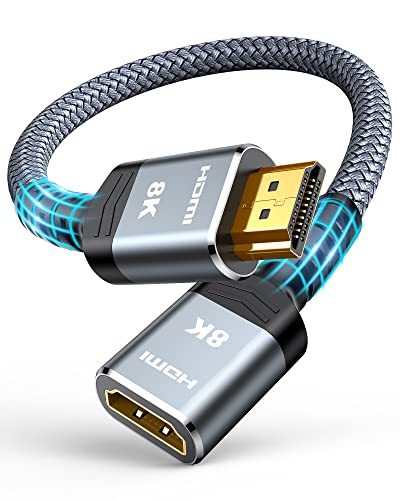
- 48Gbps HDMI 2.1 bandwidth
- Supports 8K60 and 4K120
- Durable nylon and gold-plated construction
Best For: Short, high-speed cable extensions
Best Flexible 2-Foot Option
VCELINK 8K HDMI Extender Cable

- Two-foot HDMI 2.1 extension
- Supports 8K60 and 4K144
- Shielded, flexible construction for tight spaces
Best For: High-resolution conference-room cable routing
Best for Complex AV Routing – 4K 4×4 HDMI Matrix Extender
For conference rooms that need to route several sources to multiple displays, this MT-VIKI matrix extender offers centralized distribution over CAT6/7/8 cabling. It supports 4K at 60Hz, provides extensive control options, and can transmit signals up to 230 feet.
Best For: Large conference rooms and professional AV systems requiring flexible multi-source, multi-display routing.
Pros:
- Routes four HDMI inputs to local and extended outputs, with up to eight extended screens.
- Supports 4K@60Hz, HDMI 2.0, and HDCP 2.2.
- Includes web GUI, RS232, IR, remote, and Android app control.
- POC technology powers the receivers through CAT cable.
Cons:
- The Android app does not support iOS.
- Its advanced matrix features may be more than a small room needs.
This is a strong choice when a conference room needs dependable, configurable signal distribution rather than a simple point-to-point extender. EDID and audio management add useful flexibility for mixed display and audio setups.
Best Wireless Presentation Kit – 4K Wireless HDMI Transmitter
This wireless HDMI kit is a convenient option for conference rooms where presenters need to share content without running a long HDMI cable. It supports up to 1080p at 60Hz, includes adapters for several devices, and can reach up to 165 feet in suitable conditions.
Best For: Portable presentations and smaller conference rooms where quick, cable-free screen sharing is the priority.
Pros:
- Plug-and-play design requires no driver or app installation.
- Supports laptops, PCs, smartphones, cameras, projectors, and HDTVs.
- Includes mini and USB-C adapter accessories.
- One receiver can pair with up to eight transmitters.
Cons:
- Video output is limited to 1080p at 60Hz despite the 4K reference in the title.
- Concrete walls or different floors can significantly reduce range.
- The package does not include a 5V/2A charger.
For presentation-focused HDMI extenders for conference rooms, this kit emphasizes simple setup and device flexibility. It is less suitable when the room requires guaranteed 4K output or heavily obstructed wireless transmission.
Best for Four-Screen Distribution – 4K HDMI Extender Splitter
When one conference-room source needs to appear on several displays, this 1×4 HDMI extender splitter sends synchronized video to four receivers over CAT5/6/7 cable. It supports 4K at 30Hz up to 165 feet and includes loop-out, IR pass-through, and PoC power features.
Best For: Conference rooms, training spaces, and commercial installations showing one presentation source on four screens.
Pros:
- Distributes one HDMI source to four remote displays simultaneously.
- Supports 4K@30Hz at 165 feet and 1080p@60Hz at up to 230 feet.
- PoC powers receivers through CAT cable from one transmitter adapter.
- Includes HDMI loop-out, bidirectional IR, and EDID management.
Cons:
- It distributes one source rather than switching among multiple inputs.
- 4K transmission is limited to 30Hz.
- Audio compatibility may require copying the display EDID.
This model is a practical choice for fixed multi-screen conference-room layouts. Its simple 1-to-4 architecture avoids complicated network configuration while retaining useful control and monitoring features.
Best Long-Range Wireless Multi-Display – Wireless HDMI Extender
This wireless HDMI extender includes one transmitter and two receivers, allowing the same content to appear on two displays without Wi-Fi or Bluetooth network setup. It decodes 4K but outputs 1080p at 60Hz, with a stated open-environment range of up to 500 feet.
Best For: Conference rooms or venues that need the same presentation on two remotely placed screens without installing CAT cable.
Pros:
- One transmitter sends video and audio to two displays simultaneously.
- Uses direct wireless connectivity without Wi-Fi or Bluetooth.
- Supports mirroring and extension functions with 1080p@60Hz output.
- Includes micro HDMI and mini HDMI adapters for broader device compatibility.
Cons:
- The 500-foot range applies to open environments; walls may reduce it to about 100 feet.
- The system cannot transmit from one TV to another.
- 4K decoding does not mean 4K output; output is specified at 1080p@60Hz.
Among wireless HDMI extenders for conference rooms, this kit stands out for supporting two receivers out of the box and offering a long stated range. Verify wall construction and required resolution before choosing it for a permanent installation.
Best Wired 4K Value – OREI HDMI Extender Over Cat6
For conference rooms that need a dependable wired connection, this OREI HDMI extender sends uncompressed video and audio over one direct CAT5e/CAT6 cable. It supports 1080p over longer distances and 4K at 30Hz, while its loop output and IR pass-through add flexibility for local monitoring and source control.
Best For: Conference rooms, classrooms, and multimedia spaces using direct CAT6 runs with 4K displays limited to 30Hz.
Pros:
- Extends up to 230 feet at 1080p or 131 feet at 4K@30Hz.
- Supports 7.1-channel HD audio and up to 10.2Gbps bandwidth.
- Includes HDMI loop out, one-way IR pass-through, PoC, and EDID copy.
- Includes a 12-month warranty and lifetime OREI technical support.
Cons:
- Limited to 4K at 30Hz rather than 4K at 60Hz.
- Requires a direct CAT5e/CAT6 connection and should not be used through network switches or routers.
- Uses HDMI 1.4 and HDCP 1.4.
This is a practical wired option among HDMI extenders for conference rooms when stable long-distance transmission, local display monitoring, and remote source control matter more than high-refresh-rate 4K.
Best Wireless Setup – Wireless HDMI Extender 328ft
This wireless HDMI transmitter and receiver is suited to conference rooms where avoiding a long HDMI cable run is a priority. It offers plug-and-play operation without Wi-Fi, an app, or Bluetooth, with 1080p/60Hz output and support for duplicate and extended display modes.
Best For: Portable presentations, temporary meeting setups, classrooms, and rooms where cable routing is inconvenient.
Pros:
- Wireless transmission reaches up to 165 feet indoors and 328 feet outdoors in open space.
- Supports 1080p at 60Hz output and 4K decoding.
- Works with laptops, cameras, projectors, monitors, Blu-ray players, and other HDMI devices.
- Compact design includes Micro HDMI and Mini HDMI adapters.
Cons:
- Both the transmitter and receiver require power.
- Walls and obstacles can reduce transmission distance and speed.
- Output is specified at 1080p/60Hz, not 4K output.
Choose this model when fast deployment and a cleaner room setup are more important than a fully wired signal path. Its wireless design can simplify presentations, but room construction and power access will affect installation.
Best for Clean Wired Installations – OREI EX-170C HDMI Extender
The OREI EX-170C is a wired HDMI extender designed for conference rooms and other installations that need a direct CAT5e, CAT6, or CAT7 cable run. It combines 4K@30Hz support with HDMI loop out, EDID copy, IR pass-through, and one-way PoC to reduce cabling at the transmitter.
Best For: Permanent conference-room, presentation, digital-signage, and CCTV installations requiring local monitoring and a single-cable extension path.
Pros:
- Extends 1080p up to 230 feet or 4K@30Hz up to 131 feet.
- Supports CAT5e/6/7 cabling and up to 10.2Gbps bandwidth.
- Provides HDMI loop out, EDID copy, and one-way IR pass-through.
- One-way PoC allows power from one adapter at the transmitter.
Cons:
- Does not support 4K at 60Hz.
- Not compatible with HDMI ARC.
- Must use a direct cable connection rather than a network switch or router.
Among HDMI extenders for conference rooms, this model stands out for installation-focused features such as one-adapter PoC, loop-out monitoring, and a durable metal housing. It is best matched with standard HDMI 1.4-era equipment and moderate-resolution presentation systems.
Best Wireless Reach – Wireless HDMI Transmitter and Receiver
For conference rooms where running a cable is inconvenient, this wireless HDMI kit provides a flexible way to share content. It supports 1080p output, extended or duplicate display modes, and transmission distances up to 328 feet in suitable conditions.
Best For: Presenters and teams that need wireless laptop-to-display sharing across larger rooms or spaces.
Pros:
- Wireless plug-and-play setup without Wi-Fi, an app, or Bluetooth
- Supports 1080p at 60Hz and 4K decoding
- Up to 328 feet of transmission range, with dual-frequency 2.4GHz and 5GHz operation
- Compact design includes Micro HDMI and Mini HDMI adapters
Cons:
- Both the transmitter and receiver need to be connected to power
- Walls and obstacles can reduce transmission distance and speed
- Output is limited to 1080p even though the system supports 4K decoding
Among HDMI extenders for conference rooms, this is the most convenient choice when wireless installation matters more than native 4K output. It is also portable enough for mobile presentations and temporary setups.
Best Short Cable Extension – Highwings 8K HDMI Extender
This compact male-to-female adapter is a practical option when an existing HDMI cable falls just short of a conference-room display or projector. Its HDMI 2.1 specification supports high-bandwidth video formats while keeping installation as simple as plugging in an extension.
Best For: Conference-room users who need a durable one-foot cable extension for laptops, projectors, displays, or media devices.
Pros:
- Supports up to 48Gbps bandwidth, 8K at 60Hz, and 4K at 120Hz
- Compatible with HDMI Ethernet Channel, ARC, HDR, and 3D content
- Nylon construction, gold-plated ports, and a design rated for up to 25,000 flexes
- Compact male-to-female format can help save space and protect the original port
Cons:
- Only one foot long, so it may not solve larger distance requirements
- It extends an existing cable rather than replacing a long-run HDMI solution
- Designed for indoor use
For HDMI extenders for conference rooms, the Highwings is a straightforward wired fix for tight installations and short cable shortages. Choose it when you already have a suitable HDMI cable and want a robust, high-speed extension.
Best Flexible 2-Foot Option – VCELINK 8K HDMI Extender Cable
The VCELINK HDMI extender adds two feet to an existing cable, making it useful for conference-room setups where equipment placement or behind-display wiring needs extra flexibility. It supports HDMI 2.1 features, high resolutions, and both mirrored and extended display modes.
Best For: Offices, classrooms, and conference rooms that need a flexible two-foot extension for PCs, projectors, displays, or conference equipment.
Pros:
- Supports 8K at 60Hz, 4K at up to 144Hz, and 48Gbps transmission
- Compatible with dynamic HDR, HDCP 2.2/2.3, VRR, and QFT
- Nylon braiding, triple shielding, and an aluminum alloy shell help with durability and interference reduction
- Flexible design suits tight spaces, including behind wall-mounted displays
Cons:
- It is a two-foot extension, not a complete long-distance HDMI run
- Designed for indoor use
- May be more capability than needed for basic 1080p presentation systems
Among HDMI extenders for conference rooms, this model stands out for combining extra reach with flexible, shielded construction. It is a strong fit when cable routing is tight and the room uses high-resolution displays or projectors.
How We Picked the Best Hdmi Extenders for Conference Rooms
We focused on the connection types and features that matter most in business meeting spaces: supported resolution, transmission distance, installation complexity, control options, and compatibility with common HDMI sources and displays. The selection includes wired extenders that use CAT5e, CAT6, or better cabling, as well as wireless kits for rooms where running cable is impractical.
We also considered practical capabilities such as infrared control, Power over Cable, loop-through outputs, EDID management, multiple receivers, and support for point-to-point or multi-display layouts. Because conference rooms vary widely, no single extender is ideal for every installation.
Quick Comparison
- Best for multi-display systems: A 4×4 HDMI matrix extender can route several sources to several displays and is suited to larger installations.
- Best for straightforward distribution: A 1×4 extender splitter sends one HDMI source to multiple distant screens.
- Best for flexible presentations: Wireless transmitter-and-receiver kits reduce cable clutter and simplify temporary connections.
- Best for long point-to-point runs: CAT-based extenders can carry signals across a room or between adjacent spaces using structured cabling.
- Best for short connections: HDMI 2.1 extension adapters and cables can solve limited reach problems without adding a separate transmitter and receiver.
Key Buying Factors for Hdmi Extenders for Conference Rooms
Resolution and Refresh Rate
Match the extender to the displays and source devices. A 4K model is preferable for detailed presentations, signage, and modern laptops, but verify whether it supports 4K at 30Hz, 60Hz, or higher. Wireless models may provide lower output resolutions than their source input.
Distance and Cabling
Check the rated transmission distance and the required cable category. CAT6 or CAT6A is generally a sensible choice for new installations, while the actual result can depend on cable quality, connectors, interference, and patch panels. Do not assume an HDMI cable extension adapter offers the same reach as an active extender.
Room Layout and Signal Routing
For one source and one remote display, a basic transmitter-receiver pair may be enough. Choose a splitter for one-to-many distribution and a matrix when users need to switch multiple sources across multiple displays.
Control and Installation Features
IR pass-through helps users control a source from the display location. PoC can reduce power-supply clutter, while loop-out ports allow a local monitor or confidence display. EDID support can help prevent handshake problems when sources and screens have different capabilities.
Who Should Buy Which Hdmi Extenders for Conference Rooms?
Small meeting rooms should favor simple wired or wireless kits with plug-and-play setup. Training rooms and presentation spaces may benefit from a splitter or a wireless kit with multiple receivers. Large conference rooms and flexible AV installations should consider a matrix extender with centralized routing, web management, and control integration. If the display is only slightly beyond the reach of the existing cable, a compact HDMI extension cable may be the most economical solution.