Running HDMI across a room, between floors, or through a commercial space can introduce signal loss, clutter, and connection problems. The right 4K HDMI extender can move high-resolution video and audio much farther than a standard cable while adding useful features such as IR control, PoC power, loop-out ports, and EDID management.
This roundup compares 10 options ranging from compact HDMI extension cables to long-distance Ethernet and HDBaseT systems, helping you match the hardware to your distance, resolution, control, and installation requirements.
Best 10 4K Hdmi Extenders Picks for 2026
Best Long-Range Pick
230ft 4K HDMI Ethernet Extender
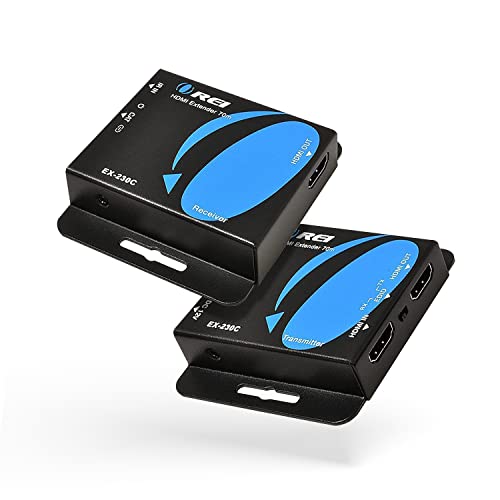
- 4K at 30Hz up to 130 feet
- 1080p transmission up to 230 feet
- PoC, loop-out, EDID, and IR support
Best For: Long indoor HDMI runs over CAT6/7
Best Simple Extension Cable

- 4K at 60Hz with up to 18Gbps bandwidth
- Supports ARC, HDR, Dolby audio, and 3D
- Compact 1.5-foot male-to-female design
Best For: Short TV, console, and streaming-device extensions
Best KVM Installation

- Up to 400 feet over Ethernet
- 4K60 4:4:4 with HDR format support
- USB KVM and two-way IR included
Best For: Long-distance video with remote computer control
Best High-Refresh Cable
Highwings 8K HDMI 2.1 Extension
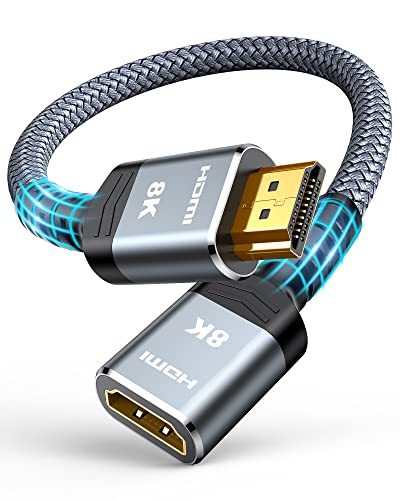
- 4K at 120Hz and 8K at 60Hz
- 48Gbps bandwidth with HDR and ARC
- Flexible 1-foot cable for gaming setups
Best For: Short HDMI 2.1 extensions for high-refresh gaming
Best Long-Run Value

- 4K/60Hz with HDR10+ and 18Gbps bandwidth
- Extends up to 230 feet over Cat6/7
- PoC powers the receiver through the cable
Best For: Home theaters and professional indoor AV runs
Best Short Extension

- Supports 4K/60Hz with 18Gbps bandwidth
- Adds 5.5 inches of flexible HDMI reach
- Compatible with ARC, HDR, 3D, and Dolby Atmos
Best For: Tight TV ports and compact entertainment setups
Best Professional Range

- Reaches up to 400 feet over Cat5e/6/7
- Supports 4K/60Hz, Dolby Vision, and HDR10+
- Adds two-way IR, RS-232, CEC, and HDMI loop-out
Best For: Long-range commercial and advanced home AV systems
Best Long-Run Pick
Steetek HT275 4K HDMI Extender

- 4K at 30Hz up to 131 feet
- 1080p at 60Hz up to 230 feet
- PoC, IR, loop-out, and EDID
Best For: Long cable runs with local monitoring and remote source control
Best Compact 4K Option

- 4K@30Hz up to 131 feet
- Loop-out, EDID copy, IR, and PoC
- Includes a one-year warranty
Best For: Point-to-point 4K@30Hz home theater and presentation setups
Best Multi-Display Kit
OREI HD14-EX165-K 1x4 Extender
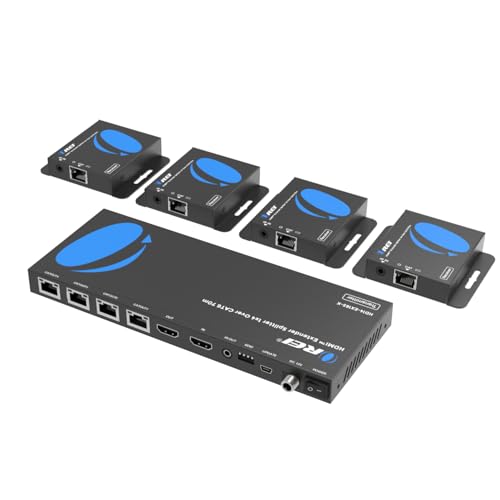
- Splits one source to four displays
- 4K@30Hz up to 165 feet
- PoC, IR, and local loop-out
Best For: Conference rooms, exhibitions, and synchronized multi-screen displays
Best Long-Range Pick – 230ft 4K HDMI Ethernet Extender
For buyers comparing 4k hdmi extenders for longer indoor runs, this OREI model uses CAT6/7 cable to send 4K at 30Hz up to 130 feet or 1080p up to 230 feet. It also adds PoC power, loop-out functionality, EDID management, and one-way IR control.
Best For: Home theaters, offices, classrooms, and installations that need extended HDMI over Ethernet cable.
Pros:
- Supports 4K at 30Hz up to 130 feet and Full HD up to 230 feet.
- PoC requires only one power adapter for the transmitter and receiver.
- Includes loop-out, EDID copy, one-way IR, and support for multichannel audio formats.
Cons:
- 4K transmission is limited to 30Hz.
- Best results call for shielded CAT6/7 cable.
- Supports HDCP 1.4 rather than newer HDCP standards.
This is a practical choice when distance and straightforward installation matter more than 4K high-refresh performance. Its 230-foot 1080p range and PoC design make it especially useful for distributed home or office video.
Best Simple Extension Cable – UGREEN 4K60 HDMI Extension
If you need a short, low-complexity option among 4k hdmi extenders, this UGREEN male-to-female HDMI 2.0 extension cable adds 1.5 feet to an existing connection. It supports 4K at 60Hz, ARC, HDR, 3D, and up to 18Gbps bandwidth.
Best For: Wall-mounted TVs, streaming devices, game consoles, and setups that need a little extra HDMI reach without a powered extender.
Pros:
- Supports 4K at 60Hz and HDMI 2.0 features including ARC and HDR.
- Triple shielding and tinned copper conductors help support stable transmission.
- Gold-plated connectors and broad device compatibility suit everyday home use.
Cons:
- It adds only 1.5 feet of length.
- For 4K at 60Hz, the combined extension and connected cable should not exceed 3 meters.
- It is a passive cable, not a long-distance Ethernet-based extender.
This cable is best viewed as a convenient port and space extender rather than a solution for routing HDMI across a room. It is a sensible pick for short connections where 4K60 and ARC matter.
Best KVM Installation – 400ft 4K60 HDMI Extender
For professional or gaming setups comparing 4k hdmi extenders, this OREI KVM model sends HDMI over Ethernet for up to 400 feet and combines video extension with USB KVM functionality. Its listed HDMI 2.0b features include 18Gbps bandwidth, 4K60 4:4:4, HDR formats, and HDCP 2.2.
Best For: Long-distance displays that also need keyboard-and-mouse access, such as control rooms, offices, and gaming installations.
Pros:
- Designed for transmission distances up to 400 feet over Ethernet.
- Supports 4K60 4:4:4, HDR10+, Dolby Vision, and HLG.
- Includes USB 1.1 KVM functionality and two-way IR support.
Cons:
- The supplied notes do not specify the required Ethernet cable category.
- Only one HDMI port is listed.
- The KVM feature may be unnecessary for basic display extension.
This is the most feature-focused option in the group for long runs and remote computer control. Choose it when KVM and modern 4K HDR compatibility justify a more specialized installation.
Best High-Refresh Cable – Highwings 8K HDMI 2.1 Extension
Gamers and home-theater users looking at 4k hdmi extenders may prefer this Highwings HDMI 2.1 male-to-female cable for higher refresh rates. The 1-foot extension supports 4K at up to 120Hz, 8K at 60Hz, 48Gbps bandwidth, HDR, ARC, and 3D.
Best For: PS5, Xbox, gaming PCs, TVs, and home theaters that need short-range HDMI 2.1 extension with high-refresh video.
Pros:
- Supports 4K at 120Hz and 8K at 60Hz with 48Gbps bandwidth.
- Includes HDR, ARC, HDMI Ethernet Channel, and full 3D support.
- Nylon construction, gold-plated ports, and a stated 25,000-flex durability rating suit frequent use.
Cons:
- The extension is only 1 foot long.
- It does not provide long-distance Ethernet-based signal extension.
- Actual high-refresh performance depends on the connected devices and cables.
This is a strong short-cable choice when gaming refresh rates are more important than installation distance. Its HDMI 2.1 specification provides more headroom than the HDMI 2.0 options here.
Best Long-Run Value – OREI 4K CAT6 Extender
For straightforward long-distance 4k hdmi extenders, the OREI HD-EX196E-K sends 4K video and audio up to 230 feet over one Cat6, Cat6A, or Cat7 cable. Its PoC design, zero-latency transmission, and compact metal housings make it practical for home theaters, conference rooms, and monitoring setups.
Best For: Extending a single 4K HDMI source across a room or building section with a clean, simple installation.
Pros:
- Supports 4K at 60Hz, HDMI 2.0a, HDCP 2.2, HDR10+, Dolby Digital, and 18Gbps bandwidth.
- Reaches up to 230 feet using a single compatible Ethernet cable.
- PoC requires power only at the transmitter, while the metal housing aids heat dissipation.
Cons:
- Provides one-way IR rather than the bidirectional IR control offered by more advanced models.
- The listed indoor design may not suit exposed outdoor installations.
This is a well-balanced choice when you need 4K performance over a substantial distance without adding a power connection at the receiver. It is less feature-rich than a long-range HDBaseT system, but its simpler setup can be an advantage.
Best Short Extension – VCE 4K HDMI Extension Cable
Unlike network-based 4k hdmi extenders, this VCE model is a compact male-to-female HDMI extension cable for solving short-distance and access problems. Its 5.5-inch length can reduce strain on hard-to-reach TV ports while supporting modern 4K entertainment devices.
Best For: Wall-mounted TVs, tight media cabinets, streaming sticks, and consoles that need a little extra HDMI reach.
Pros:
- Supports 4K at 60Hz, 18Gbps bandwidth, HDR, 3D, Dolby Atmos, and ARC.
- Works with TVs, consoles, Blu-ray players, projectors, laptops, streaming devices, and AV receivers.
- Gold-plated connectors and braided plus foil shielding help resist corrosion and interference.
Cons:
- At 5.5 inches, it is designed for port access rather than long-distance HDMI distribution.
- It does not provide features such as PoC, IR control, or Ethernet-based extension.
This is the simplest option in the group and the right fit when the problem is a cramped HDMI port rather than a distant display. Choose a CAT-based extender instead if you need to run video across a room.
Best Professional Range – OREI 400ft HDBaseT Extender
For demanding 4k hdmi extenders installations, the OREI UHD-EXB400R-K uses HDBaseT technology to transmit lossless, zero-latency 4K video up to 400 feet over Cat5e, Cat6, or Cat7 cable. Two-way IR, RS-232, CEC, PoC, and an HDMI loop-out add useful control and distribution options.
Best For: Commercial AV, large homes, conference spaces, and installations requiring long range plus remote-control integration.
Pros:
- Supports 4K/60Hz, HDMI 2.0a, HDCP 2.2, HDR10+, Dolby Vision, and 18Gbps bandwidth.
- Extends signals up to 400 feet with zero-latency HDBaseT transmission.
- Includes bidirectional IR, RS-232, CEC, HDMI loop-out, and PoC operation.
Cons:
- The matched transmitter and receiver are not interchangeable with other OREI or third-party HDBaseT models.
- Its broader feature set may be unnecessary for a basic short-distance setup.
This is the strongest choice when distance and system control matter more than minimal complexity. Confirm the cable route and use the included matching pair, especially for installations that depend on IR, RS-232, or PoC.
Best Long-Run Pick – Steetek HT275 4K HDMI Extender
If you need 4k hdmi extenders for a home theater, classroom, conference room, or security setup, the Steetek HT275 combines long-distance Cat6/Cat7 transmission with useful installation features. It supports 4K at 30Hz up to 131 feet and 1080p at 60Hz up to 230 feet.
Best For: Installations that need long cable runs, a local loop-out display, and single-sided power.
Pros:
- Extends 4K at 30Hz up to 131 feet or 1080p at 60Hz up to 230 feet.
- PoC sends power to the receiver through the Cat6/Cat7 cable, with the adapter included.
- HDMI loop-out, EDID management, and IR control support flexible installations.
Cons:
- 4K transmission is limited to 30Hz.
- Requires a direct Cat6 or Cat7 cable connection between transmitter and receiver.
The HT275 is a practical choice when distance and installation simplicity matter more than 4K high-refresh performance. Its loop-out and IR features also make it convenient for source control and local monitoring.
Best Compact 4K Option – OREI EX-170C HDMI Extender
The OREI EX-170C is one of the more straightforward 4k hdmi extenders for sending uncompressed video and audio over a single Cat5e, Cat6, or Cat7 cable. It reaches up to 131 feet at 4K@30Hz and up to 230 feet at 1080p, while adding IR pass-through and a transmitter-side loop-out.
Best For: Home theaters, presentations, CCTV systems, and other setups needing dependable 4K@30Hz extension.
Pros:
- Supports 4K@30Hz up to 131 feet and 1080p up to 230 feet.
- Includes HDMI loop-out, EDID copy, one-way IR, and PoC.
- Metal housing, included cables and adapter, and a one-year warranty.
Cons:
- Does not support 4K@60Hz.
- Not compatible with HDMI ARC.
- Should not be connected through network switches or routers.
Choose the EX-170C when you want a focused point-to-point extender with useful control and compatibility features. Its limitations are clear, but within 4K@30Hz applications it offers a clean installation approach.
Best Multi-Display Kit – OREI HD14-EX165-K 1×4 Extender
For installations that need to serve several screens, the OREI HD14-EX165-K stands apart from typical 4k hdmi extenders by distributing one HDMI source to four displays over Cat6-compatible cabling. The transmitter also includes a local HDMI output, while PoC powers the receivers without separate adapters.
Best For: Meeting rooms, bars, exhibitions, video conferences, and other multi-screen installations.
Pros:
- Distributes one HDMI source to four remote displays simultaneously.
- Supports 4K@30Hz up to 165 feet and includes a local HDMI loop-out.
- Includes one-way IR, PoC receiver power, and four receivers in the kit.
Cons:
- The listed highest resolution is 1920×1080 at 60Hz, despite 4K@30Hz support specifications.
- Designed for one source; it does not provide independent content selection for each display.
This is the strongest fit when the priority is distributing the same source across multiple screens. Its four-receiver bundle and single-adapter PoC design can simplify larger installations, provided the resolution requirements match the stated specifications.
How We Picked the Best 4K Hdmi Extenders
We organized these 10 models around the factors that most affect real-world performance: supported resolution and refresh rate, transmission distance, connection type, control features, installation flexibility, and compatibility. The selection includes short HDMI adapters for simple cable extensions, Ethernet-based transmitters and receivers for runs up to roughly 230 feet, and HDBaseT systems designed for longer professional installations.
We also considered practical features such as Power over Cable (PoC), infrared control, loop-out connectivity, EDID management, HDR support, KVM functionality, and multi-output distribution. Specifications can vary by source, display, cable quality, and network infrastructure, so confirm the manufacturer’s limits before purchasing.
Quick Comparison
- Short cable extensions: UGREEN, Highwings, and VCE are best when you only need a few extra feet and do not need transmitters or receivers.
- Typical room-to-room runs: OREI Ethernet extenders and the HT275 are suited to longer connections using Cat5e or Cat6 cable.
- Long professional runs: HDBaseT models can reach up to 400 feet and add advanced control features such as RS-232, CEC, and two-way IR.
- Distribution setups: The OREI 1×4 splitter extender is designed to send one source to multiple distant displays.
Key Buying Factors for 4K Hdmi Extenders
Resolution, Refresh Rate, and HDMI Version
Check whether you need 4K at 30Hz, 60Hz, or 120Hz. Home theater and office video may work well at 30Hz, while gaming and high-frame-rate content benefit from 60Hz or higher. HDMI 2.1-compatible cables and extenders are more appropriate for newer consoles and displays, but the complete signal chain must support the desired bandwidth.
Distance and Cable Type
For a short gap, a male-to-female extension cable is simpler and usually less expensive. For longer runs, choose an extender that uses shielded Cat6 or better Ethernet cable. Do not assume that an ordinary network switch can carry the signal unless the extender specifically supports that setup; many systems use a direct point-to-point connection.
Control and Installation Features
IR pass-through lets you control a remote source from the display location. PoC can reduce the number of power adapters, while loop-out ports allow a local monitor or preview display. EDID helps resolve handshake issues, and HDR, CEC, RS-232, or KVM support may be important in specialized installations.
Who Should Buy Which 4K Hdmi Extenders?
Choose a compact HDMI extension cable for a nearby TV, monitor, receiver, or gaming device where you only need extra reach. Choose a standard Ethernet extender for a home theater, conference room, or office run between approximately 100 and 230 feet. Choose HDBaseT when reliability, longer distance, two-way control, and professional installation features matter more than the lowest price. Choose a splitter extender when one HDMI source must feed several remote displays.
Before ordering, measure the complete cable path, verify the source and display resolutions, select the required Cat cable category, and confirm whether you need local loop-out, IR, PoC, or multi-display support. These checks prevent most compatibility and installation surprises.