Long HDMI runs can cause signal drops, limited resolution, and difficult cable routing in a home theater. The right extender sends video and audio over existing Cat5e or Cat6 cable while preserving the features your system needs.
We selected 10 HDMI extenders for home theaters covering 4K60 performance, long-distance distribution, IR control, ARC/eARC audio, loop output, and multi-display setups. Use the guide below to narrow the choices by room size, source equipment, and installation goals.
Best 10 Hdmi Extenders for Home Theaters Picks for 2026
Long-Range 4K Pick

- 4K/60Hz with HDR and Dolby Vision support
- Up to 400 feet over CAT5e/6/7
- Two-way IR, RS-232, loop-out, and PoC
Best For: Dedicated 4K home theaters with long cable runs
Network Distribution Pick
PWAY 500ft HDMI over IP Extender
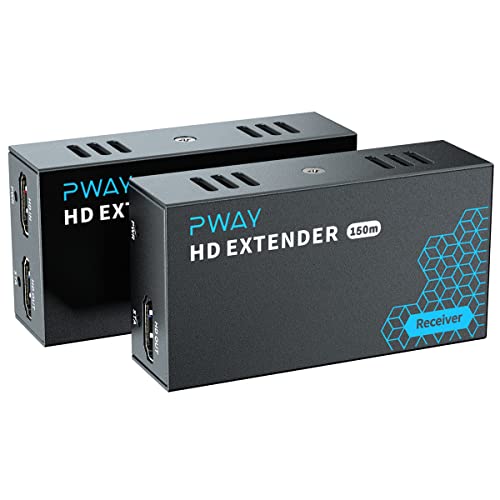
- 1080p/60Hz transmission up to 500 feet
- Works with standard gigabit switches
- Supports one-to-many display distribution
Best For: Multi-room 1080p systems using Ethernet infrastructure
Value 4K Installation Pick

- 4K/30Hz up to 131 feet
- Loop-out, EDID, one-way IR, and PoC
- Direct CAT5e/6/7 connection required
Best For: Moderate-distance systems that do not need 4K/60Hz
Compact Cable Booster
Techigher 4K HDMI Signal Repeater

- 4K/60Hz support up to 80 feet
- Self-powered with no adapter
- Compact inline HDMI-to-HDMI design
Best For: Shorter gaming, VR, and home theater cable extensions
Best for Long-Range eARC Audio

- Extends ARC/eARC audio up to 165 feet
- Supports Dolby Atmos and DTS-HD MA
- Metal housing with plug-and-play setup
Best For: Remote AV receivers and sound systems
Best 4K Performance

- Extends 4K/60Hz signals up to 165 feet
- Supports 18Gbps, HDR, and HDCP 2.2
- Adds loop out, EDID, and IR pass-through
Best For: 4K theaters with remote displays
Best Budget-Friendly Setup
IYUANEPRO HDMI Over Ethernet Extender

- Supports 4K and 1080P transmission
- Extends HDMI up to 100 feet
- Compact plug-and-play transmitter pair
Best For: Shorter home theater and gaming cable runs
Best Multi-Room Starter

- 4K@30Hz to 40m and 1080p@60Hz to 70m
- Two remote outputs plus local HDMI loop-out
- PoC power, IR control, and EDID management
Best For: Smaller home theaters and two-room display setups
Best Installation-Friendly Pick
4K HDMI Extender with Loop-Out

- Extends 4K@30Hz to 40m or 1080p@60Hz to 70m
- Loop-out and IR remote control included
- PoC power and mounting holes simplify installation
Best For: Flexible home, classroom, church, and office installations
Best for Large Display Groups

- One source reaches four remote displays
- Local loop-out supports a fifth synchronized screen
- PoC power, IR, EDID, and status indicators included
Best For: Large multi-TV walls and synchronized display systems
Long-Range 4K Pick – OREI HDBaseT 400ft Extender
For home theaters that need a dependable long-distance connection, this OREI model is one of the more capable HDMI extenders for home theaters. It sends 4K video over CAT5e/6/7 cable with no stated latency, while adding features suited to installed AV systems.
Best For: Long cable runs, 4K/60Hz home theaters, and installations needing remote control or local monitoring.
Pros:
- Supports 4K/60Hz, HDR formats, Dolby Vision, and 18Gbps bandwidth.
- Extends signals up to 400 feet over CAT5e/6/7 cable using HDBaseT.
- Includes two-way IR, RS-232, CEC, HDMI loop-out, and PoC power.
Cons:
- Requires the included matching OREI transmitter and receiver; it is not interchangeable with other models or brands.
- Uses a dedicated cable connection rather than a network switch or general-purpose IP setup.
This is a strong choice when picture quality, distance, and control flexibility matter more than a simple plug-in installation. Its feature set is particularly well suited to dedicated theater rooms and professional-style AV layouts.
Network Distribution Pick – PWAY 500ft HDMI over IP Extender
The PWAY is a practical option for home theaters or multi-room setups that need HDMI distribution over existing Ethernet infrastructure. It carries 1080p video up to 500 feet and can work with a standard gigabit switch for sending one source to multiple displays.
Best For: Multi-display systems, distributed 1080p video, and installations that already use gigabit Ethernet cabling.
Pros:
- Extends 1080p/60Hz video and audio up to 500 feet over CAT5e/CAT6.
- Works with standard gigabit Ethernet switches for one-to-many distribution.
- Provides transmitter HDMI loop-out for local monitoring and troubleshooting.
- Plug-and-play setup requires no software or technical configuration.
Cons:
- Resolution is limited to 1080p/60Hz, so it is not intended for 4K theater systems.
- Network-based distribution may be more setup than a direct point-to-point extender.
Choose this model when flexible distribution is more important than 4K resolution. Its switch compatibility and one-to-many design make it useful for sending a single source to several screens across a home or small AV installation.
Value 4K Installation Pick – OREI EX-170C 4K HDMI Extender
The OREI EX-170C is a straightforward choice among HDMI extenders for home theaters that need 4K over a moderate distance. It uses one direct CAT5e/6/7 cable, adds one-way IR control and loop-out monitoring, and keeps power requirements simple with PoC.
Best For: Direct-cable home theater runs, 4K/30Hz sources, and installations that need basic remote control.
Pros:
- Supports up to 4K/30Hz at distances up to 131 feet and 1080p up to 230 feet.
- Includes HDMI loop-out and EDID copy for display compatibility and monitoring.
- One-way IR pass-through supports control from the receiver location.
- PoC requires only one power adapter at the transmitter.
Cons:
- Does not support 4K/60Hz.
- Requires a direct CAT5e or CAT6 connection and should not be used through switches or routers.
- Not compatible with HDMI ARC.
This extender fits systems where 4K/30Hz is sufficient and installation simplicity matters. It offers useful theater features without moving to a network-based design, but buyers should verify their source, display, and refresh-rate requirements first.
Compact Cable Booster – Techigher 4K HDMI Signal Repeater
For shorter runs, this compact self-powered repeater offers a simple alternative to larger HDMI extenders for home theaters. It connects inline between two HDMI cables, supports 4K/60Hz, and requires no external power adapter.
Best For: Gaming consoles, VR headsets, and compact home theater setups needing a short HDMI extension.
Pros:
- Supports 4K/60Hz up to 80 feet and 1080p up to 145 feet within stated cable limits.
- No external power supply is required.
- Supports HDR10, Dolby Vision, HDCP 2.2, and zero-latency gaming or VR use.
- Plug-and-play female-to-female HDMI connection in a compact metal housing.
Cons:
- Requires certified HDMI 2.0 cables for 4K transmission.
- Signal flow is unidirectional and the device does not upscale resolution.
- Not compatible with fiber-optic HDMI cables, and only one repeater may be used per chain.
This is the easiest option for extending a single HDMI connection without running Ethernet or installing a transmitter-receiver pair. Keep the total cable lengths within the stated limits, and use it only for direct source-to-display connections.
Best for Long-Range eARC Audio – OREI eARC/ARC Audio Extender
For home theaters that need to place an AV receiver or amplifier away from the TV, this OREI unit extends eARC or ARC audio up to 165 feet over one CAT5e, CAT6, or CAT7 cable. It supports common surround and immersive formats while keeping installation relatively straightforward.
Best For: Wall-mounted TVs with remote AV receivers, amplifiers, or sound systems.
Pros:
- Extends eARC/ARC audio up to 165 feet over a single CAT cable.
- Supports Dolby Atmos, Dolby TrueHD, DTS-HD MA, and PCM 2.0/5.1/7.1.
- Metal housing supports durability and heat dissipation.
Cons:
- Designed for audio return rather than extending a full HDMI video signal.
- Requires compatible ARC/eARC television and audio equipment.
This is a focused choice among HDMI extenders for home theaters when the main challenge is routing TV audio to equipment in another room or media closet. Its included power adapters and plug-and-play design simplify setup, while the one-year warranty adds basic support coverage.
Best 4K Performance – OREI 4K HDMI Over Cat6 Balun
This OREI balun is a strong all-around option for HDMI extenders for home theaters, sending uncompressed 4K video and audio up to 165 feet through a direct CAT6 or CAT7 connection. Its local HDMI loop out, EDID management, and IR pass-through add useful flexibility for distributed AV setups.
Best For: 4K home theaters, gaming rooms, and installations with a remote display and local viewing screen.
Pros:
- Supports 4K at 60Hz, 18Gbps bandwidth, HDR, and HDCP 2.2.
- Extends signals up to 165 feet over one CAT6 or CAT7 cable.
- Includes HDMI loop out, EDID management, and one-way IR pass-through.
Cons:
- Requires a direct CAT6/CAT7 connection and cannot connect through network switches or routers.
- High-speed CAT6 cable is recommended for optimal long-distance 4K performance.
With broad device compatibility and support for formats including Dolby TrueHD and DTS-HD, this model fits demanding home theater and gaming installations. The direct-cable requirement is important to plan for, but the feature set is notably more comprehensive than a basic HDMI-to-CAT extender.
Best Budget-Friendly Setup – IYUANEPRO HDMI Over Ethernet Extender
For simpler installations, this paired HDMI-to-RJ45 extender provides a compact way to send video and audio up to 100 feet over Cat5e or Cat6 cable. It supports 4K or 1080P sources and uses a plug-and-play design suited to TVs, projectors, gaming consoles, and office displays.
Best For: Shorter-distance TV, gaming, projector, and monitor connections where straightforward setup matters.
Pros:
- Supports 4K and 1080P video over Cat5e/Cat6 cable.
- Extends HDMI signals up to 100 feet.
- Compact paired transmitter and receiver offer plug-and-play installation.
Cons:
- Listed transmission distance is shorter than the 165-foot OREI models.
- The notes recommend Cat6 for more stable signal transmission.
- No power plug is listed in the product details.
This model is a practical entry point among HDMI extenders for home theaters when the cable run is under 100 feet and advanced features are not essential. Its support for HDR10, HDCP 2.2, and 3D broadens compatibility, though cable quality may affect stability.
Best Multi-Room Starter – 4K 1×2 HDMI Extender Splitter
For smaller multi-screen installations, this HDMI extender for home theaters sends one HDMI source to two remote displays over CAT5e/CAT6/CAT7 cable, while its loop-out port keeps a local screen connected. It supports 4K at 30Hz up to 40 meters and 1080p at 60Hz up to 70 meters.
Best For: Home theaters, gaming setups, and small offices needing synchronized video on up to three screens.
Pros:
- Supports 4K@30Hz and 1080p@60Hz over Ethernet cable.
- Drives two remote receivers plus a local HDMI loop-out display.
- PoC power, IR pass-through, EDID controls, and metal housings simplify installation and troubleshooting.
Cons:
- 4K transmission is limited to 30Hz.
- Requires compatible CAT cable runs and does not provide native HDR through its HDMI 1.4 protocol.
This is a practical choice when two remote displays are enough and you want fewer power adapters. Its EDID and IR features add flexibility for sources located away from the viewing area.
Best Installation-Friendly Pick – 4K HDMI Extender with Loop-Out
This HDMI extender for home theaters is designed for straightforward single-display expansion over one CAT5e/CAT6/CAT6A/CAT7 cable. It carries 4K at 30Hz up to 40 meters or 1080p at 60Hz up to 70 meters, with a loop-through output for local monitoring.
Best For: Home theater, classroom, church, office, and outdoor-screen installations that benefit from mounting hardware and simplified cabling.
Pros:
- Plug-and-play transmission over a single Ethernet cable.
- Includes loop-out, IR remote control, EDID cloning, and PoC power.
- Mounting holes and included international power adapters support flexible installation.
Cons:
- 4K resolution is limited to 30Hz.
- HDMI 1.4 does not support native HDR.
Choose this model when installation convenience matters as much as distance. Its mounting design, loop-out monitoring, and EDID cloning make it a well-rounded option for mixed-use AV setups, provided HDR is not required.
Best for Large Display Groups – 4K 1×4 HDMI Extender Splitter
For larger home theater or venue layouts, this HDMI extender for home theaters distributes one source to four remote displays over CAT5e/CAT6/CAT6A/CAT7 cable, plus a local HDMI loop-out. It supports 4K at 30Hz up to 40 meters and 1080p at 60Hz up to 70 meters.
Best For: Multi-TV walls, sports viewing areas, digital signage, and home entertainment systems with up to five synchronized screens.
Pros:
- Supports four remote receivers and one local loop-out display.
- PoC technology powers all receivers from the transmitter.
- Includes bi-directional IR, dual EDID management, status lights, and reset controls.
- Metal housings are rated for operating temperatures from -5°C to +70°C.
Cons:
- 4K output is limited to 30Hz.
- Installation requires multiple Ethernet cable runs to the remote receivers.
This is the strongest fit of the three for a multi-display system. It offers the same useful control and troubleshooting features as the smaller splitter while expanding distribution to four remote screens.
How We Picked These Hdmi Extenders for Home Theaters
We focused on the specifications that matter most in real installations: supported resolution and refresh rate, transmission distance, cable requirements, audio compatibility, control features, and installation flexibility. The selection includes dedicated HDBaseT models, HDMI-over-Cat5e/Cat6 baluns, signal repeaters, audio extenders, and one-to-many splitters.
Distance claims should be treated as maximums rather than guarantees. Actual performance depends on cable quality, termination, interference, source devices, and whether the system is carrying 4K HDR or a lower-bandwidth signal.
Quick Comparison
| Setup need | Features to prioritize |
|---|---|
| Single remote display | HDBaseT or point-to-point Cat6 extender |
| 4K60 HDR home theater | 18Gbps bandwidth, 4K60 support, HDR, and EDID management |
| Long cable run | HDBaseT, quality Cat6/Cat6a cable, and PoC power |
| Multiple TVs or projectors | 1×2 or 1×4 splitter extender with independent outputs |
| Remote source control | Two-way or one-way IR, depending on equipment placement |
| Soundbar or AV receiver integration | ARC/eARC support and compatible Dolby or DTS formats |
Key Buying Factors for Hdmi Extenders for Home Theaters
Resolution, Bandwidth, and HDR
Match the extender to your source and display. A 4K30 unit may work for streaming and general video, but gaming and high-frame-rate content require 4K60 support. For 4K HDR systems, look for sufficient bandwidth—typically 18Gbps for common 4K60 formats—plus explicit HDR and HDCP compatibility.
Transmission Distance and Cable Type
Check whether the stated range applies to Cat5e, Cat6, or Cat6a cable and to which resolution. Use solid-copper, properly terminated cable for longer runs, and avoid treating ordinary Ethernet network performance as proof that an extender will work at its advertised distance.
Control, Power, and Audio Features
IR passthrough is useful when the source sits in a rack or another room. PoC can simplify installation by powering one unit from the other, while loop-out helps retain a local display. If your setup uses a soundbar or receiver through the television, verify ARC/eARC and supported multichannel formats before buying.
Splitter and Switching Requirements
A 1×2 or 1×4 extender is suitable when one source feeds multiple displays. Confirm whether all outputs must share the same resolution, whether EDID can be managed, and whether the included receivers are required at every display.
Who Should Buy Which Hdmi Extenders for Home Theaters?
Choose an HDBaseT model for the most demanding long-distance 4K installation, especially when reliability, HDR, IR, CEC, and professional-style control matter. A 165-foot Cat6 extender is a practical fit for most single-room or adjacent-room theaters. Choose a simpler HDMI repeater for a short run where advanced control and network-style distribution are unnecessary.
For distributed video, select a 1×2 or 1×4 splitter extender. For soundbar and receiver-focused systems, prioritize an ARC/eARC audio extender. Finally, verify every device’s resolution, refresh rate, HDCP version, audio format, and connector layout before ordering; those details determine whether the extender will work cleanly with your exact theater system.