Choosing the right HDMI extender for a projector depends on more than advertised distance. Resolution, refresh rate, cable type, HDCP compatibility, and installation layout all affect whether your image stays sharp and stable.
This roundup covers compact male-to-female extensions, HDMI 2.1 adapters, and powered Cat5e/Cat6 solutions for everything from nearby media consoles to long classroom, home theater, and conference-room runs.
Best 10 Hdmi Extenders for Projectors Picks for 2026
Best Long-Distance 4K Pick

- Up to 230 ft at 1080p or 131 ft at 4K@30Hz
- IR pass-through, PoC, EDID copy, and HDMI loop out
- Supports up to 7.1-channel HD audio
Best For: Long projector cable runs with local display monitoring
Best Simple Cable Extension
Cable Matters 4K HDMI Extension 2-Pack

- Two 3-foot male-to-female HDMI extension cables
- Supports 4K and 18Gbps HDMI 2.0 bandwidth
- Includes ARC, 3D, Deep Color, and 7.1 audio support
Best For: Short projector connections and spare cable needs
Best Flexible 4K60 Cable
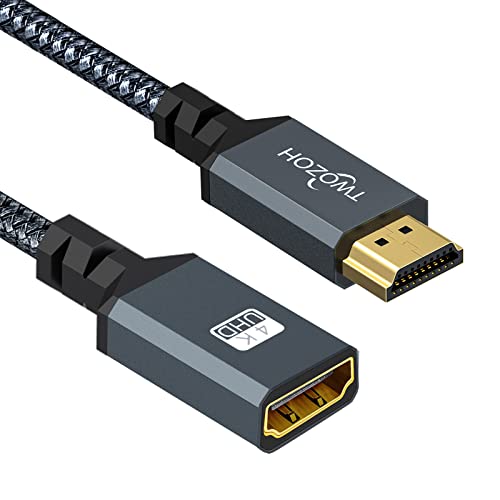
- Supports 4K@60Hz, HDR, and 3D video
- Five-foot male-to-female extension format
- Braided cable rated for 15,000+ bends
Best For: Short 4K projector and gaming connections
Best Value Cat5e/6 Extender

- Extends 1080p up to 230 feet over CAT5e/6/7
- Supports 4K@30Hz up to 131 feet
- Adds IR, PoC, EDID, and HDMI loop out
Best For: Long projector runs in classrooms and conference rooms
Best Cable-Joining Pick

- Supports up to 8K@60Hz and 4K@120Hz
- Shielded aluminum body with gold-plated contacts
- Two compact couplers included
Best For: Joining HDMI cables in tight projector or home theater setups
Best Long-Run Pick
Steetek HDMI Extender Over Ethernet

- Reaches up to 164 feet over Cat5e/Cat6/Cat7
- Supports 1080p at 60Hz and 3D
- PoC and EDID copy simplify installations
Best For: Long-distance Full HD projector connections
Best Short-Extension Pick

- Supports 4K@60Hz with 18Gbps bandwidth
- Male-to-female design eases tight-port access
- Shielded construction supports reliable signal transfer
Best For: Short projector extensions and tight media cabinets
Best Long-Range Pick

- Reaches up to 196 feet over Cat6
- Supports 1080p at 60Hz
- Includes EDID copy and POC
Best For: Long-distance 1080p projector installations
Best Short Extension
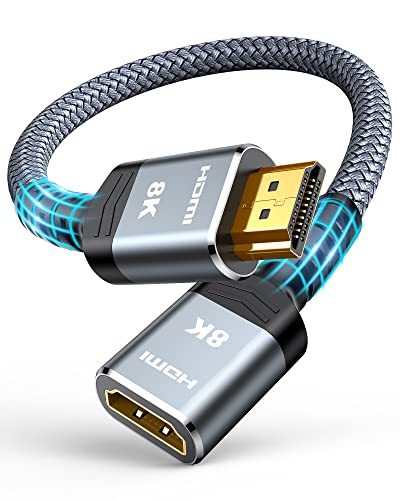
- Adds 1 foot to an HDMI connection
- Supports 8K@60Hz and 4K@120Hz
- Uses a durable braided design
Best For: Short projector cable extensions and gaming setups
Best Cable Protection
Silkland 8K HDMI Extension Cable
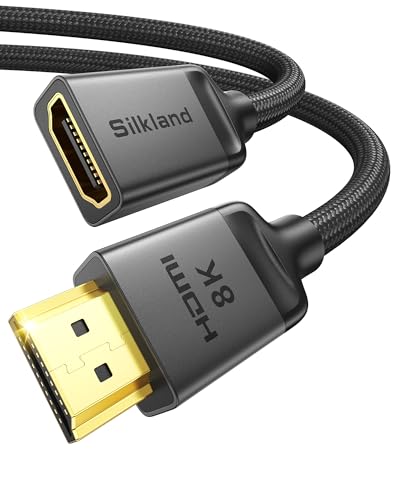
- Supports 8K@60Hz and 4K@120Hz
- Braided, shielded, and gold-plated design
- Includes two-year replacement service
Best For: Durable short extensions for projectors and home theaters
Best Long-Distance 4K Pick – OREI HDMI Extender Over Cat6
For buyers comparing HDMI extenders for projectors, the OREI EX-165C+ is a strong choice when the display is far from the source. It sends uncompressed video and audio over one CAT6 cable up to 230 feet at 1080p or 131 feet at 4K@30Hz.
Best For: Home theaters, classrooms, conference rooms, and projector installations needing long cable runs, IR control, and a local HDMI output.
Pros:
- Supports up to 4K@30Hz with 10.2Gbps bandwidth and up to 7.1-channel HD audio.
- HDMI loop out supports local monitoring and cascading to another extender.
- One-way IR pass-through, PoC, and EDID copy simplify remote operation and installation.
- Works with projectors, media players, Blu-ray players, monitors, and other HDMI devices.
Cons:
- 4K transmission is limited to 30Hz rather than 4K@60Hz.
- Requires a direct CAT5e/CAT6 connection; network switches and routers are not recommended.
This model offers a useful combination of range, projector compatibility, remote control, and loop-out flexibility. It is best suited to installations where dependable 1080p or 4K@30Hz extension matters more than higher refresh rates.
Best Simple Cable Extension – Cable Matters 4K HDMI Extension 2-Pack
If you only need a few extra feet between a projector and its HDMI source, the Cable Matters 2-pack provides a straightforward male-to-female extension. These 3-foot cables support HDMI 2.0 bandwidth up to 18Gbps and resolutions up to 4K.
Best For: Short indoor projector setups, conference rooms, offices, and spare-cable kits where an active extender is unnecessary.
Pros:
- Supports resolutions up to 4Kx2K and HDMI 2.0 bandwidth up to 18Gbps.
- Supports ARC, HDMI Ethernet Channel, 3D video, Deep Color, and Dolby TrueHD 7.1 audio.
- Male-to-female design makes it easy to add length to an existing HDMI cable.
- Two-pack provides a spare or replacement cable.
Cons:
- Each extension is only 3 feet, so it is not intended for long-distance projector runs.
- It is a passive cable extension rather than a Cat5e/Cat6 signal extender.
This is a practical, low-complexity option for modest distance problems. Choose it when your projector and source are already nearby and you want HDMI 2.0 features without installing transmitter and receiver units.
Best Flexible 4K60 Cable – Twozoh Braided HDMI Extension
Twozoh 5FT HDMI Extender, Nylon Braided HDMI Cord, Male to Female, 4K@60Hz 3D HDR Support
Check Price On AmazonThe Twozoh 5-foot cable is a convenient choice among HDMI extenders for projectors when you need a short, flexible connection supporting 4K at 60Hz. Its male-to-female design adds reach while the nylon braid and gold-plated connectors are suited to regular handling.
Best For: Projectors, gaming setups, streaming devices, and home entertainment systems that need a short HDMI extension with 4K@60Hz support.
Pros:
- Supports 4K@60Hz, 3D, HDR, and data rates up to 10Gbps.
- Five-foot male-to-female format adds useful reach without replacing the existing HDMI cable.
- Nylon braided construction is rated for more than 15,000 bends.
- Compatible with projectors, PCs, game consoles, Blu-ray players, and streaming devices.
Cons:
- It is a short passive cable, not a powered extender for long-distance installations.
- Only one cable is included in this package.
For a nearby projector, the Twozoh balances high-refresh 4K support with a durable, flexible design. It is a better fit for compact setups than for routing HDMI across a room or between floors.
Best Value Cat5e/6 Extender – OREI HDMI Over Cat5
The OREI EX-170C is designed for extending a projector signal well beyond the practical range of a standard HDMI cable. It uses one CAT5e, CAT6, or CAT7 cable to transmit up to 230 feet at 1080p or 131 feet at 4K@30Hz, while also providing IR control and local loop-out monitoring.
Best For: Projector installations in classrooms, conference rooms, home theaters, digital-signage systems, and other spaces requiring long cable runs.
Pros:
- Supports 1080p up to 230 feet and 4K@30Hz up to 131 feet.
- Works over CAT5e/6/7 cable and includes one-way PoC for simpler power installation.
- HDMI loop out enables local display monitoring alongside the remote projector.
- IR pass-through and EDID copy help with remote control and display compatibility.
Cons:
- Does not support 4K@60Hz.
- Not compatible with HDMI ARC.
- Requires a direct cable connection and is not IP or network based.
This extender is a sensible long-run alternative to purchasing an extremely long HDMI cable. Its metal housing, PoC, loop out, and IR features make it especially useful for structured projector installations, provided 4K@30Hz is sufficient.
Best Cable-Joining Pick – VCELINK HDMI Coupler 8K
For shoppers comparing HDMI extenders for projectors, the VCELINK HDMI Coupler is a compact way to join two HDMI cables when running a new, longer cable is inconvenient. It supports up to 8K at 60Hz and 4K at 120Hz, along with HDR, VRR, and Dolby sound, provided the connected equipment and cables support those features.
Best For: Extending an existing HDMI cable in a home theater, office, or tight installation space.
Pros:
- Supports 8K@60Hz, 4K@120Hz, HDR, VRR, and Dolby sound.
- Shielded aluminum housing and gold-plated contacts help with durability and signal stability.
- Two couplers are included, providing a spare for another setup.
- Compact, plug-and-play design requires no power adapter.
Cons:
- It joins two HDMI cables rather than extending a signal over Ethernet or another long-distance link.
- Performance depends on the quality and capabilities of the connected HDMI cables and devices.
This is a practical choice when you already have HDMI cables on hand and need a simple connection extension for a projector or other display. Its two-pack format adds flexibility without introducing a powered transmitter-and-receiver system.
Best Long-Run Pick – Steetek HDMI Extender Over Ethernet
Among HDMI extenders for projectors, the Steetek HT202P is designed for longer point-to-point runs. It sends uncompressed 1080p video and audio at 60Hz for up to 164 feet over one Cat5e, Cat6, or Cat7 cable, making it suitable when the source and projector are separated by a room or installation distance.
Best For: Full HD projector installations needing a long Ethernet-cable run and reduced power-cord clutter.
Pros:
- Extends 1080p at 60Hz and 3D up to 164 feet over a single network cable.
- PoC sends power from the transmitter to the receiver, with one power adapter included.
- EDID copy helps the devices establish a compatible resolution for a stable signal.
- Plug-and-play transmitter-and-receiver kit requires no software or drivers.
Cons:
- It is limited to 1080p at 60Hz rather than 4K or 8K output.
- It requires a separate Cat5e, Cat6, or Cat7 cable for the run.
- Its transmitter-and-receiver design is more involved than a simple HDMI coupler.
The HT202P is the stronger fit when distance is the main challenge and Full HD is sufficient. Its EDID feature and power-over-cable setup can simplify projector placement, but shoppers seeking 4K should consider a higher-resolution solution.
Best Short-Extension Pick – VCE 4K HDMI Extension Cable
The VCE HDMI extension cable is a convenient option for HDMI extenders for projectors when you need a little more reach or easier access to a hard-to-reach port. Its male-to-female HDMI 2.0 design supports 4K at 60Hz with 18Gbps bandwidth, plus HDR, 3D, Dolby Atmos, and ARC.
Best For: Extending a projector’s HDMI connection or relieving port strain in a tight home theater, conference, or media-cabinet setup.
Pros:
- Supports 4K@60Hz, 18Gbps bandwidth, HDR, 3D, Dolby Atmos, and ARC.
- Male-to-female design makes a hard-to-reach HDMI port easier to access.
- Gold-plated connectors and braided, foil-shielded construction help resist interference and corrosion.
- Works with projectors, laptops, consoles, streaming devices, TVs, and other standard HDMI equipment.
Cons:
- At 5.5 inches, it is intended for short extensions rather than long cable runs.
- It does not provide an Ethernet-based transmitter-and-receiver system for room-to-room distances.
This cable is a straightforward choice for improving access to a projector HDMI port or adding modest extra length. It preserves useful 4K features without requiring a power supply, though a dedicated long-distance extender is more appropriate for larger spaces.
Best Long-Range Pick – 1080p HDMI Extender Over Cat6
For installations that need to send a projector signal across a room or building, this HDMI extender for projectors uses Cat5e/6/7 Ethernet cabling to reach up to 196 feet. It supports 1080p video at 60Hz, with EDID copying intended to help the source and display negotiate compatible picture and sound settings.
Best For: Long cable runs, classrooms, conference rooms, home theaters, and other 1080p projector setups.
Pros:
- Transmits 1080p video and audio up to 196 feet over recommended oxygen-free copper Cat6 cable.
- EDID copy function helps match the source and display.
- Supports 3D, HDCP, and multiple audio formats including DTS-HD and Dolby TrueHD.
- Plug-and-play design includes POC and ESD protection features.
Cons:
- Limited to 1080p rather than 4K or 8K output.
- Best performance depends on using suitable oxygen-free copper Cat6 cabling.
This is the most installation-oriented option in the group, especially when a projector is positioned far from its source. Choose it when dependable 1080p distribution matters more than higher-resolution support.
Best Short Extension – Highwings 8K HDMI 2.1 Adapter
This compact HDMI extender for projectors adds one foot to an existing HDMI cable without requiring a powered transmitter and receiver. Its HDMI 2.1 specification supports up to 8K at 60Hz, 4K at 120Hz, 48Gbps bandwidth, HDR, 3D, ARC, and HDMI Ethernet Channel, making it suited to modern home theater and gaming connections.
Best For: Short projector cable extensions, gaming setups, home theaters, and tight spaces where a simple male-to-female adapter is convenient.
Pros:
- Supports up to 8K@60Hz and 4K@120Hz with 48Gbps bandwidth.
- Compatible with projectors, laptops, game consoles, streaming devices, and televisions.
- Gold-plated ports and nylon construction are designed for durability and frequent flexing.
- Plug-and-play design can help extend cable reach and protect device ports.
Cons:
- Provides only a 1-foot extension, so it is not intended for long-distance runs.
- It extends an existing HDMI cable rather than replacing a complete active extender system.
For a projector installation that is just short of reaching the source, this adapter is a straightforward solution. Its high bandwidth is useful for compatible equipment, although actual performance still depends on the connected devices and cables.
Best Cable Protection – Silkland 8K HDMI Extension Cable
The Silkland 3.3-foot HDMI extension cable is a practical choice when a projector or streaming device needs a little more reach. This HDMI extender for projectors supports HDMI 2.1 features including 8K@60Hz, 4K@120Hz, dynamic HDR, 3D, eARC, and 48Gbps bandwidth, while its braided jacket and triple shielding target everyday durability and signal stability.
Best For: Projectors, wall-mounted displays, streaming sticks, and high-bandwidth home theater or gaming connections needing a 3.3-foot extension.
Pros:
- Supports 8K@60Hz, 4K@120Hz, dynamic HDR, 3D, and eARC.
- Braided construction, triple shielding, and a 28AWG copper core help resist damage and interference.
- Compatible with projectors, consoles, laptops, Blu-ray players, and streaming devices.
- Available in multiple lengths and includes a two-year replacement service.
Cons:
- This 3.3-foot version is intended for short extensions, not long cable runs.
- It may have black-screen or compatibility issues when paired with thinner-than-recommended standard HDMI cables.
- It must be used as a male-to-female extension and not placed between two additional HDMI connectors.
Silkland is a strong fit when build quality and modern video support are priorities. Pay close attention to the connection instructions and the existing cable’s gauge for the best chance of a stable projector signal.
How We Picked the Best Hdmi Extenders for Projectors
We evaluated these Hdmi Extenders for Projectors by comparing their supported resolutions, refresh rates, transmission distance, connector design, and installation requirements. We also considered practical features such as power over cable (PoC), EDID management, infrared control, loop-through outputs, HDCP support, and compatibility with modern HDMI sources.
Short HDMI extension cables and couplers are best for adding a few feet or changing the connection direction. Ethernet-based extender kits are more suitable when the projector is mounted far from a receiver, streaming device, game console, or AV receiver. Advertised distance is a maximum under ideal conditions, so cable quality and electrical interference still matter.
Quick Comparison
| Type | Best For | Typical Strength | Important Limitation |
|---|---|---|---|
| Short HDMI extension cable | Nearby components and wall-mounted displays | Simple, inexpensive installation | Limited distance |
| HDMI coupler | Joining two HDMI cables | Compact and easy to use | Adds another connection point |
| HDMI 2.1 extension | 4K gaming and high-refresh video | Higher bandwidth potential | Performance depends on every link in the chain |
| Cat5e/Cat6 extender kit | Long projector runs | Long reach with existing network-style cable | Requires transmitter, receiver, and usually power |
Key Buying Factors for Hdmi Extenders for Projectors
Resolution and Refresh Rate
For standard movies, presentations, and streaming, 1080p support may be sufficient. Choose a 4K-capable model for modern home theaters, while 4K at 120Hz requires a genuine high-bandwidth HDMI 2.1 path, compatible source, projector, and cables. A product’s maximum resolution does not guarantee that every device combination will reach it.
Distance and Cable Infrastructure
For runs of a few feet, use a passive extension cable or coupler. For roughly 50 feet or more, an active or Ethernet-based extender is generally more dependable. Cat6 is often a practical choice for long runs, but follow the extender’s stated cable requirements and avoid routing HDMI or Ethernet cable alongside power wiring when possible.
Signal-Control Features
EDID support can help the source and projector agree on a usable format. HDCP compatibility is important for protected streaming content. IR pass-through matters when you need to control a source from the projector side, while PoC can reduce the number of power adapters required.
Installation and Reliability
Check whether the kit needs power at one or both ends, whether it includes the necessary adapters, and whether the transmitter and receiver fit behind your equipment. For permanent installations, secure connections, provide ventilation, and leave service access rather than sharply bending the cables.
Who Should Buy Which Hdmi Extenders for Projectors?
Buy a short male-to-female extension if your projector is only slightly out of reach or you need strain relief behind a wall mount. Choose an HDMI 2.1 extension or coupler for compatible 4K high-refresh gaming, provided the rest of the system supports the same bandwidth. For ceiling-mounted projectors, conference rooms, and long home theater layouts, choose a Cat5e/Cat6 extender with EDID and PoC. If remote operation is important, prioritize a kit with IR pass-through. Finally, verify connector gender, cable length, source output, projector input, and required resolution before ordering.