Running HDMI over a long distance can be difficult when standard cables become unreliable, expensive, or impractical to route. An HDMI extender over Ethernet uses Cat5e, Cat6, or Cat7 cable to carry video farther while adding useful features such as IR control, loop-out ports, EDID management, and power over cable.
These 10 picks cover compact 1080p setups, 4K home theaters, conference rooms, signage, and longer professional installations. Compare resolution, range, control features, and cabling requirements before choosing the right transmitter-and-receiver kit.
Best 10 Hdmi Extender Over Ethernet Picks for 2026
Best Long-Range 1080p Pick
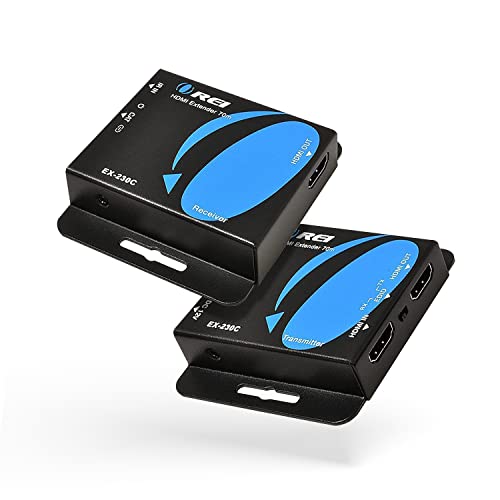
- 1080p transmission up to 230 feet
- 4K at 30Hz up to 130 feet
- PoC, EDID Copy, loop-out, and IR
Best For: Long-distance Full HD home and office setups
Best Budget Full HD Option

- 1080p at 60Hz up to 164 feet
- Supports Cat5e, Cat6, and Cat7 cable
- PoC and EDID Copy included
Best For: Simple Full HD home, classroom, and office links
Best Midrange 4K Features

- 4K at 30Hz up to 131 feet
- 1080p transmission up to 230 feet
- Loop-out, IR, PoC, and EDID Copy
Best For: Flexible home theater and professional AV installations
Best Professional 4K60 Range

- 4K60 transmission up to 400 feet
- HDR, Dolby Vision, and 18Gbps support
- Two-way IR, RS-232, CEC, loop-out, and PoC
Best For: Professional long-distance 4K AV installations
Best for 200-Foot Runs
1080p HDMI Extender Over Ethernet
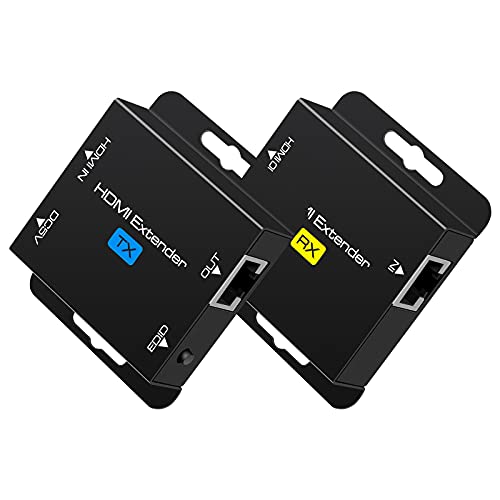
- 1080p transmission up to 200 feet
- POC power through the Cat6 cable
- EDID copy for display compatibility
Best For: Long-distance 1080p installations
Best 4K Feature Set
HT275 HDMI Extender Over Ethernet

- 4K up to 131 feet at 30Hz
- HDMI loop-out for a local display
- IR remote control and POC included
Best For: Feature-rich home theater and AV installations
Best Straightforward 1080p Value

- 1080p at 60Hz up to 196 feet
- Supports Cat5e, Cat6, and Cat7
- EDID copy and POC functionality
Best For: Simple 1080p projects and conferences
Best 4K Performance
OREI 230ft HDMI Over Ethernet Extender

- 4K@60Hz with HDR10+ and Dolby Digital support
- Up to 230 feet over Cat6/6A/7 cable
- PoC requires power at the transmitter only
Best For: Long-distance 4K60 home theater and professional installations
Best Monitoring Features
OREI 4K30 HDMI Extender with Loop Out

- Local HDMI loop-out for display monitoring
- 1080p up to 230 feet; 4K30 up to 131 feet
- IR pass-through, EDID copy, and PoC included
Best For: CCTV, conference, classroom, and digital signage setups
Best Dual-Display Flexibility

- Mirror or extend displays over Cat6
- 4K30 to 130 feet; 1080p to 230 feet
- Loop-out, IR control, and PoC included
Best For: Flexible dual-screen home, office, and presentation setups
Best Long-Range 1080p Pick – OREI 230ft HDMI Extender
If you need an HDMI extender over ethernet for a distant TV, projector, or monitor, the OREI EX-230C prioritizes reach. It supports 1080p up to 230 feet over Cat6/7 cable, while 4K is supported to 130 feet at 30Hz.
Best For: Home theaters, offices, and classrooms that need long-distance Full HD transmission with simple installation.
Pros:
- Extends 1080p up to 230 feet over Cat6/7 cable.
- Supports 4K at 30Hz to 130 feet and 2K at 60Hz.
- PoC requires only one power adapter, and EDID Copy helps with display compatibility.
- Includes loop-out, one-way IR, and support for up to 7.1-channel audio.
Cons:
- 4K is limited to 30Hz.
- Shielded cable is recommended for the best signal quality.
- Supports HDCP 1.4 rather than newer HDCP standards.
This is a practical choice when distance matters more than high-refresh 4K. Its loop-out, IR, and single-adapter PoC design add flexibility for everyday AV installations.
Best Budget Full HD Option – Steetek HT202P HDMI Extender
The Steetek HT202P is a straightforward HDMI extender over ethernet for Full HD systems. It sends 1080p at 60Hz and 3D content up to 164 feet over one Cat5e, Cat6, or Cat7 cable.
Best For: Home, office, classroom, and commercial installations that need reliable 1080p distribution without software or drivers.
Pros:
- Supports 1080p at 60Hz and 3D video up to 164 feet.
- Works over a single Cat5e, Cat6, or Cat7 cable.
- PoC reduces cable clutter by powering the receiver through the Ethernet cable.
- EDID Copy helps establish a compatible resolution and stable signal.
Cons:
- Does not list 4K support.
- Designed for point-to-point connections rather than network switching.
- Its feature set is focused on basic Full HD extension.
Choose this model if your source and display are both 1080p and you want a simple, cable-conscious installation. It offers the essential features without adding 4K-specific cost or complexity.
Best Midrange 4K Features – OREI EX-165C+ HDMI Extender
For buyers comparing an HDMI extender over ethernet with 4K capability, the OREI EX-165C+ combines long-distance 1080p transmission with moderate-range 4K support. It reaches up to 230 feet at 1080p or 131 feet at 4K 30Hz over a single Cat6 cable.
Best For: Home theaters, conference rooms, classrooms, and digital signage installations needing 4K playback, local display output, and remote control.
Pros:
- Supports 4K at 30Hz up to 131 feet and 1080p up to 230 feet.
- HDMI loop-out supports a local display and cascading applications.
- One-way IR, PoC, and EDID Copy add installation flexibility.
- Supports up to 7.1-channel audio, including Dolby TrueHD and DTS-HD.
Cons:
- 4K operation is limited to 30Hz.
- Requires a direct Cat5e/Cat6 connection; switches and routers should be avoided.
- Uses HDMI 1.4 and HDCP 1.4.
This model is a strong middle ground for installations that need both 4K support and long 1080p range. The loop-out and IR features make it more adaptable than a basic transmitter-receiver pair.
Best Professional 4K60 Range – OREI HDBaseT 400ft Extender
The OREI UHD-EXB400R-K is the high-end choice in this HDMI extender over ethernet lineup. Its HDBaseT design sends 4K at 60Hz up to 400 feet over Cat5e/6/7 cable, with zero-latency transmission and professional control features.
Best For: Commercial AV, conference rooms, classrooms, large displays, and installations requiring long-range 4K60 with control integration.
Pros:
- Extends 4K at 60Hz up to 400 feet with HDBaseT technology.
- Supports HDR, HDR10+, Dolby Vision, HDCP 2.2, and 18Gbps bandwidth.
- Includes two-way IR, RS-232, CEC, HDMI loop-out, and PoC.
- Supports 7.1-channel formats including Dolby TrueHD and DTS-HD.
Cons:
- Transmitter and receiver are not interchangeable with other OREI HDBaseT models or brands.
- More specialized than needed for basic 1080p extension.
- Only the matching included pair should be used.
This is the best fit when distance, 4K60 performance, and control signaling justify a professional HDBaseT solution. Confirm the installation’s cable requirements and keep the matched transmitter-receiver pair together.
Best for 200-Foot Runs – 1080p HDMI Extender Over Ethernet
If you need an HDMI extender over ethernet for a longer 1080p installation, this VPFET kit sends video and audio up to 200 feet over a single Cat5e or Cat6 cable. Its EDID copy function and plug-and-play setup make it practical for conference rooms, classrooms, projectors, and digital signage.
Best For: Long-distance 1080p connections where one-cable POC power and EDID compatibility are useful.
Pros:
- Transmits 1080p video and audio up to 200 feet over Cat5e or Cat6.
- POC design requires power at the transmitter only.
- EDID copying helps match the source with the display.
- Supports 3D, HDCP, and several audio formats.
Cons:
- Maximum supported resolution is 1080p rather than 4K.
- Best results require oxygen-free copper Cat6 cable.
This is a sensible choice when dependable 1080p distribution matters more than 4K capability. The 200-foot range, EDID management, and low-cable-clutter power setup suit fixed indoor or outdoor projects.
Best 4K Feature Set – HT275 HDMI Extender Over Ethernet
This HT275 HDMI extender over ethernet is the most feature-rich option here, combining 4K support, a local HDMI loop-out, IR control, and POC power. It can send 4K at 30Hz up to 131 feet or 1080p at 60Hz up to 230 feet over one Cat6 or Cat7 cable.
Best For: Home theaters, conference rooms, classrooms, and setups needing remote control or a local monitor feed.
Pros:
- Supports 4K at 30Hz up to 131 feet and 1080p at 60Hz up to 230 feet.
- HDMI loop-out supports a local display alongside the remote screen.
- IR cables enable control of compatible remote HDMI sources.
- Transmitter-side power and included adapter reduce remote cable clutter.
Cons:
- 4K transmission is limited to 131 feet at 30Hz.
- Requires Cat6 or Cat7 cable for the specified distances.
Choose this model when you want more than basic point-to-point extension. Its loop-out and IR features add installation flexibility, while the longer 1080p range benefits presentations, monitoring, and entertainment systems.
Best Straightforward 1080p Value – HDMI Cat5e/6/7 Extender
For a straightforward HDMI extender over ethernet, this kit supports 1080p at 60Hz over distances up to 196 feet using Cat5e, Cat6, or Cat7 cable. It includes EDID copy, POC functionality, and broad compatibility with computers, game consoles, Blu-ray players, and media devices.
Best For: Indoor or outdoor 1080p projects, video conferences, home theaters, and display installations using existing twisted-pair cabling.
Pros:
- Supports 1080p at 60Hz across up to 196 feet.
- Works with Cat5e, Cat6, and Cat7 LAN cable.
- EDID copy helps the source and display negotiate compatible output.
- Plug-and-play design provides zero video latency and POC functionality.
Cons:
- Does not provide 4K support.
- Recommended oxygen-free copper Cat6 cable may be needed for best results.
This kit is a practical match for users who need reliable 1080p distribution without extra features such as 4K or loop-out. Its support for multiple cable categories makes it flexible for a range of existing network-cable installations.
Best 4K Performance – OREI 230ft HDMI Over Ethernet Extender
If you need an HDMI extender over ethernet for long 4K cable runs, this OREI model is built for high-bandwidth video. It supports 4K at 60Hz, HDR formats, Dolby Digital audio, and transmission up to 230 feet over Cat6, Cat6A, or Cat7 cable.
Best For: Home theaters, gaming setups, conference rooms, and installations requiring 4K60 over longer distances.
Pros:
- Supports 4K@60Hz, HDR10+, Dolby Digital, and 18Gbps bandwidth.
- Extends HDMI signals up to 230 feet over one Cat6/7 cable.
- PoC design requires power only at the transmitter.
- Metal housing, compact design, and included 1-year warranty.
Cons:
- Designed for indoor use.
- Requires a compatible direct cable installation rather than a network-based connection.
This is the strongest option of the three for 4K60 viewing. Its higher video bandwidth and HDR support make it a good fit when image quality matters more than adding features such as a local loop-out display.
Best Monitoring Features – OREI 4K30 HDMI Extender with Loop Out
This HDMI extender over ethernet combines long-distance transmission with useful installation controls. It can send 1080p content up to 230 feet or 4K at 30Hz up to 131 feet over Cat5e, Cat6, or Cat7 cable, while its loop-out port supports local monitoring.
Best For: CCTV systems, conference rooms, classrooms, digital signage, and home theaters that need local preview or remote IR control.
Pros:
- HDMI loop-out enables monitoring on a local display.
- Supports 1080p up to 230 feet and 4K@30Hz up to 131 feet.
- Includes one-way IR pass-through and EDID copy.
- PoC simplifies installation with one power adapter at the transmitter.
Cons:
- Does not support 4K@60Hz.
- Not compatible with HDMI ARC.
- Must use a direct Cat5e/6/7 connection; it is not IP- or network-based.
The EX-170C is a practical choice when monitoring and compatibility features are more valuable than maximum 4K refresh rate. Its loop-out and EDID functions make it particularly useful for managed AV or surveillance installations.
Best Dual-Display Flexibility – PWAY HT275 4K HDMI Extender
For a flexible HDMI extender over ethernet installation, the PWAY HT275 supports both mirrored and extended display modes. It reaches up to 130 feet at 4K30 or 230 feet at 1080p over Cat6, and its loop-out port allows the source to feed a local display at the same time.
Best For: Home offices, meetings, live streaming, and dual-screen installations using a TV, monitor, or projector.
Pros:
- Supports mirror and extended display modes.
- Extends 4K@30Hz to 130 feet or 1080p to 230 feet.
- HDMI loop-out supports local preview alongside the remote display.
- Includes IR control and PoC for simpler wiring.
Cons:
- 4K transmission is limited to 30Hz.
- Its maximum 4K distance is shorter than its 1080p distance.
- The supplied notes do not specify an included power plug.
The HT275 stands out for installations where display mode flexibility matters. It offers a useful balance of extended distance, local loop-out, IR control, and single-adapter PoC, though users seeking 4K60 should choose a different model.
How We Picked the Best Hdmi Extender Over Ethernet
We focused on the specifications that determine real-world compatibility and installation flexibility: supported resolution and refresh rate, maximum transmission distance, cable category, HDCP and EDID support, IR functionality, loop-out availability, and PoC power options. We also separated standard HDMI-over-Cat solutions from HDBaseT models, since their range, performance, and installation requirements can differ significantly.
Advertised distance is typically a best-case figure. Cable quality, wall plates, patch panels, interference, and the source and display can all affect performance, so a small range buffer is sensible for permanent installations.
Quick Comparison
- 1080p installations: The 164- to 196-foot models are practical for basic offices, classrooms, meeting rooms, and distributed displays.
- 4K at 30Hz: Several 165- to 230-foot units suit home theaters, streaming devices, and signage where high-frame-rate 4K is not required.
- 4K at 60Hz: The HDBaseT option is the strongest fit for gaming, premium home theater, and professional video sources that require smoother motion.
- Control and installation: IR, loop-out, EDID, and PoC can reduce wiring and make remote source management easier.
Key Buying Factors for an Hdmi Extender Over Ethernet
Resolution, Refresh Rate, and HDR
Check the complete video specification rather than relying on a “4K” label. Many affordable units support 4K at 30Hz, while 4K at 60Hz requires a more capable extender, compatible HDMI hardware, and suitable cable. If you use HDR, verify that the extender supports the specific format and color bandwidth your source and display need.
Distance and Cable Type
Cat6 is generally the safest default for new runs, although some products support Cat5e or Cat7. Avoid mixing unnecessary couplers or low-quality patch leads on long routes. For distances approaching the advertised maximum, choose a model with extra headroom or consider HDBaseT.
IR, Loop-Out, EDID, and PoC
Two-way or one-way IR determines whether you can control the source from the display location. A loop-out connection lets you feed a local monitor or AV receiver at the transmitter. EDID helps resolve display-handshake problems, while PoC can reduce the number of power adapters at the receiver.
HDCP and Compatibility
Confirm HDCP compatibility for streaming boxes, Blu-ray players, game consoles, and protected content. Also check whether the kit supports the HDMI version, audio formats, and display arrangement used in your system.
Who Should Buy Which Hdmi Extender Over Ethernet?
Choose a basic 1080p extender for classrooms, offices, security displays, or older equipment where affordability and straightforward installation matter most. Choose a 4K-at-30Hz model for most home entertainment systems and digital-signage applications that do not require 60Hz playback. Choose a 4K-at-60Hz HDBaseT model for demanding gaming, high-quality home theater, commercial AV, or longer runs where stability and advanced control features justify the higher cost.
Before ordering, measure the actual cable route, confirm the required resolution and refresh rate, and verify whether the package includes the power supplies and IR accessories your installation needs.