CFexpress Type A cards deliver the speed modern cameras need, but the wrong reader can slow down transfers and complicate your workflow. The best reader should match your card format, computer ports, and daily shooting habits.
We compared 10 CFexpress Type A readers, including compact single-slot models, dual-slot options, and readers with both USB-C and USB-A connectivity. Use the guide below to choose a practical fit for your camera kit and editing setup.
Best 10 Memory Card Reader with Cfexpress Type a Picks for 2026
Best Dual-Slot Workflow
Lexar CFexpress Type A/SD Reader

- Supports CFexpress Type A and SD UHS-II
- Up to 900MB/s CFexpress transfer speed
- Includes USB-C and USB-A cables
Best For: Photographers using both CFexpress Type A and SD cards
Best High-Speed Option
Sony MRWG3 CFexpress Type A Reader
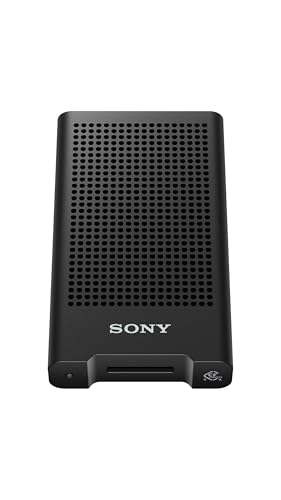
- USB 40Gbps connectivity
- Supports CFexpress Type A version 4
- Works with PCs, smartphones, and tablets
Best For: Sony CEA-G users seeking a high-bandwidth reader
Best Budget-Friendly Compatibility
BENFEI CFexpress Type A Reader

- Up to 10Gbps USB 3.2 Gen 2 transfers
- USB-C and USB-A cable design
- Supports Windows, Mac, Linux, and Android
Best For: Mixed-device users who need Type A-only card support
Best Type A and B Versatility

- Supports CFexpress Type A and Type B
- Dual-slot design in one reader
- USB4 speeds up to 40Gbps
Best For: Users working with both Type A and Type B cards
Versatile Dual-Slot Pick
Rocketek CFexpress Type A and SD Reader

- 10Gbps USB 3.2 Gen 2 transfers
- Supports CFexpress Type A and SD cards
- Includes USB-C and USB-A cables
Best For: Photographers using both CFexpress Type A and SD media
Simple Single-Slot Option
ProMaster CFexpress Type A Reader

- Dedicated CFexpress 4.0 Type A slot
- Up to 10Gbps transfer speed
- Built-in USB-C and USB-A connectivity
Best For: Users wanting a dedicated plug-and-play CFexpress Type A reader
Travel-Ready Aluminum Pick
Rytaki 10Gbps CFexpress Type A Reader

- 10Gbps USB 3.2 Gen 2 interface
- Integrated USB-C and USB-A connectors
- Compact aluminum-alloy housing
Best For: On-the-go creators transferring CFexpress Type A files across devices
Best Dedicated Type A Pick
Acer CFexpress Type A USB-C Reader

- 10Gbps USB-C transfer support
- Compact aluminum design with nylon cable
- Dedicated Type A slot; plug and play
Best For: Users who only need to read CFexpress Type A cards
Best Dual-Format Option
Rocketek CFexpress Type A & SD Reader

- Reads CFexpress Type A and SD cards
- USB-C and USB-A connectivity included
- 10Gbps USB 3.2 Gen 2 interface
Best For: Creators managing both Type A and SD media
Best Storage-Organizer Combo
MTAKYA CFexpress Type A Reader Case

- Reader and card organizer in one unit
- Stores Type A, SD, and microSD cards
- 10Gbps USB-C with protective silicone shell
Best For: Traveling shooters carrying multiple card formats
Best Dual-Slot Workflow – Lexar CFexpress Type A/SD Reader
The Lexar CFexpress Type A/SD reader is a practical choice when your workflow uses both CFexpress Type A and SD UHS-II cards. Its USB 3.2 Gen 2 connection supports transfers up to 10Gbps, while the included USB-C-to-C and USB-C-to-A cables make it easier to connect to different computers.
Best For: Photographers and videographers who need one compact reader for CFexpress Type A and SD cards.
Pros:
- Supports CFexpress Type A and SD UHS-II cards
- Transfer speeds up to 900MB/s for CFexpress Type A cards
- Includes both USB-C-to-C and USB-C-to-A cables
- Compact design with a two-year limited warranty
Cons:
- USB 3.2 Gen 2 is slower than newer USB4 readers
- Only one card slot is available for simultaneous use
Lexar’s reader balances broad card support, useful cable flexibility, and portable construction. It is especially sensible for users who want a memory card reader with CFexpress Type A support without giving up SD compatibility.
Best High-Speed Option – Sony MRWG3 CFexpress Type A Reader
The Sony MRWG3 is a focused memory card reader with CFexpress Type A support and USB 40Gbps connectivity. It is designed for CFexpress Type A version 4 cards, including Sony CEA-G series cards, and works with PCs, smartphones, and tablets that provide a suitable USB-C connection.
Best For: Sony shooters and other users who want a compact, high-bandwidth Type A reader.
Pros:
- Supports CFexpress Type A version 4 cards
- Optimized for Sony CEA-G series cards
- USB 40Gbps support for high-speed transfers
- Compatible with computers, smartphones, and tablets
Cons:
- Designed for CFexpress Type A only
- Maximum performance depends on a compatible USB 40Gbps setup
- Includes a one-year manufacturer warranty
The MRWG3 stands out for its USB 40Gbps interface and Type A version 4 compatibility. It is a strong match for users whose devices and cards can take advantage of the higher connection speed.
Best Budget-Friendly Compatibility – BENFEI CFexpress Type A Reader
The BENFEI CFexpress Type A reader offers USB 3.2 Gen 2 transfer speeds up to 10Gbps and a two-in-one cable design for USB-C and USB-A devices. Its compatibility with Windows, Mac, Linux, and Android makes it a flexible memory card reader with CFexpress Type A support for mixed-device setups.
Best For: Users who need a Type A-only reader that connects to both USB-C and USB-A ports.
Pros:
- Supports USB 3.2 Gen 2 speeds up to 10Gbps
- Includes USB-C and USB-A connectivity
- Compatible with Windows, Mac, Linux, and Android
- Reinforced housing and braided cable are designed for durability
Cons:
- Not compatible with CFexpress Type B or SD cards
- Actual transfer speed depends on the card and device port
- USB-A connection is listed as USB 3.0 hardware
BENFEI keeps the feature set focused on CFexpress Type A cards while adding broad operating-system support and flexible connections. It is a practical pick when device compatibility matters more than supporting multiple card formats.
Best Type A and B Versatility – PERGEAR CFexpress 4.0 Reader
The PERGEAR 2-in-1 reader combines CFexpress Type A and Type B support in one device, making it a versatile memory card reader with CFexpress Type A compatibility. Its USB4 interface is rated for speeds up to 40Gbps, and it can connect through USB4, Thunderbolt 4, or USB-C ports.
Best For: Photographers and videographers who use both CFexpress Type A and Type B cards.
Pros:
- Reads both CFexpress Type A and Type B cards
- Two card slots in one compact device
- USB4 connectivity rated up to 40Gbps
- Works with Windows, macOS, iPadOS, Linux, and Android
Cons:
- Maximum speed requires a USB4-compatible port
- USB4 and high-speed cards are needed to realize its full performance
- Supplied details list a one-year warranty
PERGEAR is the most format-flexible option here, especially for users moving between cameras that use Type A and Type B media. Its dual-slot design can reduce the need to carry separate readers, while USB4 support gives compatible systems substantial transfer bandwidth.
Versatile Dual-Slot Pick – Rocketek CFexpress Type A and SD Reader
If you need a memory card reader with cfexpress type a support plus SD compatibility, this Rocketek model offers a practical two-slot setup. Its USB 3.2 Gen 2 interface is rated for transfers up to 10Gbps, while included USB-C and USB-A cables support a broad range of computers and mobile devices.
Best For: Photographers and videographers who use both CFexpress Type A and SD cards and want flexible Windows, Mac, Linux, Chrome OS, or Android connectivity.
Pros:
- Supports CFexpress Type A, SD, SDXC, SDHC, and UHS-I cards.
- Includes both USB-C to USB-C and USB-C to USB-A cables.
- Plug-and-play design with hot-swapping capability.
- Rated transfer speed of up to 10Gbps.
Cons:
- CFexpress and SD cards cannot be read simultaneously.
- Its two-cable setup is less streamlined than an integrated connector design.
This is a well-rounded choice if you want one reader for two common card formats. Just keep in mind that the slots are not designed for simultaneous card reading.
Simple Single-Slot Option – ProMaster CFexpress Type A Reader
The ProMaster 84498 is a straightforward memory card reader with cfexpress type a support for users who prefer a dedicated single-card solution. It provides up to 10Gbps transfer speeds through a permanently attached USB 3.2 Gen 2 cable with a native USB-C connector and built-in USB-A adapter.
Best For: Creators who primarily use CFexpress Type A cards and want a compact, plug-and-play reader for Mac, Windows, iOS, or Android OTG devices.
Pros:
- Dedicated CFexpress 4.0 Type A card slot.
- Up to 10Gbps maximum transfer speed.
- Built-in USB-A adapter works alongside the native USB-C connection.
- Plug-and-play compatibility with Mac and Windows.
Cons:
- Only one card slot is provided.
- The cable is permanently attached, limiting replacement flexibility.
With its focused design and integrated dual-connector cable, the ProMaster keeps card transfers simple. It is less suitable if you regularly need to read SD cards or multiple cards at once.
Travel-Ready Aluminum Pick – Rytaki 10Gbps CFexpress Type A Reader
For mobile workflows, this Rytaki memory card reader with cfexpress type a support combines a compact aluminum-alloy body with integrated USB-C and USB-A connectors. Its USB 3.2 Gen 2 interface is rated at up to 10Gbps, making it suited to moving large photo and video files between cameras, computers, tablets, and supported phones.
Best For: Photographers and videographers who want a portable CFexpress Type A reader for Mac, Windows, Linux, Android, iPad, and compatible iPhone devices.
Pros:
- Supports up to 10Gbps transfer bandwidth.
- Integrated USB-C and USB-A connectors reduce the need for extra adapters.
- Aluminum-alloy housing helps dissipate heat during extended transfers.
- Compact 2.0-by-1.7-inch design with a 13.1cm flexible cable.
Cons:
- Offers one CFexpress Type A slot and no SD slot.
- Actual transfer performance depends on the card and connected device.
The Rytaki is a strong fit for creators who value portability and broad connector compatibility. Its single-slot design keeps it focused on CFexpress Type A workflows rather than mixed-media transfers.
Best Dedicated Type A Pick – Acer CFexpress Type A USB-C Reader
If you need a memory card reader with CFexpress Type A and nothing else, this Acer model keeps the setup simple. Its USB-C 3.2 Gen 2 connection supports transfers up to 10Gbps, while the aluminum housing and nylon cable are suited to regular photo and video workflows.
Best For: Photographers and videographers who use CFexpress Type A cards exclusively and want a compact USB-C reader.
Pros:
- Supports transfer speeds up to 10Gbps.
- Plug-and-play operation across Windows, Mac, Linux, and Android devices with compatible USB-C ports.
- Aluminum casing aids heat dissipation, and the spring mechanism supports secure card insertion.
Cons:
- Only supports CFexpress Type A cards; it does not read SD, microSD, XQD, or CFexpress Type B/C cards.
- Requires a compatible USB-C port with OTG support for mobile devices.
This is a focused option for users who do not need extra slots. Confirm your device supports USB-C OTG and your card is Type A before buying.
Best Dual-Format Option – Rocketek CFexpress Type A & SD Reader
This memory card reader with CFexpress Type A combines a Type A slot with an SD slot, making it useful when a camera bag includes multiple media formats. USB 3.2 Gen 2 supports transfers up to 10Gbps, and the included USB-C and USB-A connectivity adds flexibility across computers.
Best For: Photographers and creators who regularly transfer both CFexpress Type A and SD cards.
Pros:
- Dual-slot design supports CFexpress Type A and SD cards.
- Includes USB-C and USB-A connectivity for broader device compatibility.
- Compact aluminum enclosure provides passive heat dissipation and portability.
Cons:
- The listed operating-system support is Windows and Mac, so compatibility with other platforms should be confirmed.
- It is a two-slot reader rather than an all-format card organizer.
Choose this model if you want one reader for Type A and SD media without carrying separate adapters. Its dual-cable setup is especially convenient when switching between newer USB-C and standard USB ports.
Best Storage-Organizer Combo – MTAKYA CFexpress Type A Reader Case
For photographers who want a memory card reader with CFexpress Type A plus built-in media organization, this MTAKYA unit combines a reader and storage case in one portable design. Its USB-C 3.2 Gen 2 interface supports up to 10Gbps, while labeled slots hold CFexpress Type A, SD, and microSD cards.
Best For: On-location photographers and videographers who need card transfer and organized storage in one compact accessory.
Pros:
- Combines a CFexpress Type A reader with storage for Type A, SD, and microSD cards.
- USB-C transfer speeds reach up to 10Gbps with plug-and-play operation.
- Protective silicone shell helps guard against bumps, drops, dust, and splashes.
Cons:
- Uses USB-C connectivity only.
- The storage-focused design is larger than a basic single-slot reader.
This is a strong travel-oriented choice when keeping cards protected and accessible matters as much as transferring files. It is most practical for users who carry several card formats during shoots.
How We Picked the Best Memory Card Reader with Cfexpress Type a
We focused on the features that matter most after a shoot: format compatibility, transfer speed, connection flexibility, portability, and everyday usability. Every option in this roundup supports CFexpress Type A cards, while some also read SD cards or CFexpress Type B cards.
Advertised speeds up to 10Gbps are common, but actual performance depends on the card, computer, cable, and USB port. We therefore considered interface specifications alongside convenience features such as dual-slot designs, included cables, protective shells, and storage cases.
Quick Comparison
| Reader Type | Best For | What to Look For |
|---|---|---|
| Single-slot Type A | Simple, focused transfers | Compact design and USB 3.2 Gen 2 support |
| Type A and SD dual-slot | Mixed camera media | Independent slots and convenient cable setup |
| Type A and Type B | Multiple professional systems | Clear format compatibility and sufficient power |
| USB-C and USB-A models | Different computers and tablets | Included adapters or dual-ended cables |
| Reader with case | Travel and field work | Card protection and secure storage |
Key Buying Factors for a Memory Card Reader with Cfexpress Type a
Transfer Speed
Choose USB 3.2 Gen 2 or a comparable 10Gbps interface if you regularly copy large video files or full photo shoots. The reader cannot exceed the slowest part of the chain, so use a suitable cable and a compatible computer port.
Card Format Support
Confirm that the reader supports CFexpress Type A specifically. Type A and Type B are different physical formats and are not interchangeable. If you also use SD cards, a dual-slot reader can reduce the number of accessories in your bag.
Port Compatibility
USB-C is increasingly common on newer laptops, tablets, and cameras, while USB-A remains useful with older desktops and hubs. A reader with both connection options is a practical choice for shared workstations and travel.
Build and Portability
Compact readers are easy to carry, but a longer cable or detachable cable can make placement easier on a crowded desk. For field use, prioritize a durable enclosure, strain relief, secure card slots, and a protective case when available.
Who Should Buy Which Memory Card Reader with Cfexpress Type a?
Choose a compact single-slot reader if you primarily shoot with one CFexpress Type A camera and want the simplest setup. Choose a Type A and SD reader if your workflow includes both high-speed camera cards and standard SD media. Choose a Type A and Type B model if you work across camera systems that use different CFexpress formats.
Choose USB-C and USB-A connectivity when you move between newer laptops and older computers. For frequent travel, a reader with a protective shell or integrated card storage can help prevent lost cards and reduce the amount of gear you carry.
Before buying, check your computer’s port standard, confirm the reader’s supported card types, and verify whether the cable or adapter needed for your setup is included. Those details usually matter more than headline speed alone.