Choosing the right memory card reader can make a noticeable difference when transferring large photo libraries, high-bitrate video, and daily backups. UHS-II readers use the card’s second row of contacts to deliver much faster performance than standard UHS-I models—provided your cards and host device support the same standard.
We’ve gathered 10 promising options, including compact USB-C readers, dual-slot models, USB-C/USB-A designs, and professional readers built for demanding workflows. Use the guide below to compare compatibility, speed, portability, and the features that matter most before you buy.
Best 10 Memory Card Reader with Uhs Ii Support Picks for 2026
Best Value

- UHS-II speeds up to 312 MB/s
- USB-C and USB-A connectivity
- Durable braided cable and aluminum housing
Best For: Flexible use with SD and microSD cards across modern and older devices
Best Compact Option
Lexar Dual-Slot SD/Micro SD Reader
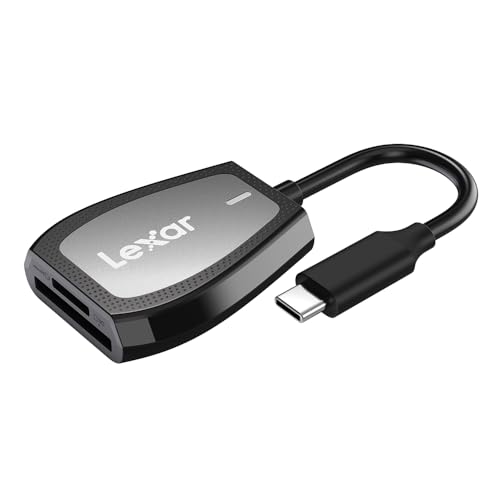
- Reads at up to 312 MB/s
- USB 3.2 Gen 1 Type-C interface
- LED activity indicator and dual slots
Best For: USB-C computers and users who want clear transfer-status feedback
Best for Phones and Tablets

- USB-A and USB-C interfaces
- UHS-II transfers up to 312 MB/s
- Supports computers and USB-C OTG devices
Best For: Mobile file transfers and mixed computer-device setups
Most Versatile Connections
ProMaster Trifecta Deluxe Reader

- USB-C, USB-A, and Micro-B connections
- UHS-II speeds up to 300 MB/s
- Supports card-to-card file transfers
Best For: Photographers using a mix of current and older devices
Fast Dual-Slot Pick
SABRENT USB-C UHS-II Card Reader

- Up to 312MBps UHS-II transfer speeds
- Simultaneous SD and microSD transfers
- Integrated 6-inch USB-C cable
Best For: Fast dual-card workflows on USB-C devices
Compact Travel Option
WISYIFIL USB-C UHS-II Card Reader
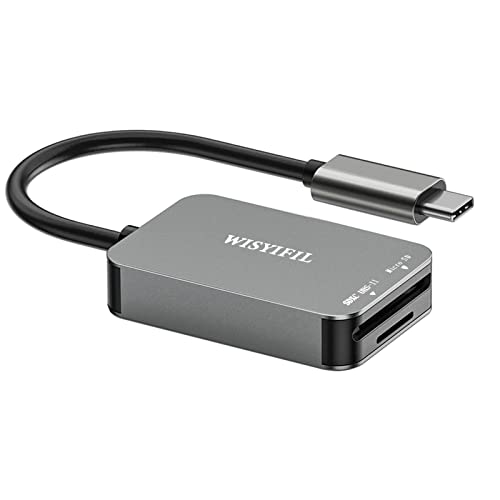
- Up to 312MB/s for UHS-II SD cards
- Full-size SD and microSD slots
- Aluminum alloy housing
Best For: Portable USB-C use with UHS-II SD cards
Durable Two-Card Choice

- Two UHS-II slots with up to 312MB/s speeds
- Simultaneous two-card read and write
- Aluminum case with braided cable
Best For: Durable dual-card transfers across USB-C devices
Professional Dual-Slot Pick
ProGrade CFast and SD UHS-II Reader

- Dual slots for CFast and SD UHS-II media
- USB 3.2 Gen 2 transfers up to 1250 MB/s
- Magnetic mounting plate and two-year warranty
Best For: Professional filmmakers and photographers using CFast and SD UHS-II cards
USB-C Versatility Pick

- Dual SD and MicroSD UHS-II slots
- Up to 312 MB/s stated transfer speed
- Plug-and-play USB-C design for many devices
Best For: Creators using both SD and MicroSD cards with USB-C devices
Travel-Friendly Pick

- SD and MicroSD dual-slot compatibility
- Up to approximately 300 MB/s with UHS-II cards
- Compact, lightweight, and protected for travel
Best For: Mobile creators transferring SD and MicroSD footage on the go
Best Value – BENFEI SD 4.0 Card Reader
If you need a memory card reader with UHS II support that works across USB-C and USB-A devices, the BENFEI SD 4.0 is a practical, versatile option. Its dual slots accept SD and microSD cards, while UHS-II support enables transfer speeds of up to 312 MB/s when paired with compatible cards and ports.
Best For: Users who want broad device compatibility, dual card slots, and a durable cable-and-metal construction.
Pros:
- UHS-II support with advertised speeds up to 312 MB/s.
- Built-in USB-C and USB-A connectivity for newer and older computers.
- Braided cable, aluminum housing, and an 18-month warranty add durability and reassurance.
- Supports both SD and microSD formats.
Cons:
- Actual speeds depend on the memory card and USB port used.
- Cards should be pressed to eject rather than pulled directly.
The BENFEI stands out as a flexible everyday reader for mixed-device households. Its speed potential and rugged design make it a strong value, although achieving top performance requires compatible UHS-II hardware throughout the setup.
Best Compact Option – Lexar Dual-Slot SD/Micro SD Reader
The Lexar dual-slot reader is a straightforward memory card reader with UHS II support for USB-C computers. It offers read speeds up to 312 MB/s with compatible UHS-II cards, while retaining backward compatibility with UHS-I SD and microSD cards.
Best For: USB-C laptop and desktop users who want a compact dual-slot reader with a status light.
Pros:
- Read speeds of up to 312 MB/s with compatible cards.
- USB 3.2 Gen 1 Type-C connection.
- Dual slots support SD and microSD cards.
- LED activity light shows when the reader is working.
Cons:
- Uses USB-C connectivity rather than offering USB-A and USB-C in one design.
- Top speeds require compatible UHS-II cards and a suitable USB port.
Lexar keeps the design focused on fast transfers and simple operation. It is a good fit for USB-C systems, especially if you value an activity indicator, but users with legacy USB-A equipment may need an adapter.
Best for Phones and Tablets – UGREEN USB C SD 4.0 Reader
The UGREEN USB C SD 4.0 is a versatile memory card reader with UHS II support for computers, smartphones, and tablets. Its USB-A and USB-C interfaces, dual card slots, and support for transfers up to 312 MB/s with UHS-II cards make it useful for moving camera files on the go.
Best For: Mobile creators and users who need USB-C OTG compatibility alongside standard computer connectivity.
Pros:
- Supports UHS-II and transfer speeds up to 312 MB/s with compatible equipment.
- USB-A and USB-C connectivity works with computers and compatible mobile devices.
- Accepts SD and microSD formats, including capacities up to 2TB.
- Plug-and-play operation with an eject mechanism to help secure cards.
Cons:
- Mobile use requires a compatible USB-C OTG device.
- Actual performance depends on the card, device, and connection.
UGREEN offers the broadest device flexibility of this group, particularly for users who transfer files directly to phones or tablets. Its compact design is convenient for travel, while the dual interface keeps it useful with regular computers.
Most Versatile Connections – ProMaster Trifecta Deluxe Reader
The ProMaster Trifecta Deluxe is a memory card reader with UHS II support and three connection options: USB-C 3.0, USB-A 3.0, and USB Micro-B 2.0. It supports SD and microSD cards, with transfer speeds up to 300 MB/s, plus iOS and Android OTG compatibility.
Best For: Photographers who need one reader for USB-C, USB-A, and Micro-B equipment.
Pros:
- UHS-II support with transfer speeds up to 300 MB/s.
- Includes USB-C, USB-A, and USB Micro-B connections.
- Dual-slot design can transfer and copy files between cards.
- Aluminum alloy housing and ABS protective caps improve portability and protection.
Cons:
- USB Micro-B connection is limited to USB 2.0.
- Listed compatibility is centered on Windows and macOS, with OTG support for iOS and Android.
- One-year warranty is shorter than some competing options.
The Trifecta Deluxe is appealing when connection flexibility matters more than having the highest advertised speed. Its three interfaces and card-to-card transfer capability make it especially useful in mixed or older equipment setups.
Fast Dual-Slot Pick – SABRENT USB-C UHS-II Card Reader
If you need a memory card reader with uhs ii support for moving files from both full-size SD and microSD media, the SABRENT CR-CSDM offers a practical dual-slot setup. Its USB-C connection, plug-and-play design, and stated speeds of up to 312MBps make it well suited to fast transfers on compatible devices.
Best For: Photographers and content creators who want simultaneous SD and microSD transfers through a compact USB-C reader.
Pros:
- Supports SDXC UHS-II and microSDXC media with transfer speeds up to 312MBps.
- Allows simultaneous file and media transfers through both slots.
- Includes an integrated 6-inch USB 3.2 Gen 1 USB-C cable and requires no drivers.
- Backward compatible with older SD cards and earlier USB standards, subject to their speed limits.
Cons:
- The host connection is limited to 5Gbps, so actual performance depends on the computer or device.
- The integrated cable may offer less flexibility than a detachable design.
With its two-card workflow and integrated cable, this SABRENT reader is a strong choice when convenience matters as much as UHS-II performance. A power-status LED and bus-powered operation add useful everyday practicality.
Compact Travel Option – WISYIFIL USB-C UHS-II Card Reader
This memory card reader with uhs ii support is designed for USB-C laptops, tablets, phones, and other compatible devices. The WISYIFIL reader combines a full-size SD slot with a microSD slot, an aluminum housing, and stated UHS-II transfer speeds of up to 312MB/s for portable file handling.
Best For: Travelers and photographers who need a compact USB-C reader for UHS-II SD cards and everyday microSD access.
Pros:
- Supports UHS-II SD cards at speeds of up to 312MB/s and remains backward compatible with UHS-I cards.
- Works with SD, SDHC, SDXC, microSD, microSDHC, microSDXC, and other listed card formats.
- Aluminum alloy housing is designed to support heat dissipation.
- Plug-and-transfer operation supports compatible USB-C and Android OTG devices without an app or driver.
Cons:
- The microSD slot supports UHS-I speed only, according to the supplied specifications.
- Actual speeds depend on the card and host device.
- Compatibility should be checked for devices that require USB-C or Android OTG support.
This reader is a straightforward portable option for users who primarily need fast UHS-II performance from full-size SD cards. Its microSD slot adds flexibility, though it is not the choice for UHS-II microSD transfers.
Durable Two-Card Choice – UGREEN USB-C SD 4.0 Reader
For users seeking a memory card reader with uhs ii support across SD and microSD formats, the UGREEN SD 4.0 reader provides two UHS-II slots and USB-C connectivity. It is rated for transfer speeds up to 312MB/s, supports simultaneous read-and-write workflows, and uses a braided cable with an aluminum alloy case.
Best For: Creators who regularly move files between two UHS-II cards or need a durable reader for computers, tablets, and compatible phones.
Pros:
- Supports UHS-II SD and TF/microSD cards with speeds up to 312MB/s.
- Can read and write two cards simultaneously, including transfers between cards.
- Compatible with a broad range of listed systems, including Windows, macOS, Linux, ChromeOS, iPadOS, and Android.
- Aluminum alloy construction and a braided cable are designed for durability.
Cons:
- Android phones need OTG support for use with the reader.
- Maximum performance depends on the host device, card, and USB connection.
- The two-slot design may be more than needed for users who transfer from one card at a time.
The UGREEN stands out for its two-card workflow and robust physical design. It is particularly appealing for transferring or organizing content between SD and microSD media without repeatedly unplugging cards.
Professional Dual-Slot Pick – ProGrade CFast and SD UHS-II Reader
For filmmakers and photographers who need a memory card reader with uhs ii support, this ProGrade Digital model combines an SD UHS-II slot with a CFast slot. Its USB 3.2 Gen 2 interface is designed for fast transfers and can handle both cards simultaneously.
Best For: Professional creators managing CFast and SD UHS-II media in the field, studio, or press room.
Pros:
- Supports CFast and SD UHS-II cards in a dual-slot design.
- USB 3.2 Gen 2 offers transfers up to 1250 MB/s according to the supplied specifications.
- Includes an adhesive magnetic plate for a compact mobile workstation.
- Comes with a two-year warranty and serialized quality tracking.
Cons:
- It is not a CompactFlash reader.
- Its professional CFast-focused design may be more than needed for basic SD-only use.
This is a strong workflow-oriented choice when you need simultaneous CFast and SD UHS-II access, especially for professional production environments. Confirm that your devices support USB-C connectivity and that CFast—not CompactFlash—is the format you need.
USB-C Versatility Pick – uni SD 4.0 UHS-II Card Reader
The uni SD 4.0 is a practical memory card reader with uhs ii support for USB-C laptops, tablets, and compatible smartphones. Its two SD 4.0 slots support both full-size SD and MicroSD cards, with stated transfer speeds up to 312 MB/s.
Best For: Photographers and content creators who switch between SD and MicroSD cards across USB-C devices.
Pros:
- Supports UHS-II and backward-compatible UHS-I SD, SDXC, and MicroSD formats.
- Dual slots accommodate full-size SD and MicroSD cards.
- Plug-and-play operation works across Windows, macOS, ChromeOS, Linux, iOS, and Android systems listed by the manufacturer.
- Compact aluminum housing and a 15 cm cable suit mobile workflows.
Cons:
- It does not support the Lightning port on iPad and iPhone devices.
- Its USB-C connection may require an adapter for devices without USB-C.
Choose this reader if broad SD and MicroSD compatibility matters more than support for professional formats such as CFast. It is especially convenient for USB-C-centered camera, laptop, tablet, and smartphone workflows.
Travel-Friendly Pick – Exascend Dual-Slot SD Reader
The Exascend dual-slot model is a compact memory card reader with uhs ii support for SD and MicroSD workflows. Its USB 3.2 interface is rated for up to approximately 300 MB/s with UHS-II cards, while remaining backward compatible with UHS-I media.
Best For: Drone, action-camera, DSLR, and mirrorless users who need a lightweight SD and MicroSD reader for travel.
Pros:
- Reads both SD/SDXC/SDHC and MicroSD/MicroSDXC/MicroSDHC cards.
- Supports UHS-II speeds up to approximately 300 MB/s and UHS-I speeds up to approximately 180 MB/s.
- Small 54 × 33.5 × 9 mm form factor weighs approximately 12 g.
- Includes impact-resistant construction plus ESD, overload, and temperature protection.
Cons:
- Uses USB Type-A rather than USB-C.
- The supplied specifications do not indicate simultaneous transfer performance for both slots.
This reader balances high-speed UHS-II support with a particularly portable design. It is a sensible option for travelers and camera users, provided your computer or adapter setup includes a compatible USB Type-A connection.
How We Picked the Best Memory Card Reader with Uhs Ii Support
We focused on readers that explicitly support UHS-II SD or microSD cards, while considering connection type, slot design, stated transfer speeds, portability, and compatibility with modern computers, tablets, cameras, and mobile devices. Models with dual slots or broader format support may be more convenient, while simpler single-purpose readers can be easier to carry and use.
Advertised speeds are maximum figures under ideal conditions. Actual performance depends on the card, USB standard, host device, file size, and whether other devices share the connection.
Quick Comparison
| Best For | Look For |
|---|---|
| Everyday photo transfers | Compact USB-C SD/microSD reader |
| Mixed devices | USB-C and USB-A compatibility |
| Two cards at once | Dual-slot design with simultaneous support |
| Professional video workflows | USB 3.2 Gen 2 and CFast support |
| Travel and field work | Small housing, durable cable or connector, and protective design |
Key Buying Factors for a Memory Card Reader with UHS-II Support
UHS-II and USB Speed
A UHS-II reader is only as fast as its slowest component. For the best results, pair a UHS-II card with a USB 3.2 Gen 2 connection when available. A USB-C plug describes the connector, not necessarily the transfer speed, so verify the reader’s specifications rather than assuming every USB-C model is equally fast.
Slot and Card Compatibility
Check whether you need full-size SD, microSD, or both. Dual-slot readers are convenient for cameras that use different card types, but some models may not read both cards simultaneously. Photographers using specialty media should also confirm support for formats such as CFast before buying.
Device Compatibility and Build
USB-C is useful for newer laptops, tablets, phones, and cameras, while USB-A support helps with older computers. A compact reader is ideal for travel, but professional users may prefer a sturdier enclosure and a fixed or detachable cable that can withstand frequent use.
Workflow Features
Consider whether you need simultaneous card access, broad operating-system compatibility, an activity indicator, or plug-and-play operation without drivers. These small details can matter more than a higher advertised speed if you regularly copy files in the field.
Who Should Buy Which Memory Card Reader with Uhs Ii Support?
Choose a compact USB-C reader if you mainly transfer photos from one SD or microSD card to a modern laptop, tablet, or phone. Choose a dual-slot model if you alternate between full-size SD and microSD cards or want a more flexible everyday setup. Choose USB-C/USB-A compatibility if the reader will move between newer and older computers.
Choose a professional, higher-bandwidth reader if you regularly move large RAW photo catalogs, 4K or higher-resolution video, or files from multiple media types. For occasional transfers, prioritize reliable compatibility, portability, and value over maximum headline speed.