The best network switches for gaming make it easier to connect PCs, consoles, access points, NAS devices, and streaming gear without relying on crowded Wi-Fi. The right model can also provide faster local transfers and more room for future upgrades.
Our selection includes simple plug-and-play switches, smart-managed options, and multi-gig models with 2.5GbE or 10GbE connectivity. Use the guide below to match port speed, capacity, features, and placement to your setup.
Best 10 Network Switches for Gaming Picks for 2026
Best Multi-Gig Value

- Eight 2.5Gbps RJ45 ports
- Fanless and plug-and-play
- Up to 40Gbps switching capacity
Best For: Multi-device gaming setups and LAN parties
Best for Network Controls
TP-Link TL-SG108E Smart Gigabit Switch
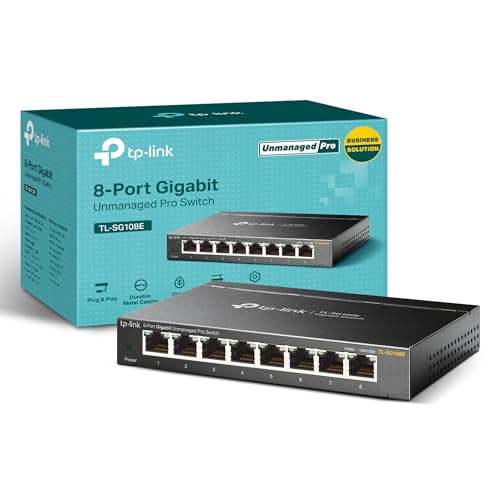
- Eight gigabit Ethernet ports
- QoS, VLAN, and monitoring tools
- Metal desktop or wall-mount design
Best For: Managed home gaming networks
Best for NAS and 10Gb Backhaul

- Five 2.5Gbps ports plus 10Gb SFP+
- Standard, VLAN, and aggregation modes
- Supports up to 12K jumbo frames
Best For: Gaming networks with NAS or 10Gb uplinks
Best Compact 2.5Gb Pick
Omada DS105G-M2 5-Port 2.5Gb Switch

- Five 2.5Gbps RJ45 ports
- 25Gbps switching capacity
- Silent plug-and-play operation
Best For: Small multi-gig gaming networks
Best 8-Port Upgrade

- Eight 2.5Gbps RJ45 ports
- Plug-and-play unmanaged setup
- Metal, fanless cooling design
Best For: Larger gaming networks with PCs, consoles, and NAS devices
Best Compact Value

- Five 2.5Gbps Ethernet ports
- Plug-and-play unmanaged operation
- Compact fanless design
Best For: Small gaming desks and five-device wired networks
Best Simple 5-Port Upgrade

- Five full-speed 2.5Gbps ports
- Supports 1Gbps and 100Mbps devices
- Silent cooling with desktop or wall placement
Best For: Simple multi-gig gaming stations with five wired devices
Best Multigig Upgrade
8-Port 2.5G Switch with 10G Uplink
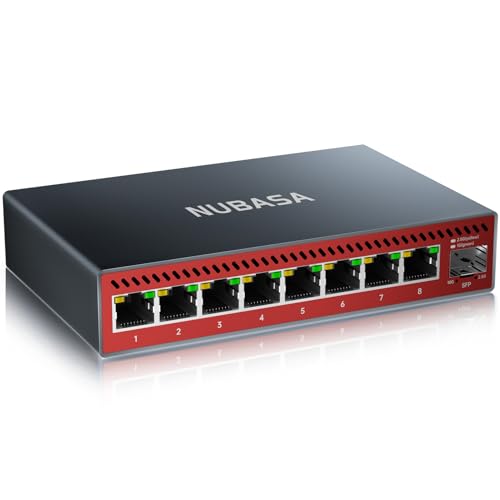
- Eight 2.5Gbps RJ45 ports
- 10Gbps SFP+ uplink
- Silent fanless aluminum design
Best For: Multigig gaming setups with NAS or 10G networking
Best for Multiplayer Homes
D-Link 6-Port 10G Gaming Switch

- Five 2.5G ports plus one 10G port
- QoS and port-priority Turbo Mode
- Quiet fanless metal housing
Best For: Multi-gamer households and LAN parties
Best Budget Gigabit Pick

- Eight standard gigabit ports
- Simple plug-and-play installation
- Quiet, energy-efficient metal design
Best For: Basic wired gaming networks with gigabit devices
Best Multi-Gig Value – BrosTrend 8-Port 2.5Gb Switch
For gamers adding several wired devices, the BrosTrend is one of the more flexible network switches for gaming. All eight RJ45 ports support 2.5Gbps, giving compatible PCs, consoles, NAS devices, and access points more headroom than standard gigabit hardware.
Best For: Gaming setups, LAN parties, home offices, and entertainment systems that need eight 2.5Gbps wired connections.
Pros:
- Eight 2.5Gbps ports provide up to 40Gbps of switching capacity.
- Fanless design operates quietly during demanding use.
- Plug-and-play setup requires no software installation.
- Desktop or wall mounting and RJ45-only connectivity simplify installation.
Cons:
- It is unmanaged, so it does not provide VLAN, QoS, or other advanced controls.
- Devices and network service must support multi-gig speeds to benefit from 2.5Gbps ports.
Choose this model when you want many multi-gig wired connections without configuration work. Its silent, compact design is particularly practical for a gaming room or shared home network.
Best for Network Controls – TP-Link TL-SG108E Smart Gigabit Switch
The TP-Link TL-SG108E is a practical choice among network switches for gaming when traffic management matters more than multi-gig speed. Its eight gigabit ports are paired with web and software management, VLAN support, QoS, monitoring, and other Layer 2 tools.
Best For: Gamers who want to organize wired traffic, prioritize latency-sensitive applications, or manage a more structured home network.
Pros:
- Eight 10/100/1000Mbps RJ45 ports expand wired connectivity.
- QoS can help optimize traffic for latency-sensitive applications.
- Supports VLANs, port mirroring, loop prevention, cable diagnostics, and IGMP snooping.
- Sturdy metal construction supports desktop or wall-mounted installation.
Cons:
- Gigabit ports are slower than the 2.5Gbps and 10Gbps options in this roundup.
- Advanced features require configuration through the web interface or software.
This is the better fit for buyers who want hands-on network management rather than a purely plug-and-play switch. It offers useful controls for a gaming network, provided gigabit speeds meet your needs.
Best for NAS and 10Gb Backhaul – UGREEN 6-Port 2.5Gb Switch
UGREEN’s six-port model stands out among network switches for gaming by combining five 2.5Gbps copper ports with a flexible 10Gb SFP+ uplink. It also adds one-touch Standard, Link Aggregation, and VLAN modes for setups that include a NAS, high-performance router, or multiple wired gaming devices.
Best For: Gamers with a 10GbE NAS or router who want multi-gig access and a high-speed backbone connection.
Pros:
- Provides five 2.5Gbps RJ45 ports and one 10Gb SFP+ port.
- Link Aggregation can raise the combined bandwidth of ports 4 and 5 to 5Gbps for compatible multi-port devices.
- Three selectable modes include Standard, Link Aggregation, and VLAN.
- Metal housing, side ventilation, and desktop or wall mounting support flexible placement.
Cons:
- The SFP+ module is not included.
- It has only six total ports and is an unmanaged, non-PoE switch.
Consider this switch if your gaming network also moves large files or connects to fast storage. Its SFP+ port and selectable modes offer more expansion potential than a basic unmanaged multi-gig switch, but may require extra hardware for fiber or RJ45 SFP+ connections.
Best Compact 2.5Gb Pick – Omada DS105G-M2 5-Port 2.5Gb Switch
The Omada DS105G-M2 is a straightforward option for buyers seeking compact network switches for gaming. Its five 2.5Gbps RJ45 ports provide up to 25Gbps of switching capacity for a gaming computer, NAS, Wi-Fi 6 access point, or other compatible devices.
Best For: Small gaming setups, home entertainment systems, LAN parties, and users upgrading to 2.5Gbps without replacing existing Cat5e cabling.
Pros:
- Five 2.5Gbps ports support fast multi-gig connections.
- Up to 25Gbps of switching capacity suits multiple high-speed devices.
- Plug-and-play operation requires no configuration or central management.
- Fanless operation is designed to stay silent.
Cons:
- Five ports provide less expansion than eight-port alternatives.
- It is unmanaged, with no listed VLAN, QoS, or link aggregation controls.
This switch makes sense when you want a simple 2.5Gbps upgrade for a focused gaming or home network. It avoids management complexity while retaining enough capacity for several compatible devices.
Best 8-Port Upgrade – UGREEN 2.5Gb 8-Port Switch
For gamers expanding a wired setup, this UGREEN model is one of the more flexible network switches for gaming. It provides eight 2.5Gbps RJ45 ports, allowing you to connect gaming PCs, consoles, NAS devices, and Wi-Fi 6/6E routers without configuration or software.
Best For: Multi-device gaming setups, NAS users, and households that need eight high-speed wired connections.
Pros:
- Eight 2.5Gbps ports support gaming PCs, consoles, NAS, and compatible routers.
- Auto-negotiates with 100Mbps, 1Gbps, and 2.5Gbps connections.
- Metal housing, heatsinks, thermal pads, and ventilation support sustained operation.
- Fanless design with desktop or wall placement keeps operation quiet.
Cons:
- As an unmanaged switch, it does not provide advanced network configuration.
- Its eight-port enclosure takes up more space than a compact five-port option.
This is a strong choice when you want several multi-gig wired connections in one place. The combination of port capacity, cooling features, and silent operation makes it especially practical for a larger gaming or home network.
Best Compact Value – BrosTrend 2.5Gb 5-Port Switch
The BrosTrend five-port model is a compact way to add multi-gig wired connectivity to a gaming desk. All five RJ45 ports support 2.5Gbps, and the unmanaged plug-and-play design keeps setup simple for gaming PCs, consoles, TVs, access points, or NAS devices.
Best For: Smaller gaming setups and users who need five fast Ethernet connections without SFP hardware.
Pros:
- Five 2.5Gbps ports provide up to 25Gbps of switching capacity.
- RJ45-only design avoids the need for SFP transceivers and fiber cables.
- Compact, lightweight enclosure supports desktop or wall placement.
- Fanless operation stays quiet during demanding use.
Cons:
- Five ports offer less expansion room than an eight-port switch.
- The plastic case may feel less substantial than a metal alternative.
For a straightforward gaming network, this switch covers the essentials without adding configuration overhead. It is particularly appealing when space is limited and your devices already use standard Ethernet ports.
Best Simple 5-Port Upgrade – UGREEN 2.5Gb 5-Port Switch
This UGREEN five-port switch is designed for gamers who want an easy step up from Gigabit Ethernet. Each port supports 2.5Gbps, with auto-negotiation for 1Gbps and 100Mbps devices, while the unmanaged design delivers a quick installation for PCs, consoles, laptops, and NAS equipment.
Best For: Plug-and-play gaming setups that need five 2.5Gbps connections and quiet continuous operation.
Pros:
- All five ports support 2.5Gbps with up to 25Gbps switching.
- Backward compatibility supports 1Gbps and 100Mbps Ethernet devices.
- Ventilation on the bottom and sides helps manage heat during heavy use.
- Fanless desktop or wall-mount design operates silently.
Cons:
- It has fewer ports than the eight-port UGREEN model.
- As an unmanaged, non-PoE Layer 2 switch, it lacks advanced management and power delivery.
This model balances speed and simplicity well. It is a practical fit for a gaming station that needs several fast wired links but does not require VLAN controls, PoE, or additional network-management features.
Best Multigig Upgrade – 8-Port 2.5G Switch with 10G Uplink
For gamers upgrading beyond standard gigabit networking, the NUBASA 8-port 2.5G switch provides multiple multigig wired connections without requiring configuration. Its 10G SFP+ uplink also makes it suitable for connecting a compatible router, NAS, or server.
Best For: Gaming setups with 2.5G-capable PCs or consoles, NAS devices, and a high-speed wired backbone.
Pros:
- Eight 2.5Gbps RJ45 ports support connections up to 2.5Gbps.
- 10Gbps SFP+ uplink supports compatible 1G, 2.5G, and 10G modules.
- Fanless aluminum construction provides quiet operation and heat dissipation.
- Plug-and-play setup includes a Cat6a cable and wall-mount screws.
Cons:
- The SFP+ modules needed for optical or copper uplinks are sold separately unless included in a bundle.
- As an unmanaged switch, it does not provide configurable network controls.
This is the strongest fit for a gaming network that already uses, or plans to add, 2.5G and 10G hardware. If your devices are limited to gigabit Ethernet, its extra capacity may not be necessary.
Best for Multiplayer Homes – D-Link 6-Port 10G Gaming Switch
The D-Link DMS-106XT is built for gaming networks that need several high-speed wired connections in a compact, fanless design. Five 2.5G ports and one 10G port support multiplayer setups, high-bandwidth uplinks, and compatible NAS devices.
Best For: Multi-gamer households, LAN parties, and users with 10G or 2.5G internet and networking equipment.
Pros:
- Combines five 2.5G ports with one 10G port.
- Smart Turbo Mode provides QoS and port-based priority for selected traffic.
- Fanless metal housing operates quietly.
- Colored indicators show port speed status at a glance.
Cons:
- It has six ports, offering less expansion than an eight-port switch.
- The supplied notes identify a push-button switch type rather than a configurable managed interface.
Choose this model when gaming traffic prioritization and a 10G connection matter more than maximizing port count. It is particularly well suited to shared gaming and streaming environments.
Best Budget Gigabit Pick – TP-Link 8-Port Gigabit Switch
The TP-Link TL-SG108 is a straightforward choice for gaming networks built around standard gigabit Ethernet. Its eight plug-and-play ports add wired connections for consoles, PCs, and other devices while the fanless metal enclosure keeps operation quiet.
Best For: Affordable wired gaming setups using gigabit Ethernet devices.
Pros:
- Eight RJ45 ports support 10/100/1000Mbps connections.
- Plug-and-play setup requires no configuration.
- Fanless metal design provides silent operation and heat dissipation.
- Power usage adjusts based on link status and cable length.
Cons:
- It does not provide 2.5G or 10G ports for multigig upgrades.
- As an unmanaged switch, it lacks advanced traffic-management controls.
This is a practical option when your gaming devices and internet connection are gigabit-based. Consider a multigig model instead if you need faster local transfers or a 10G uplink.
How We Picked the Best Network Switches for Gaming
We focused on switches suited to real gaming and home-network setups, comparing port count, Ethernet speed, ease of installation, noise, build quality, and useful networking features. The lineup includes unmanaged switches for straightforward expansion, smart-managed models for added control, and multi-gig options for fast internet plans, gaming PCs, NAS devices, and local file transfers.
Because a switch cannot make an internet connection faster than the slowest link in the network, we also considered practical system matching. A 2.5GbE switch is most useful when your router, computer, NAS, or broadband service can support speeds above 1Gbps.
Quick Comparison
| Type | Best For | What to Look For |
|---|---|---|
| Gigabit unmanaged | Basic wired expansion | Plug-and-play setup, fanless operation, sturdy enclosure |
| Gigabit smart-managed | Users who want network control | QoS, VLAN support, configuration options |
| 2.5GbE unmanaged | Gaming PCs, consoles, NAS, and multi-gig internet | Number of 2.5GbE ports, heat management, compact design |
| 10GbE and 2.5GbE hybrid | High-speed uplinks and demanding home networks | 10GbE port type, compatible cabling, total port layout |
Key Buying Factors for Network Switches for Gaming
Speed and Port Compatibility
Gigabit Ethernet remains sufficient for most online gaming because latency is usually determined by the internet connection and routing rather than raw LAN bandwidth. Choose 2.5GbE if you have multi-gig internet, transfer large files locally, use a NAS, or want additional headroom. A 10GbE uplink can connect a fast server, router, or workstation while the remaining ports serve gaming devices.
Port Count and Layout
Count every device you plan to connect, including the router uplink, then leave at least one or two spare ports. Five-port switches suit compact setups, while six- and eight-port models are better for multiple consoles, PCs, access points, and smart-home equipment.
Managed or Unmanaged
Unmanaged switches work immediately with no configuration and are usually the best choice for a simple gaming desk or entertainment center. A smart-managed switch is worthwhile if you need VLANs, traffic prioritization, monitoring, or more control over separate devices.
Noise, Heat, and Placement
Fanless switches are quiet for bedrooms, offices, and gaming rooms, but multi-gig hardware can run warmer than basic Gigabit models. Keep the switch ventilated and avoid stacking it tightly against other heat-producing equipment. Shielded metal housings can improve durability and help with cable organization.
Who Should Buy Which Network Switches for Gaming?
- Choose a Gigabit unmanaged switch for consoles, PCs, and streaming devices on a standard home internet plan.
- Choose a 2.5GbE unmanaged switch for a gaming PC, NAS, or broadband service that supports speeds above 1Gbps.
- Choose a smart-managed Gigabit switch if you want QoS, VLANs, or network monitoring without moving to multi-gig hardware.
- Choose a mixed 10GbE/2.5GbE switch for a high-speed home lab, workstation, NAS, or router uplink.
- Choose a larger eight-port model when you expect to add more wired devices soon and want to avoid replacing the switch.
Finally, use suitable Ethernet cables and verify that every connected device supports the speed you expect. For most buyers, a quiet unmanaged switch with enough spare ports offers the simplest and most reliable upgrade.