The best memory card readers make it easier to move photos, videos, and other files between cameras, phones, tablets, and computers. The right model depends on your card formats, connection type, and whether you need to read multiple cards at once.
We compared 10 versatile memory card readers, including compact USB-C adapters, dual-slot models, and multi-card hubs with support for formats such as SD, microSD, CF, MS, and xD.
Best 10 Memory Card Readers Picks for 2026
Most Versatile

- Reads and writes four card types simultaneously
- Dual USB-C and USB 3.0 connectivity
- Supports transfers up to 160MB/sec in UHS-I mode
Best For: Photographers using multiple card formats
Best Compact Option

- Slim design suits travel and camera bags
- USB-C and USB-A interfaces included
- Reads SD and microSD cards simultaneously
Best For: Traveling photographers using SD and microSD cards
Most Flexible Hub
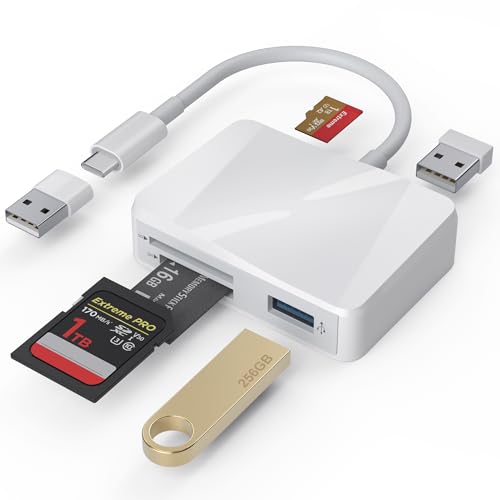
- Three card slots plus two USB-A ports
- Includes USB-C and USB-A connectivity
- Supports plug-and-play use across major operating systems
Best For: USB-C users needing card and USB expansion
Best Traditional Choice

- Supports SD, microSD, Memory Stick, and CF cards
- USB 3.0 transfer support up to 5Gbps
- Plug-and-play USB-A design with LED indicator
Best For: USB-A computers needing broad card support
Best Compact USB-C Pick
Anker PowerExpand Dual-Slot Reader
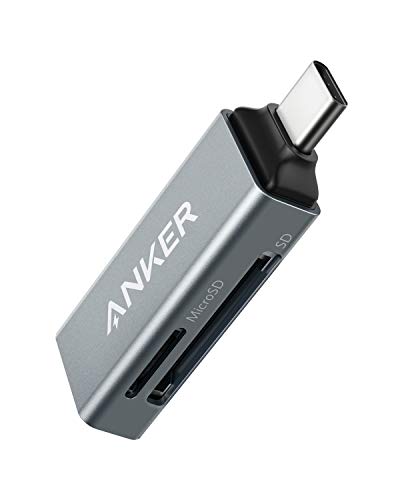
- Dual SD and microSD slots
- 5Gbps USB-C connectivity
- Lightweight 9g design
Best For: Portable USB-C file transfers
Best Multi-Format Hub
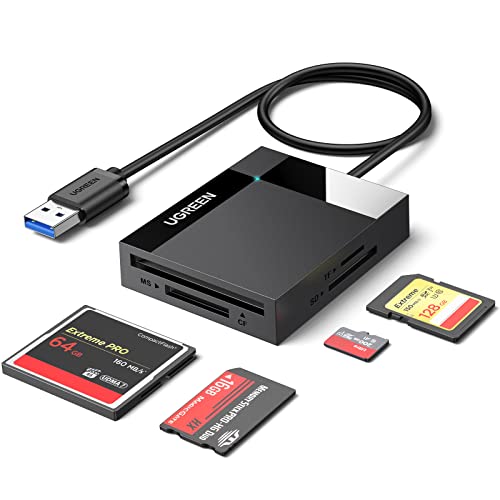
- Four card slots for broad format support
- Simultaneous reading and writing
- Up to 5Gbps USB 3.0 transfers
Best For: Photographers managing multiple card types
Best Dual-Header Option

- USB-C and USB-A connectivity
- Simultaneous SD and microSD access
- 5Gbps plug-and-play transfers
Best For: Mixed-device households and creative workflows
Best with Extra Features
7-in-1 USB-C and USB 3.0 Memory Card Reader

- Seven slots support SD, microSD, CF, MS, and xD cards
- USB-C and USB 3.0 connectors
- 5Gbps transfers with simultaneous multi-card support
Best For: Photographers and users handling varied card formats
Best Portable Pick
Mini Dual-Slot SD and microSD Reader

- USB-A and USB-C connectors
- Simultaneous SD and microSD read/write
- Keychain-ready design for travel
Best For: On-the-go photo and video backups
Best for Legacy Formats
7-in-1 USB-C Multi Card Reader

- Supports CF, SD, microSD, xD, and MS cards
- Reads and writes up to five cards simultaneously
- USB-C and USB 3.0 with 5Gbps transfers
Best For: Mixed-format camera card workflows
Most Versatile – BENFEI 4-in-1 Card Reader
For shoppers comparing memory card readers, the BENFEI 4-in-1 stands out for its broad card support and dual USB-C/USB-A connectivity. It can read and write SD, microSD, Memory Stick, and CompactFlash cards simultaneously, with USB 3.0 transfer support up to 160MB/sec in UHS-I mode.
Best For: Photographers and users who work with several card formats and both modern USB-C and standard USB ports.
Pros:
- Supports SD, microSD, Memory Stick, and CompactFlash cards.
- Reads and writes four cards at the same time.
- Integrated USB-C and USB 3.0 connections offer flexible compatibility.
- Includes an 18-month warranty.
Cons:
- Not compatible with standard Memory Stick, Memory Stick Micro (M2), or CF Type I cards.
- Actual transfer speeds depend on the card and connected USB port.
This is a strong all-purpose choice when card-format coverage matters most. Its compact design and simultaneous read/write capability make it especially useful for photographers managing multiple types of media.
Best Compact Option – UGREEN USB-C SD Card Reader
The UGREEN USB-C SD card reader is a slim, travel-friendly option for transferring photos, videos, and project files. Its USB-C and USB-A interfaces support plug-and-play use across computers, tablets, smartphones, and cameras, while SD and microSD cards can be accessed simultaneously.
Best For: Photographers, videographers, and travelers who want a lightweight reader for SD and microSD cards.
Pros:
- USB 3.0 supports data transmission up to 5Gbps.
- USB-C and USB-A interfaces work with newer and older devices.
- Reads SD and microSD cards at the same time.
- Supports SD, SDHC, SDXC, microSD, microSDHC, microSDXC, MMC, and RS-MMC formats.
Cons:
- Supports two card slots rather than a wider range of formats such as CompactFlash or Memory Stick.
- Transfer performance depends on the connected device and card.
UGREEN keeps the design focused and portable, making it a practical pick for everyday SD and microSD transfers. The dual-interface design is particularly convenient for users switching between USB-C and USB-A equipment.
Most Flexible Hub – 5-in-1 USB-C Card Reader
This 5-in-1 memory card reader combines SD, microSD, and Memory Stick slots with two USB-A ports. It connects through USB-C or an included USB-C-to-USB adapter, giving users a convenient way to transfer files between cards, phones, tablets, and computers without installing drivers.
Best For: USB-C device owners who want card access plus extra USB-A ports in one compact adapter.
Pros:
- Combines three card slots with two USB-A ports.
- Supports USB-C and standard USB connections through the included adapter.
- Supports SD, microSD, and Memory Stick formats, with stated capacities up to 2TB.
- Plug-and-play compatibility covers Windows, macOS, Chrome, Linux, iOS, and Android devices.
Cons:
- Its broad feature set may be more than users need for simple SD transfers.
- The supplied details do not specify a USB 3.0 transfer rating for the adapter.
Choose this model when versatility is more important than a minimal design. The added USB-A ports can make it useful alongside a MacBook, iPad Pro, phone, or other USB-C device.
Best Traditional Choice – SmartQ C368 Card Reader
The SmartQ C368 is a straightforward USB 3.0 memory card reader for users who prefer a traditional USB-A connection. It supports SD, microSD, Memory Stick, and CompactFlash cards, provides independent card reading, and includes a blue LED indicator to show when the device is powered.
Best For: Windows, Mac, and Linux users who need broad card-format support from a USB-A reader.
Pros:
- Four-in-one design supports SD, microSD, Memory Stick, and CompactFlash cards.
- USB 3.0 supports transfer speeds up to 5Gbps.
- Plug-and-play operation requires no driver installation.
- Blue LED indicator makes power status easy to see.
Cons:
- Uses USB-A rather than USB-C as its primary connection.
- It does not read multiple cards simultaneously.
- Memory cards are not included.
The C368 is a practical, no-frills option for desktops and laptops with USB-A ports. Its wide media support and simple operation make it a sensible choice when newer USB-C features are not required.
Best Compact USB-C Pick – Anker PowerExpand Dual-Slot Reader
The Anker PowerExpand is a compact choice among memory card readers for USB-C laptops, phones, and tablets. Its two slots handle standard SD and microSD cards, while the 5Gbps interface supports quick file transfers.
Best For: USB-C users who want a small reader for moving files between SD and microSD cards.
Pros:
- Dual SD and microSD slots allow convenient card swapping.
- Supports SDXC, SDHC, UHS-I, microSDXC, and related formats.
- Compact 9g design is easy to carry and use on the go.
- Works with compatible USB-C devices, including smartphones and laptops.
Cons:
- Thick device cases may need to be removed before connection.
- Designed for USB-C devices rather than Lightning-port devices.
This reader is a practical fit when portability and straightforward dual-slot access matter more than supporting older card formats or multiple cards at once.
Best Multi-Format Hub – UGREEN 4-Slot USB 3.0 Reader
The UGREEN USB 3.0 hub is one of the more versatile memory card readers for photographers and anyone working with several card types. It includes SD, microSD, CompactFlash, and Memory Stick slots, with support for reading and writing four cards simultaneously.
Best For: Photographers, editors, and users who regularly handle multiple card formats.
Pros:
- Four slots support SD, microSD, CompactFlash, and Memory Stick cards.
- Can read and write four different memory cards at the same time.
- USB 3.0 provides transfer rates up to 5Gbps.
- Supports Windows, macOS, Linux, and ChromeOS without driver installation.
Cons:
- Its 80g body and attached 1.7-foot cable are less minimal than compact adapters.
- USB connectivity is not USB-C natively, so a suitable port or adapter may be needed.
Choose this model if broad format support and simultaneous card access are more valuable than the smallest possible travel footprint.
Best Dual-Header Option – Acer USB-C and USB-A Reader
The Acer dual-header adapter is a flexible choice among memory card readers for computers, phones, tablets, and cameras with USB-C or USB-A ports. It offers simultaneous SD and microSD access, 5Gbps transfers, and plug-and-play operation across major operating systems.
Best For: Users who want one reader for both USB-C and USB-A devices.
Pros:
- USB-C and USB-A connectors support a wide range of host devices.
- Dual slots allow simultaneous reading and writing of SD and microSD cards.
- 5Gbps transfer speeds support quick photo and video file handling.
- Lightweight aluminum design includes protective covers and an attached cord.
Cons:
- Thick device cases may prevent full insertion.
- Does not support CF Express, SIM, XQD, MS, or Memory Stick cards.
- Not compatible with Lightning-port devices.
This is a strong all-purpose option for households or creative workflows that move between newer USB-C hardware and older USB-A computers.
Best with Extra Features – 7-in-1 USB-C and USB 3.0 Memory Card Reader
If you need memory card readers for cameras, computers, tablets, and phones, this Rocketek model offers broad format support in a compact dual-connector design. Its USB-C and USB 3.0 plugs provide flexible access, while the 5Gbps interface is suited to moving photos and video efficiently.
Best For: Users who work with several legacy and modern card formats across Windows, Mac, iOS, and Android devices.
Pros:
- Supports SD, microSD, CF, MS, and xD cards through seven slots.
- USB-C and USB 3.0 connectors work with newer and older devices.
- Supports simultaneous reading and writing on multiple cards.
- Includes a 1-year warranty and plug-and-play compatibility.
Cons:
- The extensive card support may be unnecessary for users who only need SD or microSD.
- Actual transfer speeds depend on the device, port, and card used.
This is a practical pick when format flexibility matters more than having the smallest possible reader. Its seven-slot layout and dual connectors make it especially useful for photographers managing mixed card collections.
Best Portable Pick – Mini Dual-Slot SD and microSD Reader
For memory card readers that can travel easily, this UANTIN dual-slot adapter combines USB-A and USB-C connectivity with a compact keychain design. It supports simultaneous SD and microSD transfers, making it useful for backing up or moving files between cards without using device storage.
Best For: Mobile photographers, travelers, and creators who need a small reader for USB-C and USB-A devices.
Pros:
- Offers USB-A and USB-C connectors for broad device compatibility.
- Supports simultaneous SD and microSD read/write operations.
- Compact keychain design is easy to attach to a bag or lanyard.
- Safety features help protect against over-current, short circuits, and overheating.
Cons:
- Supports SD and microSD formats rather than larger legacy card types such as CF or xD.
- Transfer performance varies with the host port and memory card speed rating.
- May become slightly warm during prolonged high-speed transfers.
This reader stands out for portability and two-card workflow flexibility. Choose it when you primarily use SD and microSD cards and want a compact adapter that works with both newer USB-C devices and older USB-A computers.
Best for Legacy Formats – 7-in-1 USB-C Multi Card Reader
This Rocketek adapter is one of the more flexible memory card readers for users who still handle CF, xD, MS, SD, and microSD media. Its USB-C and USB 3.0 connectors support modern laptops, phones, and tablets while retaining compatibility with older systems and cards.
Best For: Photographers and technicians who need broad legacy-card support plus simultaneous multi-card access.
Pros:
- Seven-slot design supports CF, SD, microSD, xD, and MS formats.
- Can read and write up to five different cards at the same time.
- USB-C and USB 3.0 connections support a wide range of devices and operating systems.
- Provides 5Gbps transfer speeds and a 12-month warranty.
Cons:
- Its larger format coverage may be excessive for basic SD-only use.
- Performance depends on the connected USB port and card speed.
- The multi-slot design is less focused than a compact single-format reader.
This is a strong choice for broad compatibility, particularly if your workflow includes older camera cards alongside current SD and microSD media. It also suits users who want simultaneous access to multiple cards rather than swapping them individually.
How We Picked the Best Memory Card Readers
We focused on compatibility, connection options, convenience, and practical versatility. The selected models cover common SD and microSD cards as well as less-common formats such as CompactFlash, Memory Stick, and xD. We also considered whether each reader supports USB-A, USB-C, simultaneous card access, plug-and-play use, and compatibility with current computers and mobile devices.
Because advertised transfer speeds depend on the card, device, files, and connection standard, we treated rated interface speed as a useful reference rather than a guarantee of real-world performance.
Quick Comparison
| Best For | Recommended Features |
|---|---|
| Everyday SD and microSD transfers | USB 3.0 or USB-C, dual slots, compact design |
| Photographers with several card types | SD, microSD, CF, MS, or xD support |
| Newer laptops and phones | Native USB-C connection |
| Older computers and accessories | USB-A support or a dual-interface design |
| Managing cards together | Multiple slots with simultaneous read/write support |
Key Buying Factors for Memory Card Readers
Card-Format Compatibility
Check the exact cards used by your camera or device before buying. SD and microSD are widely supported, but CF, Memory Stick, xD, MMC, and newer SDXC capacities may require a more specialized reader. A multi-format model is useful if you own equipment from different generations.
USB Connection and Speed
USB 3.0 can provide faster transfers than USB 2.0, while USB-C offers a convenient fit for many current laptops, phones, tablets, and desktops. Dual USB-A and USB-C readers are a practical choice for mixed-device households. Remember that the slowest component—the card, port, reader, or cable—limits overall speed.
Slots and Simultaneous Access
A dual-slot reader is convenient for copying between SD and microSD cards or leaving two cards inserted. If you regularly manage several formats, a 4-in-1 or 7-in-1 hub can reduce the need for separate adapters. Confirm whether “simultaneous” use means independent read/write access for your intended workflow.
Device and Operating-System Support
Most USB readers work without special drivers on Windows and macOS, but mobile use can depend on the phone, tablet, operating system, and file-management app. For iPhone or iPad use, verify connector compatibility and whether the device supplies enough power.
Who Should Buy Which Memory Card Readers?
Choose a compact USB-C dual-slot reader if you mainly transfer SD and microSD files to a modern laptop or phone. Pick a USB-A and USB-C model if you switch between newer and older devices. Photographers and videographers with CF, MS, or xD cards should choose a multi-format reader that explicitly lists those standards. If you frequently work with multiple cards, prioritize a hub with several slots and simultaneous read/write support. For occasional transfers, a simple single- or dual-slot reader is usually smaller, easier to carry, and better value.