A reliable Ethernet switch can add ports, reduce wireless congestion, and give your home office devices faster, steadier wired connections. The right model depends on your equipment, network speed, management needs, and available space.
We selected 10 strong options ranging from compact plug-and-play switches to multi-gigabit, PoE, smart-managed, and 24-port models, making it easier to match your setup without paying for features you will not use.
Best 10 Network Switches for Home Office Picks for 2026
Best Quiet Budget Pick
TP-Link TL-SG105 5-Port Gigabit Switch
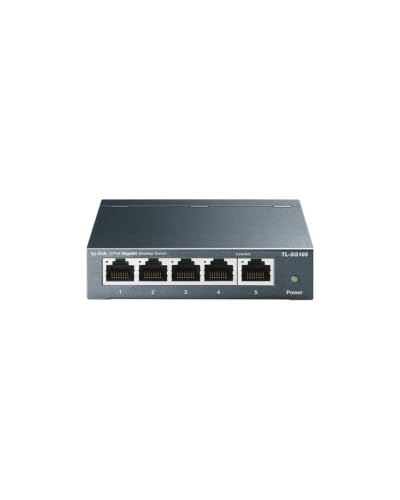
- Five auto-sensing gigabit ports
- Fanless metal design for quiet use
- Plug-and-play setup with QoS support
Best For: Simple, quiet wired home office expansions
Best for Basic Network Management
NETGEAR GS305E 5-Port Smart Switch

- Five 1Gbps Ethernet ports
- VLAN, QoS, and port-monitoring tools
- Silent metal housing with flexible mounting
Best For: Small offices needing manageable network controls
Best Multi-Gig Upgrade
TP-Link TL-SG105S-M2 2.5G Switch

- Five 2.5Gbps ports
- Up to 25Gbps switching capacity
- Silent, fanless metal construction
Best For: 2.5G home offices, NAS setups, and fast workstations
Best for Expanding Wired Devices
TP-Link TL-SG108E 8-Port Smart Switch
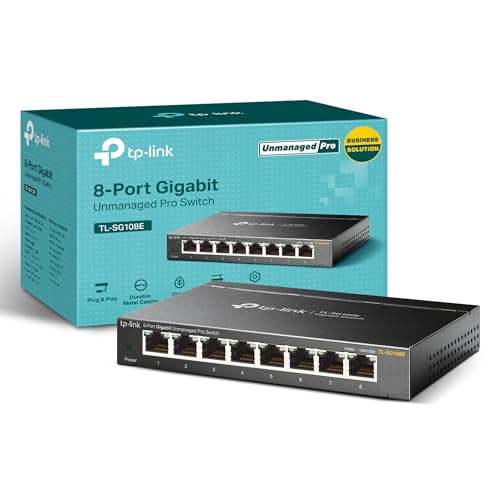
- Eight gigabit Ethernet ports
- VLAN, QoS, IGMP, and LAG support
- Monitoring and cable-diagnostic features
Best For: Larger wired home offices needing smart management
Simple Essentials
NETGEAR GS305 5-Port Gigabit Switch

- Five auto-negotiating Gigabit ports
- Plug-and-play, fanless operation
- Desktop or wall-mount design
Best For: Small home offices needing simple wired expansion
Quiet Expansion
TP-Link TL-SG108 8-Port Gigabit Switch

- Eight Gigabit Ethernet ports
- Fanless and plug-and-play
- Sturdy metal housing with shielded ports
Best For: Quiet home offices with several wired devices
Smart Traffic Control
NETGEAR GS308E 8-Port Smart Switch

- Eight Gigabit ports with web management
- VLAN, QoS, and port mirroring support
- Fanless housing with network protections
Best For: Home offices needing traffic control and segmentation
PoE Power Pick

- 8 PoE ports plus 2 Gigabit uplinks
- 120W total PoE budget
- Fanless metal desktop or wall-mount design
Best For: PoE cameras, compatible access points, and surveillance systems
Simple Desk Upgrade

- Eight auto-negotiating Gigabit ports
- Plug-and-play, with no configuration
- Silent fanless metal design
Best For: Small wired home offices needing simple Ethernet expansion
High-Capacity Choice

- 24 Gigabit Ethernet ports
- Plug-and-play unmanaged operation
- Desktop, wall-, or rack-mount installation
Best For: Larger home offices with many wired devices
Best Quiet Budget Pick – TP-Link TL-SG105 5-Port Gigabit Switch
The TP-Link TL-SG105 is a straightforward choice for expanding a home office network. Its five gigabit ports, plug-and-play setup, fanless design, and compact metal housing make it practical for desktops, wall mounting, and quiet work areas.
Best For: Home offices needing a simple, quiet gigabit switch for computers, printers, access points, or other wired devices.
Pros:
- Five 10/100/1000Mbps ports with auto-negotiation and Auto MDI/MDIX
- Fanless operation supports a quiet workspace
- Metal casing supports desktop or wall-mounted placement
- Plug-and-play setup with traffic-prioritization features including QoS and IGMP Snooping
Cons:
- Only five ports are available
- Unmanaged design does not provide configurable VLANs or detailed network administration
Choose this model when you want dependable gigabit expansion without software setup or configuration. It is a sensible fit for everyday wired home office devices, though users needing advanced management or multi-gigabit speeds should consider another option.
Best for Basic Network Management – NETGEAR GS305E 5-Port Smart Switch
The NETGEAR GS305E adds basic management tools to a compact five-port gigabit switch. It keeps installation simple while offering an interface for VLAN configuration, traffic prioritization, port monitoring, and network-security management.
Best For: Small home offices that want more control than an unmanaged switch provides without moving to a larger business-class model.
Pros:
- Five 1Gbps Ethernet ports with automatic speed negotiation
- Easy Smart Managed features support VLANs, QoS, port monitoring, and security management
- Fanless metal design provides silent, energy-efficient operation
- Desktop or wall-mount placement adds installation flexibility
Cons:
- Limited to five ports
- Regional compatibility is listed for the U.S. and Canada only
This is a strong middle ground for network switches for home office users who need light configuration features. It preserves the convenience of gigabit connectivity while offering useful controls for organizing and monitoring a small network.
Best Multi-Gig Upgrade – TP-Link TL-SG105S-M2 2.5G Switch
The TP-Link TL-SG105S-M2 is designed for home offices with newer multi-gigabit equipment. All five ports support up to 2.5Gbps and automatically negotiate between 100Mbps, 1Gbps, and 2.5Gbps, making it suitable for fast Wi-Fi access points, NAS devices, workstations, and gaming systems.
Best For: Home offices with 2.5G-capable computers, storage, networking equipment, or high-speed internet service.
Pros:
- Five 2.5Gbps ports provide up to 25Gbps of switching capacity
- Auto-negotiation supports 100Mbps, 1Gbps, and 2.5Gbps devices
- Fanless design provides silent operation
- Metal casing supports desktop or wall-mounted installation
Cons:
- Unmanaged design does not offer VLAN or traffic-management controls
- Five ports may be limiting for a growing wired setup
This model is the better choice when standard gigabit hardware would bottleneck your network. Its plug-and-play operation and backward-compatible port speeds make upgrading simpler, but its benefits depend on having compatible multi-gigabit devices.
Best for Expanding Wired Devices – TP-Link TL-SG108E 8-Port Smart Switch
The TP-Link TL-SG108E gives a home office eight gigabit ports plus smart-management features. It can help organize a larger wired setup with VLAN support, QoS, IGMP Snooping, port mirroring, cable diagnostics, loop prevention, and link aggregation.
Best For: Home offices that need additional gigabit ports and more control over traffic, segmentation, and network monitoring.
Pros:
- Eight 10/100/1000Mbps auto-negotiating ports expand wired capacity
- Supports VLAN configuration, QoS, IGMP Snooping, and link aggregation
- Port mirroring, loop prevention, and cable diagnostics aid network management
- Sturdy metal design supports desktop or wall mounting
Cons:
- Gigabit ports do not provide 2.5Gbps multi-gigabit speeds
- Management features may be more than needed for a simple plug-and-play network
For a busy home office with several wired devices, the TL-SG108E offers useful room to grow. It is a practical pick when eight ports and configurable Layer 2 features matter more than multi-gigabit performance.
Simple Essentials – NETGEAR GS305 5-Port Gigabit Switch
The NETGEAR GS305 is a straightforward choice for expanding wired connections in a home office. Its five auto-negotiating Gigabit Ethernet ports support existing Cat5e or Cat6 cables, while the fanless metal design keeps operation quiet.
Best For: Home offices that need a compact, plug-and-play network switch for a few wired devices.
Pros:
- Five 1Gbps Ethernet ports provide fast wired connectivity.
- No software or configuration is required.
- Fanless operation is silent and supports energy-efficient networking.
- Desktop or wall mounting offers flexible placement.
Cons:
- Five ports provide less expansion room than larger switches.
- Designed for use in the U.S. and Canada only.
For a small wired setup, this network switch for home office use keeps installation and maintenance simple without adding fan noise or management complexity.
Quiet Expansion – TP-Link TL-SG108 8-Port Gigabit Switch
The TP-Link TL-SG108 gives a home office eight Gigabit Ethernet ports for connecting computers, printers, consoles, and other wired devices. It combines plug-and-play setup with a quiet fanless design and sturdy metal housing.
Best For: Home offices that need more wired ports and quiet, dependable everyday operation.
Pros:
- Eight 10/100/1000Mbps RJ45 ports support multiple devices.
- Plug-and-play setup requires no configuration.
- Fanless operation suits noise-sensitive rooms.
- Metal construction, shielded ports, and automatic energy adjustment support reliable use.
Cons:
- As an unmanaged switch, it does not offer configurable network management features.
- Its listed upper temperature rating is 40°C.
Choose this network switch for home office expansion when eight ports, quiet performance, and a durable enclosure matter more than advanced controls.
Smart Traffic Control – NETGEAR GS308E 8-Port Smart Switch
The NETGEAR GS308E adds practical management features to an eight-port Gigabit switch. It remains easy to connect, but its web interface also supports VLANs, QoS, IGMP snooping, port mirroring, and network protection tools for a more organized home office.
Best For: Home offices that need traffic prioritization, segmentation, and troubleshooting controls without a fully complex managed switch.
Pros:
- Eight auto-negotiating 1Gbps ports support full Gigabit connectivity.
- Web-based management works on Windows, Mac, and Linux.
- Supports up to 64 VLANs, QoS, IGMP snooping, and port mirroring.
- Fanless metal housing operates silently and includes loop and broadcast protection features.
Cons:
- Management features require more setup than an unmanaged switch.
- It may be more capability than needed for a basic plug-and-play network.
This network switch for home office use is the strongest fit here for users who want eight Gigabit ports plus meaningful control over traffic, segmentation, and network stability.
PoE Power Pick – 8-Port Gigabit PoE Switch
For a home office that also supports cameras, access points, or other powered devices, this 10-port switch combines eight Gigabit PoE ports with two Gigabit uplinks. Its built-in 120W power supply and unmanaged design make it a practical option among network switches for home office setups that need PoE.
Best For: Home offices with PoE cameras, compatible wireless access points, or surveillance equipment.
Pros:
- Eight 1000Mbps PoE ports provide up to 30W per port, with a 120W total budget.
- Two Gigabit uplink ports can connect to a router, PC, or NVR.
- Fanless metal housing supports quiet desktop or wall-mounted operation.
- Includes VLAN, CCTV, and default modes, plus stated 4KV port protection.
Cons:
- It supports standard 48V PoE devices; 24V wireless access points are not supported directly.
- Passive PoE and non-PoE devices require additional power equipment when power is needed.
- As an unmanaged switch, it does not offer software-based network configuration.
This is the most specialized choice in the group. Choose it when PoE power and surveillance features matter more than a simple Ethernet expansion, while checking device compatibility before purchase.
Simple Desk Upgrade – NETGEAR GS308 8-Port Switch
The NETGEAR GS308 is a straightforward way to add wired connections to a home office. With eight auto-negotiating Gigabit ports, plug-and-play setup, and a compact fanless metal enclosure, it fits the needs of buyers comparing uncomplicated network switches for home office use.
Best For: Desktops, printers, servers, and other wired office devices that do not need PoE.
Pros:
- Eight 1Gbps Ethernet ports support high-speed wired connectivity.
- Plug-and-play operation requires no software or configuration.
- Fanless operation is silent, and IEEE 802.3az helps reduce power use.
- Compact metal design supports desktop or wall placement.
Cons:
- It has no PoE ports for powering cameras or access points.
- Eight ports may be limiting for a larger office or growing wired network.
- The supplied listing specifies use in the U.S. and Canada only.
For a typical home office, the GS308 keeps installation and maintenance simple. It is a strong fit when you need more Gigabit Ethernet ports and prefer a quiet, configuration-free switch.
High-Capacity Choice – NETGEAR GS324 24-Port Switch
When a home office has many wired endpoints, the NETGEAR GS324 provides 24 Gigabit Ethernet ports without requiring network configuration. Its fanless metal chassis and desktop, wall-, or rack-mount options make it a flexible high-capacity entry among network switches for home office installations.
Best For: Larger home offices, equipment rooms, and networks with many computers, consoles, televisions, or other wired devices.
Pros:
- Twenty-four 1Gbps ports provide substantial room for wired devices.
- Auto-negotiating ports work with existing Cat5e or Cat6 Ethernet cables.
- Plug-and-play unmanaged operation avoids software setup.
- Fanless design and desktop, wall-, or rack-mount installation support flexible placement.
Cons:
- It is larger and heavier than a compact 8-port desktop switch.
- It does not provide PoE power for compatible devices.
- The supplied listing specifies use in the U.S. and Canada only.
The GS324 is suited to buyers who would rather have unused ports than outgrow a smaller switch quickly. It is especially practical where several wired devices need to be centralized in one location.
How We Picked the Best Network Switches for Home Office
We focused on practical differences that matter in a home office: port count, Ethernet speed, management features, installation flexibility, noise, power requirements, and overall suitability for common wired devices. The lineup includes unmanaged switches for simple expansion, smart-managed models for VLAN and traffic controls, a 2.5Gbps option for multi-gig networks, PoE hardware for compatible devices, and a 24-port model for larger workspaces.
All selected options use Gigabit Ethernet or faster connectivity, but real-world performance still depends on your router, cabling, internet plan, and connected devices. A switch does not increase your internet speed beyond the slowest relevant link.
Quick Comparison
| Best For | Recommended Type | Why It Makes Sense |
|---|---|---|
| Simple port expansion | 5-port unmanaged | Easy plug-and-play setup for a few devices |
| More wired devices | 8-port unmanaged | Extra capacity for computers, printers, access points, and media devices |
| Network control | Easy Smart managed | Useful VLAN, QoS, and configuration options |
| Multi-gig networking | 2.5Gbps switch | Higher local transfer speeds with compatible hardware |
| Powered devices | PoE switch | Can deliver data and power over compatible Ethernet cables |
| Large wired setup | 24-port unmanaged | Ample ports for offices, labs, or network-heavy homes |
Key Buying Factors for Network Switches for Home Office
Port Count and Expansion
Count the devices you plan to connect, then leave room for growth. A five-port switch is often enough for a desk with a computer, printer, access point, and other peripherals, while eight ports offer more flexibility. Remember that one port connects the switch to your router, so the usable device count is lower than the advertised total.
Speed and Compatibility
Gigabit Ethernet is the sensible baseline for most offices. Choose a 2.5Gbps model only when your router, computer, network-attached storage, and cabling can support faster links. The switch will generally negotiate down to the highest speed supported by each connected device.
Managed Features and PoE
Unmanaged switches require almost no configuration and are ideal for straightforward setups. Smart-managed models are better when you need VLANs, QoS, monitoring, or more control over traffic. PoE matters when powering compatible cameras, phones, access points, or other devices from Ethernet; verify the switch’s PoE standard and total power budget before buying.
Design, Placement, and Noise
Fanless metal switches are quiet for desks and home offices. Check whether the enclosure supports wall mounting, how much space the cables need, and where the power adapter can be placed. Shielded ports and quality Ethernet cables can also help in electrically busy environments.
Who Should Buy Which Network Switches for Home Office?
Choose a five-port unmanaged model for the simplest and most affordable expansion. Pick an eight-port unmanaged switch if you expect to add devices soon. A smart-managed switch is worthwhile for advanced users managing separate work, guest, or IoT networks. Select the 2.5Gbps option for fast local transfers between compatible computers and storage. Choose the PoE model for powered network hardware, and move to the 24-port switch when a small office or extensive home installation needs centralized wired connectivity.