The right HDMI matrix switch can route multiple sources to multiple displays without constantly moving cables. The best choice depends on resolution, refresh rate, audio needs, control options, and whether you need long-distance signal extension.
Below, these 10 options cover compact home-theater setups, gaming systems, conference rooms, and larger AV installations. Use the buying guide to match the matrix size and features to your actual equipment.
Best 10 Hdmi Matrix Switches Picks for 2026
Top 8K Pick
OREI 4x2 HDMI 2.1 Matrix Switch
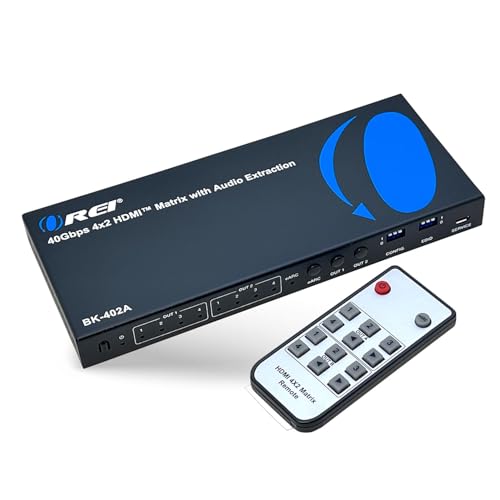
- 40Gbps HDMI 2.1 with 8K support
- 4K at 120Hz with VRR and ALLM
- eARC and optical audio extraction
Best For: Gamers and home theater users with two displays
Best for Large Installations
Arvitek 8x16 HDMI Extender Matrix

- Eight inputs and 16 remote outputs
- 4K at 60Hz over CAT6/7 up to 230 feet
- Web, LAN, RS-232, IR, and app control
Best For: Multi-room and commercial AV distribution
Premium High-Capacity Pick

- Eight HDMI inputs and eight outputs
- 48Gbps HDMI 2.1 bandwidth
- Supports 8K, Dolby Vision, and VRR
Best For: Advanced multi-source, multi-display AV systems
Best 4K Value
AV Access 4x2 HDMI Matrix with ARC
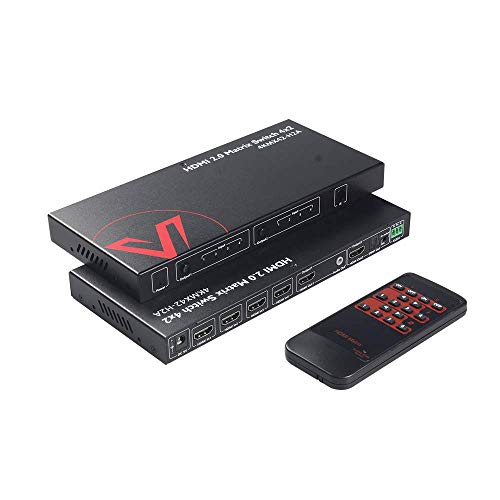
- 4K at 60Hz with HDR and Dolby Vision
- Independent 4K-to-1080p downscaling
- ARC, S/PDIF, and 3.5mm audio output
Best For: 4K home theaters with mixed-resolution displays
Best for Managed 4K Routing

- Routes 4 sources to 4 displays
- Supports 4K at 30Hz
- Web, LAN, RS232, and remote control
Best For: Conference rooms, churches, and home theaters needing rack-mounted 4x4 control
Best for 4K60 Mixed Displays

- Supports 4K at 60Hz and HDR
- Downscales 4K to 1080p
- Handles up to 18Gbps bandwidth
Best For: Mixed 4K and 1080p home entertainment or presentation systems
Best for Large-Scale AV Distribution
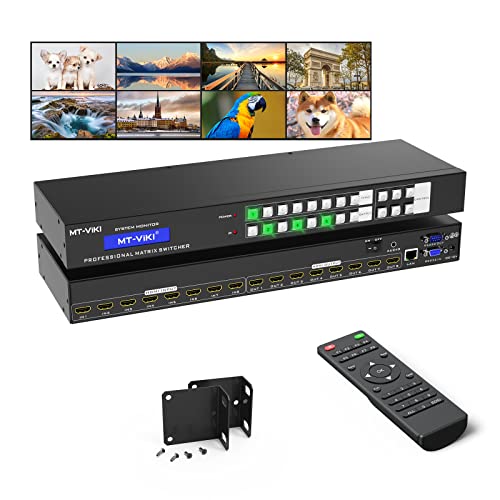
- Routes 8 sources to 8 displays
- Offers web, LAN, RS232, and IR control
- Rack-ready 1U design with 4K30 support
Best For: Commercial AV systems with many sources and displays
Best for Long-Run 4K Distribution
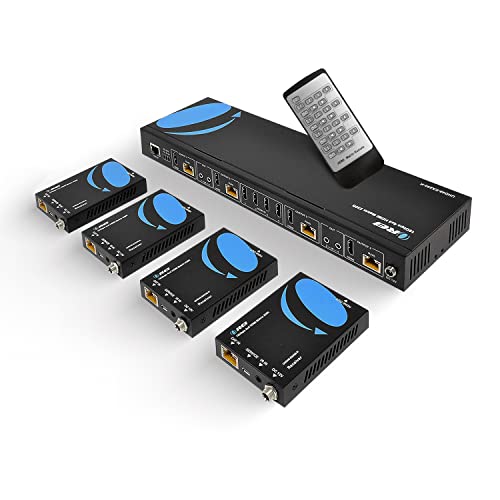
- 4K 60Hz with 4:4:4, HDR, HDMI 2.0, and HDCP 2.2
- Extends four sources to four displays up to 230 feet
- Includes receivers, loop outputs, IR, RS-232, and EDID control
Best For: Large home theater and commercial AV installations
Best for Mixed-Resolution Systems

- Supports 4K 60Hz, HDR, HDCP 2.2, and 18Gbps bandwidth
- Downscales 4K for simultaneous 1080p display support
- Adds ARC plus optical and 3.5mm audio outputs
Best For: Multi-source systems with mixed 4K and 1080p displays
Top 8K Pick – OREI 4×2 HDMI 2.1 Matrix Switch
For buyers comparing HDMI matrix switches for a modern gaming or home theater setup, the OREI 4×2 combines HDMI 2.1 bandwidth with flexible routing for two displays. It supports up to 8K video, 4K at 120Hz, VRR, ALLM, and audio extraction.
Best For: Gamers and home theater users who need 8K-ready switching between four sources and two displays.
Pros:
- Supports 40Gbps bandwidth, 8K video, and 4K at 120Hz.
- Includes VRR, ALLM, and FVA for smoother gaming performance.
- Offers eARC plus optical and 3.5mm audio extraction.
Cons:
- eARC requires compatible eARC support from both the TV and soundbar.
- Provides only two HDMI outputs.
This is a strong choice when next-generation HDMI 2.1 features matter more than a high output count. Its audio options and downscale support add useful flexibility for mixed equipment.
Best for Large Installations – Arvitek 8×16 HDMI Extender Matrix
Among HDMI matrix switches for multi-room distribution, this Arvitek system stands out with eight inputs, eight local loop outputs, and 16 CAT6/7 receiver outputs. It can send 4K at 60Hz over distances up to 230 feet and includes extensive control options.
Best For: Commercial, classroom, hospitality, and whole-home AV installations requiring many remote displays.
Pros:
- Distributes 4K at 60Hz over CAT6/7 cable up to 230 feet.
- Includes eight receivers and eight loop outputs for local monitoring.
- Supports web GUI, LAN, RS-232, IR, panel, software, and Android app control.
- Provides scene presets and audio embedding/de-embedding.
Cons:
- Its large installation-focused design is more complex than a basic home switch.
- It uses HDMI 2.0 rather than HDMI 2.1.
This matrix is built for scale rather than simplicity. The included receivers, long-distance CAT cabling support, and multiple control methods make it appropriate for structured AV deployments.
Premium High-Capacity Pick – OREI 8×8 HDMI 2.1 Matrix
For demanding systems that need many direct HDMI connections, the OREI 8×8 is a high-capacity option among HDMI matrix switches. Its listed HDMI 2.1 feature set includes 48Gbps bandwidth, 8K support, HDR10+, Dolby Vision, and advanced gaming features.
Best For: Advanced home theaters, demonstration rooms, and professional AV setups with up to eight sources and eight displays.
Pros:
- Provides eight HDMI inputs and eight HDMI outputs.
- Supports 48Gbps HDMI 2.1 bandwidth and 8K video.
- Lists HDR10+, Dolby Vision, VRR, QFT, QMS, and SBTM support.
- Includes audio extraction, EDID, IR, and web GUI control.
Cons:
- Its 7-pound, rack-style enclosure is relatively substantial.
- The supplied notes do not specify detailed output-resolution combinations.
Choose this model when routing capacity and premium HDMI 2.1 features are priorities. It is more suitable for a planned, equipment-heavy installation than a small entertainment setup.
Best 4K Value – AV Access 4×2 HDMI Matrix with ARC
This AV Access model is a practical choice among HDMI matrix switches for 4K systems using up to four sources and two displays. It supports 4K at 60Hz, HDR formats, independent downscaling, ARC, and several audio output options.
Best For: Home theater users who need dependable 4K switching with audio extraction and compatibility with mixed 4K and 1080p displays.
Pros:
- Routes four HDMI inputs to two outputs at up to 4K/60Hz.
- Supports HDR10, HLG, Dolby Vision, and 18Gbps bandwidth.
- Independently scales 4K output to 1080p.
- Offers ARC, S/PDIF, 3.5mm audio, IR, buttons, and RS-232 control.
Cons:
- ARC requires a compatible TV, and audio features depend on connected equipment.
- It is limited to HDMI 2.0 and 4K resolution.
Its independent downscaling is particularly useful when one display is 4K and another is 1080p. Buyers wanting a compact 4K matrix with flexible audio and control options should find it well suited.
Best for Managed 4K Routing – MT-VIKI 4×4 HDMI Matrix
For buyers comparing HDMI matrix switches for a conference room, church, home theater, or other multi-display setup, this MT-VIKI model provides flexible 4×4 routing. It supports 4K at 30Hz and offers front-panel, remote, web GUI, RS232, and LAN control.
Best For: Installations needing independent or mirrored routing across four HDMI displays, with rack mounting and network-based control.
Pros:
- Routes four HDMI sources to four displays independently or simultaneously.
- Supports 4K at 30Hz, 1080p, 3D video, and deep color.
- Includes rack ears plus remote, web GUI, RS232, and LAN control options.
- Provides 3.5mm stereo audio extraction through OUT4.
Cons:
- Audio extraction is available only when the source is assigned to OUT4.
- Switching between devices may take 2–3 seconds.
- Its 4K support is limited to 30Hz.
This is a practical choice when flexible control and professional installation features matter more than higher-refresh-rate 4K. Keep the OUT4 audio limitation in mind when planning the system.
Best for 4K60 Mixed Displays – OREI 4×4 HDMI Matrix
This OREI unit is a strong option among HDMI matrix switches when a setup combines 4K and 1080p screens. Its downscale function, 18Gbps bandwidth, HDR support, and HDCP 2.2 compliance are suited to modern home entertainment and presentation systems.
Best For: Users distributing high-bandwidth 4K content to four displays with different resolution capabilities.
Pros:
- Supports 4K at 60Hz, HDR, HDMI 2.0a, and HDCP 2.2.
- Downscales 4K content to 1080p for mixed-resolution displays.
- Handles up to 18Gbps bandwidth and supports up to 7.1-channel digital audio.
- Allows identical or independent content on four output displays.
Cons:
- Includes a 1-year warranty, shorter than some competing models.
- It does not list network, web GUI, or RS232 control in the supplied specifications.
- The included power setup uses a US plug, with an adapter/converter for international use.
Choose this model if 4K60 compatibility and downscaling are priorities. It is especially useful where one source system must serve both 4K and Full HD displays without sacrificing independent routing.
Best for Large-Scale AV Distribution – MT-VIKI 8×8 HDMI Matrix
For larger installations, this MT-VIKI 8×8 model expands HDMI matrix switches to eight sources and eight displays. It supports independent or simultaneous routing, rack installation, and control through buttons, IR, RS232, LAN, web GUI, or a third-party controller.
Best For: Conference rooms, churches, sports bars, control centers, and other systems requiring up to eight HDMI inputs and outputs.
Pros:
- Routes any of eight HDMI sources to any of eight displays.
- Offers button, IR, RS232, LAN, web GUI, and third-party control.
- Includes rack ears for installation in a standard 1U 19-inch rack.
- Supports 4K at 30Hz, 1080p, 3D video, and deep color.
Cons:
- 3.5mm audio extraction works only through OUT8.
- 4K support is limited to 30Hz.
- Specified transmission distance is up to 30 feet for input and output, using high-quality HDMI 1.4 cables.
This model makes sense when an 8×8 layout is more important than 4K60 performance. Its broad control options and rack-ready design are valuable for centralized commercial AV distribution.
Best for Long-Run 4K Distribution – 4×4 HDMI Extender Matrix
For larger installations, this 4×4 HDMI matrix switch combines source selection with signal extension over CAT5e/6/7 cable. It supports 4K at 60Hz with 4:4:4, includes four receivers, and can transmit signals up to 230 feet according to the supplied specifications.
Best For: Home theaters, commercial AV systems, and setups that need multiple 4K sources routed to displays over long cable runs.
Pros:
- Routes four HDMI inputs to four remote outputs over CAT5e/6/7 cable.
- Supports 4K at 60Hz, HDR, HDMI 2.0, and HDCP 2.2.
- Includes RS-232, IR control, EDID management, 1080p downscaling, and four local loop outputs.
- Passes through up to 7.1-channel audio and includes a heavy-duty metal enclosure.
Cons:
- More complex and installation-focused than a basic desktop HDMI switch.
- The supplied notes specify that IR OUT ports follow the HDMI input rather than the HDMI output.
- Requires compatible HDMI receivers and network cable runs for remote displays.
This is the most capable option here for distributing HDMI sources across rooms or longer distances. Its included receivers and control features add installation flexibility, while the larger form factor and cabling requirements make it better suited to planned AV systems than casual setups.
Best Compact Value – 2×2 HDMI Matrix Switch
This compact 2×2 HDMI matrix switch is designed for straightforward source and display sharing. It can work as a splitter or switch, supports up to 4K at 30Hz, and offers front-panel and IR-remote control for everyday AV setups.
Best For: Users connecting two HDMI sources to two displays, or sharing one source across two screens in a smaller home entertainment system.
Pros:
- Supports two HDMI inputs and two HDMI outputs with flexible routing.
- Can function as a 1-in/2-out splitter or a 2-in/1-out switch.
- Includes EDID management through four DIP switches.
- Works with devices such as game consoles, streaming players, Blu-ray players, projectors, and televisions.
Cons:
- Video support is limited to 4K at 30Hz rather than 4K at 60Hz.
- Uses HDMI 1.4a and HDCP 1.4 standards.
- Its 2×2 layout may be limiting for larger multi-source installations.
Choose this model when you want basic 2×2 routing without the complexity of a long-distance extender. It is a practical fit for common console, streaming, and Blu-ray arrangements, especially when 4K at 30Hz is sufficient.
Best for Mixed-Resolution Systems – 4×2 HDMI Matrix Switch
This 4×2 HDMI matrix switch connects four HDMI sources to two displays while adding 18Gbps bandwidth, HDR support, and audio extraction. Its built-in downscaler can convert 4K to 1080p for a compatible display, making it useful when a setup includes screens with different capabilities.
Best For: AV systems with several sources, two displays, mixed 4K and 1080p screens, or a need for ARC and extracted audio.
Pros:
- Connects four HDMI sources to two displays and supports 4K at 60Hz with YUV 4:4:4.
- Provides 18Gbps bandwidth, HDR, HDCP 2.2, and 12-bit deep color support.
- Downscales 4K to 1080p so 4K and 1080p displays can operate together.
- Includes ARC on HDMI Output A plus optical and 3.5mm audio outputs.
Cons:
- It has two display outputs, so it is not intended for four-display distribution.
- ARC support is specified for HDMI Output A rather than both outputs.
- Requires a separate compatible power connection using the included USB cable and charger.
This model offers a strong balance of modern video support and practical system flexibility. The downscaler is particularly useful for mixed-display setups, while ARC and audio extraction add options for integrating external audio equipment.
How We Picked These Hdmi Matrix Switches
We focused on the specifications that most affect day-to-day performance: input and output count, supported resolution and refresh rate, HDR and HDCP compatibility, audio extraction, EDID management, and control methods. We also included both traditional HDMI switchers and extender matrices that send signals over CAT5e, CAT6, or CAT7 cable.
The selection spans compact 2×2 and 4×2 units, flexible 4×4 models, and larger 8×8 or 8-in/16-out systems. This makes it easier to compare a simple living-room solution with equipment intended for rack-mounted or commercial installations.
Quick Comparison
| Setup type | Recommended matrix size | Features to prioritize |
|---|---|---|
| One or two displays | 2×2 or 4×2 | 4K/60Hz, ARC or eARC, audio extraction, EDID |
| Several displays in one room | 4×4 | Independent routing, HDR, downscaling, remote or network control |
| Whole-home or commercial AV | 8×8 or larger | CAT cable extension, web GUI, RS-232, IR distribution, rack mounting |
| Gaming or premium video | HDMI 2.1-capable model | 8K support, high refresh rates, compatible cables, HDCP support |
Key Buying Factors for Hdmi Matrix Switches
Inputs, Outputs, and Routing Flexibility
A 4×2 switch accepts four sources and sends them to two displays, while a 4×4 model can route any input to any output. Count current devices, then leave room for additions such as a streaming box, game console, Blu-ray player, or AV receiver. A larger matrix is useful only if its extra outputs and controls fit your installation.
Resolution, Refresh Rate, and HDMI Generation
For most 4K televisions, 4K at 60Hz with HDR is the practical baseline. Check color format, bandwidth, and HDCP version when using consoles or protected streaming content. Choose an HDMI 2.1 or 8K model only when your sources and displays also support those standards; otherwise, a well-specified HDMI 2.0 matrix may be more cost-effective.
Audio Extraction and Compatibility
Audio extraction can send sound to a soundbar, amplifier, or powered speakers separately from the display. Look for ARC or eARC when integrating a modern television, and verify whether the unit supports the surround format you use. Optical, analog, coaxial, or SPDIF outputs each have different limitations.
EDID, Downscaling, and Control
EDID management helps sources negotiate a usable format when connected displays have different capabilities. Downscaling can keep a 4K source working with a lower-resolution display. For convenience, choose IR or remote control; for installations, web GUI, LAN, RS-232, and reliable IR routing are often more important.
Signal Distance and Installation
Standard HDMI cables are best for short runs. For longer distances, an extender matrix over CAT cable can simplify wiring, but performance depends on cable quality, termination, and the receiver hardware. Confirm whether receivers are included and whether the unit fits your rack or ventilation plan.
Who Should Buy Which Hdmi Matrix Switches?
Choose a 2×2 or 4×2 model for a modest home theater, bedroom setup, or two-display gaming system. Choose a 4×4 model when several sources must be shared across multiple screens. Choose an 8×8 or larger matrix for distributed AV, conference rooms, retail displays, or a growing rack system. Choose an extender matrix when displays are far from the source equipment. Finally, prioritize HDMI 2.1 and 8K support only if your complete signal chain requires it.