The best compact HDMI matrix switches make it easier to route several sources to multiple displays without constantly moving cables. They are useful for home theaters, gaming setups, conference rooms, and small media systems where space and flexibility matter.
This roundup compares 10 options across common configurations, including 2×2, 4×2, 4×4, and larger rack-oriented designs. Pay close attention to resolution limits, audio support, control methods, and the number of inputs and outputs you actually need.
Best 10 Compact Hdmi Matrix Switches Picks for 2026
Best Control Flexibility

- Four inputs and four outputs
- Panel, IR, and RS232 control
- Scene memory and 1080p downscaling
Best For: Multi-display installations with varied control needs
Best for 8K Gaming
- 8K@60Hz and 4K@120Hz support
- 40Gbps bandwidth with VRR and ALLM
- eARC plus optical and analog extraction
Best For: HDMI 2.1 gaming and high-refresh home theater
Best Mixed-Display 4x4

- Four inputs and four outputs
- 4K@60Hz with HDR and HDCP 2.2
- Downscales 4K for 1080p displays
Best For: Multi-screen systems with mixed 4K and 1080p displays
Best 4K60 Upgrade
- Independent routing for four inputs and outputs
- 4K at 60Hz with 18Gbps bandwidth
- ARC, HDR, and optical/3.5mm extraction
Best For: Modern multi-display home and commercial AV systems
Best for Professional Distribution
- Eight inputs and eight independently routed outputs
- Web, LAN, RS232, IR, and button control
- Rack-mount design with 4K30 support
Best For: Managed commercial AV and large multi-display installations
Best Balanced 4K Pick

- 4K at 60Hz with HDR and 18Gbps bandwidth
- Downscales 4K to 1080p for mixed displays
- ARC, optical, and 3.5mm audio support
Best For: Home theaters and gaming setups using two displays
Best for Four-Display Routing

- Routes four sources across four displays
- Web GUI, LAN, RS232, and remote control
- Rack-mountable 1U chassis included
Best For: Conference rooms and professional multi-display installations
Best Audio-Focused 4K/60 Option

- 4K at 60Hz 4:4:4 with HDR and 18Gbps bandwidth
- Toslink and 3.5mm audio extraction
- ARC, 16 EDID modes, and 4K downscaling
Best For: Gaming and home theater systems needing flexible audio output
Best Compact 2×2 Pick – OREI 2×2 HDMI Matrix
For buyers comparing compact HDMI matrix switches, this OREI 2×2 model is a practical choice for routing two HDMI sources to two displays. It supports 4K at 60Hz, HDR, HDCP 2.2, EDID management, and audio extraction for flexible home or office setups.
Best For: Small two-source, two-display systems that need high-refresh 4K video and flexible audio outputs.
Pros:
- Supports up to 4K at 60Hz with 18Gbps bandwidth, HDR, and HDCP 2.2.
- Offers optical and analog audio extraction, with support for up to 7.1-channel formats.
- Includes IR remote control, EDID bypass, and a dual-voltage power supply with an international adapter.
Cons:
- It will not extend PC monitors.
- Its 2×2 configuration provides less source and display capacity than larger matrices.
This is a well-equipped compact matrix for straightforward two-display installations, especially where extracted audio is important. Its limitations are mainly the fixed 2×2 layout and lack of PC-monitor extension.
Best Control Flexibility – Yinker 4×4 HDMI Matrix
This Yinker 4×4 is one of the more capable compact HDMI matrix switches for installations needing four sources and four displays. It supports individual or simultaneous routing, 4K at 30Hz, downscaling to 1080p, and control through panel buttons, an IR remote, or RS232.
Best For: Meeting rooms, lecture halls, monitoring systems, and other setups requiring four inputs, four outputs, and multiple control methods.
Pros:
- Routes four HDMI inputs to four outputs independently or simultaneously.
- Supports 4K at 30Hz, 1080p at 60Hz downscaling, 3D, and 4:4:4 color.
- Provides panel, IR, and RS232 control plus 16 saved display scenes.
- Includes EDID management, power-off memory, and a backlit button with LCD status display.
Cons:
- It supports a maximum of 4K at 30Hz rather than 4K at 60Hz.
- It cannot function as a 2×2 video wall controller.
- Its stated dimensions do not allow direct installation in a 1U rack cabinet.
Choose this model when routing capacity and control options matter more than the latest refresh rates. Its scene memory and downscaling support are useful for mixed-display environments, while the lack of video-wall functionality should be considered before purchase.
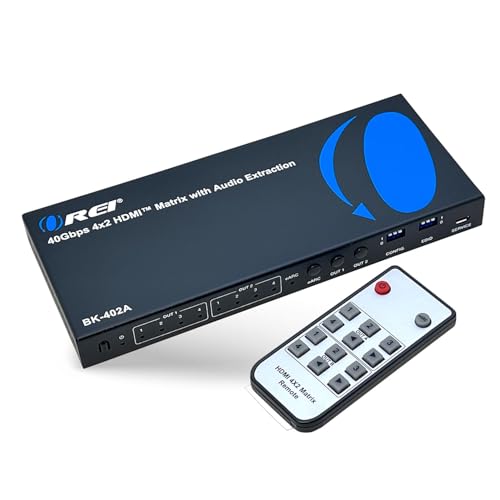
Best for 8K Gaming – OREI 4×2 HDMI 2.1 Matrix
For next-generation sources, this OREI 4×2 is a powerful option among compact HDMI matrix switches. Its HDMI 2.1 design supports up to 8K video, 4K at 120Hz, 40Gbps bandwidth, VRR, ALLM, and independent routing from four inputs to two displays.
Best For: Gaming, home theater, and professional AV systems using HDMI 2.1 sources, high-refresh 4K, or 8K displays.
Pros:
- Supports up to 8K at 60Hz, 4K at 120Hz, and 40Gbps bandwidth.
- Includes VRR, ALLM, and FVA for smoother, lower-latency video performance.
- Offers eARC and audio extraction through optical and 3.5mm analog outputs.
- Supports Dolby Atmos, Dolby TrueHD, DTS-HD Master Audio, DSD, and other audio formats.
Cons:
- eARC requires compatible eARC support from both the TV and soundbar.
- It provides two outputs rather than the four outputs offered by a 4×4 matrix.
This is the strongest fit for buyers prioritizing HDMI 2.1 features and high-refresh gaming. Its 4×2 layout is more focused than a larger distribution matrix, but it combines advanced video support with useful audio-routing options.
Best Mixed-Display 4×4 – OREI 4×4 HDMI Matrix
This OREI 4×4 is a practical choice for compact HDMI matrix switches when four sources and four displays are required. It supports 4K at 60Hz, HDR, HDCP 2.2, 18Gbps bandwidth, and downscaling so 4K content can be used with 1080p displays in the same setup.
Best For: Multi-screen home theater, office, and presentation systems combining 4K and 1080p displays.
Pros:
- Connects up to four HDMI sources and distributes them to four displays.
- Supports independent or identical content on each display.
- Downscales 4K content to 1080p for mixed-resolution systems.
- Handles 4K at 60Hz, HDR, HDCP 2.2, and up to 7.1-channel audio.
Cons:
- Its feature set is based on HDMI 2.0a rather than HDMI 2.1.
- It requires an AC adapter for power.
- International users may need the included adapter/converter for the US-plug supply.
The main advantage here is flexibility across four displays, particularly when those displays do not all share the same resolution. It is a sensible distribution-focused option, though buyers seeking 8K or HDMI 2.1 gaming features should consider a newer matrix.
Best Budget Audio-Ready Pick – 4×2 HDMI Matrix Switch
For shoppers comparing compact hdmi matrix switches, this FERRISA 4×2 model offers four HDMI inputs and two outputs in a relatively straightforward home-theater or office setup. It supports up to 4K, 3D, and 1080p video, while built-in optical and 3.5mm outputs make it useful when you need to separate audio from HDMI.
Best For: Home theaters, offices, classrooms, and other setups that need four sources routed to two displays with flexible audio output.
Pros:
- Routes up to four HDMI sources to two displays.
- Supports 4K, 3D, 1080p, deep color, and HD audio formats listed by the manufacturer.
- Provides optical and 3.5mm audio extraction, plus EDID management.
- Includes button and IR remote switching.
Cons:
- Both displays must use the same resolution at the same time.
- Supports HDMI 1.4b and HDCP 1.4 rather than newer HDMI 2.0 or HDCP 2.2 standards.
- The supplied notes say the power source includes a cable but not the power adapter, while the package list says an adapter is included; verify package contents before buying.
This is a practical choice when two-display routing and audio extraction matter more than the newest HDMI bandwidth. Check your display-resolution requirements and audio format compatibility before ordering.
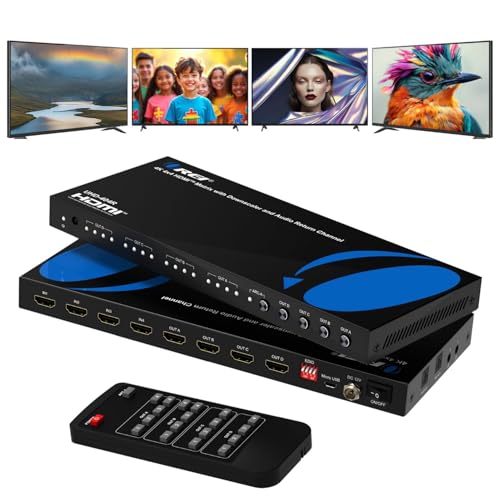
Best 4K60 Upgrade – OREI 4×4 HDMI Matrix Switch
Among compact hdmi matrix switches, the OREI UHD-404R is a strong fit for users who want four-source, four-display routing with newer HDMI 2.0 features. Its 18Gbps bandwidth, 4K at 60Hz support, HDR compatibility, downscaling, and audio extraction give it broader capabilities for home theaters and commercial AV systems.
Best For: Home theaters, conference rooms, classrooms, digital signage, and installations needing independent routing across four displays.
Pros:
- Routes four HDMI inputs independently to four HDMI outputs.
- Supports 4K at 60Hz, 18Gbps bandwidth, HDMI 2.0, and HDCP 2.2.
- Includes HDR, optical and 3.5mm audio extraction, and ARC on Output A.
- Metal enclosure is designed for durability and heat dissipation.
Cons:
- Its larger 4×4 configuration may be more than needed for a simple one- or two-display setup.
- ARC support is specified for Output A, not all outputs.
- Audio extraction is specified for HDMI Outputs A and B rather than every output.
The OREI is the most capable choice here for 4K60 distribution and modern signal compatibility. Choose it if you need independent four-display routing, but confirm which output will handle your ARC or extracted-audio requirements.
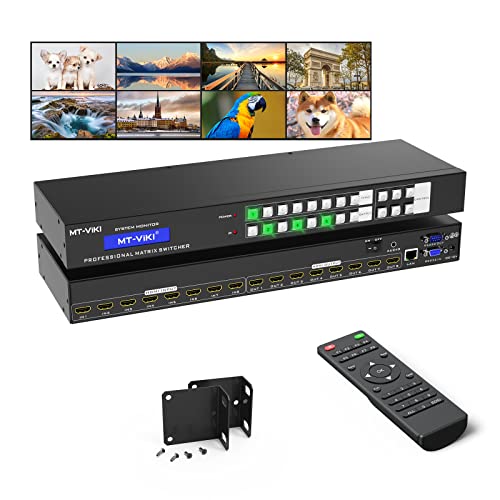
Best for Professional Distribution – MT-VIKI 8×8 HDMI Matrix
For larger installations, this MT-VIKI unit goes well beyond typical compact hdmi matrix switches by supporting eight HDMI inputs and eight independently routed outputs. It combines front-panel, IR, RS232, LAN, web GUI, and third-party control with rack-mount hardware, making it suited to managed AV environments rather than basic living-room switching.
Best For: Conference rooms, churches, sports bars, digital signage, control centers, classrooms, and large home theaters requiring eight-source, eight-display distribution.
Pros:
- Routes any of eight HDMI sources to any of eight displays independently or simultaneously.
- Supports 4K at 30Hz, 1080p, 3D video, and deep color.
- Offers button, IR, RS232, LAN, web GUI, and third-party control options.
- Includes rack ears for installation in a standard 1U 19-inch rack.
Cons:
- 4K support is limited to 30Hz.
- 3.5mm audio extraction works only through OUT8 after the desired source is assigned to that output.
- Its eight-by-eight design and rack-oriented features may be excessive for smaller setups.
This is the right direction when centralized control and extensive source-to-display routing are priorities. Its OUT8-only audio extraction and 4K30 ceiling should be checked carefully against your installation plan.
Best Balanced 4K Pick – OREI 4×2 HDMI Matrix
For shoppers comparing compact hdmi matrix switches, the OREI UHD-402D offers a practical 4×2 layout with 4K at 60Hz, flexible source-to-display switching, and useful audio features. Its downscaler also helps connect a 4K source to a 1080p display without sacrificing the main 4K output.
Best For: Home theaters and gaming setups that need two displays, 4K/1080p compatibility, and audio extraction.
Pros:
- Supports 4K at 60Hz, HDR, 18Gbps bandwidth, and 12-bit deep color.
- 4K-to-1080p downscaling supports mixed-resolution displays.
- Includes ARC, optical and 3.5mm audio outputs, EDID, and IR remote control.
Cons:
- Provides two outputs rather than four.
- ARC is supported only on HDMI Output A.
The OREI is a strong compact option when current-generation 4K performance matters more than a larger number of outputs. Its downscaling and audio flexibility make it especially versatile for mixed home AV systems.
Best for Four-Display Routing – MT-VIKI 4×4 HDMI Matrix
Among compact hdmi matrix switches, the MT-VIKI stands out for its four-input, four-output routing. It can send different sources to separate displays or mirror content across them, while web GUI, LAN, RS232, front-panel, and remote controls suit more involved AV installations.
Best For: Conference rooms, churches, retail spaces, sports bars, and rack-based systems needing four independent outputs.
Pros:
- Routes four HDMI sources to four displays independently or simultaneously.
- Offers web GUI, LAN, RS232, front-panel, and IR remote control.
- Rack ears are included, and the chassis fits a standard 1U 19-inch rack.
Cons:
- Maximum listed resolution is 4K at 30Hz rather than 4K at 60Hz.
- Audio extraction through the 3.5mm output is available only via OUT4.
- Its 16.9-inch-wide rack chassis is less suitable for small desktop setups.
The MT-VIKI is the most installation-oriented choice here. Choose it when output count and professional control options are priorities, but consider a smaller 4×2 model if space and 4K/60 performance matter more.
Best Audio-Focused 4K/60 Option – PORTTA 4×2 HDMI Matrix
The PORTTA 4×2 is a compelling choice among compact hdmi matrix switches for users who need 4K at 60Hz plus flexible audio handling. It supports two independent outputs, 16 EDID modes, downscaling, ARC, and simultaneous Toslink and 3.5mm extraction.
Best For: Gaming, home theater, lecture, and monitoring setups that need 4K/60 video with separate audio output.
Pros:
- Supports 4K at 60Hz 4:4:4, HDR10, Dolby Vision, 3D, and 18Gbps bandwidth.
- Extracts audio from Output A or B to Toslink and 3.5mm outputs simultaneously.
- Includes ARC, 16 EDID modes, 4K-to-1080p downscaling, and a two-year warranty.
Cons:
- ARC works only through Output A.
- Does not support CEC.
- PC and laptop use is limited to SST mode; MST is not supported.
PORTTA is a well-rounded pick when high-refresh 4K video and audio extraction are equally important. Its main trade-offs are the lack of CEC and the two-output limit, but its format and feature set remain well suited to compact AV systems.
How We Picked These Compact Hdmi Matrix Switches
We selected models based on the features that have the greatest effect on everyday setup and compatibility: input and output count, supported resolution and refresh rate, HDR and HDCP handling, audio extraction, EDID management, downscaling, and control options. We also considered whether a switch is better suited to a compact desktop system or a more permanent rack-mounted installation.
Because matrix switches vary substantially, a model with more ports is not automatically the best choice. A simple 2×2 switch may be easier to configure, while a 4×4 or 8×8 unit can serve a larger system but may require more planning and cable management.
Quick Comparison
- Best for small setups: 2×2 models are appropriate when you have two sources and two displays.
- Best for multiple displays with fewer outputs: 4×2 switches accept four sources and route them to two displays.
- Best for flexible distribution: 4×4 models can send several sources to several displays independently.
- Best for larger installations: 8×8 units with LAN, RS232, web control, and rack mounting suit dedicated media or commercial systems.
Key Buying Factors for Compact Hdmi Matrix Switches
Port Configuration
Choose the layout based on both current equipment and likely upgrades. Count game consoles, streaming devices, disc players, computers, projectors, and televisions before buying. Extra inputs can prevent an early replacement.
Resolution, Refresh Rate, and HDR
Check the exact specifications rather than relying on a “4K” label. Some models support 4K at 60Hz, while others are limited to 4K at 30Hz. If you use modern gaming consoles or a high-refresh PC, verify the supported refresh rate, color format, HDR standards, and HDCP version.
Audio Extraction and ARC/eARC
Audio extraction can send sound to an optical, analog, or other separate output for a receiver, soundbar, or powered speakers. ARC and eARC support can simplify television-based audio routing, but compatibility depends on the source, display, and audio device.
EDID and Downscaling
EDID controls help sources and displays negotiate compatible video and audio settings. Downscaling is especially useful when one output supports a lower resolution than another, though it may reduce the signal quality sent to that display.
Control and Installation
IR remotes are convenient for basic use. Physical buttons, RS232, LAN, and web interfaces are more useful for equipment racks, classrooms, and installations that need centralized control. Confirm dimensions, ventilation needs, and mounting hardware before placing a unit in a confined space.
Who Should Buy Which Compact Hdmi Matrix Switches?
Choose a 2×2 model for a compact living-room or office setup with limited sources and displays. A 4×2 switch is a better fit when you have several sources but only two screens. Select a 4×4 model if you need independent routing across multiple televisions, projectors, or zones. Larger MT-VIKI-style rack units make the most sense for system integrators, conference rooms, media rooms, and other installations that benefit from network or serial control.
Before ordering, confirm every device’s HDMI version, resolution, audio format, cable length, and copy-protection requirements. Matching those details is the best way to avoid handshake problems and ensure your chosen switch delivers the flexibility you expect.