Modern TVs often lack the composite, component, or S-Video inputs used by older game systems. The right HDMI converter can make a retro console easier to connect without replacing your display.
This roundup compares ten options for systems including the Nintendo 64, SNES, GameCube, PlayStation, Xbox, Wii, and other AV-equipped consoles. Pay close attention to input compatibility, signal format, resolution handling, and whether the adapter includes the required cables.
Best 10 Hdmi Converters for Gaming Consoles Picks for 2026
Retro Console Upgrade
GameCube, N64 & SNES HDMI Adapter

- Works with GameCube, N64, and SNES
- Converts S-Video to HDMI
- Includes 4:3/16:9 switch
Best For: Retro Nintendo console setups
Original Xbox Specialist

- Built for the original Xbox
- Converts YPbPr to HDMI
- Needs no external power
Best For: Original Xbox to HDTV connections
Composite Console Connector

- Converts RCA composite to 1080p HDMI
- Supports multiple video standards
- Includes HDMI and USB cables
Best For: RCA-equipped consoles and media players
Broad Compatibility Pick

- Supports many RCA-equipped consoles
- Outputs 720p/1080p at 60Hz
- Includes RCA, HDMI, and USB cables
Best For: Multi-console retro gaming setups
Direct N64 Connection

- All-in-one N64-to-HDMI cable
- Supports N64, NGC, SNES, and SFC
- 1080p/60Hz output without extra power
Best For: N64 and compatible classic-console owners wanting a simple modern-display connection
Universal RCA Support
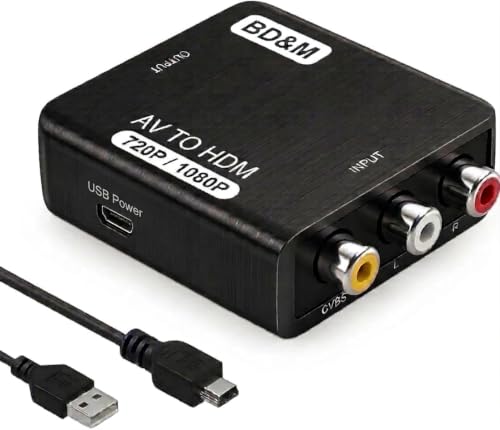
- Converts RCA/composite AV to HDMI
- Supports PS2, PS3, Xbox, N64, Wii, and more
- Handles PAL/NTSC with 720p or 1080p output
Best For: Multi-console and mixed home-entertainment setups using RCA outputs
Flexible Retro Display Options

- Supports 16:9 and 4:3 formats
- Works with Wii, PS1, PS2, N64, and more
- Includes HDMI cable with 720p/1080p output
Best For: Retro gamers wanting aspect-ratio control in a compact setup
Best All-Around Retro Pick

- Converts composite RCA to 720p or 1080p HDMI
- Supports PAL, NTSC, and SECAM formats
- Plug-and-play design with USB power
Best For: Connecting multiple retro consoles to a modern TV
Best for Aspect-Ratio Control

- Switches between 4:3 and 16:9 formats
- Outputs composite video at 1080p/60Hz
- Includes HDMI and USB power cables
Best For: Keeping retro games in their original screen proportions
Best Complete Cable Kit

- Includes RCA, HDMI, and Micro USB cables
- Selectable 720p or 1080p output
- Supports many classic consoles and AV formats
Best For: A ready-to-connect legacy console setup
Retro Console Upgrade – GameCube, N64 & SNES HDMI Adapter
If you need HDMI converters for gaming consoles from the GameCube, Nintendo 64, or Super Nintendo era, this 3-in-1 adapter is designed for those specific systems. It converts S-Video signals to HDMI, includes a 4:3/16:9 switch, and uses a detachable cable design for flexible setup.
Best For: Players connecting original GameCube, N64, or SNES consoles to modern TVs, monitors, or projectors.
Pros:
- Supports GameCube, N64, and SNES in one adapter.
- Converts and upscales analog S-Video signals to HDMI.
- Offers selectable 4:3 and 16:9 aspect ratios.
- Designed for plug-and-play use with low noticeable latency.
Cons:
- It is intended for three specific Nintendo console families rather than broad console compatibility.
- Does not include a compatible-phone function.
This is a focused choice for retro Nintendo setups, especially if you want aspect-ratio control and an S-Video-based connection. Its detachable design is also useful when a longer or higher-end HDMI cable is preferred.
Original Xbox Specialist – Xbox YPbPr to HDMI Adapter
For original Xbox owners seeking HDMI converters for gaming consoles, this adapter converts the console’s YPbPr component signal to HDMI for modern HDTVs and monitors. It requires no external power, but an HDMI cable must be supplied separately.
Best For: Original Xbox users who want a simple, no-delay connection to an HDMI-equipped display.
Pros:
- Designed specifically for the original Xbox.
- Converts YPbPr component output to HDMI.
- Requires no external power supply.
- Includes a one-year warranty.
Cons:
- HDMI cable is not included.
- It transfers the existing signal rather than improving video quality.
- Compatibility is limited to the original Xbox.
This adapter makes sense when your setup already has the appropriate Xbox component connection and a spare HDMI cable. It prioritizes straightforward signal conversion rather than image enhancement.
Composite Console Connector – Tengchi RCA to HDMI Converter
This Tengchi model is a versatile option among HDMI converters for gaming consoles that use yellow, white, and red RCA outputs. It converts composite video to HDMI 1080p for compatible TVs and monitors, while supporting several PAL, NTSC, and SECAM input formats.
Best For: Connecting composite-output consoles such as PS1, PS2, PS3, Xbox, or N64 to a 1080p display.
Pros:
- Accepts standard RCA composite input and outputs HDMI 1080p.
- Supports multiple PAL, NTSC, and SECAM formats.
- Includes an HDMI cable, USB power cable, and manual.
- Works with consoles and older video equipment including VHS and DVD players.
Cons:
- Requires a 5V/1A USB power source during use.
- Does not support 3D or 4K output.
- The power supply itself is not included.
Choose this converter if your console uses composite RCA and your display accepts HDMI. It offers broad legacy-device support and a useful included-cable bundle, but it is aimed at 1080p rather than 4K setups.
Broad Compatibility Pick – GINGIN RCA to HDMI Converter
GINGIN is a practical choice if you need HDMI converters for gaming consoles with composite RCA outputs across several generations. It converts yellow, white, and red RCA input to 720p or 1080p HDMI at 60Hz, and includes the cables needed for a basic setup.
Best For: Households connecting multiple RCA-equipped consoles, including PlayStation, N64, Wii, Xbox, and SNES systems.
Pros:
- Supports a wide range of consoles and legacy video devices.
- Outputs 720p or 1080p HDMI at 60Hz.
- Includes RCA, HDMI, and USB power cables.
- Supports PAL, NTSC, and SECAM input formats.
Cons:
- RCA input is for HDMI output only; it does not convert HDMI to AV.
- Requires a 5V/1A USB power adapter, which is not listed as included.
- It is intended for composite RCA sources rather than component or digital inputs.
This is a convenient all-around option for a mixed collection of older consoles. The included cables simplify installation, while the 1080p/60Hz output suits many modern TVs and monitors without promising 4K conversion.
Direct N64 Connection – N64 HDMI Converter Cable
For shoppers seeking HDMI converters for gaming consoles, this all-in-one cable is tailored to N64, GameCube, SNES, and SFC systems. It converts the console’s analog RGB signal to HDMI for modern TVs, monitors, and projectors, with S-Video signal output and 1080p at 60Hz HDMI output.
Best For: N64 and compatible classic-console owners who want a simple, cable-only connection to a modern display.
Pros:
- Built-in console connector and HDMI plug simplify installation.
- Supports N64, NGC, SNES, and SFC systems.
- Provides upscaled 1080p/60Hz HDMI output with S-Video signal output.
- Does not require extra power according to the supplied notes.
Cons:
- HDMI output does not support 720p/60Hz.
- Designed for specific classic consoles rather than general RCA devices.
- Connection issues may result in a blue screen or no sound.
This is a focused option for N64 setups where a direct, low-clutter connection matters. Confirm your console compatibility and display requirements before buying.
Universal RCA Support – BD&M RCA to HDMI Converter
This BD&M adapter is a versatile choice among HDMI converters for gaming consoles, converting standard RCA/composite AV signals to HDMI for HDTVs, monitors, and projectors. It supports both PAL and NTSC sources and works with several retro consoles as well as older video equipment.
Best For: Gamers with multiple RCA-equipped consoles or home-entertainment devices, including PS2, PS3, Xbox, N64, and Wii.
Pros:
- Supports a broad range of RCA devices and retro consoles.
- Offers 720p and 1080p HDMI output.
- Supports PAL and NTSC signals.
- Compact plug-and-play design includes a USB power cable.
Cons:
- Requires connection to a 5V USB power source.
- Uses standard RCA/composite input rather than a direct console-specific cable.
- Setup requires separate RCA and HDMI connections.
Choose this model if flexibility is more important than a console-specific design. Its wide compatibility also makes it useful for converting VCRs, DVD players, and other RCA sources.
Flexible Retro Display Options – LiNKFOR RCA to HDMI Converter
The LiNKFOR converter is designed for retro gaming setups that use composite RCA connections. It converts Wii, PS1, PS2, N64, and other compatible sources to HDMI at 720p or 1080p/60Hz, while adding a switch for choosing 16:9 or 4:3 screen formats.
Best For: Retro gamers who want aspect-ratio flexibility and a compact converter for home or portable use.
Pros:
- Supports 16:9 and 4:3 aspect ratios.
- Compatible with Wii, PS1, PS2, N64, and more.
- Outputs HDMI at 720p or 1080p/60Hz.
- Includes a 50cm HDMI cable and has a lightweight 28g design.
Cons:
- Requires the included USB power cable and a 5V power source.
- Designed for RCA composite sources, so it needs compatible AV outputs.
- Does not provide a console-specific direct-connect cable.
Its aspect-ratio switch makes this a practical pick for classic games that look better in their original 4:3 format. It is also convenient when a small, portable setup is a priority.
Best All-Around Retro Pick – ABLEWE RCA to HDMI Converter
For shoppers comparing HDMI converters for gaming consoles, the ABLEWE is a straightforward option for older systems with yellow, white, and red composite outputs. It converts PAL, NTSC, SECAM, and related formats to 720p or 1080p HDMI at 60Hz, with USB power required during use.
Best For: Retro gamers connecting PS2, PS3, N64, Wii, Xbox, or similar composite-output devices to a modern TV or monitor.
Pros:
- Supports 720p and 1080p HDMI output at 60Hz.
- Works with several PAL, NTSC, and SECAM input formats.
- Compact plug-and-play design requires no drivers.
- Compatible with gaming consoles, VCRs, DVD players, and set-top boxes.
Cons:
- USB power is required, and a power adapter is not included.
- Uses composite input, so it is intended for older AV-output devices.
The ABLEWE offers broad legacy-device compatibility in a small adapter. It is a practical choice when you need a simple RCA-to-HDMI connection without extra setup.
Best for Aspect-Ratio Control – PROZOR RCA to HDMI Converter
The PROZOR stands out among HDMI converters for gaming consoles with its switchable 4:3 and 16:9 aspect ratios. It converts composite AV signals to 1080p HDMI at 60Hz and includes HDMI and USB power cables for a convenient retro-gaming setup.
Best For: Players who want to preserve the original 4:3 look of PS1, PS2, N64, Wii, or Xbox games on a widescreen display.
Pros:
- Switches between 4:3 and 16:9 viewing modes.
- Supports PAL and NTSC sources with stereo audio.
- Includes a 1.5-foot HDMI cable and 5V USB power cable.
- Ferrite-core USB cable helps reduce electromagnetic interference.
Cons:
- Requires a 5V power source; the power adapter is not included.
- Designed for composite AV sources rather than HDMI devices.
With its aspect-ratio switch and included connection cables, the PROZOR is especially useful for retro consoles displayed on modern widescreen TVs. Its setup remains simple while offering more control over image proportions.
Best Complete Cable Kit – Wenter RCA to HDMI Converter
The Wenter is a practical choice for HDMI converters for gaming consoles when you want the key cables included. It converts RCA composite signals to selectable 720p or 1080p HDMI output and supports a broad range of legacy consoles and analog video formats.
Best For: Gamers and home-theater users who need an RCA cable, HDMI cable, and USB power cable in one package.
Pros:
- Includes detachable RCA, HDMI, and Micro USB cables.
- Offers selectable 720p or 1080p output at 60Hz.
- Supports PS1, PS2, PS3, Xbox, Wii, N64, SNES, and GameCube systems with RCA output.
- Handles PAL, NTSC, SECAM, and related analog formats.
Cons:
- A 5V/1A power adapter is not included.
- It changes the signal format but does not create native HD detail from low-resolution games or VHS footage.
- Only RCA-output devices are supported; it cannot convert HDMI to RCA.
The Wenter provides a flexible, cable-inclusive setup and clearly states its conversion limits. It is a strong fit for connecting several older AV devices to an HDMI display.
How We Picked These Hdmi Converters for Gaming Consoles
We focused on adapters that support common retro-console outputs, including composite RCA, S-Video, and console-specific connectors. The selection covers simple AV-to-HDMI upscalers as well as dedicated cables for systems such as the Nintendo 64, Super Nintendo, GameCube, and original Xbox.
We also considered practical features that affect setup and everyday use: PAL/NTSC compatibility, 720p or 1080p output, aspect-ratio controls, included cables, audio handling, and broad console support. These devices are generally signal converters rather than true low-latency gaming upscalers, so expectations should match the price and design.
Quick Comparison
| Adapter type | Best suited for | What to check |
|---|---|---|
| Console-specific HDMI cable | N64, SNES, GameCube, or original Xbox | Exact model and port compatibility |
| RCA-to-HDMI converter | PS1, PS2, PS3, Wii, Xbox, DVD players, and VCRs | Composite input, PAL/NTSC support, and power requirements |
| Adjustable AV converter | Mixed retro setups | 1080p output, 4:3/16:9 switching, and input controls |
Key Buying Factors for Hdmi Converters for Gaming Consoles
Input and Console Compatibility
Confirm how your console outputs video before buying. Yellow-white-red RCA cables require a composite converter, while an S-Video or proprietary console cable may need a different adapter. A product listing that mentions a console does not guarantee compatibility with every regional or hardware revision.
Resolution and Image Quality
Many adapters output a 720p or 1080p signal, but that does not mean they create new detail. They upscale the original low-resolution image. Look for stable synchronization, clean color, and minimal flicker. Dedicated cables may provide a cleaner signal than inexpensive composite converters, but results vary by console and display.
PAL, NTSC, Aspect Ratio, and Latency
PAL and NTSC support matters if your console or games come from another region. A 4:3/16:9 switch can prevent stretched retro graphics, although 4:3 is usually the more authentic choice. For timing-sensitive games, prioritize a converter known for low processing delay; basic adapters may introduce noticeable lag on some TVs.
Power, Audio, and Cable Length
Check whether the converter needs USB power and whether a USB adapter is included. Verify that audio travels through HDMI and that the supplied cable is long enough for your setup. If you already own reliable RCA cables, a compact converter may be all you need.
Who Should Buy Which Hdmi Converters for Gaming Consoles?
Choose a dedicated N64, SNES, or GameCube cable if you mainly play one compatible console and want the simplest installation. An original Xbox-specific adapter makes more sense for that system than a generic RCA converter when the console uses a compatible proprietary output.
For households with several composite-output systems, choose a broadly compatible RCA-to-HDMI model with PAL/NTSC support. If your TV stretches older games or you switch between consoles often, prioritize a converter with aspect-ratio controls and accessible input switching. Buyers seeking the best possible retro image or the lowest latency should consider a purpose-built gaming scaler rather than relying solely on a basic HDMI adapter.