Managing several HDMI sources across a TV, projector, or AV receiver can quickly become a cable-swapping chore. The right matrix switch lets you route different devices to multiple displays while preserving 4K video, HDR, and compatible audio formats.
We selected 10 models spanning compact 2×2 units, versatile 4×4 switchers, larger rack-mount systems, and extender-based installations. Use the guide below to match inputs, outputs, control options, resolution support, and audio features to your setup.
Best 10 4K Hdmi Matrix Switches Picks for 2026
Best All-Around 4K Matrix
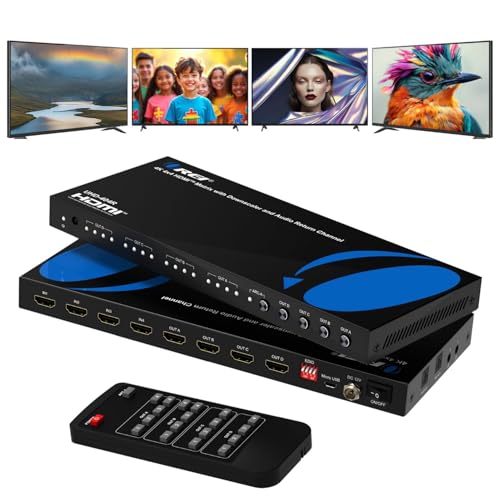
- 4K@60Hz with 18Gbps bandwidth
- Four inputs and four independently switchable outputs
- Optical, 3.5mm, and ARC audio support
Best For: Multi-display home theaters and commercial AV setups
Best Value 4K Matrix
ENBUER 4x2 HDMI Matrix with Audio Extraction

- Routes four sources to two displays
- 4K@60Hz, HDR, and 18.5Gbps support
- Optical and 3.5mm audio outputs
Best For: Two-display gaming and media setups
Best for 8K Gaming
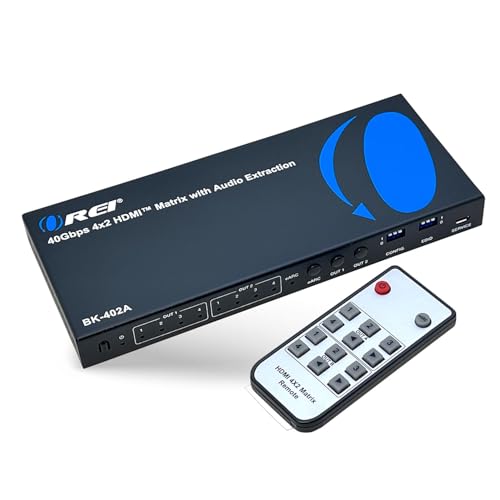
- 8K@60Hz and 4K@120Hz support
- 40Gbps bandwidth with VRR and ALLM
- eARC, optical, and 3.5mm audio extraction
Best For: HDMI 2.1 gaming and high-refresh-rate displays
Best for Long Runs
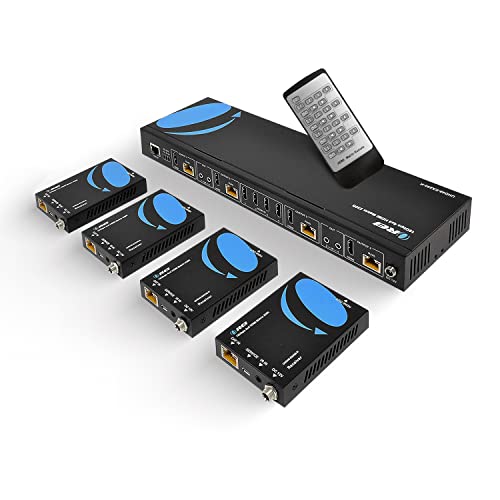
- Transmits 4K over CAT5e/6/7 up to 230 feet
- Includes four receivers and four local loop outputs
- Adds IR control, RS-232, and EDID management
Best For: Multi-room and commercial AV distribution
Professional AV Hub
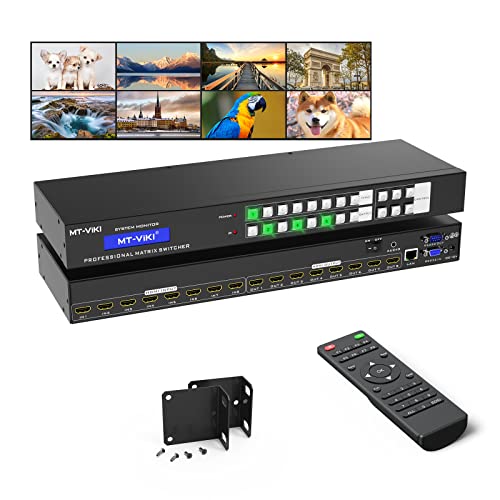
- Routes 8 sources to 8 displays
- Web, LAN, RS232, app, and remote control
- Rack-mount design with output-8 audio extraction
Best For: Large commercial and home AV installations
High-Refresh Choice

- Supports 4K@60Hz, HDR, and HDCP 2.2
- Downscales 4K for 1080p displays
- Handles up to 7.1-channel digital audio
Best For: Mixed-resolution home theater and office systems
Managed Mid-Size Option

- Routes 4 sources to 4 displays
- Includes web, LAN, RS232, app, and remote control
- Rack-mountable with output-4 audio extraction
Best For: Small professional AV and home theater systems
Best Overall 4K Matrix

- 4K@60Hz with 18Gbps bandwidth
- Optical, analog, and ARC audio support
- Independent 4K-to-1080p downscaling
Best For: Home theaters and flexible two-display AV systems
Best for Multi-Display Control

- Four inputs and four outputs
- Panel, IR, and RS232 control
- Stores and recalls 16 display scenes
Best For: Commercial spaces with multiple displays and sources
Best All-Around 4K Matrix – OREI 4×4 HDMI Matrix with ARC
For flexible home theater or commercial AV routing, this OREI model is one of the more capable 4k hdmi matrix switches. It connects four HDMI sources to four displays and supports independent switching, 4K at 60Hz, HDR, and 18Gbps bandwidth.
Best For: Home theaters, conference rooms, classrooms, digital signage, and installations needing four inputs and four outputs.
Pros:
- Routes four HDMI sources independently to four displays.
- Supports 4K@60Hz, HDR, HDMI 2.0, HDCP 2.2, and up to 12-bit color.
- Includes optical and 3.5mm audio extraction plus ARC on Output A.
- Metal enclosure, remote control, and a one-year warranty.
Cons:
- ARC support is limited to Output A.
- Uses an AC adapter rather than a built-in power supply.
Choose this model when you need broad routing flexibility and convenient audio extraction without stepping up to an 8K HDMI 2.1 system.
Best Value 4K Matrix – ENBUER 4×2 HDMI Matrix with Audio Extraction
This ENBUER unit is a practical choice among 4k hdmi matrix switches when you need four source inputs but only two displays. It supports 4K@60Hz, HDR, HDMI 2.0b, HDCP 2.2, and separate optical and 3.5mm audio outputs.
Best For: Gaming setups, media rooms, and two-display systems using consoles, streaming devices, computers, or Blu-ray players.
Pros:
- Connects four HDMI sources to two displays.
- Supports 4K@60Hz, HDR, 18.5Gbps data rates, and RGB 4:4:4.
- Provides optical and 3.5mm audio extraction.
- Includes EDID management and an IR remote.
Cons:
- EDID settings may require selecting the correct mode and restarting the switch.
- Limited to two HDMI outputs.
This is a sensible fit for a two-screen system that needs multiple source devices and extracted stereo or optical audio, though setup may take some EDID adjustment.
Best for 8K Gaming – OREI 4×2 HDMI 2.1 Matrix
If you are choosing 4k hdmi matrix switches for newer gaming hardware, this OREI 4×2 model adds HDMI 2.1 bandwidth and next-generation features. It supports up to 8K@60Hz, 4K@120Hz, 40Gbps, VRR, ALLM, and FVA.
Best For: High-refresh-rate gaming, 8K-capable sources, home cinema systems, and two-display HDMI 2.1 installations.
Pros:
- Supports 8K@60Hz, 4K@120Hz, and up to 40Gbps bandwidth.
- Includes VRR, ALLM, and FVA for smoother, lower-latency gaming.
- Offers eARC plus optical and 3.5mm audio extraction.
- Supports Dolby Atmos, Dolby TrueHD, DTS formats, and DSD audio.
Cons:
- Only two HDMI outputs are provided.
- eARC requires compatible eARC support from both the TV and soundbar.
This is the strongest option here for future-facing video performance, especially when 4K/120 gaming and advanced audio matter more than having four displays.
Best for Long Runs – OREI 4×4 HDMI Extender Matrix
For installations where displays are spread across a room or building, this OREI extender matrix stands apart from typical 4k hdmi matrix switches. It sends 4K video over CAT5e, CAT6, or CAT7 cable for distances up to 230 feet and includes four receivers, loop outputs, IR control, and RS-232.
Best For: Large home theaters, conference rooms, classrooms, commercial AV distribution, and multi-room 4K systems.
Pros:
- Distributes four sources to four remote displays over network cable up to 230 feet.
- Supports 4K@60Hz, 4:4:4 color, HDR, HDMI 2.0, and HDCP 2.2.
- Includes four local HDMI loop outputs and four receivers.
- Provides IR transport, RS-232, EDID management, CEC control, and 7.1-channel audio pass-through.
Cons:
- Requires CAT5e/6/7 cabling and receiver installation.
- The notes indicate IR OUT ports follow the HDMI input rather than the HDMI output.
- Its three-pound system is more installation-focused than compact switchers.
Select this model when cable distance and centralized distribution are the main priorities; it offers substantially more installation hardware than a standard desktop matrix.
Professional AV Hub – 8×8 4K HDMI Matrix Switch
For larger installations, this 4k hdmi matrix switch routes eight sources to eight displays independently or simultaneously. Its rack-mount design, web controls, LAN, RS232, and 4K@30Hz support make it suited to managed AV environments.
Best For: Conference rooms, churches, sports bars, control centers, digital signage, and larger home theater systems.
Pros:
- Routes any of eight HDMI inputs to any of eight outputs.
- Offers button, IR remote, RS232, LAN, web GUI, and app control.
- Includes rack ears for standard 1U 19-inch rack installation.
- Provides 3.5mm audio extraction through HDMI output 8.
Cons:
- 4K resolution is limited to 30Hz.
- Audio extraction works only when the source is assigned to output 8.
- Stable transmission distances are specified at up to 30 feet per input and output.
This is the most capable option here for high-output-count installations, especially when centralized control and rack mounting matter. Keep the output-8 audio limitation and 4K@30Hz ceiling in mind when planning the system.
High-Refresh Choice – OREI 4×4 4K HDMI Matrix
This 4k hdmi matrix switch is designed for four-source, four-display systems needing 4K@60Hz performance. It adds HDR, HDCP 2.2, 18Gbps bandwidth, and downscaling for setups that mix 4K and 1080p screens.
Best For: Home theaters, offices, presentation systems, and multi-display setups using mixed-resolution screens.
Pros:
- Supports 4K@60Hz, HDR, HDMI 2.0a, and HDCP 2.2.
- Downscales 4K content to 1080p for mixed-display systems.
- Supports up to 7.1-channel digital audio, including Dolby Digital and DTS-HD Master Audio.
- Provides 18Gbps bandwidth and independent or mirrored output routing.
Cons:
- Offers four inputs and four outputs, fewer than the 8×8 model in this roundup.
- The supplied warranty is one year.
Choose the OREI when smooth 4K@60Hz playback and compatibility with mixed 4K/1080p displays are more important than advanced rack-control features. Its audio and HDR support also make it a strong fit for home entertainment systems.
Managed Mid-Size Option – 4×4 4K HDMI Matrix with Audio
This 4k hdmi matrix switch handles four HDMI sources and four displays while adding web GUI, LAN, RS232, app, and remote control. It supports 4K@30Hz and includes rack hardware for organized professional installations.
Best For: Conference rooms, churches, retail displays, sports bars, and home theaters needing flexible 4×4 routing.
Pros:
- Routes four sources to four displays independently or simultaneously.
- Includes front-panel, remote, web GUI, RS232, LAN, and app control.
- Supports 4K@30Hz, 1080p, 3D video, and deep color.
- Provides 3.5mm stereo audio extraction through output 4.
Cons:
- 4K support is limited to 30Hz.
- Audio extraction is available only through output 4 when the source is assigned there.
- Source switching may take 2–3 seconds.
This model offers a practical balance for smaller professional AV systems that benefit from network and rack control. It is a better match than the 8×8 version when four inputs and four outputs are sufficient, but the output-4 audio restriction requires planning.
Best Overall 4K Matrix – OREI 4×2 HDMI Matrix
If you need flexible routing for a home theater or professional AV setup, this OREI 4×2 is one of the more capable 4k hdmi matrix switches. It connects four sources to two displays, supports 4K at 60Hz with 18Gbps bandwidth, and adds useful audio and EDID features.
Best For: Home theaters, conference rooms, and mixed 4K/1080p display setups needing audio extraction.
Pros:
- Supports 4K@60Hz, 4:4:4, HDR10+, Dolby Vision, and HLG.
- Routes four HDMI inputs independently to two outputs.
- Includes optical and analog audio extraction, ARC, and EDID modes.
- Can keep one output at 4K while downscaling the other to 1080p.
Cons:
- Does not support 4K@120Hz, VRR, or ALLM.
- Stable 4K performance requires suitable HDMI 2.0/2.1 cables under 30 feet.
Its combination of modern HDR support, audio flexibility, and mixed-resolution downscaling makes it a strong all-purpose choice when two-display routing matters more than next-generation gaming features.
Best for Multi-Display Control – Yinker 4×4 HDMI Matrix
For installations that need four sources and four displays, this Yinker model offers the expanded routing capacity many 4k hdmi matrix switches lack. It supports simultaneous or individual distribution, with front-panel, IR remote, and RS232 control.
Best For: Conference rooms, lecture halls, monitoring systems, and other setups with up to four displays.
Pros:
- Connects four inputs to four outputs simultaneously or individually.
- Provides panel-button, IR, and RS232 switching options.
- Includes EDID management and storage for 16 display scenes.
- Supports 4K@30Hz, 1080p@60Hz downscaling, and 4:4:4 color.
Cons:
- Maximum 4K output is 30Hz rather than 60Hz.
- It is not a 2×2 video wall controller.
- Cannot be directly mounted in a 1U rack cabinet.
This is a practical choice when output quantity and control flexibility are priorities. Its scene memory and RS232 support are particularly useful for repeatable commercial or presentation-room configurations.
Best Compact 2×2 Option – OREI 2×2 HDMI Matrix
This OREI 2×2 is a straightforward option for smaller systems. Among 4k hdmi matrix switches, it keeps the layout compact while supporting 4K@60Hz, 18Gbps bandwidth, HDR, EDID management, and digital or analog audio extraction.
Best For: Smaller home theater or desktop AV systems with two HDMI sources and two displays.
Pros:
- Supports 4K@60Hz at 4:4:4 with 18Gbps bandwidth.
- Offers EDID bypass, HDCP 2.2, HDR, and full 3D support.
- Extracts digital and analog audio, including supported surround formats up to 7.1 channels.
- Includes IR remote control and dual-voltage power support.
Cons:
- Only provides two inputs and two outputs.
- Will not extend PC monitors.
- Audio extraction is specified for PCM 2.0 through optical and analog outputs.
Choose this model when you want 4K60 performance and audio flexibility without paying for four-input routing. Its compact 2×2 design suits simpler systems where expansion is not a priority.
How We Picked the Best 4K Hdmi Matrix Switches
We focused on models that offer practical multi-display routing rather than simple HDMI switching. The selection includes 2×2, 4×2, 4×4, and 8×8 configurations, with options for 4K at 30Hz or 60Hz, HDR, HDCP 2.2, EDID management, audio extraction, ARC or eARC, and downscaling.
We also considered installation and control. IR remotes are useful for everyday changes, while front-panel buttons, RS-232, LAN, and web interfaces are better suited to custom theaters, conference rooms, and rack-mounted systems. Extender models were included for installations that need longer cable runs over CAT5e, CAT6, or CAT7.
Quick Comparison
| Configuration | Best For | Features to Prioritize |
|---|---|---|
| 2×2 | Small home theater systems | 4K at 60Hz, audio extraction, compact control |
| 4×2 | Several sources feeding one or two displays | EDID, downscaling, ARC/eARC, HDR |
| 4×4 | Flexible home and commercial routing | Independent output switching, HDCP support, RS-232 |
| 8×8 | Large installations and distributed AV | Web control, rack mounting, audio management |
Key Buying Factors for 4K Hdmi Matrix Switches
Inputs, Outputs, and Routing
Count every source and display you plan to connect, then leave room for expansion. A 4×4 switch can send any of four inputs to any of four outputs, but verify whether outputs can show different sources simultaneously.
Resolution, Refresh Rate, and HDR
For gaming and smooth 4K video, look for 4K at 60Hz and the required color format, such as 4:4:4. Some budget models support 4K only at 30Hz. Confirm HDR compatibility and remember that the entire signal chain—including cables, displays, and receivers—must support the desired format.
EDID, HDCP, and Downscaling
EDID controls how connected devices negotiate resolution and audio. Strong EDID options help avoid blank screens or unstable handshakes. Downscaling is valuable when a 4K source must feed both a 4K display and an older 1080p screen. HDCP support should match your streaming devices and protected content.
Audio and Control Features
Audio extraction can send sound to powered speakers, a soundbar, or an amplifier. ARC and eARC matter when returning TV audio to a receiver. For convenience, choose IR or front-panel controls; for automation or commercial installations, prioritize RS-232, LAN, or a web GUI.
Who Should Buy Which 4K Hdmi Matrix Switches?
Choose a 2×2 model for a compact setup with two sources and two displays. A 4×2 switch is a good fit when you have more sources than screens and want audio extraction or downscaling. Pick a 4×4 unit for a living-room theater, gaming space, or small office that needs independent routing to several displays.
For whole-home, classroom, or commercial distribution, an 8×8 model with LAN or web control is easier to manage as the system grows. If displays are far from the source equipment, choose an extender-based matrix and plan the cable infrastructure carefully. Before buying, verify connector standards, cable lengths, audio formats, remote-control requirements, and the resolution of every connected device.