Connecting a projector to a laptop, game console, VCR, or older media player is not always as simple as matching cable ends. The right converter must support the source signal, projector input, resolution, and—when needed—separate audio.
This roundup compares 10 HDMI converters for projectors across common connection types, from VGA and RCA to USB-C, DisplayPort, and component video. Use the guide below to narrow your choice by compatibility, image quality, audio support, and ease of setup.
Best 10 Hdmi Converters for Projectors Picks for 2026
Best Portable VGA Pick

- Compact design for presentations and travel
- 1080p video with USB audio support
- 18-month warranty included
Best For: VGA laptops connecting to HDMI projectors
Best USB-C 4K Option
Highwings USB-C to HDMI Adapter

- 4K output at 60Hz on compatible devices
- Plug-and-play with no drivers
- Durable braided design and 24-month warranty
Best For: USB-C devices with DisplayPort Alt Mode
Best VGA Audio Bundle

- 1080p VGA-to-HDMI conversion
- Includes audio and USB power cables
- Supports Windows 7/8/10 and Linux
Best For: Older computers needing video and audio output
Best Composite AV Converter

- Converts yellow, white, and red RCA input
- HDMI output supports up to 1080p
- Includes HDMI and USB cables
Best For: Legacy consoles, VCRs, and DVD players
Best Compact HDMI-to-VGA Pick

- Up to 1080p at 60Hz
- Compact travel-friendly design
- 18-month warranty
Best For: Laptop presentations with VGA projectors
Best Legacy AV Conversion Pick

- RCA input to HDMI output
- 720p/1080p at 60Hz
- Supports PAL and NTSC formats
Best For: Older AV equipment and retro consoles
Best DisplayPort-to-HDMI Pick

- Up to 4K at 30Hz
- 1080p at 60Hz
- Secure latching connector
Best For: DisplayPort computers using HDMI projectors
Best Component-to-HDMI Pick
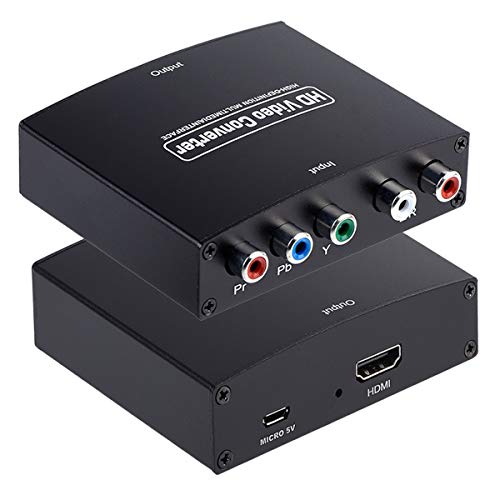
- Converts component video and analog audio to HDMI
- Supports HDMI output up to 1080p/60Hz
- Requires YPbPr input; not compatible with composite RCA input
Best For: Component-output DVD players, consoles, and satellite boxes
Best RCA Bundle

- Converts yellow-white-red composite AV to HDMI
- Includes RCA, HDMI, and Micro USB cables
- Selectable 720p or 1080p output; USB power required
Best For: VCRs, DVD players, and retro consoles with composite output
Best Compact RCA Adapter
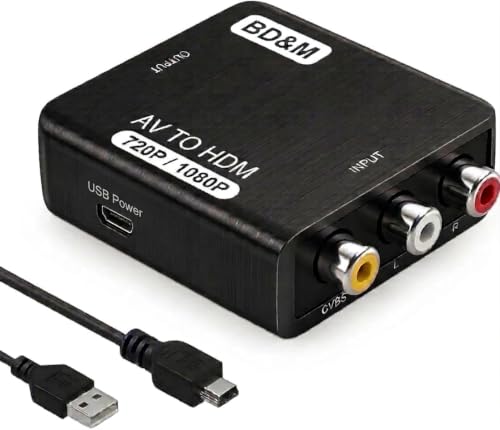
- Converts composite RCA AV to HDMI
- Supports PAL/NTSC and 720p/1080p output
- Compact plug-and-play design with USB power
Best For: Retro consoles, VCRs, DVD players, and composite AV devices
Best Portable VGA Pick – BENFEI VGA to HDMI Adapter
If you need HDMI converters for projectors and your laptop only has VGA, this compact BENFEI adapter provides a straightforward way to connect it to an HDMI projector, monitor, or TV. It converts VGA video to HDMI and uses USB for audio support.
Best For: Laptop and desktop presentations using a VGA output and HDMI projector.
Pros:
- Compact, lightweight design for travel and presentations
- Supports up to 1080p VGA-to-HDMI conversion
- USB audio support can carry sound with the HDMI output
- Includes an 18-month warranty
Cons:
- One-way only: it does not convert HDMI to VGA
- Requires a separate HDMI cable
- USB connection is needed for audio functionality
This is a practical choice for older computers with VGA ports, especially when portability matters. Confirm that your source has VGA output and plan for the required HDMI cable.
Best USB-C 4K Option – Highwings USB-C to HDMI Adapter
For newer laptops, tablets, and compatible phones, this Highwings adapter is one of the more capable HDMI converters for projectors. It sends video and audio from USB-C to an HDMI display, with support for 4K at 60Hz when the source supports DisplayPort Alt Mode.
Best For: USB-C laptops or mobile devices connecting to a 4K HDMI projector or display.
Pros:
- Supports up to 4K at 60Hz on compatible devices
- Plug-and-play design requires no drivers
- HDMI female output lets you use an existing HDMI cable
- Braided jacket, gold-plated connectors, and a 24-month warranty
Cons:
- USB-C port must support DisplayPort Alt Mode
- One-way only and does not support charging
- Requires a separate HDMI cable and stable cable length for 4K use
This adapter fits modern setups well, but USB-C compatibility is the key consideration. Check the device specifications before buying, particularly for phones and tablets.
Best VGA Audio Bundle – FOINNEX VGA to HDMI Adapter
This FOINNEX model is a useful option among HDMI converters for projectors when an older computer has VGA video and you also need a direct audio connection. It converts VGA to HDMI at up to 1080p and includes a 3.5mm audio cable plus a Micro USB power cable.
Best For: Older Windows or Linux computers connecting VGA video and external audio to an HDMI projector.
Pros:
- Supports 1080p video conversion
- Includes 3.5mm audio and Micro USB cables
- Compact plug-and-play design
- Gold-plated connectors are designed for stable signal transfer
Cons:
- Only converts VGA to HDMI, not the reverse direction
- Requires USB power during use
- HDMI cable is sold separately
The included audio accessories make this a convenient presentation kit for legacy computers. Make sure the USB power connection is available and that your projector accepts HDMI input.
Best Composite AV Converter – Tengchi RCA to HDMI Converter
If your projector source is an older console, VCR, DVD player, or other composite device, this Tengchi adapter is a useful addition to the HDMI converters for projectors category. It changes yellow, white, and red RCA input into HDMI output at up to 1080p.
Best For: Connecting legacy gaming consoles, VCRs, DVD players, or set-top boxes to an HDMI projector.
Pros:
- Supports composite RCA input with PAL, NTSC, and SECAM formats
- Outputs through HDMI at up to 1080p
- Includes an HDMI cable, USB power cable, and manual
- Plug-and-play installation with a 12-month warranty
Cons:
- Does not support 3D or 4K
- Requires external USB power
- Designed for RCA-to-HDMI only, not HDMI-to-AV conversion
This converter is aimed at legacy analog equipment rather than modern high-resolution sources. It is a sensible choice when your projector has HDMI input but the source only provides composite AV output.
Best Compact HDMI-to-VGA Pick – Benfei HDMI to VGA Adapter
For older projectors with VGA inputs, this compact HDMI-to-VGA adapter is a practical choice among hdmi converters for projectors. It converts an HDMI source to VGA and supports up to 1080p at 60Hz, but you will need a separate VGA cable.
Best For: Laptop presentations and HDMI devices connecting to VGA projectors.
Pros:
- Supports up to 1920×1080 at 60Hz.
- Compact, lightweight design for travel.
- Gold-plated connector and molded strain relief support durability.
- Includes an 18-month warranty.
Cons:
- Requires a separate VGA cable.
- Works only from HDMI to VGA, not VGA to HDMI.
- Not compatible with certain low-power HDMI devices and Blu-ray players.
This is a straightforward option when your projector accepts VGA and your source provides HDMI. Confirm device compatibility and remember that VGA does not carry audio.
Best Legacy AV Conversion Pick – ABLEWE RCA to HDMI Converter
This RCA-to-HDMI converter suits projectors or displays that accept HDMI when your source uses composite AV. It converts the yellow, white, and red RCA signals to HDMI output at 720p or 1080p, making it useful for older video equipment.
Best For: Connecting VCRs, DVD players, retro consoles, and other composite-AV devices to an HDMI projector or display.
Pros:
- Converts composite RCA input to HDMI output.
- Supports 720p and 1080p output at 60Hz.
- Supports PAL, NTSC, SECAM, and related video formats.
- Plug-and-play operation without extra drivers.
Cons:
- Requires the included USB cable and a separate 5V power source.
- Power adapter is not included.
- Designed for composite AV sources rather than HDMI sources.
Choose this model when the connection problem starts with legacy RCA equipment. It is less suitable for modern HDMI-only setups, and you should plan for an available USB power source.
Best DisplayPort-to-HDMI Pick – Benfei 4K DisplayPort Adapter
If your computer has DisplayPort and your projector uses HDMI, this adapter provides a compact one-way connection. It supports resolutions up to 4K at 30Hz or 1080p at 60Hz, making it a capable choice among hdmi converters for projectors.
Best For: Connecting DisplayPort computers and laptops to HDMI projectors, monitors, or TVs.
Pros:
- Supports up to 3840×2160 at 30Hz.
- Supports 1080p at 60Hz for smoother Full HD output.
- Latch-equipped DisplayPort connector helps secure the connection.
- Includes an 18-month warranty.
Cons:
- Uni-directional: DisplayPort source to HDMI display only.
- Does not convert HDMI source to DisplayPort monitor.
- 4K output is limited to 30Hz.
This adapter is a good fit for presentations or desktop extension when the source is a DisplayPort computer. Verify the direction of the connection and the projector’s HDMI capability before buying.
Best Component-to-HDMI Pick – YPbPr to HDMI Converter
For shoppers comparing HDMI converters for projectors, this model is designed for older component-video equipment rather than standard yellow-white-red composite connections. It converts YPbPr video and left/right audio into HDMI, with support for 720p and 1080p output at 60Hz.
Best For: Connecting component-output DVD players, satellite boxes, and game consoles to an HDMI projector or display.
Pros:
- Supports YPbPr component input with analog R/L audio.
- Offers HDMI output up to 1080p/60Hz.
- Supports several legacy resolutions, including 480i/p, 576i/p, 720p, and 1080i/p.
Cons:
- It is not reversible; it cannot convert HDMI to component.
- Requires a YPbPr output, not a standard RCA composite output.
This is a focused choice when your source has five RCA-style component connections and your projector accepts HDMI. Confirm the source ports before buying, since the wrong video format will not produce a signal.
Best RCA Bundle – Wenter RCA to HDMI Converter
This Wenter adapter is a practical option among HDMI converters for projectors when the source uses classic yellow, white, and red RCA connections. It converts composite AV to HDMI and lets you select 720p or 1080p output at 60Hz.
Best For: Connecting VCRs, VHS players, DVD players, retro consoles, and other composite-output devices to an HDMI projector.
Pros:
- Supports RCA composite input from a broad range of legacy devices.
- Includes RCA, HDMI, and Micro USB cables.
- Offers selectable 720p or 1080p HDMI output with no drivers required.
- Supports PAL, NTSC, SECAM, and related analog input formats.
Cons:
- USB power is required, and a 5V/1A power adapter is not included.
- It converts the signal format but cannot make low-resolution footage native HD.
The included cables make setup convenient, but plan on supplying a compatible 5V/1A USB power source. It is a strong fit for composite equipment, not HDMI-to-RCA conversion.
Best Compact RCA Adapter – BD&M RCA to HDMI Converter
The BD&M adapter offers a simple way to connect older composite devices to a modern projector. For anyone shopping for HDMI converters for projectors, its RCA-to-HDMI design supports PAL and NTSC sources and provides 720p or 1080p HDMI output.
Best For: Retro gaming, VHS playback, DVD players, and other older devices with standard RCA AV output.
Pros:
- Works with many legacy devices, including PS1, PS2, PS3, Xbox, Wii, N64, VCRs, and DVD players.
- Supports 720p and 1080p HDMI output.
- Plug-and-play setup requires no drivers or software.
- Compact design suits home entertainment, travel, and retro gaming setups.
Cons:
- Requires the included USB power connection.
- Designed for RCA/composite sources, not component or HDMI-to-RCA conversion.
This compact converter is a straightforward choice for basic composite-to-HDMI projector connections. Verify that your source uses standard RCA AV output and that you have a suitable USB power connection available.
How We Picked These Hdmi Converters for Projectors
We organized this selection around the source device you need to connect and the input available on your projector. The list includes active VGA-to-HDMI and HDMI-to-VGA adapters, USB-C and DisplayPort solutions for newer computers, plus RCA and component converters for legacy consoles, DVD players, VCRs, and other analog equipment.
We also considered stated resolution support, directional compatibility, audio handling, format support such as PAL and NTSC, and practical use cases. A converter that changes the connector type is not always the same as one that converts the signal, so active conversion and correct signal direction are especially important.
Quick Comparison
| Source Device | Recommended Converter Type | Best For |
|---|---|---|
| VGA computer | VGA to HDMI | Older laptops and desktops |
| HDMI computer or player | HDMI to VGA | Projectors with VGA input |
| USB-C laptop | USB-C to HDMI | Modern notebooks and tablets |
| DisplayPort computer | DisplayPort to HDMI | Desktop PCs and monitors |
| RCA/AV device | RCA to HDMI | VCRs, DVD players, and retro consoles |
| Component device | YPbPr to HDMI | Older consoles and DVD equipment |
Key Buying Factors for Hdmi Converters for Projectors
Match the Source and Display Direction
Check both ends before buying. VGA-to-HDMI and HDMI-to-VGA are different products, and most adapters work in only one direction. A projector with HDMI input generally needs a converter that outputs HDMI; a projector with VGA input needs a compatible HDMI-to-VGA solution.
Check Resolution and Refresh Rate
Many budget converters support 1080p, while USB-C and some DisplayPort adapters may support 4K at 60Hz. Your actual result depends on the source, projector, cable, and adapter. Older analog sources may deliver lower-resolution video even when the converter advertises 1080p output.
Plan for Audio
VGA, RCA, and component video do not carry audio in the same way HDMI does. Look for models that explicitly support audio conversion or provide an audio output when connecting older equipment. HDMI-to-VGA setups may also require separate audio routing.
Confirm Power and Format Requirements
Some active converters need USB power, particularly when converting analog signals. For RCA equipment, verify PAL/NTSC compatibility and use the included or appropriate USB power cable. Also allow space for bulky adapters behind ceiling-, wall-, or shelf-mounted projectors.
Who Should Buy Which Hdmi Converters for Projectors?
Choose a VGA-to-HDMI converter for an older laptop or desktop feeding a modern HDMI projector. Pick HDMI-to-VGA when your source has HDMI but the projector only accepts VGA. USB-C-to-HDMI is the simplest choice for many current laptops, while DisplayPort-to-HDMI suits desktop PCs with DisplayPort outputs.
For retro consoles, VCRs, DVD players, and composite camcorders, use an RCA-to-HDMI converter. Choose a YPbPr-to-HDMI model when the source provides component video and you want to preserve that connection type. Before ordering, verify the exact ports, signal direction, audio path, and required power supply.