Managing multiple sources across two TVs, monitors, or projectors is easier with the right HDMI matrix switch. These devices let you route different inputs to separate displays while adding useful features such as audio extraction, EDID control, ARC, HDR, and downscaling.
We selected 10 HDMI matrix switches for dual displays across common 2×2, 3×2, 4×2, 4×4, and 6×2 configurations. The list includes options for straightforward home setups as well as more demanding 4K and 8K systems.
Best 10 Hdmi Matrix Switches for Dual Displays Picks for 2026
Best 8K Pick
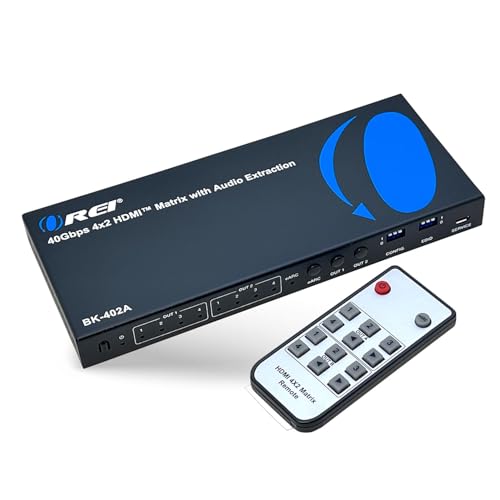
- 8K@60Hz and 4K@120Hz support
- 40Gbps HDMI 2.1 bandwidth
- eARC and audio extraction
Best For: High-end gaming and home theater systems
Best Budget Option

- Two inputs and two outputs
- Up to 4K/60Hz YUV 4:2:0
- Remote-controlled switching
Best For: Simple mirrored-display installations
Best 4K Home Theater Pick

- 4K/60Hz 4:4:4 at 18Gbps
- 4K-to-1080p downscaling
- ARC and audio extraction
Best For: Mixed-resolution 4K home theater systems
Best Compact 3x2 Model

- Three HDMI inputs and two outputs
- 4K/60Hz with HDR10 and HDCP 2.2
- Optical and 3.5mm audio extraction
Best For: Compact 4K/60Hz setups with three sources
Best Overall
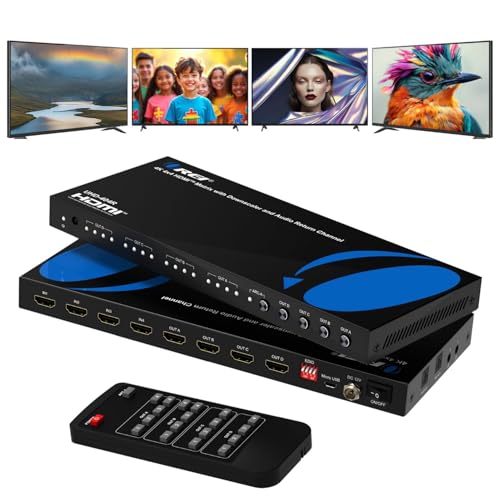
- 4K/60Hz with 18Gbps bandwidth, HDR, and HDCP 2.2
- Four inputs and four independently routable outputs
- Optical, 3.5mm, and ARC audio support
Best For: Expandable home theater and commercial AV setups
Best for More Sources
FERRISA 6x2 HDMI Matrix Switch

- Six HDMI inputs feed two displays
- 4K/60Hz, 18Gbps, and automatic downscaling
- Optical and 3.5mm audio extraction
Best For: Dual-screen setups with many connected sources
Best for Mixed-Resolution Displays
OREI 4x4 HDMI Matrix for Mixed 4K/1080p

- Downscales 4K content for 1080p displays
- Routes sources independently or identically to four outputs
- Supports 4K/60Hz, HDR, and 18Gbps bandwidth
Best For: Systems combining 4K and 1080p screens
Most Flexible Setup

- Four inputs and two display outputs
- 4K60 with HDR and 18Gbps bandwidth
- Downscales 4K for 1080p displays
Best For: Multi-source systems with mixed-resolution displays
Best 8K Pick – OREI 4×2 HDMI 2.1 Matrix
For shoppers comparing HDMI matrix switches for dual displays, the OREI BK-402A is the most capable option here. Its four inputs and two independently switchable outputs support up to 8K video, 4K at 120Hz, VRR, and ALLM, making it well suited to newer gaming and home theater systems.
Best For: High-bandwidth gaming setups, 8K-capable displays, and users who need eARC or flexible audio extraction.
Pros:
- Routes four HDMI sources independently to two displays.
- Supports HDMI 2.1 bandwidth up to 40Gbps, with 8K and 4K/120Hz modes.
- Includes eARC, optical, and 3.5mm audio extraction options.
- Offers VRR, ALLM, FVA, HDCP 2.3, and EDID features.
Cons:
- eARC requires compatible eARC support from both the TV and soundbar.
- Its advanced features may be unnecessary for basic 4K/60Hz systems.
This is the strongest choice for a future-ready dual-display setup, especially when gaming performance and audio flexibility matter more than a lower purchase price.
Best Budget Option – Anber-Tech 2×2 HDMI Matrix
If you need a straightforward switch for two displays, this Anber-Tech 2×2 model covers the basics of HDMI matrix switches for dual displays. It connects two sources to two monitors or projectors and supports up to 4K/60Hz in YUV 4:2:0, with button and IR remote control.
Best For: Basic home theater, office, classroom, or conference-room setups that only need mirrored or switched output.
Pros:
- Connects two HDMI sources to two displays.
- Supports 4K/60Hz YUV 4:2:0, 4K/30Hz, 1080p, and 3D.
- Includes IR remote control and LED port indicators.
- Supports several Dolby, DTS, and DSD audio formats.
Cons:
- Does not support PC or laptop extended-display mode; it mirrors the screen.
- Does not support HDCP 2.2, HDMI 2.0, or HDMI 1.4b.
- Limited to two inputs and basic stereo audio output.
This is a practical low-complexity option when your sources are compatible and mirrored output is acceptable, but it is not the right fit for modern extended desktop workflows or HDCP 2.2 content.
Best 4K Home Theater Pick – OREI 4×2 HDMI 2.0 Matrix
The OREI UHDS-402A is a well-rounded choice among HDMI matrix switches for dual displays when 4K/60Hz is sufficient. It offers four inputs, independent routing to two outputs, HDR support, audio extraction, ARC, EDID management, and 4K-to-1080p downscaling for mixed-resolution displays.
Best For: Home theaters and AV installations using a 4K display alongside a 1080p TV, projector, or other secondary screen.
Pros:
- Routes four HDMI sources independently to two displays.
- Supports 4K/60Hz at 4:4:4 with 18Gbps bandwidth.
- Handles Dolby Vision, HDR10+, HLG, HDCP 2.2/1.4, and DVI 1.0.
- Provides ARC, optical and analog audio extraction, EDID modes, and downscaling.
Cons:
- Does not support 4K/120Hz, VRR, or ALLM.
- Stable 4K/60Hz performance depends on quality HDMI cables under 30 feet.
For conventional 4K systems, its mixed-resolution downscaling and audio features make it more flexible than a basic matrix, while its HDMI 2.0 limits rule out newer 4K/120Hz gaming needs.
Best Compact 3×2 Model – SIGRAPID HDMI 2.0 Matrix
The SIGRAPID 3×2 is a compact alternative for shoppers seeking HDMI matrix switches for dual displays with three source inputs. It supports 4K/60Hz, HDR10, HDCP 2.2, 18Gbps transmission, audio extraction, and automatic downscaling to 1080p for a mixed-resolution pair of screens.
Best For: Compact setups with three HDMI sources, two displays, and a need for optical or headphone audio outputs.
Pros:
- Provides three HDMI inputs and two outputs in a small enclosure.
- Supports 4K/60Hz, HDMI 2.0b, HDCP 2.2, HDR10, and 3D.
- Extracts audio through Toslink SPDIF or 3.5mm stereo outputs.
- Can downscale 4K to 1080p for a lower-resolution display connected to OUTA.
Cons:
- Automatic downscaling is limited to 4K-to-1080p conversion.
- It does not offer HDMI 2.1 features such as 4K/120Hz or VRR.
- The supplied notes do not specify independent switching details for each output.
This model balances source capacity, compact size, and audio flexibility, making it a sensible middle ground for 4K/60Hz installations that do not require next-generation gaming features.
Best Overall – OREI 4×4 HDMI Matrix with ARC
For shoppers comparing HDMI matrix switches for dual displays, the OREI UHD-404R offers four inputs and four outputs, letting you route sources independently to multiple screens. It also adds 4K/60Hz support, downscale capability, and useful audio-extraction options.
Best For: Home theaters, conference rooms, and installations needing flexible multi-display routing with ARC or extracted audio.
Pros:
- Supports 4K at 60Hz with 18Gbps bandwidth, HDR, HDMI 2.0, and HDCP 2.2.
- Routes up to four sources to four displays independently.
- Provides optical and 3.5mm audio extraction, plus ARC on Output A.
Cons:
- Its four-by-four design may be more capacity than a simple dual-display setup requires.
- Audio-extraction features depend on compatible equipment and connections.
This is the most feature-rich option of the three for users who want room to expand beyond two displays. Its metal enclosure, remote control, and one-year warranty add practical value for permanent AV setups.
Best for More Sources – FERRISA 6×2 HDMI Matrix Switch
If you need HDMI matrix switches for dual displays but have many source devices, this FERRISA model provides six HDMI inputs and two outputs. It supports 4K/60Hz, can downscale 4K to 1080p, and includes optical and 3.5mm audio extraction.
Best For: Dual-display systems with numerous consoles, streaming devices, computers, or disc players.
Pros:
- Six inputs feed two displays, making it useful for source-heavy setups.
- Supports 4K/60Hz, 18Gbps, HDMI 2.0, HDCP 2.2, 3D, and mixed 4K/1080p output.
- Offers optical and 3.5mm audio outputs with support for EDID and multiple audio formats.
Cons:
- It has two outputs rather than the four outputs offered by the OREI 4×4 models.
- The remote control requires separately supplied AAA batteries.
The six-input layout is the key advantage here. It is a practical choice when dual displays are enough but switching between a large collection of sources is more important than expanding to additional screens.
Best for Mixed-Resolution Displays – OREI 4×4 HDMI Matrix for Mixed 4K/1080p
This OREI 4×4 is a strong option among HDMI matrix switches for dual displays when your screens do not share the same resolution. Its downscale function can convert 4K content to 1080p, while its four-by-four routing supports identical or independent output content.
Best For: Multi-screen systems combining 4K and 1080p televisions, monitors, or projectors.
Pros:
- Supports mixed 4K and 1080p displays through 4K-to-1080p downscaling.
- Handles 4K/60Hz, HDR, HDMI 2.0a, HDCP 2.2, and 18Gbps bandwidth.
- Supports up to 7.1-channel digital audio, including Dolby Digital and DTS-HD Master Audio.
Cons:
- The four-by-four capacity may be unnecessary for users with only two displays.
- It does not list dedicated optical or 3.5mm audio-extraction outputs in the supplied specifications.
Choose this model when display compatibility is the priority. Its downscaling and independent-routing capabilities make it particularly useful for upgrading an existing setup where older 1080p screens remain in service.
Top 4K Performance – OREI 2×2 HDMI Matrix
For shoppers comparing hdmi matrix switches for dual displays, this OREI 2×2 model is a capable choice when two HDMI sources need to feed two displays. It supports 4K at 60Hz, HDR, HDCP 2.2, EDID bypass, and 18Gbps bandwidth, while also providing audio extraction.
Best For: Users who need two-source, two-display switching with high-refresh 4K video and flexible audio output.
Pros:
- Supports up to 4K x 2K at 60Hz with 4:4:4 video and HDR.
- Offers optical and analog audio output, plus support for PCM, Dolby TrueHD, and DTS-HD Master Audio up to 7.1 channels.
- Includes IR remote control and smart EDID management.
- Supports HDMI 2.0a, 18Gbps bandwidth, full 3D, and HDCP 2.2.
Cons:
- It will not extend PC monitors.
- The included power setup uses a US plug; international users need the supplied adapter/converter.
This model is a strong fit for a compact dual-display setup where 4K60 performance and extracted audio matter. Its main limitation is that it switches and distributes signals rather than extending a computer desktop.
Most Flexible Setup – OREI 4×2 HDMI Matrix
This OREI 4×2 is one of the more flexible hdmi matrix switches for dual displays, connecting up to four HDMI sources to two displays. It combines 4K60 video, 18Gbps bandwidth, ARC, audio extraction, and automatic downscaling for mixed-resolution screens.
Best For: Home theaters or workspaces with several HDMI sources and one 4K display alongside a 1080p display.
Pros:
- Connects four HDMI sources to two displays.
- Supports 4K at 60Hz, YUV 4:4:4, HDR, HDCP 2.2, and 12-bit deep color.
- Downscales 4K to 1080p so 4K and 1080p displays can be used at the same time.
- Provides ARC support on HDMI Output A and optical and 3.5mm audio outputs.
Cons:
- It uses USB power rather than a traditional AC adapter.
- Its advanced features may be more than needed for a simple two-source system.
The downscaler makes this the most adaptable option in the group for mixed-display systems. Choose it when you need extra source capacity or ARC; simpler setups may not require its broader feature set.
Budget 4K30 Option – OREI 2×2 HDMI Matrix
This older OREI 2×2 model offers the core functionality expected from hdmi matrix switches for dual displays: two inputs, two outputs, remote or front-panel switching, and EDID controls. It supports resolutions up to 4K at 30Hz and works with common consoles, streaming devices, Blu-ray players, televisions, and projectors.
Best For: Basic dual-display switching where 4K30 is sufficient and broad source compatibility is more important than newer HDMI standards.
Pros:
- Can function as a 2×2 matrix, a splitter, or a switch.
- Supports up to 4K at 30Hz, 3D content, HDMI 1.4a, and HDCP 1.4.
- Includes four DIP switches for EDID control.
- Works with devices such as Xbox, PlayStation, Nintendo Switch, Roku, Fire TV, and Blu-ray players.
Cons:
- Limited to 4K at 30Hz rather than 4K at 60Hz.
- Uses older HDMI 1.4a and HDCP 1.4 standards.
- The supplied notes do not specify the same high-bandwidth 18Gbps performance as the newer models.
This is a practical choice for legacy equipment and everyday switching, but its 4K30 ceiling makes it less suitable for high-refresh gaming or newer 4K sources. Verify your display and source requirements before choosing it.
How We Picked the Best Hdmi Matrix Switches for Dual Displays
We focused on the features that determine whether a matrix switch works reliably in a dual-display system: input and output count, supported resolution and refresh rate, HDCP compatibility, EDID management, audio handling, remote control, and downscaling. We also considered whether each configuration suits a simple two-source setup or a larger home theater, gaming, or office installation.
Because product specifications can vary by input, output, and operating mode, confirm the manufacturer’s supported combinations before purchase. A switch advertised as 4K or 8K may support that resolution only under specific bandwidth, chroma, HDR, or audio conditions.
Quick Comparison
- Best for newer high-bandwidth systems: The OREI 4×2 8K model is the most suitable choice when compatible 8K hardware and HDMI bandwidth are priorities.
- Best for basic dual-display routing: A 2×2 matrix is usually the simplest and most affordable fit for two sources and two screens.
- Best for more sources: A 4×2 or 6×2 switch provides additional input capacity without requiring four displays.
- Best for larger installations: A 4×4 matrix is better when multiple sources need flexible routing to four outputs.
- Best for external audio systems: Models with optical, 3.5mm, ARC, eARC, or dedicated audio extraction can simplify connections to soundbars, AV receivers, or powered speakers.
Key Buying Factors for Hdmi Matrix Switches for Dual Displays
Inputs, Outputs, and Routing
Choose a layout based on your current equipment and likely upgrades. A 2×2 switch handles two sources and two displays, while a 4×2 or 6×2 model gives you more source inputs with two simultaneous outputs. A 4×4 model makes sense when you need several sources routed independently to up to four screens.
Resolution, Refresh Rate, and HDMI Bandwidth
For everyday 4K video, look for support at 60Hz when your sources and displays require it. Gamers should verify refresh-rate, HDR, and chroma specifications rather than relying on the “4K” label alone. If you are building an 8K system, check every connected device, cable, and output mode for matching bandwidth support.
EDID, HDCP, and Downscaling
EDID controls help the switch negotiate compatible video and audio formats between sources and displays. HDCP support matters for streaming boxes, Blu-ray players, and game consoles. Downscaling is especially useful when two displays have different capabilities, allowing a high-resolution source to remain usable with an older screen.
Audio and Control Features
Audio extraction can send sound to a separate receiver or speaker system instead of relying on display speakers. ARC or eARC may simplify TV audio return, while IR remote control is convenient for switching from across the room. Check whether the desired audio output supports the format your equipment uses.
Who Should Buy Which Hdmi Matrix Switches for Dual Displays?
Choose a 2×2 model for a compact office, bedroom, or gaming setup with two sources and two displays. Choose a 4×2 model if you have several consoles, streaming devices, or computers but only need two screens. Choose a 6×2 model when frequent source expansion is likely. Choose a 4×4 model for a distributed video system with independent routing to multiple rooms or displays. Finally, choose an 8K-capable option only when your entire signal chain—including cables, sources, displays, and receivers—supports the required standard.