The right smart home hub can make your devices work together more reliably, reduce app switching, and unlock automations that basic voice assistants cannot handle alone.
These 10 wireless smart home hubs cover a range of priorities, from local control and Matter support to lighting reliability, security sensors, infrared devices, and simple Alexa-based management.
Best 10 Wireless Smart Home Hubs Picks for 2026
Best Overall

- Preinstalled Home Assistant OS
- Local data storage and automation
- USB expansion for major protocols
Best For: Flexible, privacy-focused whole-home automation
Best for Local Automation

- Processes automations locally
- Supports Matter, Z-Wave, and Zigbee
- No recurring subscription required
Best For: Complex routines and mixed-brand device setups
Best for Lutron Lighting
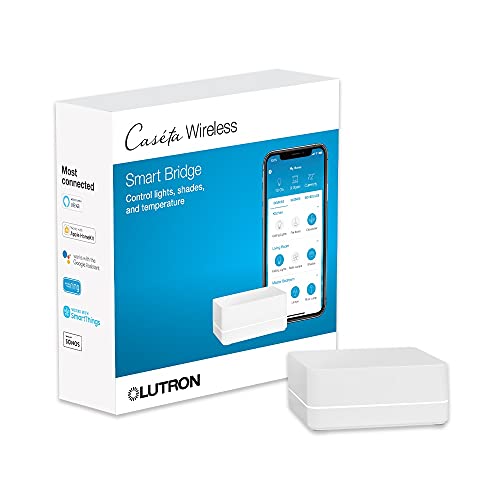
- Controls up to 75 Caseta devices
- Works with major voice platforms
- Uses Clear Connect technology
Best For: Caseta-centered lighting installations
Best Multi-Protocol Hub

- Bridges Aqara Zigbee and Thread to Matter
- Supports local automation and IR control
- Offers Wi-Fi, PoE, and encrypted storage
Best For: Aqara homes expanding into Matter and IR control
Best Sensor-Rich Pick

- Built-in temperature, humidity, and light monitoring
- Learns infrared remotes for TVs and air conditioners
- Matter, Alexa, Google Home, and Apple Home compatibility
Best For: Environmental monitoring and IR appliance control
Best Long-Range Gateway
YoLink X3 Hub Smart Home Gateway

- LoRa range reaches up to 2,034 feet
- Up to 8 hours of backup battery power
- Supports Ethernet or 2.4GHz Wi-Fi
Best For: Large properties and hard-to-reach outbuildings
Best Touchscreen Control Center

- Customizable 8-inch smart home dashboard
- Built-in Wi-Fi, Zigbee, Matter, Thread, and more
- Controls devices, cameras, routines, security, and media
Best For: Alexa households wanting a shared visual control panel
Best with Extra Features
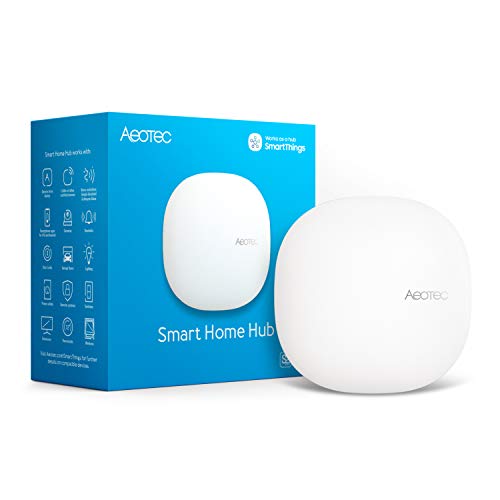
- Matter, Zigbee, and Z-Wave Plus support
- Ethernet or Wi-Fi connectivity
- SmartThings automations with Alexa and Google Home
Best For: Broadly compatible SmartThings setups
Best for Aqara Ecosystems

- Supports up to 128 Aqara Zigbee devices
- Built-in 360-degree IR control
- Works with HomeKit, Alexa, Google Assistant, and IFTTT
Best For: Aqara-centered automation and IR control
Best Budget Multi-Protocol Pick

- Zigbee 3.0 and Bluetooth Mesh support
- App and voice control through Tuya or Smart Life
- Supports up to 128 Tuya devices
Best For: Tuya/Smart Life device networks
Best Overall – Home Assistant Green
Home Assistant Green | Smart Home hub with Advanced Automation | Official Home Assistant Hardware
Check Price On AmazonHome Assistant Green is a strong starting point for shoppers comparing wireless smart home hubs, especially if you want broad automation without assembling a server first. Home Assistant OS comes preinstalled, and setup requires connecting the included power supply and Ethernet cable.
Best For: DIY-minded households seeking a flexible, privacy-focused central hub.
Pros:
- Home Assistant is preinstalled for straightforward setup.
- Runs automations and keeps home data locally on the hub.
- Supports expansion through USB devices for Zigbee, Z-Wave, and Thread.
- Compact, fanless, silent, and power efficient.
Cons:
- Ethernet connectivity is required for the initial setup.
- Z-Wave, Zigbee, and Thread support requires separate USB devices.
Choose Home Assistant Green when flexibility and local data control matter more than an all-in-one wireless radio package. Its preinstalled software makes a capable automation platform easier to begin using.
Best for Local Automation – Hubitat Elevation C-8 Pro
The Hubitat Elevation C-8 Pro is designed for buyers who want wireless smart home hubs to process routines locally. It supports Matter, Z-Wave 800 Long Range, Zigbee 3.0, and Bluetooth, while also connecting with Alexa, Google Home, and Apple HomeKit.
Best For: Experienced smart-home users building complex, responsive routines without a subscription.
Pros:
- Local processing keeps automations working when the internet is unavailable.
- Supports multiple protocols, including Matter, Z-Wave, Zigbee, and Bluetooth.
- Works with Alexa, Google Home, and Apple HomeKit.
- Offers Rule Machine and an AI-assisted routine builder.
Cons:
- Its advanced automation tools may require more learning than simpler hubs.
- External antennas and extensive features may be more than basic users need.
The C-8 Pro is a compelling choice for a growing, mixed-brand installation. Its local-first design, broad compatibility, and no-subscription platform make it particularly suitable for users who want detailed control.
Best for Lutron Lighting – Caseta Smart Hub
The Lutron Caseta Smart Hub is a focused option among wireless smart home hubs for homeowners building around Caseta lighting. It connects to a router, works with major voice and smart-home platforms, and supports up to 75 Caseta devices.
Best For: Households that primarily want reliable Caseta lighting control with popular ecosystem integrations.
Pros:
- Supports Alexa, Apple HomeKit, Google Assistant, Ring, Serena shades, and Sonos.
- Clear Connect technology avoids competing with Wi-Fi-connected devices.
- Simple router connection and app-guided setup.
- Supports expansion to up to 75 Caseta devices.
Cons:
- Caseta dimmers and switches are sold separately.
- It is primarily suited to Lutron Caseta devices rather than a broad mix of protocols.
If your priority is coordinated Lutron lighting, this hub offers a straightforward foundation with strong ecosystem support. It is less appropriate as a universal hub for unrelated smart-device standards.
Best Multi-Protocol Hub – Aqara Smart Home Hub M3
The Aqara Smart Home Hub M3 stands out among wireless smart home hubs by combining Aqara Zigbee, Thread, Matter bridging, Wi-Fi, Bluetooth, and PoE connectivity. It also adds local automation, encrypted storage, and an IR blaster for compatible traditional appliances.
Best For: Aqara users who want local routines, Matter integration, and added control for IR appliances.
Pros:
- Supports Aqara Zigbee and Thread devices with Matter bridge functionality.
- Prioritizes local control and can migrate Zigbee devices from older Aqara hubs.
- Includes a 360-degree IR blaster with feedback and learning.
- Offers dual-band Wi-Fi, PoE, USB-C power options, and encrypted local storage.
Cons:
- Its Zigbee support is specified for Aqara Zigbee devices, not third-party Zigbee devices.
- A 2A USB power adapter is not included.
- Some cloud-based notifications still require an internet connection.
The M3 is a versatile choice for an Aqara-centered home that also uses Matter ecosystems. Its IR control and wired connectivity broaden its usefulness, but buyers should check device compatibility before mixing in non-Aqara Zigbee products.
Best Sensor-Rich Pick – SwitchBot Hub 2 (2nd Gen)
For shoppers comparing wireless smart home hubs, the SwitchBot Hub 2 (2nd Gen) stands out as a compact control point with built-in temperature, humidity, and light monitoring. It also consolidates infrared remotes and works with Alexa, Google Home, and Apple Home-compatible setups through Matter.
Best For: Homes that want environmental monitoring, IR appliance control, and SwitchBot device connectivity in one hub.
Pros:
- Tracks temperature, humidity, and light remotely over 2.4GHz Wi-Fi.
- Can learn and consolidate infrared remotes for devices such as TVs and air conditioners.
- Supports scenes, geofencing, two physical buttons, and Matter-enabled SwitchBot devices.
- Works with Alexa, Google Home, and Apple Home-compatible ecosystems.
Cons:
- Wi-Fi connectivity supports 2.4GHz networks.
- Matter support is specified for SwitchBot Lock, Curtains, and Blind Tilts, with broader device support described as forthcoming.
The Hub 2 is a particularly versatile choice if sensing and infrared control matter as much as basic device integration. Its value is strongest for SwitchBot households and rooms where temperature- or humidity-based automations are useful.
Best Long-Range Gateway – YoLink X3 Hub Smart Home Gateway
Among wireless smart home hubs, the YoLink X3 is designed for devices that need coverage beyond typical residential Wi-Fi. Its LoRa-based connection reaches up to 2,034 feet under the stated conditions, while Ethernet or 2.4GHz Wi-Fi links the hub to your network.
Best For: Large properties, outbuildings, garages, sheds, patios, and other areas where standard Wi-Fi coverage is limited.
Pros:
- LoRa technology provides claimed receiving range of up to 2,034 feet.
- Supports coverage in challenging areas such as basements, garages, sheds, and outdoor spaces.
- Built-in backup battery provides up to eight hours of operation during power outages.
- Sends power-outage and offline alerts through the YoLink app.
Cons:
- Network connection is limited to 2.4GHz Wi-Fi or Ethernet.
- Its strongest advantages depend on using compatible YoLink smart home devices.
The X3 is a practical infrastructure choice rather than a touchscreen controller. Choose it when dependable long-distance communication and outage awareness are more important than broad, multi-ecosystem control.
Best Touchscreen Control Center – Amazon Echo Hub
The Amazon Echo Hub combines a wall-mountable 8-inch touchscreen with Alexa control, making it one of the more visual wireless smart home hubs. Its customizable dashboard can organize devices, cameras, routines, and security controls, while built-in support covers Wi-Fi, Bluetooth, Zigbee, Matter, Sidewalk, and Thread devices.
Best For: Alexa households that want a shared, easy-to-see control panel for smart home devices, cameras, routines, and security.
Pros:
- Customizable dashboard lets users arrange device sections and resize controls.
- Built-in hub supports Wi-Fi, Bluetooth, Zigbee, Matter, Sidewalk, and Thread devices.
- Provides on-screen control for compatible cameras, locks, alarms, sensors, routines, and media.
- Can be wall mounted and includes privacy features such as a microphone-off button.
Cons:
- Wall cable pass-throughs, a power-over-Ethernet adapter, and tabletop stands are sold separately.
- Ring camera event summaries require Alexa+ and a compatible Ring subscription sold separately.
The Echo Hub is a strong fit when the household benefits from a central visual interface instead of relying only on voice or phone control. Its broad protocol support also makes it a flexible starting point for an Alexa-centered setup.
Best with Extra Features – Aeotec Smart Home Hub
For shoppers comparing wireless smart home hubs, the Aeotec Smart Home Hub is a versatile choice built around the SmartThings app. It supports Matter, Zigbee, Z-Wave Plus on the V3 model, and Wi-Fi devices, with both Ethernet and Wi-Fi setup options.
Best For: Homes that need broad protocol support, SmartThings automations, and voice-assistant integration.
Pros:
- Supports Matter, Zigbee, Z-Wave Plus, Wi-Fi, Alexa, and Google Home.
- Works with Android, iOS, and iPadOS through the SmartThings app.
- Offers Ethernet or Wi-Fi connectivity, with many automations able to run locally.
- Can connect compatible devices for lighting, comfort, energy management, and more.
Cons:
- Z-Wave Plus support is specified for the V3 model.
- Designed for use in North America.
The Aeotec hub is a strong all-around option when compatibility and flexible connectivity matter more than a narrowly focused ecosystem.
Best for Aqara Ecosystems – Aqara Smart Hub M2
The Aqara Smart Hub M2 is a practical pick among wireless smart home hubs for households built around Aqara devices. It combines Aqara Zigbee connectivity with IR control, alarm features, Ethernet, and support for several major smart-home platforms.
Best For: Aqara users who want automation, security alerts, and IR control for compatible household electronics.
Pros:
- Can connect up to 128 Aqara Zigbee devices when required repeaters are used.
- Built-in 360-degree infrared control works with devices such as TVs, fans, and air conditioners.
- Supports Apple HomeKit, Alexa, Google Assistant, and IFTTT.
- Includes Ethernet for a more stable wired connection and a built-in speaker for alerts.
Cons:
- Requires 2.4 GHz Wi-Fi.
- Supports Aqara Zigbee child devices, not Aqara Thread devices or Zigbee devices from other brands.
- Compatibility varies by sub-device.
The M2 makes the most sense when Aqara is your primary ecosystem; its cross-platform support does not eliminate the limits on third-party Zigbee compatibility.
Best Budget Multi-Protocol Pick – Tuya Multi-Mode Gateway
This compact gateway is one of the more focused wireless smart home hubs, combining Zigbee 3.0 and Bluetooth Mesh communication in a small bridge for Tuya Smart or Smart Life devices. It supports app control, device grouping, automation triggers, and voice commands through Alexa or Google Home.
Best For: Tuya or Smart Life users who want an inexpensive Zigbee-and-Bluetooth bridge.
Pros:
- Combines Zigbee 3.0 and Bluetooth Mesh in one gateway.
- Supports remote control, group control, device setup, and automation through the app.
- Works with Alexa and Google Home voice control.
- Supports up to 128 Tuya smart home devices.
Cons:
- Supports Tuya/Smart Life devices only.
- Requires a 2.4 GHz network.
- Offers a narrower ecosystem than more broadly compatible hubs.
Its small size and dual-protocol design are appealing, but the Tuya-only restriction makes this best suited to shoppers already committed to that platform.
How We Picked These Wireless Smart Home Hubs
We selected hubs that represent the main ways people build and manage a connected home. The lineup includes local-first platforms, multi-protocol gateways, lighting-focused controllers, touchscreen control centers, and compact bridges for specific ecosystems.
Our comparison emphasizes protocol support, automation capability, compatibility, network requirements, ease of setup, and long-term flexibility. A hub may be a strong choice for one household but unnecessary for another, so the best option depends on the devices you already own and the systems you plan to add.
Quick Comparison
| Best For | Look For | Potential Trade-Off |
|---|---|---|
| Advanced local automation | Home Assistant Green or Hubitat Elevation | More setup and configuration |
| Reliable smart lighting | Lutron Caseta Smart Hub | Primarily focused on Lutron devices |
| Matter and multi-protocol control | Aqara M3 or Aeotec Smart Home Hub | Compatibility still varies by device |
| Infrared appliances and sensors | SwitchBot Hub 2 or Aqara hubs | Some features depend on cloud services |
| Alexa-centered households | Amazon Echo Hub | Best within the Alexa ecosystem |
| Long-range sensors | YoLink X3 Hub | Requires compatible YoLink devices |
Key Buying Factors for Wireless Smart Home Hubs
Protocol and Device Compatibility
Check support for Wi-Fi, Zigbee, Z-Wave, Matter, Thread, Bluetooth, or proprietary radio systems before buying. Matter can simplify cross-platform compatibility, but it does not guarantee that every advanced feature will work across every ecosystem.
Local Control and Automation
Local processing can improve response times and keep essential routines working during an internet outage. If you want detailed conditions, presence detection, schedules, or device-to-device rules, choose a platform with a capable automation engine rather than a hub designed mainly for remote control.
App and Voice-Assistant Support
Consider whether you prefer Alexa, Google Home, Apple Home, SmartThings, Home Assistant, or a dedicated manufacturer app. Voice compatibility is useful, but the quality of dashboards, notifications, scenes, and troubleshooting tools matters just as much.
Network and Installation Requirements
Some hubs require Ethernet, 2.4 GHz Wi-Fi, a cloud account, or a separate ecosystem account. Place wireless hubs away from routers, metal objects, and heavy interference, and confirm that your home has adequate coverage before adding distant sensors.
Who Should Buy Which Wireless Smart Home Hubs?
Choose Home Assistant Green or Hubitat Elevation if you want powerful automation and greater local control. Pick the Lutron Caseta hub when dependable lighting control is the priority. The Aqara M3 and Aeotec Smart Home Hub suit shoppers building around Matter and multiple wireless protocols.
SwitchBot Hub 2 is a practical fit for infrared appliances and environmental monitoring, while YoLink X3 makes more sense for long-range sensors within the YoLink system. Choose the Amazon Echo Hub for an Alexa-first home that benefits from a dedicated touchscreen. The remaining Aqara, multi-mode, and gateway options are best for buyers who already own compatible devices and want to expand that ecosystem economically.