The right smart home hub can make everyday tasks easier for elderly parents by putting lights, thermostats, cameras, locks, and alerts within simpler reach. The best choice depends on ease of use, device compatibility, reliability, and how much family support the system needs.
We compared 10 leading hubs and starter systems across those priorities, from large touchscreen controllers to flexible platforms for more advanced home automation.
Best 10 Smart Home Hubs for Elderly Parents Picks for 2026
Best Overall
Customizable Alexa Control Panel

- Customizable 8-inch smart home dashboard
- Works with thousands of compatible devices
- Supports touch, voice, routines, and security controls
Best For: Families wanting a flexible Alexa-based control panel
Best for Camera Monitoring

- Supports up to 16 cameras and 64 sensors
- Includes local 16GB storage
- Offers HDMI viewing and two-way audio
Best For: Tapo households focused on security cameras and local recording
Best Starter Bundle

- Includes hub, plug, and four smart bulbs
- Guided setup for a simple starting point
- Supports routines and many Alexa-compatible devices
Best For: Families building an Alexa smart home from scratch
Best for Visual Security Alerts
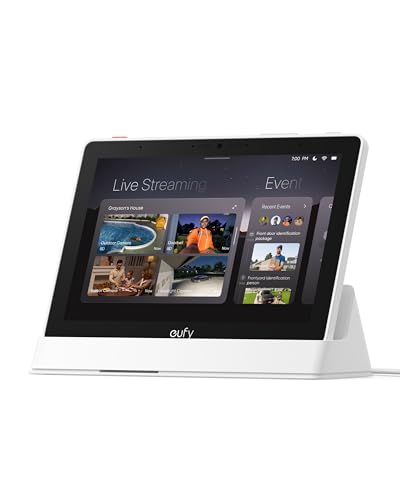
- Automatically shows compatible security events
- Displays up to four camera feeds
- Senior-friendly 8-inch touchscreen
Best For: eufy users wanting simple, visible security monitoring
Versatile Hub
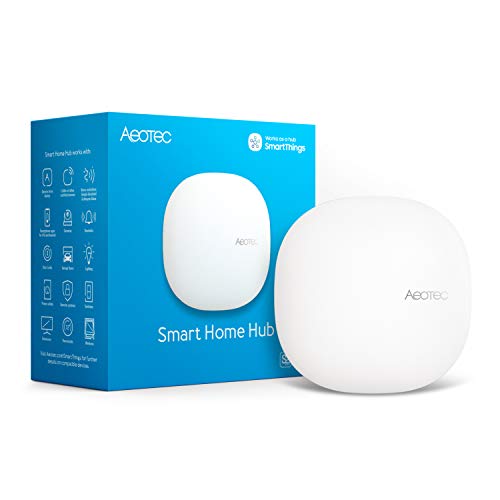
- Supports Matter, Zigbee, and Z-Wave Plus on V3
- Works with Alexa and Google Assistant
- Wi-Fi or Ethernet connectivity
Best For: Broad compatibility and customizable home routines
Aqara-Focused Pick

- Connects up to 128 Aqara devices
- Built-in alarm, doorbell, and night light
- Supports Alexa, Google Assistant, and HomeKit
Best For: Aqara-based alerts and home automation
Visual Control Center
- 8-inch touchscreen with Alexa control
- Customizable dashboard for devices and cameras
- Built-in Zigbee, Matter, Thread, and Sidewalk support
Best For: Touchscreen-based control in Alexa homes
Best Overall for Custom Automation

- Preinstalled Home Assistant OS
- Centralizes compatible smart home devices
- Local data storage and USB expansion
Best For: Families wanting flexible, locally stored smart home automation
Best for Simple Buttons and Climate Monitoring

- Includes two buttons for simple scene control
- Tracks temperature, humidity, and light
- Learns compatible infrared appliance remotes
Best For: Older adults needing accessible controls and comfort monitoring
Best for Zigbee and Z-Wave Devices
SmartThings Hub 3rd Generation

- Supports Zigbee and Z-Wave protocols
- Controls devices through one smartphone app
- Automates responses to household events
Best For: Homes with an existing compatible SmartThings device setup
Best Overall – Customizable Alexa Control Panel
The Amazon Echo Hub is a practical choice for families comparing smart home hubs for elderly parents. Its dedicated 8-inch touchscreen lets users arrange frequently used controls, view cameras, start routines, and manage compatible security devices from one dashboard.
Best For: Families wanting an easy-to-customize Alexa-based control panel for lights, cameras, locks, routines, and other compatible devices.
Pros:
- Customizable dashboard sections and resizable controls can keep important devices easy to find.
- Supports thousands of compatible devices using Wi-Fi, Bluetooth, Zigbee, Matter, Sidewalk, and Thread.
- Provides on-screen controls for media and voice control for routines and smart home commands.
- Can help household members arm or disarm compatible security systems and check connected devices remotely.
Cons:
- Wall-mounting accessories, cable pass-throughs, Ethernet power options, and tabletop stands are sold separately.
- Some Ring camera features require Alexa+ and a compatible Ring subscription, sold separately.
The Echo Hub stands out when simple access and layout customization matter most. It is especially appealing if the home already uses Alexa-compatible devices, although the broad ecosystem may require some initial setup.
Best for Camera Monitoring – Tapo H500 CentralHub
The Tapo H500 is a strong option for households prioritizing camera and sensor management among smart home hubs for elderly parents. It brings compatible Tapo cameras and sensors into one platform, with local recording, large-screen viewing, and app-based activity summaries.
Best For: Families managing a Tapo-focused security setup with multiple cameras, sensors, and local video storage.
Pros:
- Connects up to 16 Tapo cameras and 64 Tapo Sub-G sensors, with continuous recording for up to four cameras.
- Includes 16GB of built-in storage and supports an optional 2.5-inch SATA HDD or SSD up to 16TB.
- Offers HDMI viewing for up to four live views and two-way audio through compatible cameras or doorbells.
- Local storage keeps footage accessible during network outages and avoids separate microSD cards for each camera.
Cons:
- It is centered on the Tapo ecosystem rather than being a broadly compatible general-purpose hub.
- Additional storage requires a separately purchased drive.
- Facial recognition is unavailable in Illinois and Texas.
Choose the H500 when monitoring cameras and preserving footage locally are more important than controlling a wide mix of smart home brands. Its HDMI output and activity summaries can also make checking events more convenient.
Best Starter Bundle – Echo Hub Smart Home Kit
This starter kit simplifies the first step for families researching smart home hubs for elderly parents. It combines an Echo Hub with an Amazon Smart Plug and four Amazon Basics smart bulbs, so users can begin with basic lighting and plug control instead of buying each component separately.
Best For: Families setting up a straightforward Alexa smart home with included lights, a plug, and guided installation.
Pros:
- Includes the Echo Hub, one Amazon Smart Plug, and four smart bulbs in one package.
- Guided setup is designed to make getting started as simple as unboxing, plugging in, and tapping.
- The Echo Hub can bring compatible cameras, locks, thermostats, speakers, and other devices into one interface.
- Lights can be scheduled to make the home appear occupied when family members are away.
Cons:
- The included accessories are centered on Alexa-compatible devices, so broader setups may require additional purchases.
- Advanced routines and conversational requests depend on Alexa+ features.
For a first installation, this bundle offers a practical starting point with useful lighting and plug controls already included. It is less suited to shoppers who only need a standalone hub or already own a collection of smart devices.
Best for Visual Security Alerts – eufy Smart Display E10
The eufy Smart Display E10 is worth considering among smart home hubs for elderly parents when visual security alerts are a priority. Its 8-inch touchscreen can automatically show a live feed and provide a voice alert when a compatible doorbell, lock, or camera detects activity.
Best For: Households using eufy security devices that want simple on-screen alerts, multi-camera viewing, and local event access.
Pros:
- Automatically displays live video and voice alerts for supported doorbell, lock, and camera events.
- Shows up to four simultaneous live feeds for at-a-glance property monitoring.
- Downloads historical events to local storage for quick playback without waiting for buffering.
- The user-friendly 8-inch touchscreen is designed to be simple for seniors and other household members.
Cons:
- Its features are closely tied to compatible eufy security devices and HomeBase 3.
- The listed package includes a charging station, adapter, cable, and wall mount, but the display still requires a suitable placement and power setup.
The E10 is a focused choice for families that want security information to appear automatically rather than requiring someone to open an app. It makes the most sense in an existing or planned eufy security system.
Versatile Hub – Aeotec Smart Home Hub
For families comparing smart home hubs for elderly parents, the Aeotec Smart Home Hub is a flexible option for connecting lights, sensors, switches, comfort devices, and other compatible equipment. It supports Wi-Fi or Ethernet and can be managed through the SmartThings app or by voice with Alexa and Google Assistant.
Best For: Households that want broad device compatibility and customizable routines.
Pros:
- Supports Matter, Zigbee, Z-Wave Plus on the V3 model, Wi-Fi, SmartThings, Alexa, and Google Home.
- Automations can coordinate lights, sensors, switches, and other devices.
- Offers both Wi-Fi and wired Ethernet setup.
- Many automations can run locally for improved speed and reliability.
Cons:
- Requires using the SmartThings app for setup and management.
- Compatibility varies by device and protocol, so connected products should be checked before purchase.
- Designed for use in North America.
This is a strong choice when an elderly parent’s home may grow beyond a few basic devices. Its wide protocol support provides flexibility, while app and voice control can reduce the need to operate individual switches.
Aqara-Focused Pick – Aqara Hub M1S Gen 2
The Aqara Hub M1S Gen 2 suits smart home hubs for elderly parents when the home primarily uses Aqara sensors and automation devices. It connects Aqara Zigbee products, supports schedules and scenes through the Aqara Home app, and adds a built-in alarm, doorbell, RGB light, and illumination sensor.
Best For: Aqara-centered homes needing simple alerts, lighting, and automation features.
Pros:
- Can link up to 128 Aqara devices when the required Zigbee repeaters are used.
- Built-in 2-watt speaker can function as an alarm or doorbell.
- RGB light can serve as an alarm, accent light, or night light.
- Works with Apple HomeKit, Google Assistant, Alexa, and IFTTT, with platform limitations for some devices.
Cons:
- Requires a secure 2.4 GHz Wi-Fi network and does not support Wi-Fi 6.
- It supports Aqara Zigbee devices, not third-party Zigbee devices.
- Setup requires the hub and router to be on the same local network.
The M1S Gen 2 can be useful for caregivers who want Aqara-based motion, alarm, lighting, and scene automation in one system. Its narrower ecosystem makes it less suitable for a mixed-brand setup.
Visual Control Center – Like-New Amazon Echo Hub
For smart home hubs for elderly parents, the like-new Amazon Echo Hub offers a dedicated 8-inch screen for tapping controls or asking Alexa. Its customizable dashboard can show device controls, routines, and camera feeds, while the built-in hub supports compatible Wi-Fi, Bluetooth, Zigbee, Matter, Sidewalk, and Thread devices.
Best For: Users who prefer a visible touchscreen for controlling Alexa-compatible devices.
Pros:
- Provides an 8-inch control panel for lights, smart plugs, cameras, and routines.
- Works with thousands of compatible locks, thermostats, speakers, and other devices.
- Includes built-in support for Zigbee, Matter, Sidewalk, and Thread devices.
- Can arm and disarm compatible security systems and includes a microphone-off button.
Cons:
- Wall mounting may require separately sold installation accessories, including cable pass-throughs or a power-over-Ethernet adapter.
- A tabletop stand is sold separately.
- This is a like-new refurbished device, so packaging may be generic Amazon-branded.
The Echo Hub stands out when a large, centralized display is more approachable than relying only on a phone app. Its Alexa focus and broad compatible-device support make it especially practical for homes already using Alexa.
Best Overall for Custom Automation – Home Assistant Green
Home Assistant Green | Smart Home hub with Advanced Automation | Official Home Assistant Hardware
Check Price On AmazonHome Assistant Green is a powerful choice for families seeking smart home hubs for elderly parents, especially when a relative can handle initial setup. Home Assistant OS comes preinstalled, and the compact, fanless hub brings compatible devices into one system while keeping home data stored locally.
Best For: Families wanting broad automation and centralized control with local data storage.
Pros:
- Preinstalled Home Assistant OS makes setup largely plug-and-play.
- Supports whole-home control and advanced automations.
- Includes 4GB RAM, 32GB storage, Ethernet, Bluetooth, and USB expansion.
- Silent, compact, and power efficient.
Cons:
- Ethernet connectivity is required for the initial connection.
- Z-Wave, Zigbee, and Thread support requires compatible USB accessories.
- Its advanced automation options may need family assistance to configure.
Choose Home Assistant Green when flexibility and long-term automation matter more than the simplest standalone appliance experience. It is particularly suitable when someone can set up routines that reduce daily app and device juggling.
Best for Simple Buttons and Climate Monitoring – SwitchBot Hub 2 (2nd Gen)
SwitchBot Hub 2 is a practical option for smart home hubs for elderly parents because it combines temperature, humidity, and light monitoring with remote control for infrared appliances. Its two physical buttons can trigger scenes without requiring a smartphone or voice command.
Best For: Older adults who benefit from simple controls for appliances, comfort settings, and routines.
Pros:
- Two touch buttons provide straightforward control for appliances or scenes.
- Monitors temperature, humidity, and light remotely.
- Can consolidate compatible infrared remotes for TVs, air conditioners, and more.
- Works with Alexa, Google Home, and Apple Home through supported integrations.
Cons:
- Wi-Fi support is limited to 2.4GHz.
- Its listed maximum supported-device count is six.
- Matter support is specified for SwitchBot Lock, Curtains, and Blind Tilts rather than every device.
Hub 2 is appealing when ease of everyday use is the priority. The physical buttons and visible environmental readings can make common routines more accessible, while a caregiver can manage scenes and remote monitoring through the app.
Best for Zigbee and Z-Wave Devices – SmartThings Hub 3rd Generation
The SmartThings Hub 3rd Generation is worth considering for smart home hubs for elderly parents when the household includes compatible Zigbee, Z-Wave, or cloud-connected products. It brings monitoring and control into one smartphone app and supports automations based on events such as doors opening or people arriving.
Best For: Homes already using compatible Zigbee, Z-Wave, or SmartThings-connected devices.
Pros:
- Supports Zigbee, Z-Wave, and cloud-to-cloud protocols.
- Provides centralized control through a smartphone app.
- Can automate devices based on doors opening and people coming or going.
- Compatible with Alexa and Google Home.
Cons:
- Smartphone app use is central to monitoring and control.
- Compatibility depends on the specific connected products.
- The supplied details do not indicate built-in temperature or humidity monitoring.
This hub makes the most sense as a central controller for an existing compatible-device ecosystem. It can help simplify routines, but a family member may need to configure automations and confirm device compatibility before installation.
How We Picked These Smart Home Hubs for Elderly Parents
We focused on practical benefits rather than feature counts alone. Each option was considered for setup complexity, interface clarity, compatibility with common smart-home standards, remote access, automation potential, and usefulness for family caregivers. We also included different approaches: touchscreen hubs, security-oriented displays, starter kits, and expandable platforms.
For an older adult, a hub should reduce the number of apps, remotes, and confusing routines required to manage the home. For family members, dependable alerts and remote control can matter just as much as voice commands or a polished display.
Quick Comparison
| Best For | Look For | Notable Options |
|---|---|---|
| Simple visual control | Large screen, clear controls, voice assistance | Amazon Echo Hub, eufy Smart Display E10 |
| Easy starter setup | Included bulbs or plugs and fewer configuration steps | Echo Hub Smart Home Starter Kit |
| Broad device compatibility | Support for Matter, Zigbee, Z-Wave, or major assistants | Aeotec Smart Home Hub, SmartThings Hub |
| Security and monitoring | Camera integration, alerts, and local control options | Tapo CentralHub, Aqara Hub M1S Gen 2 |
| Advanced automation | Flexible routines, sensors, and customization | Home Assistant Green |
| Bridging existing remotes | Infrared control and appliance integration | SwitchBot Hub 2 |
Key Buying Factors for Smart Home Hubs for Elderly Parents
Ease of Use
Prioritize a clear interface, large readable labels, simple voice commands, and dependable routines. A touchscreen can be useful when parents prefer visual confirmation, while voice control helps anyone with limited mobility or dexterity.
Compatibility and Expansion
Check whether the hub works with the devices already installed. Matter improves cross-platform compatibility, while Zigbee and Z-Wave can expand sensor and switch choices. Avoid buying a hub that requires replacing every existing device unless starting from scratch.
Caregiver Access and Reliability
Look for secure remote access, useful notifications, and a system that continues working when possible during internet interruptions. Confirm whether important features require a subscription and whether multiple household members can manage the setup.
Privacy and Maintenance
Review camera, microphone, and cloud-storage policies before installation. Choose products with automatic updates, straightforward account recovery, and enough local control to avoid unnecessary maintenance.
Who Should Buy Which Smart Home Hubs for Elderly Parents?
Choose an Echo Hub or the bundled starter kit when familiar Alexa control and a straightforward visual dashboard are the priorities. The eufy display is worth considering for households that want a dedicated screen alongside security devices.
Select Aeotec or SmartThings when compatibility with a varied collection of sensors, switches, and appliances matters most. Aqara and Tapo are strong candidates for security-focused setups, particularly when their supported cameras and sensors fit the home.
Home Assistant Green is best for a technically confident family member who will configure and maintain advanced automations. SwitchBot Hub 2 suits homes with infrared appliances or existing SwitchBot devices. A like-new Echo Hub can reduce cost, but verify condition, warranty coverage, returns, and account-reset status before purchase.