Adding more screens can improve productivity, simplify presentations, or make a home entertainment setup easier to manage—but the right hardware depends on whether you need mirrored output or a genuinely extended desktop.
This roundup compares 10 HDMI splitters and multi-monitor adapters, including straightforward HDMI distribution boxes, DisplayPort MST hubs, and USB-C docking solutions. Check your source device, desired resolution, refresh rate, and operating-system support before choosing.
Best 10 Hdmi Splitters for Multiple Displays Picks for 2026
Best for DP-Based Triple-Monitor Setups
DisplayPort MST Hub for 3 Monitors

- Connects one DP source to two DP monitors and one HDMI display
- Supports mirrored or extended output on compatible Windows systems
- Up to 4K60Hz output with required hardware and cables
Best For: DP-equipped Windows desktops needing three displays
Best Simple 4K Mirror Splitter
avedio links 1x2 HDMI Splitter

- Mirrors one HDMI source to two displays
- Supports 4K30Hz and common lower resolutions
- Includes a 4-foot HDMI cable and USB power cable
Best For: Two-screen mirrored home theater or presentation setups
Best USB-C Triple-Display Dock

- Connects two HDMI and one DisplayPort monitor
- Supports up to three displays with compatible DP1.4 systems
- Adds USB 3.0 and up to 100W PD input
Best For: USB-C laptops needing displays, peripherals, and charging
Best for Four Extended Screens
WAVLINK Quad HDMI DisplayLink Adapter
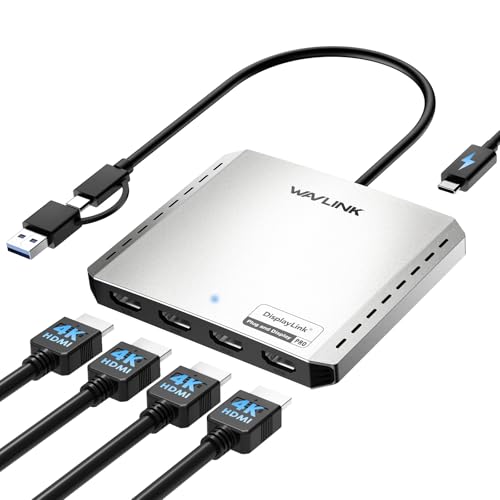
- Four HDMI outputs up to 4K@60Hz
- USB-C and USB-A connectivity
- Supports up to 85W laptop charging
Best For: Four-screen productivity setups on compatible Mac, Windows, or ChromeOS systems
Best for Mirrored Triple Displays

- Mirrors one source to three displays
- Supports 4K@30Hz and 1080p@60Hz
- No drivers or software required
Best For: Synchronized presentations, entertainment, and commercial displays
Best for Dual Extended Monitors

- Two HDMI outputs for mirrored or extended viewing
- USB-C and USB-A connection options
- Supports up to 4K@30Hz
Best For: Laptop users creating a dual-external-monitor productivity setup
Best Powered 4K Distributor

- Mirrors one HDMI source to four displays
- Supports 4K@30Hz, 3D, and HDCP 1.4
- AC-powered metal housing for stable operation
Best For: Four-screen mirrored installations
Best for Extended PC Displays

- Connects three HDMI monitors from DP 1.4
- Supports extended and mirrored modes
- Up to 4K@60Hz with compatible hardware
Best For: Windows PC multitasking with three monitors
Best for DP-Based Triple-Monitor Setups – DisplayPort MST Hub for 3 Monitors
If you are comparing HDMI splitters for multiple displays but your computer uses DisplayPort, this MST hub can connect one DP source to two DP monitors and one HDMI monitor. It supports mirrored or extended output, though compatibility checks are essential before buying.
Best For: Windows desktop users with a DP 1.2-or-newer graphics card who need up to three connected displays.
Pros:
- Supports one DP input to two DP outputs plus one HDMI output.
- Can mirror content or extend across separate screens on supported systems.
- Supports up to 4K at 60Hz with three connected monitors under stated conditions.
- Includes power and carries a 24-month warranty.
Cons:
- Does not support laptops as the signal source or use with docking stations, hubs, or KVMs.
- macOS supports mirroring only, not MST extended displays.
- DP cables are not included, and the computer must meet specific DP and cable requirements.
This is a specialized choice rather than a conventional HDMI splitter. Confirm your graphics card, operating system, cables, and monitor inputs before ordering, and connect the included Micro USB power cable for reliable operation.
Best Simple 4K Mirror Splitter – avedio links 1×2 HDMI Splitter
For straightforward HDMI sharing, this compact 1-in-2-out unit duplicates one source to two displays. It is a practical option among HDMI splitters for multiple displays when both screens need to show the same content, not separate desktop views.
Best For: Home theaters, presentations, gaming, or signage setups that need one HDMI source mirrored on two screens.
Pros:
- Mirrors one HDMI input to two displays simultaneously.
- Supports 4K at 30Hz and is backward compatible with common HD resolutions.
- Includes a 4-foot HDMI cable and USB power cable.
- Plug-and-play design requires no drivers.
Cons:
- Cannot extend the desktop or show different content on each monitor.
- Requires a 5V, 1A power adapter, which is not included.
- Does not support HDCP 2.2, switching, or audio extraction.
This splitter is best when identical output is the goal. For 4K use, follow the recommended cable-length guidance, and plan to supply your own compatible USB power adapter.
Best USB-C Triple-Display Dock – 5-in-1 HDMI and DP Adapter
This USB-C docking station combines dual HDMI, DisplayPort, USB 3.0, and USB-C power delivery in one compact adapter. It suits laptop users seeking HDMI splitters for multiple displays, provided the host USB-C port supports DisplayPort Alt Mode and the required DP version.
Best For: Compatible Windows laptops and desktops that need up to three external monitors plus charging and a USB data port.
Pros:
- Provides two HDMI outputs and one DisplayPort output for up to three displays.
- Supports extended MST mode on compatible Windows systems and mirrored SST mode.
- Offers up to 100W PD input, with charging output limited to 87W.
- Adds a USB 3.0 port and uses a compact aluminum housing.
Cons:
- Triple-monitor output requires USB-C video support and DisplayPort 1.4; older DP 1.2 devices support up to two displays.
- macOS is limited to mirrored SST output according to the supplied notes.
- Power adapter is not included.
This is more versatile than a basic HDMI-only splitter, but its performance depends heavily on the host computer, cables, and monitors. Verify USB-C video capability and DP 1.4 support before expecting three independent 4K displays.
Best for Four-Screen HDMI Mirroring – 4K 1×4 Powered Splitter
This powered 1-in-4 HDMI splitter sends the same video and audio to four displays, making it useful for multi-room viewing, presentations, and signage. Among HDMI splitters for multiple displays, it stands out for long-distance transmission and support for 1080p at 120Hz.
Best For: Home theaters, conferences, exhibitions, and other setups that need one HDMI source mirrored across four screens.
Pros:
- Duplicates one HDMI source to four displays simultaneously.
- Supports 4K at 30Hz, 3D, and 1080p at 120Hz.
- Supports up to 100 feet of transmission using the stated cable arrangement.
- Includes a UL-certified 5V power adapter and metal housing.
Cons:
- Mirror-only operation does not provide independent extended desktops.
- 4K transmission is limited to 30Hz.
- Uses HDMI 1.4 and HDCP 1.4 compatibility, so newer protected-content requirements may not be supported.
Choose this model when reliable four-way duplication matters more than separate screen content or high-refresh 4K. Its included power supply and long-distance specifications make it a practical fit for larger installations.
Best for Four Extended Screens – WAVLINK Quad HDMI DisplayLink Adapter
For shoppers seeking HDMI splitters for multiple displays, the WAVLINK Quad HDMI adapter is built for four-screen extended desktop setups. It supports up to four 4K@60Hz HDMI outputs from compatible USB-C, Thunderbolt, USB4, or USB-A 3.0 ports, though DisplayLink drivers are required.
Best For: Productivity users who need four extended monitors from a compatible Mac, Windows PC, or ChromeOS device.
Pros:
- Provides four simultaneous HDMI outputs at up to 4K@60Hz.
- Hybrid USB-C and USB-A connection supports a broad range of compatible computers.
- Offers up to 85W upstream USB-C power delivery for compatible laptops.
- Supports extended or mirrored screen configurations.
Cons:
- DisplayLink driver installation is required.
- Not recommended for gaming, graphics-intensive work, or design applications.
- Does not support HDCP-protected streaming content such as Netflix and Hulu.
This is a strong productivity-focused choice when four independent displays matter more than gaming performance. Confirm operating-system support, available ports, and driver-installation permissions before buying.
Best for Mirrored Triple Displays – Closs 1×3 HDMI Splitter
If you need HDMI splitters for multiple displays showing the same content, this Closs 1-in-3 model distributes one HDMI source to three screens simultaneously. It supports up to 4K@30Hz, requires USB-C power during use, and works without drivers or software.
Best For: Home entertainment, office presentations, and commercial setups that need synchronized content on three displays.
Pros:
- Duplicates one HDMI input across three HDMI outputs.
- Supports 4K@30Hz, 1080p@60Hz, 3D, and 36-bit deep color.
- Aluminum housing is designed for heat dissipation and interference shielding.
- Independent LED indicators make output-status checks straightforward.
Cons:
- It mirrors the source rather than creating independent extended desktops.
- USB-C power must remain connected during use.
- The USB-C power adapter is not included.
This compact splitter is a practical plug-and-play option for synchronized screens. Its 4K limit is 30Hz, so buyers seeking higher refresh rates or separate desktop spaces should consider a different type of adapter.
Best for Dual Extended Monitors – OREI USB-C Dual HDMI Adapter
Among HDMI splitters for multiple displays, the OREI Dual HDMI adapter is aimed at users who want two external screens with either mirrored or extended viewing. It connects through USB-C or USB-A, supports up to 4K@30Hz, and requires Silicon Motion drivers.
Best For: Windows, Mac, ChromeOS, or compatible Android users building a laptop-plus-two-monitor productivity workstation.
Pros:
- Supports two external HDMI displays in mirrored or extended mode.
- Can create a three-screen setup when combined with a laptop display.
- Integrated USB-A to USB-C flexibility supports several connection types.
- Works with a range of Windows, macOS, ChromeOS, and Android versions.
Cons:
- Silicon Motion driver installation is required; it is not plug-and-play.
- An Intel i5 processor or higher is recommended for optimal performance.
- It is not compatible with iOS, Linux, or Unix.
The OREI is a sensible middle ground for dual-monitor productivity when your computer meets the processor and operating-system requirements. Check workplace IT policies before purchasing if driver installation is restricted.
Best Powered 4K Distributor – MT-ViKI 1×4 HDMI Splitter
If you need HDMI splitters for multiple displays in a conference room, classroom, retail setting, or home theater, the MT-ViKI sends one HDMI source to four screens simultaneously. It supports up to 4K at 30Hz and uses a dedicated AC adapter for stable transmission.
Best For: Mirroring one source across four TVs, monitors, or projectors, especially where reliable powered operation and longer cable runs matter.
Pros:
- Distributes one HDMI input to four identical outputs.
- Supports 4K@30Hz, 1080p@60Hz, 3D, and HDCP 1.4.
- Powered metal design helps support stable operation and up to 100 feet of total transmission distance.
Cons:
- Supports mirror mode only; it cannot extend the desktop across displays.
- Limited to 4K at 30Hz rather than 4K at 60Hz.
- Does not include audio extraction or a remote control.
The MT-ViKI is a practical choice when all connected screens need to show the same content. Its four outputs, AC power supply, durable housing, and cascade support make it better suited to fixed installations than portable setups.
Best for Extended PC Displays – DisplayPort to 3 HDMI MST Hub
Unlike conventional HDMI splitters for multiple displays, this adapter uses a DisplayPort 1.4 source to connect up to three HDMI monitors. On compatible Windows systems with MST support, it can provide independent extended displays as well as mirrored output, with support for up to 4K at 60Hz under the stated configuration.
Best For: Windows desktop users with a native DisplayPort 1.4 connection who want three HDMI monitors for multitasking.
Pros:
- Connects up to three HDMI displays from one DisplayPort 1.4 source.
- Supports extended or mirrored modes on compatible Windows systems.
- Offers up to 4K@60Hz and includes a built-in cable plus USB-C power cable.
Cons:
- Requires a native DP 1.4 source and external USB power; the power adapter is not included.
- It is one-way only and cannot work in reverse.
- Not compatible with KVM switches, docking stations, hubs, or other port converters.
This is the most suitable option here for genuine multi-monitor productivity because it supports independent extended displays. Compatibility is more demanding, so verify the graphics card, operating system, monitors, cables, and available power before buying.
Best Complete 3-Screen Kit – NEWCARE 1×3 HDMI Splitter
The NEWCARE is a straightforward option for HDMI splitters for multiple displays when you need to mirror one source to three screens. It includes a 4-foot HDMI cable and power adapter, supports 4K at 30Hz, and requires no drivers for setup.
Best For: Home entertainment, office presentations, or retail displays that need the same video on three TVs, monitors, or projectors.
Pros:
- Mirrors one HDMI input to three displays simultaneously.
- Includes a 4-foot HDMI 2.0 cable, 5V/1A adapter, and manual.
- Supports 4K@30Hz, 1080p@60Hz, 3D, and Dolby TrueHD/DTS-HD audio.
Cons:
- Does not support extended displays.
- Does not extract audio to external devices and is not compatible with ARC/eARC.
- Supports 4K at 30Hz rather than 4K at 60Hz.
The NEWCARE offers a convenient out-of-the-box setup for three-screen mirroring. Its included cable and adapter make it approachable for basic installations, but users needing independent desktop extensions or external audio extraction should choose a different type of adapter.
How We Picked These Hdmi Splitters for Multiple Displays
We selected products across the main multi-display categories: basic HDMI distribution, DisplayPort MST hubs, USB-C docks, and DisplayLink adapters. We compared advertised resolution and refresh-rate support, output count, connection type, power requirements, cable or adapter inclusion, and whether each device mirrors one source or can create extended desktops.
That distinction matters. A conventional HDMI splitter usually sends the same image to every output. It does not normally create independent Windows or macOS desktops. Extended display setups require compatible MST hardware, a USB-C video-capable port, or DisplayLink software and drivers.
Quick Comparison
| Setup type | Best suited for | What to verify |
|---|---|---|
| HDMI 1-in/2-out or 1-in/3-out | Mirrored presentations and TVs | Resolution, HDCP, power, and cable length |
| HDMI 1-in/4-out | Distributing one source to several screens | Identical-output behavior and bandwidth limits |
| DisplayPort MST hub | Extended desktops from compatible PCs | GPU, DisplayPort version, MST support, and adapters |
| USB-C or DisplayLink dock | Laptops needing multiple independent displays | USB-C video support, drivers, OS compatibility, and bandwidth |
Key Buying Factors for Hdmi Splitters for Multiple Displays
Mirroring Versus Extended Displays
Choose a standard HDMI splitter when every screen should show the same content—for example, a presentation, security feed, or video source. For separate windows on each monitor, look for MST or DisplayLink capability rather than relying on the word “splitter” alone.
Resolution and Refresh Rate
Confirm the maximum output for the number of connected screens. A product advertised as 4K may support 4K at 30Hz, while 4K at 60Hz requires more bandwidth and compatible source, cables, and displays. Gaming users should also check support for their target refresh rate, HDR, HDCP, and adaptive-sync features.
Source and Operating-System Compatibility
HDMI, DisplayPort, and USB-C are not interchangeable in every situation. USB-C must support DisplayPort Alt Mode for many video docks, while DisplayLink products may require software. Macs, Windows laptops, graphics cards, and Chromebooks can have different limits on external monitors, so verify the manufacturer’s compatibility list.
Power, Distance, and Accessories
Powered splitters are generally more reliable when driving several displays or long HDMI cables. For runs approaching 100 feet, check the specified cable type and signal distance rather than assuming any HDMI lead will work. Included power adapters and cables can also reduce setup cost.
Who Should Buy Which Hdmi Splitters for Multiple Displays?
For presentations or one source on several TVs: choose a powered HDMI 1-in/2-out, 1-in/3-out, or 1-in/4-out splitter.
For a desktop with separate monitors: choose a DisplayPort MST hub, provided the computer and graphics hardware support MST and the required outputs.
For a USB-C laptop: choose a multiport USB-C dock after confirming DisplayPort Alt Mode, charging needs, monitor count, and operating-system support.
For a Mac or a system with limited native display support: consider a DisplayLink-based adapter, but account for driver installation, software permissions, and potential performance limits.