A dependable HDMI splitter can send one presentation, video call, or signage source to multiple conference-room displays without repeatedly swapping cables. The right model depends on screen count, resolution, distance, and whether your system needs only mirroring or more advanced control.
We compared ten options across output capacity, 4K support, bandwidth, power requirements, EDID and HDCP compatibility, and installation convenience to help you choose a stable fit for your room.
Best 10 Hdmi Splitters for Conference Rooms Picks for 2026
High-Capacity Distribution

- Mirrors one source to eight displays
- Supports 4K@30Hz and 100-foot total runs
- Powered, plug-and-play installation
Best For: Large rooms needing eight synchronized screens
High-Refresh 4K Choice
OREI UltraHD 1x4 HDMI Splitter

- Delivers 4K@60Hz with 18Gbps bandwidth
- Includes HDR and EDID control
- Supports advanced surround-sound formats
Best For: Four-screen rooms prioritizing smooth 4K playback
Durable Room Installation
MT-ViKI 1x4 Metal HDMI Splitter

- Mirrors one HDMI source to four displays
- Metal housing supports continuous use
- Reaches up to 100 feet total and can cascade
Best For: Fixed four-screen commercial installations
Color-Accurate 4K Distribution
KanexPro UltraSlim 1x4 HDMI Splitter

- Supports 4K@60Hz with 18Gbps bandwidth
- Adds 4:4:4 color, HDR10, and HDCP 2.2
- Includes automatic resolution matching and EDID
Best For: Modern 4K presentation systems with shorter cable runs
Best for Multi-Display Routing

- Routes four HDMI sources to four displays
- Supports 4K at 30Hz and multiple control methods
- Rack-mountable with OUT4 audio extraction
Best For: Conference rooms needing flexible multi-source, multi-display control
Best for Four Extended Screens
WAVLINK Quad HDMI DisplayLink Adapter
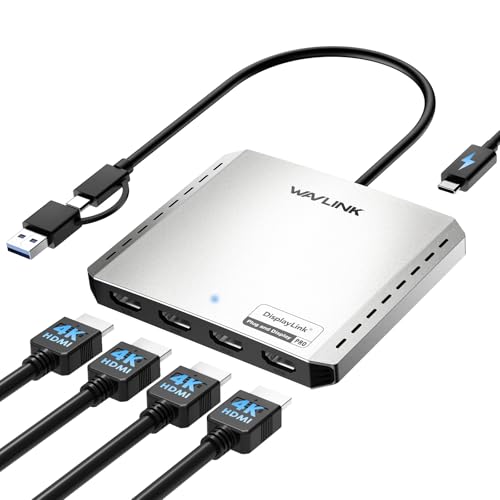
- Adds four 4K at 60Hz displays from one computer
- Supports USB-C, USB-A, Thunderbolt, and USB 3.0
- Includes up to 85W power delivery
Best For: Laptop-based rooms needing four extended productivity displays
Best Simple Mirror Splitter
avedio links 1x2 HDMI Splitter

- Mirrors one HDMI source to two displays
- Supports up to 4K at 30Hz
- Includes a 4-foot HDMI cable and needs no drivers
Best For: Small rooms showing identical content on two displays
Compact 4K Meeting-Duplicate Pick

- Mirrors one HDMI source to two displays
- Supports 4K@60Hz and 18Gbps bandwidth
- Includes broad audio support and a 1-year warranty
Best For: Small conference rooms and two-display presentations
Large-Display Classroom Choice
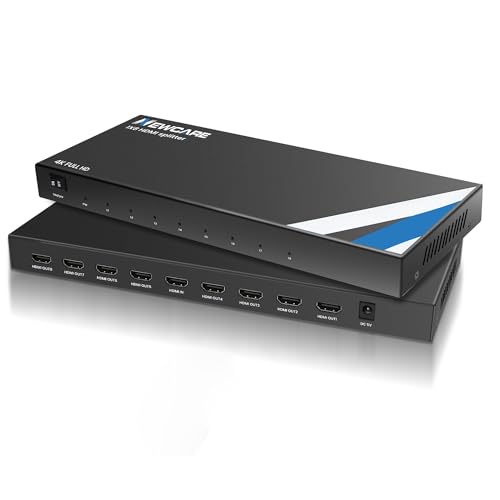
- Mirrors one source across eight displays
- Supports 4K@30Hz and 1080p@60Hz
- Metal housing and auto EDID aid stable setup
Best For: Large conference rooms, classrooms, and exhibition displays
High-Refresh 4K Presentation Pick

- Mirrors one source to four displays
- Supports 4K@60Hz, HDR10, and 18Gbps
- Uses USB-C power in a compact aluminum case
Best For: Four-screen conference presentations and digital signage
High-Capacity Distribution – MT-ViKI 1×8 HDMI Splitter
For conference rooms that need to mirror one presentation across many screens, this powered splitter distributes a single HDMI source to eight displays. It supports up to 4K at 30Hz and is designed for longer cable runs, making it a practical option among HDMI splitters for conference rooms.
Best For: Large conference rooms, classrooms, churches, retail displays, and other installations requiring eight mirrored screens.
Pros:
- Distributes one HDMI input to eight displays simultaneously.
- Supports 4K at 30Hz, 1080p, 3D video, and deep color.
- Supports up to 50 feet of input cable plus 50 feet of output cable per display.
- Plug-and-play setup requires no software or drivers.
Cons:
- Supports mirror mode only, not extended desktop mode.
- Maximum listed 4K refresh rate is 30Hz.
This is a strong fit when screen count and cable reach matter more than higher-refresh-rate 4K. Its included power adapter helps maintain stable operation across a larger multi-display setup.
High-Refresh 4K Choice – OREI UltraHD 1×4 HDMI Splitter
The OREI UltraHD is a compact four-output distributor for teams that want sharper, smoother 4K presentation playback. With 4K at 60Hz, 18Gbps bandwidth, HDR, and EDID control, it is a well-equipped choice among HDMI splitters for conference rooms.
Best For: Conference rooms, offices, gaming-focused presentations, and home theater setups using up to four identical displays.
Pros:
- Supports 4K at 60Hz, HDR, and 18Gbps HDMI 2.0 bandwidth.
- EDID control helps manage resolution compatibility between source and displays.
- Supports Dolby TrueHD, DTS-HD Master Audio, and LPCM 7.1-channel audio.
- Metal housing supports heat dissipation, with plug-and-play setup.
Cons:
- Duplicates one source to four identical displays rather than extending the desktop.
- Requires the included AC power adapter.
Choose this model when 4K at 60Hz and broad audio support are priorities. Its EDID switch can be especially useful when connected displays do not share identical resolution capabilities.
Durable Room Installation – MT-ViKI 1×4 Metal HDMI Splitter
This four-output MT-ViKI splitter is built for straightforward, always-on mirroring in conference rooms and commercial spaces. Its powered design, metal housing, and signal amplifier support stable distribution to four displays, making it a practical selection among HDMI splitters for conference rooms.
Best For: Conference rooms, schools, retail environments, and other installations needing durable four-screen mirroring.
Pros:
- Splits one HDMI source to four identical displays.
- Metal case provides heat dissipation and EMI protection.
- Supports 4K at 30Hz, 1080p at 60Hz, 3D video, and HDCP 1.4.
- Powered amplifier supports up to 100 feet of total transmission and cascading.
Cons:
- Supports mirror mode only and cannot extend a desktop.
- Does not include a remote and is not an HDMI switch.
- 4K output is limited to 30Hz.
This model makes sense for a fixed installation where durability and reliable signal distribution matter. Consider it for synchronized displays rather than interactive or independently controlled screens.
Color-Accurate 4K Distribution – KanexPro UltraSlim 1×4 HDMI Splitter
The KanexPro UltraSlim targets presentation systems that need 4K at 60Hz, rich color, and modern content protection. Its 18Gbps bandwidth, YUV 4:4:4 support, HDR10, and EDID features make it a capable option among HDMI splitters for conference rooms.
Best For: Conference rooms, lecture halls, and house-of-worship spaces using two or more mirrored 4K displays.
Pros:
- Supports 4K at 60Hz and 1080p at 60Hz.
- Provides 18Gbps bandwidth, YUV 4:4:4 color, and HDR10 support.
- HDCP 2.2 compliance suits newer 4K sources and displays.
- Automatically identifies input resolution and supports EDID.
Cons:
- 4K transmission distance is listed at up to 32 feet.
- Designed for mirrored distribution, not extended displays.
- The supplied notes do not specify a power adapter or detailed audio-format support.
This is a good fit for presentation environments where color detail and smooth 4K playback are more important than long cable runs. Its slim design may also suit installations with limited equipment space.
Best for Multi-Display Routing – MT-VIKI 4×4 HDMI Matrix
For conference rooms that need flexible source management, the MT-VIKI 4×4 is a powerful alternative to a basic HDMI splitter. It can route four HDMI sources to four displays independently or mirror the same content across screens, with control through the front panel, remote, web GUI, RS232, or LAN.
Best For: Conference rooms, churches, retail spaces, and other installations that need multiple sources and displays.
Pros:
- Routes any of four HDMI inputs to any of four outputs independently or simultaneously.
- Supports resolutions up to 4K at 30Hz, plus 1080p, 3D video, and deep color.
- Offers rack mounting and several control methods, including web GUI, LAN, RS232, and remote.
- Provides 3.5mm stereo audio extraction through OUT4.
Cons:
- Audio extraction is available only through OUT4.
- Supports 4K at 30Hz rather than 4K at 60Hz.
- Source switching may take approximately 2–3 seconds.
This is the most capable option here for a professionally installed conference-room system with several sources and displays. Its rack-ready design and flexible routing are useful for larger setups, but a simple two-screen presentation system may not need all of its controls.
Best for Four Extended Screens – WAVLINK Quad HDMI DisplayLink Adapter
The WAVLINK quad HDMI adapter suits conference rooms where one compatible computer needs to drive four separate displays. Unlike a mirror-only splitter, it can add four extended 4K screens through USB, though it requires DisplayLink software and is intended primarily for web and productivity work.
Best For: Laptop-based conference rooms, productivity workstations, and presentations requiring four extended displays.
Pros:
- Outputs four simultaneous 4K displays at up to 60Hz.
- Supports USB-C, USB-A, Thunderbolt 3/4, USB4, and USB 3.0 connections through its hybrid cable.
- Provides up to 85W USB-C power delivery for compatible laptops.
- Works with supported Windows, macOS, and ChromeOS systems.
Cons:
- DisplayLink driver installation is required.
- Does not support iOS, Linux, or Unix systems.
- Not recommended for gaming, graphics-intensive work, or HDCP-protected services such as Netflix and Hulu.
Choose this model when the goal is to extend one computer across four monitors rather than route several independent HDMI sources. Its 4K/60Hz output and laptop charging support are valuable in modern conference rooms, but compatibility and driver requirements should be checked before deployment.
Best Simple Mirror Splitter – avedio links 1×2 HDMI Splitter
For straightforward conference-room duplication, this avedio links HDMI splitter sends one source to two displays at the same time. It is a compact, plug-and-play choice for showing the same presentation on a room display and a confidence monitor, provided you do not need separate screen content.
Best For: Small conference rooms that need one HDMI source mirrored on two TVs, monitors, or projectors.
Pros:
- Duplicates one HDMI signal to two displays simultaneously.
- Supports up to 4K at 30Hz and is backward compatible with lower resolutions.
- Includes a 4-foot HDMI cable and requires no drivers.
- Compact design is easy to place behind conference-room equipment.
Cons:
- Only mirrors the same content and cannot extend separate screens.
- It is not an HDMI switcher or audio extractor.
- USB power is required, but the power adapter is not included.
- 4K cable runs are advised to stay at 16 feet or less.
This is the simplest and most budget-friendly fit when both displays should show identical content. It is less suitable for larger AV systems or presentations requiring independent sources, but its no-driver setup keeps basic room installations uncomplicated.
Compact 4K Meeting-Duplicate Pick – OREI 1×2 HDMI Splitter
For smaller conference rooms that need the same presentation on two displays, this OREI splitter is a straightforward choice among HDMI splitters for conference rooms. It supports 4K at 60Hz with 18Gbps bandwidth and is designed for mirroring, not extending, a desktop across separate screens.
Best For: Conference rooms, lecture halls, trade shows, and other setups with one HDMI source and two displays.
Pros:
- Duplicates one HDMI input to two displays.
- Supports 4K@60Hz, 18Gbps, 4:4:4 8-bit, and HDCP 2.3/DVI 1.0 compliance.
- Supports a broad range of stereo and multichannel audio formats.
- Includes a 1-year warranty and international power adapter/converter.
Cons:
- Does not create an extended or dual-screen desktop.
- HDMI cables longer than 30 feet may not work.
- It is limited to two outputs.
The UHDS-102 is a practical fit when a room needs reliable two-screen duplication without extra configuration. Confirm cable length and remember that both displays will show the same image.
Large-Display Classroom Choice – NEWCARE 1×8 HDMI Splitter
When a presentation needs to appear on many screens at once, the NEWCARE 1×8 is a practical option among HDMI splitters for conference rooms. It mirrors one HDMI source to eight displays and supports up to 4K@30Hz, making it suitable for larger rooms, classrooms, exhibitions, and signage.
Best For: Conference rooms, classrooms, exhibitions, shopping areas, and venues requiring one source on up to eight screens.
Pros:
- Distributes one HDMI input to eight identical outputs.
- Supports 4K@30Hz, 2K@30Hz, and 1080p@60Hz.
- Handles 12-bit Deep Color and several multichannel audio formats.
- Metal housing supports heat dissipation, and auto EDID helps simplify connections.
Cons:
- Mirroring only; it cannot extend the desktop.
- 4K cable runs should not exceed 16 feet at the input and output.
- 4K output is limited to 30Hz.
This NEWCARE model makes sense when output count matters more than high-refresh 4K. For 4K installations, plan short HDMI cable runs and verify that identical-image distribution meets the room’s needs.
High-Refresh 4K Presentation Pick – BENFEI 1×4 HDMI Splitter
The BENFEI 1×4 combines four-way mirroring with 4K@60Hz, HDR10, and 18Gbps bandwidth, making it a strong candidate among HDMI splitters for conference rooms. Its USB-C power input and aluminum case are useful for compact installations where stable operation and simple cable management matter.
Best For: Conference rooms, digital signage, retail displays, bars, and presentations using up to four identical screens.
Pros:
- Mirrors one HDMI source to four displays simultaneously.
- Supports 4K@60Hz, 4:4:4 chroma, HDR10, and 12-bit Deep Color.
- Passes Dolby TrueHD, DTS-HD Master Audio, and 7.1-channel LPCM.
- Compact aluminum housing, USB-C power, HDCP 2.2 compatibility, and an 18-month warranty.
Cons:
- It mirrors only and does not extend desktops.
- In four-display mode, resolution follows the first display.
- The highest-resolution monitor should be connected to HDMI Output 1.
For rooms that need four matching screens and smoother 4K presentation playback, BENFEI offers stronger video specifications than many basic splitters. Connect the best display to Output 1 and use a USB-C power source near the unit.
How We Picked the Best Hdmi Splitters for Conference Rooms
We focused on practical requirements for meeting spaces rather than judging splitters by port count alone. The lineup includes two-, four-, and eight-output models, plus a matrix switcher and a USB display adapter for setups that need more than straightforward HDMI duplication.
Our comparison emphasized supported resolution and refresh rate, HDMI bandwidth, HDCP handling, EDID behavior, power design, build quality, and installation flexibility. We also considered whether a splitter is mirror-only, since most conventional HDMI splitters duplicate one source rather than create independent desktops.
Quick Comparison
- For two displays: Choose a compact 1×2 splitter such as the OREI, avedio links, or BENFEI options.
- For four displays: Look at the OREI 1×4, MT-ViKI 1×4, KanexPro, or BENFEI 1×4 models.
- For eight displays: The MT-ViKI and NEWCARE 1×8 units suit larger rooms when one source must reach many screens.
- For centralized control: The MT-VIKI 4×4 matrix adds multiple inputs, audio extraction, network access, remote control, and rack-mount potential.
- For laptop-based multi-monitor use: The WAVLINK adapter is designed for extending displays from compatible USB 3.0 or USB-C computers, not simply duplicating one HDMI source.
Key Buying Factors for Hdmi Splitters for Conference Rooms
Output Count and Signal Path
Choose a splitter with enough outputs for current displays and modest future expansion. Every extra output adds cabling and may increase installation complexity. Confirm that the product mirrors one source if that is what your presentation system requires; a splitter will not usually provide separate content on each screen.
Resolution, Refresh Rate, and Bandwidth
For standard presentations, 4K at 30Hz may be adequate. Smooth 4K video, modern laptops, and higher-refresh content are better matched with an 18Gbps HDMI 2.0 model supporting 4K at 60Hz. Check the entire chain—source, splitter, cables, and displays—because the weakest component determines the result.
EDID and HDCP Compatibility
EDID management helps the source negotiate a usable format when connected displays have different capabilities. HDCP support matters for protected streaming and commercial video sources. If displays behave inconsistently, a unit with clearer EDID controls and dependable HDCP handling is generally easier to deploy.
Power, Distance, and Installation
Powered splitters are preferable for conference rooms, especially with several outputs or long cable runs. Check included adapters, USB power requirements, enclosure durability, ventilation, and whether the device can be mounted or placed securely. Use high-quality, appropriately rated HDMI cables for long runs.
Who Should Buy Which Hdmi Splitters for Conference Rooms?
Small huddle rooms usually need a simple 1×2 splitter. Medium conference rooms can benefit from a 1×4 model with 4K60 support and a metal enclosure. Larger training rooms, classrooms, and boardrooms should consider an 1×8 unit or a matrix switcher when multiple sources and centralized control are important. Choose the WAVLINK adapter only when the goal is to extend several monitors from a compatible computer rather than distribute a single HDMI signal.