Choosing among HDMI splitters for projectors is easier when you first identify how many displays you need, which resolutions they support, and whether you need audio extraction or signal conversion.
This roundup compares 10 options for mirroring one HDMI source across projectors, televisions, monitors, and presentation screens. The right choice depends on compatibility, distance, refresh rate, and installation requirements—not simply the number of output ports.
Best 10 Hdmi Splitters for Projectors Picks for 2026
Best for Four-Display Mirroring

- Mirrors one HDMI source to four displays
- Supports 4K@30Hz, 3D, and HDCP 1.4
- Powered metal housing with long-distance support
Best For: Conference rooms, classrooms, retail displays, and home theaters
Best for Switching Sources to One Projector

- Connects two HDMI sources to one display
- Supports up to 4K@60Hz with HDR and 3D
- Manual button switching with no unplugging
Best For: One projector used with multiple source devices
Best Budget 1x4 Option
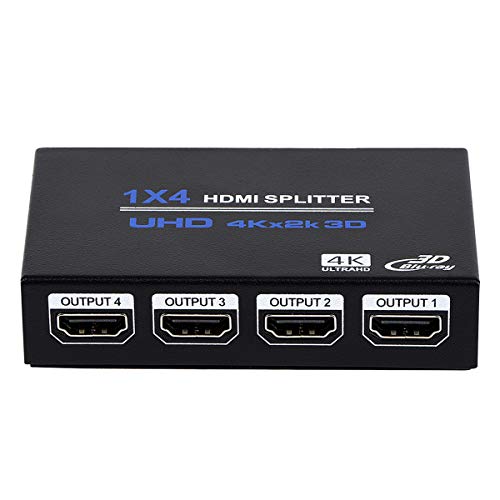
- Mirrors one HDMI source to four outputs
- Supports 4K@30Hz, 3D, and deep color
- Includes power supply with plug-and-play setup
Best For: Basic presentations, movies, and four-screen signage
Best for Two-Projector Setups

- Duplicates one HDMI source to two displays
- Supports 4K@30Hz, 1080P, and 3D
- Powered metal design for stable transmission
Best For: Two-projector presentations and synchronized displays
Best Premium Pick
4K 1x4 Splitter with Audio Extraction

- 4K@60Hz HDR distribution to four displays
- Optical and 3.5mm audio extraction
- Per-output downscaling and EDID controls
Best For: Advanced projector systems with mixed displays and external audio
Best Budget 4K Mirror Splitter
avedio links 4K HDMI Splitter 1 in 2 Out

- Mirrors one HDMI source to two displays
- Supports 4K at 30Hz
- Includes HDMI and USB cables
Best For: Basic projector and TV mirroring
Best 4K60 Projector Splitter
avedio links HDMI 2.0b 1 in 2 Out

- Supports 4K at 60Hz and 18.5Gbps
- Can mix 4K and 1080p displays
- Includes power adapter and HDMI cable
Best For: Modern 4K projector and presentation setups
Best for Four-Display Mirroring – MT-ViKI 4K HDMI Splitter
For anyone comparing hdmi splitters for projectors, the MT-ViKI 1×4 is designed to duplicate one HDMI source across four displays. Its powered metal design and support for 4K at 30Hz make it a practical choice for conference rooms, classrooms, retail displays, and home theaters.
Best For: Mirroring one source to up to four projectors, TVs, or monitors.
Pros:
- Distributes one HDMI input to four identical outputs simultaneously.
- Supports up to 4K@30Hz, 1080P@60Hz, 3D, and HDCP 1.4.
- Includes a 5V/2A power adapter and durable metal housing for stable operation.
- Supports signal transmission up to 100 feet total and can be cascaded.
Cons:
- Only supports duplicate or mirror mode, not extended desktop mode.
- Limited to 4K at 30Hz rather than 4K at 60Hz.
- Does not include built-in speakers or a separate audio output.
This is a strong fit when several projectors or displays need to show the same content. Choose another device if you need independent screens, source switching, or higher 4K refresh rates.
Best for Switching Sources to One Projector – Anker HDMI Switch
Although it is not a splitter, the Anker HDMI Switch can be useful alongside hdmi splitters for projectors when the goal is to connect two HDMI sources to one projector. A manual button selects the active source, while compatible setups can support up to 4K at 60Hz.
Best For: Switching between two HDMI sources connected to one projector or display.
Pros:
- Accepts two HDMI inputs and sends the selected signal to one output.
- Supports resolutions up to 4K@60Hz, plus HDR, 3D, and Dolby formats.
- Offers simple manual button switching without unplugging cables.
Cons:
- It is a switch, not a splitter, and cannot drive two displays simultaneously.
- Does not support automatic signal detection or HDMI CEC.
- For 4K@60Hz, input and output cables must meet the specified short-length requirements.
This is worth considering only if your projector needs multiple source inputs rather than duplicated output. For displaying the same image on multiple projectors, use a true HDMI splitter instead.
Best Budget 1×4 Option – ENBUER 1×4 HDMI Splitter
The ENBUER 1×4 is a straightforward option among hdmi splitters for projectors, sending one HDMI source to four displays at once. It supports 4K at 30Hz, includes an external power supply, and is intended for duplicate or mirror viewing rather than separate desktop expansion.
Best For: Basic four-display mirroring for projectors, monitors, or HDTVs.
Pros:
- Distributes one input signal to four identical HDMI outputs.
- Supports 4K@30Hz, 2K@60Hz, 1080P@120Hz, 3D, and deep color.
- Includes a 5V power supply and plug-and-play setup.
- Supports listed HDMI cable distances of up to 33 feet on input and 50 feet on outputs.
Cons:
- Does not support extended mode; all displays show the same image.
- Does not support HDR, VRR, or CEC.
- It cannot switch multiple inputs to one output.
This model covers the essentials for presentations, movies, and signage across four screens. Its feature set is best suited to standard 4K@30Hz installations where advanced HDR or independent display control is unnecessary.
Best for Two-Projector Setups – MT-ViKI 1×2 HDMI Splitter
The MT-ViKI 1×2 offers a compact way to compare hdmi splitters for projectors when only two displays are required. It duplicates one HDMI source to two outputs, supports 4K at 30Hz, and includes a dedicated power adapter for more consistent signal transmission.
Best For: Mirroring one source to two projectors, TVs, or monitors.
Pros:
- Sends one HDMI signal to two displays simultaneously.
- Supports up to 4K@30Hz, 1080P, and 3D formats.
- Includes a 5V/2A power adapter to help reduce flicker and signal loss.
- Compact metal housing and plug-and-play installation.
Cons:
- Supports mirror mode only, not extended dual-screen output.
- Does not include a built-in audio port.
- Cannot switch multiple HDMI sources to one display.
For a two-projector presentation or synchronized home-theater display, this is a focused and simple solution. Its 4K@30Hz ceiling and mirror-only design should be checked against your equipment before purchase.
Best Premium Pick – 4K 1×4 Splitter with Audio Extraction
For demanding home theaters, classrooms, or commercial displays, this is one of the most capable hdmi splitters for projectors. It distributes one source to four displays while adding audio extraction, per-output downscaling, and EDID controls for mixed-resolution setups.
Best For: 4K HDR projector systems that need multiple outputs, flexible compatibility, and optical or 3.5mm audio connections.
Pros:
- Supports 4K at 60Hz, HDR10, HLG, 4:4:4 color, and up to 18Gbps bandwidth.
- Extracts audio through TOSLINK and 3.5mm stereo outputs.
- Offers independent 4K-to-1080p downscaling and auto/copy EDID modes.
- Includes a metal enclosure, power adapter, LED indicators, and a two-year warranty.
Cons:
- Requires AC power and is more feature-heavy than basic mirroring splitters.
- Does not include HDMI cables.
This model is the strongest choice when projector installations involve different display resolutions or separate sound equipment. Its advanced format support and compatibility controls provide more flexibility than simpler 1×3 and 1×4 options.
Best Compact Value – NEWCARE 4K 1×3 Projector Splitter
This NEWCARE unit is a straightforward option for buyers who need practical hdmi splitters for projectors without advanced audio features. It mirrors one HDMI source to three displays and includes a 4-foot HDMI cable plus a power adapter for quick setup.
Best For: Home entertainment, office presentations, and retail displays using three projectors, TVs, or monitors with matching content.
Pros:
- Mirrors one source to three displays simultaneously.
- Supports 4K at 30Hz, 1080p at 60Hz, 3D, and HD audio formats.
- Includes a 4-foot HDMI cable, 5V/1A adapter, and one-year warranty.
- Compact aluminum-alloy enclosure and plug-and-play setup.
Cons:
- Mirrors only; it cannot extend the desktop across displays.
- Does not extract audio to external devices and is not ARC/eARC compatible.
- Supports HDMI 1.4 and 4K at 30Hz rather than 4K at 60Hz.
Choose this splitter when simplicity and included accessories matter more than high-refresh 4K or audio routing. It is a sensible fit for basic projector mirroring, provided all connected displays can use the same source signal.
Best for Long Runs – 4K 1×4 Splitter with 100-Foot Reach
For installations where projectors are spread across rooms or a large venue, this powered unit stands out among hdmi splitters for projectors. It mirrors one HDMI source to four screens and supports transmission up to 100 feet when used with suitable AWG26 HDMI 2.0 cables.
Best For: Large homes, conference spaces, exhibitions, basements, and backyard theaters requiring long-distance projector connections.
Pros:
- Distributes one source to four displays with synchronized audio and video.
- Supports 4K at 30Hz, 3D, and 1080p at 120Hz for smoother gaming.
- Advertises up to 100 feet of transmission with 50 feet on each side.
- Includes a UL-certified 5V adapter, metal shell, and LED status indicators.
Cons:
- Mirrors only and cannot extend displays.
- Uses HDMI 1.4 and HDCP 1.4, limiting newer-format compatibility.
- Does not list audio extraction or independent output scaling.
This splitter is a practical choice for stable four-screen distribution over longer cable paths. Its 4K limit is 30Hz, so buyers seeking 4K at 60Hz or advanced audio features should consider a higher-spec alternative.
Best Budget 4K Mirror Splitter – avedio links 4K HDMI Splitter 1 in 2 Out
For shoppers comparing hdmi splitters for projectors, this avedio links model is a straightforward choice for mirroring one HDMI source to two displays. It supports up to 4K at 30Hz, includes a 4-foot HDMI cable, and requires USB power for stable operation.
Best For: Basic projector and TV setups that need the same video and audio on two screens.
Pros:
- Mirrors one HDMI input to two displays simultaneously.
- Supports 4K at 30Hz and is backward compatible with common HD resolutions.
- Includes a 4-foot HDMI cable and USB power cable.
- Supports multiple surround and stereo audio formats.
Cons:
- Cannot extend separate content across two displays.
- Not a switcher or audio extractor.
- Does not support HDCP 2.2, and the power adapter is not included.
This is a practical, compact option for duplicating a source to a projector and another display, provided your equipment does not require 4K at 60Hz or HDCP 2.2.
Best Simple HD Mirror Cable – Sorthol HDMI Splitter 1 in 2 Out
This Sorthol unit is a basic option among hdmi splitters for projectors when your setup only needs HD mirroring. It routes one HDMI source to one or two output devices, with support for 720p, 1080i, and 1080p resolutions.
Best For: Simple 1080p projector arrangements using compatible displays and a single HDMI source.
Pros:
- Supports 720p, 1080i, and 1080p high-definition resolutions.
- Can send one source to two visual output devices.
- Compact and lightweight at 1.76 ounces.
- Includes a 30 cm HDMI cable.
Cons:
- Mirroring only; it cannot extend the desktop or act as a switcher.
- Two connected displays may need to be the same model for simultaneous output.
- No power plug is included.
Its low-complexity design suits older or standard HD projector systems, but buyers should confirm display compatibility before expecting both outputs to work simultaneously.
Best 4K60 Projector Splitter – avedio links HDMI 2.0b 1 in 2 Out
For higher-refresh setups, this avedio links model is one of the more capable hdmi splitters for projectors, supporting 4K at 60Hz and up to 18.5Gbps bandwidth. It mirrors one HDMI source to two displays and includes both a USB power adapter and a 4-foot HDMI 2.0 cable.
Best For: 4K projector systems, presentations, gaming, and home entertainment setups that need duplicated output.
Pros:
- Supports 4K at 60Hz with HDMI 2.0b and 18.5Gbps bandwidth.
- Can mix 4K and 1080p displays with automatic or forced downscaling.
- Includes a USB cable with power adapter and a 4-foot HDMI 2.0 cable.
- Works with projectors, TVs, monitors, consoles, streaming devices, and PCs.
Cons:
- Mirrors only and cannot extend separate content.
- Not a switcher or audio extractor, and it does not support ARC/eARC or CEC.
- Some 4K signal combinations cannot be downscaled to 1080p.
This is the strongest fit of the three for modern 4K60 equipment, especially when you need one source duplicated to a projector and a second display without adding separate playback hardware.
How We Picked the Best Hdmi Splitters for Projectors
We focused on the features that affect real-world projector installations: supported resolution and refresh rate, output count, HDMI version compatibility, power requirements, signal stability, included accessories, and setup flexibility. We also separated true splitters from HDMI switches. A splitter sends one source to multiple displays, while a switch selects between multiple sources for one display. That distinction is essential when comparing products with similar names.
Models with powered operation generally offer more dependable performance than passive adapters, especially with longer cables or multiple connected displays. We also considered useful extras such as EDID management, downscaling, audio extraction, and bundled HDMI cables.
Quick Comparison
| What You Need | Best Configuration to Look For | Why It Matters |
|---|---|---|
| One source to two displays | 1×2 powered splitter | Simple, compact distribution for a projector and TV or monitor |
| One source to several displays | 1×3 or 1×4 splitter | Useful for classrooms, conference rooms, and demonstrations |
| Modern 4K gaming or video | 4K at 60Hz support | Preserves smoother motion when the source and displays support it |
| Mixed-resolution displays | EDID or downscaling support | Can improve compatibility between newer and older screens |
| Separate sound equipment | Audio-extractor model | Routes audio to a receiver, speakers, or other output |
Key Buying Factors for Hdmi Splitters for Projectors
Output Count and Display Behavior
Choose a 1×2 unit for a projector plus one additional screen, or a 1×4 model when distributing the same presentation to several destinations. Most HDMI splitters mirror the same image; they do not create an extended desktop. Confirm that mirroring meets your intended setup.
Resolution, Refresh Rate, and HDR
Check the complete signal specification rather than relying on a “4K” label. Some products support 4K at 30Hz, while others support 4K at 60Hz. If you use a gaming console or high-frame-rate video, verify refresh-rate compatibility across the source, splitter, cables, and projector. HDR, HDCP, 3D, and color-format support can also affect whether a signal displays correctly.
Distance and Power
Long HDMI runs are more demanding, particularly when splitting one signal to multiple outputs. A powered splitter is usually the safer choice. For installations approaching the stated transmission limit, use suitable high-speed cables and avoid assuming that the splitter alone guarantees the advertised distance.
Audio and Compatibility Features
An audio extractor is useful when the projector has limited audio options or you need to connect external speakers. EDID management and downscaling can help when displays have different capabilities, but they cannot overcome every HDCP or handshake problem. Make sure the device supports the source and projector standards you use.
Who Should Buy Which Hdmi Splitters for Projectors?
Home theater users: Choose a powered 1×2 or 1×4 model based on the number of screens, with 4K at 60Hz support if your streaming device or console requires it.
Classrooms and offices: A 1×3 or 1×4 splitter is practical for sending one laptop, media player, or presentation source to multiple displays. Prioritize stable operation and simple cabling.
AV enthusiasts: Look for EDID, downscaling, audio extraction, and strong format support. These features are valuable in mixed-display systems but may add cost and complexity.
Simple two-screen setups: A compact powered 1×2 splitter is usually sufficient. Avoid HDMI switches unless you specifically need to select between multiple input sources.