Choosing the right 4K SDI converter can simplify everything from camera monitoring to broadcast signal distribution. The best model depends on the direction of conversion, supported video standards, audio requirements, and the way you plan to power and deploy it.
This roundup compares 10 practical options, including bidirectional converters, SDI distribution tools, audio interfaces, and compact HDMI-to-SDI or SDI-to-HDMI models.
Best 10 4K Sdi Converters Picks for 2026
Versatile 4K Workflow Pick

- HDMI/SDI cross-conversion
- Scaling and frame rate conversion
- Compact 10 x 6.2 x 2.4-inch design
Best For: Mixed HDMI and SDI setups needing format conversion
Distribution Specialist
Blackmagic Mini Converter SDI Distribution 4K

- One SDI input to eight outputs
- Supports SD, HD, and 6G-SDI
- Automatic detection and reclocking
Best For: Distributing one SDI source to eight destinations
Audio Embedding Choice
Mini Converter Audio to SDI 4K

- Four 1/4-inch audio inputs
- Four analog or eight AES/EBU channels
- Supports UHD and DCI 4K up to 30 fps
Best For: Embedding multi-channel audio into 4K SDI
Compact Bidirectional Pick
Blackmagic Micro Converter 12G

- Bidirectional SDI/HDMI conversion
- HDMI 2.0 and SDI inputs
- Includes universal 5V power supply
Best For: Portable camera and display conversion setups
Audio Extraction Specialist

- Extracts audio from SD, HD, and 3G-SDI
- Offers balanced analog and AES/EBU outputs
- Includes redundant input switching and reclocking
Best For: Professional SDI audio de-embedding
Compact Display Converter
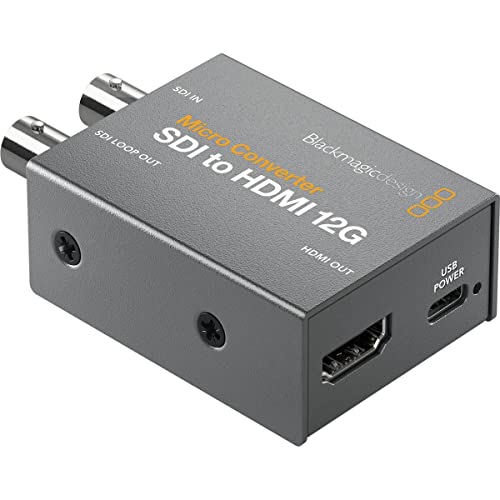
- Connects SDI sources to HDMI displays
- Includes a 33-point 3D LUT
- Uses a compact metal body for portable work
Best For: Portable SDI-to-HDMI monitoring
Multi-Output Signal Splitter

- Splits one SDI input across eight outputs
- Supports SD, HD, and 3G-SDI formats
- Adds reclocking, embedded audio, and redundant input
Best For: Multi-device SDI signal distribution
Dual-Output 12G Conversion
Micro Converter HDMI to SDI 12G

- Two SDI outputs
- Supports up to 12G-SDI and 4K
- Automatic format detection with reclocking
Best For: HDMI sources requiring two SDI feeds
Power-Supply Bundle
Micro Converter HDMI to SDI 12G with Power

- HDMI-to-SDI 12G conversion
- AC supply with four socket adapters
- Includes a two-year warranty
Best For: Broadcast setups needing included power accessories
3D LUT Monitoring
Micro Converter SDI to HDMI 12G

- 12G-SDI-to-HDMI conversion
- Supports 3D LUT color calibration
- Compact monitor-focused design
Best For: SDI sources feeding an HDMI monitor
Versatile 4K Workflow Pick – Decimator 12G-CROSS
Decimator 12G-CROSS 4K HDMI/SDI Cross Converter with Scaling and Frame Rate Conversion
Check Price On AmazonFor buyers comparing 4k sdi converters, the Decimator 12G-CROSS stands out as a cross-converter built for HDMI and SDI workflows. Its listed scaling and frame rate conversion features make it a practical choice when connected video equipment does not share the same format.
Best For: Users who need HDMI/SDI conversion with scaling and frame rate conversion.
Pros:
- Supports HDMI and SDI cross-conversion.
- Includes scaling and frame rate conversion.
- Compact listed dimensions of 10 x 6.2 x 2.4 inches.
Cons:
- The supplied specifications identify two ports but do not detail the complete input/output layout.
- The listed power plug is Type B, which may require an adapter outside North America.
This is the most feature-oriented option in the group for mixed HDMI and SDI setups, especially where format conversion is part of the workflow. Confirm the port configuration and regional power compatibility before buying.
Distribution Specialist – Blackmagic Mini Converter SDI Distribution 4K
Among 4k sdi converters, this Blackmagic Design model is designed specifically for distributing one SDI source to multiple destinations. It accepts SD, HD, and 6G-SDI signals, automatically detects the input, and sends the signal to eight SDI outputs.
Best For: Studios, control rooms, and installations that need one SDI feed delivered to eight outputs.
Pros:
- Connects one SDI source to eight SDI outputs.
- Supports SD, HD, and 6G-SDI with automatic detection.
- Provides SDI reclocking for signal distribution.
- Listed power consumption is 4.80 watts.
Cons:
- It is a distribution converter rather than a general HDMI-to-SDI converter.
- The supplied notes do not list HDMI connectivity.
Choose this unit when the priority is reliable multi-output SDI distribution rather than cross-format conversion. Its eight-output layout is the key advantage for larger SDI video systems.
Audio Embedding Choice – Mini Converter Audio to SDI 4K
This Mini Converter is a specialized option among 4k sdi converters, adding external audio to an SDI signal. It provides four 1/4-inch audio inputs for four analog channels or up to eight AES/EBU digital channels, with the embedded signal delivered through a 6G-SDI output.
Best For: Video systems that need analog or AES/EBU audio embedded into UHD or DCI 4K SDI.
Pros:
- Provides four 1/4-inch audio jack connectors.
- Supports four analog or eight AES/EBU digital audio channels.
- Supports UHD and DCI 4K resolutions up to 30 fps.
- Outputs embedded audio through a single 6G-SDI connector.
Cons:
- Its specialized audio-embedding design may not suit basic video-only conversion.
- The listed minimum supply voltage is 12 volts, so an appropriate power source is needed.
This converter makes sense when audio integration is the main requirement. It combines multi-channel audio handling with 6G-SDI support, but buyers seeking HDMI conversion or general signal routing should consider a different type of converter.
Compact Bidirectional Pick – Blackmagic Micro Converter 12G
Blackmagic Design Micro Converter BiDirectional SDI/HDMI 12G with Power Supply CONVBDC/SDI/HDMI12G/P
Check Price On AmazonFor compact 4k sdi converters, the Blackmagic Design Micro Converter BiDirectional SDI/HDMI 12G offers conversion in both directions. It includes one SDI input, one HDMI 2.0 input, matching video outputs, and a 5V universal power supply with international socket adapters.
Best For: Camera, monitor, projector, and display setups requiring compact SDI-to-HDMI or HDMI-to-SDI connectivity.
Pros:
- Supports bidirectional SDI and HDMI conversion.
- Includes SDI and HDMI 2.0 inputs.
- Compatible with SDI cameras, computers, monitors, projectors, and displays.
- Includes a 5V universal power supply with international adapters.
Cons:
- The supplied notes list one input for each interface, limiting simultaneous source connections.
- The compact unit has a listed nominal power rating of 1.06 watts but still requires external power.
This is a strong fit for portable or space-constrained production kits that move between SDI and HDMI equipment. Its bidirectional operation and included international power accessories add flexibility without a large footprint.
Audio Extraction Specialist – SDI to Audio 4K
The Blackmagic Design Mini Converter SDI to Audio 4K is a practical choice among 4k sdi converters when your workflow needs to extract audio from SDI video. It accepts SD, HD, and 3G-SDI and provides both balanced analog and AES/EBU audio outputs.
Best For: Broadcast, live production, and installation setups that need SDI audio de-embedding.
Pros:
- Supports SD, HD, 2K, and 3G-SDI with automatic detection.
- Provides four channels of balanced analog audio.
- Also provides eight channels of balanced AES/EBU digital audio.
- Includes redundant SDI input switching and reclocking.
Cons:
- It is an audio de-embedding converter rather than an SDI-to-HDMI display converter.
- Its standard 1/4-inch terminals may not suit every installation.
With automatic format handling, redundant input switching, and dual audio output modes, this model is well suited to professional signal-routing systems where dependable audio extraction matters.
Compact Display Converter – SDI to HDMI 12G
The Blackmagic Design Micro Converter SDI to HDMI 12G is a compact option for 4k sdi converters when you need to connect SDI equipment to an HDMI monitor, projector, or television. Its metal body is designed for portable production use, and the built-in 3D LUT feature supports display calibration.
Best For: Portable video crews and users connecting SDI sources to HDMI displays.
Pros:
- Converts SDI for use with HDMI display equipment.
- Supports a 33-point 3D LUT for monitor, projector, or television calibration.
- Can output the 3D LUT through the SDI loop output.
- Uses a compact, robust metal body.
Cons:
- The supplied notes identify a 5-volt power requirement, so a suitable power source is necessary.
- The notes specify one channel and do not describe multi-channel audio features.
This converter prioritizes portability and display flexibility. The 3D LUT capability is especially useful when consistent color calibration is important in field or monitoring applications.
Multi-Output Signal Splitter – SDI Distribution
The Blackmagic Design Mini Converter SDI Distribution is a strong choice among 4k sdi converters for sending one SDI source to multiple destinations. It accepts SD, HD, and 3G-SDI signals and provides eight reclocked outputs for displays, recorders, or other connected equipment.
Best For: Broadcast, live-event, and studio systems that need reliable SDI signal distribution.
Pros:
- Distributes one SD, HD, or 3G-SDI input to eight outputs.
- Reclocks outputs to help maintain signal integrity across connected gear.
- Supports embedded audio and ancillary data.
- Includes automatic format switching and a redundant SDI input.
Cons:
- It is a distribution amplifier, not a format converter for HDMI output.
- Requires a 12-volt minimum supply according to the supplied details.
For installations that need one SDI feed shared across several devices, the eight-output design and reclocking make this a practical signal-management tool, particularly for demanding live or mission-critical setups.
Dual-Output 12G Conversion – Micro Converter HDMI to SDI 12G
For workflows that need to turn an HDMI source into professional SDI, this compact Blackmagic Design unit is a practical choice among 4k sdi converters. It supports SD through 12G-SDI rates and automatically matches the HDMI input, including Ultra HD and 4K signals.
Best For: HDMI-equipped cameras, computers, or other sources feeding two SDI outputs in broadcast and production setups.
Pros:
- Provides two SDI video outputs.
- Supports 270Mb, 1.5G, 3G, 6G, and 12G SDI rates.
- Automatically detects SD, HD, 2K, Ultra HD, and 4K formats.
- Includes signal reclocking for output stability.
Cons:
- Requires a 5V to 5.25V DC power supply.
- Converts HDMI to SDI only; it does not provide SDI-to-HDMI conversion.
Choose this model when dual SDI outputs and broad multi-rate support matter more than a bundled power adapter. Its small 0.16 kg design also suits compact production rigs.
Power-Supply Bundle – Micro Converter HDMI to SDI 12G with Power
This HDMI-to-SDI model is a convenient option for buyers comparing 4k sdi converters and wanting power included. It is designed for broadcast equipment, uses a USB-C connection for power, and comes with an AC power supply and four socket adapters.
Best For: Production users who want an HDMI-to-SDI 12G converter with an included AC power solution for desktop or laptop-based setups.
Pros:
- Converts HDMI input to SDI 12G output.
- Includes an AC power supply with four socket adapters.
- Uses a USB-C power connection.
- Covered by a listed two-year warranty.
Cons:
- The supplied notes do not specify the number of SDI outputs.
- Power input is listed at 5V, so another power source must match that requirement.
This is the more convenient package if you do not want to source a compatible power adapter separately. Confirm the available SDI output configuration before purchase if your installation requires multiple feeds.
3D LUT Monitoring – Micro Converter SDI to HDMI 12G
For the reverse direction, this Blackmagic Design unit converts 12G-SDI to HDMI and adds 3D LUT support for monitoring workflows. Among 4k sdi converters, it is suited to connecting an SDI source to an HDMI monitor while using USB power.
Best For: Monitoring an SDI camera or production feed on an HDMI display with 3D LUT functionality.
Pros:
- Converts 12G-SDI to HDMI.
- Includes 3D LUT support for monitoring and color calibration workflows.
- Offers two ports and a compact design measuring 3.01 x 1.8 x 0.98 inches.
- Uses 5V input power and weighs 363 g.
Cons:
- It is an SDI-to-HDMI converter, not an HDMI-to-SDI model.
- The listed warranty is one year.
- The supplied notes do not specify supported HDMI output resolutions.
Select this converter when HDMI monitoring and LUT support are priorities. Before ordering, verify that your SDI source and display requirements align with the listed 12G-SDI input and HDMI output design.
How We Picked These 4K Sdi Converters
We organized this selection around the jobs converters perform in real production systems: changing HDMI to SDI, converting SDI to HDMI, distributing one SDI source to multiple outputs, embedding or de-embedding audio, and handling more advanced format or frame-rate requirements. We also considered support for 12G-SDI and 4K workflows, compact installation, included power supplies, and the practical difference between single-purpose and multifunction hardware.
Before buying, confirm the exact video standards your cameras, switchers, monitors, recorders, and cabling support. “4K” alone does not guarantee compatibility with every frame rate, signal format, or SDI level.
Quick Comparison
| Need | Best converter type | What to look for |
|---|---|---|
| Connect an HDMI camera to SDI infrastructure | HDMI-to-SDI converter | 12G-SDI, supported 4K frame rates, reliable power |
| Monitor an SDI source over HDMI | SDI-to-HDMI converter | Output resolution support, down-conversion, loop-through if needed |
| Send one SDI signal to several devices | SDI distribution converter | Number of re-clocked outputs and signal integrity |
| Add audio to an SDI feed | Audio-to-SDI converter | Audio channel support, connector type, embedding controls |
| Handle multiple formats or directions | Cross or bidirectional converter | Scaling, frame-rate conversion, routing, and format flexibility |
Key Buying Factors for 4K Sdi Converters
Signal Direction and Conversion Features
Start with the signal path. A dedicated converter is often the simplest and most dependable choice when you only need one direction. A bidirectional or cross converter costs more but can reduce the number of devices in a mobile or changing setup.
4K, 12G-SDI, and Frame-Rate Compatibility
For single-link 4K workflows, 12G-SDI support is an important specification. Check whether the unit supports your required frame rates, color formats, and video standards rather than relying on a general UHD label. If sources and destinations use different formats, scaling or frame-rate conversion may be necessary.
Audio Handling
Some converters only pass video, while others embed, de-embed, or convert analog audio. Verify the number of channels, input and output connector types, and whether audio controls are available for your workflow.
Power, Cabling, and Installation
Compact converters are useful in racks, studios, OB setups, and event kits, but small enclosures can make cable management important. Check the included power supply, voltage requirements, mounting options, and cable lengths. Use suitable 12G-SDI-rated coaxial cable for high-bandwidth 4K links.
Who Should Buy Which 4K Sdi Converters?
Choose an HDMI-to-SDI model when your source is a consumer, mirrorless, presentation, or compact cinema camera and the rest of the system runs on SDI. Pick an SDI-to-HDMI unit for confidence monitoring, affordable displays, or HDMI recording devices. Distribution models are best for sending one stable SDI feed to multiple destinations without repeatedly splitting the signal.
If your production includes embedded audio, external mixers, or analog sources, an audio-focused converter is the better fit. For freelance kits, live events, and facilities that change frequently, a bidirectional or cross converter offers more flexibility. Finally, choose a model with an included power supply when you need a ready-to-deploy package, especially for field work or temporary installations.