Long HDMI runs can introduce signal drops, handshake problems, and resolution limits. The right matrix switch combines dependable distribution with the transport, control, and compatibility features your installation requires.
We compare 10 HDMI matrix switches for long cable runs, from compact 4K models to larger HDBaseT systems built for multi-room AV, conference spaces, classrooms, and home theaters.
Best 10 Hdmi Matrix Switches for Long Cable Runs Picks for 2026
Best Long-Run 4K Distribution
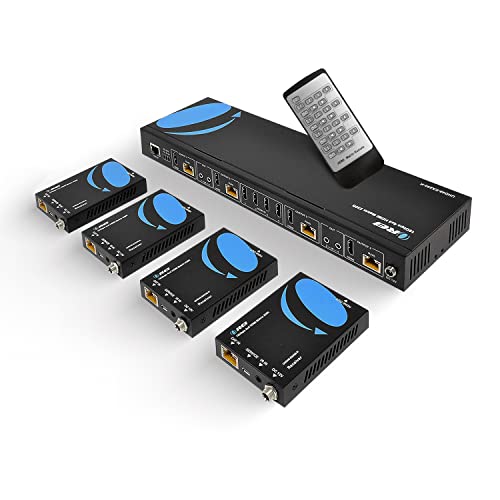
- 4K60 4:4:4 over CAT5e/6/7 up to 230 feet
- Four receivers, loop outputs, IR, and RS-232 included
- Supports EDID, CEC, downscaling, and 7.1-channel audio
Best For: Long-distance 4K distribution to multiple displays
Best Rack-Mount 8x8 Control
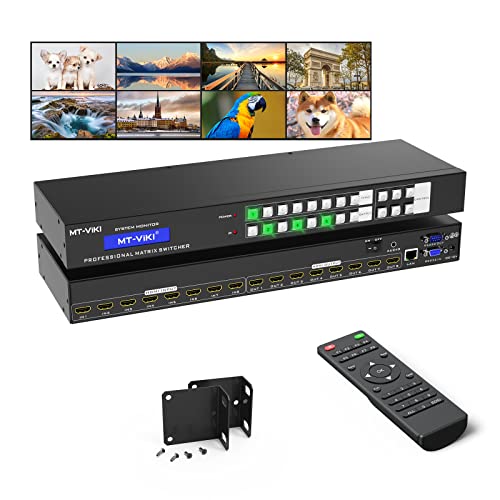
- Routes eight HDMI inputs to eight outputs independently
- Provides web, LAN, RS-232, IR, and panel control
- Rack-mount design with 4K30 and 1080p support
Best For: Large short-run AV routing installations
Best High-Capacity CAT Extension
MT-VIKI 4x4 HDMI Extender Matrix
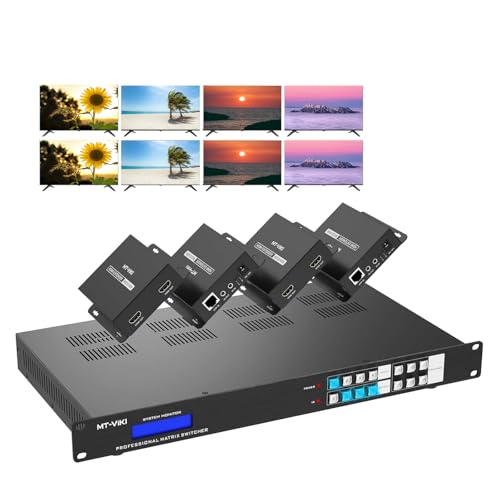
- Four inputs and 12 total outputs with eight extended outputs
- 4K60 4:4:4 transmission over CAT cable up to 230 feet
- Adds web, RS-232, IR, Android, and audio integration
Best For: Large venues needing many remote displays
Best HDMI 2.1 Upgrade
OREI 8K 4x2 HDMI Matrix Switch
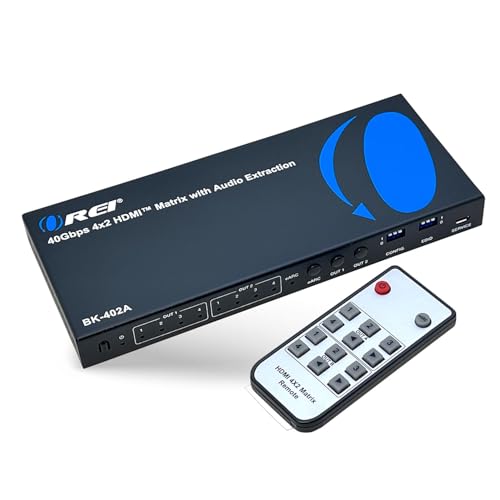
- 40Gbps HDMI 2.1 with 8K60 and 4K120 support
- VRR, ALLM, FVA, and HDCP 2.3 for gaming systems
- eARC plus optical and analog audio extraction
Best For: HDMI 2.1 gaming and home theater systems
Professional 4K Control

- 4K60 4:4:4 with HDR and Dolby Vision
- 4K-to-1080p downscaling on every output
- Independent S/PDIF extraction and IP control
Best For: Professional mixed-resolution AV installations
Long-Distance Distribution

- 4K60 transmission up to 230 feet over Cat 6/7
- Eight HDMI outputs mirrored to eight HDBaseT outputs
- 18Gbps, HDR, Dolby Vision, and 7.1-channel audio
Best For: Large installations with extended 4K display runs
Flexible Home AV Routing

- Routes four sources to four displays
- 4K60, HDR, HDCP 2.2, and 18Gbps bandwidth
- Downscales 4K for 1080p displays
Best For: Smaller mixed-resolution HDMI systems
Top Long-Run 8x8 Pick
OREI 8x8 4K60 HDMI Matrix Extender

- 4K60 4:4:4 with HDR support
- CAT6/7 extension up to 230 feet
- PoC, downscaling, and Web GUI
Best For: Large 4K AV installations with long CAT cable runs
Flexible Rack-Mount Choice

- Eight HDMI inputs and outputs
- 4K30 with 4K-to-1080p downscaling
- Eight presets and Web GUI control
Best For: Rack-based HDMI switching with mixed-resolution displays
Best HDBaseT Reach
J-Tech Digital 8x8 4K60 Matrix

- 4K60 extension up to 131 feet
- 1080p60 extension up to 230 feet
- Seven PoC HDBaseT receivers included
Best For: Multi-room 4K60 distribution over CAT5e/6
Best Long-Run 4K Distribution – OREI 4×4 HDMI Extender Matrix
For demanding hdmi matrix switches for long cable runs, this OREI 4×4 extender combines four HDMI inputs and outputs with transmission over a single CAT5e/6/7 cable up to 230 feet. It is a strong fit for installations that need 4K video, centralized source control, and multiple remote displays.
Best For: Home theaters, commercial AV systems, churches, and other setups distributing several sources to displays up to 230 feet away.
Pros:
- Supports 4K at 60Hz with 4:4:4, HDMI 2.0, and HDCP 2.2/1.4.
- Includes four receivers and supports CAT5e/6/7 runs up to 230 feet.
- Offers IR control, RS-232, EDID management, CEC control, and 1080p downscaling.
- Supports up to 7.1-channel HDMI audio pass-through and includes local loop outputs.
Cons:
- The IR OUT ports follow the HDMI inputs rather than the HDMI outputs.
- Its four-by-four routing capacity may be limiting for larger distribution systems.
This is one of the more installation-ready options in the group, especially when long CAT cable runs and 4K60 performance matter. Its included receivers and single-adapter power design help simplify deployment.
Best Rack-Mount 8×8 Control – MT-VIKI 4K HDMI Matrix Switch
This MT-VIKI 8×8 is designed for users who need flexible source-to-display routing in a rack-mounted installation. While its listed transmission range is up to 30 feet on both input and output sides, it provides extensive control options and independent switching for eight sources and eight displays.
Best For: Conference rooms, churches, sports bars, digital signage, classrooms, and large home AV systems using shorter high-quality HDMI cable runs.
Pros:
- Routes any of eight HDMI sources to any of eight displays independently or simultaneously.
- Supports 4K at 30Hz, 1080p, 3D video, and deep color.
- Offers front-panel, IR, RS-232, LAN, web GUI, and third-party control.
- Includes rack ears for installation in a standard 1U 19-inch rack.
Cons:
- Its stated input and output transmission distance is limited to 30 feet per display.
- Audio extraction is available only through OUT8.
- It does not provide the 4K60 long-distance CAT-cable extension specified by the other extender matrices.
This model prioritizes routing capacity and system control over extreme cable length. Choose it when an 8×8 matrix and rack integration are more important than sending HDMI hundreds of feet.
Best High-Capacity CAT Extension – MT-VIKI 4×4 HDMI Extender Matrix
For hdmi matrix switches for long cable runs that must serve many remote displays, this MT-VIKI model combines four HDMI inputs with 12 total outputs. It sends signals over CAT5e/6/7/8 cable up to 230 feet and adds flexible control and audio features for commercial installations.
Best For: Churches, hotels, bars, and other venues that need four sources distributed to multiple local and extended displays.
Pros:
- Provides four inputs, four local loop outputs, and eight extended outputs.
- Supports 4K at 60Hz, 4:4:4, HDMI 2.0, and HDCP 2.2 over runs up to 230 feet.
- Supports five control methods: panel, IR, web, RS-232, and Android app.
- Includes EDID management, bidirectional IR, and audio embedding/de-embedding.
Cons:
- The Android app is supported, but iOS is not listed as supported.
- Only four receivers are included, despite the system offering eight extended outputs.
- Its one-year warranty is shorter than some competing professional AV products.
The standout feature is its 4-in/12-out architecture, which gives installers more display capacity than a conventional 4×4 extender. It is particularly practical where long CAT runs, centralized control, and external audio integration are all required.
Best HDMI 2.1 Upgrade – OREI 8K 4×2 HDMI Matrix Switch
This OREI 4×2 matrix is aimed at next-generation HDMI systems rather than very long CAT-cable extensions. It handles HDMI 2.1 sources and displays at up to 40Gbps, making it a compelling choice when 4K120 gaming, 8K video, and advanced audio are more important than 230-foot transmission over Ethernet cable.
Best For: Gaming setups, home theaters, and AV systems with HDMI 2.1 televisions or projectors and eARC-compatible audio equipment.
Pros:
- Supports up to 8K60, 4K120, HDMI 2.1, HDCP 2.3, and 40Gbps bandwidth.
- Includes VRR, ALLM, and FVA for smooth, low-latency gaming performance.
- Provides eARC plus optical and 3.5mm audio extraction.
- Supports Dolby Atmos, Dolby TrueHD, DTS-HD Master Audio, and other listed audio formats.
Cons:
- It has only two outputs and does not list CAT5e/6/7 long-distance extension.
- eARC requires both the TV and soundbar to support eARC.
- It is less suitable for large multi-display distribution than the 4×4 and 8×8 models.
This is the best fit when HDMI 2.1 features and high-frame-rate video take priority over long cable runs. For genuinely distant displays, pair the system with an appropriate external extension solution or choose a dedicated CAT-based extender matrix.
Professional 4K Control – AV Access 4×4 HDMI Matrix
For home theaters, boardrooms, and multi-room systems, this AV Access model is one of the more capable hdmi matrix switches for long cable runs when the installation also needs reliable 4K60 video management. Its four inputs, four outputs, downscaling, audio extraction, and multiple control methods make it practical for mixed-display environments.
Best For: Professional 4K installations with mixed-resolution displays and multi-zone optical audio.
Pros:
- Supports 4K@60Hz 4:4:4, HDR10, HLG, and Dolby Vision.
- Downscales 4K sources to 1080p on each output for mixed-display setups.
- Provides dedicated S/PDIF extraction for each output, supporting 5-channel HBR or 2-channel PCM.
- Offers front-panel, IR, RS232, and IP/TCP control, plus EDID presets and Smart EDID.
Cons:
- Its four-input, four-output layout may be limiting for larger venues.
- The supplied notes do not specify a maximum cable distance.
This is a strong choice when signal-handshake stability, audio breakout, and installation control matter more than maximum port count. The rack-friendly metal enclosure and firmware-update support also suit long-term professional deployments.
Long-Distance Distribution – OREI 8×8 HDBaseT Matrix
For demanding installations, this OREI unit is especially relevant among hdmi matrix switches for long cable runs because its HDBaseT outputs carry 4K@60Hz video up to 230 feet over Cat 6/7 cable. The 8×8 matrix can also mirror each HDMI output to a corresponding HDBaseT output, supporting up to 16 displays overall.
Best For: Large commercial, hospitality, education, or multi-room systems requiring extended 4K distribution.
Pros:
- Extends 4K@60Hz video up to 230 feet over Cat 6/7 cable.
- Supports eight HDMI inputs, eight HDMI outputs, and eight mirrored HDBaseT outputs.
- Handles 18Gbps bandwidth, HDR formats, Dolby Vision, and HDMI audio up to 7.1 channels.
- Includes Web GUI, LAN, RS-232, IR, EDID, and CEC control options.
Cons:
- Its 7.7 kg chassis and included receivers make it a substantial installation.
- More complex and potentially excessive for a small home setup.
This is the clearest fit for genuinely long runs and high display counts. The included HDBaseT receivers, audio extraction connections, mounting kit, and one-year warranty add practical value for structured installations.
Flexible Home AV Routing – OREI 4×4 HDMI Matrix
This OREI 4×4 is a straightforward option for home theaters and smaller distributed systems. While the supplied notes do not give a specific extension distance, its 18Gbps HDMI 2.0 performance, EDID support, and 4K-to-1080p downscaling make it useful when comparing hdmi matrix switches for long cable runs in a conventional HDMI-based setup.
Best For: Smaller systems with up to four sources and four displays, especially mixed 4K and 1080p environments.
Pros:
- Routes up to four HDMI sources to four displays with independent or identical content.
- Supports 4K@60Hz, HDR, HDCP 2.2, and up to 7.1-channel digital audio.
- Downscales 4K content to 1080p for compatibility with older displays.
- Provides 18Gbps bandwidth and includes a one-year warranty with OREI support.
Cons:
- No specific long-run transmission distance is provided in the supplied details.
- It lacks the HDBaseT extension hardware included with the larger OREI model.
- Its four-by-four capacity may not suit larger commercial installations.
Choose this model when you need flexible local HDMI switching and mixed-resolution support without the scale of an 8×8 extender system. For a documented 230-foot run, the HDBaseT-equipped OREI alternative is the better match.
Top Long-Run 8×8 Pick – OREI 8×8 4K60 HDMI Matrix Extender
For installations searching for HDMI matrix switches for long cable runs, this OREI model combines 8×8 source and display routing with mirrored CAT outputs. It supports 4K60 4:4:4 video, HDR formats, and transmission up to 230 feet over CAT6/7, making it suited to larger home theater, signage, and commercial AV systems.
Best For: Large installations that need 4K60 distribution, long CAT cable runs, and flexible control.
Pros:
- Routes eight HDMI sources to eight HDMI and eight CAT mirrored outputs.
- Extends signals up to 230 feet over CAT6/7 and provides 12V PoC to receivers.
- Supports HDR10, HDR10+, Dolby Vision, HLG, 7.1-channel audio, and per-output 4K-to-1080p downscaling.
- Offers LAN, Web GUI, RS-232, IR, CEC, and EDID control.
Cons:
- Its 8×8 capacity and rack-oriented design may be more than smaller systems require.
- IR OUT follows the HDMI input rather than the HDMI output.
- Only a one-year warranty is listed.
This is the strongest fit of the three when long-distance distribution and full 4K60 HDR support matter. PoC and independent downscaling also help simplify mixed-display installations.
Flexible Rack-Mount Choice – OREI HDS-808 8×8 HDMI Matrix
This OREI HDS-808 is a practical option for buyers who need HDMI matrix switches for long cable runs but plan to keep the signal path on HDMI cabling. It routes up to eight sources to eight displays, supports 4K at 30Hz, and adds downscaling, presets, and several control methods for organized multi-display systems.
Best For: Rack-mounted HDMI systems using shorter or already-managed HDMI connections.
Pros:
- Independently routes up to eight HDMI inputs to eight HDMI outputs.
- Supports 4K30 video, Dolby Atmos, DTS:X, and multichannel audio formats.
- Per-output downscaling helps combine 4K and 1080p displays.
- Includes eight scene presets plus IR, RS-232, LAN, and Web GUI control.
Cons:
- It is limited to 4K at 30Hz rather than 4K60.
- The supplied notes do not specify CAT-based extension or a maximum long-run distance.
- Its HDMI-only design may be less convenient for distributed displays far from the rack.
The HDS-808 makes sense when switching capacity, rack installation, and compatibility features are more important than integrated long-distance extension. For genuinely long runs, plan the cabling carefully or consider a model with HDBaseT or CAT outputs.
Best HDBaseT Reach – J-Tech Digital 8×8 4K60 Matrix
For HDMI matrix switches for long cable runs, the J-Tech Digital JTECH-4K88-EX2B stands out with HDBaseT transmission over a single CAT5e/6 cable. It supports 4K60 4:4:4 up to 131 feet and 1080p60 up to 230 feet, while its included receivers, PoC, and control options target whole-home and commercial AV distribution.
Best For: Multi-room systems needing 4K60 HDBaseT extension, receiver PoC, and automation integration.
Pros:
- Connects up to eight HDMI sources and routes them to distributed displays.
- Extends 4K60 4:4:4 to 131 feet or 1080p60 to 230 feet over CAT5e/6.
- Includes seven HDBaseT receivers with dual HDMI outputs and one local HDMI output.
- Provides PoC, bi-directional IR, RS-232, Web GUI, app control, and Control4 compatibility.
Cons:
- 4K60 extension distance is shorter than the listed 1080p distance.
- The system includes multiple receivers, which may be unnecessary for smaller installations.
- External audio extraction uses RCA and optical SPDIF rather than being limited to HDMI output.
This is the most purpose-built option here for long-distance, multi-room distribution. Its HDBaseT architecture and powered receivers reduce the amount of equipment needed at remote display locations.
How We Picked These Hdmi Matrix Switches for Long Cable Runs
We focused on matrix switches that do more than route sources between displays. The selection emphasizes models with HDBaseT or HDMI extension over CAT5e, CAT6, or CAT7 cable, along with practical installation features such as EDID management, IR control, RS-232, PoC, downscaling, and audio extraction.
We also considered port count, supported video formats, system-control options, and whether each model suits a simple home setup or a larger commercial installation. Specifications can vary by input, output, cable quality, and extender hardware, so confirm the manufacturer’s distance and format limits before buying.
Quick Comparison
| Best For | What to Prioritize |
|---|---|
| Home theater or small room | 4K60 support, downscaling, eARC, and straightforward remote control |
| Multi-room distribution | 4×4 or 8×8 routing with HDBaseT extension and IR/RS-232 control |
| Commercial AV | Rack mounting, WebGUI, EDID control, PoC, and reliable system integration |
| Mixed-resolution displays | Independent downscaling and flexible EDID management |
| Advanced video systems | 4K60 4:4:4, HDR, HDCP compatibility, and sufficient bandwidth |
Key Buying Factors for Hdmi Matrix Switches for Long Cable Runs
Extension Method and Distance
For extended runs, HDBaseT is usually more dependable than relying on a long passive HDMI cable. Check whether the system uses a dedicated receiver at each display, supports PoC, and reaches the distance you need with the desired resolution. Use properly terminated, solid-copper network cable and avoid treating ordinary Ethernet networking hardware as a substitute for a direct point-to-point AV link.
Resolution, Refresh Rate, and HDR
Confirm the complete signal path—not just the matrix’s headline resolution. 4K at 60Hz with 4:4:4 chroma requires substantially more bandwidth than 4K at 30Hz. If you use game consoles, computers, Dolby Vision, or HDR sources, verify support for the specific formats and refresh rates. HDCP version compatibility is equally important for streaming devices and protected content.
EDID and Downscaling
EDID management helps the matrix negotiate a usable format when displays have different capabilities. Downscaling is valuable when a 4K source must feed an older 1080p screen without disrupting other outputs. Look for independent output control if your displays are mixed-resolution.
Control, Audio, and Installation
IR pass-through, RS-232, LAN, and WebGUI support make a system easier to automate and troubleshoot. Audio extraction or eARC can simplify connections to an AV receiver or soundbar. For equipment racks, check mounting hardware, ventilation, power requirements, and the number of receivers and accessories included.
Who Should Buy Which Hdmi Matrix Switches for Long Cable Runs?
Choose a compact 4×2 or 4×4 model for a home theater, media room, or small office with a limited number of sources and displays. A 4×4 extender matrix is a better fit when displays are spread across rooms and each location needs independent source selection.
Move to an 8×8 system when you are distributing several sources to many displays, especially in a conference room, classroom, hospitality space, or larger home. Prioritize WebGUI, RS-232, EDID control, and HDBaseT when the system will be installed in a rack or managed remotely. For demanding 4K gaming and premium video, favor 4K60 4:4:4 and HDR support; for basic television distribution, a 4K30 model may be sufficient and more economical.