The best compact SDI converters make it easier to connect professional SDI cameras and equipment with HDMI monitors, switchers, recorders, and streaming systems. The right model can add format flexibility without taking up valuable space in a mobile or studio rig.
We selected 10 compact SDI converters covering SDI-to-HDMI, HDMI-to-SDI, bidirectional conversion, loop-through output, audio handling, and 12G-SDI support. Use the guide below to narrow the options by signal standard, power needs, audio workflow, and intended setup.
Best 10 Compact Sdi Converters Picks for 2026
Flexible Field Pick
Blackmagic Micro BiDirectional SDI/HDMI

- Bidirectional SDI and HDMI conversion
- Supports SD, HD, and 3G-SDI
- Universal 5V power supply included
Best For: Portable camera, projector, and display setups
Audio De-Embedder Pick
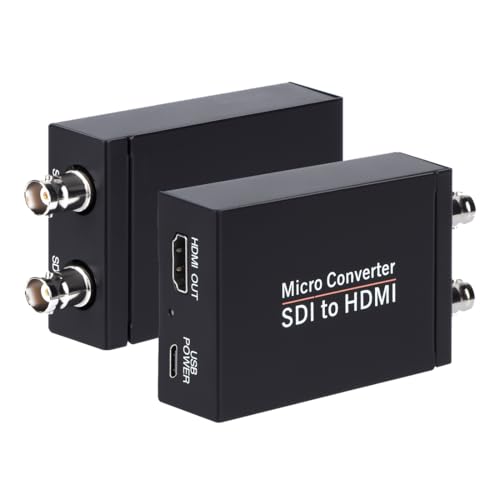
- Auto-detects 3G, HD, and SD-SDI
- HDMI output plus SDI loopout
- Supports eight channels of digital audio
Best For: SDI camera monitoring and loop-through
12G Workflow Pick
Blackmagic Micro BiDirectional 12G

- Supports 12G-SDI workflows
- Bidirectional SDI and HDMI conversion
- HDMI 2.0 input and output
Best For: Higher-bandwidth camera and display systems
Simple HD Monitoring Pick
SHUITING SDI to HDMI Converter

- Converts SD, HD, and 3G-SDI to HDMI
- Supports up to 1080p Full HD
- Includes SDI loopout and metal housing
Best For: Basic SDI camera-to-HDMI monitoring
Best Plug-and-Play Pick
Blackmagic SDI to HDMI Micro Converter

- SD, HD, and 3G-SDI input
- HDMI output plus SDI loop out
- Automatic SD/HD detection
Best For: Projectors and HDMI displays using an SDI source
Best Long-Run HDMI-to-SDI Value

- Two SDI outputs from one HDMI input
- Supports up to 1080p at 60 Hz
- Long-distance SDI transmission ratings
Best For: Distributing HDMI to two SDI displays
Best 12G-SDI Feature Set
Blackmagic Micro Converter SDI to HDMI 12G
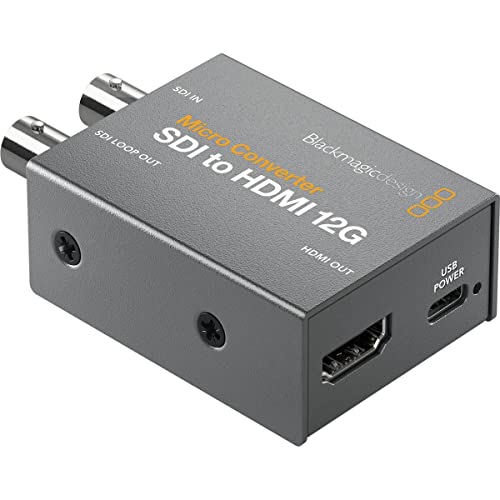
- 33-point 3D LUT for calibration
- LUT output through SDI loop
- Compact metal broadcast-style design
Best For: Color-calibrated SDI monitoring setups
Flexible 3G Choice
Bidirectional SDI/HDMI Converter

- Bidirectional 3G-SDI and HDMI conversion
- Supports uncompressed 1080p at up to 60 fps
- Metal housing and long-distance SDI transmission
Best For: Flexible Full HD broadcast and streaming setups
12G HDMI-to-SDI Pick
Blackmagic Micro Converter HDMI to SDI 12G

- Provides two SDI video outputs
- Supports SDI rates through 12G
- Handles formats up to Ultra HD and 4K
Best For: HDMI sources feeding 4K-capable SDI systems
Compact 12G Flexibility
Blackmagic Bidirectional Micro Converter

- Provides bidirectional SDI/HDMI conversion
- Supports 12G SDI workflows
- Cable-mount design and two-year warranty
Best For: Compact camera and production setups needing two-way conversion
Flexible Field Pick – Blackmagic Micro BiDirectional SDI/HDMI
For compact SDI converters that can handle both signal directions, this portable Blackmagic Design model combines SD, HD, and 3G-SDI with HDMI input and output. It includes a 5V universal power supply with international socket adapters.
Best For: Camera, projector, and display setups needing bidirectional SDI-to-HDMI flexibility.
Pros:
- Supports SD, HD, and 3G-SDI formats.
- Provides HDMI input and output alongside SDI connections.
- Includes international power adapters.
- Portable metal construction.
Cons:
- Does not list 12G-SDI support.
- Requires a separate HDMI or SDI cable setup.
This is a versatile choice when a small converter may need to work in either direction. Its included universal power supply also makes it practical for travel and mixed-location production.
Audio De-Embedder Pick – Anber-Tech 3G-SDI to HDMI
Among compact SDI converters, the Anber-Tech model is designed for straightforward SDI-to-HDMI monitoring with audio de-embedding and SDI loopout. It automatically detects 3G-SDI, HD-SDI, and SD-SDI formats.
Best For: SDI camera feeds that need HDMI monitoring, loop-through, and digital audio support.
Pros:
- Supports 3G-SDI, HD-SDI, and SD-SDI signals.
- Offers HDMI output and SDI loopout.
- De-embeds up to eight channels of 48 kHz digital audio.
- Supports long cable runs up to 300 feet for 3G-SDI, 500 feet for HD-SDI, and 1,000 feet for SD-SDI.
Cons:
- Only converts SDI to HDMI; it is not bidirectional.
- Does not support 4K specifications in the supplied notes.
This converter is especially useful when monitoring and signal distribution matter more than two-way conversion. Its loopout and audio features add flexibility for camera, television, monitor, and projector workflows.
12G Workflow Pick – Blackmagic Micro BiDirectional 12G
Blackmagic Design Micro Converter BiDirectional SDI/HDMI 12G with Power Supply CONVBDC/SDI/HDMI12G/P
Check Price On AmazonFor compact SDI converters intended for higher-bandwidth workflows, this Blackmagic Design unit adds 12G-SDI capability to bidirectional SDI and HDMI conversion. It includes HDMI 2.0 connections and a universal 5V power supply.
Best For: SDI cameras, computers, HDMI monitors, projectors, and displays in 12G-SDI production systems.
Pros:
- Supports 12G-SDI workflows.
- Provides bidirectional SDI and HDMI conversion.
- Includes HDMI 2.0 input and output.
- Comes with international power socket adapters.
Cons:
- Higher-bandwidth capability may be unnecessary for basic SDI-to-HDMI monitoring.
- The supplied dimensions and weight are less compact than some micro-converter listings.
This is the strongest fit in the group for users building around 12G-SDI equipment. Its two-way operation also helps reduce the need for separate converters when switching between SDI and HDMI sources.
Simple HD Monitoring Pick – SHUITING SDI to HDMI Converter
This SHUITING model keeps compact SDI converters focused on the basics: converting SD, HD-SDI, or 3G-SDI to HDMI at up to 1080p. Its metal shell, heat dissipation design, and plug-and-play operation suit simple monitoring installations.
Best For: Connecting an SDI camera to a 1080p HDMI television, monitor, or projector.
Pros:
- Supports SD-SDI, HD-SDI, and 3G-SDI input.
- Outputs up to 1920×1080 Full HD.
- Includes SDI loopout for signal pass-through.
- Uses a durable metal housing with heat dissipation.
Cons:
- Supports SDI-to-HDMI only, not HDMI-to-SDI.
- Does not support 4K.
- Requires a BNC male coaxial cable and does not support RF, CVBS, AHD, TVI, or CVI signals.
This is a practical budget-style option for standard HD monitoring where 4K and bidirectional conversion are not required. Confirm the source is genuine SDI before buying, since the converter does not accept several other video signal types.
Best Plug-and-Play Pick – Blackmagic SDI to HDMI Micro Converter
For a straightforward addition to a compact SDI converters kit, this Blackmagic Design model converts one SDI source to HDMI while providing an SDI loop output. It automatically detects SD or HD signals and uses an HDMI Type A output for display connection.
Best For: Projectors, monitors, or other HDMI displays that need an SDI feed.
Pros:
- Supports SD, HD, and 3G-SDI input.
- Includes an SDI loop output for passing the signal onward.
- Automatic SD or HD detection simplifies setup.
- Backed by a 3-year limited warranty.
Cons:
- Power supply is not included.
- Converts SDI to HDMI only; the supplied notes do not indicate reverse conversion.
This is a practical choice when you want a compact, brand-name SDI-to-HDMI converter with loop-through capability. Plan for a separate power solution when budgeting.
Best Long-Run HDMI-to-SDI Value – HDMI to Dual 3G-SDI Converter
This HDMI-to-SDI adapter is a flexible option among compact SDI converters when you need to distribute one HDMI source to two SDI displays. It supports resolutions through 1080p at 60 Hz, includes a metal shell, and is designed for plug-and-play operation.
Best For: Sending an HDMI camera, home-theater, or other HDMI device to two SDI displays over longer cable runs.
Pros:
- Provides two SDI outputs from one HDMI input.
- Supports HDMI resolutions from 480i through 1080p at 24/25/30/50/60 Hz.
- Rated for output distances up to 100 m for 3G-SDI, 200 m for HD-SDI, and 300 m for standard-definition SDI.
- Metal housing is intended to aid durability and heat dissipation.
Cons:
- Supports HDMI-to-SDI conversion only, not SDI-to-HDMI.
- The supplied notes do not specify a power supply or warranty.
Choose this model if dual SDI distribution and cable distance matter more than bidirectional flexibility. Confirm that your source is HDMI before purchasing.
Best 12G-SDI Feature Set – Blackmagic Micro Converter SDI to HDMI 12G
For workflows that need a compact SDI-to-HDMI converter with more advanced monitoring features, this Blackmagic Design Micro Converter adds a 33-point 3D LUT. Its compact, robust metal body is built around broadcast-oriented technology and includes an SDI interface.
Best For: Calibrating a monitor, projector, or television while converting an SDI feed to HDMI.
Pros:
- Includes a 33-point 3D LUT for display color calibration.
- Can output the 3D LUT from the SDI loop output.
- Uses a compact, robust metal body.
- Designed around 12G-SDI conversion in a portable form factor.
Cons:
- The supplied notes do not list the HDMI connector or specific supported output resolutions.
- Only one SDI channel is specified.
- The supplied notes do not identify included accessories beyond the main unit.
The LUT capability makes this the strongest fit for color-conscious monitoring setups. It is worth considering when calibration matters, but verify connector and resolution requirements before ordering.
Flexible 3G Choice – Bidirectional SDI/HDMI Converter
For shoppers comparing compact SDI converters, this bidirectional model is a practical choice when one device needs to handle both SDI-to-HDMI and HDMI-to-SDI conversion. It supports adaptive input up to 1080p, including 1080p at 60 fps, and uses a durable metal housing for mobile or demanding setups.
Best For: Broadcast, live streaming, photography, conferencing, and home-theater users needing flexible 3G-SDI connectivity.
Pros:
- Supports bidirectional SDI/HDMI conversion in one compact unit.
- Handles uncompressed 1080p video with low latency and no drivers.
- Offers SDI transmission distances up to 80m for 3G-SDI, 100m for HD-SDI, and 120m for SD-SDI.
- Metal construction, heat dissipation, FPGA processing, clock recovery, and ESD protection support stable operation.
Cons:
- Video support is limited to up to 1080p rather than 4K.
- Its broad feature set may be more than needed for a single-direction setup.
This is the most versatile option here for Full HD workflows, especially if your equipment changes between HDMI and SDI. Choose it when bidirectional flexibility and long cable runs matter more than 4K support.
12G HDMI-to-SDI Pick – Blackmagic Micro Converter HDMI to SDI 12G
This Blackmagic model is a focused option among compact SDI converters for sending an HDMI source into an SDI workflow. It automatically matches the HDMI input, provides two SDI video outputs, and supports formats from standard definition through Ultra HD and 4K.
Best For: Users converting HDMI sources to SDI while retaining support for higher-bandwidth SDI formats.
Pros:
- Converts HDMI to SDI with two SDI video outputs.
- Supports 270Mb, 1.5G, 3G, 6G, and 12G SDI rates.
- Automatically matches the HDMI input and detects SD, HD, 2K, Ultra HD, and 4K.
- Includes SDI reclocking for signal conditioning.
Cons:
- It is designed for HDMI-to-SDI conversion rather than bidirectional operation.
- The supplied notes do not specify included power accessories or a warranty.
Choose this converter when your workflow starts with HDMI and needs multiple SDI outputs or 12G compatibility. Its format range makes it a stronger fit for 4K-capable systems than the 3G Full HD alternative.
Compact 12G Flexibility – Blackmagic Bidirectional Micro Converter
For buyers who want compact SDI converters with two-way signal flexibility, this Blackmagic Micro Converter handles bidirectional SDI and HDMI conversion. Its small form factor and cable-mount design suit camera-based setups, while 12G capability supports demanding SDI workflows.
Best For: Camera operators and production teams needing a compact bidirectional SDI/HDMI converter.
Pros:
- Supports bidirectional conversion between SDI and HDMI.
- Offers 12G capability for high-bandwidth SDI workflows.
- Compact cable-mount design is suited to camera installations.
- Includes a listed two-year warranty.
Cons:
- The supplied notes provide limited detail about supported resolutions and frame rates.
- Only one channel is listed in the product details.
This is a good fit when physical size and bidirectional operation are priorities. Consider the HDMI-to-SDI-only Blackmagic model instead if you specifically need two SDI outputs; otherwise, this version offers useful flexibility for production and camera setups.
How We Picked the Best Compact Sdi Converters
We focused on the capabilities that matter most in real-world video workflows: supported SDI speeds, conversion direction, HDMI compatibility, audio handling, loop-through options, power requirements, and overall portability. The lineup includes straightforward SDI-to-HDMI adapters, HDMI-to-SDI models, bidirectional units, and higher-bandwidth 12G-SDI converters.
Brand reputation also matters for equipment used in production environments, so the selection includes widely used Blackmagic Design models alongside lower-cost alternatives. Because product versions can differ by included power supply, always verify the exact package contents before ordering.
Quick Comparison
| Best For | What to Look For |
|---|---|
| Basic monitor connection | SDI-to-HDMI conversion and the required SDI speed |
| Flexible production rigs | Bidirectional conversion with clear input and output indicators |
| Signal distribution | SDI loop output or dual SDI outputs |
| Ultra HD workflows | 12G-SDI support and compatible HDMI resolution |
| Mobile use | Compact housing, USB power, and a supplied power adapter |
Key Buying Factors for Compact Sdi Converters
Signal Standard and Resolution
Match the converter to your equipment’s SDI format. SD-SDI and HD-SDI cover older and standard HD systems, while 3G-SDI supports common 1080p workflows. Choose 12G-SDI when you need higher-bandwidth 4K connections, but confirm that the camera, display, cable, and converter all support the desired format.
Conversion Direction
SDI-to-HDMI models are useful for viewing a camera feed on a consumer or computer monitor. HDMI-to-SDI models serve the opposite need, such as sending a laptop, camera, or playback source into professional SDI infrastructure. A bidirectional converter offers more flexibility, especially for changing production setups, but may cost more than a dedicated adapter.
Audio and Loop-Through Features
If audio must travel with the video, check whether the converter embeds, de-embeds, or simply passes audio through. An SDI loop output is valuable when one source must feed both an HDMI display and another SDI device. For monitoring or routing, confirm the supported audio channels and connector behavior.
Power, Cabling, and Reliability
Small converters are only convenient when they are easy to power. Look for USB power or a supplied adapter that suits your rig, and check whether the listing includes the power supply. Use appropriately rated, properly terminated BNC and HDMI cables, particularly for 3G-SDI and 12G-SDI signals.
Who Should Buy Which Compact Sdi Converters?
Choose a dedicated SDI-to-HDMI converter if your main goal is connecting an SDI camera or router to an HDMI monitor. Pick HDMI-to-SDI when your source is HDMI but the rest of the workflow uses SDI. A bidirectional 3G model is a practical middle ground for HD production, live streaming, and photography setups that change frequently.
For 4K production or future-proofing, prioritize a 12G-SDI model, while verifying resolution and frame-rate compatibility across the entire chain. If you only need basic HD monitoring, a simpler 3G-SDI converter can reduce cost and complexity. Finally, select a model with loop-through or dual outputs when you need to distribute one signal to multiple destinations.