The best smart displays for seniors make everyday information easier to see, remember, and share. Depending on the model, they can show large calendars, medication reminders, weather, photos, alarms, and family updates.
We selected 10 options with different strengths—from simple day-and-date clocks to connected planners and video-enabled photo frames—so you can match the display to a senior’s routine, eyesight, technology comfort, and support needs.
Best 10 Smart Displays for Seniors Picks for 2026
Best Connected Photo Frame

- Auto-answer video calling
- Remote photo and reminder management
- 15.6-inch 1080p display
Best For: Hands-free family connection and remote support
Best No-Subscription Reminder Board
Memoryboard Digital Reminder Board

- No interaction required for seniors
- Remote reminders and photo sharing
- No monthly subscription
Best For: Daily routines and caregiver-managed reminders
Best Family Planning Hub
Westsee 15.6-Inch Digital Calendar

- Two-way Google, iCloud, and Outlook sync
- Calendar, meals, tasks, and notes
- Photo display with 32GB storage
Best For: Shared family schedules and household organization
Best Senior Clock Display

- Clock, alarm, calendar, and weather
- Adjustable brightness and volume
- Photo slideshow with family sharing
Best For: Bedroom timekeeping with useful daily information
FamilySync Choice

- Syncs Google, iCloud, Outlook, Yahoo, and Cozi
- Combines schedules, tasks, meals, and photos
- Wall- or desk-mountable with no subscription fees
Best For: Connected families managing schedules with a senior household member
EasyView Planner
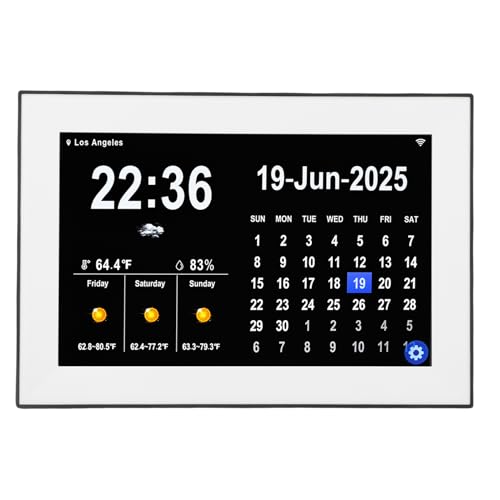
- Displays seven-day local weather forecasts
- Holds up to 64 reminders and 64 tasks
- Includes adjustable brightness and sleep mode
Best For: Seniors wanting a focused calendar, task, and weather display
CareSchedule Pick
Photo Calendar with Medication Alerts

- Sets five alarms and three medication reminders
- Includes eight display modes and 13 languages
- Uses a 1024x600 HD LCD screen
Best For: Elderly users needing routine and medication prompts
Best Simple Planner
10.1-Inch Digital Calendar Planner
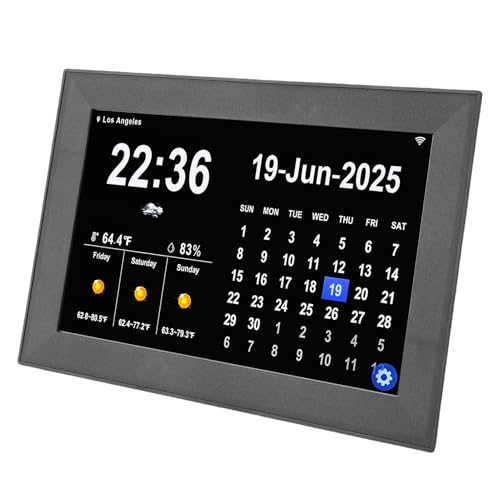
- 10.1-inch HD touchscreen for readable calendar information
- Up to 64 reminders and 64 pending tasks
- Seven-day weather, alarms, and adjustable brightness
Best For: Seniors who want a focused digital planner with reminders and weather
Best Family Organizer
15.6-Inch Smart Digital Wall Planner

- Large touchscreen for shared schedules and routines
- Syncs with several major calendar services
- Adds chores, meals, weather, and photo slideshows
Best For: Families and seniors who need a large shared home organizer
Best Senior Reminder Clock
SSINI 7-Inch Day and Date Clock

- Large display shows time, day, date, and day periods
- 12 alarms plus three medication-reminder sets
- Auto-dimming with tabletop or wall mounting
Best For: Seniors needing clear day orientation and recurring reminders
Best Connected Photo Frame – ViewClix Smart Frame
For families comparing smart displays for seniors, the ViewClix Smart Frame focuses on simple, remote connection rather than complicated on-device controls. Family members can share photos, videos, captions, reminders, and weather updates through the app or web portal, while the frame can be set to auto-answer video calls.
Best For: Seniors who want hands-free video calling and family members who manage updates remotely.
Pros:
- Auto-answer video calling supports hands-free conversations.
- Family can remotely manage photos, videos, settings, reminders, and weather updates.
- Private Share List and encrypted, unrecorded video calls support family privacy.
- Includes a 15.6-inch 1080p display and one month of Premier membership.
Cons:
- Premier membership costs $9.95 per month after the included month.
- Requires AC power and Wi-Fi or Ethernet connectivity.
- Its button-based control setup may offer less touchscreen interaction than some alternatives.
ViewClix is a strong choice when the main goal is staying connected with minimal effort for the senior. The ongoing membership cost should be included in the buying decision.
Best No-Subscription Reminder Board – Memoryboard Digital Reminder Board
Memoryboard is one of the most straightforward smart displays for seniors because the recipient does not need to tap, swipe, log in, or learn an app. Family members and caregivers send reminders, messages, appointments, and photos from the free phone app, with updates appearing automatically in large text.
Best For: Seniors who need visible routine reminders for medications, appointments, meals, hydration, and daily check-ins.
Pros:
- Requires no phone, app, tapping, swiping, or login for the recipient.
- Supports remotely managed reminders, appointments, messages, and photos.
- Multiple family members and caregivers can participate through a Care Circle.
- No monthly subscription is required.
Cons:
- Requires a 2.4 GHz Wi-Fi network; 5 GHz-only networks are not supported.
- The 10.1-inch version is more suited to a nightstand or side table than a large wall display.
- It requires a standard power outlet.
Memoryboard prioritizes clarity and passive viewing over entertainment features. It is particularly practical for families coordinating care without asking the senior to operate another device.
Best Family Planning Hub – Westsee 15.6-Inch Digital Calendar
The Westsee Digital Calendar takes a more active approach to smart displays for seniors, combining a large touchscreen calendar with meal planning, tasks, notes, weather, and photo display. Its Zical App supports two-way syncing with Google, iCloud, and Outlook calendars, making it useful for households managing shared schedules.
Best For: Families who want a shared calendar and photo display for appointments, meals, chores, and household planning.
Pros:
- 15.6-inch display offers day, week, month, and custom calendar views.
- Supports two-way sync with Google, iCloud, and Outlook calendars.
- Includes meal planning, tasks, notes, weather updates, and smart sound reminders.
- Core functions have no subscription fee, and 32GB of built-in memory supports photos and videos.
Cons:
- Touchscreen operation may require more learning than a passive reminder board.
- The device must remain plugged into a power outlet during use.
- Optional advanced tools, such as the AI Assistant, may require a future subscription.
Westsee is best viewed as a family command center rather than a dedicated senior clock or reminder screen. Its broad planning features make it useful when several people need to coordinate household information.
Best Senior Clock Display – Santek Large Digital Clock
The Santek Large Digital Clock combines timekeeping with calendar, weather, alarm, brightness, and family photo features. For shoppers seeking smart displays for seniors, its adjustable display and volume settings can help tailor the device to a bedroom or tabletop routine.
Best For: Seniors who primarily need an easy-to-read clock with alarms, date, weather, calendar, and family photos.
Pros:
- Combines a digital clock, date, calendar, weather, alarm, and photo slideshow.
- Brightness and volume can be adjusted for personal comfort.
- Touchscreen LCD IPS display offers a wide viewing angle and five-point touch sensitivity.
- Supports five languages and includes customizable designs, text, colors, and multiple alarms.
Cons:
- It is a corded tabletop device rather than a portable display.
- The listed screen size is 7 inches despite the 10.1-inch product sizing.
- Touchscreen controls may not suit seniors who prefer a completely passive display.
Santek is a practical fit when a clearly visible clock and alarm are more important than extensive caregiver management. Its photo and weather functions add connection and context without replacing its core timekeeping role.
FamilySync Choice – Smart Calendar Hub
For shoppers comparing smart displays for seniors, this 10.1-inch touchscreen combines calendar planning, tasks, meal organization, and family photo sharing in one wall- or desk-mounted device. Its support for Google, iCloud, Outlook, Yahoo, and Cozi can make shared scheduling easier, while the photo-frame mode adds a personal touch.
Best For: Families who want a shared planning display that also helps seniors stay connected with household schedules and photos.
Pros:
- Syncs in real time with several popular calendar platforms.
- Supports chores, meal planning, recipes, reminders, and photo slideshows.
- Can be used in landscape or portrait orientation on a wall or desk.
- Includes a one-year warranty and lifetime technical support.
Cons:
- The broad range of family-planning features may be more than a senior needs.
- The notes do not specify display resolution or battery operation.
This is a versatile choice when shared family coordination matters as much as calendar visibility. It is especially appealing for households that want remote photo sharing without a monthly subscription fee.
EasyView Planner – Weather Calendar Display
For those seeking smart displays for seniors, the Luocute offers a straightforward 10.1-inch HD touchscreen with large-at-a-glance calendar information, weather data, reminders, and tasks. Wi-Fi setup provides automatic seven-day forecasts, while adjustable brightness and sleep mode support comfortable indoor viewing.
Best For: Seniors who want a simple indoor display for appointments, tasks, time, and local weather.
Pros:
- Supports up to 64 reminders and 64 pending tasks.
- Shows seven-day weather forecasts with temperature, humidity, wind, and conditions.
- Offers adjustable brightness, sleep mode, three alarm tones, and 18 languages.
- Setup requires plugging in, connecting to Wi-Fi, and entering a location.
Cons:
- It is intended for indoor use and requires an AC/DC power connection.
- The notes do not mention photo-sharing or digital photo-frame functions.
This model prioritizes practical daily information over extra entertainment features. Its task capacity and weather display make it a sensible option for users who prefer a dedicated, easy-to-set-up organizer.
CareSchedule Pick – Photo Calendar with Medication Alerts
Among smart displays for seniors, this 10.1-inch digital photo frame focuses on visible timekeeping and routine support. It combines a calendar clock with up to five alarms and three medication reminders, making it a practical consideration for elderly users or people with dementia who benefit from repeated daily prompts.
Best For: Elderly users who need simple alarm and medication reminders alongside a clock, calendar, and photo display.
Pros:
- Provides five alarms and three medication reminders.
- Offers eight display modes for the clock, calendar, and photo frame.
- Supports 13 languages, including English, Spanish, German, French, and Japanese.
- Uses a 1024×600 HD LCD with 12/24-hour display options.
Cons:
- Its reminder capacity is more limited than a full family task-planning hub.
- The supplied notes do not mention Wi-Fi or remote calendar synchronization.
This is the most care-focused option in the group, emphasizing medication prompts and alarms rather than shared scheduling. Choose it when routine reminders and familiar photos are more important than extensive connectivity.
Best Simple Planner – 10.1-Inch Digital Calendar Planner
For shoppers comparing smart displays for seniors, this 10.1-inch digital calendar planner emphasizes readable information and straightforward daily organization. It offers a touchscreen calendar, weather updates, reminders, tasks, and adjustable display settings in a compact format.
Best For: Seniors or households wanting a simple touchscreen planner for appointments, tasks, alarms, and weather information.
Pros:
- Large HD touchscreen is designed for clear viewing from different angles.
- Supports up to 64 reminders and 64 pending tasks, with three alarm sounds.
- Provides seven-day weather forecasts, adjustable brightness and volume, and support for 18 languages.
- Starts with plug-in power and Wi-Fi connection for setup and automatic updates.
Cons:
- The supplied notes do not identify the brand beyond “Generic.”
- It requires a Wi-Fi connection for weather updates and related connected features.
This is a practical choice when readability and reminder capacity matter more than entertainment features. Its focused planning design may suit seniors who want calendar information, alerts, and weather in one place.
Best Family Organizer – 15.6-Inch Smart Digital Wall Planner
Among smart displays for seniors, this 15.6-inch digital wall planner stands out as a larger family organization hub. It combines calendar syncing, task charts, meal planning, weather, photo slideshows, and desktop or wall placement without a monthly subscription.
Best For: Families and seniors who benefit from a large shared schedule, color-coded tasks, meal plans, and calendar synchronization.
Pros:
- Large 15.6-inch HD touchscreen is intended for schedules and shared household planning.
- Syncs with Google, iCloud, Outlook, Cozi, and Yahoo calendars through Wi-Fi.
- Includes customizable task lists, chore tracking, meal planning, weather, and photo-frame mode.
- Can be wall-mounted or placed on a desk, with scheduled sleep and wake modes.
Cons:
- Its many family-focused functions may be more than a senior seeking only a basic clock or calendar needs.
- Calendar synchronization and connected features require Wi-Fi and setup with compatible services.
This model is best viewed as a shared household command center rather than a dedicated senior clock. The large screen and flexible placement can make family schedules easier to see, while the photo mode adds a personal touch.
Best Senior Reminder Clock – SSINI 7-Inch Day and Date Clock
For shoppers seeking smart displays for seniors with an emphasis on time orientation, the SSINI digital calendar clock uses a large 7-inch display for the time, date, day, and parts of the day. It also adds alarms, medication reminders, auto-dimming, and tabletop or wall mounting.
Best For: Seniors who need an easy-to-read day-and-date clock with recurring alarms and medication reminders.
Pros:
- Large bold display shows the time, date, weekday, and five periods of the day.
- Supports 12 daily alarms and three medication-reminder sets.
- Offers five display modes, eight languages, five brightness levels, and automatic dimming.
- Works as a tabletop or wall-mounted clock and can also display photos.
Cons:
- The 7-inch screen is smaller than the displays on the two larger planner models.
- It is a corded electric clock, so placement needs access to power.
- The supplied notes do not specify how long the backup lithium-ion battery operates.
This is the most focused option for daily orientation and scheduled reminders. Its day-part labels, medication reminders, and automatic dimming make it particularly suitable for seniors who prioritize clarity over extensive calendar-management tools.
How We Picked These Smart Displays for Seniors
We focused on features that can make daily routines clearer and more manageable: readable screen sizes, high-contrast date and time displays, touchscreen usability, alarms, task and medication reminders, weather information, photo sharing, and calendar synchronization. We also considered practical details such as wall mounting, Wi-Fi requirements, subscription costs, and whether the display is better suited to a bedroom, kitchen, living room, or family command center.
Because needs vary widely, this list includes both straightforward digital clocks and more capable smart planners. A display that works well for an independent user may not be the best choice for someone who needs family-managed reminders or frequent schedule updates.
Quick Comparison
- Best for family photo sharing: ViewClix Smart Frame, with photo, video, caption, and video-calling features.
- Best for simple reminders: Memoryboard, which emphasizes an accessible reminder-board format.
- Best for large shared schedules: The 15.6-inch Westsee and Digital Wall Planner models.
- Best for clocks and alarms: Santek and SSINI options, which prioritize large time and date information.
- Best for medication and task planning: The 10.1-inch calendar displays offering multiple alarms, reminders, or task slots.
Key Buying Factors for Smart Displays for Seniors
Screen Size and Readability
A larger screen can be easier to read from across a room, but it also takes up more wall or counter space. Look for clear typography, strong contrast, adjustable brightness, and a layout that does not overcrowd the display. A 10.1-inch screen may suit a bedside table or kitchen counter, while a 15.6-inch model is more visible in a shared room.
Reminders, Alarms, and Medication Support
Check how many reminders, tasks, and alarms the device supports and whether they repeat automatically. Some products are useful for general routines, while others are better for medication prompts or dementia-friendly day and date orientation. These displays should supplement—not replace—professional medical advice or appropriate caregiver support.
Connectivity and Calendar Sync
Wi-Fi and account setup may be required for weather, remote updates, photo sharing, or calendar synchronization. Confirm that the device works with the calendars and phones used by the family. If simplicity is the priority, a model with fewer connected features may be easier to maintain.
Placement and Maintenance
Decide whether the display will sit on a tabletop or mount on a wall. Consider nearby power outlets, viewing distance, glare, touch accessibility, and who will change schedules or troubleshoot the device. Also check whether a subscription is required for core features.
Who Should Buy Which Smart Displays for Seniors?
Choose a photo frame with calling and remote sharing when staying emotionally connected is the main goal. Pick a large digital clock when the senior primarily needs an obvious day, date, time, weather, or alarm display. A 10.1-inch digital calendar is a practical middle ground for reminders and household planning without dominating a room.
For couples, caregivers, or families coordinating appointments, meals, chores, and visits, a larger wall planner offers better visibility. Users who need structured medication or daily routine prompts should prioritize multiple alarms, recurring reminders, and simple controls over decorative features. Finally, if the senior is uncomfortable with apps and accounts, favor a clearly labeled display with minimal setup and plan for a family member to handle configuration.