The best smart displays with large screens combine clear resolution, touch controls, streaming or productivity software, and convenient placement options. The right model depends on whether you need an interactive classroom board, a connected home hub, or a portable screen that can move between rooms.
We selected 10 standout options across several sizes and use cases, from compact rolling displays and kitchen organizers to full-size 4K interactive boards for offices and classrooms. Use the guide below to compare essential features before choosing.
Best 10 Smart Displays with Large Screens Picks for 2026
Best for Interactive Collaboration
COOLHOOD 65-Inch 4K Smart Board

- 65-inch 4K touchscreen with 20-point multi-touch
- Wireless sharing across major device platforms
- Built-in annotation, conferencing, and file-sharing tools
Best For: Classrooms, offices, and collaborative presentations
Best for Family Organization

- 15.6-inch Full HD screen with customizable widgets
- Built-in Fire TV and broad streaming app support
- Camera, smart-home controls, and privacy features
Best For: Family schedules, kitchen use, and home entertainment
Best for Google-Based Classrooms
NewBoard 65E Interactive Whiteboard

- Google EDLA-certified with Play Store and Workspace access
- 50-point touch supports up to 10 simultaneous writers
- Wireless sharing for up to 16 connected devices
Best For: Google-based classrooms, training, and group brainstorming
Best for Flexible Home Offices

- 32-inch 4K IPS touchscreen with webOS
- Wheeled stand adjusts for height, tilt, swivel, and portrait use
- Three USB-C ports with up to 65W power delivery
Best For: Mobile home-office work and multipurpose rooms
Best Interactive Display
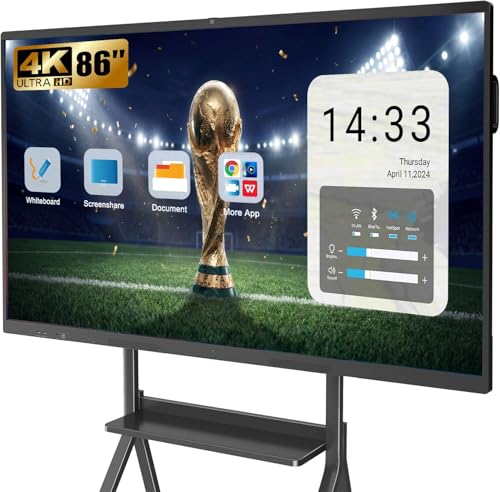
- 86-inch 4K touchscreen for classrooms and meetings
- 20-point touch supports collaborative annotation
- Built-in camera, microphones, speakers, and app ecosystem
Best For: Business meetings, classrooms, and remote collaboration
Best Portable Display
ApoloSign 32-Inch 4K Rolling TV

- Rolling 32-inch 4K touchscreen with swivel adjustment
- 15,000mAh battery provides up to six hours of use
- Android 16, casting, HDMI, and 256GB storage
Best For: Portable home entertainment, kitchens, bedrooms, and home gyms
Best Interactive Collaboration Board
55-Inch Google EDLA Smart Board
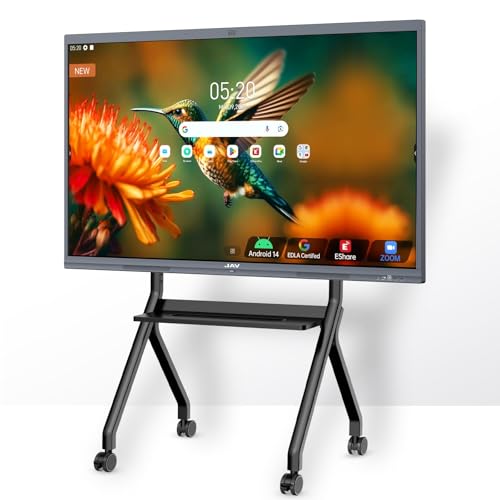
- 4K touchscreen with 20-point interaction
- AI camera and meeting audio tools
- Google, casting, and screen-sharing support
Best For: Classrooms, offices, training rooms, and hybrid collaboration
Best Short-Range Portable Display

- FHD 10-point touch display
- About 4–5 hours of cordless use
- Rolling stand and 13MP webcam
Best For: Mobile meetings, teaching, presentations, and home offices
Best Long-Battery Portable Display

- 38,400mAh battery for roughly 4–10 hours
- Android 15 with EDLA certification
- Adjustable rolling stand and built-in camera
Best For: Cordless home entertainment, calls, classes, and presentations
Best for Interactive Collaboration – COOLHOOD 65-Inch 4K Smart Board
If you need smart displays with large screens for teaching, meetings, or collaborative presentations, the COOLHOOD combines a 65-inch 4K touchscreen with built-in annotation and sharing tools. Its Android 13 platform and open app ecosystem also support a range of business and education workflows.
Best For: Classrooms, offices, and teams that need a large interactive whiteboard for presentations, annotation, and hybrid collaboration.
Pros:
- 65-inch 4K display with 20-point multi-touch and a 6ms response time.
- Supports wireless screen sharing from Mac, Windows, iOS, and Android devices.
- Works with Zoom, Google Meet, Microsoft Teams, and Webex.
- Includes QR-code file sharing, cloud storage support, and built-in collaboration tools.
Cons:
- The stand is sold and shipped separately; the listed package includes a wall mount.
- Only one HDMI port is listed.
This is a purpose-built interactive display rather than a conventional home TV. Choose it when touch writing, group participation, and presentation tools matter more than simple media streaming.
Best for Family Organization – Echo Show 15 Smart Display
The Echo Show 15 is a practical choice among smart displays with large screens for kitchens and shared living spaces. Its 15.6-inch Full HD screen brings calendars, lists, weather, smart-home controls, video calls, photos, and Fire TV into one wall-friendly household hub.
Best For: Families that want a central screen for schedules, entertainment, smart-home control, and video calling.
Pros:
- 15.6-inch 1080p display with customizable widgets for household organization.
- Built-in Fire TV supports services including Prime Video, Netflix, YouTube, and Apple TV.
- Centered camera offers auto-framing, a wide field of view, 3.3x zoom, and noise reduction.
- Includes microphone and camera controls plus a physical camera shutter.
Cons:
- Some entertainment services may require subscriptions.
- Its 15.6-inch Full HD screen is smaller and lower-resolution than the 4K interactive boards in this roundup.
For home use, the Echo Show 15 emphasizes convenience rather than professional collaboration. It is especially appealing if your household already uses Alexa and wants organization and streaming on one screen.
Best for Google-Based Classrooms – NewBoard 65E Interactive Whiteboard
For schools and businesses comparing smart displays with large screens, the NewBoard 65E stands out with Google EDLA certification and direct access to Google Play, Workspace, and Education tools. Its 65-inch 4K panel and 50-point touch system are designed for shared lessons, brainstorming, and presentations.
Best For: Google-centered classrooms, training rooms, and teams that need multi-user writing and wireless content sharing.
Pros:
- Google EDLA certification provides access to Google Play Store, Workspace, and Education Suite.
- Android 14 with 8GB RAM and 64GB storage supports multitasking.
- 50-point multi-touch allows up to 10 users to write simultaneously.
- Can wirelessly share content from up to 16 smartphones, tablets, or laptops.
Cons:
- The listed glossy finish may reflect room lighting more than a matte screen.
- The display lists one HDMI port.
The NewBoard 65E is a strong fit when Google services and simultaneous touch input are central to the buying decision. Its included wall mount and listed mobile-cart support add installation flexibility.
Best for Flexible Home Offices – LG Smart Monitor Swing 32
The LG Smart Monitor Swing offers a more compact alternative for shoppers seeking smart displays with large screens for work and entertainment. Its 32-inch 4K IPS touchscreen sits on a wheeled, adjustable base, while webOS supports PC-free tasks, streaming, and remote access.
Best For: Home offices and multipurpose rooms where mobility, touchscreen control, and adjustable viewing positions are priorities.
Pros:
- 32-inch 4K UHD IPS touchscreen with up to 95% DCI-P3 color coverage.
- Wheeled stand supports tilt, swivel, height adjustment, and portrait orientation.
- webOS enables PC-free home-office tasks and entertainment.
- Three USB-C ports provide connectivity and up to 65W power delivery, alongside two HDMI ports.
Cons:
- Its 32-inch size is smaller than the 65-inch boards in this roundup.
- The supplied details identify a touchscreen monitor rather than a multi-user interactive whiteboard.
This LG is best viewed as a movable smart workstation rather than a classroom board. It makes sense for buyers who value flexible placement, portrait mode, PC-free webOS use, and a broad selection of ports.
Best Smart Monitor – Samsung M7 43-Inch 4K Smart Monitor
The Samsung M7 is a practical choice for shoppers seeking smart displays with large screens for both productivity and entertainment. Its 43-inch 4K UHD panel supports built-in streaming, USB-C connectivity, smart-home controls, and gaming-oriented features in a desk-mounted design.
Best For: Home offices, multimedia setups, streaming, and casual gaming.
Pros:
- 43-inch 4K UHD resolution provides detailed visuals for work and video.
- Built-in streaming access includes Samsung TV Plus and other smart content features.
- USB-C, HDMI, USB-A, Wi-Fi, and Bluetooth support flexible connectivity.
- AI picture optimization and Active Voice Amplifier help tailor visuals and dialogue.
Cons:
- The 60Hz refresh rate is less suited to high-refresh competitive gaming.
- Its desk-mount design may not fit shoppers wanting a portable or wall-mounted display.
The M7 stands out as a versatile large-screen smart monitor rather than a dedicated television or professional gaming display. Choose it if you want one 4K screen for streaming, computer work, smart-home control, and everyday entertainment.
Best Interactive Display – YCKJNB 86-Inch 4K Smart Board
The YCKJNB smart board is built for shoppers who need smart displays with large screens in classrooms, offices, or collaborative spaces. Its 86-inch 4K touchscreen combines 20-point infrared touch, digital whiteboarding, video-conference hardware, and an open Android app ecosystem.
Best For: Business meetings, classrooms, remote collaboration, and group presentations.
Pros:
- Large 86-inch 4K UHD touchscreen is easy for groups to view.
- 20-point multi-touch supports simultaneous annotation and interaction.
- Built-in 13MP camera, eight-array microphones, and dual 20W speakers support conferencing.
- Supports wireless projection for up to four users and includes a wall mount.
Cons:
- The wall-mounted format is less convenient for rooms that require frequent repositioning.
- At 86 inches, installation requires substantial wall space and planning.
This is the most collaboration-focused option in the roundup. Its combination of touchscreen annotation, conferencing hardware, and app support makes it better suited to shared work than ordinary home entertainment.
Best Portable Display – ApoloSign 32-Inch 4K Rolling TV
The ApoloSign Gen2 offers a more mobile approach to smart displays with large screens. Its 32-inch 4K touchscreen rolls on a swivel stand, includes a 15,000mAh battery, and supports casting, Google Play apps, voice control, and flexible viewing around the home.
Best For: Portable home entertainment, kitchens, bedrooms, home gyms, and flexible workspaces.
Pros:
- 32-inch 4K touchscreen provides sharp viewing in a portable format.
- Rolling stand, tilt, swivel, and full rotation help position the screen where needed.
- Built-in battery provides up to six hours of runtime for cordless use.
- Android 16, Google Play, casting, HDMI, and generous 256GB storage add flexibility.
Cons:
- The 32-inch screen is smaller than the other displays in this roundup.
- Premium streaming services may require casting or a dedicated TV stick.
- Its 16ms response time and 60Hz refresh rate are not aimed at competitive gaming.
Choose the ApoloSign if mobility matters more than maximum screen size. It works well as a movable recipe screen, workout monitor, bedroom display, or casual entertainment hub, with the battery making it more flexible than a conventional TV.
Best Interactive Collaboration Board – 55-Inch Google EDLA Smart Board
For buyers comparing smart displays with large screens for classrooms, offices, and hybrid meeting rooms, this 55-inch JAV model combines a 4K touchscreen with built-in collaboration and conferencing tools. Its Android 14 platform, 20-point touch support, AI camera, and Google integrations make it more capable than a basic presentation display.
Best For: Classrooms, training rooms, business meetings, and hybrid workspaces that need interactive whiteboarding and video collaboration.
Pros:
- 55-inch 4K UHD touchscreen with support for up to 20 touch points, palm erase, annotation, and multi-finger zoom.
- Android 14, 8GB RAM, and 128GB storage provide room for apps and daily collaboration tasks.
- Includes a 48MP AI camera, microphone array, AI noise suppression, and compatibility with Zoom, Google Meet, Microsoft Teams, and Webex.
- Supports AirPlay, Miracast, Chromecast, Google Drive, E-Share Pro, and cross-platform screen sharing.
Cons:
- The large interactive board is better suited to a dedicated room than casual home use.
- Its extensive classroom and meeting features may be more than needed for simple streaming or display use.
This JAV board is a strong choice when the priority is hands-on collaboration rather than merely viewing content. The included wall mount and broad software support also help simplify installation in a permanent meeting or teaching space.
Best Short-Range Portable Display – 32-Inch Rolling Smart TV
This 32-inch rolling model is a practical option for shoppers who want smart displays with large screens that can move between rooms. It pairs a matte FHD touchscreen with Android 14, a built-in battery, a wheeled stand, and multiple connections for meetings, teaching, streaming, and demonstrations.
Best For: Home offices, classrooms, trade-show booths, small meeting spaces, and portable presentations where cordless movement is useful.
Pros:
- 32-inch 1920 x 1080 matte anti-glare touchscreen with 178-degree viewing angles.
- Built-in 10,000mAh battery provides approximately 4–5 hours of cordless use, according to the supplied notes.
- Rolling floor stand makes it easy to move between desks, rooms, booths, and presentation areas.
- Includes a 13MP external webcam, dual microphones, speakers, HDMI, USB-C, Wi-Fi, and Bluetooth.
Cons:
- FHD resolution is less detailed than a 4K display at a similar large-screen viewing distance.
- Listed battery life is limited compared with the larger-capacity battery in some portable alternatives.
- The supplied information identifies the brand as Generic.
Choose this model when portability and touch control matter more than maximum resolution. Its rolling base and external webcam make it especially flexible for temporary workstations, small presentations, and mobile teaching setups.
Best Long-Battery Portable Display – 32-Inch Android 15 Rolling TV
For flexible home and office setups, this 32-inch model stands out among smart displays with large screens because it combines a rolling, adjustable stand with a high-capacity battery. Android 15, EDLA certification, a built-in camera, and a 120Hz FHD panel support entertainment, video calls, online learning, and presentations without requiring a nearby outlet.
Best For: Rooms that need a movable screen for streaming, video calls, workouts, online classes, and occasional presentations.
Pros:
- 38,400mAh battery supports approximately 4–10 hours of use, depending on brightness and volume.
- Android 15 and EDLA certification allow direct access to apps and streaming services over Wi-Fi.
- Rolling stand offers height adjustment, screen tilt, and swivel for different viewing positions.
- Built-in 5MP camera, microphone, speakers, and voice-enabled remote support video calls and hands-free browsing.
Cons:
- Its 32-inch FHD screen offers less resolution than a 4K large-format display.
- The glossy finish may reflect more ambient light than a matte screen.
- The supplied specifications list a 25ms response time, which may be less suited to fast-action gaming.
This VLH model is the more flexible pick for buyers who want a cordless screen that can follow them around the home or office. Its adjustable stand and large battery make it particularly convenient for shared spaces and changing viewing positions.
How We Picked These Smart Displays with Large Screens
We compared the selected displays by screen size, resolution, operating system, touch capability, built-in cameras, storage, connectivity, portability, and intended use. We also considered whether each model is best suited to collaboration, entertainment, home organization, or mobile viewing. Because these products vary widely, the “best” choice depends on the space, software ecosystem, and level of interactivity you need.
Quick Comparison
- For classrooms and offices: The 55-inch, 65-inch, and 86-inch interactive boards offer expansive canvases, touch input, conferencing features, and collaboration tools.
- For home organization: The 15.6-inch Echo Show 15 is compact and designed around Alexa, calendars, lists, widgets, and entertainment.
- For flexible home viewing: The 32-inch and 43-inch smart monitors provide 4K or Full HD viewing with more adaptable placement than a conventional television.
- For portability: Rolling displays with built-in batteries can move between rooms without requiring a fixed wall installation.
Key Buying Factors for Smart Displays with Large Screens
Screen Size and Resolution
Larger screens improve visibility in classrooms, conference rooms, and shared living spaces, but they require more wall or floor area. Choose 4K when displaying detailed documents, spreadsheets, video, or presentations. Full HD can be sufficient for smaller portable screens viewed at shorter distances.
Touch and Collaboration Features
Interactive whiteboards are useful for lessons, brainstorming, annotations, and meetings. Check the number of simultaneous touch points, stylus support, palm rejection, and whether the operating system supports the apps your team already uses. Google EDLA certification can be especially important if access to Google services and Play Store apps is a priority.
Software, Connectivity, and Cameras
Android, webOS, Alexa, and Fire TV offer different app libraries and workflows. Confirm support for video-calling services, casting, HDMI, USB, USB-C, Wi-Fi, and Bluetooth. A built-in camera can simplify remote meetings, but review its resolution and privacy controls before placing the display in a shared or private area.
Mounting and Mobility
Fixed boards are generally better for permanent installations, while wheeled displays make sense when one screen serves multiple rooms. For portable models, compare battery capacity, charging time, wheel quality, screen rotation, and stability. A height-adjustable base can improve ergonomics for both seated and standing use.
Who Should Buy Which Smart Displays with Large Screens?
Choose a large interactive board if you need classroom instruction, team collaboration, or frequent handwriting and annotation. The 65-inch models suit medium-sized rooms, while an 86-inch board is better for large groups and longer viewing distances.
Choose a smart monitor or rolling TV if you want entertainment, remote work, and flexible placement without committing to a dedicated interactive whiteboard. A 4K 32-inch or 43-inch model is a strong fit for desks, apartments, and multipurpose rooms.
Choose a compact home hub if calendars, shopping lists, recipes, household reminders, voice control, and streaming matter more than maximum screen size. The Echo Show 15 is purpose-built for that role.
Before ordering, measure the intended location, verify power and network access, and confirm that the display’s operating system supports your essential apps. Those checks will help you choose the most useful screen rather than simply the largest one.