The best compact smart displays put useful information and everyday controls within easy reach without taking over a counter, desk, or wall. This roundup compares options for alarms, calendars, entertainment, smart-home management, and dedicated control panels.
From small Alexa and Google Assistant screens to larger wall-mounted and commercial displays, these picks cover different room sizes, ecosystems, and budgets. Use the guide below to narrow down the right fit for your setup.
Best 10 Compact Smart Displays Picks for 2026
Best Nightstand Pick
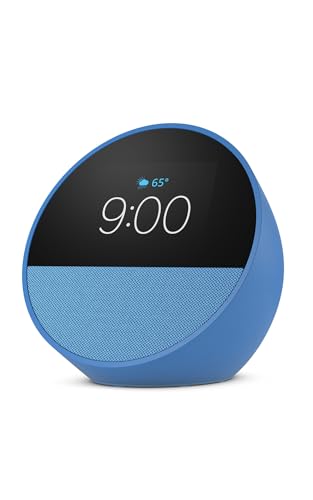
- Customizable clock with time, weather, and reminders
- Rich sound with clear vocals and deep bass
- Alexa routines and compatible smart-home control
Best For: Nightstands, offices, and kitchens
Best Family Organizer

- Syncs Google, iCloud, and Outlook calendars
- Tracks chores, rewards, meals, and grocery lists
- Wall-mountable with weather and photo slideshow features
Best For: Shared household planning and family routines
Best Alexa Video Hub
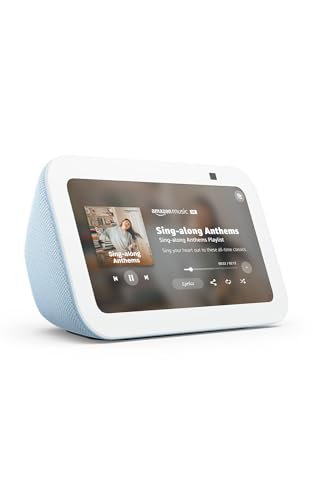
- 5.5-inch display for news, weather, shows, and music
- 2 MP camera supports video calls and home check-ins
- Smart-home control with camera shutter and privacy controls
Best For: Compact video calling, media, and camera viewing
Best Built-In Smart-Home Panel
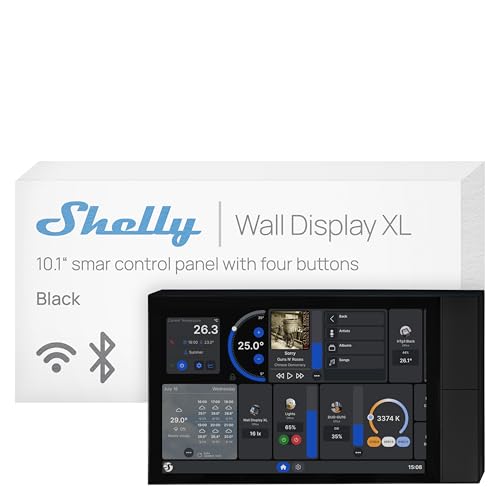
- 10.1-inch touchscreen with relay and four buttons
- Controls appliances, scenes, and compatible smart-home devices
- Supports Shelly, Home Assistant, Alexa, Google, and HomeKit
Best For: Permanent wall-mounted smart-home control
Best All-Around Smart Display

- 8.7-inch HD screen with expanded viewing area
- Spatial audio and up to 2x the bass
- Alexa, smart-home hub, calls, and privacy controls
Best For: Families wanting a versatile Alexa display
Best for Security Monitoring
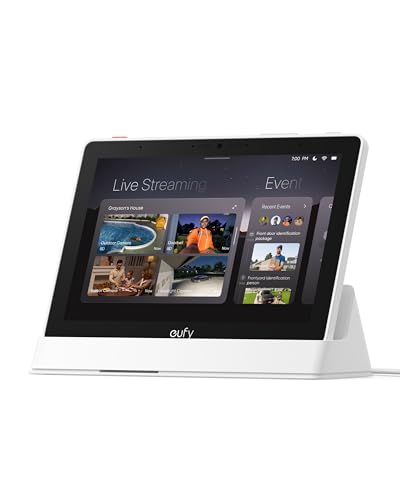
- Shows four live camera feeds simultaneously
- Local event storage enables quick replay
- Alerts and summaries for security activity
Best For: eufy users building a central security hub
Best for IoT Makers

- Compact touchscreen for IoT interfaces
- Wi-Fi 6, BLE 5.3, Zigbee, and Thread
- Matter 1.2 compatibility with C5 RISC-V chip
Best For: Developers and makers building connected-device projects
Kitchen-Friendly Pick
Google Nest Hub 7" Smart Display

- 7-inch display with built-in Google Assistant
- Voice and touchscreen smart-home control
- Supports entertainment and daily organization
Best For: Compact hands-free help in kitchens, bedrooms, and offices
Commercial Signage Pick

- 24-inch Full HD commercial display
- Built-in Wi-Fi and cloud-based VXT management
- Home UI and Favorites for easier access
Best For: Office, entrance, exit, and promotional signage
Entertainment Pick

- 7-inch 1024x600 touchscreen
- Google Assistant with Voice Match routines
- Supports YouTube, Spotify, Pandora, and Photos
Best For: Compact home entertainment and personalized daily information
Best Nightstand Pick – Echo Spot
The Echo Spot is a compact smart display designed for quick, glanceable information in bedrooms, offices, and kitchens. Its customizable clock face, Alexa controls, routines, and built-in speaker make it especially practical when you want more than a basic alarm clock without taking up much space.
Best For: Nightstands, compact workspaces, and users who want an Alexa alarm clock with strong audio.
Pros:
- Displays the time, weather, reminders, and song information at a glance.
- Offers rich sound with clear vocals and deep bass.
- Supports gradual-light wake routines and compatible smart-home controls.
- Can extend an existing eero network by up to 1,000 square feet.
Cons:
- Its compact display is better suited to quick information than extensive visual content.
- Wi-Fi extension requires an existing compatible eero network.
The Echo Spot is a focused choice among compact smart displays, combining an alarm clock, Alexa assistant, speaker, and basic smart-home control in a small footprint.
Best Family Organizer – 10.1-Inch Digital Calendar
This 10.1-inch digital calendar is a wall-mountable family command center rather than a traditional voice assistant display. It syncs schedules from Google, iCloud, and Outlook while also handling chores, meal planning, grocery lists, weather, reminders, and photo slideshows.
Best For: Busy families that need a shared schedule, task tracker, and household planning screen.
Pros:
- Synchronizes Google, iCloud, and Outlook calendars in real time.
- Includes chore tracking with points and reward support for children.
- Combines meal planning, grocery lists, reminders, weather, and photos.
- Can be wall-mounted in a high-traffic area for shared visibility.
Cons:
- Its family-planning features depend on using the associated application.
- The wall-calendar format may be less suitable for users seeking a general-purpose smart display.
For households comparing compact smart displays, this model stands out when organization and shared family visibility matter more than entertainment or voice-assistant features.
Best Alexa Video Hub – Echo Show 5
The Echo Show 5 adds a 5.5-inch screen, camera, and Alexa functionality to a compact desktop design. It works well for checking weather and news, making video calls, viewing compatible cameras, streaming content, and controlling compatible smart-home devices.
Best For: Small desks and bedside tables where video calling, camera viewing, and media playback are priorities.
Pros:
- Shows news, weather, song titles, and streaming content on a 5.5-inch display.
- Includes a 2 MP camera for video calls and home check-ins.
- Controls compatible lights, thermostats, cameras, and doorbells.
- Offers a camera shutter plus microphone and camera-off controls.
Cons:
- The 5.5-inch screen limits viewing space for video and visual information.
- Video calling and camera features require compatible Alexa devices or services.
The Echo Show 5 is a versatile option among compact smart displays, particularly for shoppers who want a small Alexa screen with communication and monitoring features.
Best Built-In Smart-Home Panel – Shelly Wall Display XL
The Shelly Wall Display XL is a 10.1-inch touchscreen control panel designed for permanent installation in a standard electrical wall box. With a built-in 5A relay, four customizable buttons, and integrations with Shelly, Home Assistant, Alexa, Google, and HomeKit, it is aimed at centralized smart-home control rather than portable use.
Best For: Homes and commercial spaces that need a dedicated, wall-mounted automation and appliance-control panel.
Pros:
- Provides a large 10.1-inch touchscreen plus four customizable physical buttons.
- Built-in relay can control compatible lights, fans, heaters, and other appliances.
- Works with Shelly Smart Control, Home Assistant, Alexa, Google, and HomeKit.
- Can control Bluetooth or Sonos audio and supports automation schedules.
Cons:
- Requires wall installation and a neutral wire.
- The built-in relay is rated for 5A, which may limit some appliance applications.
- Its 920-gram design is intended for fixed installation, not easy repositioning.
Among compact smart displays, the Shelly Wall Display XL is the specialist choice for a permanent control point, especially in installations already using Shelly devices or Home Assistant.
Best All-Around Smart Display – Echo Show 8
The newest Echo Show 8 is a strong choice among compact smart displays for households that want entertainment, Alexa assistance, video calls, and smart-home control in one device. Its 8.7-inch HD screen, spatial audio, built-in smart-home hub, and privacy controls make it particularly versatile for kitchens, bedrooms, and common areas.
Best For: Families seeking a compact Alexa display for entertainment, routines, recipes, calls, and connected-device control.
Pros:
- Vibrant 8.7-inch HD touchscreen with 15% more viewing area than the 2023 Echo Show 8.
- Spatial audio, wider soundstage, crisper vocals, and up to twice the bass of the previous model.
- Built-in smart-home hub, camera viewing, video calling, and Alexa-powered everyday assistance.
- Camera and microphone controls provide added privacy management.
Cons:
- Its Alexa ecosystem focus may be less suitable for households using other smart-home platforms.
- The broad feature set may be more than needed if you only want a basic display or clock.
Choose the Echo Show 8 when you want one compact screen to handle media, household organization, calls, and smart-home tasks. It is the most balanced option here for general-purpose use.
Best for Security Monitoring – eufy Smart Display E10
The eufy Smart Display E10 stands out among compact smart displays as a dedicated security and monitoring hub. Its 8-inch touchscreen can show four camera feeds at once, surface alerts, replay locally stored events, and present daily summaries from compatible eufy security equipment.
Best For: Households that want a simple central screen for eufy cameras, doorbells, access events, and local security playback.
Pros:
- Automatically displays live video and voice alerts for doorbell, door, and camera activity.
- Supports four simultaneous live feeds for broad property visibility.
- Downloads historical events to local storage for quick replay without buffering.
- Provides facial and package recognition features through HomeBase 3, plus daily event summaries.
Cons:
- Its feature set is centered on eufy security products rather than general entertainment.
- The supplied information does not identify broad compatibility with non-eufy camera ecosystems.
- At 2.44 pounds, it may be less convenient to move frequently than lighter displays.
The E10 is a focused choice rather than a general-purpose media screen. If your priority is seeing security events quickly and reviewing multiple feeds in one place, its dedicated monitoring features are compelling.
Best for IoT Makers – 2.8-Inch Matter Touch Display
This 2.8-inch touch display is a specialized option among compact smart displays, designed for smart-home developers, industrial IoT engineers, and makers. Wi-Fi 6, Bluetooth Low Energy 5.3, Zigbee 3.0, Thread, and Matter 1.2 support give it a connectivity-focused profile for IoT projects.
Best For: Developers and hobbyists creating or testing connected-device interfaces and Matter-enabled IoT projects.
Pros:
- Compact 2.8-inch touchscreen suited to small IoT control interfaces.
- Supports dual-band Wi-Fi 6 and Bluetooth LE 5.3.
- Includes Zigbee 3.0, Thread, and Matter 1.2 compatibility for broad protocol support.
- Uses a C5 RISC-V processor running at 240MHz.
Cons:
- The small screen is less suitable for media, video calls, or viewing detailed dashboards.
- It is positioned for developers and makers rather than typical plug-and-play household use.
- The supplied details do not specify included software, mounting options, or battery behavior.
Consider this display when connectivity standards and project flexibility matter more than screen size or mainstream assistant features. It is a niche but capable platform for compact IoT interfaces.
Kitchen-Friendly Pick – Google Nest Hub 7" Smart Display
Google Nest Hub 7” Smart Display with Google Assistant (1st Gen) - Chalk (Bulk Packaging)
Check Price On AmazonIf you want compact smart displays for a kitchen, bedroom, desk, or nightstand, the Google Nest Hub 1st Gen provides a space-conscious 7-inch touchscreen with Google Assistant. It combines hands-free help, smart-home control, entertainment, and daily organization in a small footprint.
Best For: Users who want a compact Google Assistant display for timers, recipes, reminders, music, photos, and compatible smart-home devices.
Pros:
- Compact 7-inch design fits counters, desks, offices, and nightstands.
- Controls compatible lights, cameras, thermostats, plugs, and speakers by voice or touchscreen.
- Supports music, videos, Google Photos, weather, timers, reminders, and recipes.
- Language can be changed to English after setup through Google Home or device settings.
Cons:
- This is a 1st-generation model.
- The supplied unit is a Korean/international version, so setup may require changing the language.
- Bulk packaging may provide fewer packaging extras than a standard retail package.
Its small dimensions and broad everyday functions make it a practical choice when countertop or bedside space is limited. Buyers should account for the international specification and language setup.
Commercial Signage Pick – Samsung 24" UHD Display
For buyers comparing compact smart displays for offices, entrances, or promotional areas, this Samsung commercial display offers a 24-inch Full HD screen with a space-efficient design. Its Home UI, built-in Wi-Fi, remote, and cloud-management support suit business-oriented installations rather than personal voice-assistant use.
Best For: Offices, entrances, exits, and promotional signage that need a compact commercial screen with remote-management options.
Pros:
- Compact 24-inch landscape display designed for efficient space use.
- Home UI puts popular categories on one screen, with a Favorites folder for frequent features.
- Built-in Wi-Fi, center IR, and included remote support convenient control.
- Samsung VXT enables cloud-based remote management.
Cons:
- It is a commercial signage display, not a compact voice-assistant smart display.
- The listed resolution is Full HD rather than a higher UHD resolution.
- Wall mounting is the specified mounting type, which may require installation planning.
This model is best understood as a business display for managed content and signage. Its 24-inch format balances visibility with space efficiency, while the included remote and cloud features add control flexibility.
Entertainment Pick – Google Nest Hub 7" Charcoal
This Google Nest Hub is one of the more versatile compact smart displays for buyers who want a small screen for weather, calendars, photos, videos, and music. Its 7-inch 1024×600 touchscreen works with Google Assistant, Voice Match, Wi-Fi, Bluetooth, and compatible smart-home products.
Best For: Homes that want a compact display for personalized routines, entertainment, smart-home control, and at-a-glance information.
Pros:
- 7-inch touchscreen shows weather, calendar information, YouTube videos, and Google Photos.
- Google Assistant supports reminders, hands-free answers, and smart-home commands.
- Works with more than 200 devices from over 50 brands, according to the supplied product notes.
- Supports YouTube, Spotify, Pandora, and other entertainment services.
Cons:
- This is a 1st-generation Google Nest Hub.
- The 1024×600 WSVGA resolution is modest compared with larger or newer displays.
- Its compact screen may be less suitable for viewing content from across a large room.
With Voice Match, personalized routines, and broad service support, this model is a well-rounded compact option for everyday home use. Its smaller display and first-generation platform are the main trade-offs.
How We Picked These Compact Smart Displays
We selected products across the main categories shoppers consider when choosing Compact Smart Displays: voice-assistant screens, smart-home hubs, wall-mounted dashboards, digital calendars, IoT panels, and space-saving commercial displays. We considered screen size, placement flexibility, connectivity, audio and visual capabilities, ecosystem compatibility, and the type of information or controls each device is designed to handle.
Because these products are not interchangeable, the roundup includes both general-purpose displays and specialized options. A bedside alarm display has different strengths from a security hub or a wall-mounted home-control panel.
Quick Comparison
| Best For | Recommended Type | What to Look For |
|---|---|---|
| Nightstands and desks | Small voice-assistant display | Compact footprint, alarms, timers, and clear controls |
| Kitchen and family spaces | Mid-size smart display | Readable screen, useful audio, and hands-free assistance |
| Home automation | Dedicated smart-home hub | Device compatibility, centralized controls, and reliable Wi-Fi |
| Wall organization | Touchscreen calendar or wall display | Mounting method, dashboard visibility, and simple updates |
| IoT projects | Small connected touchscreen | Network support, software compatibility, and power requirements |
Key Buying Factors for Compact Smart Displays
Screen Size and Placement
Measure the available surface before buying. Smaller displays work well beside a bed or on a crowded desk, while 8- to 10-inch screens are easier to read from across a kitchen or hallway. Wall-mounted models need extra attention to mounting depth, cable routing, and viewing height.
Smart-Home Ecosystem
Choose a display that works with the devices and services you already use. Alexa and Google Assistant models are convenient when your lights, cameras, speakers, calendars, and streaming accounts are already linked to the same platform. Specialized hubs may be better for a particular security or automation system.
Connectivity and Compatibility
Check Wi-Fi requirements, supported protocols, app compatibility, and whether the display requires a separate hub. For IoT-focused products, confirm operating-system support, available ports, firmware options, and power needs before ordering.
Audio, Privacy, and Durability
For music, calls, or kitchen use, compare speaker quality and microphone controls. Look for physical camera shutters or microphone switches if privacy matters. Commercial or wall-oriented models may prioritize continuous operation and installation flexibility over voice features.
Who Should Buy Which Compact Smart Displays?
Choose a small Alexa display if you want an alarm, timer, weather, and quick voice controls in a bedroom, office, or kitchen. A mid-size smart display is a better all-purpose choice for media, recipes, video calls, and family use. Select a digital calendar when shared schedules and visible household organization matter more than entertainment.
Smart-home owners may prefer a dedicated control panel or security display for centralized device access. DIY users should focus on the small IoT touchscreen, checking compatibility carefully. Finally, a larger commercial display makes sense when you need a more visible dashboard, signage screen, or wall-mounted interface rather than a traditional voice assistant.