The best wireless smart remote controls make everyday devices easier to operate without reaching for a phone or opening an app. From scene-based lighting controls to long-range outlet remotes and compact air-mouse controllers, the right option depends on what you want to operate and how much setup you prefer.
We compared these 10 picks for range, compatibility, button layout, installation, and practical household use so you can find a dependable remote for lights, appliances, smart-home scenes, or entertainment systems.
Best 10 Wireless Smart Remote Controls Picks for 2026
Hue Scene Controller
Philips Hue Smart Dimmer Switch

- On/off, dimming, and four favorite scenes
- Wall-mountable with detachable handheld remote
- Requires a Philips Hue Bridge
Best For: Philips Hue lighting setups
Govee Multi-Device Button
GoveeLife Wireless Smart 6 Button Sensor

- Six buttons for one-touch group commands
- Supports up to 50 GoveeLife devices
- 180-foot range; no Alexa or Google Assistant support
Best For: GoveeLife smart-device ecosystems
Long-Range RF Outlet Kit
Wireless Remote Control Outlets
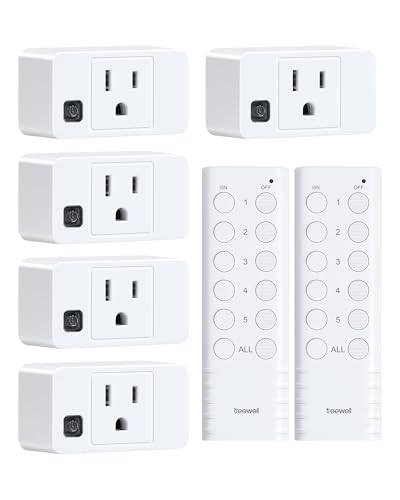
- Two remotes control five outlets
- Up to 200-foot RF range through barriers
- 15A/1875W rating with ETL and FCC listings
Best For: Simple remote on/off control for lamps and appliances
Caseta Lighting Remote

- On/off and brighten/darken controls
- Designed for Lutron Caseta dimmers
- Includes a battery rated for up to 10 years
Best For: Adding remote control points to Lutron Caseta lighting
Best Air Mouse Keyboard

- Bluetooth 5.2 and 2.4G connectivity
- Six-axis air-mouse cursor control
- Backlit rechargeable QWERTY keyboard
Best For: Android TV boxes, smart TVs, PCs, projectors, and media navigation
Best Wireless Outlet Controller
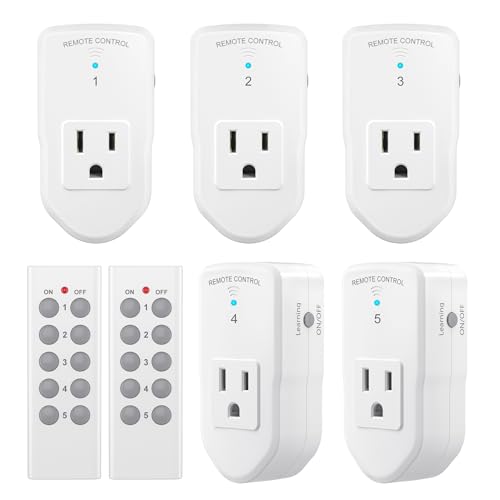
- Up to 100-foot line-of-sight range
- Works through doors and walls
- 120V, 10A, 1200W rating
Best For: Remote on/off control of lights, fans, decorations, and small appliances
Best Smart Lighting Remote
Philips WiZ Dimming Controller

- Nine dedicated lighting-control buttons
- Customizable scene shortcut buttons
- Works without Wi-Fi
Best For: Connected by WiZ smart lights needing physical dimming and scene control
Best Single-Outlet Pick
WILAWELS Wireless Remote Outlet

- No Wi-Fi or app setup
- Up to 100-foot RF range
- Compact, expandable design
Best For: One remotely controlled lamp or appliance
Best Multi-Outlet Value

- Five outlets and two remotes
- Programmable one-button control
- Up to 100-foot RF range
Best For: Managing multiple household appliances
Best Appliance Coverage

- Works with varied indoor appliances
- Five outlets with two remotes
- Programmable multi-outlet control
Best For: Controlling lamps, fans, chargers, and seasonal devices
Hue Scene Controller – Philips Hue Smart Dimmer Switch
The Philips Hue Smart Dimmer Switch is a convenient choice for wireless smart remote controls within a Philips Hue lighting setup. It provides physical access to on/off control, dimming, and four favorite scenes, while its detachable design lets you use it as a handheld remote.
Best For: Philips Hue households that want an easy wall-mounted or handheld lighting controller.
Pros:
- Controls Hue lights with on/off, dimming, and scene selection.
- Can be mounted with adhesive or magnetic backing.
- Detachable switch works as a portable remote.
- Settings can be personalized in the Hue app.
Cons:
- Requires a Philips Hue Bridge.
- Designed for Philips Hue devices rather than general household appliances.
This is a focused, polished option for Hue users who want another physical control point. The Bridge requirement limits compatibility, but the flexible mounting and scene controls make it practical for bedrooms, hallways, and shared spaces.
Govee Multi-Device Button – GoveeLife Wireless Smart 6 Button Sensor
The GoveeLife Wireless Smart 6 Button Sensor is built for wireless smart remote controls across compatible GoveeLife devices. Its six-button layout supports one-touch commands, group control, and alternating on/off actions, with a stated range of up to 180 feet.
Best For: GoveeLife users who want physical, multi-device control in one room or connected space.
Pros:
- Can control groups of GoveeLife devices with one press.
- Supports up to 50 GoveeLife smart ecological devices.
- Offers a claimed 55-meter/180-foot effective range.
- Includes a CR2032 battery and has six buttons.
Cons:
- Does not connect to Alexa or Google Assistant.
- Compatible with GoveeLife devices rather than a broad range of brands.
- Weak signals may require moving the sensor closer to devices.
For homes already invested in GoveeLife products, this sensor can simplify repeated routines and grouped actions. Its ecosystem-specific compatibility is the main limitation, so confirm your devices support the required GoveeLife connection modes.
Long-Range RF Outlet Kit – Wireless Remote Control Outlets
This wireless remote control outlet kit offers a straightforward approach to wireless smart remote controls without relying on a smart-home app. Two remotes operate five plug-in outlets individually or together, and the RF signal is designed to work through walls, doors, and windows from up to 200 feet away.
Best For: Controlling lamps and household appliances remotely with a simple RF system.
Pros:
- Includes two remotes and five outlets.
- Supports individual or simultaneous on/off control.
- Compact outlets use one wall socket without blocking the other.
- Rated at 15A/1875W and ETL and FCC listed.
Cons:
- Provides on/off control rather than dimming or advanced automation.
- Uses a plug-in RF design instead of app-based smart-home control.
- Additional compatible kits may be needed for expansion.
This is a practical pick when dependable remote switching matters more than smart-assistant features. Its long stated range, compact form, and expandable pairing make it useful for lamps, hard-to-reach outlets, and selected appliances.
Caseta Lighting Remote – Lutron Pico 3-Button Control
The Lutron Pico Remote is a compact option for wireless smart remote controls in a Lutron Caseta lighting system. Its three-button layout handles on/off and brighten/darken commands, allowing you to adjust compatible lights from elsewhere in the room.
Best For: Lutron Caseta users who need an additional handheld or wall-positioned lighting control.
Pros:
- Turns compatible lights on and off and adjusts brightness.
- Works with Lutron Caseta dimmers and plug-in lamp dimmers.
- Includes a battery designed for up to 10 years of life.
- Can be paired with separately sold tabletop or wall-mount accessories.
Cons:
- Compatible Lutron dimmers and accessories are sold separately.
- Primarily suited to compatible Lutron lighting systems.
- Provides three-button lighting control rather than broad appliance control.
The Pico is a focused add-on for extending control around a Caseta installation. It is especially useful when you want lighting adjustment from another seat, doorway, or convenient wall location without adding a conventional wired switch.
Best Air Mouse Keyboard – Gyro QWERTY Remote
For shoppers seeking wireless smart remote controls for streaming and connected devices, this handheld model combines cursor control, text entry, and dual wireless connectivity in one compact design. It supports Bluetooth 5.2 and 2.4G connections, making it a flexible choice for compatible TVs, computers, projectors, and media devices.
Best For: Android TV boxes, smart TVs, PCs, projectors, and users who want an air mouse with a built-in keyboard.
Pros:
- Bluetooth 5.2 and 2.4G wireless modes support multiple compatible devices.
- Six-axis gyroscope enables motion-based cursor control.
- Backlit QWERTY keyboard helps with searches and text entry.
- Rechargeable Type-C battery and automatic sleep mode add convenience.
Cons:
- Supports a maximum of one device at a time according to the listed specifications.
- Its broad compatibility is focused on media and computing devices rather than household outlets or lighting.
This is a practical pick when a standard remote is not enough. The combination of air-mouse navigation and a compact backlit keyboard is especially useful for typing on TV interfaces, while the 10-meter listed range suits typical room setups.
Best Wireless Outlet Controller – BN-LINK Remote Outlet Kit
For wireless smart remote controls that operate everyday appliances, this BN-LINK kit provides remote on/off switching for lights, fans, holiday decorations, and other compatible devices. The plug-and-play outlets use radio frequency signals that can work through doors and walls, with a listed line-of-sight range of up to 100 feet.
Best For: Lights, fans, seasonal decorations, charging devices, and small appliances rated within the outlet’s limits.
Pros:
- Ready-to-use kit includes the remote batteries.
- RF signal can operate through doors and walls.
- Multiple outlets can be paired for expanded control.
- Outlets can also be switched manually.
Cons:
- Rated for 120V, 10A, and 1200W; it is not compatible with shop vacs.
- It is an on/off outlet system rather than a dimming or app-controlled smart-home hub.
- Requires two 12V batteries for the remote.
This kit is a straightforward way to add remote switching without relying on Wi-Fi. Its power rating and post-outage off behavior make it suitable for many household loads, but shoppers should confirm appliance requirements before connecting higher-powered equipment.
Best Smart Lighting Remote – Philips WiZ Dimming Controller
Among wireless smart remote controls for lighting, this Philips model is designed for Connected by WiZ products and provides direct control without depending on Wi-Fi. Its nine buttons handle power, dimming, light modes, and night-light functions, while four numbered buttons can be customized through the WiZ app.
Best For: Rooms using Connected by WiZ smart lights that need convenient physical dimming and scene controls.
Pros:
- Controls one or more lights in a room with dedicated power and dimming buttons.
- Four numbered buttons can be assigned to favorite light modes.
- Works even when Wi-Fi is unavailable because it sends signals directly.
- Offers a listed indoor range of up to 50 feet through normal partitions and walls.
Cons:
- Compatible with Connected by WiZ products, not Philips Hue products.
- Customization requires the WiZ app.
- Designed for smart lighting rather than general-purpose device control.
This remote is a strong fit for households that want dependable physical lighting controls alongside app access. Its direct signaling and dedicated dimming buttons are useful for everyday use, provided your bulbs and devices are part of the Connected by WiZ ecosystem.
Best Single-Outlet Pick – WILAWELS Wireless Remote Outlet
For straightforward wireless smart remote controls without Wi-Fi or an app, the WILAWELS remote outlet provides plug-and-play on/off control for lamps, fans, lights, and other compatible appliances. Its RF signal works through doors and walls up to 100 feet line of sight.
Best For: Shoppers who need one compact, wall-mountable remote outlet with flexible handheld or mounted control.
Pros:
- No Wi-Fi, app, or complicated setup required
- Remote RF range reaches up to 100 feet line of sight
- Expandable with matching pre-programmed WILAWELS sockets and remotes
- Compact design leaves the second wall outlet available
Cons:
- Rated for 10A and 1250W, so it is not intended for loads beyond those limits
- Designed primarily for on/off control rather than advanced smart-home features
This is a practical choice when reliable wireless switching matters more than app-based automation. The removable mounting option and included AAA batteries add convenience, while FCC certification provides an additional specification to consider.
Best Multi-Outlet Value – Five-Outlet Remote Switch Kit
This five-outlet kit is a useful option for wireless smart remote controls across several household devices. It includes two remotes, supports RF operation through doors and walls up to 100 feet, and lets you program multiple outlets to one button or control an outlet with multiple remotes.
Best For: Households that want to control several lamps or appliances from a pair of remotes.
Pros:
- Includes five outlets and two remotes
- Can activate multiple devices with one button
- Compact outlets use only one wall socket each
- Remains off after a power interruption to help reduce standby use
Cons:
- The listed wattage rating is 1000W
- Uses simple remote control rather than Wi-Fi or app-based operation
With five receivers included, this kit is better suited to whole-room or multi-device coverage than a single-outlet package. ETL and FCC approvals, along with programmable pairing, strengthen its appeal for basic household control.
Best Appliance Coverage – Five-Outlet RF Remote Kit
The BHC1801-5-2 kit offers wireless smart remote controls for a broad mix of indoor devices, including lamps, coffee pots, fans, heaters, sound systems, holiday decorations, and chargers. Its five outlets use a strong RF signal with a stated line-of-sight range of up to 100 feet.
Best For: Users who want five remotely switched outlets for varied indoor appliances and seasonal devices.
Pros:
- Supports many common household and entertainment devices
- Includes five outlets, two remote controllers, and batteries
- Programmable so one remote can control all outlets
- Compact plugs preserve access to the other wall socket
Cons:
- Indoor use is the stated application
- Power remains off after an outage, which may not suit devices needing automatic restart
- Offers on/off switching rather than advanced scheduling or app control
This kit stands out for versatility and included accessories. FCC certification and ETL listing are useful quality markers, while the expandable programming makes it easier to coordinate several devices from one remote.
How We Picked the Best Wireless Smart Remote Controls
We focused on the features that matter most in daily use: device compatibility, wireless range, control capacity, power requirements, setup difficulty, and physical usability. The selection includes dedicated smart-light remotes, wireless outlet kits, multi-device sensors, and a Bluetooth/2.4GHz air-mouse controller. Because these categories work differently, the best choice is the one that matches your devices rather than the one with the longest feature list.
We also considered whether each control is designed for local operation, app-based smart-home integration, or simple plug-and-play switching. Always verify the required hub, receiver, outlet type, and supported ecosystem before ordering.
Quick Comparison
| Best For | Look For | Typical Setup |
|---|---|---|
| Smart lighting | Scene buttons, dimming, ecosystem compatibility | Pair with bulbs, switches, or a hub |
| Basic lamps and appliances | RF range, outlet capacity, included receivers | Plug in and pair the remote |
| Multiple devices | Group control and programmable buttons | Configure groups or scenes |
| Streaming and smart TVs | Bluetooth, 2.4GHz, keyboard, backlight | Pair with a compatible media device |
Key Buying Factors for Wireless Smart Remote Controls
Compatibility and Ecosystem
Check whether the remote works with your existing bulbs, switches, outlets, hub, or media player. A remote intended for a specific lighting platform may not control generic RF outlets, while a simple outlet remote usually cannot trigger app-based scenes.
Range and Signal Reliability
Manufacturers may quote open-air range, which can be reduced by walls, furniture, and interference. For a bedroom, office, or nearby lamp, modest range may be sufficient. For detached spaces or large rooms, prioritize a clearly stated RF range and test placement before permanently installing anything.
Control Layout and Accessibility
Large, clearly labeled buttons are useful for lamps and everyday lighting. Dimming controls and scene buttons suit smart bulbs, while a QWERTY keyboard and gyro pointer are more appropriate for media devices. Consider whether the remote can be wall-mounted, carried between rooms, or operated in the dark.
Power, Installation, and Safety
Battery-powered remotes are easy to place but require occasional replacement or charging. Outlet kits are simple to install but must support the voltage, load, and appliance type you plan to use. Do not exceed the receiver’s electrical rating, and avoid using an outlet remote with equipment that requires specialized safety controls.
Who Should Buy Which Wireless Smart Remote Controls?
Choose a dedicated smart-light remote if you already use compatible smart bulbs or switches and want dimming, scenes, or grouped lighting without relying on a phone. Pick a wireless outlet kit for lamps, fans, seasonal decorations, or small appliances that only need straightforward on/off control. A multi-button sensor is a better fit when you want several devices or groups controlled from one location. For televisions and streaming boxes, select the air-mouse style controller only when your device supports its Bluetooth or 2.4GHz connection.
Before buying, count the devices you need to control, measure the distance through walls, and confirm whether batteries, a hub, or extra receivers are required. That short checklist will narrow this list quickly and help ensure your new remote works as expected from day one.