The best smart displays for home automation put lighting, cameras, thermostats, sensors, and routines within easy reach. Instead of relying on separate apps or voice commands, a wall-mounted or countertop panel can give your household a clear visual control center.
Our selection includes Alexa-compatible hubs, Zigbee control panels, PoE Android touchscreens, security-focused displays, and larger calendar-style screens. The right choice depends on your existing devices, installation plans, screen size preferences, and how much setup you want to handle.
Best 10 Smart Displays for Home Automation Picks for 2026
Best Alexa Control Panel

- Customizable dashboard for devices and routines
- Built-in hub supports Matter, Zigbee, Thread, and more
- Wall-mountable with Alexa voice control
Best For: Alexa households wanting a dedicated smart-home screen
Best Large Wired Panel
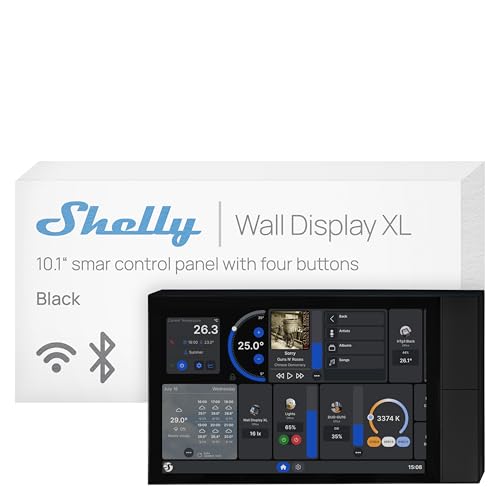
- 10.1-inch touchscreen with four customizable buttons
- Built-in 5A relay for selected appliances
- Integrates with Shelly, Home Assistant, Alexa, Google, and HomeKit
Best For: Permanent in-wall control in homes or commercial spaces
Best Refurbished Value
- Certified refurbished and tested to work like new
- 8-inch customizable Alexa control dashboard
- Built-in hub supports thousands of compatible devices
Best For: Alexa users seeking a certified refurbished control panel
Best Silver Wall Panel

- Large 10.1-inch touchscreen in a silver finish
- Built-in 5A relay and four programmable buttons
- Supports Shelly, Home Assistant, Alexa, Google, and HomeKit
Best For: Silver-finish in-wall control for Shelly-based homes
Compact Control Center

- 4.7-inch touchscreen for home controls
- Security modes with sensor alerts
- Camera viewing and energy tracking
Best For: Compact everyday automation and security control
Family Command Hub
21.5-Inch Smart Calendar Display

- Large Full HD touchscreen dashboard
- Google Play app flexibility without subscription
- Wall or countertop installation
Best For: Family scheduling and visible smart home management
White Home Automation Panel

- Compact 4.7-inch touchscreen
- Security alerts and camera monitoring
- Lighting, thermostat, and energy controls
Best For: Dedicated compact control in a light-colored finish
Best Wired Control Panel
JEESTON 10.1-Inch PoE Touch Panel
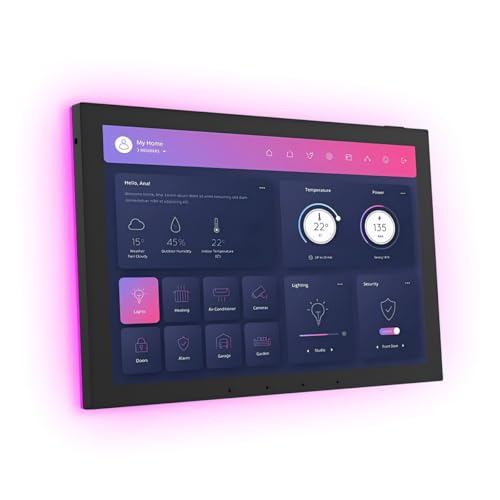
- Android 14 with 4GB RAM and 64GB storage
- PoE, Wi-Fi 6E, Ethernet, RS-232, and RS-485
- Proximity, light, temperature, and humidity sensors
Best For: In-wall smart-home control and custom wired integrations
Best for Security Monitoring
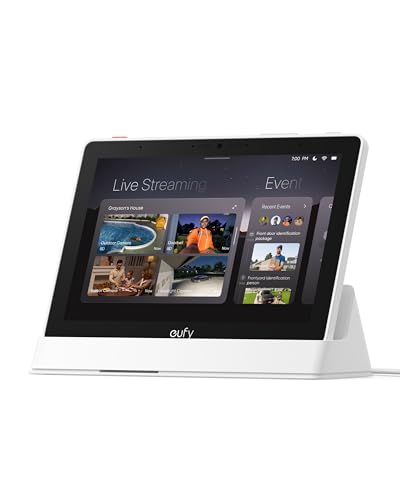
- 8-inch touchscreen for household monitoring
- Shows up to four live security feeds
- Local playback plus HomeBase 3 summaries
Best For: Centralized eufy doorbell and camera monitoring
Best Alexa Zigbee Hub

- Alexa voice assistant built in
- Integrated Zigbee gateway
- 5-inch touchscreen with Smart Life compatibility
Best For: Alexa and Smart Life device control from one panel
Best Alexa Control Panel – Echo Hub 8-Inch
The Amazon Echo Hub is a practical choice among smart displays for home automation, combining an 8-inch customizable dashboard with Alexa voice control. It lets you organize device controls, view compatible camera feeds, start routines, and manage security features from a wall-mounted or tabletop location.
Best For: Alexa households that want a dedicated, highly customizable smart-home control screen.
Pros:
- Works with thousands of compatible Wi-Fi, Bluetooth, Zigbee, Matter, Sidewalk, and Thread devices.
- Customizable dashboard supports sections and resizable controls.
- Built-in smart-home hub and support for routines, cameras, and security systems.
- Offers wall mounting, optional tabletop use, and a microphone-off button.
Cons:
- Wall-mounting cable-management accessories and tabletop stands are sold separately.
- Some Ring camera features require Alexa+ and a compatible Ring subscription.
Echo Hub is strongest when your home already uses Alexa-compatible devices. Its dedicated interface makes frequently used controls easier to reach than relying only on a phone app.
Best Large Wired Panel – Shelly Wall Display XL Black
The Shelly Wall Display XL Black is a 10.1-inch touchscreen for shoppers seeking smart displays for home automation with a permanent, in-wall installation. Its built-in 5A relay, four customizable buttons, and Shelly integration provide direct control of selected appliances and connected devices.
Best For: Homes, apartments, and commercial spaces that want a large, permanently installed Shelly control panel.
Pros:
- Large 10.1-inch touchscreen with four customizable physical buttons.
- Built-in 5A relay can control lights, fans, heaters, coffee makers, and more.
- Works with Shelly Smart Control, Home Assistant, Alexa, Google, and HomeKit.
- Supports Bluetooth or Sonos audio control and scheduled automations.
Cons:
- Requires a standard electrical wall box and neutral wire.
- Installation is less flexible than a plug-in or tabletop display.
- The listed relay is limited to 5A and 1150 watts.
This model is a strong fit when you want a substantial wall interface and direct relay switching. Check the electrical requirements and load limits before installation.
Best Refurbished Value – Like-New Echo Hub
The like-new Amazon Echo Hub offers a lower-waste way to add a dedicated Alexa control screen to a connected home. As a refurbished, tested, and certified device, it provides an 8-inch dashboard for lights, plugs, cameras, routines, and compatible security equipment.
Best For: Alexa users who want Echo Hub functionality in a certified refurbished package.
Pros:
- Refurbished, tested, and certified to look and work like new.
- Compatible with thousands of devices, including Matter, Zigbee, Thread, Wi-Fi, and Bluetooth products.
- Customizable controls and widgets simplify everyday device management.
- Supports wall mounting, optional tabletop placement, media playback, and privacy controls.
Cons:
- Refurbished units may arrive in generic Amazon-branded packaging.
- Wall pass-through accessories, power-over-Ethernet adapters, and tabletop stands are sold separately.
This version makes sense for buyers comfortable with refurbished electronics and already invested in Alexa. Its broad compatibility and built-in hub keep it useful as a central home-control point.
Best Silver Wall Panel – Shelly Wall Display XL Silver
The Shelly Wall Display XL Silver brings the same large-format control approach to smart displays for home automation in a silver finish. It combines a 10.1-inch touchscreen, four programmable buttons, and a built-in 5A relay for controlling compatible appliances and Shelly automations.
Best For: Buyers who want a silver, permanently installed panel for Shelly and multi-platform smart-home control.
Pros:
- 10.1-inch touchscreen offers a spacious interface for device control.
- Built-in 5A relay and four buttons support direct appliance control.
- Compatible with Shelly Smart Control, Home Assistant, Alexa, Google, and HomeKit.
- Can control Bluetooth or Sonos audio and run scheduled scenes.
Cons:
- Requires wall-box installation and a neutral wire.
- Relay capacity is limited to 5A and 1150 watts.
- It is less portable than a tabletop or plug-in smart display.
Choose this version if the silver finish better matches your room and you want a fixed control point rather than a portable screen. Verify wiring and appliance requirements before fitting it.
Compact Control Center – SONOFF NSPanel Pro 120
For shoppers comparing smart displays for home automation, the SONOFF NSPanel Pro 120 is a compact touchscreen designed for quick control and monitoring. Its 4.7-inch display brings lighting, thermostat adjustments, energy tracking, compatible camera feeds, security modes, and saved webpages into one panel.
Best For: Homes that want a small, wall-friendly control panel for everyday automation and security monitoring.
Pros:
- Combines lighting, thermostat, energy, camera, and security controls in one interface.
- Supports three customizable security modes with alarm and phone notifications when a sensor is triggered.
- Tracks daily energy consumption over a week for selected compatible devices.
- Can display supported camera feeds and open saved webpages.
Cons:
- The 4.7-inch screen is better suited to focused controls than broad, room-distance viewing.
- Camera and energy features depend on compatible devices and supported integrations.
The NSPanel Pro 120 is a practical choice when you want a dedicated automation interface rather than a large general-purpose tablet. Its compact format keeps key home functions accessible without taking over a wall or countertop.
Family Command Hub – 21.5-Inch Smart Calendar Display
Among smart displays for home automation, the 21.5-inch Mazera stands out as a large family dashboard rather than a dedicated automation panel. Google Play access lets households add calendar, planning, photo, productivity, streaming, and compatible smart home apps without a required subscription.
Best For: Busy families that need a highly visible shared dashboard for schedules, routines, reminders, and selected smart home controls.
Pros:
- Large anti-glare Full HD touchscreen with auto brightness for shared spaces.
- Works with Google Calendar, Apple Calendar, Outlook, Cozi, and other downloadable apps.
- Supports customizable widgets, chores, meal plans, reminders, weather, and smart home controls.
- Can be wall-mounted or used on a countertop with the included metal stand.
Cons:
- Its 21.5-inch size requires more wall or counter space than compact control panels.
- Hands-free control and Gemini features depend on supported services and compatible devices.
This display is best viewed as a shared household command center with automation capabilities. Choose it if visibility, flexible app support, and family organization matter as much as device control.
White Home Automation Panel – SONOFF NSPanel Pro 120 White
The white SONOFF NSPanel Pro 120 offers a focused option for shoppers seeking smart displays for home automation in a clean, compact format. Its 4.7-inch touchscreen supports lighting and thermostat adjustments, energy monitoring, live camera viewing, security modes, and saved web content.
Best For: Users who want a white, dedicated touchscreen for coordinating compatible SONOFF and connected home devices.
Pros:
- Provides a single touchscreen for lighting, thermostat, cameras, energy use, and security.
- Offers three customizable arming modes with an audible alarm and phone notification.
- Displays supported camera feeds for monitoring rooms such as a garage, bedroom, or living room.
- Includes energy statistics and a saved-webpage feature for quick access to content.
Cons:
- The compact display may not be ideal for viewing detailed information from across a room.
- Supported camera, energy, and automation functions require compatible devices or services.
Functionally, this white model is a compact automation and monitoring station, with its finish offering a lighter visual option for the installation area. It makes the most sense for buyers prioritizing centralized control over a large entertainment-style display.
Best Wired Control Panel – JEESTON 10.1-Inch PoE Touch Panel
For shoppers comparing smart displays for home automation, the JEESTON JEMT101 is a highly configurable in-wall control panel. Its Android 14 platform, PoE support, large touchscreen, and wired interfaces make it better suited to integrated installations than casual countertop use.
Best For: In-wall smart-home dashboards and advanced installations using Ethernet, RS-232, RS-485, IR, or I/O connections.
Pros:
- 10.1-inch 1280 x 800 capacitive touchscreen with Android 14.
- Supports Wi-Fi 6E, Gigabit Ethernet, Bluetooth 5.3, and RJ45 PoE power.
- Includes RS-232, RS-485, IR, and I/O support for compatible smart-home devices.
- Proximity, light, temperature, and humidity sensors add automation-friendly inputs.
Cons:
- Its in-wall design and wiring options may require more installation planning.
- The supplied notes do not identify specific software-update support.
The JEMT101 stands out when hardware flexibility matters most. It offers substantial memory and broad connectivity, but buyers should verify installation requirements and compatibility with their chosen automation platform before purchasing.
Best for Security Monitoring – eufy Smart Display E10
The eufy Smart Display E10 is a focused choice among smart displays for home automation, especially for households already using eufy security devices. Its 8-inch touchscreen brings live camera views, alerts, local event playback, and security summaries into a dedicated control panel.
Best For: eufy users who want a simple central screen for doorbell, camera, and home-security monitoring.
Pros:
- Automatically displays live video and voice alerts for supported doorbell, lock, and camera events.
- Can show four simultaneous live feeds for at-a-glance property monitoring.
- Downloads historical events to local storage for quick playback.
- HomeBase 3 supports facial and package recognition with daily security summaries.
Cons:
- Its standout features are centered on the eufy security ecosystem.
- The supplied notes do not specify broad third-party smart-home compatibility.
Choose the E10 if security visibility is the priority rather than broad device-agnostic automation. The straightforward 8-inch interface and included wall mount make it practical for shared household monitoring.
Best Alexa Zigbee Hub – MOES Smart Home Control Panel
The MOES Smart Home Control Panel is a compact option for shoppers seeking smart displays for home automation with built-in voice and Zigbee control. Its Alexa integration, 5-inch touchscreen, and Smart Life compatibility let you manage supported devices and scenes from one wall-mounted or wired panel.
Best For: Smart Life households that want Alexa voice control and an integrated Zigbee gateway.
Pros:
- Built-in Alexa enables hands-free control of devices, scenes, and voice skills.
- Integrated Zigbee gateway eliminates the need for a separate gateway.
- Compatible with Smart Life devices including lights, switches, sockets, cameras, and locks.
- Supports wired or wireless networking and Type-C or circuit-connected power.
Cons:
- The 5-inch display is smaller than the screens on the other listed panels.
- Compatibility is described around Smart Life devices, so buyers should check specific products.
- The supplied notes do not list advanced wired interfaces such as RS-232 or RS-485.
The MOES panel is a sensible all-in-one starting point for Alexa and Zigbee users. It prioritizes approachable device and scene control over the larger display or deeper physical connectivity found on more installation-oriented panels.
How We Picked the Best Smart Displays for Home Automation
We focused on the features that matter most in a household control panel: device compatibility, smart-home protocol support, display size, installation flexibility, security features, and everyday usability. The list includes established hubs as well as more specialized wall panels, so shoppers can compare simple voice-assistant ecosystems with more configurable wired or Zigbee-based systems.
We also considered whether each display is better suited to a countertop, a standard wall box, or a professional-style in-wall installation. Product descriptions and listed specifications were used to distinguish full smart-home hubs from screens that primarily provide an interface.
Quick Comparison
| Best For | Recommended Type | What to Look For |
|---|---|---|
| Alexa households | Echo Hub or Alexa-equipped panel | Alexa compatibility, routines, and device support |
| Zigbee-focused setups | SONOFF or MOES control panel | Built-in Zigbee gateway and supported device profiles |
| Large visual dashboards | 10.1-inch or 21.5-inch display | Viewing distance, mounting, and available dashboard software |
| Wired installations | PoE Android touchscreen | Ethernet cabling, power delivery, and wall-box fit |
| Security monitoring | eufy or compatible hub display | Camera integration, alerts, and privacy controls |
Key Buying Factors for Smart Displays for Home Automation
Compatibility and Ecosystem
Check whether the panel works with your current platform before buying. Alexa, Zigbee, Wi-Fi, Matter, and proprietary camera ecosystems do not offer identical compatibility. A display may control thousands of devices through a cloud assistant while another is designed primarily for local Zigbee accessories.
Screen Size and Placement
An 8-inch display is compact enough for a kitchen counter or entryway, while 10.1-inch models are easier to read when wall-mounted. A 21.5-inch screen can show calendars, scenes, and dashboards at once, but it needs more wall space and may require a sturdier installation.
Power and Installation
Determine whether you need a plug-in device, a panel that fits an electrical wall box, or PoE wiring. In-wall products can provide a cleaner appearance, but installation may require electrical work, network cabling, or an appropriate back box.
Automation and Monitoring Features
Look for customizable controls, routines, camera views, energy monitoring, proximity sensing, and physical relays if those functions match your plans. Built-in radios and relays can reduce the number of separate hubs, but verify ratings and installation requirements before connecting mains-powered equipment.
Who Should Buy Which Smart Displays for Home Automation?
Choose an Echo Hub if you want a straightforward visual Alexa controller with broad consumer-device compatibility. Pick a SONOFF or MOES panel if Zigbee devices and centralized automation are priorities. Shelly’s larger wall displays suit users who want a substantial touchscreen and integrated relay functionality. A PoE Android panel is best for technically confident buyers building a customized dashboard, while a large calendar display works well in shared family spaces. Consider the eufy display if security cameras and household monitoring are central to your setup.