Choosing the right HDMI matrix switch can simplify presentation sharing, video conferencing, signage, and multi-display control across a busy meeting space. The best option depends on room size, display count, resolution requirements, and how much automation your AV team needs.
We selected 10 models spanning compact 4×4 systems, rack-ready 8×8 installations, HDBaseT extension, seamless switching, video walls, and newer HDMI 2.1 connectivity. Use the guide below to narrow the field by workflow, infrastructure, and budget.
Best 10 Hdmi Matrix Switches for Conference Rooms Picks for 2026
Best Compact 4x4 Option
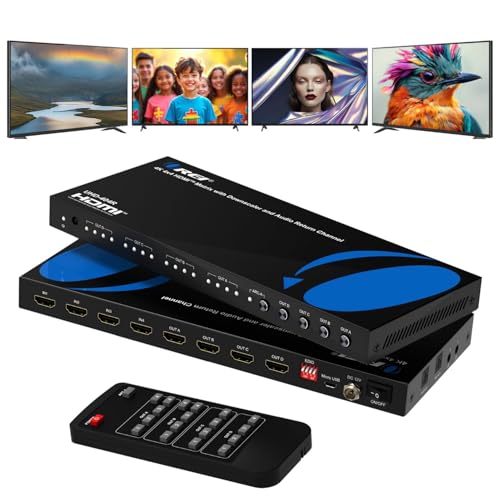
- 4K@60Hz and 18Gbps bandwidth
- Independent 4x4 source-to-display routing
- Optical, 3.5mm, and ARC audio support
Best For: Small conference rooms needing flexible video and audio routing
Best for Large Installations

- Supports up to 16 displays via HDMI and HDBaseT
- 4K extension up to 394 feet over CAT cable
- WebGUI, LAN, RS-232, IR, EDID, and CEC control
Best For: Large rooms and commercial AV systems with long cable runs
Best for Video Walls
Seamless 4x4 Matrix Multiviewer

- Seamless 4K@60Hz 4x4 switching
- Seven video-wall modes with screen rotation
- Twelve multiview layouts and audio routing
Best For: Rooms needing video walls, multiview monitoring, and smooth transitions
Best for Preset-Based Control

- Eight-source, eight-display independent routing
- 4K-to-1080p downscaling for mixed displays
- Eight presets plus LAN and WebGUI control
Best For: Larger fixed installations using mixed-resolution displays
Best All-Around Control

- Routes 4 sources to 4 displays
- Web, LAN, RS232, remote, and panel control
- Rack-mountable with OUT4 audio extraction
Best For: Medium conference rooms needing flexible routing and control
Best for 4K60 Displays

- Supports 4K@60Hz and 18Gbps bandwidth
- Downscales 4K to 1080p
- Handles HDR and up to 7.1-channel audio
Best For: Rooms with mixed 4K and 1080p displays
Best for Large AV Systems
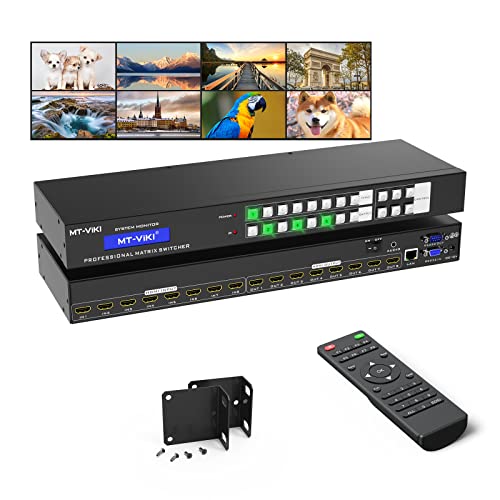
- Routes 8 sources to 8 displays
- Web, LAN, RS232, remote, and third-party control
- 1U rack design with 4K@30Hz support
Best For: Large conference rooms and multi-display installations
High-Capacity 4K Hub

- Routes 8 sources to 8 displays
- Supports 4K@60Hz and 18Gbps
- Downscales for mixed 4K/1080p rooms
Best For: Large conference rooms with mixed-resolution displays
Next-Gen Presentation Core

- Uses HDMI 2.1 with 48Gbps bandwidth
- Supports 8K, HDR10+, and Dolby Vision
- Adds Web GUI control and EDID
Best For: Modern AV installations requiring HDMI 2.1 features
Video Wall Specialist
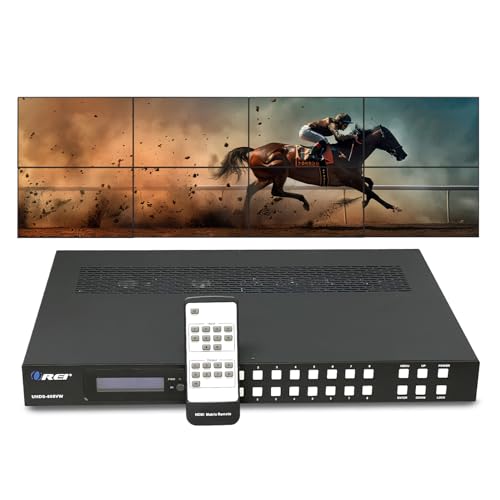
- Supports flexible 8x8 source routing
- Includes 2x2, 2x3, and 3x3 video wall layouts
- Offers optical and analog audio extraction
Best For: Conference rooms and command centers using video walls
Best Compact 4×4 Option – 4K HDMI Matrix with ARC Audio
For smaller meeting spaces comparing HDMI matrix switches for conference rooms, this OREI 4×4 model combines independent source-to-display routing with 4K@60Hz support. Its ARC capability and optical and 3.5mm audio extraction also make it practical when the room needs a separate audio system.
Best For: Small conference rooms, classrooms, and installations needing four sources, four displays, and flexible audio routing.
Pros:
- Routes four HDMI inputs independently to four HDMI outputs.
- Supports 4K@60Hz, 18Gbps bandwidth, HDR, HDMI 2.0, and HDCP 2.2.
- Includes optical and 3.5mm audio extraction, plus ARC on Output A.
- Metal enclosure supports heat dissipation and durable installation.
Cons:
- Limited to four inputs and four outputs.
- Long-distance distribution over network cabling is not listed as a feature.
This is a well-rounded choice when a conference room needs modern 4K switching without the size or complexity of a larger distribution system. Choose it when local HDMI cabling and straightforward remote control are sufficient.
Best for Large Installations – 8×8 HDBaseT Matrix Extender
For large venues seeking HDMI matrix switches for conference rooms, this OREI system supports eight HDMI sources, eight local HDMI outputs, and eight HDBaseT outputs. Its long-range CAT5e/6/7 extension and professional control options suit rooms or campuses where displays are spread across substantial distances.
Best For: Large conference rooms, training facilities, control centers, and commercial AV installations with distant displays.
Pros:
- Connects eight sources to up to 16 displays through mirrored HDMI and HDBaseT outputs.
- Extends 4K@60Hz up to 394 feet and 1080p up to 492 feet over compatible CAT cable.
- Supports HDR formats, 18Gbps video, independent output downscaling, and audio de-embedding.
- Offers IR, EDID, CEC, RS-232, LAN, WebGUI, front-panel, and remote control.
Cons:
- Its 2U rack-mount design and 12-pound weight require dedicated installation space.
- Professional features may be excessive for a small room with short cable runs.
This is the strongest fit when a conference-room system must distribute video beyond the limits of ordinary HDMI cables. It provides substantial routing capacity and installation control, but its scale makes it better suited to permanent commercial AV deployments.
Best for Video Walls – Seamless 4×4 Matrix Multiviewer
This J-Tech Digital unit stands out among HDMI matrix switches for conference rooms by adding seamless switching, video-wall layouts, and multiview monitoring. It can route four sources to four displays while also combining sources on one screen for presentations, monitoring, or collaborative room layouts.
Best For: Conference rooms that need video-wall displays, multiview source monitoring, or transition-free switching.
Pros:
- Supports 4K@60Hz 4×4 matrix routing with seamless transitions.
- Provides seven video-wall modes and 180-degree screen rotation in 2×2 mode.
- Offers 12 multiview layouts, including picture-in-picture and multi-screen views.
- Provides 3.5mm and SPDIF audio outputs with audio routing options.
Cons:
- Its specialized video-wall and multiview features may be unnecessary for basic switching.
- Supports four HDMI inputs and four HDMI outputs rather than a larger source count.
Choose this model when the room’s presentation workflow depends on visual layouts rather than simple one-source-to-one-display switching. Its compact enclosure adds installation flexibility, while seamless transitions help keep source changes polished.
Best for Preset-Based Control – 8×8 4K Matrix Switch
For installations comparing HDMI matrix switches for conference rooms with several connected devices, this OREI 8×8 model provides independent routing across eight inputs and eight outputs. EDID management, downscaling, saved scenes, and network-capable control help simplify recurring room configurations.
Best For: Medium-to-large conference rooms needing multiple sources, mixed-resolution displays, and repeatable control presets.
Pros:
- Routes up to eight HDMI sources independently to eight displays.
- Downscales 4K signals to 1080p for compatibility with mixed-resolution displays.
- Stores up to eight preset scenes and supports EDID management.
- Provides front-panel, IR, RS-232, LAN, and WebGUI control in a 1U rack-mountable chassis.
Cons:
- Video support is listed at up to 4K@30Hz, below the 4K@60Hz capability of some alternatives.
- The supplied notes contain inconsistent port wording, so verify the exact configuration before purchase.
This model is appealing when a fixed installation needs many connections and repeatable scene recalls more than high-refresh 4K performance. Its downscaling and broad control options can help integrate older 1080p displays into a larger room system.
Best All-Around Control – MT-VIKI 4×4 HDMI Matrix
For conference rooms needing flexible source distribution, this MT-VIKI 4×4 is one of the more versatile HDMI matrix switches for conference rooms. It routes four HDMI sources to four displays independently or simultaneously and offers front-panel, remote, web GUI, RS232, and LAN control.
Best For: Medium-size conference rooms and professional AV setups that need multiple control options and stereo audio extraction.
Pros:
- Routes four sources to four displays independently or in mirrored configurations.
- Includes web GUI, LAN, RS232, front-panel, and remote control.
- Rack-mountable 1U design with EDID support and 4K resolution up to 30Hz.
- Extracts stereo audio through the 3.5mm output when the source is assigned to OUT4.
Cons:
- 4K support is limited to 30Hz.
- Audio extraction is available through OUT4 only.
- Switching may take approximately two to three seconds.
This is a practical choice when installation flexibility and control integration matter more than higher-refresh-rate 4K video. Confirm that the OUT4 audio-routing requirement fits your room design.
Best for 4K60 Displays – OREI 4×4 HDMI Matrix
The OREI UHD-404 is a strong option for conference rooms using newer 4K displays. Among HDMI matrix switches for conference rooms, it stands out with 4K at 60Hz, HDR, HDCP 2.2, 18Gbps bandwidth, and downscaling for mixed 4K and 1080p screens.
Best For: Conference rooms with mixed-resolution displays, HDR content, and demanding digital video and audio requirements.
Pros:
- Routes up to four HDMI sources to four displays independently or simultaneously.
- Supports 4K@60Hz, HDR, HDCP 2.2, and HDMI 2.0a.
- Downscales 4K content to 1080p for compatibility with older displays.
- Supports up to 7.1-channel digital audio, including Dolby Digital and DTS-HD Master Audio.
Cons:
- Only a one-year warranty is specified.
- The supplied power setup uses a US plug, with an adapter/converter for international use.
- The notes do not list web, LAN, or RS232 control.
Choose this model when smooth 4K60 playback and mixed-display compatibility are priorities. Its downscale function can simplify upgrades where older 1080p projectors or monitors remain in service.
Best for Large AV Systems – MT-VIKI 8×8 HDMI Matrix
For larger installations, this MT-VIKI 8×8 provides substantially more routing capacity than typical HDMI matrix switches for conference rooms. It connects eight HDMI sources to eight displays, with independent or mirrored routing and control through the panel, remote, RS232, LAN, web GUI, or third-party systems.
Best For: Large conference rooms, control centers, classrooms, churches, and other multi-display AV systems.
Pros:
- Routes eight sources to eight displays independently or simultaneously.
- Offers button, IR, RS232, LAN, web GUI, and third-party control options.
- Fits a standard 1U 19-inch rack and includes rack ears.
- Supports 4K@30Hz, 1080p, 3D video, and deep color.
Cons:
- 4K support is limited to 30Hz.
- Specified transmission distance is up to 30 feet for input and output connections.
- Audio extraction works through OUT8 only.
This is the better fit when an installation has many sources and displays to manage from a centralized rack. Use high-quality HDMI 1.4 cables and plan the OUT8 audio route before installation.
High-Capacity 4K Hub – 8×8 4K HDMI Matrix
For conference rooms that need to route several sources to several displays, this 8×8 HDMI matrix switch supports independent connections between up to eight HDMI inputs and eight outputs. It is a practical choice for installations using a mix of 4K and 1080p screens.
Best For: Conference rooms and multi-display systems needing flexible 4K routing, audio extraction, and multiple control options.
Pros:
- Routes up to eight HDMI sources independently to eight displays.
- Supports 4K@60Hz, HDR, HDCP 2.2, HDMI 2.0a, and 18Gbps bandwidth.
- Offers downscaling for mixed 4K and 1080p displays.
- Includes analog and SPDIF audio extraction plus RS-232, LAN, Web GUI, IR, and front-panel control.
Cons:
- Its 4K-era HDMI 2.0 feature set is less advanced than newer HDMI 2.1 hardware.
- The eight-input/eight-output design may be more capacity than smaller rooms require.
The UHD-808 provides broad routing flexibility and useful audio integration for a larger conference-room AV setup. Its downscaling support is especially helpful when displays do not share the same resolution.
Next-Gen Presentation Core – 8×8 8K HDMI 2.1 Matrix
Among HDMI matrix switches for conference rooms, this OREI model stands out for its HDMI 2.1 platform and 48Gbps bandwidth. It is designed for installations that need modern video features and centralized web-based management across multiple displays.
Best For: Advanced conference-room systems using HDMI 2.1 sources, high-bandwidth video, and networked control.
Pros:
- Provides 8×8 routing with HDMI 2.1 and up to 48Gbps bandwidth.
- Supports 8K, HDR10+, Dolby Vision, VRR, QFT, QMS, and SBTM.
- Includes EDID, IR, audio extraction, and Web GUI control.
Cons:
- The supplied notes do not specify the exact audio output formats or connector configuration.
- At approximately 7 pounds and 17.5 inches wide, it may require dedicated equipment-rack space.
This is the forward-looking option in the group, particularly for conference rooms being built around HDMI 2.1 equipment. Confirm the room’s source, display, and audio requirements before installation.
Video Wall Specialist – 8×8 4K Seamless Matrix
This 8×8 HDMI matrix switch combines flexible source-to-display routing with built-in video wall processing. For conference rooms, control centers, and shared presentation spaces, it can route sources independently or help combine displays into larger layouts.
Best For: Conference rooms and command-center installations that need video wall layouts, audio extraction, and professional control integration.
Pros:
- Routes eight HDMI sources independently to eight displays or mirrors one source across several screens.
- Supports 4K@60Hz, HDR, HDCP 2.2, and 18Gbps bandwidth.
- Built-in video wall processing supports layouts including 2×2, 2×3, and 3×3.
- Provides optical and analog audio extraction with Web GUI, TCP/IP, RS-232, IR, and front-panel control.
Cons:
- Its 4K/18Gbps platform does not offer the newer HDMI 2.1 features listed for the 8K model.
- Video wall functionality may be unnecessary for a basic single-screen conference room.
The UHDS-808VW is the most specialized choice here for rooms that need display-wall capabilities alongside conventional matrix routing. Its broad control options also suit managed commercial AV deployments.
How We Picked the Best Hdmi Matrix Switches for Conference Rooms
We evaluated these Hdmi Matrix Switches for Conference Rooms by looking at input and output capacity, supported resolution and refresh rate, signal-management features, control options, and installation flexibility. Models with EDID management, HDCP support, audio extraction, IR, RS-232, WebGUI, LAN, or CEC control can be easier to integrate into professional AV systems. We also considered whether a switch supports downscaling, seamless switching, video-wall layouts, or long-distance distribution through HDBaseT.
Specifications can vary by source, display, cable, and operating mode. Confirm the manufacturer’s current documentation before purchasing, particularly for HDR formats, chroma sampling, HDCP versions, ARC or eARC behavior, and maximum cable distances.
Quick Comparison
| Best For | Recommended Type | Features to Prioritize |
|---|---|---|
| Small and medium meeting rooms | 4×4 matrix | 4K support, downscaling, EDID, audio extraction |
| Large rooms or multiple zones | 8×8 matrix | Higher I/O count, WebGUI, LAN, RS-232, rack mounting |
| Displays located far from the rack | HDBaseT matrix extender | Receiver compatibility, rated distance, PoC, IR and control transport |
| Presentation walls and flexible layouts | Seamless or video-wall controller | Fast switching, multiview, rotation, wall modes |
| Newer high-bandwidth sources | HDMI 2.1 matrix | 8K support, bandwidth, HDCP version, compatible cables |
Key Buying Factors for Hdmi Matrix Switches for Conference Rooms
Capacity and Routing
A 4×4 unit is often enough for a conference room with several presentation sources and displays. Choose an 8×8 model when multiple rooms, overflow screens, signage displays, or future expansion may share the same system. Count both current devices and likely additions.
Resolution, Refresh Rate, and Compatibility
For standard business presentations, 4K at 30Hz may be adequate, but 4K at 60Hz provides smoother desktop movement and video. Check whether the switch supports HDR, 4:4:4 chroma, the required HDCP version, and downscaling when a 4K source must feed an older display. HDMI 2.1 models make the most sense when 8K or other high-bandwidth sources are part of the plan.
Control and Installation
Front-panel buttons and remotes work for simple rooms. WebGUI, LAN, RS-232, IR, CEC, and automation-system compatibility are more valuable in managed conference spaces. Rack mounting, labeled connectors, EDID controls, and reliable status feedback can also reduce service calls.
Audio and Distance
Audio extraction is useful when sound must reach a DSP, amplifier, or conferencing system separately from the display. For long cable runs, consider an HDBaseT model with compatible receivers rather than relying on extended passive HDMI cables.
Who Should Buy Which Hdmi Matrix Switches for Conference Rooms?
Choose a compact 4×4 model for a typical conference room with limited sources and displays. Select an 8×8 switch for a larger installation, centralized AV rack, or multi-room distribution. Pick an HDBaseT system when displays are hundreds of feet from the source equipment. A seamless video-wall controller suits command centers, divisible rooms, and presentation walls where layout changes matter. Choose an HDMI 2.1 model only when your sources and displays genuinely require its higher bandwidth; otherwise, a well-integrated HDMI 2.0 switch may deliver better value.