Choosing among SDI converters for projectors depends on more than simply matching BNC and HDMI ports. Signal format, resolution support, audio handling, loop-through output, and power requirements can determine whether a converter works smoothly in a presentation, production, classroom, or installation.
This roundup compares 10 notable options, from compact 3G-SDI adapters to higher-bandwidth 12G-SDI models and converters with display, scaling, or bidirectional functionality. Use the guide below to narrow the choices based on your projector, source equipment, and workflow.
Best 10 Sdi Converters for Projectors Picks for 2026
Versatile Bidirectional Pick

- Bidirectional SDI and HDMI conversion
- Supports SD, HD, and 3G-SDI
- Includes international 5V power adapters
Best For: Projector systems needing flexible SDI and HDMI routing
DisplayPort Conversion Pick

- Outputs DisplayPort up to 1080p/60Hz
- Includes SDI loop-out
- Uses USB Type-C power
Best For: DisplayPort projectors requiring SDI input and loop-through
12G-SDI Calibration Pick
Micro Converter SDI to HDMI 12G
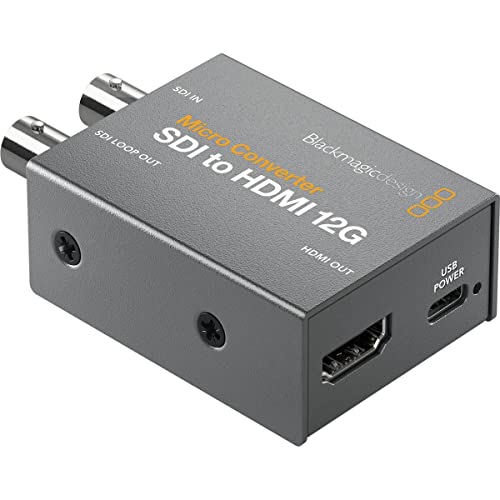
- Adds a 33-point 3D LUT
- Supports LUT output through SDI loop-out
- Built with a compact metal body
Best For: Projector setups requiring SDI-to-HDMI conversion and calibration
Scaling Control Pick
Lumantek SDI to HDMI Converter

- Includes a display and scaler
- Provides HDMI connectivity
- Backed by a two-year warranty
Best For: Projector installations needing scaling and onboard status information
Best Value SDI Converter

- Converts 3G-, HD-, and SD-SDI to HDMI
- Includes SDI loop output
- Supports HDMI up to 1080p at 60Hz
Best For: Basic SDI-to-HDMI projector setups
Premium 12G Choice
Blackmagic BiDirectional SDI/HDMI 12G

- Supports bidirectional SDI/HDMI conversion
- Offers 12G-SDI and HDMI 2.0 connectivity
- Includes international power adapters
Best For: Professional mixed SDI and HDMI workflows
Best for Long Cable Runs
Anber-Tech SDI to HDMI De-embedder
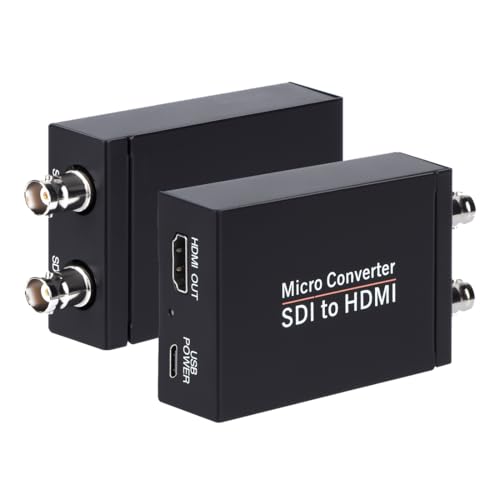
- Supports 3G-, HD-, and SD-SDI
- Lists long SDI cable-distance support
- Adds HDMI, loopout, and audio de-embedding
Best For: Long-run SDI projector installations with audio
Best Budget SDI Adapter
Straightforward 1080p SDI-to-HDMI Converter

- Converts SD, HD, and 3G-SDI to HDMI
- Adds SDI loop-out functionality
- Plug-and-play metal design
Best For: Basic SDI camera-to-HDMI projector setups
Most Versatile Pick
Bidirectional HDMI/SDI Converter

- Converts HDMI to SDI and SDI to HDMI
- Supports adaptive input resolution up to 1080p
- Handles long 3G-SDI runs up to 80 meters
Best For: Flexible mixed HDMI and SDI systems
Best for Production Setups
3G-SDI to HDMI Converter with Audio De-Embedding

- Supports SD, HD, and 3G-SDI standards
- Handles many 720p and 1080p frame rates
- De-embeds eight channels of 48 kHz audio
Best For: Broadcasting and conference projector systems
Versatile Bidirectional Pick – Micro Converter SDI/HDMI
For buyers comparing SDI converters for projectors, the Blackmagic Design Micro Converter offers flexible SDI-to-HDMI and HDMI-to-SDI connectivity in a compact metal body. It supports SD, HD, and 3G-SDI formats and includes a universal 5V power supply with international socket adapters.
Best For: Projector setups that need bidirectional conversion and broad SDI/HDMI format compatibility.
Pros:
- Supports SD, HD, and 3G-SDI signals.
- Provides both SDI and HDMI input/output connections.
- Includes a universal power supply with international adapters.
- Compact, portable metal construction.
Cons:
- Requires external 5V power.
- Does not provide a dedicated DisplayPort output.
This is a strong all-purpose option when a projector installation may require either SDI-to-HDMI or HDMI-to-SDI conversion rather than a one-way adapter.
DisplayPort Conversion Pick – SDI to DisplayPort Converter
Among SDI converters for projectors, the ACHAVE model is a focused choice for sending SDI sources to a DisplayPort projector or display. It converts SD-, HD-, and 3G-SDI to DisplayPort at up to 1080p at 60Hz and includes an SDI loop-out for another SDI device.
Best For: DisplayPort projectors and AV systems that need 1080p/60Hz SDI conversion with loop-through.
Pros:
- Converts SDI to DisplayPort at up to 1080p/60Hz.
- Supports SD-SDI, HD-SDI, and 3G-SDI inputs.
- SDI loop-out can feed a recorder, matrix, or other SDI device.
- Uses a compact metal enclosure and USB Type-C power.
Cons:
- One-way conversion only; DisplayPort-to-SDI is not supported.
- Requires 5V USB Type-C power.
Choose this converter when DisplayPort is the required projector input and maintaining an SDI signal for a second device is useful.
12G-SDI Calibration Pick – Micro Converter SDI to HDMI 12G
For projector buyers seeking SDI converters for projectors with color-calibration needs, the Blackmagic Design Micro Converter SDI to HDMI 12G adds a 33-point 3D LUT. Its compact, robust metal body is designed for SDI-to-HDMI conversion and can output the LUT through the SDI loop output.
Best For: Monitor and projector workflows that benefit from 3D LUT-based color calibration.
Pros:
- Includes a 33-point 3D LUT for display calibration.
- Can output the 3D LUT through the SDI loop output.
- Uses a compact, robust metal enclosure.
Cons:
- Designed for SDI-to-HDMI conversion rather than bidirectional operation.
- The supplied notes do not list an included power supply.
This model stands out when accurate, repeatable display calibration matters as much as getting an SDI source onto an HDMI projector or monitor.
Scaling Control Pick – Lumantek SDI to HDMI Converter
The Lumantek SDI to HDMI Converter is a practical candidate among SDI converters for projectors when integrated display control is useful. Its supplied features include an onboard display and scaler, with HDMI connectivity and a two-year warranty.
Best For: Monitor or projector installations where an SDI-to-HDMI converter with scaling and status display is preferred.
Pros:
- Includes a built-in display.
- Provides scaler functionality.
- Offers a two-year limited warranty.
Cons:
- The supplied notes specify HDMI connectivity but do not detail supported SDI formats.
- Its listed 18V input may require a suitable power source.
- The unit is heavier and larger than the compact Blackmagic converters listed here.
Consider this option when scaling and front-panel information are priorities, but confirm format and power requirements before completing a projector installation.
Best Value SDI Converter – SDI to HDMI with Loop Out
If you need a straightforward option among SDI converters for projectors, this model converts 3G-SDI, HD-SDI, and SD-SDI inputs to HDMI. Its auto format detection and SDI loop output make it practical for connecting a projector while also passing the signal to another SDI device.
Best For: Users who need SDI-to-HDMI conversion for a projector, monitor, or camera setup with loop-through capability.
Pros:
- Supports 3G-SDI, HD-SDI, and SD-SDI input signals.
- Provides both HDMI output and SDI loop output.
- Supports HDMI output up to 1080p at 60Hz with auto format detection.
Cons:
- Only converts SDI to HDMI; it does not support HDMI-to-SDI conversion.
- Does not accept RF, CVBS, AHD, TVI, or CVI signals through the BNC input.
This is a sensible pick when you want basic SDI-to-HDMI projector connectivity without needing bidirectional conversion or higher-than-1080p output.
Premium 12G Choice – Blackmagic BiDirectional SDI/HDMI 12G
Blackmagic Design Micro Converter BiDirectional SDI/HDMI 12G with Power Supply CONVBDC/SDI/HDMI12G/P
Check Price On AmazonFor buyers comparing SDI converters for projectors, the Blackmagic Design Micro Converter stands out for its bidirectional SDI/HDMI design. It includes 12G-SDI support, an HDMI 2.0 input, and a universal 5V power supply with international socket adapters.
Best For: Professional camera, projector, monitor, and display workflows that require flexible SDI and HDMI signal conversion.
Pros:
- Supports bidirectional SDI and HDMI conversion.
- Includes 12G-SDI and HDMI 2.0 connectivity.
- Comes with a 5V universal power supply and international socket adapters.
Cons:
- The supplied notes do not specify supported output resolutions or cable-distance limits.
- Its professional feature set may be more than needed for a simple one-way projector connection.
Choose this model if conversion flexibility matters more than a basic one-way adapter, especially when your setup includes both SDI equipment and pro-style HDMI displays or projectors.
Best for Long Cable Runs – Anber-Tech SDI to HDMI De-embedder
This Anber-Tech model is a useful choice among SDI converters for projectors when cable distance and embedded audio matter. It converts SDI to HDMI, provides SDI loopout, and can de-embed up to eight channels of 48kHz digital audio.
Best For: Camera and projector installations using longer SDI cable runs and HDMI output with audio de-embedding.
Pros:
- Supports 3G-SDI, HD-SDI, and SD-SDI with auto format detection.
- Lists cable support up to 300 feet for 3G-SDI, 500 feet for HD-SDI, and 1,000 feet for SD-SDI.
- Provides HDMI output, SDI loopout, and eight-channel 48kHz digital audio de-embedding.
Cons:
- It is not bidirectional and cannot convert HDMI to SDI.
- The listed power plug type is “No Plug,” so users should verify the included power arrangement.
Its stated cable-distance support and audio de-embedding make it particularly practical for distributed camera-to-projector setups, provided your source is SDI and not HDMI.
Best Budget SDI Adapter – Straightforward 1080p SDI-to-HDMI Converter
If you need sdi converters for projectors and only require one-way SDI-to-HDMI conversion, this SHUITING model keeps the setup simple. It accepts SD-SDI, HD-SDI, and 3G-SDI sources and sends synchronized video and audio to an HDMI projector or display at up to 1080p.
Best For: Basic SDI camera-to-projector setups, conference systems, and users who want an affordable plug-and-play converter rather than bidirectional connectivity.
Pros:
- Supports SD-SDI, HD-SDI, and 3G-SDI inputs up to 1080p.
- Includes an SDI loop output for passing the signal to another device.
- Metal housing, heat dissipation, and simple plug-and-play operation.
Cons:
- Converts SDI to HDMI only; it does not convert HDMI to SDI.
- Does not support 4K or RF, CVBS, AHD, TVI, or CVI signals.
- Requires a coaxial cable with a BNC male connector.
This is a practical choice when your projector accepts HDMI and your source outputs SDI. Confirm the source signal and resolution requirements before buying, especially if you need 4K or reverse conversion.
Most Versatile Pick – Bidirectional HDMI/SDI Converter
Among sdi converters for projectors, the Qonakism bidirectional model stands out when your setup may need either conversion direction. It supports SDI-to-HDMI and HDMI-to-SDI connections, adaptive input resolution, and up to 1080p video for cameras, monitors, and projectors.
Best For: Mixed professional and consumer video systems where flexible HDMI/SDI routing, low-latency 1080p output, and longer SDI cable runs are important.
Pros:
- Supports conversion in both SDI-to-HDMI and HDMI-to-SDI directions.
- FPGA design, clock recovery, and ESD protection support stable operation.
- Supports 1080p video and SDI distances up to 80 meters for 3G-SDI.
- Durable metal housing helps with heat dissipation.
Cons:
- Maximum supported resolution is 1080p, not 4K.
- Its 3-month warranty is shorter than some alternatives.
- More features may be unnecessary for a simple one-way projector connection.
This is the strongest fit when you want one converter to serve multiple signal paths. For a projector-only installation, its bidirectional capability may add flexibility but also more complexity than a dedicated SDI-to-HDMI adapter.
Best for Production Setups – 3G-SDI to HDMI Converter with Audio De-Embedding
For projector installations that need broad SDI format support, this Boobrie converter handles SD-SDI, HD-SDI, and 3G-SDI inputs and outputs up to 1080p over HDMI. It also includes an integrated audio de-embedder supporting eight channels of 48 kHz audio.
Best For: Event broadcasting, conference rooms, outdoor displays, and production environments that benefit from multiple SDI standards and embedded-audio handling.
Pros:
- Supports SD-SDI, HD-SDI, and 3G-SDI signals up to 2.970 Gbit/s.
- Accepts a wide range of 720p, 1080i, and 1080p frame rates.
- Includes eight-channel, 48 kHz audio de-embedding.
- Metal casing and secure BNC and HDMI connections support field use.
Cons:
- Provides SDI-to-HDMI conversion only.
- Output resolution tops out at 1080p rather than 4K.
- Its supplied details list two ports, so it may be less flexible than models with loop-out or bidirectional conversion.
This model is a good match when compatibility with varied SDI formats and embedded audio matters more than reverse conversion. Check your projector’s HDMI requirements and the source’s frame rate before installation.
How We Picked These Sdi Converters for Projectors
We focused on converters that can connect common SDI sources—such as professional cameras, switchers, and distribution systems—to projectors with HDMI or DisplayPort inputs. Selection criteria included supported SDI standards, maximum resolution and frame rate, conversion direction, signal pass-through, audio support, power options, and practical installation features.
Because projector systems vary widely, the best choice is not always the most advanced model. A compact 3G-SDI converter may be ideal for 1080p presentations, while a 12G-SDI unit is better suited to 4K-capable production equipment. Models with loop output or scaling can also solve specific routing and compatibility problems.
Quick Comparison
| Type | Best For | Features to Look For |
|---|---|---|
| SDI to HDMI | Connecting cameras or switchers to HDMI projectors | Auto format detection, embedded audio, reliable power |
| SDI to DisplayPort | Projectors or displays with DisplayPort inputs | 1080p support, locking connectors, loop output |
| Bidirectional | Flexible studio and presentation systems | Selectable conversion direction, format compatibility |
| 12G-SDI | Higher-bandwidth professional video workflows | 4K support, adequate cabling, matching source and display |
| Scaler-equipped | Mixed-resolution installations | Output scaling, status display, stable synchronization |
Key Buying Factors for Sdi Converters for Projectors
Signal Standard and Resolution
Confirm whether your source uses SD-SDI, HD-SDI, 3G-SDI, or 12G-SDI. A converter must support the source format and the projector’s accepted input resolution. A 1080p projector does not gain 4K detail from a 12G converter, but higher-bandwidth compatibility may still help with future equipment.
Output Connector and Conversion Direction
Most projectors use HDMI, but some professional displays and installation systems use DisplayPort. Choose the output that matches the projector directly whenever possible. Bidirectional models add flexibility, though they may offer fewer dedicated controls than a purpose-built SDI-to-HDMI converter.
Loop-Through and Signal Routing
An SDI loop out lets one source feed the projector and another SDI device at the same time. This is useful for monitoring, recording, distribution, or feeding multiple stages without adding a separate splitter.
Audio and Scaling
Check whether audio is embedded in the SDI signal and whether the converter passes it through HDMI or de-embeds it separately. Built-in scaling and format displays are valuable when the source and projector use different resolutions or when technicians need faster troubleshooting.
Power, Cabling, and Reliability
Verify the included power supply, connector type, and expected cable distances. Use quality 75-ohm BNC cabling for SDI, and remember that converters generally do not compensate for poor signal integrity, excessive cable length, or incompatible frame rates.
Who Should Buy Which Sdi Converters for Projectors?
Choose a basic SDI-to-HDMI converter for a straightforward camera-to-projector or switcher-to-projector connection, especially in 720p or 1080p systems. Choose a loop-through model when the same SDI feed must continue to a monitor, recorder, or additional device.
Choose a DisplayPort converter when the projector or installation display lacks HDMI. Choose a bidirectional converter for a mixed studio or event setup where equipment may alternate between SDI and HDMI roles. Choose a scaler-equipped model when sources and projectors frequently use different output formats. Finally, choose a 12G-SDI model only when your source, cabling, and display workflow can take advantage of its higher bandwidth.