Choosing resin printers for schools requires more than comparing resolution. Classroom buyers also need manageable workflows, dependable operation, appropriate build volume, and a clear plan for ventilation, storage, and resin handling.
This roundup compares 10 selected models across compact, high-resolution, large-format, and production-oriented categories to help schools match printer capabilities with curriculum needs and available resources.
Best 10 Resin Printers for Schools Picks for 2026
Best Detail on a Compact Footprint

- 10K LCD with 17 × 17 μm XY pixels
- Compact 153.4 × 87 × 165 mm build volume
- Simple leveling and power-resume features
Best For: Classrooms prioritizing detailed prints in limited space
Best for Larger Batch Projects

- 10-inch 12K LCD for detailed models
- Large 218.88 × 122.88 × 250 mm build volume
- Supports CHITUBOX and Lychee Slicer workflows
Best For: School makerspaces handling larger or multiple models
Best for Automated Classroom Workflows

- High-contrast amber screen for detail and speed
- One-click slicing with model repair and supports
- Auto-leveling and real-time force monitoring
Best For: Technical programs needing automation and print diagnostics
Best High-Speed Premium Option

- 16K LCD with 14 × 19 μm XY resolution
- Heated resin tank and AI monitoring camera
- 150 mm/h claimed speed with automatic leveling
Best For: Makerspaces needing fast, detailed, monitored production
Best Beginner Pick

- 9K LCD with 18μm XY resolution
- Factory pre-leveled platform
- USB, WiFi, and Creality Cloud support
Best For: Beginner classroom projects and detailed miniatures
Best Smart Workflow

- 16K detail with 14 × 19μm pixels
- Built-in resin heating
- Remote monitoring and control
Best For: High-detail projects with managed classroom workflows
Best for Large Projects

- 298 × 164 × 300 mm build volume
- Print speeds up to 60 mm/h
- Automatic resin management and self-checks
Best For: Large models and batch printing in dedicated workshops
Industrial Precision Pick
F14 Industrial Photopolymer Resin Printer
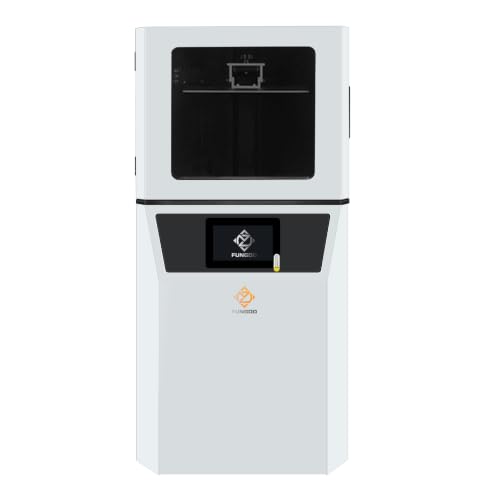
- Large 302 × 162 × 400mm build volume
- 6K detail with 0.01–0.15mm layers
- Wi-Fi, USB, and CHITUBOX compatibility
Best For: University labs and professional training environments
High-Volume Classroom Pick

- 18.3L volume for large batches
- 14-inch 12K screen for fine detail
- Auto-leveling and heated resin tank
Best For: Makerspaces and classrooms with high-volume projects
Fast Batch Production Pick

- Large plate supports dense model batches
- 43μm detail from an 8K mono LCD
- Drip hanger supports cleaner resin recovery
Best For: Advanced programs with frequent miniature or prototype production
Best Detail on a Compact Footprint – Anycubic Photon Mono 4
For schools seeking resin printers for schools that fit daily classroom projects, the Anycubic Photon Mono 4 combines a compact design with a highly detailed 10K monochrome LCD. Its simple four-point leveling process and power-resume feature make it approachable for student projects supervised by an instructor.
Best For: Classrooms needing detailed prints and a relatively compact resin printer for routine projects.
Pros:
- 7-inch 10K screen provides 17 × 17 μm XY pixels for fine detail.
- Build volume measures 153.4 × 87 × 165 mm for varied classroom models.
- Laser-engraved platform improves adhesion while keeping print removal manageable.
- Four-point leveling is designed to remain set after initial leveling and tightening.
Cons:
- It does not support the Anycubic app.
- Its build volume is smaller than the larger Saturn models in this roundup.
The Photon Mono 4 is a practical choice when detail, straightforward setup, and modest space requirements matter more than maximum throughput or print size.
Best for Larger Batch Projects – ELEGOO Saturn 3 12K
The ELEGOO Saturn 3 is a strong option for resin printers for schools that need more room for larger models or multiple smaller pieces. Its 10-inch 12K screen, generous build volume, and multiple printing modes support detailed project work and flexible classroom workflows.
Best For: School makerspaces and advanced classes producing larger or multiple detailed models.
Pros:
- 12K LCD delivers 19 × 24 μm XY resolution for intricate models.
- 218.88 × 122.88 × 250 mm build volume accommodates larger projects.
- COB and Fresnel optics provide over 90% light uniformity.
- Laser-carved build plate is designed for strong print adhesion.
Cons:
- At 33 pounds, it is substantially heavier than the Photon Mono 4.
- The larger footprint requires more dedicated workspace.
Choose the Saturn 3 when classroom capacity and model size are priorities. Its third-party slicer compatibility also gives instructors flexibility when setting up software workflows.
Best for Automated Classroom Workflows – Reflex RS Turbo Resin Printer
The Reflex RS Turbo targets schools looking for resin printers for schools with more automation and monitoring support. Its high-contrast amber screen, one-click slicing, auto-leveling, and real-time force sensing are designed to simplify setup and help identify problems during a print.
Best For: Technical programs and makerspaces that value automated setup, diagnostics, and high-speed workflows.
Pros:
- Amber screen combines high contrast with faster curing for standard and high-speed resins.
- One-click slicing can repair several model defects and generate supports.
- Floating Screen Auto-Leveling corrects deviations up to 0.15°.
- Force sensors can detect resin residue and automatically pause prints.
Cons:
- The 50.6-pound weight makes relocation between classrooms less convenient.
- Its advanced feature set may be more than introductory classes need.
With diagnostic reporting, motion monitoring, and professional support, the RS Turbo is geared toward schools that want a more managed production environment rather than a basic entry-level setup.
Best High-Speed Premium Option – ELEGOO Saturn 4 Ultra 16K
For schools that need resin printers for schools with fast production and extensive monitoring, the ELEGOO Saturn 4 Ultra 16K offers a feature-rich setup. Its 16K screen, heated resin tank, AI camera, automatic leveling, and claimed 150 mm/h print speed support demanding classroom and makerspace projects.
Best For: School makerspaces producing intricate models quickly with hands-off monitoring features.
Pros:
- 16K LCD provides 14 × 19 μm XY resolution for highly detailed models.
- Heated resin tank activates below 25°C to help maintain printing conditions.
- AI camera supports monitoring, error awareness, and time-lapse recording.
- Automatic leveling, Wi-Fi transfer, power resume, and cluster printing support easier operation.
Cons:
- Its 35.4-pound weight and larger dimensions require a dedicated location.
- The advanced feature set may exceed the needs of basic introductory projects.
The Saturn 4 Ultra 16K is the most automation-focused option here. It makes the most sense for schools where detailed output, speed, temperature management, and remote oversight justify a larger investment and footprint.
Best Beginner Pick – Creality HALOT-X1 Neo
For schools seeking resin printers for schools that are approachable for new users, the Creality HALOT-X1 Neo combines a factory pre-leveled platform with high-resolution output and flexible file transfer. Its compact build area suits classroom projects involving miniatures, figurines, and intricate models.
Best For: Beginner-friendly classroom printing, detailed miniatures, and creative model-making projects.
Pros:
- 9K LCD and 18μm XY resolution support detailed prints.
- Factory pre-leveling helps simplify setup for beginners.
- Files can be transferred through USB, 2.4GHz WiFi, or Creality Cloud.
- AI 2D-to-3D generation can turn images into printable models.
Cons:
- The 153.36 × 77.76 × 160 mm build volume is relatively compact.
- AI model generation is listed as taking as fast as 3.5 hours, so it may not be instant.
The HALOT-X1 Neo is a practical choice when ease of entry and fine detail matter more than printing large objects or batches. Its pre-leveled platform and multiple connectivity options can reduce friction in a school maker space.
Best Smart Workflow – UniFormation GK3T 16K
The UniFormation GK3T is a strong option among resin printers for schools where repeatable operation and remote oversight are priorities. Its 16K display, factory pre-leveling, resin heating, and workflow-focused features are designed to simplify detailed printing.
Best For: Schools needing high-detail output, monitored printing, and a streamlined print-to-post-processing workflow.
Pros:
- 16K resolution and 14 × 19μm pixel size support highly detailed models.
- Factory pre-leveling and smart resin-feeding features are designed for easier operation.
- Built-in heating maintains resin fluidity in temperatures as low as 0°C/32°F.
- App-based remote control offers progress monitoring and one-touch start/stop.
Cons:
- At 52.8 pounds, it is substantially heavier than the other listed options.
- Its larger 12.99 × 15.75 × 20.47-inch footprint requires dedicated space.
The GK3T emphasizes consistency and convenience for supervised school use. Remote monitoring, temperature management, and compatible wash-and-cure integration may help organize projects, though its size and weight should be considered before placement.
Best for Large Projects – ANYCUBIC Photon Mono M7 MAX
For schools that need to produce larger models or multiple parts in one run, the ANYCUBIC Photon Mono M7 MAX stands out among resin printers for schools with its 298 × 164 × 300 mm build volume. Its temperature-controlled vat, automatic resin management, and print checks are aimed at efficient operation.
Best For: Large models, batch printing, and school workshops where print capacity is a priority.
Pros:
- Large build volume can accommodate bigger models without splitting them.
- Up to 60 mm/h printing speed supports faster production.
- Automatic resin management monitors levels and adds material as needed.
- Self-check features include failed-print detection and residual-resin detection.
Cons:
- The 30.91 × 19.29 × 20.47-inch dimensions require considerable workspace.
- Its 60.9-pound weight makes relocation difficult.
- The 46 × 46μm pixel size is less fine than the higher-resolution alternatives listed here.
The Photon Mono M7 MAX is best suited to a dedicated lab or workshop rather than a small classroom desk. Its unusually large capacity and material-management features can improve batch efficiency, provided the school has enough space for the printer and its workflow.
Industrial Precision Pick – F14 Industrial Photopolymer Resin Printer
For schools seeking resin printers for schools with professional-level capacity, the F14 combines a large build area, fine resolution, and connectivity suited to lab workflows. Its industrial-style motion system is designed for stable, extended printing and batch production.
Best For: University labs, technical programs, and enterprise training environments that need a large-format printer with wireless task management.
Pros:
- Large 302 × 162 × 400mm build volume supports taller prints and efficient batches.
- 6K LCD and adjustable 0.01–0.15mm layer thickness support detailed prototypes.
- Ball screw, linear guide, and dual-slider Z-axis design offers 0.02mm repeatability.
- Wi-Fi and USB connectivity with Linux OS supports CHITUBOX-based workflows.
Cons:
- At 68 pounds, it may require a dedicated, sturdy workstation.
- Its 14.2 × 16.9 × 25.6-inch footprint needs substantial lab space.
The F14 is a strong choice when a school values build height, repeatable motion, and connected lab operation more than compact size.
High-Volume Classroom Pick – ANYCUBIC Photon P1 Max
The ANYCUBIC Photon P1 Max is among the resin printers for schools to consider when multiple students or projects require large batch capacity. Its 18.3-liter build volume, automated leveling, and heated resin tank are aimed at repeatable production with less setup guesswork.
Best For: Schools, makerspaces, and technical classrooms producing oversized prototypes or densely packed batches.
Pros:
- 285.5 × 214 × 300mm build volume accommodates large parts and batch runs.
- 14-inch 12K monochrome screen provides 24.8 × 24.8μm pixels for fine detail.
- Intelligent heating maintains the resin tank up to 35°C for more consistent resin flow.
- Auto-Leveling 3.0 checks and adjusts the build plate before printing.
Cons:
- The 20.08 × 20.87 × 29.53-inch dimensions require considerable workspace.
- Its 68.9-pound weight makes relocation between classrooms impractical.
With automated leveling and temperature control alongside a very large build volume, the P1 Max is well suited to schools that prioritize throughput and simplified preparation.
Fast Batch Production Pick – Phrozen Sonic Mega 8K S
The Phrozen Sonic Mega 8K S suits resin printers for schools programs that need to produce many detailed models in limited time. Its broad build plate, 43μm XY resolution, and workflow features such as a drip hanger make it practical for repeated production and cleaner resin handling.
Best For: Advanced design, engineering, art, and fabrication programs running frequent miniature or prototype batches.
Pros:
- 33 × 18.5 × 30cm build plate can produce up to 80 1/32-scale miniatures in 90 minutes, according to the supplied specifications.
- 15-inch 8K monochrome LCD delivers 43μm XY resolution.
- ACF film and TR300 resin are specified for speeds up to 10 times faster than standard mid-size printers.
- Built-in metal drip hanger helps recover excess resin and reduce workspace mess.
Cons:
- Its large 18.6 × 15 × 22.3-inch footprint may still need dedicated placement.
- At 57.3 pounds, it is not especially portable between classrooms.
- The advertised high-speed workflow references ACF film and TR300 resin.
The Mega 8K S is compelling for schools focused on production speed and detailed batch output, especially where an advanced workflow can support its specialized materials.
How We Picked the Best Resin Printers for Schools
We focused on features that matter in supervised educational environments: print quality, build volume, leveling and setup assistance, operating consistency, connectivity, speed, maintenance demands, and overall classroom practicality. We also considered whether a printer is better suited to individual projects, small-group instruction, engineering prototypes, or makerspace production.
Specifications such as 10K, 12K, or 16K resolution can indicate fine detail, but they do not guarantee better results by themselves. Software settings, resin choice, exposure calibration, support design, and post-processing habits are equally important.
Quick Comparison
| School need | What to prioritize | Best fit among these categories |
|---|---|---|
| Introductory classroom projects | Simple setup, compact size, accessible controls | Entry-level or easy-to-use desktop models |
| Detailed models and miniatures | High-resolution LCD and reliable exposure control | 12K–16K MSLA printers |
| Large prototypes | Generous build volume and stable platform | Large-format printers |
| Frequent makerspace use | Speed, repeatability, monitoring, and serviceability | Advanced or production-oriented models |
Key Buying Factors for Resin Printers for Schools
Safety and Room Setup
Uncured resin can irritate skin and produce odors or fumes. Plan for suitable ventilation, covered work surfaces, nitrile gloves, eye protection, spill control, and secure resin storage. Schools should also budget for washing, curing, waste handling, and adult supervision. A printer is only classroom-ready when the entire resin workflow is addressed.
Build Volume and Class Size
Small printers can be easier to place and less expensive to operate, but they limit the size or number of parts produced in one session. Larger machines support assemblies and batch work while consuming more space, resin, and cleanup supplies. Match capacity to actual project dimensions rather than choosing the largest model automatically.
Resolution, Speed, and Reliability
Higher pixel counts help preserve small features, while a stable build platform and consistent exposure settings can have a greater effect on successful prints. For student use, guided leveling, failure recovery, straightforward slicing, and dependable network or USB transfer may be more valuable than maximum resolution.
Total Cost and Maintenance
Compare the printer price with replacement vats, screens, build plates, resin, cleaning supplies, curing equipment, protective equipment, and staff time. Check whether consumables and replacement parts are readily available. Schools should also confirm warranty coverage and identify who will handle calibration and repairs.
Who Should Buy Which Resin Printers for Schools?
Choose a compact entry-level model for schools introducing resin printing or assigning individual student projects. Select a high-resolution mid-size printer when detail is central to art, design, miniatures, or engineering lessons. An easy-to-use model with automation and connectivity can reduce teacher workload in a busy makerspace.
Large-format options make sense for schools producing architectural pieces, robotics components, functional assemblies, or multiple parts at once. Industrial-grade and production-focused machines are best reserved for well-equipped labs with ventilation, trained supervision, and a clear need for higher throughput. Whichever model you select, prioritize a complete safety and post-processing setup over headline specifications alone.