Powered KVM switches make it easier to control two or more computers from one keyboard, mouse, and monitor setup. The right model can also simplify dual-monitor workstations, USB device sharing, and high-resolution gaming or creative workflows.
We selected 10 powered KVM switches spanning single- and multi-monitor configurations, HDMI and DisplayPort connectivity, USB hubs, and support for resolutions up to 8K. Use the guide below to match features with your desk, computers, and display requirements.
Best 10 Powered Kvm Switches Picks for 2026
Best Dual-Monitor USB-C Pick
8K USB-C Dual-Monitor KVM Dock
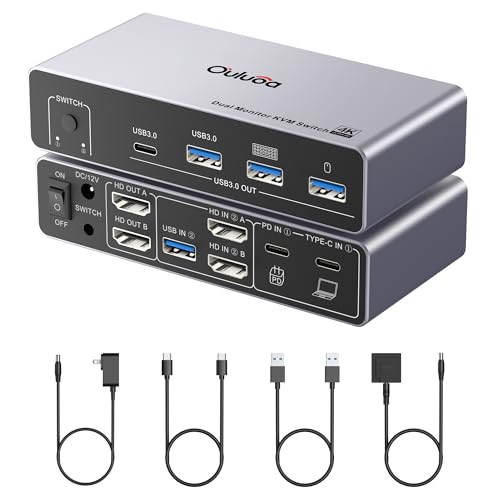
- Controls a desktop and laptop
- Supports dual HDMI displays
- Includes 100W PD and external power
Best For: Dual-monitor USB-C workstations
Best DisplayPort High-Refresh Pick

- Supports 8K@60Hz video
- Handles 4K up to 240Hz
- Shares four USB 3.0 peripherals
Best For: Single-monitor DisplayPort setups
Best Simple HDMI Value
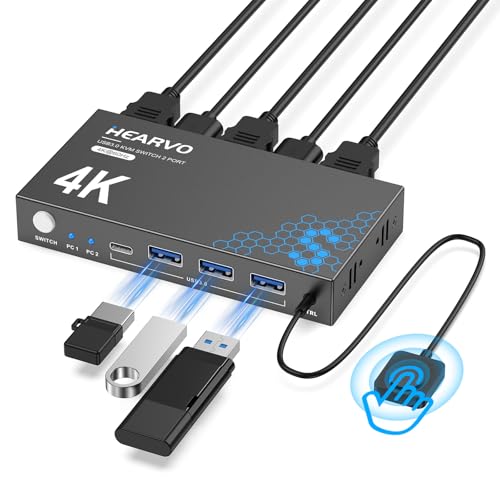
- Shares one HDMI monitor
- Supports 4K@60Hz output
- Includes adaptive EDID and remote switching
Best For: Basic two-computer HDMI desks
Best Dual-Input Desktop Setup
Unitek HDMI/DisplayPort Dual-Monitor KVM

- Supports two monitors and two desktops
- Accepts HDMI and DisplayPort inputs
- Includes 5V/2A power adapter
Best For: Fixed dual-monitor desktop workstations
Best Powered KVM for Four Computers
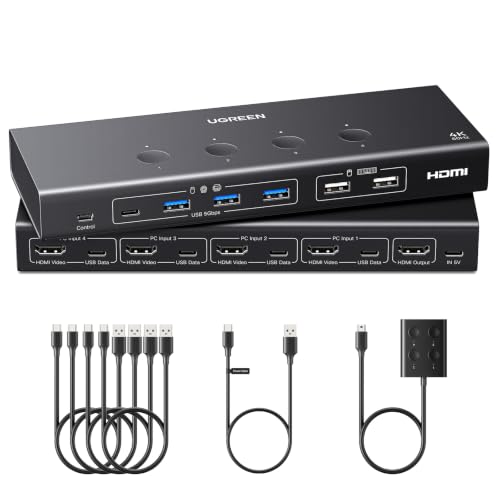
- Controls four computers from one monitor
- Six USB ports, including four USB 3.0
- Supports 4K@60Hz and EDID emulation
Best For: Multi-PC offices and testing stations
Best Powered Dual-Monitor KVM

- Switches two computers across two monitors
- Supports 8K@60Hz and 4K@120Hz
- Includes USB 3.0 hub, remote, and power adapter
Best For: High-resolution dual-monitor workstations
Best Powered Triple-Monitor KVM

- Shares three monitors between two computers
- Supports 8K@60Hz and 4K@240Hz
- Includes cables, power adapter, and controller
Best For: Triple-monitor creator and IT workstations
Best Overall Single-Monitor Pick
UGREEN 4K HDMI KVM for 2 Computers

- 4K at 60Hz over HDMI
- Four shared USB 3.0 ports
- Button and wired-controller switching
Best For: Two-computer, single-monitor workstations
Best Dual-Monitor Option
UGREEN 4K HDMI KVM for 2 Displays

- Supports two monitors per computer
- Extend and mirror display modes
- Four shared USB 3.0 ports
Best For: Dual-screen setups switching between two computers
Best Compact Budget Pick
HDMI 4K KVM with Wired Controller

- 4K at 60Hz support
- Compact, driver-free design
- Two USB 2.0 peripheral ports
Best For: Basic two-PC, single-monitor setups
Best Dual-Monitor USB-C Pick – 8K USB-C Dual-Monitor KVM Dock
This powered KVM switch is designed for users who need to control a desktop and laptop while sharing two HDMI monitors and several USB peripherals. It supports up to 8K at 60Hz from the desktop, 4K at 60Hz from the laptop, and includes 100W USB-C PD charging plus an external power adapter for steadier operation.
Best For: Dual-monitor desktop-and-laptop workstations that need USB-C connectivity and laptop charging.
Pros:
- Supports two HDMI monitors in extended or mirrored mode on Windows.
- Offers up to 8K@60Hz output from the desktop and 4K@60Hz from the laptop.
- Includes 100W PD charging, external power, four USB expansion ports, and a wired remote.
Cons:
- macOS works in SST mode only; Windows is required for MST display mode.
- HDMI cables within 6.56 feet are recommended for stable transmission.
- The four USB ports share bandwidth, with up to 5Gbps per port under the stated conditions.
This is the most feature-rich option here for a mixed desktop-and-laptop setup. Its dual-display support, charging, and powered USB connectivity make it a strong choice when a basic one-monitor switch is not enough.
Best DisplayPort High-Refresh Pick – UGREEN 8K DisplayPort KVM
This powered KVM switch is a focused DisplayPort solution for sharing one monitor and four USB peripherals between two computers. It supports up to 8K at 60Hz and high refresh rates including 4K at 240Hz, but it requires DisplayPort and USB data connections for each computer and does not include DP cables or a power adapter.
Best For: DisplayPort users who want high-refresh video from two computers on one monitor.
Pros:
- Supports 8K@60Hz and up to 4K@240Hz with compatible equipment and cables.
- Provides three USB-A ports and one USB-C port for shared peripherals.
- Offers front-button and desktop-controller switching with Windows, macOS, and Linux compatibility.
Cons:
- It supports one monitor only and has no HDMI interface.
- DP cables, USB-C power cable, and power adapter are not included.
- It does not support hotkeys or EDID emulation, and switching is unavailable while a computer is sleeping.
Choose this model when your setup is DisplayPort-based and refresh rate matters more than dual-monitor flexibility. Budget for the required cables and power accessories before buying.
Best Simple HDMI Value – 4K HDMI USB 3.0 KVM
This powered KVM switch provides a straightforward way to share one HDMI monitor, keyboard, mouse, and other USB devices between two computers. It supports 4K at 60Hz, includes four USB 3.0 ports and adaptive EDID, and is designed for plug-and-play use without a separate power supply or driver installation.
Best For: Home and office users who need an uncomplicated two-computer, one-monitor HDMI setup.
Pros:
- Supports 4K@60Hz, HDCP 2.2, 2K, 3D, and 1080p video.
- Includes three USB-A ports and one USB-C port for shared accessories.
- Provides both on-device and wired-remote switching with adaptive EDID.
Cons:
- Supports one monitor rather than a dual-monitor arrangement.
- It is limited to HDMI video connectivity.
- The USB ports and video features still depend on compatible connected computers and displays.
For a conventional HDMI desk, this model covers the essentials without adding an external power brick. Its adaptive EDID and remote switch are useful conveniences for everyday computer switching.
Best Dual-Input Desktop Setup – Unitek HDMI/DisplayPort Dual-Monitor KVM
This powered KVM switch is built for two desktop computers sharing dual monitors and USB peripherals through HDMI and DisplayPort. It supports 4K at 60Hz, includes a 5V/2A power adapter for higher-power USB devices, and provides both a front button and desktop controller for switching.
Best For: Dual-monitor desktop workstations that require both HDMI and DisplayPort inputs.
Pros:
- Connects two computers to two monitors using HDMI and DisplayPort.
- Supports 4K@60Hz, HDR, HDCP 2.2/1.4, and HDMI 2.0.
- Includes four USB-A ports, a 5V/2A adapter, and a wired desktop controller.
Cons:
- It is not compatible with laptops according to the supplied notes.
- Both host computers need the required USB, HDMI, and DisplayPort cables for simultaneous video output.
- The notes specify desktop-host use only.
This is the better fit for a fixed desktop environment where two monitors and mixed HDMI/DisplayPort connectivity are priorities. Its included power adapter is helpful when several USB devices are connected, but laptop users should look elsewhere.
Best Powered KVM for Four Computers – 4-Computer 4K HDMI KVM
For users comparing powered KVM switches, this UGREEN model is built to centralize four computers through one monitor while sharing a keyboard, mouse, and other USB devices. Its 4K@60Hz HDMI support, six USB ports, and wired controller make it practical for busy workspaces, though the required computer connections and cables should be planned in advance.
Best For: Offices, testing stations, and multi-PC desks that need four-computer control from one display.
Pros:
- Supports up to 4K@60Hz with HDMI 2.0, HDR, HDCP, and 3D support.
- Shares four USB 3.0 and two USB 2.0 ports for peripherals and storage.
- Offers front-button and wired desktop-controller switching.
- EDID emulation can help retain display settings and reduce reconnection issues.
Cons:
- Each computer needs both an HDMI cable and a USB-A-to-C data cable.
- Power connection is recommended for stable operation, but the adapter is not included.
- Not designed for use with docking stations.
This is a capable powered KVM choice when four computers must share one screen and a broad selection of USB peripherals. Confirm the cable requirements and available power source before buying.
Best Powered Dual-Monitor KVM – 8K Dual-Monitor KVM
This powered KVM switch is designed for two computers sharing one keyboard, mouse, and dual-monitor setup. With support for 8K@60Hz, 4K@120Hz, four USB 3.0 ports, and a supplied 5V/2A adapter, it suits high-resolution workstations that need straightforward switching between Windows, Mac, or Linux systems.
Best For: Dual-monitor productivity, design, and gaming setups using two computers.
Pros:
- Supports mirror and extend modes across two monitors.
- Handles up to 8K@60Hz or 4K@120Hz video output.
- Includes four USB 3.0 ports with up to 5Gbps transfer speeds and charging support.
- Includes a wired remote, USB cables, an 8K braided HDMI cable, and power adapter.
Cons:
- Designed for two computers rather than a larger multi-host installation.
- High-resolution performance depends on compatible computers, monitors, and cabling.
Its powered design and included accessories make this a convenient option for a two-PC dual-screen desk. It is especially appealing when smooth high-resolution output matters more than supporting many computers.
Best Powered Triple-Monitor KVM – 8K Triple-Display KVM
Among powered KVM switches, this UGREEN model targets demanding two-computer, three-monitor setups. It combines two DisplayPort 1.4 outputs, one HDMI 2.1 output, four USB 3.0 ports, and support for resolutions up to 8K@60Hz, but both computers must support triple-display output and require multiple video connections.
Best For: Content creators, IT professionals, and advanced home offices using three monitors with two computers.
Pros:
- Supports three monitors with mirror or extend display modes.
- Offers up to 8K@60Hz and up to 4K@240Hz compatibility.
- Includes four USB 3.0 ports for shared peripherals.
- Package includes DP cables, HDMI cables, USB cables, power adapter, and desktop controller.
Cons:
- Each computer needs two DisplayPort cables, one HDMI cable, and one USB cable.
- Both computers must support three displays; docking stations and signal converters may cause compatibility issues.
- Does not support keyboard-shortcut switching or EDID emulation.
This is a specialized powered KVM for users who genuinely need three displays shared between two computers. Its included cabling is helpful, but verify graphics-output support and workspace requirements before purchase.
Best Overall Single-Monitor Pick – UGREEN 4K HDMI KVM for 2 Computers
For shoppers comparing powered kvm switches, this UGREEN model is a practical single-monitor option for controlling two computers. It supports 4K at 60Hz, shares four USB 3.0 ports, and includes a power adapter for stable operation.
Best For: Workstations that alternate between two HDMI computers while sharing one monitor, keyboard, mouse, and USB accessories.
Pros:
- Supports up to 4K at 60Hz with HDMI 2.0, HDR, and HDCP support.
- Shares four USB 3.0 ports, including three USB-A ports and one USB-C port.
- Offers switch-button and wired desktop-controller switching.
- Includes a power adapter and is compatible with Windows, macOS, and Linux.
Cons:
- Each computer requires both an HDMI cable and a USB cable.
- Does not support hotkey switching, EDID emulation, docking stations, DisplayPort, or USB-C video connections.
- Requires the power adapter for stable use.
This is a well-rounded choice when one 4K HDMI display is enough and fast USB 3.0 sharing matters. Confirm your computers have suitable HDMI and USB connections before buying.
Best Dual-Monitor Option – UGREEN 4K HDMI KVM for 2 Displays
Among powered kvm switches, this UGREEN dual-monitor model is designed for users who need two screens from either of two computers. It supports extend or mirror modes, 4K at 60Hz, and shared USB 3.0 peripherals without requiring software installation.
Best For: Dual-screen office or home setups where both monitors display the selected computer.
Pros:
- Controls two computers and two monitors with one keyboard and mouse.
- Supports extend and mirror display modes at up to 4K at 60Hz.
- Provides four shared USB 3.0 ports, including USB-A and USB-C.
- Includes four HDMI cables, USB cables, power adapters, and a desktop controller.
Cons:
- Each computer needs two HDMI cables and one USB-A cable.
- Both monitors show the selected computer; they cannot display the two computer sources simultaneously.
- Does not support hotkeys or EDID emulation, and output HDMI cables should be within 3 meters.
This model makes the most sense for a two-monitor workflow that switches as a complete pair. Check that both computers support dual-screen output and that your cable lengths meet the stated limit.
Best Compact Budget Pick – HDMI 4K KVM with Wired Controller
This compact HDMI KVM is a straightforward choice for switching one monitor and a keyboard-and-mouse setup between two computers. It offers 4K at 60Hz, a wired desktop controller, and plug-and-play operation without an external power supply.
Best For: Simple two-PC, single-monitor setups using wired USB 2.0 peripherals.
Pros:
- Supports up to 4K at 60Hz and lower resolutions.
- Includes a wired desktop controller for convenient switching.
- Uses two USB 2.0 ports for a keyboard, mouse, or other USB 2.0 devices.
- Compact, driver-free, and powered without an external adapter.
Cons:
- USB ports are limited to USB 2.0 speeds of up to 480Mbps.
- Does not support hotkey switching, and HDMI cables are not included.
- Not recommended for Mac devices; HDMI adapters may cause instability.
This is a sensible low-complexity option when you only need basic peripheral sharing and do not require USB 3.0 transfer speeds. Verify native HDMI compatibility and the short, high-quality HDMI cable requirement before purchase.
How We Picked These Powered Kvm Switches
We focused on the features that most affect everyday switching: supported resolution and refresh rate, number and type of video inputs and outputs, USB sharing, monitor count, computer capacity, switching methods, and operating-system compatibility. The selection includes compact two-computer models as well as options for four computers or multi-monitor workstations.
Specifications such as “8K” or “4K at 120Hz” describe maximum supported output under the right cable, computer, and display conditions. Actual performance can be limited by the source device, connection standard, cable quality, or the KVM’s ability to pass through the required signal.
Quick Comparison
| Setup type | Best suited for | Features to prioritize |
|---|---|---|
| Single monitor, two computers | Home offices and basic desk sharing | 4K support, USB 3.0, reliable switching |
| Dual monitor, two computers | Productivity and professional workstations | Matching video outputs, EDID support, sufficient bandwidth |
| Three or more computers | Testing benches and busy workspaces | Input count, port labeling, remote or button control |
| USB-C laptop and desktop | Hybrid workstations | USB-C video compatibility, charging needs, adapter requirements |
Key Buying Factors for Powered Kvm Switches
Video Standard, Resolution, and Refresh Rate
Choose HDMI or DisplayPort based on the ports on your computers and monitors. Check both resolution and refresh rate: a switch advertised for 8K at 60Hz may not deliver 4K at 120Hz, HDR, or variable refresh features simultaneously. For dual- or triple-monitor use, verify the exact output arrangement rather than relying only on the total port count.
Number of Computers and Displays
Buy for your current workflow with some room for expansion. A two-computer KVM is usually simpler, while a four-computer model is more practical for testing, server, or development environments. Multi-monitor KVMs require compatible outputs on every connected computer, unless you plan to use docks or adapters.
USB Sharing and Power
USB 3.0 ports are useful for keyboards, mice, storage, webcams, and other peripherals, but high-power devices may need their own supply. Powered Kvm Switches are generally preferable when several USB devices, high-resolution signals, or stable peripheral detection matter. Confirm whether the included power adapter is required and whether it supports laptop charging; most KVMs do not replace a full USB-C dock.
Switching and Compatibility
Look for front-panel buttons, wired remotes, hotkeys, or automatic switching that fit your desk. Check compatibility with Windows, macOS, and Linux, and consider EDID or display-emulation support if your monitors frequently rearrange windows when switching.
Who Should Buy Which Powered Kvm Switches?
Choose a compact single-monitor model if you simply need one keyboard, mouse, and display for two computers. Choose a dual-monitor KVM if your work depends on side-by-side applications and both computers can provide the necessary video outputs. Choose a four-computer model for a shared control station or multiple test systems. Choose a USB-C model when a laptop is central to the setup, but verify video mode, charging, and adapter requirements before buying.