The best laptops for multitasking make it easier to switch between browser tabs, office apps, video calls, spreadsheets, and creative tools without constant slowdowns. For 2026, the strongest options combine capable processors, generous memory, fast SSD storage, and comfortable displays.
This roundup includes business laptops, touchscreen models, large-screen systems, and affordable everyday choices. Use the guide below to match specifications and features to the way you work, study, or manage multiple applications.
Best 10 Laptops for Multitasking Picks for 2026
Large-Screen Business Pick

- 17.3-inch FHD IPS display
- 32GB DDR5 RAM and Core Ultra 7
- Backlit numeric keypad and Wi-Fi 7
Best For: Desk-based business productivity and side-by-side work
Portable Touchscreen Value
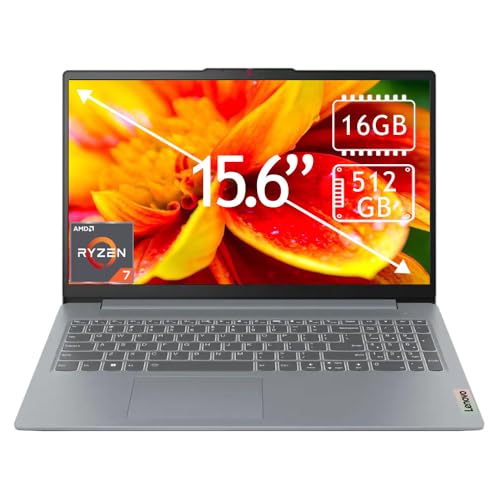
- Ryzen 7 processor for everyday multitasking
- 16GB RAM and 512GB SSD
- 15.6-inch Full HD touchscreen
Best For: School, remote work, and general productivity
High-Capacity Storage Pick

- 32GB RAM with a 10-core Core i7
- 1TB SSD plus 500GB external drive
- 17.3-inch display and numeric keypad
Best For: Business and school users managing many files
Budget Student Workhorse

- 12GB RAM and 256GB SSD
- 15.6-inch Full HD IPS display
- Includes Office 365 and Windows 11 AI features
Best For: Basic schoolwork and everyday productivity
Best Business Multitasker
Dell Premium 15.6-inch Core i7 Laptop

- 32GB DDR5 RAM for demanding multitasking
- 1TB NVMe SSD for fast, spacious storage
- 15.6-inch FHD IPS display with 120Hz refresh rate
Best For: Professionals and students running many applications at once
Best Large-Screen Value
HP OmniBook 3 17.3-inch Laptop

- Spacious 17.3-inch FHD IPS display
- Up to 14 hours and 15 minutes of rated battery life
- FHD HDR camera with AI noise reduction
Best For: Home and student users who want a roomy screen
Best Portable Performance
MALLRACE 15.6-inch Intel i5 Laptop
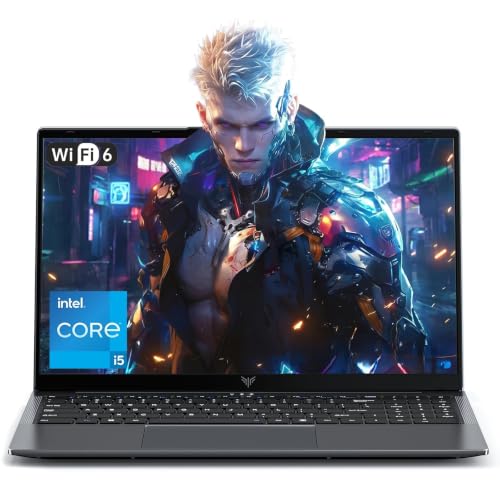
- 12-core, 16-thread Core i5-12600H processor
- 24GB LPDDR5 memory for responsive multitasking
- Lightweight 1.6kg design with privacy webcam switch
Best For: Mobile users needing strong everyday processing power
Balanced Everyday Performer

- 8-core Ryzen 7 processor
- 16GB RAM and 512GB NVMe SSD
- 15.6-inch FHD touchscreen
Best For: Students and business users handling everyday multitasking
Business Productivity Pick
Lenovo V15 Gen 4 Business Laptop

- Core i5-13420H with 8 cores
- 16GB RAM and 512GB SSD listed
- HDMI, RJ45 Ethernet, and numeric keypad
Best For: Office users needing practical ports and Windows 11 Pro
Large-Screen Workstation

- 17.3-inch anti-glare display
- 16GB RAM with SSD storage
- Numeric keypad and claimed 12-hour battery life
Best For: Desk-based multitasking, spreadsheets, and home-office work
Large-Screen Business Pick – HP OmniBook 17.3-inch
For shoppers comparing laptops for multitasking, the HP OmniBook stands out with a spacious 17.3-inch FHD IPS screen, 32GB of DDR5 memory, and an Intel Core Ultra 7 processor. Its full-size backlit keyboard and numeric keypad also suit desk-based productivity.
Best For: Business users who want a large display for documents, spreadsheets, meetings, and side-by-side windows.
Pros:
- 17.3-inch FHD IPS display provides ample workspace.
- 32GB DDR5 RAM and a 12-core Core Ultra 7 processor support demanding multitasking.
- Backlit keyboard with numeric keypad is useful for data entry and accounting.
- Includes Wi-Fi 7, a 1080p privacy camera, and Windows 11 Pro.
Cons:
- The large 17.3-inch format is less convenient for frequent travel.
- Integrated Intel Iris Xe graphics are intended for productivity rather than dedicated graphics workloads.
Choose this OmniBook if screen space and memory capacity matter more than compact portability. Its business-focused features make it a strong workstation-style option for everyday multitasking.
Portable Touchscreen Value – Lenovo IdeaPad Slim 3
The Lenovo IdeaPad Slim 3 is a practical choice among laptops for multitasking, pairing an eight-core AMD Ryzen 7 processor with 16GB of memory and a 512GB SSD. Its 15.6-inch touchscreen adds a convenient way to navigate work, school, and entertainment tasks.
Best For: Students, remote workers, and everyday users who want responsive multitasking in a relatively portable design.
Pros:
- Ryzen 7 5825U processor is suited to productivity and multitasking.
- 16GB RAM and a 512GB SSD provide a balanced everyday configuration.
- 15.6-inch Full HD touchscreen supports intuitive navigation.
- Wi-Fi 6, HDMI, and multiple USB ports support common accessories.
Cons:
- Memory is listed at a 16GB maximum, limiting future expansion.
- The display is rated at 250 nits, which may be modest in bright environments.
This IdeaPad offers a sensible middle ground for users who need multitasking performance without moving to a larger 17-inch machine. The touchscreen and 1.6 kg weight add flexibility for school, travel, and remote work.
High-Capacity Storage Pick – HP 17 Multitasking Laptop
For shoppers seeking laptops for multitasking with generous storage, this HP 17 combines a 10-core Intel Core i7-1255U processor with 32GB of RAM and 1.5TB of total storage. The 17.3-inch display and numeric keypad are particularly useful for office-oriented work.
Best For: Students and business users who prioritize a large screen, ample memory, and extra space for files and backups.
Pros:
- 32GB RAM supports numerous applications and browser tabs.
- Includes 1TB SSD storage plus a 500GB external drive.
- 17.3-inch display and numeric keypad suit office productivity.
- Has USB-C, two USB-A ports, HDMI, and a built-in webcam.
Cons:
- The 1600 x 900 display is less sharp than a Full HD panel.
- The included external drive adds storage but requires a separate connection.
- Windows 11 Home is less business-oriented than a Pro edition.
This HP is a functional desktop-replacement-style option for multitaskers who need memory and storage more than display sharpness. It is best suited to a fixed workspace or occasional relocation rather than highly mobile use.
Budget Student Workhorse – AKCHART 15.6-inch AI Laptop
The AKCHART M156FH is an entry-level option for basic laptops for multitasking, with 12GB of RAM, a 256GB SSD, and a 15.6-inch Full HD IPS display. It also includes Windows 11, Office 365, and productivity-focused AI features for everyday school and work tasks.
Best For: Students and light business users handling documents, web browsing, online meetings, and basic productivity.
Pros:
- 15.6-inch Full HD IPS screen offers wide viewing angles.
- 12GB RAM and an SSD support routine everyday multitasking.
- Includes Office 365 and built-in Windows 11 AI productivity features.
- 7000mAh battery, 180-degree hinge, numeric keypad, and expansion options add convenience.
Cons:
- The four-core Celeron J4105 is less suited to demanding multitasking than the processors in the other options.
- 256GB of included storage is relatively limited before expansion.
- Uses Wi-Fi 5 and Bluetooth 4.2 rather than newer wireless standards.
This laptop makes the most sense when affordability and included software are priorities. It can handle common productivity workloads, but heavier applications and intensive multitasking may call for a more powerful processor.
Best Business Multitasker – Dell Premium 15.6-inch Core i7 Laptop
For shoppers comparing laptops for multitasking, this Dell configuration stands out with 32GB of DDR5 memory, a 1TB PCIe NVMe SSD, and a 13th Gen Intel Core i7-1355U processor. It is well equipped for running many browser tabs, business applications, video calls, and demanding productivity software together.
Best For: Business users, students, content creators, and professionals who need substantial memory and storage for demanding daily workflows.
Pros:
- 32GB DDR5 RAM supports extensive multitasking and virtual machines.
- 1TB NVMe SSD provides fast boot times and generous file storage.
- 15.6-inch Full HD IPS display offers a smooth 120Hz refresh rate and anti-glare coating.
- Includes Wi-Fi 6, Ethernet, HDMI, USB-C, USB-A, and an SD card slot.
Cons:
- Integrated graphics are better suited to productivity and moderate creative work than graphics-intensive tasks.
- Windows 11 Home may offer fewer business-management features than a Pro edition.
This is the strongest all-around choice in the group for heavy multitasking, particularly if you regularly work across numerous applications or need room for large project files.
Best Large-Screen Value – HP OmniBook 3 17.3-inch Laptop
If a large workspace matters when choosing laptops for multitasking, the HP OmniBook 3 offers a 17.3-inch Full HD IPS display with wide viewing angles. Its Ryzen 3 processor, 8GB of LPDDR5 memory, and 512GB SSD are aimed at everyday work, streaming, video calls, and routine application switching.
Best For: Home users and students who prioritize a spacious screen, long battery life, and everyday productivity.
Pros:
- Large 17.3-inch anti-glare FHD IPS screen provides ample room for side-by-side work.
- Battery life is rated for up to 14 hours and 15 minutes, with fast charging to 50% in about 45 minutes.
- FHD camera with HDR and AI noise reduction supports clearer video calls.
- Wi-Fi 6, Bluetooth 5.4, and multiple USB-C ports provide modern connectivity.
Cons:
- 8GB of onboard RAM provides less multitasking headroom than the other listed models.
- The 17.3-inch design is less convenient for frequent travel than a smaller laptop.
- Integrated Radeon 610M graphics are intended for everyday use and entertainment.
The OmniBook 3 is a practical pick when screen size and battery endurance are more important than maximum multitasking capacity or compact portability.
Best Portable Performance – MALLRACE 15.6-inch Intel i5 Laptop
This thin-and-light MALLRACE model is a compelling option for laptops for multitasking when portability and processing power both matter. Its 12-core, 16-thread Intel Core i5-12600H processor works with 24GB of LPDDR5 memory and a 512GB NVMe SSD for office work, school tasks, streaming, and heavier everyday workloads.
Best For: Mobile professionals, students, and remote workers who need strong multitasking performance in a lightweight 15.6-inch design.
Pros:
- 12-core Intel Core i5-12600H processor delivers robust multitasking performance.
- 24GB LPDDR5 RAM provides substantial capacity for multiple applications.
- Lightweight 1.6kg design and 54.72Wh battery suit commuting and travel.
- Offers Wi-Fi 6, Bluetooth 5.2, a privacy-switch webcam, fingerprint recognition, and numerous ports.
Cons:
- 512GB storage is smaller than the Dell’s 1TB capacity.
- Display specifications are Full HD LCD rather than the Dell’s IPS panel with a stated 120Hz refresh rate.
- Integrated Intel Iris Xe graphics are not designed for demanding dedicated-GPU workloads.
With more memory than a typical everyday laptop and a relatively light chassis, this model balances multitasking capability and mobility well for work, study, and remote use.
Balanced Everyday Performer – Lenovo IdeaPad Slim 3
The Lenovo IdeaPad Slim 3 is a practical choice among laptops for multitasking, pairing an 8-core AMD Ryzen 7 processor with 16GB of memory and a 512GB NVMe SSD. Its touchscreen, full-size keyboard, and Windows 11 Pro setup suit work, study, and everyday entertainment.
Best For: Students, home users, and business users who want a responsive 15.6-inch touchscreen laptop for documents, browser tabs, and general productivity.
Pros:
- Ryzen 7 5825U processor with 8 cores and speeds up to 4.5 GHz
- 16GB DDR4 memory and a 512GB NVMe M.2 SSD
- 15.6-inch 1920 x 1080 touchscreen with Wi-Fi 6 connectivity
- Full-size keyboard with numeric keypad and privacy camera feature
Cons:
- Integrated AMD Radeon graphics are intended for general use rather than dedicated-graphics workloads
- 60Hz display is suited to standard productivity and media use
- Listed battery energy capacity is 26 watt-hours
With strong everyday specifications and a useful touchscreen, this IdeaPad is a well-rounded multitasking laptop. It is especially appealing when office work, studying, and web-based tasks matter more than graphics-intensive applications.
Business Productivity Pick – Lenovo V15 Gen 4 Business Laptop
The Lenovo V15 Gen 4 focuses on business productivity, making it a solid option among laptops for multitasking. Its Intel Core i5-13420H processor, 16GB RAM, 512GB SSD, Windows 11 Pro, and built-in numeric keypad are designed for handling office applications and multiple browser tabs.
Best For: Business users who need a Windows 11 Pro laptop with office-friendly ports, Ethernet, a numeric keypad, and upgradeable memory potential.
Pros:
- 8-core, 12-thread Intel Core i5-13420H processor with speeds up to 4.6 GHz
- 16GB DDR4 RAM and a 512GB PCIe NVMe SSD
- 15.6-inch Full HD 1920 x 1080 display
- Includes HDMI, USB-C, USB-A, RJ45 Ethernet, Wi-Fi, and Bluetooth
Cons:
- Supplied bullet notes contain conflicting RAM and storage figures; confirm the listing configuration before purchase
- Integrated Intel UHD Graphics are aimed at standard productivity
- Display specifications do not list a touchscreen
This V15 stands out for its business-oriented connectivity and H-series Intel processor. It is a sensible multitasking choice for office work, especially if Ethernet, HDMI, and a number pad are more important than a premium display or dedicated graphics.
Large-Screen Workstation – HP 17 Business Laptop
The HP 17 is built around a spacious 17.3-inch display, making it a comfortable choice among laptops for multitasking. With 16GB RAM, a 512GB SSD, a numeric keypad, Windows 11, and Office 365 for the web, it is suited to managing documents, spreadsheets, video calls, and entertainment on a larger screen.
Best For: Home-office users, students, and business users who prioritize a large anti-glare display and full-size keyboard for split-screen work.
Pros:
- Large 17.3-inch FHD anti-glare display with slim bezels
- 16GB DDR4 RAM and SSD storage for everyday productivity
- Full-size keyboard with a 10-key numeric keypad
- Listed battery life of up to 12 hours with HP Fast Charge
Cons:
- Integrated graphics are intended for standard work and media use
- The supplied details list conflicting display resolutions, so confirm the exact panel specification
- Larger 17.3-inch dimensions may be less convenient for frequent travel
The HP 17 makes multitasking easier to view by giving you more screen real estate than typical 15.6-inch models. Its numeric keypad, anti-glare coating, camera, and claimed battery life make it particularly practical for desk-based productivity.
How We Picked the Best Laptops for Multitasking
We focused on the specifications that most directly affect everyday multitasking: processor class, RAM capacity, SSD storage, display size, connectivity, and portability. Models with 16GB of RAM or more generally provide a smoother experience when several applications and browser tabs are open. We also included lower-cost configurations for lighter workloads, along with business-oriented laptops that offer useful features such as numeric keypads, HDMI, Ethernet, and larger displays.
Because listed configurations can vary by seller, confirm the exact processor, memory, storage, operating system, and included accessories before purchasing. Performance also depends on cooling, software optimization, and the type of applications you use.
Quick Comparison
- Best overall performance: Look for a recent Core Ultra 7, Core i7, or comparable Ryzen 7 processor with 32GB of RAM.
- Best value for office work: A Ryzen 7 or Core i5 system with 16GB of memory and a 512GB SSD is a practical balance.
- Best for large-screen productivity: A 17.3-inch display gives spreadsheets, documents, and side-by-side windows more room.
- Best for portability: Choose a 15.6-inch model or smaller, and check the listed weight and battery capacity.
- Best for storage-heavy workflows: A 1TB SSD reduces the need for external storage and keeps applications responsive.
Key Buying Factors for Laptops for Multitasking
Processor
The CPU determines how quickly a laptop handles simultaneous workloads. Core i7, Core Ultra 7, and Ryzen 7 models are well suited to heavier office work, large spreadsheets, frequent video meetings, and moderate content creation. Core i5 and Ryzen 5 systems are often sufficient for documents, web research, streaming, and schoolwork.
RAM and Storage
RAM is especially important when you keep many tabs and programs open. Choose at least 16GB for a comfortable multitasking setup; 32GB is preferable for demanding software, virtual machines, or long-term headroom. An SSD is essential for faster startup and application loading. Choose 512GB for general use and 1TB if you store large media libraries or work files locally.
Display, Keyboard, and Connectivity
A Full HD display should be the baseline for clear text and useful workspace. A 17.3-inch screen improves visibility but is less portable, while 15.6 inches offers a more versatile compromise. Touchscreens can be helpful for navigation and presentations. For business use, check for a comfortable keyboard, numeric keypad, webcam, HDMI, USB ports, and Ethernet.
Who Should Buy Which Laptops for Multitasking?
Students and home-office users can usually choose a 16GB Ryzen 5, Ryzen 7, or Core i5 laptop with a 512GB SSD. Professionals handling large spreadsheets, multiple monitors, or demanding browser-based tools should prioritize 32GB of RAM, a stronger processor, and convenient business connectivity. Creators and power users should consider 32GB or more, 1TB storage, and dedicated graphics if their software requires it. Users who value visibility over portability should choose a 17.3-inch model, while commuters and frequent travelers may prefer a lighter 15.6-inch laptop.