The best ergonomic gaming mice make long sessions more comfortable without sacrificing speed, accuracy, or useful controls. This roundup compares ten options spanning lightweight wireless designs, vertical mice, MMO-focused models, and proven wired favorites.
Use the buying guide below to match grip style, connectivity, button layout, sensor performance, and budget to the way you actually play.
Best 10 Ergonomic Gaming Mice Picks for 2026
Best All-Around Pick

- Thumb-rest ergonomic design
- 11 programmable buttons
- 26,000 DPI sensor and 11-zone RGB
Best For: Feature-focused PC gamers who prefer a wired mouse
Best Quiet Vertical Option
UGREEN Ergonomic Wireless Mouse

- Vertical handshake-style design
- Quiet clicks with PTFE glide feet
- Bluetooth and 2.4G connectivity
Best For: Medium- to large-handed users seeking quiet everyday comfort
Best Customizable Classic

- Adjustable weight and balance
- 11 programmable buttons
- 25,600 DPI HERO sensor
Best For: Right-handed gamers who want a tunable wired mouse
Best Vertical Gaming Feature Set
TKMARS Wireless Vertical Mouse
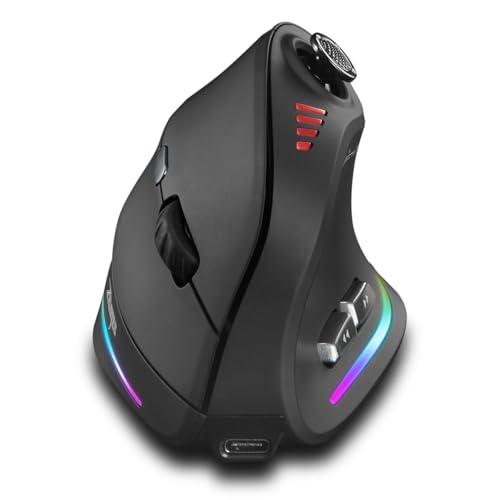
- Vertical ergonomic grip with joystick
- 12 programmable buttons and 24,000 DPI
- Bluetooth, 2.4G, and rechargeable USB-C use
Best For: Right-handed users wanting vertical comfort and extensive controls
Versatile Wireless Pick
Razer Basilisk V3 X HyperSpeed

- Ergonomic right-handed design with nine customizable controls
- HyperSpeed wireless and Bluetooth connectivity
- Up to 285 hours of HyperSpeed battery life
Best For: Right-handed gamers seeking long battery life and wireless flexibility
MMO Control Specialist

- 18 programmable buttons with 12 MMO side buttons
- Adjustable DPI up to 12,400 and five memory profiles
- Includes an eight-piece weight-tuning set
Best For: MMO players who need extensive remapping and command access
Comfort-Focused Performance
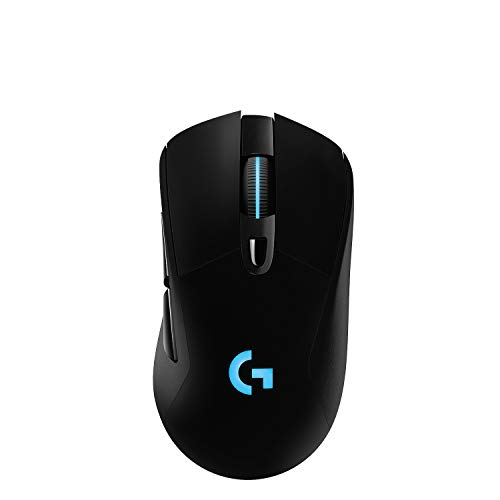
- Comfortable design with rubber side grips
- LIGHTSPEED wireless and HERO sensor tracking
- POWERPLAY charging support sold separately
Best For: Gamers seeking responsive wireless performance and a comfortable grip
Button-Rich MMO Pick
Redragon M811 Wired RGB MMO Mouse

- 15 programmable buttons for MMO keybinds
- Ergonomic right-handed shape for long sessions
- Adjustable DPI and five RGB modes
Best For: Right-handed MMO players who need extensive button customization
Vertical Wireless Choice
24,000 DPI Rocker Gaming Mouse

- Vertical handshake grip for wrist-conscious use
- Wireless, Bluetooth, and USB-C connectivity
- 12 buttons plus a five-direction thumb rocker
Best For: Right-handed users seeking a vertical multi-device gaming mouse
Proven Budget Option
Redragon M602 Ergonomic RGB Mouse

- Comfort-focused contoured right-handed design
- Adjustable tracking up to 7200 DPI
- Programmable controls and seven RGB modes
Best For: PC users wanting a dependable wired gaming and office mouse
Best All-Around Pick – Razer Basilisk V3
The Razer Basilisk V3 is a strong choice for shoppers comparing ergonomic gaming mice with extensive customization. Its right-handed shape includes a thumb rest, 11 programmable buttons, a 26,000 DPI optical sensor, and a versatile HyperScroll tilt wheel.
Best For: PC gamers who want a feature-rich wired mouse for customizable controls, precise tracking, and RGB lighting.
Pros:
- Thumb rest and hand-supporting ergonomic shape
- 11 programmable buttons for macros and secondary commands
- 26,000 DPI sensor and crisp optical switches rated for up to 70 million clicks
- Customizable RGB lighting across 11 zones
Cons:
- Right-handed design limits suitability for left-handed users
- Wired connection may be less convenient than wireless alternatives
- Full customization requires the Razer Synapse app
Choose the Basilisk V3 if you want a comfortable, control-heavy gaming mouse and do not mind using a cable. Its combination of programmable inputs, a tilt wheel, and high-resolution sensor makes it a particularly versatile option.
Best Quiet Vertical Option – UGREEN Ergonomic Wireless Mouse
The UGREEN Ergonomic Wireless Mouse takes a vertical, handshake-style approach to comfort, making it a practical alternative among ergonomic gaming mice for casual play and everyday computer use. It offers Bluetooth and 2.4G wireless connectivity, quiet clicks, and four DPI settings up to 4,000.
Best For: Medium- to large-handed users who want a quiet wireless mouse for productivity, browsing, and light gaming.
Pros:
- Vertical shape is designed to reduce wrist rotation and muscle strain
- Quiet-click buttons and PTFE glide feet support a quieter workspace
- Bluetooth and 2.4G wireless connections can switch among up to three devices
- Compatible with Windows, macOS, Linux, ChromeOS, and Android
Cons:
- Designed for medium to large hands and may not fit small hands well
- Five-button layout is less customizable than gaming-focused models
- 4,000 DPI maximum is modest for competitive gaming
This UGREEN model is best viewed as a comfort-first wireless mouse rather than a high-performance competitive gaming peripheral. Check the hand-size guide before buying, especially if you prefer a compact mouse.
Best Customizable Classic – Logitech G502 HERO
The Logitech G502 HERO remains a compelling wired choice for shoppers seeking ergonomic gaming mice with extensive control options. It combines an adjustable-weight design, 11 programmable buttons, a dual-mode scroll wheel, and a HERO sensor with tracking up to 25,600 DPI.
Best For: Right-handed PC gamers who want to tune mouse weight and balance while adding macros and RGB lighting.
Pros:
- Five removable 3.6-gram weights allow balance customization
- 11 programmable buttons provide broad control flexibility
- HERO sensor tracks up to 25,600 DPI without smoothing, filtering, or acceleration
- Dual-mode scroll wheel and LIGHTSYNC RGB add useful customization
Cons:
- Wired design does not provide wireless freedom
- Right-handed shape is not intended for left-handed use
- RGB synchronization requires Logitech Gaming Software
The G502 HERO is a good fit when weight tuning matters as much as button count. Its established wired design favors players who want consistent connectivity and a substantial set of physical controls.
Best Vertical Gaming Feature Set – TKMARS Wireless Vertical Mouse
The TKMARS Wireless Vertical Gaming Mouse combines a handshake-style grip with gaming-oriented controls, making it one of the more unusual ergonomic gaming mice in this group. It includes a five-way joystick, 12 programmable buttons, adjustable sensitivity up to 24,000 DPI, dual wireless modes, and a rechargeable battery.
Best For: Right-handed users who want a vertical grip with many programmable inputs and joystick-style navigation.
Pros:
- Vertical design is intended to support a natural hand position and reduce wrist strain
- Built-in five-way joystick adds directional and press controls
- 12 programmable buttons and sensitivity up to 24,000 DPI
- Bluetooth, 2.4G, and USB-C connectivity with an 800mAh rechargeable battery
Cons:
- Large vertical shape may require an adjustment period
- Right-handed design excludes left-handed users
- Supplied specifications list an unusual 9V battery requirement despite the rechargeable-battery description
The TKMARS stands out for users who want vertical comfort without giving up a large control layout. Its joystick and wireless flexibility are distinctive, but shoppers should confirm fit and battery details before purchasing.
Versatile Wireless Pick – Razer Basilisk V3 X HyperSpeed
The Razer Basilisk V3 X HyperSpeed is a strong choice among ergonomic gaming mice for right-handed players who want a contoured shape, wireless flexibility, and plenty of customization. It combines HyperSpeed wireless and Bluetooth connectivity with nine customizable controls, an 18,000 DPI optical sensor, and exceptionally long battery life.
Best For: Right-handed gamers who want a comfortable, customizable wireless mouse for extended play.
Pros:
- Ergonomic right-handed shape supports different grips and provides nine customizable controls.
- Offers low-latency HyperSpeed wireless plus Bluetooth and multi-device support.
- Provides up to 285 hours on HyperSpeed or 535 hours on Bluetooth, depending on usage.
- Includes an 18,000 DPI sensor, Gen-2 mechanical switches, and Chroma RGB lighting.
Cons:
- Uses a single AA battery, so it is not a rechargeable mouse out of the box.
- Its 110-gram weight may feel less nimble than lighter gaming mice.
- Advanced customization requires the Razer Synapse app.
Choose this model if comfort, wireless range, battery endurance, and programmable controls matter more than minimizing weight. It is especially practical for players who switch between gaming and other Bluetooth-connected devices.
MMO Control Specialist – Redragon M908 Impact
The Redragon M908 Impact stands out among ergonomic gaming mice for MMO players who need many commands within easy reach. Its 18 programmable buttons, adjustable DPI, onboard profiles, weight-tuning set, and wired connection prioritize control and consistency over wireless convenience.
Best For: MMO and strategy players who need extensive button remapping and profile management.
Pros:
- Provides 18 programmable buttons, including 12 side buttons for MMO commands.
- Supports five DPI levels, with software adjustment from 200 to 12,400 DPI.
- Includes five memory profiles and an eight-piece, 2.4-gram weight-tuning set.
- Features a 1,000 Hz polling rate, Pixart PAW3327 sensor, RGB lighting, and braided cable.
Cons:
- The 175-gram body is considerably heavier than many conventional gaming mice.
- Its wired design does not provide wireless freedom.
- The dense button layout may take time to learn and configure.
The M908 is a specialized tool rather than a minimalist everyday mouse. Its large button array and adjustable weight make it a logical fit for players who value quick access to macros and abilities over a lighter, simpler design.
Comfort-Focused Performance – Logitech G703 LIGHTSPEED
The Logitech G703 LIGHTSPEED is a practical option among ergonomic gaming mice for players who prefer a comfortable shape, rubber side grips, and responsive wireless performance. It pairs LIGHTSPEED connectivity with a HERO sensor, six programmable buttons, an optional 10-gram weight, and compatibility with the separately sold POWERPLAY charging system.
Best For: Gamers wanting a comfortable wireless mouse with responsive tracking and optional wireless charging.
Pros:
- Comfort-focused design includes rubber side grips and a 10-gram optional weight.
- LIGHTSPEED wireless is designed for responsive, high-performance gameplay.
- HERO sensor offers 1:1 tracking, 400+ IPS, and sensitivity up to 25,600 DPI.
- Supports six programmable buttons, LIGHTSYNC RGB, and optional POWERPLAY charging.
Cons:
- Battery life is rated for up to 35 hours with default RGB lighting.
- The POWERPLAY wireless charging system is sold separately.
- It is designed for Microsoft Windows according to the supplied compatibility details.
Pick the G703 if you want a relatively light, comfort-oriented wireless mouse with dependable tracking and a straightforward button layout. Its POWERPLAY support is a useful upgrade path, but the separate charging system adds to the overall cost.
Button-Rich MMO Pick – Redragon M811 Wired RGB MMO Mouse
For shoppers comparing ergonomic gaming mice, the Redragon M811 combines a hand-shaped right-handed design with extensive button customization. Its wired connection, multiple DPI settings, and programmable controls make it particularly suited to MMO gaming and productivity-heavy setups.
Best For: Right-handed MMO players who want many programmable buttons and a wired connection.
Pros:
- 15 programmable buttons support custom keybinds, media controls, DPI settings, and macros.
- Adjustable sensitivity includes five default DPI levels, with software support for settings between 500 and 12,400 DPI.
- Ergonomic right-handed shape is designed for extended gaming or work sessions.
- Includes five RGB backlight modes and dedicated configuration software.
Cons:
- Its 200 g weight may feel heavy compared with lighter gaming mice.
- Wired USB connectivity is less flexible than a wireless design.
- The large button layout may take time to learn.
The M811 is a practical choice when button quantity matters more than minimal weight or cable-free use. It offers strong MMO-focused customization while retaining an ergonomic shape for long sessions.
Vertical Wireless Choice – 24,000 DPI Rocker Gaming Mouse
This vertical model stands out among ergonomic gaming mice with a handshake-style grip intended to reduce wrist and shoulder strain. It also combines wireless, Bluetooth, and USB-C wired connectivity with a five-direction thumb rocker and programmable controls.
Best For: Right-handed gamers who prioritize a vertical grip, multi-device connectivity, and thumb-based movement controls.
Pros:
- Vertical ergonomic design supports a natural handshake position and accommodates small to large hands.
- Tri-mode connectivity includes Bluetooth 5.0, 2.4GHz wireless, and USB-C wired operation.
- Five-direction rocker provides forward, backward, left, right, and click inputs.
- Offers 12 programmable buttons, five DPI presets up to 24,000, and RGB lighting effects.
Cons:
- The vertical shape is intended for right-handed users and may require an adjustment period.
- Button programming requires the included software.
- The product notes identify it as rechargeable, but do not specify battery runtime.
Choose this mouse if wrist posture and connection flexibility are priorities. Its vertical form and rocker are distinctive, though gamers accustomed to conventional shapes may need time to adapt.
Proven Budget Option – Redragon M602 Ergonomic RGB Mouse
The Redragon M602 is a straightforward wired option for shoppers seeking ergonomic gaming mice without a complicated feature set. Its contoured right-handed design, adjustable DPI, programmable controls, and RGB lighting cover everyday gaming and office use.
Best For: Right-handed PC users who want an affordable wired mouse with adjustable sensitivity and customizable controls.
Pros:
- Ergonomic shape includes dedicated finger positions for comfortable use across different grips.
- 7200 adjustable DPI and an optical sensor support responsive, consistent tracking.
- Software allows button remapping, macro editing, speed adjustments, and lighting customization.
- Seven RGB lighting modes and effects provide flexible appearance options.
Cons:
- Wired USB operation limits placement flexibility.
- The design is right-handed rather than ambidextrous.
- Its older feature set lacks the wireless and high-DPI options found on newer models.
The M602 makes sense for buyers who value proven basics over cutting-edge specifications. It delivers useful customization and an ergonomic contour at the cost of wireless freedom and newer premium features.
How We Picked These Ergonomic Gaming Mice
We selected these models for their combination of hand comfort, gaming-focused features, control options, and value. The list includes wired and wireless designs, conventional right-handed shapes, vertical mice, and models with extra buttons for MMO, productivity, and shortcut-heavy gaming.
We also considered adjustable DPI ranges, programmable buttons, lighting, wireless connectivity, and whether each mouse suits fast competitive play or longer comfort-focused sessions. Because hand size and grip preference vary, no single shape is best for everyone.
Quick Comparison
- Best all-around wired option: Look for a conventional ergonomic shape, dependable tracking, and extensive software customization.
- Best wireless flexibility: Dual-mode models can provide low-latency 2.4GHz gaming while retaining Bluetooth convenience.
- Best for MMO controls: MMO mice with nine or more programmable buttons reduce keyboard travel for skill rotations and macros.
- Best for unusual grip needs: Vertical and joystick-equipped designs can reduce wrist rotation, though they may require an adjustment period.
- Best budget approach: A wired mouse generally provides more buttons and features for the money while avoiding charging concerns.
Key Buying Factors for Ergonomic Gaming Mice
Shape and Grip
Choose a mouse that supports your palm without forcing your fingers into an awkward angle. Palm grips generally favor larger, fuller shells, while claw and fingertip grips often work better with shorter or lower-profile designs. Check dimensions carefully if you have especially large or small hands.
Wired or Wireless Connectivity
Wired mice offer consistent power and usually cost less. Wireless models provide a cleaner desk and greater freedom, but check battery life, charging methods, and whether the mouse supports a responsive 2.4GHz receiver as well as Bluetooth. Bluetooth is convenient for laptops but is not always the preferred mode for competitive gaming.
Buttons and Software
Extra buttons are valuable for MMOs, strategy games, creative applications, and productivity shortcuts. Confirm that the software supports remapping, profiles, sensitivity stages, and onboard memory if you switch between computers.
Sensor and Adjustability
High maximum DPI is not automatically better. Reliable tracking, consistent lift-off behavior, and easy sensitivity adjustment matter more. Most players should prioritize sensor stability and comfortable control over an extreme DPI specification.
Weight and Comfort Details
Consider total weight, button tension, scroll-wheel feel, cable flexibility, and the location of side buttons. A heavier mouse may feel steadier, while a lighter model can be easier to move during fast aiming. Rubberized surfaces and textured sides can improve control during long sessions.
Who Should Buy Which Ergonomic Gaming Mice?
Competitive FPS players should prioritize a comfortable shape, dependable sensor, low-friction movement, and minimal button clutter. A responsive wired or 2.4GHz wireless model is usually the safest choice.
MMO and shortcut-heavy players should choose one of the models with a large programmable-button layout. More controls can simplify ability rotations, inventory actions, and application shortcuts.
Players with wrist discomfort may prefer a vertical design that keeps the hand in a more neutral position. Start with shorter sessions while adapting, since vertical mice feel different from standard gaming shapes.
Mixed work-and-gaming users should consider quiet clicks, Bluetooth support, onboard profiles, and a shape comfortable for several hours of everyday use. A dual-purpose ergonomic mouse can reduce the need for separate office and gaming peripherals.
Budget-conscious buyers will generally get the strongest feature-to-price ratio from a wired model. Spend extra only when wireless freedom, specialized ergonomics, or additional programmable controls directly solve a problem you have.