A gaming mouse with charging dock can keep your desk tidy while making wireless play far more convenient. Instead of plugging in after every session, you can return the mouse to its dock between matches and keep it ready to go.
Our roundup covers lightweight tri-mode models, feature-rich MMO mice, RGB docking systems, and budget-friendly options. Use the guide below to match sensor performance, shape, controls, and connectivity to the way you play.
Best 10 Gaming Mouse with Charging Dock Picks for 2026
Style-Focused Pick
DAREU Sakura Pink Wireless Mouse

- Secure magnetic charging dock
- 85 g body with 12K DPI sensor
- RGB lighting and 50M-click switches
Best For: Lightweight pink gaming and office setups
Flexible Connectivity Pick

- 2.4G, Bluetooth, and USB-C modes
- Four programmable macro buttons
- Magnetic RGB charging dock
Best For: Multi-device gaming and productivity
Simple RGB Value Pick

- 1 ms wireless response time
- Ambidextrous ergonomic shape
- Rechargeable battery with RGB dock
Best For: Straightforward PC gaming with RGB
MMO Control Pick
ASUS ROG Spatha X Wireless Mouse

- 12 programmable MMO/MOBA buttons
- 19K DPI sensor and dual-mode connection
- 67-hour battery with magnetic dock
Best For: Right-handed MMO and MOBA gaming
Screen-Smart Pick

- Dual OLED screens show DPI, battery, and connection details
- 65g body with tri-mode wireless and wired connectivity
- RGB charging dock and five programmable buttons
Best For: Gamers who want visible settings and a lightweight, versatile mouse
Balanced Docked Performer

- 59g design with a magnetic RGB fast-charging dock
- Up to 22,000 DPI and 1,000Hz polling rate
- Bluetooth, 2.4GHz, and USB-C wired modes
Best For: Gamers wanting low weight, quick charging, and versatile connectivity
High-Rate Feature Pick

- 24,000 DPI sensor with a claimed 7,200Hz polling rate
- 63g body, 60-hour battery, and fast charging support
- RGB magnetic dock, tri-mode connectivity, and grip tapes
Best For: Competitive gamers focused on high polling rates and customization
Best Lightweight Value
ATTACK SHARK X11 Wireless Gaming Mouse

- 62g ergonomic design with included grip tape
- 22,000 DPI PAW3311 sensor and 1,000Hz polling
- Tri-mode connectivity with RGB charging dock
Best For: Lightweight gaming and flexible PC or Mac setups
Best for Long Sessions
AJAZZ AJ139 V2 MC Wireless Gaming Mouse

- 66g ergonomic design with a 500mAh battery
- RGB magnetic charging dock for easy recharging
- Tri-mode operation and Huano switches rated for 80 million clicks
Best For: Right-handed gaming and extended desktop sessions
Best Feature-Packed Dock
M8 RGB Magnetic Charging Dock Mouse
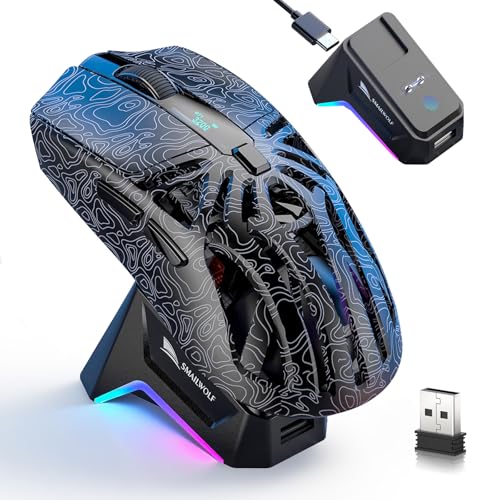
- Magnetic RGB dock with touch-controlled lighting
- Six programmable buttons and built-in power display
- Tri-mode connectivity for PC, Mac, and mobile devices
Best For: Multi-device users who want extra controls and dock features
Style-Focused Pick – DAREU Sakura Pink Wireless Mouse
The DAREU Sakura Pink is a practical gaming mouse with charging dock for shoppers who want a lightweight, colorful setup. Its 1 ms wireless transmission, 12,000 DPI sensor, rechargeable battery, and magnetic dock cover everyday gaming and office use.
Best For: Gamers and office users who want a lightweight pink mouse with RGB lighting and convenient dock charging.
Pros:
- Strong magnetic alignment helps the mouse connect securely to the dock.
- Lightweight 85 g design and symmetrical claw-grip shape support extended use.
- 12,000 DPI sensor and 1 ms wireless transmission provide responsive tracking.
- Micro switches are rated for 50 million clicks.
Cons:
- Battery life is listed at 24 hours, which may require frequent recharging.
- The right-hand design and pink styling may not suit every user or setup.
The DAREU stands out for its appearance and secure charging setup. It is a sensible choice if you value a lighter mouse and decorative RGB lighting as much as core wireless performance.
Flexible Connectivity Pick – Redragon M999 Wireless Mouse
The Redragon M999 is a versatile gaming mouse with charging dock that supports 2.4G wireless, Bluetooth, and USB-C connections. Its programmable buttons, adjustable DPI presets, optical sensor, and magnetic RGB dock make it suited to gaming and general productivity.
Best For: Windows and Mac users who need multiple connection modes, remappable controls, and a dock-based charging setup.
Pros:
- Tri-mode connectivity supports 2.4G wireless, Bluetooth, and USB-C use.
- Four programmable buttons can handle macros, shortcuts, and commands.
- Optical tracking reaches up to 750 IPS and 70G acceleration.
- Automatic standby and sleep modes help conserve battery power.
Cons:
- The listed DPI presets top out at 3,200 despite the product title referencing 45,000 DPI.
- Charging through a PC requires USB power to remain enabled when the computer is off.
- Software and operating-system support are specified primarily for Windows and newer macOS versions.
The M999 is the strongest fit for buyers who prioritize connection flexibility and customization. Its dock adds convenience, while the programmable controls make it useful beyond gaming.
Simple RGB Value Pick – KLIM Blaze Pro Wireless Mouse
The KLIM Blaze Pro is a straightforward gaming mouse with charging dock for users who want wireless play without disposable batteries. It combines a claimed 1 ms response time, an ambidextrous shape, customizable RGB lighting, and a rechargeable battery.
Best For: Gamers seeking an ambidextrous wireless mouse with basic RGB customization and convenient charging.
Pros:
- 1 ms response time is designed to provide lag-free performance comparable to wired mice.
- Ambidextrous shape and anti-slip flanks support varied grip styles.
- Included charging dock simplifies rechargeable use.
- Buttons are rated for more than 20 million clicks.
Cons:
- The 6,000 DPI maximum is lower than the other high-sensitivity options in this roundup.
- It is listed as compatible with a personal computer rather than a broad range of devices.
- No battery-runtime figure is provided in the supplied details.
The Blaze Pro focuses on the essentials: responsive wireless operation, ergonomic handling, RGB effects, and dock charging. It is a reasonable match for users who prefer a balanced, uncomplicated feature set.
MMO Control Pick – ASUS ROG Spatha X Wireless Mouse
The ASUS ROG Spatha X is a premium gaming mouse with charging dock built for MMO and MOBA players. It offers 12 programmable buttons, dual-mode wireless or wired connectivity, a 19,000 DPI sensor, hot-swappable switches, and fast magnetic-dock charging.
Best For: Right-handed MMO and MOBA players who need extensive button customization and long battery life.
Pros:
- Twelve programmable buttons include six strategically positioned side buttons for macros and commands.
- Dual-mode 2.4GHz wireless and USB-C wired connectivity supports flexible play.
- Battery life reaches up to 67 hours with RGB off, and a 15-minute charge can provide up to 12 hours.
- Hot-swappable switches are rated for 70 million clicks.
Cons:
- At 168 g, it is considerably heavier than lightweight gaming mice.
- The large ergonomic body is right-handed rather than ambidextrous.
- Its extensive controls and accessories may be unnecessary for users who prefer a minimalist mouse.
The Spatha X is the most specialized option here. Its weight and MMO-focused button layout favor control and customization over portability, while the dock and fast charging help keep long sessions going.
Screen-Smart Pick – EPOMAKER NEX Lite
The EPOMAKER NEX Lite is a gaming mouse with charging dock designed for users who want clear at-a-glance settings and flexible device support. Its dual OLED screens show DPI, battery, connection mode, and polling rate, while tri-mode connectivity covers 2.4GHz wireless, Bluetooth 5.0, and USB-C wired use.
Best For: Gamers who value on-mouse status displays, a lightweight right-handed shape, and a tidy RGB charging setup.
Pros:
- Dual OLED screens display key performance and battery information without software.
- Tri-mode connectivity works across PCs, tablets, and compatible operating systems.
- Lightweight 65g design, five programmable buttons, and up to 12,000 DPI.
- Charging dock doubles as an RGB lighting control point and storage stand.
Cons:
- The right-handed shape is intended for medium-to-large hands.
- Online configuration software may require Chrome for optimal compatibility.
The NEX Lite stands out for its information-rich design rather than maximum headline specifications. Choose it if seeing settings directly on the mouse and dock is more useful to you than having the highest polling rate.
Balanced Docked Performer – ATTACK SHARK X11
The ATTACK SHARK X11 is a gaming mouse with charging dock that balances low weight, fast charging, and broad connectivity. Its magnetic RGB dock provides a convenient home between sessions, while the mouse supports Bluetooth, 2.4GHz wireless, and USB-C wired modes.
Best For: Players seeking a lightweight everyday mouse with a magnetic dock, high DPI capability, and support for medium-to-large hands.
Pros:
- Lightweight 59±3g construction supports quick movement and extended use.
- Magnetic RGB dock can provide up to five hours of use after a 10-minute charge.
- PAW3311 sensor offers up to 22,000 DPI, 1,000Hz polling, 300 IPS, and 35G acceleration.
- Tri-mode connectivity and programmable controls add flexibility across gaming and work.
Cons:
- The ergonomic design is aimed primarily at medium-to-large right-handed users.
- Its listed seven-button count differs from the five programmable buttons described in the product features.
The X11 is a practical middle ground for shoppers who want a light mouse without giving up a dedicated charging stand. Its combination of fast dock charging, tri-mode support, and adjustable performance makes it a flexible choice for PC, Mac, and Linux setups.
High-Rate Feature Pick – YPBDAN 24000 DPI
The YPBDAN is a gaming mouse with charging dock aimed at users who want aggressive performance specifications and a customizable desk setup. It combines a 24,000 DPI sensor, claimed 7,200Hz polling rate, tri-mode connectivity, and an RGB magnetic dock with a lightweight 63g body.
Best For: Competitive players who prioritize high polling-rate specifications, fast charging, and a lightweight ergonomic mouse.
Pros:
- Supports up to 24,000 DPI and a claimed 7,200Hz polling rate.
- Tri-mode support includes Bluetooth 5.3, 2.4GHz wireless, and USB-C wired operation.
- Up to 60 hours of battery life, with 15 minutes of charging providing over eight hours of play.
- Includes an RGB magnetic dock and DIY grip tapes for added customization.
Cons:
- The six listed DPI steps do not include every sensitivity value between 800 and 24,000 DPI.
- The performance benefits of a 7,200Hz polling rate may depend on system and game support.
YPBDAN packs the most ambitious performance figures in this roundup, while keeping the weight low and the charging setup convenient. It is a strong fit for buyers who specifically want a high polling-rate mouse and do not mind choosing from a limited set of preset DPI levels.
Best Lightweight Value – ATTACK SHARK X11 Wireless Gaming Mouse
If you want a gaming mouse with charging dock that balances low weight, flexible connectivity, and customization, the ATTACK SHARK X11 is a practical option. Its 62g body, 22,000 DPI PAW3311 sensor, and included grip tape suit both competitive play and everyday computer use.
Best For: Players seeking a lightweight, adaptable mouse with an RGB dock and included grip tape.
Pros:
- Very light 62g ergonomic design for palm, claw, or fingertip grips
- Tri-mode connection includes 2.4GHz wireless, Bluetooth 5.2, and USB-C wired modes
- RGB dock stores the receiver and helps keep the desk organized
- Grip tape, programmable controls, and adjustable settings add flexibility
Cons:
- Only five programmable buttons are provided
- Software compatibility is listed for Windows and Mac, while some advanced settings may require the driver
The X11 stands out as a feature-rich budget-style pick for users who value a low-friction wireless setup and multiple connection options. The grip tape and lightweight shell are especially useful for longer sessions.
Best for Long Sessions – AJAZZ AJ139 V2 MC Wireless Gaming Mouse
The AJAZZ AJ139 V2 MC is a gaming mouse with charging dock designed for users who want a lightweight shape, extended battery capacity, and three connection modes. Its 66g body, 500mAh battery, and RGB magnetic dock make it convenient for both gaming and work-from-home use.
Best For: Right-handed users who prioritize battery capacity, light weight, and durable click switches.
Pros:
- 500mAh battery and magnetic RGB charging dock support convenient recharging
- 66g ergonomic body is designed to reduce fatigue during extended use
- Tri-mode connectivity works through 2.4GHz wireless, Bluetooth, or USB-C
- Huano switches are rated for an 80 million-click lifespan
Cons:
- The supplied details list the mouse as right-hand oriented
- Product information contains inconsistent DPI specifications, listing 24,000 DPI in the title and 12,000 DPI in the details
This model is appealing when dock convenience and switch durability matter more than an especially minimal shell. Before buying, verify the current software and DPI specification if those details are important to your setup.
Best Feature-Packed Dock – M8 RGB Magnetic Charging Dock Mouse
For shoppers looking for a gaming mouse with charging dock and extra controls, the M8 combines a magnetic RGB base with six programmable buttons, tri-mode connectivity, and a built-in power display. Its 72g hollow design and PAW3311 sensor make it suited to gaming across computers and mobile devices.
Best For: Gamers who want dock lighting, battery information, macro controls, and broad device compatibility.
Pros:
- Magnetic RGB dock includes touch control and helps stabilize the 2.4GHz signal
- Six programmable buttons support remapping and macro customization
- Tri-mode connectivity covers 2.4GHz wireless, Bluetooth 5.1, and Type-C wired use
- Onboard power screen displays battery status, with a 500mAh battery included
Cons:
- At 72g, it is heavier than the other two listed models
- The hollow design and line-focused styling may not suit users who prefer a solid, traditional shell
- Advanced customization requires the M8 software
The M8 is the most feature-oriented choice in this group, particularly for users who want visible battery information and additional programmable input. Its compatibility with Windows, macOS, Android, and iOS also makes it useful beyond a single gaming PC.
How We Picked the Best Gaming Mouse with Charging Dock
We compared these models across the features that matter most in daily gaming: wireless modes, sensor resolution, weight, button layout, charging-dock design, ergonomics, and software flexibility. A high DPI number alone does not determine performance, so we also considered whether the mouse offers useful tracking, dependable connectivity, and practical controls.
Because comfort and grip preference vary, the selection includes lightweight symmetrical-style options as well as larger right-handed designs. We also noted whether each mouse supports Bluetooth, 2.4GHz wireless, wired operation, or a combination of these modes.
Quick Comparison
| Feature | What to Look For |
|---|---|
| Connection | 2.4GHz is generally best for competitive play; Bluetooth is useful for convenience and multiple devices. |
| Sensor | Look beyond maximum DPI and prioritize consistent tracking and adjustable sensitivity. |
| Weight | Light mice suit fast aim and low-sensitivity play; heavier models can feel steadier and more substantial. |
| Controls | Extra buttons benefit MMO, MOBA, productivity, and streaming workflows, but can crowd the thumb area. |
| Dock | Check magnetic alignment, charging reliability, desk footprint, and whether RGB lighting can be customized. |
Key Buying Factors for a Gaming Mouse with Charging Dock
Wireless Performance and Battery Life
For gaming, a stable 2.4GHz receiver is usually preferable to Bluetooth because it is designed for low-latency play. Tri-mode mice add flexibility for laptops, tablets, and secondary systems. Check battery claims carefully, since lighting brightness, polling rate, and usage habits affect runtime.
Shape, Weight, and Grip
Choose a shell that fits your hand and grip style before focusing on specifications. Palm grippers often prefer a fuller body, while claw and fingertip users may favor shorter or lighter designs. A very light mouse can feel agile, but a heavier MMO model may provide better support for long sessions.
Buttons, Software, and Compatibility
Programmable buttons are valuable for games with many commands, but fewer controls may be better for shooters. Confirm that the configuration software supports your operating system and that onboard profiles are available if you switch between computers.
Charging Dock Design
A dock is most useful when it is easy to align and stable enough to use every day. Magnetic contacts, visible charging indicators, and optional RGB effects improve convenience, while a detachable cable provides a backup if the dock is misplaced.
Who Should Buy Which Gaming Mouse with Charging Dock?
Competitive FPS players should prioritize a lightweight mouse, reliable 2.4GHz wireless, a consistent sensor, and a shape that allows quick repositioning. MMO and MOBA players should look for additional programmable buttons and a comfortable body that supports extended sessions. Choose a tri-mode model if you regularly move between a gaming PC, laptop, and other devices.
Buyers focused on desk aesthetics may prefer a dock with customizable RGB lighting, while practical shoppers should emphasize charging reliability and battery life over visual effects. If you are unsure, select the model with the most comfortable shape and the connectivity you will actually use; those traits have a greater effect on everyday satisfaction than an extreme DPI rating.