The best gaming mouse with programmable buttons can put skills, macros, media controls, and everyday shortcuts within easy reach. The right layout depends on how many commands you need, which games you play, and whether you prefer wired reliability or wireless freedom.
This roundup compares 10 options across MMO, MOBA, FPS, and general PC use, with attention to button placement, software, ergonomics, connectivity, sensor performance, and long-session comfort.
Best 10 Gaming Mouse with Programmable Buttons Picks for 2026
Best Wired Control

- 11 programmable buttons for customizable commands
- HERO tracking up to 25,600 DPI
- Five removable weights for balance tuning
Best For: Right-handed PC gamers seeking adjustable wired control
Best Wireless Battery Life
Razer Basilisk V3 X HyperSpeed

- Nine customizable controls
- Up to 285 hours with HyperSpeed Wireless
- Bluetooth and multi-device support
Best For: Right-handed gamers wanting long-lasting wireless flexibility
Best for MMO Commands
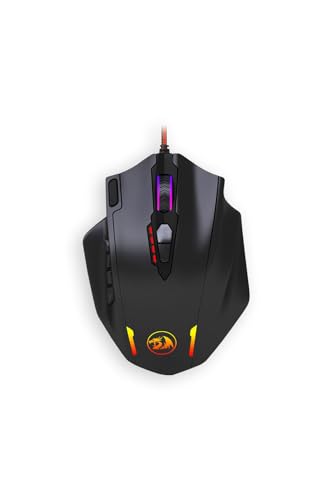
- 18 customizable buttons
- 12 side buttons for quick MMO commands
- Adjustable DPI and polling rate
Best For: MMO players needing a high-capacity command layout
Best Ergonomic Wired Pick

- 11 programmable buttons with ergonomic thumb rest
- HyperScroll tilt wheel offers two scroll modes
- 26,000 DPI sensor and 11 RGB zones
Best For: Right-handed PC gamers wanting comfort and customization
MMO Command Center

- 12 programmable buttons with six side controls
- Wireless or USB-C wired play with up to 67-hour battery
- 19,000 DPI sensor and hot-swappable switches
Best For: MMO and MOBA players needing extensive right-hand controls
Precision Workhorse

- 11 programmable buttons and a dual-mode scroll wheel
- 25,600 DPI HERO sensor with precision tracking
- Five removable weights for balance customization
Best For: PC gamers wanting a customizable wired mouse
Maximum Macro Control

- 19 programmable buttons with 12 side controls
- Five profiles, two modes, and adjustable DPI up to 12,400
- Eight removable weights for balance tuning
Best For: Macro-heavy MMO and MOBA gaming setups
Best Wireless MMO Pick

- 19 programmable buttons for MMO commands and macros
- Up to 400 hours of Bluetooth battery life
- 30,000 DPI optical sensor with wireless connectivity
Best For: MMO players who need extensive wireless controls
Best Budget Wired Pick

- Programmable buttons with macro editing software
- Adjustable sensitivity up to 7,200 DPI
- Ergonomic design with seven RGB modes
Best For: Budget-conscious users who prefer a wired mouse
Best Customizable MMO Layout
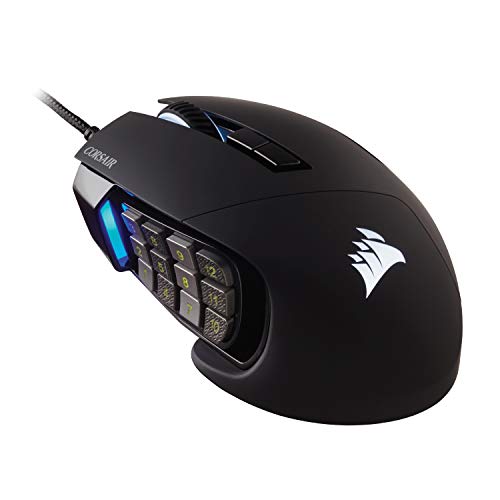
- 17 programmable buttons for MMO and MOBA actions
- Repositionable 12-button side panel
- 18,000 DPI sensor with 1 DPI-step adjustment
Best For: Right-handed MMO and MOBA players wanting adjustable side controls
Best Wired Control – Logitech G502 SE Hero
Logitech G502 SE Hero High Performance RGB Gaming Mouse with 11 Programmable Buttons
Check Price On AmazonThe Logitech G502 SE Hero is a strong gaming mouse with programmable buttons for players who want extensive control without giving up precise tracking. Its 11 buttons, adjustable weights, and dual-mode scroll wheel make it especially adaptable for PC gaming.
Best For: Right-handed PC gamers who want customizable controls, adjustable balance, and high-precision wired performance.
Pros:
- 11 programmable buttons provide flexible command and macro options.
- HERO sensor supports precision tracking up to 25,600 DPI.
- Five removable 3.6g weights allow personalized balance.
- Dual-mode scroll wheel and customizable LIGHTSYNC RGB add versatility.
Cons:
- Wired USB connectivity may be less convenient than wireless designs.
- Right-hand orientation limits suitability for left-handed users.
- Its many features may be more than casual players need.
The G502 SE Hero is a practical choice when button customization and tuning options matter most. Choose it for a feature-rich wired setup with a substantial, adjustable feel.
Best Wireless Battery Life – Razer Basilisk V3 X HyperSpeed
The Razer Basilisk V3 X HyperSpeed is a wireless gaming mouse with programmable buttons designed for players who want flexible connectivity and long battery life. It combines nine customizable controls with HyperSpeed Wireless, Bluetooth, and an 18,000 DPI optical sensor.
Best For: Right-handed gamers who want wireless freedom, multi-device support, and extended battery life.
Pros:
- Nine customizable controls support commands and macros.
- HyperSpeed Wireless offers low-latency play, while Bluetooth supports longer battery life.
- Battery life reaches up to 285 hours on HyperSpeed and 535 hours on Bluetooth.
- Gen-2 mechanical switches are rated for up to 60 million clicks.
Cons:
- Requires a replaceable AA battery.
- Right-hand design is not intended for left-handed use.
- It has fewer listed buttons than some MMO-focused wired models.
This Basilisk is a sensible pick for gamers who prioritize cable-free play and endurance. Its Bluetooth and dongle options also make it useful across compatible Windows and macOS devices.
Best for MMO Commands – Redragon M908 Impact
The Redragon M908 is a gaming mouse with programmable buttons built for players who need a large command layout. With 18 buttons, including 12 side buttons, it offers extensive customization for MMO skills, shortcuts, and other frequently used actions.
Best For: MMO players who need many accessible commands and adjustable DPI settings.
Pros:
- 18 buttons are customizable, with 12 positioned on the side.
- DPI can be selected from presets or adjusted from 100 to 12,400 through software.
- Polling rate is switchable up to 1,000 Hz.
- Weight-tuning cartridges allow some balance customization.
Cons:
- The 177g weight may feel heavy for users who prefer lightweight mice.
- USB connectivity requires a wired setup.
- Its extensive button layout may take time to learn.
The M908 stands out when command capacity is more important than a minimalist design. It is especially suited to MMO players who can take advantage of a large side-button grid.
Best Ergonomic Wired Pick – Razer Basilisk V3
The Razer Basilisk V3 is a gaming mouse with programmable buttons for players who want a comfortable right-handed shape and detailed control. Its 11 programmable buttons, thumb rest, tilt wheel, and 26,000 DPI sensor make it a versatile wired option.
Best For: Right-handed PC gamers who want ergonomic support, many programmable controls, and customizable RGB lighting.
Pros:
- 11 programmable buttons support macros and secondary functions.
- Ergonomic design includes a thumb rest for hand support.
- HyperScroll tilt wheel switches between free-spin and tactile modes.
- Focus+ sensor tracks up to 26,000 DPI, with 11 Chroma RGB zones.
Cons:
- Wired USB operation may not suit users seeking a wireless setup.
- Right-hand orientation limits ambidextrous use.
- Its feature set may be unnecessary for simple gaming needs.
The Basilisk V3 is a well-rounded choice for users who value comfort and button access in equal measure. Its scroll-wheel modes and broad software customization make it particularly adaptable for varied PC gaming.
MMO Command Center – ASUS ROG Spatha X
The ASUS ROG Spatha X is a gaming mouse with programmable buttons built for MMO and MOBA players who want extensive control without relying as heavily on keyboard shortcuts. Its 12 buttons, wireless or wired connectivity, and customizable switches make it a feature-rich option for right-handed users.
Best For: MMO and MOBA players who want a large ergonomic mouse with wireless flexibility and many customizable controls.
Pros:
- 12 programmable buttons, including six strategically positioned side buttons.
- Dual-mode 2.4GHz wireless and USB-C wired connectivity.
- 19,000 DPI sensor with 1,000Hz polling in both wireless and wired modes.
- Up to 67 hours of battery life, plus a magnetic charging dock and fast charging.
Cons:
- The 168g design and large shape may feel heavy or bulky for some users.
- Its extensive feature set is more than many casual gamers need.
- Customization features are designed for right-handed use.
With its high button count, long battery life, and included charging dock, the Spatha X is a strong choice for players who prioritize MMO-style command access. Its size and weight are worth considering before buying.
Precision Workhorse – Logitech G502 HERO
The Logitech G502 HERO is a wired gaming mouse with programmable buttons for players who want precise tracking and customizable controls without managing battery charging. Its 11 buttons, adjustable weights, and dual-mode scroll wheel suit a broad range of PC games.
Best For: PC gamers who prefer a wired mouse with high-resolution tracking, configurable buttons, and adjustable weight balance.
Pros:
- 11 programmable buttons provide flexible in-game control.
- HERO sensor supports tracking up to 25,600 DPI without smoothing, filtering, or acceleration.
- Five removable 3.6g weights allow balance and weight customization.
- Dual-mode hyper-fast scroll wheel and customizable LIGHTSYNC RGB lighting.
Cons:
- It uses a wired USB connection rather than wireless connectivity.
- RGB synchronization requires Logitech Gaming Software.
- The right-handed shape may not suit left-handed users.
The G502 HERO is a practical option if dependable wired performance matters more than portability. Its adjustable weights and 11 programmable buttons add flexibility, while the HERO sensor supports precise aiming and movement.
Maximum Macro Control – Redragon M901K MMO Mouse
The Redragon M901K is a gaming mouse with programmable buttons aimed at users who want an unusually high number of customizable inputs. With 19 programmable buttons, 12 side buttons, memory profiles, and adjustable weights, it is designed for MMO, MOBA, and other games that benefit from extensive macros.
Best For: MMO and MOBA players who want maximum button access, macro profiles, and customizable weight tuning on a wired mouse.
Pros:
- 19 remappable buttons, including 12 side buttons.
- Five memory profiles and two selectable working modes support different setups.
- Adjustable DPI from 100 to 12,400 and polling rates from 125Hz to 1,000Hz.
- Eight removable 2.4g weights allow personalized balance and feel.
Cons:
- The large number of side buttons may require an adjustment period.
- It is a wired USB mouse rather than a wireless model.
- Its macro-focused layout may be excessive for FPS or minimalist setups.
The M901K stands out for sheer customization, especially for players who regularly use macros and multiple profiles. Consider its dense button layout carefully if you prefer a simpler mouse shape or fewer controls.
Best Wireless MMO Pick – Razer Naga V2 HyperSpeed
If you want a gaming mouse with programmable buttons for MMOs and other command-heavy games, the Razer Naga V2 HyperSpeed offers 19 programmable controls, wireless flexibility, and a sensor rated up to 30,000 DPI. Its long battery life also helps reduce interruptions during extended sessions.
Best For: MMO players who want many programmable controls without giving up wireless connectivity.
Pros:
- 19 programmable buttons support essential mappings and advanced macros.
- HyperSpeed 2.4GHz wireless provides low-latency performance, while Bluetooth extends battery life.
- Battery life reaches up to 250 hours on HyperSpeed or 400 hours on Bluetooth.
- Focus Pro 30K optical sensor and Gen-2 mechanical switches offer precise tracking and a rated lifespan of up to 60 million clicks.
Cons:
- It is designed for right-handed use.
- It requires one AA battery rather than relying solely on a rechargeable internal battery.
- The large number of buttons may take time to configure and learn.
The Naga V2 HyperSpeed is a strong fit when programmable-button capacity and wireless endurance matter most. Choose it over a simpler mouse if you regularly use macros, multiple hotkeys, or MMO action bars.
Best Budget Wired Pick – Redragon M602
The Redragon M602 is a practical gaming mouse with programmable buttons for shoppers who prefer a wired setup and adjustable controls at a lower-complexity feature level. It combines macro editing, up to 7,200 DPI, ergonomic shaping, and customizable RGB lighting.
Best For: Gamers and office users who want configurable buttons, wired reliability, and RGB lighting.
Pros:
- Programmable controls and macro editing can be configured through Redragon software.
- Adjustable sensitivity reaches up to 7,200 DPI.
- Ergonomic right-handed shape includes dedicated finger positions for comfort.
- Seven RGB lighting modes and effects provide customization.
Cons:
- The wired USB connection limits movement compared with wireless models.
- It offers fewer programmable buttons than the MMO-focused alternatives here.
- Software must be downloaded from Redragon’s website for configuration.
The M602 makes sense for buyers who want basic remapping and macro support without adding wireless battery management. Its 7,200 DPI ceiling is also more moderate than the sensors in the other two options.
Best Customizable MMO Layout – Corsair Scimitar RGB Elite
For a gaming mouse with programmable buttons built around MMO and MOBA play, the Corsair Scimitar RGB Elite provides 17 programmable controls and a repositionable 12-button side panel. Its wired connection, accurate sensor, and contoured shape suit players who want a stable, highly configurable layout.
Best For: MMO and MOBA players who want to position side buttons around their grip.
Pros:
- Seventeen programmable buttons support frequent actions and complex macros.
- The patented Key Slider system lets you reposition the 12 side buttons.
- Its PixArt PMW3391 optical sensor supports up to 18,000 DPI with 1 DPI-step adjustment.
- Contoured construction, a right-side finger rest, and 50-million-click-rated Omron switches support extended use.
Cons:
- The wired design does not provide wireless mobility.
- It is intended for right-handed users.
- The 12-button side layout may feel busy until customized.
The Scimitar RGB Elite stands out when side-button placement is as important as button count. Its adjustable panel can help tailor the controls to different grips, while the wired connection keeps the setup straightforward.
How We Picked the Best Gaming Mouse with Programmable Buttons
We focused on mice that offer genuinely useful remapping rather than only standard left, right, and scroll-click controls. The selection spans compact models with a few extra buttons, MMO mice with dense thumb grids, and versatile designs suited to gaming and productivity.
We also considered sensor resolution, wired and wireless connectivity, software support, onboard profiles, button accessibility, grip comfort, weight, battery life where applicable, and the needs of different game genres. A high button count can be valuable, but only when the controls are easy to distinguish and reach without accidental presses.
Quick Comparison
| Best For | What to Look For |
|---|---|
| MMO and strategy games | 12 or more thumb buttons, profile support, and clear button spacing |
| FPS and mixed gaming | A lighter shape, accessible side buttons, and a reliable sensor |
| Wireless setups | Low-latency 2.4GHz connectivity, dependable battery life, and optional wired use |
| Budget customization | Remapping software, adjustable DPI, and a comfortable ergonomic shell |
| Work and gaming | Flexible profiles, quiet or easy-to-press controls, and a shape suited to long sessions |
Key Buying Factors for a Gaming Mouse with Programmable Buttons
Button Layout and Count
Choose the layout before chasing the highest number. Two to five extra buttons are often ideal for FPS games and everyday shortcuts, while MMO players may benefit from a 12-button thumb grid. Extra controls are less useful if they cause misclicks or force uncomfortable thumb movement.
Software and Profiles
Check whether the companion software supports remapping, macros, application-specific profiles, DPI stages, and lighting controls. Onboard memory is especially helpful if you move between computers or want settings to remain available without running background software.
Shape, Weight, and Grip
Ergonomic right-handed mice can reduce strain for palm and claw grips, while lighter models generally feel more agile in competitive shooters. Heavier MMO designs may feel stable but can become tiring during long sessions. Confirm the mouse suits your hand size and preferred grip.
Wired Versus Wireless
Wired models avoid charging and are often the simplest value choice. Wireless models provide a cleaner desk and more freedom, but verify battery claims, charging options, and whether the 2.4GHz connection—not just Bluetooth—is available for gaming.
Sensor and Performance
Very high DPI numbers are not automatically better. Consistent tracking, adjustable sensitivity, a dependable polling rate, and a comfortable lift-off behavior matter more for most players.
Who Should Buy Which Gaming Mouse with Programmable Buttons?
Choose a compact programmable mouse if you play FPS titles, want a few easy-to-reach shortcuts, or prefer a lighter, less crowded design. Choose an MMO mouse with a thumb grid if you regularly manage large action bars, macros, or many simultaneous abilities. Choose a wireless model if desk space and cable freedom matter more than avoiding battery maintenance. Choose a wired model if you want dependable plug-and-play performance and strong value.
For mixed gaming and productivity, prioritize flexible profiles and buttons that are distinct enough to use without looking. Whichever model you select, spend time customizing the layout gradually: assign the most frequently used commands first, then add less important functions only after the controls feel natural.