A gaming mouse with optical switches can deliver fast actuation, consistent clicks, and improved resistance to traditional mechanical-switch wear. The right model still depends on your grip, preferred games, connection type, and tolerance for weight.
We selected 10 strong options spanning lightweight esports mice, ergonomic wired designs, customizable wireless models, and feature-rich choices for everyday gaming.
Best 10 Gaming Mouse with Optical Switches Picks for 2026
Best Lightweight Pick

- 58g wired design for agile control
- Gen-3 optical switches rated for 90 million clicks
- Speedflex cable and PTFE feet reduce drag
Best For: Competitive-minded PC gamers who prefer a lightweight wired mouse
Best Feature-Rich Wireless Pick

- Gen-3 optical switches with 90-million-click rating
- 11 programmable buttons and HyperScroll tilt wheel
- HyperSpeed wireless plus Bluetooth and USB
Best For: Right-handed gamers seeking extensive customization and wireless flexibility
Best Button-Rich Wired Pick
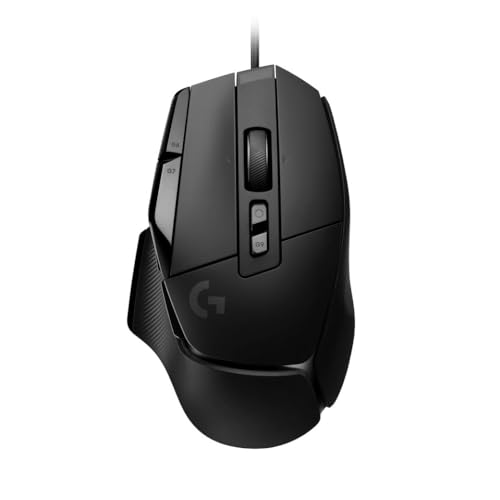
- LIGHTFORCE hybrid optical-mechanical switches
- HERO 25K sensor with precise tracking
- 13 buttons plus configurable DPI-shift control
Best For: Right-handed gamers who want many inputs in a wired mouse
Best Battery-Life Wireless Pick

- Up to 280 hours on one AA battery
- Focus Pro 30K sensor with glass tracking
- Low-latency HyperSpeed Wireless connection
Best For: Wireless gamers who prioritize endurance over optical switches
Esports FPS Pick

- 69g lightweight FPS design
- 100-million-click optical magnetic switches
- 18,000 CPI TrueMove Pro sensor
Best For: Competitive FPS players wanting a lightweight, right-handed mouse
Feature-Rich Ergonomic Pick

- 90-million-click Gen-3 optical switches
- 13 customizable controls
- 35,000 DPI Focus Pro sensor
Best For: Right-handed PC gamers who want extensive controls and customization
Customizable Control Pick
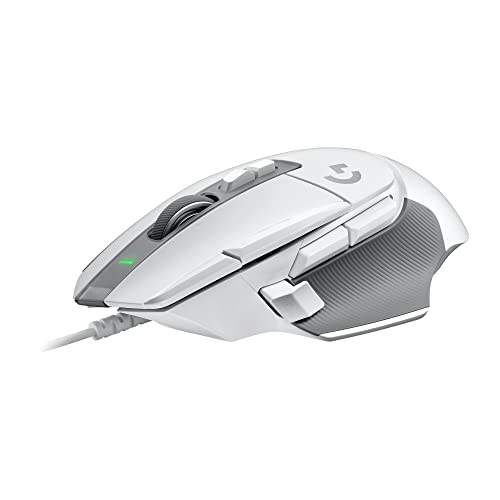
- LIGHTFORCE hybrid optical-mechanical switches
- HERO 25K precision sensor
- Reversible DPI-shift button and versatile wheel
Best For: Right-handed gamers who want configurable wired controls
Best Wireless Pick
Razer Basilisk V3 X HyperSpeed

- HyperSpeed Wireless and Bluetooth connectivity
- Up to 285 hours wireless battery life
- Nine customizable controls and 18,000 DPI sensor
Best For: Gamers seeking long-lasting wireless performance and customization
Best Budget Wired Option

- Ergonomic right-handed wired design
- 6,400 DPI optical sensor
- Five programmable buttons and 10-million-click switches
Best For: Gamers wanting a simple, affordable wired mouse
Best Optical-Switch Choice

- Gen-2 optical switches with 0.2 ms actuation
- Rated for up to 70 million clicks
- 11 buttons and 26,000 DPI optical sensor
Best For: Gamers prioritizing optical switches and deep customization
Best Lightweight Pick – Razer Cobra
The Razer Cobra is a practical gaming mouse with optical switches for players who want a light, responsive wired design. Its 58g body, 8,500 DPI sensor, Speedflex cable, and PTFE feet are suited to fast, controlled swipes.
Best For: Competitive-minded PC gamers who prefer a lightweight wired mouse.
Pros:
- 58g design supports quick, precise movements.
- Gen-3 optical switches offer a 90-million-click lifecycle and 0.2 ms actuation.
- Speedflex cable and 100% PTFE feet help reduce drag.
- Chroma RGB gradient underglow provides extensive lighting customization.
Cons:
- Wired connectivity may be less convenient than wireless alternatives.
- Its 8,500 DPI sensor is less adjustable than the higher-DPI options in this roundup.
The Cobra focuses on speed and low weight without giving up optical-switch durability. It is a strong choice for straightforward wired play, especially if cable drag and mouse weight matter to you.
Best Feature-Rich Wireless Pick – Razer Basilisk V3 Pro
The Razer Basilisk V3 Pro is a gaming mouse with optical switches built for players who want wireless freedom and extensive controls. It combines Gen-3 optical switches with an ergonomic right-handed shape, 11 programmable buttons, and a 30,000 DPI sensor.
Best For: Right-handed gamers who want customizable controls, wireless connectivity, and a feature-rich design.
Pros:
- Gen-3 optical switches provide a 90-million-click lifecycle and 0.2 ms actuation.
- 2.4GHz HyperSpeed Wireless, Bluetooth, and USB connectivity offer flexibility.
- 10+1 programmable buttons and a HyperScroll tilt wheel support varied game and productivity setups.
- Focus Pro 30K sensor is designed to track across a wide range of surfaces, including glass.
Cons:
- Its 3.84-ounce weight is considerably higher than the lightweight wired option here.
- 4KHz and 8KHz polling require separately sold accessories.
- Battery life varies significantly by connection and polling mode.
The Basilisk V3 Pro is the most versatile option here for users who value customization over minimal weight. Its optical switches, wireless modes, lighting zones, and large button layout make it especially adaptable.
Best Button-Rich Wired Pick – Logitech G502 X
The Logitech G502 X is a gaming mouse with optical switches that combines hybrid LIGHTFORCE optical-mechanical primary switches with a familiar, control-heavy layout. Its HERO 25K sensor, adjustable DPI-shift button, and 13-button configuration suit players who want precision and many inputs.
Best For: Right-handed PC and Mac gamers who want plentiful controls in a wired mouse.
Pros:
- LIGHTFORCE hybrid switches are designed for speed, reliability, and crisp actuation.
- HERO 25K sensor provides high-resolution tracking without smoothing, filtering, or acceleration.
- Reversible and removable DPI-shift button supports grip and preference adjustments.
- Hyperfast scroll wheel includes free-spin, ratcheting, and tilt controls.
Cons:
- At 89g, it is heavier than lightweight-focused models.
- It uses wired USB connectivity rather than wireless.
- The hybrid optical-mechanical design is not a fully optical switch implementation.
The G502 X prioritizes tactile control and flexibility rather than the lowest possible weight. It is a compelling wired choice for players who can use its extra buttons and appreciate a configurable scroll wheel.
Best Battery-Life Wireless Pick – Razer Viper V3 HyperSpeed
The Razer Viper V3 HyperSpeed is a wireless gaming mouse with optical tracking and a balanced, mass-centralized shape. It pairs a Focus Pro 30K sensor with HyperSpeed Wireless and up to 280 hours of battery life, making it practical for extended gaming schedules.
Best For: Wireless PC gamers who prioritize long battery life and consistent competitive tracking.
Pros:
- Up to 280 hours of operation from one AA battery.
- Focus Pro 30K sensor supports precise tracking on surfaces including glass.
- HyperSpeed Wireless is designed for a stable, low-latency connection and multi-device support.
- Centralized 82g design aims to provide consistent swipes.
Cons:
- It uses Gen-2 mechanical switches rather than optical mouse switches.
- At 82g, it is heavier than the 58g wired Razer Cobra.
- Its supplied operating-system requirement is Windows 11.
The Viper V3 HyperSpeed stands out for endurance and wireless convenience, but it is not the closest match for shoppers specifically requiring optical switches. Choose it when battery life and wireless performance matter more than switch technology.
Esports FPS Pick – SteelSeries Prime
The SteelSeries Prime is a gaming mouse with optical switches built for fast-paced FPS play. Its 69g right-handed design, 18,000 CPI TrueMove Pro sensor, and optical magnetic switches prioritize quick responses, precise tracking, and comfortable control.
Best For: Competitive FPS players who want a lightweight, right-handed mouse with a streamlined button layout.
Pros:
- Optical magnetic switches are rated for up to 100 million clicks.
- Lightweight 69g construction supports agile FPS movement.
- TrueMove Pro sensor offers 18,000 CPI, 450 IPS, and 50G tracking.
- Shape supports finger, palm, and claw grips.
Cons:
- Only five programmable buttons may limit command-heavy setups.
- The right-handed shape is not designed for left-handed use.
The Prime keeps its focus on FPS fundamentals: low weight, accurate tracking, and durable optical clicking. It is a particularly practical choice when speed and comfort matter more than a large number of controls.
Feature-Rich Ergonomic Pick – Razer Basilisk V3 35K
The Razer Basilisk V3 35K is a gaming mouse with optical switches for users who want speed alongside extensive customization. It combines Gen-3 optical switches with 13 customizable controls, a high-resolution sensor, and a configurable tilt scroll wheel.
Best For: Right-handed PC gamers who need many accessible controls for commands, macros, and varied game genres.
Pros:
- Gen-3 optical switches offer 0.2 ms actuation and a 90-million-click lifecycle.
- Thirteen customizable controls include a multifunction trigger.
- Focus Pro 35K sensor supports 35,000 DPI and one-DPI-step adjustments.
- Hyperscroll wheel offers tactile, free-spin, and Smart-Reel modes.
Cons:
- The feature-rich design may be more than minimalist FPS players need.
- Customization and lighting features depend on Razer Synapse.
- It is a wired, right-handed mouse.
Choose the Basilisk V3 35K if versatility is as important as click speed. Its optical switches support responsive input, while the controls, wheel, and Chroma lighting make it better suited to players who enjoy extensive configuration.
Customizable Control Pick – Logitech G502 X
The Logitech G502 X is a gaming mouse with optical switches that blends hybrid optical-mechanical clicking with the familiar G502 control layout. Its HERO 25K sensor, adjustable DPI-shift button, and tilting hyperfast wheel make it suited to players who want precision and adaptable controls.
Best For: Right-handed gamers who prefer a wired mouse with configurable controls and a versatile scroll wheel.
Pros:
- LIGHTFORCE hybrid switches provide fast actuation and crisp response.
- HERO 25K sensor is designed for precise tracking without smoothing or acceleration.
- Reversible, removable DPI-shift button accommodates different grips.
- Hyperfast scroll wheel supports free-spin, ratcheting, and tilt controls.
Cons:
- At 89g, it is heavier than the 69g SteelSeries Prime.
- The right-handed design may not suit left-handed users.
- Its wired connection offers less setup flexibility than a wireless mouse.
The G502 X is a strong middle ground for gamers who want optical-switch responsiveness without giving up practical controls. Its adjustable DPI button and flexible wheel are especially useful for users who switch between aiming and command-heavy gameplay.
Best Wireless Pick – Razer Basilisk V3 X HyperSpeed
If you want a gaming mouse with optical switches but need wireless flexibility, the Razer Basilisk V3 X HyperSpeed combines low-latency HyperSpeed Wireless with Bluetooth connectivity. Its ergonomic right-handed shape, nine customizable controls, and long battery life make it a practical choice for extended gaming sessions.
Best For: Gamers who want customizable wireless performance, long battery life, and an ergonomic right-handed design.
Pros:
- HyperSpeed Wireless and Bluetooth connectivity support flexible setups.
- Up to 285 hours of HyperSpeed battery life or 535 hours over Bluetooth.
- 18,000 DPI optical sensor and nine customizable controls support precise, adaptable play.
- Chroma RGB lighting adds customizable effects.
Cons:
- Uses a single AA battery rather than an integrated rechargeable battery.
- At 110 g, it may feel less lightweight than some gaming mice.
- The listed switches are mechanical rather than optical, despite the optical movement sensor.
The Basilisk V3 X HyperSpeed is a strong all-around wireless option for players who prioritize battery life and extra controls. However, shoppers specifically seeking optical mouse switches should note that the supplied specifications identify Gen-2 mechanical switches.
Best Budget Wired Option – Razer DeathAdder Essential
The Razer DeathAdder Essential is a straightforward wired gaming mouse with an ergonomic right-handed shape and a 6,400 DPI optical sensor. It offers programmable controls and a durable design for shoppers who want dependable basics without wireless battery management.
Best For: Casual and competitive PC gamers who prefer a simple, corded ergonomic mouse with programmable buttons.
Pros:
- Ergonomic right-handed design supports comfortable gaming.
- 6,400 DPI optical sensor provides adjustable sensitivity.
- Five programmable buttons support remapping and macros through Razer Synapse.
- Mechanical switches are rated for up to 10 million clicks.
Cons:
- Wired connectivity offers less desk flexibility than a wireless mouse.
- Its 6,400 DPI sensor is less capable on paper than the other listed Razer models.
- The supplied notes list mechanical switches, not optical switches.
This is a sensible entry-level choice for users who value a familiar ergonomic shape and reliable wired performance. It does not directly meet the optical-switch requirement, so consider it mainly when price and simplicity matter more than switch technology.
Best Optical-Switch Choice – Razer Basilisk V3
The Razer Basilisk V3 is the clearest match for a gaming mouse with optical switches in this lineup. Its Gen-2 optical mouse switches are rated for up to 70 million clicks and offer 0.2 ms actuation, while 11 programmable buttons, a 26,000 DPI sensor, and a customizable scroll wheel add flexibility for demanding games.
Best For: PC gamers who specifically want optical switches, extensive customization, and a precision-focused wired design.
Pros:
- Gen-2 optical mouse switches deliver 0.2 ms actuation and up to 70 million clicks.
- Eleven programmable buttons support macros and secondary functions.
- Focus+ 26K DPI optical sensor is designed for precise tracking.
- Hyperscroll tilt wheel and 11-zone Chroma RGB add versatility and customization.
Cons:
- Wired USB connectivity may be less convenient than wireless models.
- The feature-rich design may be more mouse than some users need.
- The supplied details specify a right-handed form factor.
For this roundup’s target keyword, the Basilisk V3 stands out because its supplied specifications explicitly identify optical mouse switches. It is especially compelling for players who want fast actuation alongside extensive button mapping and high-resolution tracking.
How We Picked the Best Gaming Mouse with Optical Switches
We focused on the features that most affect real-world gaming: switch technology, sensor performance, weight, shape, connection reliability, button layout, battery or cable considerations, and software support. The list includes both true optical-switch designs and hybrid optical-mechanical implementations, since manufacturers use different names for similar fast-actuation technologies.
We also considered the trade-offs between wired and wireless models. Wired mice generally offer simple plug-and-play use and consistent weight, while wireless options provide a cleaner desk and unrestricted movement. Ergonomics and hand fit received equal attention because comfort can matter more than small differences in sensor specifications.
Quick Comparison
| Best For | Recommended Type | Why It Stands Out |
|---|---|---|
| Competitive FPS | Lightweight wired or wireless | Low weight, quick response, and controlled movement |
| MMO and action games | Ergonomic mouse with extra buttons | More accessible controls and customizable layouts |
| All-day comfort | Right-handed ergonomic design | Supportive shape for longer sessions |
| Minimal desk setup | Wireless model | Fewer cables and greater freedom of movement |
| Value-focused gaming | Wired optical-switch mouse | Strong performance without battery costs |
Key Buying Factors for a Gaming Mouse with Optical Switches
Switches and Click Feel
Optical switches use light-based actuation and can reduce concerns associated with traditional metal-contact switch wear. They are not automatically silent or identical in feel, so check whether you prefer a crisp, light click or a more substantial press. Hybrid designs may combine optical actuation with mechanical elements.
Shape, Grip, and Weight
Choose a shape that matches your grip. Palm users often prefer a taller ergonomic shell, while claw and fingertip users may favor shorter or lighter designs. Lightweight mice can help with rapid FPS movement, but a slightly heavier model may feel steadier for general use or high-sensitivity play.
Sensor and Connectivity
Modern gaming sensors are typically accurate enough for competitive play, so prioritize reliable tracking and useful sensitivity adjustment over headline CPI numbers alone. Wired models avoid charging, while wireless mice should offer stable 2.4GHz connectivity and battery life that fits your routine. Bluetooth is useful for secondary devices but is usually less desirable for latency-sensitive gaming.
Buttons and Software
Extra buttons are valuable for MMOs, productivity, and shortcuts but can add weight or create accidental presses. Confirm that the mouse software supports remapping, profiles, lighting controls, and onboard memory if you move between computers.
Who Should Buy Which Gaming Mouse with Optical Switches?
Choose a lightweight esports-oriented model if you mainly play competitive shooters and want quick swipes. Pick an ergonomic Basilisk- or DeathAdder-style design if comfort and palm support are priorities. A G502-style mouse suits players who want a broad button layout, customizable controls, and a more substantial feel. Wireless Basilisk or Viper models are better for cable-free setups, while a wired Cobra, G502 X, or similar option is practical for buyers who want dependable plug-in performance with no charging routine.
Before buying, verify hand size, preferred grip, platform compatibility, and the exact switch configuration listed for the model. Those details will determine whether the mouse feels natural long after its specifications stop being the main attraction.