A great home theater should feel effortless, but juggling remotes for a TV, streaming device, receiver, and other components can quickly become frustrating. The best smart remote controls for home theater combine broad device compatibility with simpler controls and dependable automation.
This roundup compares ten options, including compact IR blasters, learning remotes, and hub-based systems with apps, macros, touchscreens, and one-touch activities. Use the guide below to narrow the list by setup complexity, smart-home compatibility, and budget.
Best 10 Smart Remote Controls for Home Theater Picks for 2026
Best for Simple IR App Control

- Controls compatible IR home theater devices
- Smart Life/Tuya app with Alexa and Google Assistant support
- 2.4GHz Wi-Fi; no hub required
Best For: Simple phone and voice control of same-room IR equipment
Best for Mixed Device Control

- Supports IR, Bluetooth, and RF devices
- Macros, air mouse, and customizable buttons
- Rechargeable battery with 40-foot IR range
Best For: Multi-device home theaters needing a physical universal remote
Best for Budget Smart Scenes
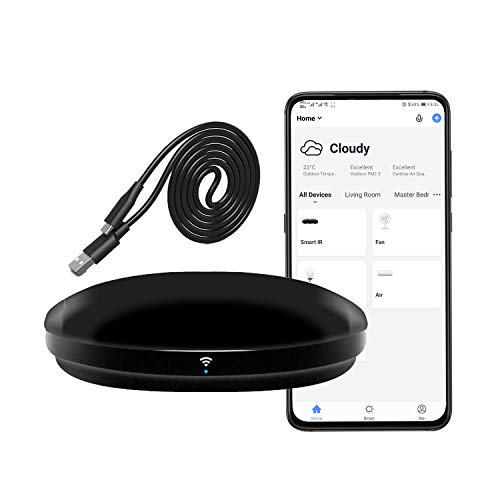
- Supports 50,000+ IR-controlled devices
- App, voice, timer, and custom-scene control
- 2.4GHz Wi-Fi and 38kHz IR only
Best For: Automating compatible same-room home theater equipment
Best for Whole-Setup Activities
SofaBaton X1S Universal Remote

- Hub-based control with two IR blasters
- Custom one-click activities for multiple devices
- Backlit remote with Alexa and Google Assistant support
Best For: Multi-component theaters needing coordinated scenes and hidden equipment control
Best App-Setup Pick

- Controls up to eight devices
- App setup and remote-learning feature
- Dedicated streaming shortcut keys
Best For: Infrared-based home theater setups
Best Hub-Based Upgrade

- Supports IR, Bluetooth, and Wi-Fi devices
- One-touch activities and customizable macros
- Hub covers up to 40 feet
Best For: Complex or cabinet-enclosed entertainment systems
Best for Custom Control

- Controls up to 30 IR, Bluetooth, and RF devices
- Macros and air-mouse navigation
- Cloud library covers 500,000+ devices
Best For: Customizable setups with Bluetooth and IR equipment
Best Budget Wi-Fi Hub
SENCKIT Smart IR Remote Controller

- Supports 50,000+ IR devices
- App, voice, and IFTTT control
- No separate hub required
Best For: Budget-friendly phone control of IR home devices
Best Physical Universal Remote

- Supports IR, Bluetooth, and RF
- Controls 500,000+ devices
- Rechargeable with LCD and backlighting
Best For: Mixed-device home theaters needing a customizable handheld remote
Best Premium Hub System
SofaBaton X2 Touchscreen Remote with Hub

- Controls IR, Bluetooth, Wi-Fi, and RF devices
- One-touch activities and voice control
- Hub extends IR coverage throughout the home
Best For: Advanced home theaters and connected smart-home setups
Best for Simple IR App Control – MOES WiFi Smart IR Remote
The MOES WiFi Smart IR Remote is a compact option for adding app and voice control to compatible home theater gear and other infrared devices. It works with the Smart Life/Tuya app, Alexa, and Google Assistant, but it requires a 2.4GHz Wi-Fi network and should be placed in the same room as the equipment.
Best For: Users who want remote phone or voice control for a TV, DVD player, set-top box, or other 38kHz IR device without adding a hub.
Pros:
- Controls TVs, DVD players, set-top boxes, air conditioners, fans, and other IR devices.
- Supports remote access through the Smart Life/Tuya app on Android and iOS.
- Works with Alexa and Google Assistant, with a DIY learning function for unsupported devices.
Cons:
- Supports 2.4GHz Wi-Fi only.
- Infrared signals cannot pass through walls, so one unit is recommended per room.
- Does not support RF devices.
Choose the MOES if your setup is primarily infrared and you value simple app-based control. Confirm device compatibility before buying, especially for less common equipment.
Best for Mixed Device Control – SofaBaton U3 Universal Remote
The SofaBaton U3 is a handheld choice among smart remote controls for home theater, combining IR, Bluetooth, and RF support in one rechargeable remote. Its broad device library, programmable macros, air mouse, and customizable buttons make it useful for more involved entertainment setups, though it does not control Wi-Fi devices.
Best For: Viewers who want one physical remote for TVs, streaming players, soundbars, projectors, Blu-ray players, and other supported IR, Bluetooth, or RF equipment.
Pros:
- Supports more than 6,000 brands and 500,000 devices, according to the supplied product information.
- Controls IR, Bluetooth, and RF devices and can connect to multiple Bluetooth devices.
- Includes global macros, remappable buttons, air mouse mode, and a rechargeable battery.
- Offers a 40-foot IR range and can work with the optional R1 repeater.
Cons:
- Does not support Wi-Fi devices.
- Google Assistant voice control is limited to compatible Bluetooth devices and excludes Apple TV, Fire TV, and IR-only devices.
- The R1 repeater is sold separately.
The U3 is the stronger fit when your system spans several connection types and you prefer tactile buttons over a phone-only interface. Review the voice-control limitations if streaming-device search is a priority.
Best for Budget Smart Scenes – Frankever WiFi IR Blaster
The Frankever WiFi IR Blaster turns a phone into a smart remote for compatible home theater equipment and household IR devices. It supports Smart Life, Alexa, Google Assistant, Siri, timers, and custom scenes, making it a practical choice for automating basic TV, soundbar, and set-top-box commands.
Best For: Smart-home users who want app-based remote access and scheduled or voice-controlled operation of same-room 38kHz IR equipment.
Pros:
- Supports more than 50,000 infrared-controlled devices, including TVs, soundbars, home theater systems, and DVDs.
- Enables remote control through the Smart Life app, including power, volume, and channel commands.
- Works with Alexa, Google Assistant, and Siri, and supports timers and custom scenes.
- Can learn commands when a device is not found in the cloud database.
Cons:
- Requires a secured 2.4GHz Wi-Fi network.
- Controls 38kHz IR equipment only and does not support RF devices.
- Infrared operation is subject to room placement and line-of-sight limitations.
Consider the Frankever when automation features matter more than a dedicated handheld remote. Its learning function adds flexibility, but verify that your equipment uses compatible infrared control.
Best for Whole-Setup Activities – SofaBaton X1S Universal Remote
The SofaBaton X1S combines a universal remote with a hub, app, and customizable activities for streamlined home theater control. It can send commands without aiming directly at equipment, hide components inside a cabinet, and trigger multi-step routines such as turning on a TV, receiver, and cable box together.
Best For: Home theater owners who want one-click activities, hub-based control, voice commands, and reliable operation across multiple entertainment components.
Pros:
- Supports more than 6,000 brands and 500,000 device models, with an expanding database.
- Creates custom activities that combine several device commands into one action.
- Hub provides 360-degree control and includes two IR blasters for fewer signal blind spots.
- Offers Alexa and Google Assistant support, backlighting, raise-to-wake, and a find-my-remote feature.
Cons:
- Its more extensive hub and activity system may be unnecessary for a simple single-device setup.
- Device support depends on the available database or adding the device through the manufacturer.
- Using hidden equipment requires appropriate hub and IR-blaster placement.
The X1S is the most suitable option here for a multi-component theater where startup sequences and cabinet-mounted gear are common. Choose it over a basic IR blaster when coordinated activities are central to your routine.
Best App-Setup Pick – One for All URC7880
For shoppers seeking smart remote controls for home theater without adding a hub, the One for All URC7880 offers straightforward infrared control for up to eight devices. Its smartphone setup app, learning feature, and dedicated shortcut keys make it a practical replacement for several remotes.
Best For: Users with primarily infrared-based TVs, streaming devices, soundbars, disc players, and other entertainment equipment.
Pros:
- Controls up to eight devices and supports more than 7,000 brands.
- Smartphone app helps with setup and identifies the device being controlled.
- Learning feature can copy commands from an original remote.
- Three shortcut keys provide quick access to streaming apps.
Cons:
- Uses infrared connectivity rather than Bluetooth or Wi-Fi.
- Batteries are required but not included.
- Game-console compatibility is limited to IR-only control.
The URC7880 is a sensible, uncomplicated choice when your home theater components use infrared. It is less suited to setups that require hub-based control, wireless device pairing, or voice commands.
Best Hub-Based Upgrade – SofaBaton X1S
The SofaBaton X1S is one of the more capable smart remote controls for home theater, combining a handheld remote with a hub and support for infrared, Bluetooth, and Wi-Fi devices. Its activity-based controls can simplify multi-device routines such as watching TV.
Best For: Multi-device home theaters with TVs, projectors, soundbars, AV receivers, disc players, or equipment stored in cabinets.
Pros:
- Supports more than 500,000 entertainment devices across IR, Bluetooth, and Wi-Fi.
- One-touch activities can power devices on and select the correct input.
- Hub provides 360-degree signal coverage up to 40 feet.
- Works with Alexa and Google Assistant for activity commands.
Cons:
- Voice control applies to activities, not individual devices.
- The remote itself has no microphone.
- More involved than a basic infrared-only remote because it uses a hub and app.
Choose the X1S when convenience and broad connectivity matter more than simplicity. The hub is particularly useful for enclosed components, while macros and activity controls reduce the number of steps needed for common viewing routines.
Best for Custom Control – SofaBaton U3
The SofaBaton U3 brings several advanced features to smart remote controls for home theater, including macro programming, multi-device Bluetooth, an air-mouse mode, and app-based setup. It is designed for users who want to fine-tune how their entertainment system responds.
Best For: Tech-focused users who want macros, motion-based cursor control, and support for multiple Bluetooth and infrared devices.
Pros:
- Supports infrared, Bluetooth, and RF devices, with control for up to 30 devices.
- Macros can combine actions such as powering on the TV and soundbar.
- Maintains simultaneous Bluetooth connections with up to three devices.
- Air-mouse mode provides motion-sensing cursor control.
Cons:
- Google Assistant voice control is not compatible with Apple TV, Fire TV, or standard IR-only devices.
- The R1 repeater for hidden or distant equipment is sold separately.
- Its extensive customization may require more setup than a basic universal remote.
The U3 is a strong fit for a configurable entertainment system, especially if you value macros and air-mouse navigation. Check your specific streaming and voice-control requirements first, since support varies by device type and platform.
Best Budget Wi-Fi Hub – SENCKIT Smart IR Remote Controller
For shoppers seeking smart remote controls for home theater on a budget, the SENCKIT controller turns a phone into a Wi-Fi-connected IR remote. It can operate compatible TVs, DVD players, set-top boxes, air conditioners, fans, and other infrared appliances through the Smart Life or Tuya app.
Best For: Phone-based control of multiple IR devices, with Alexa or Google Home voice compatibility.
Pros:
- Supports more than 50,000 devices and allows DIY configuration for additional 38kHz IR remotes.
- Works through the Smart Life or Tuya app, including remote operation when away from home.
- Supports Alexa, Google Home, IFTTT, and 2.4GHz Wi-Fi without requiring a separate hub.
- Includes a 24-month warranty and customer support.
Cons:
- Controls require infrared line of sight, with no obstruction between the blaster and appliance.
- It supports 2.4GHz Wi-Fi rather than newer Wi-Fi bands.
- The package includes a USB charging cable but no power plug.
This is a practical choice if you want app and voice control without replacing your existing IR devices. It is less suitable for systems that depend on Bluetooth or RF connections.
Best Physical Universal Remote – SofaBaton U3 Universal Remote
The SofaBaton U3 is a strong option among smart remote controls for home theater when you want one handheld remote for several device types. It combines IR, Bluetooth, and 315/433MHz RF support with app customization, making it suitable for TVs, soundbars, streaming boxes, DVD players, projectors, and more.
Best For: Home theater users who want a rechargeable physical remote with broad connectivity and customizable controls.
Pros:
- Supports more than 500,000 devices across over 6,000 brands.
- Works with IR, Bluetooth, and 315/433MHz RF devices.
- Offers remappable buttons, one-touch macros, a scroll wheel, and an air mouse function.
- Includes a 2.4-inch LCD, backlit buttons, Bluetooth multipoint, and a rechargeable 1,200mAh battery.
Cons:
- Google Assistant voice control is limited to compatible Bluetooth devices.
- Its feature-rich design may require setup through the SofaBaton app.
- The stated maximum range is 40 feet.
Choose the U3 if you prefer tactile buttons and broad device support over a phone-only setup. Its combination of RF, Bluetooth, and IR is especially useful for mixed-component entertainment systems.
Best Premium Hub System – SofaBaton X2 Touchscreen Remote with Hub
The SofaBaton X2 is designed for shoppers who want advanced smart remote controls for home theater with centralized coverage and activity automation. Its touchscreen remote and hub can coordinate IR, Bluetooth, Wi-Fi, and RF-compatible equipment, while integrations with Alexa, Google Assistant, and Home Assistant extend control beyond the theater.
Best For: Complex entertainment setups and smart homes that benefit from one-touch scenes and whole-home IR coverage.
Pros:
- Supports more than 500,000 devices from over 6,000 brands.
- One-touch Activities can combine TV, input, audio, and lighting commands.
- Includes a touchscreen, numeric keypad access, macros, charging dock, and raise-to-wake design.
- Hub-based coverage uses two additional IR blasters and supports Alexa, Google Assistant, and Home Assistant.
Cons:
- The system is more involved than a basic single-device remote because it uses a hub and app.
- An optional R1 repeater is sold separately for larger homes.
- Some Wi-Fi device support depends on compatible brands and ongoing updates.
The X2 is the most capable option here for coordinated scenes and devices placed in cabinets or other rooms. Its broader ecosystem and hub-based design make it best suited to users willing to spend more time configuring a connected home theater.
How We Picked the Best Smart Remote Controls for Home Theater
We focused on the features that have the biggest effect on daily use: device compatibility, setup process, control range, activity or macro support, smart-home integration, and overall flexibility. The selection includes both traditional infrared remotes and Wi-Fi hub systems so you can match the controller to your equipment and comfort level.
We also considered whether a remote can reduce clutter without creating a new source of frustration. App quality, customization, button layout, charging, and the ability to control devices hidden inside a cabinet are especially important in a multi-component theater.
Quick Comparison
| Type | Best For | Main Advantage | Potential Limitation |
|---|---|---|---|
| Standalone IR blaster | Simple rooms and smart-home routines | Low cost and app or voice control | Usually requires line-of-sight for some devices |
| Learning universal remote | Replacing several handheld remotes | Physical buttons and straightforward control | Limited control of hidden components |
| Hub-based universal remote | Complex home theaters | Activities, macros, and cabinet-friendly control | Higher setup effort and price |
| Touchscreen hub remote | Premium, highly customized systems | Flexible menus and one-touch commands | More dependence on batteries, apps, and software |
Key Buying Factors for Smart Remote Controls for Home Theater
Compatibility and Control Method
Confirm that the remote supports the devices you actually use, including televisions, streaming boxes, receivers, soundbars, disc players, and projectors. Most models rely on infrared, while hubs may use Wi-Fi or other connections for networked devices. IR works well for common appliances but may need a clear path or an external hub.
Activities and Macros
Look for activity shortcuts such as “Watch TV” or “Movie Night.” A single command can turn on several components, select the right input, and adjust volume. Macro reliability matters more than the number of advertised commands.
Setup and Customization
App-assisted setup is convenient, but check whether the system requires an account, Wi-Fi, or ongoing cloud support. Physical buttons are often faster for volume and playback, while customizable screens are useful when you have unusual equipment.
Smart-Home and Voice Integration
If you use Alexa or Google Home, verify exactly what voice commands are supported. Voice control is helpful for basic power and playback tasks, but a handheld remote should still provide dependable control when speed and precision matter.
Who Should Buy Which Smart Remote Controls for Home Theater?
- Choose an IR blaster if you want affordable app or voice control for common devices and do not need a sophisticated handheld remote.
- Choose a learning universal remote if you mainly want to replace several remotes with one familiar, button-based controller.
- Choose a hub-based SofaBaton system if your theater has multiple components, enclosed cabinets, or activity commands.
- Choose a touchscreen hub remote if you want premium customization, a charging dock, and a polished interface for a complex setup.
Before buying, count your devices, identify which ones use IR, and decide whether you prefer physical buttons or app-driven control. The best Smart Remote Controls for Home Theater are the ones that simplify your routine without making basic commands harder.