Apartment living rewards technology that does more without taking up much space. The right smart display can combine voice control, calendars, entertainment, home monitoring, and everyday reminders in one compact setup.
We selected 10 options for different rooms, routines, and budgets, including full-featured Alexa screens, digital family planners, and smart-home security devices.
Best 10 Smart Displays for Apartments Picks for 2026
Best Large-Screen Pick
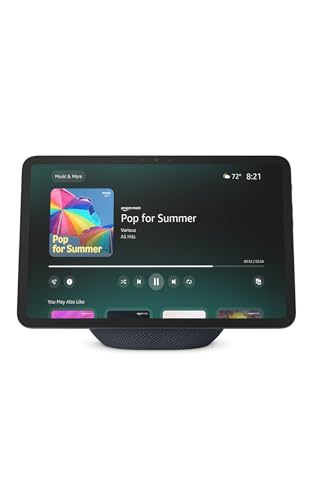
- 11-inch Full-HD display with spacious viewing area
- Built-in smart home hub and Alexa control
- Spatial audio, video calls, and photo slideshows
Best For: Large-screen apartment entertainment and smart home control
Best Family Command Center

- Large Full-HD touchscreen for shared planning
- Google Play supports multiple calendar and productivity apps
- Wall or countertop setup with photo-frame mode
Best For: Families and roommates organizing a shared apartment
Best Compact Alexa Display

- Space-saving 5.5-inch display
- Streams media and shows compatible camera feeds
- Camera shutter and mic/camera privacy controls
Best For: Small counters, nightstands, desks, and shelves
Best No-Subscription Family Planner

- Syncs multiple calendar services
- Adds chores, rewards, meals, and shared to-dos
- No subscription fees and includes a two-year warranty
Best For: Apartment families managing schedules and routines
Best Nightstand Pick
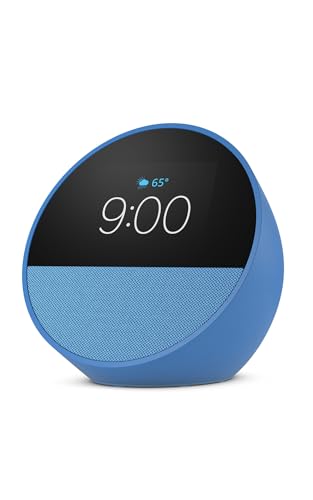
- Compact customizable smart clock
- Alexa routines and smart-home control
- Adds eero coverage to an existing network
Best For: Apartment bedrooms, kitchens, and offices
Best Family Organizer

- Syncs Google, Outlook, and iCloud calendars
- Includes chores, meal planning, and rewards
- Wall or desk mounting with photo-frame mode
Best For: Busy families and multi-generational households
Best Security Hub
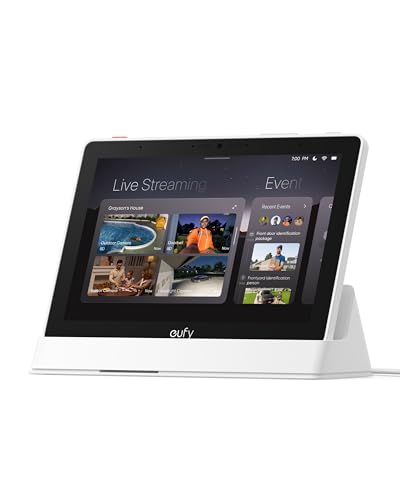
- 8-inch touchscreen security control panel
- Displays up to four live camera feeds
- Supports local event playback and alerts
Best For: Eufy-equipped apartments needing centralized monitoring
Apartment CO Safety Pick
Kidde Smart Carbon Monoxide Detector

- App alerts without a subscription
- Plug-in power with AA backup
- Alexa and Google Home compatible
Best For: Renters and homeowners seeking connected CO monitoring
Compact Apartment Security Hub
XUK WiFi Wireless Alarm System

- 4.3-inch touchscreen status display
- Four control options, including app and voice
- Battery backup for blackout protection
Best For: Residents wanting a touchscreen alarm system with flexible controls
All-in-One Apartment Alarm Kit
DEEPVIGLX 8-Piece Security System

- Includes motion and door/window sensors
- Touchscreen shows temperature and weather
- App, remote, touch, and voice control
Best For: Buyers wanting a bundled apartment alarm starter kit
Best Large-Screen Pick – Echo Show 11
For shoppers comparing smart displays for apartments, the Echo Show 11 is a versatile choice when you want a larger screen without giving up voice control. Its 11-inch Full-HD display, built-in smart home hub, and spatial audio suit kitchens, living rooms, and shared spaces.
Best For: Apartment residents who want a large, entertainment-friendly Alexa display for smart home control, recipes, video calls, and photo viewing.
Pros:
- Large 11-inch Full-HD screen with more viewing area than the Echo Show 8 (2025 release).
- Built-in smart home hub controls compatible devices without a separate hub.
- Spatial audio, stronger bass, auto-framing video calls, and photo slideshow support.
- Includes multiple privacy controls for the microphones and camera.
Cons:
- Its larger footprint may take more counter space than compact smart displays.
- Some personalized features depend on Alexa+ and compatible devices or services.
The Echo Show 11 is the strongest all-around option here for renters who want one display to cover entertainment, household organization, smart home control, and communication.
Best Family Command Center – Mazera 21.5-Inch Smart Hub
If your apartment needs a visible household planning station, this 21.5-inch smart hub stands out among smart displays for apartments. Its large touchscreen and Google Play access let you combine calendars, chores, meal plans, reminders, widgets, and smart home tools in one dashboard.
Best For: Families or roommates who need a large shared calendar and customizable organization screen for a kitchen, office, or common area.
Pros:
- Large anti-glare Full-HD touchscreen is easy to view across a room.
- Supports Google Calendar, Apple Calendar, Outlook, Cozi, and other apps through Google Play.
- Works as a customizable dashboard, smart photo frame, and household command center.
- Can be wall-mounted or placed on a countertop with the included metal stand.
Cons:
- The 21.5-inch format requires substantially more wall or counter space.
- App and service compatibility may vary depending on the calendar or smart home platform used.
Mazera is a practical pick when organization matters more than compactness, especially for households that want flexibility beyond a single proprietary calendar system.
Best Compact Alexa Display – Echo Show 5
The Echo Show 5 is a space-conscious option for shoppers seeking smart displays for apartments. Its 5.5-inch screen fits easily on a nightstand, shelf, or kitchen counter while still providing Alexa controls, streaming, camera viewing, photo display, and video calling.
Best For: Apartment residents who want an affordable-feeling, compact Alexa display for small surfaces and everyday glanceable information.
Pros:
- Compact 5.5-inch design suits bedrooms, desks, shelves, and limited counters.
- Displays news, weather, song titles, compatible camera feeds, and video content.
- Deeper bass and clearer vocals support music, podcasts, and streaming.
- Includes a camera shutter, mic/camera off button, and recyclable-material features.
Cons:
- The smaller display is less suitable for recipes, calendars, or viewing content from across a room.
- Its camera and calling features work within compatible Alexa devices and apps.
Choose the Echo Show 5 when apartment space is limited and you want core Alexa functionality without dedicating a large surface to a screen.
Best No-Subscription Family Planner – 10.1-Inch Digital Calendar
For households prioritizing schedules over entertainment, this 10.1-inch digital calendar is a focused choice among smart displays for apartments. It syncs with several calendar services and adds chores, rewards, meal planning, to-dos, notifications, and photo-frame functionality without recurring subscription fees.
Best For: Families wanting an always-visible apartment calendar with chore tracking, shared lists, and wall-or-desk flexibility.
Pros:
- Syncs with Google, iCloud, Outlook, Cozi, and Yahoo calendars through its app.
- Includes color-coded schedules, daily/weekly/monthly views, chore charts, and reward points.
- Supports meal plans, grocery lists, to-dos, remote updates, and push notifications.
- No subscription fees, with a stated two-year warranty.
Cons:
- The 10.1-inch screen is smaller than the 21.5-inch family hub for viewing across a room.
- Setup requires the companion app, Wi-Fi pairing, and compatible calendar services.
This model is a good fit for apartment households that want a dedicated organizational display and useful family-planning features without committing to monthly software costs.
Best Nightstand Pick – Echo Spot
The Amazon Echo Spot is a compact choice for apartments where you want smart-display convenience without giving up much counter or nightstand space. Its customizable clock screen shows time, weather, and song information, while Alexa handles compatible smart-home controls, routines, music, podcasts, and audiobooks.
Best For: Apartment bedrooms, kitchens, and offices needing a compact smart display and alarm clock.
Pros:
- Customizable clock faces with time, weather, reminders, and song titles at a glance
- Rich sound with clear vocals and deep bass
- Supports Alexa routines, smart-home controls, gradual wake-up music, and light
- Can add up to 1,000 square feet of coverage to an existing eero network
Cons:
- Wi-Fi extender functionality requires an existing eero network
- Designed for compact information and control rather than a large viewing area
For apartment residents who want an unobtrusive display beside the bed or on a kitchen counter, the Echo Spot combines clock features, Alexa control, and surprisingly capable audio in a small footprint.
Best Family Organizer – 15.6-Inch Digital Calendar
This 15.6-inch digital calendar is a practical pick for larger apartments or busy households that need shared organization in one visible place. It combines synced calendars, meal planning, chore charts, rewards, and a digital photo frame, with wall or desk mounting options.
Best For: Families and multi-generational households coordinating schedules, chores, and meals.
Pros:
- Real-time syncing with Google, Outlook, iCloud, and other platforms
- No monthly subscription fees for essential calendar features
- Built-in chore chart and reward points can encourage kids’ participation
- Works as a wall-mounted or desk calendar and includes photo-frame functionality
Cons:
- Batteries are not included
- The 15.6-inch format requires more wall or desk space than compact smart displays
- Its focus is household coordination rather than voice-first entertainment or smart-home control
Among smart displays for apartments, this model stands out as a household command center. It makes the most sense when shared planning and visibility matter more than a small footprint.
Best Security Hub – eufy Smart Display E10
The eufy Smart Display E10 is geared toward apartment residents who want a dedicated security control panel. Its 8-inch touchscreen can show live camera feeds, alert you to doorbell or camera activity, and provide access to recorded events through the eufy security ecosystem.
Best For: Apartments using eufy cameras, doorbells, and HomeBase 3 for centralized monitoring.
Pros:
- Automatically displays live video and voice alerts for supported security events
- Can show four simultaneous live feeds
- Offers local playback of downloaded historical events without buffering
- Includes facial and package recognition features powered by HomeBase 3
Cons:
- Its most useful features depend on compatible eufy security equipment
- Focused on security monitoring rather than general-purpose Alexa-style functions
- The supplied warranty description is limited to 12 months
If security visibility is the priority, the E10 offers a focused alternative to general smart displays. It is especially compelling for eufy households that want live feeds and event summaries available from one simple touchscreen.
Apartment CO Safety Pick – Kidde Smart Carbon Monoxide Detector
The Kidde Smart Carbon Monoxide Detector is a practical safety upgrade for apartments, combining a plug-in design with app notifications when you are home or away. It uses 2.4 GHz Wi-Fi, provides an 85-dB audible alarm, and includes AA battery backup for outages.
Best For: Renters and homeowners who want connected carbon monoxide monitoring in an apartment.
Pros:
- Real-time Kidde app alerts without a subscription
- Plug-in power with two included AA backup batteries
- Digital backlit display and no low-battery chirps
- Alexa and Google Home compatibility
Cons:
- Requires a 2.4 GHz Wi-Fi network
- Its primary function is carbon monoxide detection rather than general security monitoring
For apartment safety, this model stands out when remote CO alerts and outage protection matter. Its rotating plug can fit vertical or horizontal outlets, while UL 2034, 5th Edition testing and a 10-year limited warranty add reassurance.
Compact Apartment Security Hub – XUK WiFi Wireless Alarm System
The XUK WiFi Wireless Alarm System is suited to smart displays for apartments because its 4.3-inch color touchscreen shows system status, time, and alerts in real time. It supports app, voice, remote, and RFID control, with 2.4 GHz Wi-Fi and optional SMS or voice notifications through a SIM card.
Best For: Apartment residents who want a touchscreen alarm hub with several control methods.
Pros:
- 4.3-inch color touchscreen with a multilingual interface
- App, voice, remote, and RFID operation
- Alexa and Google Assistant integration
- Wireless installation designed for setup in about 10–15 minutes
Cons:
- SMS notifications and voice intercom require a SIM card
- Uses 2.4 GHz Wi-Fi
- The listed 90-dB siren may be more than needed for some apartment settings
This system offers a flexible apartment security interface without a stated subscription or hidden monthly fee. Battery backup helps maintain operation during blackouts, and the stated 393-foot maximum range may be useful for larger layouts, though actual performance depends on the environment.
All-in-One Apartment Alarm Kit – DEEPVIGLX 8-Piece Security System
The DEEPVIGLX 8-piece kit is a ready-to-deploy apartment security system with a 2.4-inch full-touch HD control panel. It includes a motion sensor, door/window contact sensor, siren, remotes, and RFID tags, making it a practical choice for buyers comparing smart displays for apartments with bundled entry and motion coverage.
Best For: Apartment occupants who want a bundled alarm kit with touchscreen, remote, and app control.
Pros:
- Eight-piece package includes sensors, siren, remotes, and RFID tags
- Touchscreen displays temperature and weather alongside system information
- Supports app, remote, touch, and voice control
- Wireless installation uses screw-in or self-adhesive mounting
Cons:
- The listed wireless range is 50 feet
- Only one motion sensor and one door/window contact sensor are included
- One-year manufacturer warranty is shorter than some competing coverage
This kit makes sense when you want core apartment alarm components in one package rather than buying sensors separately. Its touchscreen adds at-a-glance environmental information, while the included remote controls and RFID tags provide alternatives to app operation.
How We Picked the Best Smart Displays for Apartments
We evaluated these products for the needs most common in apartments: limited counter and wall space, shared living areas, easy installation, and useful control from one location. We considered screen size, voice-assistant compatibility, calendar and reminder features, audio quality, smart-home integrations, privacy-related controls, and whether a subscription is required.
The roundup includes both traditional smart displays and specialized touchscreen hubs. Calendar panels and security controls may not replace a general-purpose assistant, but they can be more useful for specific apartment routines such as chore tracking, entry monitoring, or managing connected devices.
Quick Comparison
| Best For | Recommended Type | What to Look For |
|---|---|---|
| General apartment use | Mid-size smart display | Voice control, video calls, streaming, and smart-home support |
| Small bedrooms or nightstands | Compact display or smart clock | Low footprint, alarms, timers, and adjustable brightness |
| Shared schedules | Digital calendar touchscreen | Clear layout, wall or stand mounting, and simple editing |
| Security control | Smart-home hub or alarm system | Camera compatibility, alerts, cellular backup, and reliable connectivity |
| Safety monitoring | Smart carbon monoxide detector | Audible alarm, battery backup, and phone notifications |
Key Buying Factors for Smart Displays for Apartments
Size and Placement
Measure the intended location before buying. An 8- to 11-inch screen usually works well on a kitchen counter, shelf, or desk, while larger calendar displays need a suitable wall or tabletop stand. Leave room for power cables and avoid blocking outlets, windows, or walkways.
Compatibility and Connectivity
Check whether the display works with your preferred ecosystem, such as Alexa, Google services, or a manufacturer-specific platform. Wi-Fi reliability matters in apartments with crowded networks, and devices that support only certain cameras, locks, or sensors may limit future upgrades.
Privacy and Apartment-Friendly Features
Look for microphone or camera controls, physical shutters where available, notification settings, and clear account permissions. For renters, wireless installation, removable mounts, and no-drill placement can be more practical than permanent hardware.
Subscriptions, Backup, and Alerts
Confirm whether calendar synchronization, cloud recording, professional monitoring, or advanced automation requires a monthly fee. For safety products, review battery backup, alarm volume, phone alerts, and what happens if the internet connection drops.
Who Should Buy Which Smart Displays for Apartments?
Choose a larger Echo Show or comparable general-purpose screen if you want one central device for music, video, timers, recipes, calls, and connected-home commands. A compact Echo Show or Echo Spot is better for a bedroom, office, or small kitchen where space and nighttime usability matter most.
Families, roommates, and busy households should consider a dedicated digital calendar display when shared schedules, chores, and reminders are the priority. These products can be easier to scan at a glance than a voice-only assistant, especially in a common area.
For apartment security, a smart display or hub makes sense when you already use compatible cameras, sensors, or locks. An alarm kit is more suitable when you need door and motion detection, while a smart carbon monoxide detector addresses a specific safety need. Before purchasing, verify landlord rules, mounting restrictions, Wi-Fi coverage, and any monitoring or storage fees.