The best wireless smart displays do more than show photos. They can organize calendars, run digital menus, stream media, mirror a phone, or deliver changing information without a permanent wired connection.
Our roundup covers consumer smart hubs, Android signage screens, e-paper boards, photo frames, and wireless display adapters so you can match the hardware to your space, content, and connectivity needs.
Best 10 Wireless Smart Displays Picks for 2026
Best Family Calendar Pick
Changingtouch F16S 15.6-Inch Smart Display
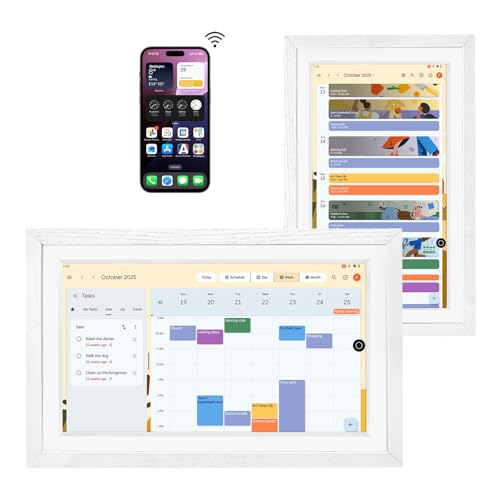
- Large anti-glare 1080p touchscreen
- Google Play apps and shared calendars
- Battery powered with voice control
Best For: Families needing a shared calendar and photo display
Best Portable Business Signage
WeADS Android 11 Display Board

- Android 11 with 4GB RAM and 32GB storage
- 23,200mAh removable battery
- USB, cloud/CMS, and custom app support
Best For: Portable restaurant, bar, and retail signage
Best Compact Smart-Home Hub

- 7-inch touchscreen with Google Assistant
- Smart-home control and personalized routines
- YouTube, Spotify, and Google Photos support
Best For: Compact everyday home control and entertainment
Best Signage With Phone Charging

- Wi-Fi cloud CMS for remote content updates
- 23,000mAh-plus battery for extended use
- Built-in phone cables and dual USB-A outputs
Best For: Countertop menus, promotions, and customer charging
Wireless Mirroring Pick

- 1080p/60Hz output with up to 4K support
- AirPlay and Miracast compatibility
- Plug-and-play mirroring with dual-band transmission
Best For: Mirroring phones and laptops to TVs, projectors, and monitors
Commercial Display Pick
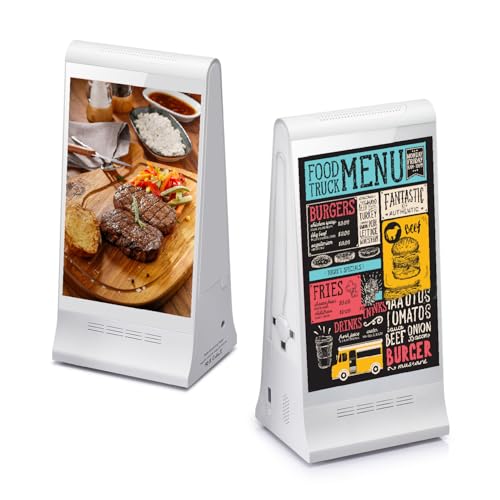
- Two interactive 8-inch HD touchscreens
- Remote cloud content management
- 23,200mAh battery with device charging
Best For: Menus, promotions, and interactive signage in commercial spaces
Personal Media Pick

- 1280 × 800 HD touchscreen display
- Wi-Fi sharing with wireless remote
- Adjustable all-metal stand
Best For: Displaying photos, videos, and music at home or in small advertising setups
Best for Reusable Signage
Fabater 7.5-Inch Three-Color E-Paper Display

- Three-color reflective e-paper screen
- Bluetooth template and content updates
- Battery rated for up to one year
Best For: Reusable office, school, event, and retail signage
Best for Paper-Like Dashboards
Paper Portrait Wireless E-Ink Smart Frame

- Glare-free e-ink display stays visible while asleep
- Shows photos, weather, clocks, quotes, and custom text
- NFC setup with app and browser control
Best For: Compact bedside, desk, fridge, and office dashboards
Best for Wireless Screen Mirroring
SmartSee Anycast 1080p Display Adapter

- Mirrors compatible devices at up to 1080p
- Supports AirPlay, Miracast, and DLNA
- Works with TVs, projectors, and monitors
Best For: Presentations, teaching, demos, and unencrypted media sharing
Best Family Calendar Pick – Changingtouch F16S 15.6-Inch Smart Display
For shoppers comparing wireless smart displays, the Changingtouch F16S stands out as a large, wall- or desk-friendly family organizer. Its 15.6-inch anti-glare touchscreen supports Google Play apps, shared calendars, photos, music, and voice controls without a subscription for Google Calendar.
Best For: Families wanting a shared calendar, photo frame, and smart-home display in one larger screen.
Pros:
- Large 15.6-inch 1080p anti-glare touchscreen with full lamination.
- Supports Google Play apps and calendar services such as Outlook, Cozi, and Google Calendar.
- Includes built-in battery, Bluetooth, speakers, stylus support, and Google Assistant voice control.
- Available in several frame styles, including white wood, walnut, oak, and black.
Cons:
- Its larger footprint requires more counter or wall space than compact displays.
- Current software-update support is not specified.
The F16S is a versatile choice when scheduling and family communication matter more than a compact footprint. It is especially appealing for kitchens, living rooms, home offices, and gift giving.
Best Portable Business Signage – WeADS Android 11 Display Board
Among wireless smart displays, the WeADS display board is designed for businesses that need portable, customer-facing content. Android 11, Wi-Fi, app support, and a high-capacity removable battery make it suitable for menus, promotions, and announcements in changing locations.
Best For: Restaurants, bars, retailers, and other businesses needing portable tabletop signage with custom app support.
Pros:
- Android 11 system with 4GB RAM and 32GB of internal storage.
- 23,200mAh rechargeable battery supports extended operation away from an outlet.
- Removable battery and portable design make repositioning easier.
- Supports local USB uploads, cloud/CMS management, and custom applications.
Cons:
- Its listed 4.84-by-3.46-inch dimensions may limit how much content is visible at once.
- Designed primarily for business signage rather than general household smart-display use.
The WeADS is a practical fit for businesses that value portability and flexible content management. Its removable battery and Android platform offer more deployment flexibility than a permanently plugged-in sign.
Best Compact Smart-Home Hub – Google Nest Hub 1st Gen
The Google Nest Hub remains a straightforward option for shoppers seeking wireless smart displays for everyday home control. Its 7-inch touchscreen combines Google Assistant, calendar and weather information, Google Photos, and entertainment services such as YouTube and Spotify.
Best For: Homes that want a compact voice-controlled hub for compatible smart devices, media, reminders, and routines.
Pros:
- Compact 7-inch touchscreen with 1024-by-600 resolution.
- Google Assistant enables hands-free answers, reminders, and smart-home control.
- Works with more than 200 devices from over 50 brands, according to the supplied specifications.
- Supports Google Photos, YouTube, Spotify, Pandora, Voice Match, and personalized routines.
Cons:
- The first-generation model has a smaller display and lower resolution than larger modern options.
- Connectivity is listed as Wi-Fi and Bluetooth; no battery-powered operation is specified.
The Nest Hub is best when simplicity and Google Assistant integration are priorities. Its compact size suits bedside tables, kitchen counters, and other spaces where a larger display would be intrusive.
Best Signage With Phone Charging – 7-Inch Android Menu Display
This 7-inch Android display is one of the more business-focused wireless smart displays for countertop use. Its Wi-Fi cloud CMS, looping multimedia playback, extended battery, and built-in phone-charging cables combine customer messaging with a practical service feature.
Best For: Restaurants, cafes, hotels, retail counters, and reception areas that need portable menus or promotions with customer charging.
Pros:
- Cloud CMS over 2.4GHz Wi-Fi supports remote updates for JPG, PNG, and MP4 content.
- 23,000mAh-plus battery offers stated runtimes of approximately 14 to 36 hours depending on settings.
- Built-in Micro-USB, USB-C, and Lightning charging cables support compatible phones.
- Dual USB-A outputs add further charging options, while Android supports multimedia playback.
Cons:
- The 7-inch landscape display is better suited to concise content than detailed menus.
- At 3.9 pounds, it may be less convenient to move frequently than smaller signage units.
- Its countertop advertising focus may not suit general home smart-display needs.
This display makes the most sense when signage and customer convenience are equally important. The long battery life and integrated charging cables can help place it where outlets are inconvenient.
Wireless Mirroring Pick – 4K HDMI Display Dongle
This compact adapter is a practical choice for adding wireless screen mirroring to an existing TV, projector, or monitor. It supports AirPlay for Apple devices and Miracast for Android and Windows, with plug-and-play setup and no required app, Bluetooth, or Wi-Fi connection.
Best For: Home entertainment, presentations, classrooms, and users who want to mirror a phone or laptop on a larger HDMI screen.
Pros:
- Supports up to 4K input and 1080p/60Hz Full HD output.
- Works across Apple, Android, and Windows platforms through AirPlay or Miracast.
- Dual-band 2.4/5GHz antennas support stable transmission at distances up to 16 feet.
- One-click mirroring, privacy mode, and landscape or portrait switching simplify use.
Cons:
- Some HDCP-protected services, including Netflix and Amazon Prime Video, may not work.
- Its stated transmission range is limited to approximately 5 meters.
This is one of the more focused wireless smart displays accessories for users who already own an HDMI display. It is best suited to screen sharing rather than unrestricted streaming from protected apps.
Commercial Display Pick – Dual-Sided Tabletop Signage
This tabletop signage unit brings interactive wireless smart displays into restaurants, bars, hotels, and retail settings. Its two 8-inch touchscreens show content in both directions, while cloud management lets businesses update menus, promotions, and videos remotely.
Best For: Restaurants, cafés, bars, hotels, retail counters, reception desks, and promotional tabletop displays.
Pros:
- Dual-sided 8-inch HD touchscreens improve visibility from either direction.
- License-free cloud software supports remote updates across multiple displays.
- Built-in 23,200mAh battery supports portable operation and includes a 3-in-1 charging cable.
- Combines digital menus, advertising, customer interaction, and device charging.
Cons:
- The product is designed for commercial signage rather than general home viewing.
- Its 1.5 kg weight and tabletop form factor may be less suitable for wall or ceiling mounting.
For businesses replacing printed menus or countertop signs, this device offers a flexible all-in-one display solution. The dual-sided design and remote content management are its main advantages, especially across multiple locations.
Personal Media Pick – 13.3-Inch Android Photo Frame
This 13.3-inch Android photo frame is a simple option for displaying memories, videos, and music on a wireless smart display. It combines a 1280 × 800 touchscreen with Wi-Fi sharing, a wireless remote, and an adjustable metal stand for desk or handheld use.
Best For: Family photo viewing, home desks, gifts, and advertising displays that need wireless sharing and removable-media security.
Pros:
- 13.3-inch 1280 × 800 display reproduces photo detail and color.
- Wi-Fi supports wireless sharing from different locations.
- Adjustable all-metal stand offers flexible viewing angles and height adjustment.
- Wireless remote control supports convenient photo, video, and music playback.
Cons:
- The supplied notes do not specify supported sharing platforms or wireless protocols.
- The display resolution is below Full HD.
- The anti-theft cover is useful for advertising setups but may be unnecessary for casual home use.
This frame fits buyers who want a larger personal photo display with wireless sharing instead of a basic non-connected frame. Its adjustable stand and remote add flexibility, while the cover makes it adaptable to light commercial use.
Best for Reusable Signage – Fabater 7.5-Inch Three-Color E-Paper Display
For shoppers comparing wireless smart displays for offices, schools, retail counters, or events, the Fabater Epaper Display focuses on reusable signage rather than streaming or photo presentation. Its 7.5-inch reflective screen supports text, images, QR codes, and barcodes, with content updated through Bluetooth and a companion app.
Best For: Door signs, name cards, meeting notices, price displays, and conference agendas that need occasional wireless updates.
Pros:
- Three-color reflective e-paper remains readable from wide viewing angles and benefits from brighter ambient light.
- Supports customizable templates along with text, images, QR codes, and barcodes.
- Built-in 4000mAh battery is rated for up to a year per charge.
- Bluetooth app updates avoid repeatedly printing paper signage.
Cons:
- Bluetooth connectivity is intended for nearby updates rather than remote, internet-based control.
- The three-color e-paper format is more specialized than a full-color smart display.
- The supplied details do not specify a touchscreen.
This is a practical choice when low-maintenance, paper-like signage matters more than animation or video. Its long battery rating and reusable templates make it especially suitable for fixed business and event communication.
Best for Paper-Like Dashboards – Paper Portrait Wireless E-Ink Smart Frame
Among wireless smart displays, the Paper Portrait stands out as a compact e-ink dashboard for photos, art, weather, clocks, quotes, QR codes, and custom text. Its glare-free, paper-like screen keeps the displayed image visible while asleep, while Wi-Fi enables updates from a phone or web browser.
Best For: Bedrooms, offices, refrigerators, and small spaces where a low-glare information panel or rotating photo frame is useful.
Pros:
- Paper-like e-ink screen is glare-free and does not use a harsh backlight.
- Supports photos, art, weather, transit arrivals, Bible verses, quotes, stock prices, clocks, and custom content.
- NFC tap setup simplifies connection to compatible 2.4GHz Wi-Fi networks.
- Rechargeable battery, tabletop stand, and magnetic mounting strips are included.
Cons:
- It supports 2.4GHz Wi-Fi only; 5GHz-only networks are not supported.
- The 4.2-inch display is relatively small for shared viewing.
- The listed warranty is only one month.
This model is best viewed as a small, quiet information frame rather than a conventional multimedia display. Its remote app and web controls add flexibility, but buyers should confirm their router supports 2.4GHz Wi-Fi before setup.
Best for Wireless Screen Mirroring – SmartSee Anycast 1080p Display Adapter
For buyers seeking wireless smart displays that can put mobile or computer content on a larger screen, the SmartSee Anycast adapter is a receiver rather than a standalone display. It mirrors compatible iOS, Android, Windows, and Mac devices to an HDMI-equipped TV, projector, or monitor at up to 1080p.
Best For: Presentations, classroom demonstrations, photo sharing, unencrypted video, product displays, and travel setups using an existing screen.
Pros:
- Supports AirPlay, Miracast, and DLNA across multiple device platforms.
- Mirrors content at up to 1080p without requiring an app or drivers for initial setup.
- Compact HDMI dongle connects to TVs, projectors, and monitors through USB power.
- Automatic over-the-air firmware updates help maintain compatibility.
Cons:
- It is an adapter, so a separate HDMI display and USB power source are required.
- Encrypted services such as Netflix, Amazon Video, Hulu, and similar apps are not supported.
- Google Pixel and Motorola devices are listed as unsupported, and Android or Windows devices require Miracast support.
This adapter makes the most sense when you already own a suitable TV, projector, or monitor and need flexible device mirroring. Compatibility limitations, especially with protected streaming services and certain phones, should be checked before purchase.
How We Picked the Best Wireless Smart Displays
We evaluated these Wireless Smart Displays by intended use rather than treating every model as interchangeable. Key considerations included screen size, operating system, wireless connectivity, power design, content-management options, compatibility, and whether the device requires a subscription. We also separated true standalone displays from HDMI adapters, which rely on a separate TV or projector.
Because the products serve different audiences, the right choice depends on whether you want a household assistant, a business sign, a digital menu, a photo frame, or a simple way to mirror a mobile screen.
Quick Comparison
| Best For | Look For | Most Important Advantage |
|---|---|---|
| Home organization | Voice assistant and calendar support | Hands-free control and reminders |
| Digital signage | Android, Wi-Fi, and CMS support | Remote content management |
| Portable displays | Large battery capacity | Flexible countertop placement |
| Photos and artwork | Touchscreen and app support | Simple content updates |
| Low-power information | E-paper screen and wireless updates | Long battery life |
| Screen mirroring | HDMI and device compatibility | Adds wireless display functionality to an existing screen |
Key Buying Factors for Wireless Smart Displays
Connectivity and Compatibility
Check whether the display supports your preferred Wi-Fi band, Bluetooth devices, phone platform, and casting standard. iPhone, Android, Mac, and Windows compatibility can differ, especially with HDMI adapters. A wireless connection also depends on a reliable local network.
Power and Placement
Plug-in displays are usually best for fixed locations, while battery-powered signage is easier to move around a counter or event space. E-paper models consume less power for static content, but they are not designed for fluid video or frequent animation.
Content and Software
Look for the management method that fits your routine: a mobile app, browser dashboard, Google services, Android apps, USB transfer, or NFC. Confirm whether the advertised features require an account, recurring fee, or cloud service. For business use, consider scheduling, remote updates, screen orientation, and proof of playback.
Screen Performance
LCD and high-definition touchscreen displays are more suitable for menus, video, and interactive content. E-paper is easier to view in bright light and can conserve energy, but it typically has slower refresh rates and limited color or motion. Larger screens improve readability from a distance, while compact models fit better on desks and countertops.
Who Should Buy Which Wireless Smart Displays?
Choose a Google-based smart hub if you want voice control, calendars, music, and smart-home commands in one household device. Choose an Android signage display if you need a countertop menu, advertisement, announcement board, or continuously changing business content. A battery-powered model is especially useful where outlets are inconvenient.
Photo-focused shoppers should prioritize resolution, viewing angle, app support, and easy sharing over signage controls. E-paper is the better fit for artwork, schedules, reminders, or information that changes occasionally and should remain visible with minimal energy use.
If you already own a TV or projector, a wireless HDMI adapter may be the most economical option for occasional phone or laptop mirroring. Before buying, verify supported operating systems, maximum resolution, network requirements, and whether the adapter supports the exact casting method you plan to use.