The best wireless mechanical keyboards combine the feel and responsiveness of mechanical switches with a cleaner, more flexible desktop setup. This roundup covers compact 75% boards, practical full-size options, gaming-focused models, and productivity keyboards.
Use the guide below to compare layouts, connection modes, switch options, battery capacity, and customization features before choosing the keyboard that fits your work or gaming routine.
Best 10 Wireless Mechanical Keyboards Picks for 2026
Customizable Compact Pick

- 75% hot-swappable layout with arrow keys
- Tri-mode connectivity supports up to five devices
- RGB, macros, knob, and 4000mAh battery
Best For: Gamers and hobbyists who want compact customization
Low-Profile Office Choice

- Full-size low-profile tactile quiet design
- Pairs with up to three devices
- Smart backlight and long rechargeable battery life
Best For: Productivity users switching between multiple devices
Full-Size Gaming Value

- 108 keys with four dedicated shortcut hotkeys
- Tri-mode wireless and USB-C connectivity
- Gasket build, RGB, and hot-swappable switches
Best For: Gamers wanting full-size controls and customization
Extended-Battery Work-and-Play Pick

- 96% layout retains arrow keys and number area
- 8000mAh battery with tri-mode connectivity
- Hot-swap support, RGB, and PBT keycaps
Best For: Work-and-gaming setups needing number-pad functionality
Long-Lasting Customizer
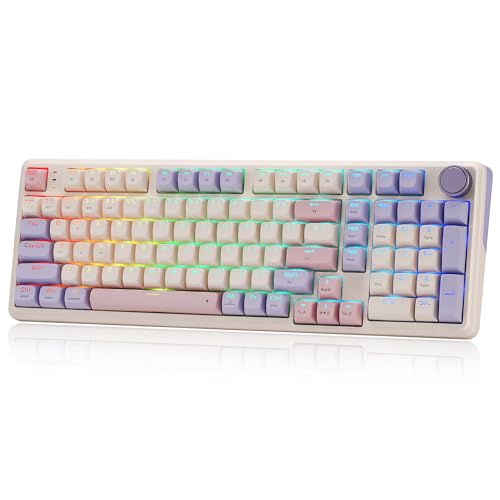
- 8000mAh battery with tri-mode connectivity
- Gasket design and hot-swappable switches
- PBT keycaps, RGB, and control knob
Best For: Extended wireless use and switch customization
Feature-Packed 96% Pick

- Compact 96% layout with number pad
- Tri-mode connectivity and long stated battery life
- Hot-swappable switches with sound dampening
Best For: Gaming and work with full-size functionality
Solid Full-Size Value

- 104-key aluminum design for stable typing
- Tri-mode wireless and wired connectivity
- Hot-swappable quiet linear switches
Best For: Full-size gaming and everyday typing
Compact Thocky Pick
Kisnt KN85 Wireless Mechanical Keyboard

- Compact 75% layout saves desk space
- Tri-mode connectivity with Bluetooth 5.0
- Hot-swappable switches and soft thocky sound
Best For: Small desks, multi-device work, and customizable typing
Retro Full-Size Choice
Redragon K710 Typewriter-Style Keyboard

- Full 104-key layout with number pad
- Clicky blue switches with tactile feedback
- Tri-mode wireless and wired connectivity
Best For: Retro-style desks, full-size typing, and audible key feedback
Customizable Gaming Pick
Redragon K671KS Wireless Mechanical Keyboard
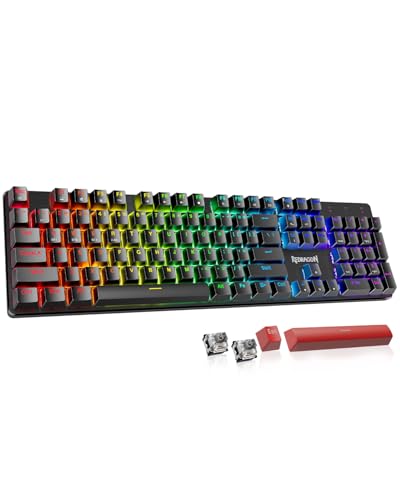
- 81-key compact layout with tri-mode connectivity
- Hot-swappable linear switches with spares included
- PBT keycaps, programmable controls, and RGB lighting
Best For: Compact gaming setups and users who want easy customization
Customizable Compact Pick – AULA F75 Pro
The AULA F75 Pro is one of the more versatile wireless mechanical keyboards for shoppers who want a compact layout without giving up customization. Its 75% design retains arrow keys, while tri-mode connectivity, hot-swappable switches, RGB lighting, and a control knob suit both gaming and everyday use.
Best For: Gamers and hobbyists who want a compact, customizable keyboard with flexible device support.
Pros:
- Bluetooth 5.0, 2.4GHz wireless, and USB-C wired modes support up to five connected devices.
- Hot-swappable PCB accepts 3-pin and 5-pin switches without soldering.
- Five-layer dampening, pre-lubed stabilizers, and Reaper switches are designed for a softer, quieter-feeling typing experience.
- 4000mAh battery, RGB lighting, programmable keys, and a multifunction knob add practical flexibility.
Cons:
- The 75% layout omits the dedicated number pad found on full-size keyboards.
- Its extensive lighting and macro features may be more than office-only users need.
The F75 Pro is a strong fit when layout efficiency and customization matter more than a traditional full-size design. Its three connection modes and hot-swap support make it adaptable, while the included acoustic-focused construction gives it a more refined feel than a basic gaming keyboard.
Low-Profile Office Choice – Logitech MX Mechanical
The Logitech MX Mechanical is a practical choice among wireless mechanical keyboards for productivity-focused users who prefer a full-size layout and low-profile keys. Its tactile quiet switches provide noticeable feedback, while smart illumination and multi-device pairing make it well suited to changing work environments.
Best For: Office users who want a quieter tactile feel, full-size keys, and easy switching between computers.
Pros:
- Low-profile tactile quiet switches provide a defined bump with less typing noise.
- Pairs with up to three devices through Bluetooth Low Energy or the included Logi Bolt receiver.
- Smart backlighting activates as hands approach and adjusts to ambient conditions.
- USB-C charging provides up to 15 days of battery life with lighting on, or up to 10 months with lighting off.
Cons:
- Its full-size form factor takes more desk space than compact alternatives.
- The backlighting is single-color rather than RGB.
- Customization depends on Logitech’s Logi Options+ software.
The MX Mechanical emphasizes comfortable, efficient office typing rather than gaming-focused visual effects. Choose it if you value a conventional number pad, low-profile ergonomics, quiet tactile feedback, and dependable multi-device workflow.
Full-Size Gaming Value – Redragon K745 PRO
The Redragon K745 PRO gives wireless mechanical keyboard shoppers a full-size gaming layout with dedicated shortcuts and a cushioned gasket construction. It combines USB-C, Bluetooth, and 2.4GHz connectivity with hot-swappable switch support, RGB lighting, and software-based customization.
Best For: Gamers who want a full-size keyboard with dedicated hotkeys, wireless flexibility, and a softer typing feel.
Pros:
- 108-key layout includes dedicated mute, calculator, screen-lock, and desktop hotkeys.
- Tri-mode connectivity supports USB-C, Bluetooth, and 2.4GHz wireless use.
- Gasket mounting and five-layer dampening aim to provide a cushioned, quieter typing experience.
- Hot-swappable sockets, translucent PBT keycaps, RGB, and programmable software expand customization.
Cons:
- The full-size layout requires more desk space than a compact board.
- Its plastic enclosure may feel less premium than metal-bodied alternatives.
- Its gaming-oriented styling may not suit minimalist office setups.
The K745 PRO is a well-rounded option for users who need every standard key plus quick-access controls. Its gasket design and PBT keycaps add comfort and durability-oriented features, while tri-mode connectivity keeps it useful across several devices.
Extended-Battery Work-and-Play Pick – AULA F99
The AULA F99 is a flexible wireless mechanical keyboard for users who need a near-full layout but still want to save desk space. Its 96% arrangement keeps the arrow keys and number area, while tri-mode connectivity, hot-swappable switches, RGB effects, and an 8000mAh battery support work, study, and gaming.
Best For: Users who want number-pad functionality, long battery capacity, and a customizable keyboard for multiple devices.
Pros:
- Bluetooth 5.0, 2.4GHz, and USB-C modes can connect with up to five devices.
- Hot-swappable PCB supports 3-pin and 5-pin switches without soldering.
- Gasket construction, five-layer dampening, and pre-lubed linear switches target a smooth, cushioned feel.
- 8000mAh battery, RGB lighting, programmable keys, and double-shot PBT keycaps add useful extras.
Cons:
- The 96% layout is less compact than a 75% or tenkeyless keyboard.
- Its linear switches may not suit users who prefer pronounced tactile feedback.
- The feature-rich design may require time to configure fully.
The F99 is particularly appealing when a number pad is important but a traditional full-size board feels unnecessarily large. Its high-capacity battery and multi-device support make it a practical centerpiece for a mixed work-and-gaming setup.
Long-Lasting Customizer – Redragon K768 PRO
The Redragon K768 PRO is a practical choice for shoppers comparing wireless mechanical keyboards with a compact full-function layout. Its 100-key gasket design combines tri-mode connectivity, a large 8000mAh battery, hot-swappable support, and a dedicated control knob.
Best For: Users who want extended wireless runtime, a cushioned typing feel, and flexible switch customization.
Pros:
- Tri-mode connectivity supports USB-C, Bluetooth, and 2.4GHz wireless connections.
- 8000mAh battery is designed for longer periods between charges.
- Hot-swappable sockets accept most 3-pin and 5-pin switches.
- PBT keycaps, RGB lighting, and a multifunction knob add practical customization.
Cons:
- The 100-key layout may be less compact than a tenkeyless keyboard.
- Its gaming-focused design may not suit minimalist desk setups.
The K768 PRO stands out for its battery capacity and mod-friendly construction. Choose it if you value a softer gasket feel and extensive customization without giving up wireless flexibility.
Feature-Packed 96% Pick – ASUS ROG Strix Scope II 96
The ASUS ROG Strix Scope II 96 is built for shoppers seeking wireless mechanical keyboards that preserve a number pad while saving desk space. It offers tri-mode connectivity, hot-swappable pre-lubed switches, sound-dampening materials, and extensive gaming controls.
Best For: Gamers and productivity users who need number-pad functionality in a space-saving layout.
Pros:
- 96% layout retains full-size functionality and a number pad in a compact design.
- Bluetooth, 2.4GHz ROG SpeedNova, and wired USB connectivity provide flexibility.
- Pre-lubed switches, foam, and switch-dampening pads help improve acoustics.
- Hot-swappable switches, per-key RGB, macro programming, and a multifunction wheel support customization.
Cons:
- The feature-rich design weighs 2.8 pounds.
- It is not water resistant according to the supplied specifications.
This ASUS is a strong all-around option when a numpad matters but a standard full-size footprint feels excessive. Its long stated 2.4GHz battery life and included wrist rest also suit extended sessions.
Solid Full-Size Value – Redragon K556 PRO
The Redragon K556 PRO is a straightforward option among wireless mechanical keyboards for shoppers who prefer a traditional 104-key layout. Its aluminum plate, tri-mode wireless support, quiet linear switches, and hot-swappable design balance stability with customization.
Best For: Users who want a sturdy full-size keyboard with quiet switches and wireless flexibility.
Pros:
- Brushed aluminum construction and an aluminum plate provide a stable typing platform.
- USB-C, Bluetooth, and 2.4GHz connectivity support multiple devices and low-latency use.
- Hot-swappable sockets accept most 3-pin and 5-pin switches without soldering.
- Quiet linear switches and 20 RGB presets suit gaming or everyday use.
Cons:
- The 104-key layout takes more desk space than compact alternatives.
- The supplied specifications do not state a battery capacity or runtime.
The K556 PRO makes the most sense for buyers who prioritize a conventional full-size layout and solid aluminum construction. It offers useful modding support without requiring a wired-only setup.
Compact Thocky Pick – Kisnt KN85 Wireless Mechanical Keyboard
The Kisnt KN85 is a space-conscious choice for shoppers comparing wireless mechanical keyboards. Its 75% layout keeps function keys, arrows, and shortcuts while leaving out the number pad, making it well suited to smaller desks and laptop setups. Tri-mode connectivity, hot-swappable switches, and a rechargeable battery add flexibility for work and gaming.
Best For: Small desks, multi-device users, typists who prefer a softer thocky sound, and anyone who wants to customize switches without soldering.
Pros:
- Compact 85-key layout preserves essential navigation and function keys.
- Supports USB-C, 2.4GHz wireless, and Bluetooth 5.0 with three Bluetooth channels.
- Hot-swappable 3-pin and 5-pin switch support allows solder-free customization.
- Gasket mount, PBT keycaps, RGB lighting, and a 4000mAh rechargeable battery add everyday versatility.
Cons:
- The compact layout does not include a dedicated number pad.
- Key remapping and macro features require Windows software in wired or 2.4GHz mode.
- The manufacturer recommends a wrist rest for extended use.
The KN85 stands out among wireless mechanical keyboards for its compact footprint and customization potential. Choose it over a full-size model if desk space and switch experimentation matter more than frequent number-pad input.
Retro Full-Size Choice – Redragon K710 Typewriter-Style Keyboard
The Redragon K710 brings a distinctive typewriter-inspired look to the wireless mechanical keyboards category. Its 104-key full-size layout, clicky blue switches, tri-mode connectivity, and metal panel make it a practical option for users who want a classic appearance without giving up gaming-oriented features.
Best For: Buyers who want a full-size keyboard with a retro design, audible clicky feedback, RGB customization, and a dedicated number pad.
Pros:
- Full 104-key layout includes a dedicated number pad.
- Tri-mode connection supports USB-C wired, Bluetooth, and 2.4GHz wireless use.
- Blue mechanical switches provide audible clicks and tactile feedback.
- Offers RGB effects, programmable controls, anti-ghosting, and a solid metal panel.
Cons:
- Clicky switches may be less suitable for quiet shared spaces.
- The full-size design takes more desk room than compact wireless mechanical keyboards.
- Driver software is designed for Windows systems.
The K710 is a style-forward full-size option for shoppers who value a number pad and pronounced clicky feedback. Its retro round keycaps and metal construction make it especially appealing for themed desks and users who prefer a substantial keyboard.
Customizable Gaming Pick – Redragon K671KS Wireless Mechanical Keyboard
The Redragon K671KS is a compact 81-key option for shoppers comparing wireless mechanical keyboards with gaming and customization in mind. It combines Bluetooth, 2.4GHz, and USB-C connectivity with hot-swappable linear switches, PBT keycaps, programmable controls, and per-key RGB lighting.
Best For: Gamers and hybrid users who want a compact keyboard with multiple connection modes, linear switches, and straightforward switch replacement.
Pros:
- Tri-mode connectivity supports Bluetooth, 2.4GHz wireless, and USB-C wired use across multiple devices.
- Hot-swappable design includes eight spare linear switches and two extra red keycaps.
- Double-shot PBT keycaps and adjustable RGB lighting support durable, customized use.
- Programmable keys, remapping, macros, metal construction, and spill-proof features add practicality.
Cons:
- The 81-key layout omits a dedicated number pad.
- Its listed compatible operating system family is Windows, with Windows 11 specified as the minimum version.
- Linear switches may offer less audible or tactile feedback than clicky alternatives.
The K671KS is a well-rounded choice when you want compact wireless mechanical keyboards with gaming features and easy switch customization. It offers more flexibility than a basic wireless model, particularly for users who regularly move between computers, tablets, and phones.
How We Picked These Wireless Mechanical Keyboards
We selected these models based on the features that matter most in everyday use: reliable wireless connectivity, useful layouts, mechanical switch quality, hot-swappable design, battery capacity, build materials, lighting, and control options. The list includes Bluetooth, 2.4GHz, and USB-C models, along with compact, near-full-size, and traditional 104-key layouts.
Because keyboard preferences vary, no single board is ideal for everyone. A compact keyboard may free up mouse space, while a full-size model keeps the number pad and navigation cluster within easy reach.
Quick Comparison
| Priority | Look for | Best-fit options |
|---|---|---|
| Compact desk setup | 75% or 96% layout | AULA F75 Pro, ASUS ROG Strix Scope II 96, Kisnt KN85 |
| Office productivity | Quiet tactile switches, Bluetooth, familiar key spacing | Logitech MX Mechanical |
| Gaming flexibility | 2.4GHz wireless, low-latency performance, RGB | ASUS ROG, Redragon K745 PRO, K768 PRO |
| Customization | Hot-swappable switches and keycaps | AULA F99, AULA F75 Pro, Redragon K671KS |
| Maximum battery capacity | Large rechargeable battery | Redragon K768 PRO |
Key Buying Factors for Wireless Mechanical Keyboards
Layout and Desk Space
A 75% keyboard keeps the function row and arrow keys while removing the number pad. A 96% layout retains nearly all full-size functionality in a tighter footprint. Choose a 104- or 108-key board if you regularly enter numbers or rely on dedicated navigation keys.
Connectivity and Compatibility
Tri-mode keyboards offer Bluetooth, 2.4GHz wireless, and wired USB-C connections, making them useful across computers, tablets, and gaming systems. Bluetooth is convenient for multiple devices, while 2.4GHz is generally the better choice for responsive gaming. Check operating-system support and device switching before buying.
Switches, Hot-Swapping, and Sound
Linear switches provide smooth, uninterrupted keystrokes and are popular for gaming. Tactile switches offer a noticeable bump that can help with typing accuracy. Hot-swappable sockets let you replace compatible switches without soldering, making the keyboard easier to personalize or repair. Pre-lubed switches can also reduce scratchiness and unwanted noise.
Battery, Build, and Controls
Battery life depends on wireless mode, RGB brightness, and usage. A larger battery is useful for heavy users, but it can add weight. Aluminum construction may improve rigidity, while a rotary knob or dedicated media controls can make volume and playback adjustments faster.
Who Should Buy Which Wireless Mechanical Keyboards?
Choose a compact 75% model if you want more mouse room without giving up arrow keys and function access. Pick a 96% or full-size keyboard for productivity, spreadsheets, and frequent number entry. Office users should prioritize comfortable switches, Bluetooth support, and restrained lighting. Gamers should favor dependable 2.4GHz connectivity, rollover performance, stable construction, and easy profile or media controls. If you enjoy modifying your setup, focus on hot-swappable boards with standard-compatible switches and keycap support.