The best mechanical keyboard for gaming should deliver reliable switches, responsive input, comfortable control, and features that match the way you play. This roundup covers compact 60% and 75% layouts, full-size boards, wireless models, hot-swappable designs, and feature-rich RGB options.
Whether you want dedicated media controls, programmable keys, a volume knob, or a smaller desk footprint, these keyboards offer distinct strengths for different gaming setups and budgets.
Best 10 Mechanical Keyboard for Gaming Picks for 2026
Fast-Action RGB Pick

- Fast, quiet Yellow linear switches
- Six dedicated macro keys
- Per-key Chroma RGB and media controls
Best For: PC gamers wanting rapid inputs and extensive customization
Display Customization Pick

- Built-in color multimedia display
- Hot-swappable 3- or 5-pin PCB
- Gasket mount with customizable RGB
Best For: Gamers and keyboard hobbyists seeking compact customization
Wireless Custom Build Pick

- Tri-mode wireless and wired connectivity
- Hot-swappable 3- and 5-pin support
- 75% layout with knob and programmable macros
Best For: Gamers wanting wireless flexibility and customization
Durable Full-Size Value Pick

- Tactile mechanical switches
- Durable PBT keycaps
- Aluminum body with white backlighting
Best For: Gamers seeking a sturdy, simple full-size keyboard
Customizable Full-Size Pick

- Hot-swappable 108-key layout
- Four programmable shortcut keys
- RGB lighting with music mode
Best For: Full-size gaming setups needing customization
Space-Saving Budget Pick

- Compact 68-key layout
- Smooth red mechanical switches
- 16 blue LED lighting modes
Best For: Small desks and portable gaming setups
Feature-Rich Premium Pick
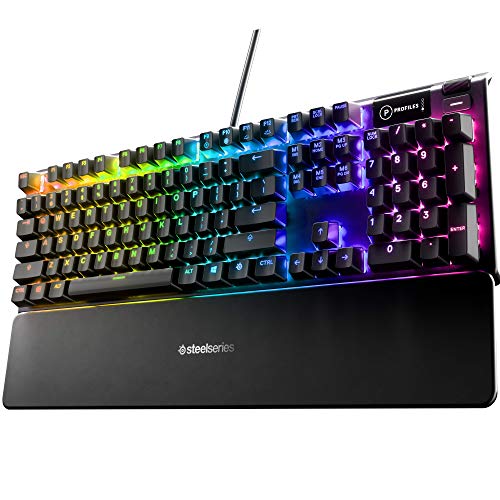
- Hybrid tactile blue switches
- OLED smart display
- Per-key RGB and aluminum frame
Best For: Feature-focused gaming desks and dedicated playrooms
Best Budget RGB Pick
Redragon K671 Hot-Swappable Gaming Keyboard

- Smooth linear red switches with hot-swappable sockets
- 11 backlight modes and programmable macro editing
- Full-key anti-ghosting with a 24-month warranty
Best For: Gamers wanting a full-size red-switch keyboard with easy switch replacement
Best for Macros
Redragon K580 VATA RGB Mechanical Keyboard

- Five onboard macro keys with no software required
- Clicky Blue switches and hot-swappable sockets
- Volume roller, media controls, and full anti-ghosting
Best For: Macro-heavy gaming and users who want dedicated physical controls
Best Ergonomic Full-Size Value
RisoPhy RGB Blue-Switch Keyboard

- Clicky Blue switches with nine adjustable backlight modes
- Full-key anti-ghosting and 12 multimedia shortcuts
- Kickstands, rubber feet, and spill-resistant drainage holes
Best For: Full-size gaming and daily use across PC, Mac, and Xbox
Fast-Action RGB Pick – Razer BlackWidow V4 X
The Razer BlackWidow V4 X is a strong mechanical keyboard for gaming if you want rapid linear inputs, dedicated macros, and extensive RGB customization. Its Yellow switches are designed for quick, relatively quiet actuation, while the full-size layout preserves a complete number pad.
Best For: Gamers who want fast linear switches, dedicated macro keys, and a full-size wired layout.
Pros:
- Yellow linear switches require only 45g of force and actuate at 1.2mm.
- Six dedicated macro keys provide convenient command access.
- Per-key Chroma RGB supports over 16.8 million colors and game-integrated effects.
- Doubleshot ABS keycaps, sound dampening, and lubricated stabilizers support durability and quieter operation.
Cons:
- Wired connectivity limits placement flexibility.
- The full-size 104-key design takes up more desk space than a compact keyboard.
- It is not water resistant.
Choose this model when speed and programmable controls matter more than a compact footprint. The combination of rapid switches, macro keys, media controls, and RGB effects makes it a feature-rich choice for PC gaming.
Display Customization Pick – Womier SK80 75%
The Womier SK80 is a distinctive mechanical keyboard for gaming that combines a compact 75% layout with a color multimedia display. Its gasket-mounted construction, hot-swappable PCB, and customizable RGB lighting make it appealing to users who want a more personalized setup.
Best For: Gamers and hobbyists who value a compact layout, visual customization, and switch-swapping flexibility.
Pros:
- The upper-right color display can show GIFs, connection mode, lighting information, volume, and more.
- Hot-swappable PCB supports both 3-pin and 5-pin switches.
- Gasket mount, EVA positioning plate, and bottom filling are designed for a softer, quieter feel.
- Offers 19 lighting effects, nine colors, and software customization.
Cons:
- The supplied notes specify wired USB-C connectivity rather than wireless operation.
- The 82-key layout omits the dedicated number pad found on full-size keyboards.
- It is not water resistant.
The SK80 stands out for its built-in display and enthusiast-friendly design. It is a good fit if you want a compact gaming keyboard that can be customized through software, lighting controls, and replaceable switches.
Wireless Custom Build Pick – AULA F75 Pro
The AULA F75 Pro is a versatile mechanical keyboard for gaming with Bluetooth 5.0, 2.4GHz wireless, and USB-C wired modes. Its 75% layout, hot-swappable base, programmable functions, and multi-function knob give it a strong mix of gaming flexibility and everyday usability.
Best For: Gamers who need wireless flexibility, a compact layout, and room to customize switches and controls.
Pros:
- Tri-mode connectivity supports Bluetooth 5.0, 2.4GHz wireless, and USB-C wired use.
- Hot-swappable base accepts 3-pin and 5-pin switches without soldering.
- 4000mAh battery supports portable wireless use across compatible devices.
- Includes RGB lighting, programmable macros, N-key rollover, and a control knob.
Cons:
- The compact 81-key layout does not include a dedicated number pad.
- Wireless features require battery management.
- It is not water resistant.
The F75 Pro is a particularly flexible choice for users who move between devices or want to tune their keyboard over time. Its connectivity options and hot-swap design make it more adaptable than a basic wired gaming keyboard.
Durable Full-Size Value Pick – Logitech G413 SE
The Logitech G413 SE is a straightforward mechanical keyboard for gaming built around tactile switches, durable PBT keycaps, and a sturdy brushed aluminum-magnesium top case. Its full-size layout and white backlighting suit gamers who want familiar functionality without a highly customized feature set.
Best For: Gamers who prefer a durable, full-size wired keyboard with tactile switches and simple backlighting.
Pros:
- Heat- and wear-resistant PBT keycaps are designed for durability.
- Tactile mechanical switches provide a responsive gaming feel.
- Six-key rollover anti-ghosting supports reliable key input.
- Aluminum construction and a minimal-flex body provide a solid platform.
Cons:
- Backlighting is single-color white rather than RGB.
- Six-key rollover is less extensive than full N-key rollover designs.
- USB wired connectivity offers less flexibility than wireless models.
The G413 SE focuses on core gaming performance and robust materials rather than extensive lighting or customization. It is a sensible pick for users who want a dependable full-size board with tactile switches and a clean appearance.
Customizable Full-Size Pick – Redragon K668
The Redragon K668 is a practical mechanical keyboard for gaming when you want a full-size layout, dedicated shortcuts, and room to customize switches and lighting. Its linear red switches are designed for quieter, smooth keystrokes, while the wired USB-C connection keeps setup straightforward.
Best For: Gamers who want a full-size, hot-swappable keyboard with extensive RGB and shortcut customization.
Pros:
- Hot-swappable sockets support most 3-pin and 5-pin switches without soldering.
- Includes four dedicated hotkeys for mute, calculator, screen lock, and desktop functions.
- Offers up to 19 RGB lighting modes, including music synchronization.
- Comes with two keycap sets and adjustable two-stage feet.
Cons:
- Its full-size design takes more desk space than compact gaming keyboards.
- Advanced remapping, macros, and lighting customization require the included software.
The K668 is a flexible choice if you value a conventional number-pad layout but still want enthusiast-friendly switch swapping and software controls. It is especially appealing for shared spaces where the smooth linear switches and noise-dampening design may be preferable to louder clicky options.
Space-Saving Budget Pick – MageGee MK-Box
The MageGee MK-Box is a compact mechanical keyboard for gaming that preserves arrow keys and F-row access while freeing up desk space. Its red switches provide smooth linear action, and the detachable USB connection makes the 68-key board convenient to move between a gaming PC and laptop.
Best For: Gamers and students who want a portable, compact keyboard with dedicated arrow keys and simple LED backlighting.
Pros:
- Compact 68-key layout saves space while retaining separate arrow keys and F1-F12 access.
- Linear red switches offer smooth presses with minimal resistance and no tactile bump.
- Provides about 16 adjustable blue LED backlight modes.
- Supports full anti-ghosting across all 68 keys and works with Windows, Linux, and Mac.
Cons:
- Uses single-color blue backlighting rather than RGB illumination.
- The compact layout may require Fn combinations for functions found on larger keyboards.
- It does not include software for deeper remapping or macro customization.
The MK-Box is a sensible choice for smaller desks or portable setups. Its layout is more practical than an ultra-minimal 60% board because the arrow keys remain separate, but buyers wanting RGB effects, wireless connectivity, or full-size controls should look elsewhere.
Feature-Rich Premium Pick – SteelSeries Apex 5
The SteelSeries Apex 5 is a mechanical keyboard for gaming built around hybrid blue switches, per-key RGB illumination, and a durable aluminum frame. It adds an OLED smart display for game information, GIFs, and Discord messages, plus a magnetic wrist rest for longer sessions.
Best For: Gamers who want tactile clicky feedback, premium construction, per-key RGB, and an integrated display.
Pros:
- Hybrid blue switches combine tactile, clicky feedback with a membrane element.
- OLED smart display can show GIFs, game information, and Discord messages.
- Aircraft-grade aluminum alloy frame is designed for sturdiness and durability.
- Includes per-key RGB lighting and a magnetic wrist rest.
Cons:
- Clicky switches may be distracting in shared spaces.
- Its full-size 104-key design requires more room than compact alternatives.
- The supplied specifications list a USB connection rather than wireless connectivity.
The Apex 5 suits buyers who want more than basic input hardware, particularly an integrated OLED display and premium-feeling chassis. Its hybrid blue switches favor tactile feedback and audible clicks, so it is a stronger fit for dedicated gaming spaces than quiet offices.
Best Budget RGB Pick – Redragon K671 Hot-Swappable Gaming Keyboard
The Redragon K671 is a practical mechanical keyboard for gaming if you want a full-size wired layout, smooth linear red switches, customizable macros, and colorful backlighting. Its hot-swappable design also makes basic switch replacement easier without soldering.
Best For: Gamers and everyday users who prefer smooth, quieter-feeling linear switches and a full-size keyboard with macro support.
Pros:
- Hot-swappable red switches include spare switches and keycaps.
- Full-key anti-ghosting supports simultaneous key presses.
- Offers 11 backlight modes, macro editing, and 12 multimedia shortcuts.
- Includes a 24-month warranty.
Cons:
- Backlight effects are adjustable, but the color cannot be changed.
- Its wired, full-size design takes up more desk space than a compact board.
The K671 balances gaming essentials with useful customization. It is especially appealing if smooth red switches and easy maintenance matter more to you than wireless connectivity or per-key color control.
Best for Macros – Redragon K580 VATA RGB Mechanical Keyboard
The Redragon K580 VATA is a mechanical keyboard for gaming built around shortcut access. Five dedicated macro keys, onboard recording, a volume roller, and separate media controls make it a strong fit for players who want commands close at hand.
Best For: MMO and MOBA players, streamers, and power users who value dedicated macros and physical media controls.
Pros:
- Five dedicated G keys can record combos without requiring software.
- Clicky Blue switches provide pronounced tactile and audible feedback.
- Hot-swappable sockets allow switch changes without soldering.
- Full anti-ghosting and double-shot keycaps support heavy daily use.
Cons:
- Clicky switches can be loud in shared spaces.
- The 104-key layout is less compact than smaller gaming keyboards.
- Advanced RGB and macro profiles require optional companion software.
The K580 is the most feature-focused option here for command-heavy games. Choose it when dedicated macro keys and a volume roller are more valuable than a quieter typing experience or a smaller footprint.
Best Ergonomic Full-Size Value – RisoPhy RGB Blue-Switch Keyboard
The RisoPhy is a mechanical keyboard for gaming that combines clicky Blue switches with a full-size layout, rainbow backlighting, and comfort-oriented design details. It also adds spill-resistant drainage holes and a Win-lock function for everyday gaming and work.
Best For: PC, Mac, and Xbox users who want a clicky full-size keyboard with adjustable lighting and basic spill protection.
Pros:
- Clicky Blue switches offer tactile feedback and audible response.
- Provides nine backlight modes with adjustable speed and brightness.
- Full-key anti-ghosting and 12 multimedia shortcuts support gaming and productivity.
- Foldable kickstands, rubber padding, and stair-up keycaps support comfortable use.
Cons:
- Blue switches may be too loud for shared workspaces.
- Rainbow lighting offers effects but not freely selectable per-key colors.
- The full-size USB-A design is not ideal for minimal desks or newer USB-C-only devices.
The RisoPhy makes sense for buyers who want a traditional 104-key board with noticeable clicky feedback and comfort features. Its spill-resistant construction is useful for everyday durability, though it should not be treated as waterproof.
How We Picked the Best Mechanical Keyboard for Gaming
We compared these keyboards by focusing on the features that have the biggest effect on everyday play: switch type, layout, connectivity, key rollover, build quality, customization, and included controls. We also considered whether each model suits competitive gaming, general PC use, streaming, or a compact desk setup.
Switch feel is important, but it is only one part of the decision. A keyboard with smooth linear switches may suit fast-paced games, while tactile or clicky switches can provide more noticeable feedback for typing. Features such as hot-swappable sockets, RGB lighting, onboard controls, and programmable keys can add flexibility, but they may not be worth paying for if you prefer a simple setup.
Quick Comparison
- Best for feature-rich gaming: Look for dedicated media controls, macro keys, per-key RGB, or an integrated display.
- Best for small desks: 60% and 75% keyboards save space while retaining essential gaming controls.
- Best for customization: Hot-swappable boards let you change compatible switches without soldering.
- Best for simplicity and value: Wired keyboards typically offer dependable plug-and-play performance without charging.
- Best for flexible placement: Wireless models reduce cable clutter, provided their battery life and connection meet your needs.
Key Buying Factors for a Mechanical Keyboard for Gaming
Switches and Sound
Linear switches are generally smooth and consistent, tactile switches provide a bump during actuation, and clicky switches produce a more pronounced sound. Choose based on preference, noise tolerance, and whether you also type frequently.
Layout and Controls
A full-size keyboard includes a number pad, while compact layouts remove some keys to save room. A 75% model often preserves the function row and arrow keys, making it a practical middle ground. Dedicated macro, media, and volume controls are useful for streaming, productivity, and games with many commands.
Connectivity and Responsiveness
Wired USB models are straightforward and do not require battery management. Wireless keyboards provide a cleaner setup, but check connection modes, charging requirements, and whether the keyboard supports the performance you expect for competitive play.
Customization and Durability
Hot-swappable sockets, RGB software, programmable keys, and replaceable keycaps can extend a keyboard’s usefulness. Also check the frame material, keycap construction, stabilizers, and warranty rather than judging durability by lighting alone.
Who Should Buy Which Mechanical Keyboard for Gaming?
Competitive players should prioritize a dependable connection, consistent switches, anti-ghosting, and a layout that leaves enough room for mouse movement. Streamers and power users may prefer macro keys, media controls, a knob, or an integrated display. Space-conscious gamers should consider a 60% or 75% board, while office-and-gaming users may benefit from a full-size layout and quieter switches.
Before buying, confirm operating-system compatibility, software support, key layout, and the exact switch version. The best choice is the model whose controls and size fit your desk and games—not necessarily the one with the most lighting or the highest feature count.