A dependable business mesh Wi-Fi system can eliminate dead zones, support busy offices, and keep employees, guests, phones, cameras, and connected equipment online with fewer interruptions.
This roundup compares 10 mesh systems across Wi-Fi generations, coverage ratings, device capacity, wired backhaul options, and multi-gigabit performance so you can choose a practical fit for your workspace.
Best 10 Business Mesh Wifi System Picks for 2026
Best Value Gigabit Mesh

- Gigabit-speed support at a lower price point
- Up to 4,500 sq. ft. and 75+ devices
- Simple app management with smart-home hub
Best For: Small businesses and home offices needing reliable, easy-to-manage gigabit Wi-Fi
Best for High-Capacity Offices

- Wi-Fi 6E tri-band connectivity with 6 GHz
- Up to 7,200 sq. ft. and 200 devices
- 5,400 Mbps combined tri-band speeds
Best For: Larger offices with many devices and demanding wireless traffic
Best Future-Ready Upgrade

- Wi-Fi 7 support for plans up to 2.5 Gbps
- Up to 6,000 sq. ft. and 120+ devices
- Two 2.5 GbE ports per router and three-year warranty
Best For: Businesses adopting multi-gigabit service and newer Wi-Fi devices
Best Budget Coverage

- Covers up to 5,500 sq. ft.
- Supports up to 100 devices with seamless roaming
- Six Gigabit ports and wired backhaul support
Best For: Small offices prioritizing affordable coverage and straightforward networking
Best Premium Coverage
NETGEAR Orbi 770 Series WiFi 7

- Up to 8,000 sq. ft. and 100 devices
- Tri-band WiFi 7 speeds up to 11 Gbps
- App setup with built-in security features
Best For: Large homes and high-device-count networks
Best Multi-Gig Flexibility

- Covers up to 8,100 sq. ft. and 200+ devices
- Includes 10 Gbps, 2.5 Gbps, and 1 Gbps ports
- WiFi 7 with 10 Gbps wired backhaul support
Best For: Multi-gig networks and advanced wired setups
Best Value WiFi 7 Coverage
NETGEAR Orbi 370 Series WiFi 7

- Covers up to 6,000 sq. ft. and 70 devices
- WiFi 7 speeds up to 5 Gbps
- Includes multi-gig Ethernet and app management
Best For: Medium-to-large homes and home offices
Best Wi-Fi 7 Upgrade

- Wi-Fi 7 tri-band system with up to 10,000 Mbps
- Covers up to 5,800 sq. ft. and 200+ devices
- Includes 10G and four 2.5G wired ports
Best For: Performance-focused users and growing networks
Best Value Mesh

- Wi-Fi 6 AX3000 coverage for up to 4,500 sq. ft.
- Supports up to 150 connected devices
- Six total Gigabit Ethernet ports in the two-pack
Best For: Budget-conscious homes and small offices
Best 6 GHz Coverage
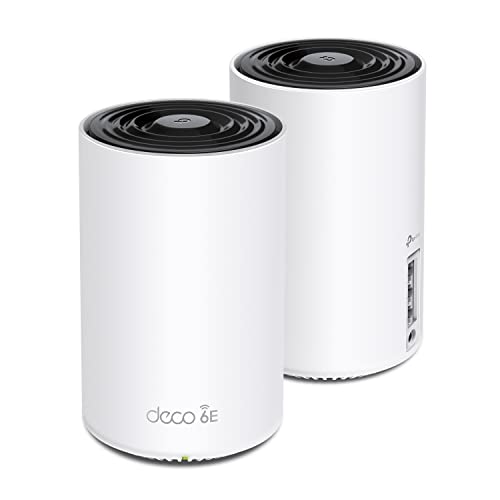
- Wi-Fi 6E tri-band system with a dedicated 6 GHz band
- Covers up to 5,500 sq. ft. and 200 devices
- Can use 6 GHz for mesh backhaul or compatible clients
Best For: Networks with Wi-Fi 6E devices and high wireless demand
Best Value Gigabit Mesh – eero 6+ 3-Pack
For businesses seeking a dependable business mesh wifi system without paying a premium, the eero 6+ offers gigabit-class support, broad coverage, and simple management. Its TrueMesh technology helps reduce dead spots and drop-offs across offices, while the app makes setup and remote administration straightforward.
Best For: Small businesses and home offices that need reliable gigabit connectivity, easy setup, and smart-home support.
Pros:
- Supports internet plans and Wi-Fi speeds up to a gigabit.
- Three units cover up to 4,500 square feet and support 75+ devices.
- Built-in Thread and Zigbee smart-home hub, plus automatic security updates.
Cons:
- Advanced security and additional network-management features require a separate subscription.
- Coverage and device capacity may be limiting for larger offices.
The eero 6+ is a practical, affordable choice when straightforward deployment and dependable everyday connectivity matter more than the latest Wi-Fi generation.
Best for High-Capacity Offices – TP-Link Deco XE75 3-Pack
The TP-Link Deco XE75 is a strong business mesh wifi system for offices with many devices and demanding wireless workloads. Its tri-band Wi-Fi 6E design adds a less-congested 6 GHz band, which can serve compatible clients or provide a dedicated connection between mesh nodes.
Best For: Larger offices, busy workgroups, and businesses with Wi-Fi 6E-compatible devices or heavy simultaneous traffic.
Pros:
- Covers up to 7,200 square feet and supports up to 200 devices.
- Tri-band speeds reach up to 5,400 Mbps, with a 6 GHz band available for backhaul or client devices.
- Deco app, Alexa support, and included HomeShield security and management features simplify administration.
Cons:
- The benefits of 6 GHz are greatest with compatible Wi-Fi 6E devices.
- Premium HomeShield features may require an additional service.
- A modem is required for most internet service providers.
With extensive coverage, high device capacity, and flexible 6 GHz use, the XE75 is well suited to businesses that expect substantial network traffic and want room to grow.
Best Future-Ready Upgrade – eero 7 3-Pack
The eero 7 is a future-ready business mesh wifi system for organizations upgrading to Wi-Fi 7 and faster internet service. It supports plans up to 2.5 Gbps, includes two auto-sensing 2.5 GbE ports per unit, and uses eero software features to help maintain reliable connections as users move around the coverage area.
Best For: Businesses with multi-gigabit internet, newer Wi-Fi devices, and a need for broad, reliable coverage.
Pros:
- Supports internet plans up to 2.5 Gbps and wireless speeds up to 1.8 Gbps.
- Three units cover up to 6,000 square feet and support 120+ devices.
- Wi-Fi 7 features include multi-link operation, with a three-year warranty.
Cons:
- It is a dual-band system rather than tri-band.
- Advanced security, parental controls, VPN, and other eero Plus features require an optional subscription.
The eero 7 makes the most sense for businesses investing in newer networking hardware and multi-gigabit service, especially where simple management and long-term compatibility are priorities.
Best Budget Coverage – TP-Link Deco S4 3-Pack
The TP-Link Deco S4 is a budget-friendly business mesh wifi system for smaller offices that need consistent coverage without complicated setup. Its three units create one network name, support wired Ethernet backhaul, and provide Gigabit Ethernet ports for compatible wired devices.
Best For: Small offices and budget-conscious teams that need broad Wi-Fi 5 coverage and basic network controls.
Pros:
- Three units cover up to 5,500 square feet and support up to 100 devices.
- Seamless roaming keeps devices on one unified network as users move around.
- Includes six Gigabit Ethernet ports, wired backhaul support, and parental controls.
Cons:
- Uses Wi-Fi 5 rather than newer Wi-Fi 6, 6E, or 7 standards.
- Its listed data transfer rate is up to 1,200 Mbps, making it less suitable for demanding multi-gigabit environments.
- A modem is required for most internet service providers.
The Deco S4 is a sensible entry-level option when coverage, simple roaming, and wired connectivity are more important than the newest wireless performance.
Best Premium Coverage – NETGEAR Orbi 770 Series WiFi 7
For demanding homes or small workspaces, this business mesh wifi system combines WiFi 7, tri-band networking, and Enhanced Backhaul to support fast connections across up to 8,000 square feet. It is designed for multi-device use, with support for up to 100 devices and internet plans up to 2.5 Gbps.
Best For: Large homes, multi-story spaces, and households or home offices with many simultaneous users and high-bandwidth devices.
Pros:
- Provides up to 8,000 square feet of coverage and supports up to 100 devices.
- WiFi 7 speeds reach up to 11 Gbps, with tri-band performance and Enhanced Backhaul.
- Includes app-based setup, guest WiFi management, WPA3, automatic updates, and Advanced Router Protection.
Cons:
- Internet support is listed for plans up to 2.5 Gbps, so faster plans may not use the full connection.
- NETGEAR Armor requires a separate subscription after its 30-day trial.
The Orbi 770 is the strongest fit here when coverage, capacity, and top-end wireless performance matter most. Its expansion option also makes it practical for larger or multi-story layouts.
Best Multi-Gig Flexibility – Deco 7 Pro WiFi 7 Mesh
This business mesh wifi system is built for multi-gig connectivity, with each Deco 7 Pro unit offering 10 Gbps, 2.5 Gbps, and 1 Gbps WAN/LAN ports. Tri-band WiFi 7, a 10 Gbps wired backhaul, and coverage up to 8,100 square feet make it a strong option for demanding connected spaces.
Best For: Users with multi-gig internet, wired backhaul requirements, or networks supporting more than 200 devices.
Pros:
- Supports up to 8,100 square feet and more than 200 devices simultaneously.
- Offers WiFi 7 performance with advertised speeds up to 8,647 Mbps on the 6 GHz band.
- Provides 10 Gbps, 2.5 Gbps, and 1 Gbps ports on each unit, plus USB 3.0 connectivity.
- Includes AI-assisted roaming, VPN client and server support, guest mode, QoS, and app management.
Cons:
- A modem must be purchased separately.
- Its advanced multi-gig capabilities may be more than needed for standard internet plans.
The Deco 7 Pro stands out for wired and wireless flexibility. It is especially compelling when a network needs 10 Gbps connectivity, extensive device capacity, and the option to combine wireless coverage with a high-speed wired backhaul.
Best Value WiFi 7 Coverage – NETGEAR Orbi 370 Series WiFi 7
The Orbi 370 Series is a practical business mesh wifi system for smaller homes, home offices, and connected spaces that need WiFi 7 without the larger coverage target of premium kits. Its three-unit setup covers up to 6,000 square feet, supports up to 70 devices, and works with internet plans up to 2.5 Gbps.
Best For: Medium-to-large homes and home offices that need straightforward WiFi 7 coverage with dual-band performance.
Pros:
- Delivers up to 6,000 square feet of coverage and supports up to 70 devices.
- Offers WiFi 7 speeds up to 5 Gbps with Enhanced Backhaul.
- Includes multi-gig Ethernet, app-based setup, guest WiFi management, WPA3, and automatic firmware updates.
Cons:
- Dual-band design provides less band separation than a tri-band system.
- NETGEAR Armor requires a separate subscription after its 30-day trial.
The Orbi 370 makes sense for buyers who want current-generation WiFi 7 features and broad coverage while staying below the capacity and speed targets of larger premium systems. It can also be expanded with additional Orbi 370 satellites.
Best Wi-Fi 7 Upgrade – TP-Link Deco BE63
For buyers seeking a business mesh wifi system that can handle heavy traffic and newer devices, the TP-Link Deco BE63 is the most future-ready option here. Its tri-band Wi-Fi 7 design, 5,800-square-foot coverage, and support for more than 200 devices suit demanding connected homes and small workspaces. A separate modem is required for most internet providers.
Best For: Performance-focused users who want Wi-Fi 7, extensive coverage, and faster wired networking.
Pros:
- Wi-Fi 7 tri-band speeds of up to 10,000 Mbps across the network.
- Two-pack coverage reaches up to 5,800 square feet and supports more than 200 devices.
- Includes four 2.5G ports, a 10G WAN/LAN connection, and a USB 3.0 port.
- Offers AI-assisted roaming, network security, parental controls, and VPN support.
Cons:
- Its advanced Wi-Fi 7 and multi-gigabit capabilities may exceed the needs of basic networks.
- Maximum wireless performance depends on distance, walls, device compatibility, and network conditions.
- Backhaul requires at least two Deco units.
The BE63 is the strongest choice for a growing network with many devices, multi-gigabit service, or demanding streaming and gaming needs. It costs more complexity-wise than older Wi-Fi 6 systems, but its capacity and port selection provide substantial headroom.
Best Value Mesh – TP-Link Deco X55
The TP-Link Deco X55 is a practical business mesh wifi system for offices, home workspaces, and connected households that need dependable coverage without moving to Wi-Fi 7. This two-pack provides up to 4,500 square feet of Wi-Fi 6 coverage, supports up to 150 devices, and includes six Gigabit Ethernet ports in total. Most internet providers require a separate modem.
Best For: Buyers who want affordable whole-home or small-office Wi-Fi 6 coverage with wired backhaul support.
Pros:
- Wi-Fi 6 AX3000 performance helps reduce dead zones and buffering.
- Two-pack coverage reaches up to 4,500 square feet and supports up to 150 devices.
- Each unit has three Gigabit Ethernet ports, with wired Ethernet backhaul available.
- Deco app setup, AI-driven mesh management, and basic HomeShield features are included.
Cons:
- Dual-band Wi-Fi offers less capacity than the tri-band alternatives listed here.
- Gigabit Ethernet ports are less suitable for multi-gigabit networking.
- Premium HomeShield services may be needed for the full security feature set.
The Deco X55 is the sensible choice when coverage, device capacity, and easy management matter more than cutting-edge speeds. It offers a balanced feature set for typical broadband plans and small networks while keeping wired expansion straightforward.
Best 6 GHz Coverage – TP-Link Deco XE75
The TP-Link Deco XE75 brings Wi-Fi 6E to buyers who want a business mesh wifi system with a dedicated 6 GHz band. Its two-pack covers up to 5,500 square feet, supports up to 200 devices, and can use 6 GHz as a backhaul between nodes to improve mesh stability. A separate modem is required for most internet providers.
Best For: Homes and small workspaces with Wi-Fi 6E devices or a need for additional wireless capacity.
Pros:
- Tri-band Wi-Fi 6E adds a 6 GHz band with less interference from legacy devices.
- Covers up to 5,500 square feet and supports up to 200 devices.
- The 6 GHz band can serve as a dedicated backhaul or connect compatible Wi-Fi 6E clients.
- Includes AI-driven mesh management, app controls, Alexa compatibility, and basic HomeShield protection.
Cons:
- The 6 GHz benefits apply primarily to Wi-Fi 6E-compatible devices and suitable placement.
- Its Ethernet ports are Gigabit rather than multi-gigabit.
- Some advanced HomeShield services require an additional subscription.
The XE75 occupies a useful middle ground: it offers more wireless capacity than a typical Wi-Fi 6 system while costing less than a Wi-Fi 7 platform. It is especially appealing when several newer devices can use 6 GHz, though older clients will not receive all of its benefits.
How We Picked the Best Business Mesh Wifi System
We selected systems that offer clear advantages for offices, studios, retail locations, professional practices, and other small-business environments. Our comparison considers wireless standard, advertised coverage, supported internet speed, node count, Ethernet connectivity, capacity for simultaneous devices, and ease of deployment. We also included options across several budgets, from straightforward Wi-Fi 6 kits to premium Wi-Fi 7 systems.
Coverage figures are manufacturer estimates and can vary significantly with walls, interference, building materials, and node placement. A mesh system is not automatically enterprise-grade, so businesses with strict compliance, advanced VLAN requirements, centralized authentication, or many access points should verify whether a separate business networking platform is more appropriate.
Quick Comparison
- Best for affordable gigabit coverage: Amazon eero 6+.
- Best for accessible Wi-Fi 6E: TP-Link Deco XE75.
- Best for simple, lower-cost deployments: TP-Link Deco S4.
- Best for broad premium coverage: NETGEAR Orbi 770 Series.
- Best for newer multi-gigabit networks: Deco 7 Pro or TP-Link Deco BE63.
- Best for compact or moderately sized spaces: TP-Link Deco X55 or a two-pack XE75.
Key Buying Factors for a Business Mesh Wi-Fi System
Coverage and Node Placement
Choose a kit based on the building’s layout, not just its advertised square footage. Dense walls, multiple floors, metal fixtures, and neighboring networks reduce real-world range. Additional nodes can improve coverage, but placing them too far apart can weaken the mesh connection. Whenever possible, use Ethernet backhaul between nodes for more consistent performance.
Wi-Fi Generation and Capacity
Wi-Fi 6 is usually sufficient for typical small offices and mixed device fleets. Wi-Fi 6E adds access to the less congested 6 GHz band, while Wi-Fi 7 is more compelling for newer client devices, multi-gigabit internet, high-throughput file transfers, and longer-term upgrades. The newest standard will not make older devices faster by itself.
Wired Ports and Internet Speed
Check whether each node has gigabit, 2.5Gbps, or faster Ethernet ports. Your router, switch, cabling, and internet plan all need to support the target speed. Multi-gigabit hardware is most valuable when the business uses fast broadband, network storage, demanding cloud workflows, or several high-bandwidth users at once.
Management and Security
Review the mobile app, guest-network controls, automatic updates, parental or access controls, subscription requirements, and remote-management features. For business use, separate employee and guest traffic, use strong administrator credentials, enable automatic firmware updates when appropriate, and confirm the system supports the security controls your organization requires.
Who Should Buy Which Business Mesh Wifi System?
Choose an affordable Wi-Fi 6 system such as the eero 6+, Deco S4, or Deco X55 for routine browsing, cloud applications, point-of-sale devices, and moderate device counts. Select the Deco XE75 when 6 GHz access and additional wireless capacity are useful. Move to a Wi-Fi 7 option such as eero 7, Orbi 370, Orbi 770, or Deco 7 Pro when you have multi-gigabit service, newer client hardware, demanding workloads, or a strong reason to plan ahead. For very large offices or organizations needing granular access policies and centralized oversight, compare these consumer-oriented mesh kits with a dedicated business access-point system before buying.