Mesh Wi-Fi systems with dedicated backhaul use a separate wireless band to connect nodes, helping preserve device bandwidth and improve performance across larger homes.
We selected 10 systems spanning Wi-Fi 6, Wi-Fi 6E, and Wi-Fi 7, with options for budget-conscious households, multi-gig internet, demanding smart homes, and expansive coverage.
Best 10 Mesh Wifi Systems with Dedicated Backhaul Picks for 2026
Best Premium Value

- Tri-band Wi-Fi 7 with up to 5,800 sq. ft. coverage
- Four 2.5G ports plus USB 3.0
- Supports wired and wireless backhaul
Best For: Large, high-device-count homes with multi-gig networking
Best for Large Homes

- Three-pack covers up to 8,000 sq. ft.
- Tri-band Wi-Fi 7 with Enhanced Backhaul
- Supports up to 100 devices
Best For: Large, multi-level homes with busy networks
Best for Multi-Gig Internet

- 10G, 2.5G, and 1G ports on every unit
- Up to 8,100 sq. ft. and 200+ devices
- Supports 10 Gbps wired backhaul
Best For: Homes with 10 Gbps service and Ethernet wiring
Best Budget-Friendly Wi-Fi 7

- Three-pack covers up to 6,000 sq. ft.
- Dual-band Wi-Fi 7 with Enhanced Backhaul
- Up to 5 Gbps advertised throughput
Best For: Homes wanting Wi-Fi 7 coverage without top-tier hardware
Best 6E Upgrade

- 6 GHz band supports wireless backhaul
- Up to 7,200 sq. ft. coverage
- AXE5400 speeds for up to 200 devices
Best For: Large homes wanting Wi-Fi 6E and a dedicated wireless backhaul option
Best Full-Speed Wi-Fi 6

- Tri-band Wi-Fi 6 mesh system
- Up to 5,400 sq. ft. coverage
- Supports 80-plus connected devices
Best For: Homes prioritizing broad coverage and simple app-based management
Best Wired Backhaul Value

- Supports dedicated Ethernet backhaul
- Up to 6,500 sq. ft. coverage
- Three Gigabit ports per unit
Best For: Homes with Ethernet cabling for reliable wired mesh connections
Best Balanced Wi-Fi 7 Value

- Wi-Fi 7 with up to 5 Gbps class throughput
- Covers up to 6,600 square feet
- Supports Wi-Fi 7 and 2.5G Ethernet backhaul
Best For: Large homes wanting accessible Wi-Fi 7 coverage
Best Premium Multi-Gigabit Pick

- Quad-band Wi-Fi 7 up to BE33000
- Covers up to 7,800 square feet
- Includes two 10G and two 2.5G ports
Best For: Multi-gigabit homes and demanding device loads
Best Budget Wired-Backhaul Kit
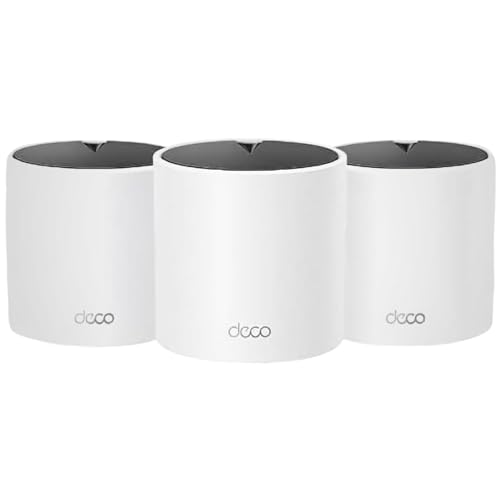
- Three-pack covers up to 5,600 square feet
- Supports wired Ethernet backhaul
- Wi-Fi 6 supports up to 120 devices
Best For: Everyday whole-home coverage with Ethernet cabling
Best Premium Value – TP-Link Deco 7 Pro BE63
For buyers seeking mesh wifi systems with dedicated backhaul capabilities, the TP-Link Deco 7 Pro BE63 combines tri-band Wi-Fi 7 with wired 10G networking. Its 2-pack is rated for up to 5,800 square feet and more than 200 devices, making it a strong fit for demanding connected homes.
Best For: Large homes that need high wireless capacity, multi-gig wired connections, and flexible backhaul options.
Pros:
- Tri-band Wi-Fi 7 supports high-speed streaming, gaming, and newer devices.
- Includes four 2.5G WAN/LAN ports and a USB 3.0 port.
- Supports wired and wireless backhaul between Deco units.
- Deco app, AI roaming, parental controls, and VPN support simplify management.
Cons:
- A separate modem is required.
- Backhaul requires at least two Deco units.
- Actual speeds and coverage vary with walls, distance, and network conditions.
The BE63 is a well-rounded choice when you want Wi-Fi 7 performance without giving up versatile wired expansion. Its dedicated wired-backhaul support is especially useful for homes with Ethernet already installed.
Best for Large Homes – NETGEAR Orbi 770 WiFi 7
The NETGEAR Orbi 770 is a three-piece option for shoppers comparing mesh wifi systems with dedicated backhaul features. Enhanced Backhaul works with its tri-band Wi-Fi 7 design, while the system covers up to 8,000 square feet and supports up to 100 devices.
Best For: Large or multi-level homes that need broad coverage and strong simultaneous-device performance.
Pros:
- Three-unit system covers up to 8,000 square feet.
- Tri-band Wi-Fi 7 and Enhanced Backhaul support busy networks.
- Up to 11 Gbps advertised wireless throughput and support for plans up to 2.5 Gbps.
- Orbi app offers guided setup and network management.
Cons:
- NETGEAR Armor requires a separate subscription after its trial.
- Actual coverage depends on layout, construction, and satellite placement.
- Made for use in the US only.
With the largest stated coverage area in this roundup, the Orbi 770 is a practical pick for sprawling homes. Its enhanced backhaul and tri-band design are suited to households where many devices need connectivity at once.
Best for Multi-Gig Internet – TP-Link Deco 7 Pro BE67
The three-pack TP-Link Deco 7 Pro BE67 stands out among mesh wifi systems with dedicated backhaul support because every unit includes 10G, 2.5G, and 1G WAN/LAN ports. It also pairs tri-band Wi-Fi 7 with a stated coverage area of up to 8,100 square feet.
Best For: Homes with 10 Gbps internet, wired Ethernet runs, and many Wi-Fi 7-capable devices.
Pros:
- Each unit includes 10G, 2.5G, and 1G WAN/LAN connectivity.
- Tri-band Wi-Fi 7 supports newer laptops, phones, consoles, and other devices.
- Three-pack is rated for up to 8,100 square feet and more than 200 devices.
- Supports high-capacity 10 Gbps wired backhaul and includes USB 3.0.
Cons:
- A modem must be purchased separately.
- Its highest advertised speeds require compatible client devices and network conditions.
- Premium features and multi-gig hardware may exceed the needs of smaller households.
The BE67 is the most compelling choice here for a multi-gig home network that can take advantage of 10G Ethernet. Its three-unit design and extensive port selection also make wired backhaul easier to deploy across larger spaces.
Best Budget-Friendly Wi-Fi 7 – NETGEAR Orbi 370 WiFi 7
The NETGEAR Orbi 370 offers a simpler entry point into mesh wifi systems with dedicated backhaul functionality. Its three-unit, dual-band Wi-Fi 7 setup covers up to 6,000 square feet, supports up to 70 devices, and uses Enhanced Backhaul to help distribute traffic.
Best For: Medium-to-large homes that want Wi-Fi 7 coverage and multi-gig Ethernet without moving to a tri-band system.
Pros:
- Three-pack provides up to 6,000 square feet of stated coverage.
- Enhanced Backhaul helps maintain performance across the mesh.
- Advertised speeds reach up to 5 Gbps, with support for plans up to 2.5 Gbps.
- Orbi app provides guided setup and device management.
Cons:
- Dual-band design has less band capacity than the tri-band systems listed here.
- NETGEAR Armor requires a separate subscription after its trial.
- Actual coverage depends on placement, construction, and home layout.
The Orbi 370 makes sense when you want Wi-Fi 7 and backhaul assistance at a more restrained specification level. It is best suited to homes that do not need the extra capacity or 10G ports offered by the higher-end alternatives.
Best 6E Upgrade – TP-Link Deco XE75
For shoppers seeking mesh wifi systems with dedicated backhaul, the TP-Link Deco XE75 stands out with a 6 GHz band that can work as a backhaul by default. Its tri-band Wi-Fi 6E design provides up to 7,200 square feet of coverage and supports up to 200 devices.
Best For: Large homes and households wanting Wi-Fi 6E performance with a dedicated 6 GHz backhaul option.
Pros:
- 6 GHz band can provide a stable wireless backhaul between nodes.
- Tri-band AXE5400 speeds reach up to 5,400 Mbps.
- Covers up to 7,200 square feet and supports up to 200 devices.
- Deco app offers guided setup, management, and AI-driven mesh optimization.
Cons:
- 6 GHz client access and backhaul use require choosing between network modes.
- Most internet providers still require a separate modem.
The XE75 is the most advanced option here for households ready to use Wi-Fi 6E. Its extra band is especially useful when you want wireless node-to-node communication without sacrificing as much client bandwidth.
Best Full-Speed Wi-Fi 6 – Linksys Velop MX8000
The Linksys Velop MX8000 is a tri-band Wi-Fi 6 mesh system designed to extend gigabit-class wireless coverage throughout a home, backyard, and outdoor smart-home areas. Its two-node system covers up to 5,400 square feet and supports more than 80 devices.
Best For: Homes that want broad tri-band Wi-Fi 6 coverage, app-based control, and room to expand the mesh.
Pros:
- Tri-band design is suited to maintaining strong mesh performance.
- Covers up to 5,400 square feet and supports 80-plus devices.
- Linksys app provides setup and remote network management.
- Includes automatic firmware updates, parental controls, and guest networks.
Cons:
- The supplied specifications do not explicitly confirm a dedicated wireless backhaul mode.
- Uses Wi-Fi 6 rather than the newer Wi-Fi 6E standard.
- The two-pack offers less stated coverage than the three-node TP-Link systems.
The MX8000 is a practical tri-band choice for general whole-home connectivity and device-heavy households. Consider it when coverage, straightforward management, and expansion are more important than having a specifically documented dedicated backhaul feature.
Best Wired Backhaul Value – TP-Link Deco X55
The TP-Link Deco X55 is a dual-band Wi-Fi 6 mesh system for shoppers who can connect nodes with Ethernet. Unlike wireless-only options, it explicitly supports wired Ethernet backhaul, while its three units cover up to 6,500 square feet and support up to 150 devices.
Best For: Homes with Ethernet cabling that want reliable mesh coverage and a wired dedicated backhaul.
Pros:
- Supports Ethernet backhaul for node-to-node connections.
- Three-unit system covers up to 6,500 square feet.
- Supports up to 150 connected devices.
- Each unit includes three Gigabit Ethernet ports and Deco app control.
Cons:
- Dual-band design does not provide a separate wireless backhaul band.
- Maximum combined wireless speed is AX3000, below the XE75 and Velop specifications.
- Ethernet backhaul requires suitable network cabling between nodes.
The Deco X55 is a strong fit for buyers who interpret dedicated backhaul as a wired connection. It gives you substantial coverage and multiple Gigabit ports, but wireless backhaul performance may be less flexible because this is a dual-band system.
Best Balanced Wi-Fi 7 Value – Deco 7 Dual-Band BE5000
The Deco 7 is a practical starting point for shoppers seeking mesh wifi systems with dedicated backhaul capabilities. Its Wi-Fi 7 and 2.5G Ethernet traffic balancing can support whole-home coverage, while its dual-band design keeps the feature set and setup relatively straightforward.
Best For: Larger homes with many connected devices, 4K or 8K streaming, and users who want Wi-Fi 7 without moving to a quad-band system.
Pros:
- Up to 6,600 square feet of stated coverage and support for more than 150 devices.
- Wi-Fi 7 performance with up to 4,324 Mbps on 5 GHz and 688 Mbps on 2.4 GHz.
- Supports Wi-Fi 7 and 2.5G Ethernet traffic balancing for a more stable mesh connection.
- Deco App setup, AI roaming, guest access, parental controls, and VPN server support.
Cons:
- Backhaul requires at least two Deco units.
- It is dual-band rather than quad-band, so wireless capacity is more limited than premium alternatives.
- A separate modem is required.
The Deco 7 is a strong middle ground when coverage and Wi-Fi 7 features matter more than maximum multi-band capacity. Its backhaul approach is flexible, but buyers should confirm that their home layout and Ethernet equipment can take advantage of the 2.5G connections.
Best Premium Multi-Gigabit Pick – Deco 7 Elite BE95
The Deco 7 Elite BE95 is the high-capacity choice among these mesh wifi systems with dedicated backhaul potential. Its quad-band Wi-Fi 7 platform, dual 10G connectivity, and support for more than 200 devices make it suited to demanding networks with fast wired and wireless clients.
Best For: Multi-gigabit households, advanced home offices, high-end gaming setups, and homes with many simultaneous connections.
Pros:
- Quad-band Wi-Fi 7 with stated combined speeds up to BE33000.
- Up to 7,800 square feet of coverage and support for more than 200 devices.
- Four Ethernet ports, including two 10G ports and two 2.5G ports.
- Includes Wi-Fi 7 features such as Multi-Link Operation, Multi-RUs, 4K-QAM, and 320 MHz channels.
Cons:
- Its advanced capabilities may be unnecessary for homes with slower internet service or lighter usage.
- It has a premium feature set that may require compatible multi-gigabit devices and service to realize its benefits.
- A modem is required for most internet service providers.
The BE95 stands out when wired backhaul, multi-gigabit networking, and wireless capacity are priorities. It is best considered an investment for a demanding network rather than a basic dead-zone solution.
Best Budget Wired-Backhaul Kit – Deco X15 AX1500 3-Pack
The Deco X15 3-pack is a sensible option for shoppers who want mesh wifi systems with dedicated backhaul support at a more approachable Wi-Fi 6 tier. Its three units provide broad coverage, and the included Gigabit Ethernet ports allow wired backhaul when cabling is available.
Best For: Medium-to-large homes that need dependable coverage, wired backhaul support, and straightforward Wi-Fi 6 performance for everyday devices.
Pros:
- Three-unit system covers up to 5,600 square feet.
- Supports wired Ethernet backhaul, with two Gigabit Ethernet ports on each unit.
- Wi-Fi 6 dual-band speeds are rated up to 1,201 Mbps on 5 GHz and 300 Mbps on 2.4 GHz.
- Supports up to 120 devices and includes AI roaming, app management, and basic security features.
Cons:
- Its AX1500 performance is below the Wi-Fi 7 systems in this roundup.
- Gigabit Ethernet limits wired backhaul and client connections compared with multi-gigabit models.
- The system uses dual-band dynamic backhaul rather than a separate dedicated wireless backhaul band.
The X15 makes the most sense when reliable coverage and Ethernet backhaul matter more than headline speeds. If you can connect the nodes by cable, it offers a practical way to reduce wireless mesh overhead while keeping setup simple.
How We Picked the Best Mesh Wifi Systems with Dedicated Backhaul
We focused on systems that provide a dedicated wireless backhaul band, or use higher-end tri-band, quad-band, or Wi-Fi 7 designs that can reserve capacity for node-to-node communication. We also considered advertised coverage, wireless standard, maximum throughput, wired port speeds, scalability, and the practical needs of modern homes.
Coverage figures are estimates and vary with walls, floor plans, interference, and client devices. A system’s maximum link rate is not the same as real-world internet speed, so we gave weight to design features that can improve consistency rather than headline numbers alone.
Quick Comparison
| Best For | Recommended Type | Why It Matters |
|---|---|---|
| Maximum performance | Wi-Fi 7 tri-band or quad-band | Higher capacity, wider channels, and improved multi-device performance |
| Multi-gig internet | Wi-Fi 7 with 10Gbps-class ports | Better long-term support for fast wired and wireless connections |
| Balanced upgrade | Wi-Fi 6E tri-band | Access to the less congested 6GHz band with broad device compatibility |
| Value and dependable coverage | Wi-Fi 6 dual-band or tri-band | Lower cost while still supporting modern streaming and smart-home use |
Key Buying Factors for Mesh Wi-Fi Systems with Dedicated Backhaul
Backhaul Design
A dedicated 5GHz or 6GHz backhaul can reduce competition between mesh nodes and connected devices. For the most demanding setups, look for tri-band or quad-band Wi-Fi 7 hardware. Ethernet backhaul is another strong option if your home is wired, often delivering the most predictable performance.
Wi-Fi Generation and Client Support
Wi-Fi 7 is the best fit for new premium networks and multi-gig plans, but Wi-Fi 6 and Wi-Fi 6E remain practical choices. Wi-Fi 6E adds 6GHz access, although compatible phones, laptops, and tablets are required to benefit from it.
Ports and Internet Speed
Check both the router and satellite ports. Gigabit ports can limit a multi-gig connection, while 2.5Gbps and 10Gbps ports provide more headroom for fast broadband, local file transfers, gaming PCs, and network storage.
Coverage and Expandability
Choose the number of nodes based on layout, not just square footage. Multiple smaller nodes can work better than one overly powerful unit in a home with thick walls or multiple floors. Confirm that additional units can be added to the same ecosystem.
Management and Security
Review whether essential controls require a subscription. Useful features include guest networking, parental controls, automatic firmware updates, device prioritization, WPA3 support, and clear app-based setup.
Who Should Buy Which Mesh Wifi Systems with Dedicated Backhaul?
Choose a premium Wi-Fi 7 tri-band or quad-band system if you have multi-gig internet, many simultaneous users, newer Wi-Fi 7 devices, or a large home where sustained performance matters. A Wi-Fi 7 system with faster Ethernet ports is the strongest long-term investment.
Wi-Fi 6E is a sensible middle ground for households with compatible 6GHz devices that want extra wireless capacity without moving to the highest-priced hardware. Wi-Fi 6 models are better for shoppers prioritizing affordability, reliable coverage, streaming, video calls, and everyday smart-home devices.
Finally, prioritize wired backhaul whenever you can run Ethernet between nodes. Otherwise, place mesh units in open areas roughly midway between the main router and weak-signal zones, rather than at the edge of coverage. That placement usually delivers a more reliable network than simply adding more nodes.