A mesh Wi-Fi system with PoE nodes can deliver more consistent coverage while giving you greater flexibility over where access points are installed. Power over Ethernet reduces cable clutter and can place nodes on ceilings, walls, or other locations that improve signal quality.
We selected 10 options spanning Wi-Fi 6, Wi-Fi 7, indoor and outdoor designs, standalone access points, and complete mesh kits. The right choice depends on your home size, network hardware, internet speed, installation plans, and management preferences.
Best 10 Mesh Wi Fi System with Poe Nodes Picks for 2026
Best PoE Mesh Kit

- Wi-Fi 6 dual-band speeds up to 3,000Mbps
- PoE+ or standard power options
- Up to 6,500 sq. ft. and 150 devices
Best For: Whole-home PoE mesh coverage
Best Wi-Fi 7 PoE Access Point

- Wi-Fi 7 speeds up to 5.0Gbps
- 2.5Gbps port and 802.3at PoE
- Omada mesh and centralized management
Best For: Managed PoE Wi-Fi 7 deployments
Best High-Speed Mesh System

- Tri-band Wi-Fi 7 performance
- Up to 8,100 sq. ft. and 200-plus devices
- 10Gbps, 2.5Gbps, and 1Gbps ports
Best For: Large homes with multi-gig internet
Best Budget PoE Access Point

- Wi-Fi 6 speeds up to 2,976Mbps
- PoE Plus, passive PoE, or DC power
- Omada mesh and cloud management
Best For: Affordable managed PoE expansion
Best Whole-Home Upgrade

- Covers up to 6,000 square feet
- Wi-Fi 7 speeds up to 5 Gbps
- Simple app setup and management
Best For: Large homes needing broad, fast wireless coverage
Best In-Wall PoE Node
Omada EAP615-Wall Access Point

- 802.3af/at PoE-powered uplink
- Three downstream Gigabit ports
- Omada-managed Wi-Fi 6 access point
Best For: Room-by-room office and hospitality deployments
Best Outdoor PoE Mesh Node
- IP66 weatherproof outdoor design
- Up to 15,000 square feet of coverage
- Supports PoE+ and Wi-Fi 7
Best For: Large patios, yards, and outdoor property coverage
Best Value PoE Mesh Node

- Wi-Fi 5 dual-band access point
- 802.3af or passive PoE support
- Omada mesh and centralized management
Best For: Affordable indoor managed Wi-Fi expansion
High-Capacity Wi-Fi 7 Node

- Tri-band Wi-Fi 7 access point
- 10G SFP+ and 2.5G PoE ports
- Designed for 300+ clients
Best For: Dense business and campus networks
Best Simple Pick

- IP65 weatherproof enclosure
- 802.3af/at and passive PoE support
- Omada mesh and roaming features
Best For: Outdoor managed Wi-Fi coverage
Best PoE Mesh Kit – TP-Link Deco X50-PoE 3-Pack
If you want a mesh wi fi system with poe nodes, the TP-Link Deco X50-PoE is a practical whole-home option. This three-pack supports PoE+ or standard power, includes two 2.5Gbps ports per unit, and is rated for coverage up to 6,500 square feet and as many as 150 devices.
Best For: Homes or small spaces needing ceiling-friendly PoE mesh coverage and multi-gig wired backhaul options.
Pros:
- Wi-Fi 6 speeds up to 3,000Mbps across dual bands.
- PoE+ or conventional power supports flexible placement.
- Two 2.5Gbps Ethernet ports per unit.
- Deco app, AI-driven roaming, and HomeShield features simplify management.
Cons:
- PoE+ switch is not included.
- A modem is required for most internet providers.
The X50-PoE is a strong fit when wired installation flexibility matters as much as wireless coverage. Its Wi-Fi 6 platform is less advanced than newer Wi-Fi 7 alternatives, but the included three-node design and PoE support make it especially practical for larger homes.
Best Wi-Fi 7 PoE Access Point – TP-Link Omada EAP720
The TP-Link Omada EAP720 is a single access point rather than a complete multi-node kit, but it suits buyers building a mesh wi fi system with poe nodes through Omada. Its Wi-Fi 7 radios, 2.5Gbps port, and support for 802.3at PoE make it a flexible choice for managed deployments.
Best For: Homes, offices, or small businesses that want a centrally managed Wi-Fi 7 network with PoE-powered access points.
Pros:
- Wi-Fi 7 dual-band performance rated up to 5.0Gbps.
- 2.5Gbps Ethernet port supports multi-gig networking.
- Supports 802.3at PoE and included DC power.
- Omada provides mesh, seamless roaming, VLAN, monitoring, and bandwidth features.
Cons:
- Sold as one access point, so additional nodes are needed for broader coverage.
- Its 1,500-square-foot stated coverage is smaller than the three-pack systems here.
The EAP720 makes the most sense for users who prefer a scalable, controller-managed network instead of a simple all-in-one home mesh kit. Its five-year warranty and remote-management options add appeal for business-style installations.
Best High-Speed Mesh System – TP-Link Deco 7 Pro BE67
For buyers prioritizing maximum throughput, the TP-Link Deco 7 Pro BE67 is a powerful three-pack mesh platform. It delivers tri-band Wi-Fi 7, supports up to 8,100 square feet and more than 200 devices, and includes 10Gbps, 2.5Gbps, and 1Gbps ports on each unit. It is not described as PoE-powered, so it may require separate power cabling when compared with dedicated PoE nodes.
Best For: Large homes with multi-gig internet, Wi-Fi 7 devices, and demanding streaming or gaming workloads.
Pros:
- Tri-band Wi-Fi 7 supports speeds up to 13,659Mbps across its bands.
- Three-node coverage is rated for up to 8,100 square feet and 200-plus devices.
- Each unit includes 10Gbps, 2.5Gbps, and 1Gbps WAN/LAN ports.
- Includes wired backhaul support, AI roaming, USB 3.0, and VPN features.
Cons:
- The supplied notes do not identify PoE powering for the nodes.
- A modem must be purchased separately.
The Deco 7 Pro is the performance leader in this group, especially for homes already using Wi-Fi 7 clients and internet service up to 10Gbps. Choose it over a PoE-focused system when throughput and port flexibility matter more than ceiling-oriented installation.
Best Budget PoE Access Point – TP-Link Omada EAP650
The TP-Link Omada EAP650 is a compact Wi-Fi 6 access point for expanding a mesh wi fi system with poe nodes. It supports 802.3at PoE Plus, passive PoE, or the included DC adapter, while Omada adds mesh, roaming, cloud management, and business-network controls.
Best For: Offices, classrooms, cafés, or homes that need an affordable, flexible PoE-capable access point.
Pros:
- Wi-Fi 6 dual-band speeds up to 2,976Mbps.
- Supports PoE Plus, passive PoE, and DC power.
- Omada enables mesh, seamless roaming, WPA3, load balancing, and cloud control.
- Includes a five-year warranty and mounting hardware.
Cons:
- Sold as a single access point rather than a complete mesh pack.
- Its wired port is limited to 1Gbps.
- Omada mesh and seamless roaming require an Omada SDN controller.
The EAP650 is a sensible entry point for PoE networking when Wi-Fi 6 performance is sufficient. It offers more deployment flexibility than a typical consumer router, but buyers should budget for additional nodes or controller hardware if they want a larger managed mesh.
Best Whole-Home Upgrade – Orbi 370 Series WiFi 7 Mesh
If you want a fast mesh Wi-Fi system with PoE nodes but do not specifically need PoE, the NETGEAR Orbi 370 Series is a strong whole-home option. Its three-unit Wi-Fi 7 system covers up to 6,000 square feet, supports plans up to 2.5 Gbps, and is designed for homes with many connected devices.
Best For: Large homes that prioritize broad coverage, Wi-Fi 7 performance, and simple app-based setup.
Pros:
- Up to 6,000 square feet of stated coverage with the three-pack
- Wi-Fi 7 speeds up to 5 Gbps with enhanced backhaul
- Supports up to 70 devices and works with cable or fiber internet equipment
- Includes WPA3/WPA2-PSK security features and automatic firmware updates
Cons:
- This system is not described as supporting Power over Ethernet for its satellites
- NETGEAR Armor requires a separate subscription after the 30-day trial
- Actual coverage and speeds vary with home construction, placement, devices, and internet plan
The Orbi 370 is best viewed as a high-performance residential mesh system rather than a true PoE-node solution. Choose it for easy, expansive wireless coverage; look elsewhere if powering remote nodes over Ethernet is essential.
Best In-Wall PoE Node – Omada EAP615-Wall Access Point
The TP-Link Omada EAP615-Wall is a practical choice when a mesh Wi-Fi system with PoE nodes needs discreet, room-by-room deployment. This Wi-Fi 6 wall-plate access point uses 802.3af/at PoE, adds three downstream Gigabit ports, and can be centrally managed through Omada.
Best For: Offices, hotel rooms, and multi-room installations that need wired PoE-powered access points and centralized control.
Pros:
- PoE-powered uplink supports 802.3af/at deployment
- Three downlink Gigabit Ethernet ports, including PoE pass-through on one port
- Wi-Fi 6 dual-band speeds up to 1,800 Mbps
- Supports Omada SDN, cloud access, roaming, mesh, and WPA3
Cons:
- Coverage is listed at approximately 538 square feet per unit
- Requires compatible network infrastructure for PoE and centralized Omada management
- It is an access point rather than a complete multi-node kit
For installations where Ethernet cabling is already available, the EAP615-Wall offers a cleaner and more scalable approach than conventional plug-in mesh satellites. It is especially compelling for business and hospitality deployments, though building a complete network requires additional Omada equipment.
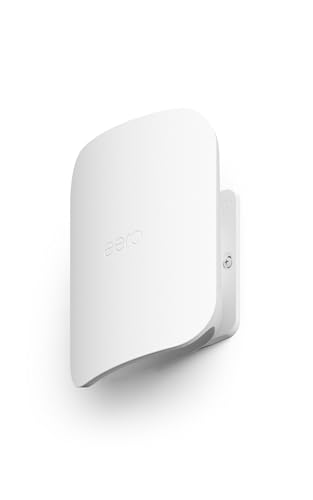
Best Outdoor PoE Mesh Node – eero Outdoor 7
The Amazon eero Outdoor 7 extends a mesh Wi-Fi system with PoE nodes into patios, yards, and other exposed areas. It offers Wi-Fi 7, up to 15,000 square feet of outdoor coverage, IP66 weather protection, and support for AC or PoE+ power, although the AC power adapter is not included.
Best For: Large outdoor spaces that need weather-resistant mesh coverage for many connected devices.
Pros:
- IP66-rated design protects against dust, rain, and snow
- Outdoor coverage is rated up to 15,000 square feet and 100-plus devices
- Supports Wi-Fi 7 speeds up to 2.1 Gbps
- Can use PoE+ or support a point-to-point wireless bridge up to 1,000 feet with clear line of sight
Cons:
- AC power adapter is not included
- PoE deployment requires compatible PoE+ infrastructure
- The 1,000-foot bridge distance requires clear line of sight between two units
The eero Outdoor 7 is the most purpose-built option here for extending mesh coverage beyond the walls of a home. Its weatherproof enclosure and PoE+ support make it well suited to outdoor installations, while the eero app simplifies setup and ongoing management.
Best Value PoE Mesh Node – Omada EAP225
The TP-Link Omada EAP225 is a practical starting point for a mesh wi fi system with poe nodes, combining Wi-Fi 5 dual-band coverage with flexible PoE options. It can run from an 802.3af PoE switch or the included PoE adapter and supports Omada-based management.
Best For: Homes and small businesses that want an affordable, centrally managed indoor access point with mesh expansion options.
Pros:
- Supports both 802.3af and passive PoE, with an injector included.
- Omada SDN provides centralized app and cloud management.
- Supports mesh networking, seamless roaming, MU-MIMO, and gigabit Ethernet.
Cons:
- Wi-Fi 5 is less advanced than newer Wi-Fi 6 and Wi-Fi 7 hardware.
- Indoor coverage only; outdoor deployment requires a different model.
The EAP225 makes sense when dependable PoE deployment and Omada compatibility matter more than the latest wireless standard. It is a flexible, budget-conscious node for expanding an existing managed network.
High-Capacity Wi-Fi 7 Node – Cudy AP11000
The Cudy AP11000 is a high-performance choice for a mesh wi fi system with poe nodes, offering tri-band Wi-Fi 7, 2.5G PoE connectivity, and a 10G SFP+ uplink. Its enterprise-oriented features target busy networks with many simultaneous clients.
Best For: Campuses, offices, and demanding indoor deployments that need high client capacity, multi-gigabit backhaul, and centralized provisioning.
Pros:
- Tri-band Wi-Fi 7 with 320 MHz channels and support for 300+ clients.
- 10G SFP+ and 2.5G RJ45 connectivity support fast wired backhaul.
- Includes band steering, zero-touch provisioning, and WPA3 Enterprise with RADIUS.
Cons:
- No power adapter is included; use an existing compatible PoE switch or power setup.
- Its advanced capabilities may be excessive for smaller home networks.
The AP11000 is the strongest performance-oriented option here, particularly where fiber backhaul and dense client loads justify the investment. Plan the power and network infrastructure in advance because the adapter is not included.
Best Simple Pick – Omada EAP225-Outdoor
The TP-Link Omada EAP225-Outdoor extends a mesh wi fi system with poe nodes beyond indoor spaces. It supports 802.3af/at and passive PoE, includes a power adapter, and uses an IP65 enclosure for weather-resistant outdoor deployment.
Best For: Patios, gardens, courtyards, outdoor work areas, and other locations needing managed wireless coverage outside the main building.
Pros:
- IP65 weatherproof construction supports outdoor installation.
- Supports 802.3af/at and passive PoE for flexible deployment.
- Offers Omada management plus mesh, seamless roaming, band steering, and beamforming.
Cons:
- Uses older Wi-Fi 5 technology.
- Its Ethernet port is listed at 10/100 Mbps, limiting wired throughput.
Choose the EAP225-Outdoor when weather resistance and flexible placement are the priorities. It is a sensible complement to an Omada network, though its Wi-Fi 5 platform and 10/100 Ethernet port make it less suited to high-throughput applications.
How We Picked the Best Mesh Wi Fi System with Poe Nodes
We compared these systems and access points by wireless generation, stated coverage, Ethernet capacity, PoE support, mesh compatibility, installation flexibility, and long-term expandability. We also considered whether each option is best suited to a typical home, a larger property, an office, or outdoor coverage.
Because the lineup includes both complete mesh kits and managed access points, we evaluated practical deployment rather than treating every product as a direct substitute. A standalone Omada or Cudy node may require a gateway, controller, or additional access points, while a three-pack mesh system is generally simpler to configure.
Quick Comparison
- Best for straightforward whole-home setup: A three-node Deco, Orbi, or eero system.
- Best for wired ceiling or wall installation: PoE-capable Deco, Omada, or Cudy access points.
- Best for advanced network management: Omada-compatible access points with a suitable controller or gateway.
- Best for outdoor coverage: Weather-resistant outdoor access points or an outdoor-rated eero PoE model.
- Best for high-speed wired backhaul: Wi-Fi 7 models with 2.5Gbps, 10Gbps, or 10G SFP+ connectivity.
Key Buying Factors for a Mesh Wi-Fi System with PoE Nodes
PoE Standard and Power Equipment
Check whether the node uses 802.3af, 802.3at, or another power requirement, and confirm that your switch can provide enough wattage. Some products include a PoE injector or power adapter; others expect compatible network equipment.
Wired Backhaul and Ethernet Speed
PoE does not automatically mean fast networking. Gigabit ports are sufficient for many homes, but 2.5Gbps or faster ports are more appropriate for multi-gig internet, local storage, demanding workstations, and Wi-Fi 7 clients.
Wireless Generation and Capacity
Wi-Fi 6 remains a strong value for everyday streaming and smart-home use. Wi-Fi 7 can provide higher throughput and improved handling of busy networks, but it is most worthwhile when your devices and wired infrastructure can take advantage of it.
Coverage, Placement, and Management
Use coverage claims as estimates, not guarantees. Walls, floors, interference, and client devices affect results. Also decide whether you prefer a consumer app with simple setup or a managed platform offering VLANs, multiple SSIDs, monitoring, and centralized controls.
Who Should Buy Which Mesh Wi Fi System with Poe Nodes?
Choose a three-pack consumer mesh system if you want quick setup, broad coverage, and minimal network administration. Choose Omada if you are building a more structured home, small-business, or multi-access-point network and want centralized management. Choose a wall-plate model for bedrooms, offices, hotels, or rooms where a discreet wired access point is useful.
Choose an outdoor model for patios, yards, workshops, or other exposed areas, but verify weather protection and mounting requirements. Choose Wi-Fi 7 with multi-gig ports if you already have fast wired networking or plan to upgrade soon. Before buying, map likely node locations, confirm PoE compatibility, and prioritize wired backhaul whenever possible.