A USB hub with display output can turn a laptop’s limited port selection into a more capable workstation, adding HDMI or USB-C video alongside charging and data connectivity.
We selected 10 options for different setups, from portable single-monitor adapters to full docking stations designed for dual displays, peripherals, and everyday desk use.
Best 10 USB Hub with Display Output Picks for 2026
Best High-Speed 6-in-1 Hub

- 4K@60Hz HDMI output
- Four 10Gbps USB ports
- Up to 85W pass-through charging
Best For: Fast storage and single-display setups
Portable 4K Workstation Hub

- 4K HDMI output at 30Hz
- Up to 90W pass-through charging
- 10Gbps USB-A plus two USB 2.0 ports
Best For: Mobile workstations using one external display
Dual USB-C Display Specialist
Vicfluxion Dual 4K Video Adapter

- Two USB-C video outputs
- Up to 4K at 60Hz
- 5Gbps USB 3.0 and up to 90W host charging
Best For: Dual USB-C monitors, portable displays, or AR glasses
Everyday HDMI Expansion

- 4K HDMI output at 30Hz
- Two USB-A and one USB-C 5Gbps data ports
- Up to 85W pass-through charging
Best For: One external HDMI monitor and everyday peripherals
Best Dual-Screen Hub
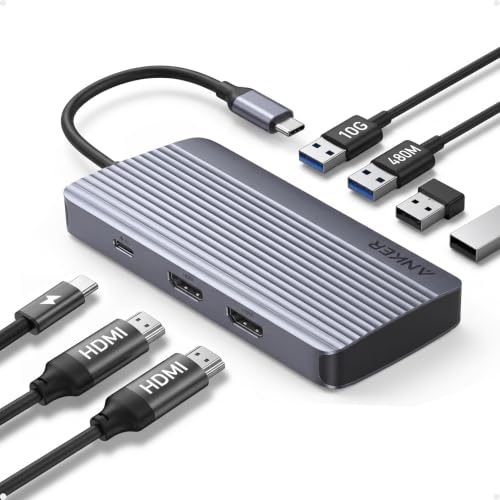
- Two displays at 1080p@60Hz
- 10Gbps data transfer
- 85W laptop charging output
Best For: Windows multitasking with two 1080p monitors
Best Full-Featured Dock
LIONWEI 13-in-1 Triple-Display Dock

- Triple-display support on Windows
- Dual HDMI plus DisplayPort
- Ethernet, audio, and eight USB ports
Best For: Windows workstations needing many ports and displays
Best Compact 4K Hub – UGREEN Revodok 4K@60Hz
If you need a compact USB hub with display output, the UGREEN Revodok adds 4K@60Hz video through USB-C while also providing four 10Gbps USB ports. Its integrated braided cable and aluminum shell make it well suited to mobile workstations.
Best For: Laptop users who want one-cable 4K display connectivity, fast peripherals, and up to 85W laptop charging.
Pros:
- Supports 4K@60Hz output to a monitor, projector, or AR glasses.
- Two USB-A and two USB-C Gen 2 ports support 10Gbps transfers.
- 100W PD pass-through can deliver up to 85W to the laptop.
- Integrated 30 cm braided cable and aluminum housing suit travel.
Cons:
- Video output requires a compatible USB-C host connection.
- It offers fewer total expansion options than larger docking stations.
This is a strong choice when display output and fast USB connectivity matter more than Ethernet, card readers, or multiple monitor support.
Best Multi-Monitor Dock – Selore USB-C Triple-Display Station
For a Windows setup that needs several screens, this Selore is a versatile USB hub with display output featuring dual HDMI, DisplayPort, and VGA. It also adds Gigabit Ethernet, USB ports, and 100W PD input in a single aluminum dock.
Best For: Windows users building a multi-monitor desk with up to three independent 4K displays.
Pros:
- Supports up to three independent 4K displays on Windows through two HDMI ports and DisplayPort.
- DisplayPort can drive one 8K@30Hz display, while VGA supports 1080p@60Hz.
- Includes Gigabit Ethernet, 5Gbps USB ports, and up to 85W laptop power delivery.
- Dedicated monitor-control button switches display modes or wakes connected monitors.
Cons:
- On macOS, connected external displays mirror rather than extend independently.
- Host devices must support DisplayPort Alt Mode through USB-C or Thunderbolt.
- Its larger port selection may be more than needed for a simple setup.
This dock is particularly compelling for Windows productivity, trading, coding, or design setups where multiple independent displays and wired networking are priorities.
Best High-Speed 6-in-1 Hub – UGREEN Revodok Pro 4K HDMI
The UGREEN Revodok Pro is a focused USB hub with display output for users who want 4K@60Hz HDMI alongside fast, flexible storage and accessory connectivity. Four USB ports support 10Gbps transfers, and USB-C PD adds laptop charging.
Best For: Creators and power users who need fast USB-A and USB-C file transfers with a single 4K monitor.
Pros:
- Provides 4K@60Hz HDMI output for monitors, TVs, and projectors.
- Two USB-C and two USB-A ports all support up to 10Gbps data speeds.
- 100W PD input provides up to 85W pass-through laptop charging.
- Aluminum-alloy construction and safety features support extended use.
Cons:
- It supports one HDMI display rather than a multi-monitor setup.
- No Ethernet, VGA, or memory-card reader is included.
- Full video functionality depends on a compatible host USB-C port.
Choose this model when fast simultaneous data access is the main requirement and one 4K HDMI display is enough for your desk or travel kit.
Best Dual-Display Hub for Windows – Anker Nano 8-in-1 Dock
The Anker Nano is an 8-in-1 USB hub with display output designed for Windows laptops. It combines two HDMI outputs, 10Gbps USB-A and USB-C data ports, SD/TF card slots, and up to 85W laptop charging.
Best For: Windows users who want dual 4K@60Hz monitors plus fast USB ports and memory-card access.
Pros:
- Can drive two 4K@60Hz external displays on compatible Windows systems.
- Provides three 10Gbps data ports across USB-C and USB-A connections.
- Includes SD and TF card slots with transfer speeds up to 104MB/s.
- 100W PD input supports up to 85W pass-through charging.
Cons:
- On macOS, both external displays mirror the same content.
- It is not compatible with Linux.
- Charger and cable needed for full 85W charging are not included.
This is a well-rounded Windows-focused dock for photographers, editors, and multitaskers who need dual-screen output without giving up high-speed peripherals or card readers.
Portable 4K Workstation Hub – BENFEI 5-in-1 USB-C Hub
If you need a USB hub with display output for a laptop or tablet, the BENFEI 5-in-1 combines a 4K HDMI connection with charging and three USB-A ports. Its compact aluminum body and soft, flexible 20 cm silicone cable make it practical for mobile workstations.
Best For: Users who want a portable hub for one external 4K display, fast USB-A file transfers, and everyday peripherals.
Pros:
- HDMI supports resolutions up to 4K at 30Hz.
- USB-A 3.2 supports data speeds up to 10Gbps, while two USB-A 2.0 ports suit keyboards and mice.
- Supports up to 90W USB-C pass-through charging and includes an 18-month warranty.
- Soft, knot-free silicone cable is designed for frequent carrying.
Cons:
- HDMI is limited to 4K at 30Hz.
- The USB-C port is for pass-through charging only, with no data or video function.
- Video output requires a host USB-C port that supports video.
This is a well-rounded choice when one external screen and several USB-A accessories are more important than high-refresh-rate video or additional USB-C data connectivity.
Dual USB-C Display Specialist – Vicfluxion Dual 4K Video Adapter
The Vicfluxion adapter is a specialized USB hub with display output for compatible USB-C monitors, AR glasses, and portable screens. It provides two USB-C video outputs, USB 3.0 data, and host charging in a compact aluminum enclosure.
Best For: Users connecting two compatible USB-C displays or AR glasses while retaining 5Gbps data and up to 90W host charging.
Pros:
- Offers two USB-C video outputs for dual-display setups.
- Supports up to 4K at 60Hz, depending on the host, cables, and displays.
- USB 3.0 provides 5Gbps data transfer, and the PD input provides up to 90W to the host.
- Plug-and-play design requires no drivers.
Cons:
- The two USB-C video ports do not support charging or data transfer.
- The USB-C PD port is for charging only and does not carry video or data.
- macOS supports mirror mode only, and compatible cables plus DisplayPort Alt Mode are required.
This adapter stands out for USB-C display ecosystems rather than conventional HDMI setups. Confirm that your computer, cables, and displays support the required video standards before buying.
Everyday HDMI Expansion – Anker 332 5-in-1 USB-C Hub
The Anker 332 is a straightforward USB hub with display output for adding one external HDMI monitor to a compatible laptop. It also supplies two USB-A ports, a USB-C data port, and up to 85W pass-through charging in a compact design.
Best For: Laptop users who need one 4K HDMI display plus common USB peripherals and charging.
Pros:
- HDMI supports up to 4K at 30Hz for streaming or mirroring.
- Two USB-A ports and one USB-C data port support transfers up to 5Gbps.
- Provides up to 85W pass-through charging while the hub is in use.
- Supports USB-C, USB4, and Thunderbolt connections on compatible systems.
Cons:
- USB-C ports do not support video output; display connection is through HDMI only.
- Pass-through charging requires a separate charger, which is not included.
- Not compatible with Linux.
The Anker 332 is a practical single-display hub for mainstream Windows, ChromeOS, and compatible MacBook setups. Its 4K output is useful for office and media use, though it is not aimed at high-refresh-rate display work.
Best Compact USB-C Pick – Acer 10Gbps 4-in-1 Hub
If you need a compact usb hub with display output for a modern laptop, the Acer 4-in-1 hub focuses on USB-C connectivity, fast transfers, 4K video, and host charging. It is a good fit for users whose computer has a full-featured USB-C port with DP Alt Mode, USB4, or Thunderbolt support.
Best For: Laptop users who want one 4K display connection, two fast USB-C data ports, and up to 100W host charging in a compact hub.
Pros:
- USB-C display output supports up to 4K at 60Hz.
- Two USB-C data ports support transfers up to 10Gbps.
- Supports up to 100W input and 90W output for host charging.
- Aluminum enclosure and portable, plug-and-play design.
Cons:
- Video output requires a compatible full-featured USB-C, USB4, or Thunderbolt port.
- The PD USB-C port supports charging only, not data or video.
- Charger and cable are not included, and full 10Gbps performance requires compatible equipment.
This Acer hub is a focused choice rather than a full desktop dock. Its all-USB-C layout makes sense for newer laptops and tablets, but buyers should confirm host-port compatibility before purchasing.
Best Dual-Screen Hub – Anker 7-in-1 Dual-Display Hub
The Anker 7-in-1 is a practical usb hub with display output for multitaskers who want to connect two external screens. It supports 1080p at 60Hz on both displays, along with 10Gbps data transfer and up to 85W output from a 100W power input.
Best For: Windows users and compatible USB-C laptop owners who want dual-monitor productivity without adding a separate docking station.
Pros:
- Supports two external displays at up to 1080p and 60Hz.
- 10Gbps data transfer helps move large files quickly.
- 100W input and 85W output support laptop charging.
- Compatible with USB-C, USB4, and Thunderbolt connections.
Cons:
- No Ethernet port is included.
- On macOS, both external displays show the same image.
- Not compatible with Linux, and the wall charger is not included.
This Anker hub is strongest for Windows-based dual-screen setups where 1080p resolution is sufficient. Its macOS mirroring limitation and lack of Ethernet make it less suitable as a universal workstation dock.
Best Full-Featured Dock – LIONWEI 13-in-1 Triple-Display Dock
For shoppers seeking a usb hub with display output that also replaces several desktop accessories, the LIONWEI 13-in-1 docking station offers HDMI, DisplayPort, USB ports, Ethernet, and audio connections. It supports up to three displays on Windows systems, with 4K at 60Hz available through its HDMI and DisplayPort outputs when the source supports DP 1.4.
Best For: Windows laptop users building a broad workstation setup with multiple displays, wired networking, USB peripherals, audio, and laptop charging.
Pros:
- Provides dual HDMI and DisplayPort outputs for up to three displays on Windows.
- Offers 4K at 60Hz through supported HDMI and DisplayPort connections.
- Includes Gigabit Ethernet, 3.5mm audio, and eight USB ports.
- Supports 100W PD input, with up to 87W available for laptop charging.
Cons:
- macOS can extend only one monitor, though it supports 4K at 60Hz.
- Display capabilities depend on the computer’s source and operating system.
- The dock reserves 13W of power for its own operation.
This LIONWEI dock delivers the widest port selection of the three options and is especially compelling for Windows workstations. Mac users should choose it only if a single extended external display meets their needs.
How We Picked the Best USB Hub with Display Output
We focused on the features that most affect real-world laptop connectivity: display resolution and refresh-rate support, the number and type of ports, power delivery, data-transfer speeds, portability, and compatibility. The selection includes compact hubs for travel, multiport adapters for home offices, and larger docking stations for users who regularly connect multiple monitors.
Claims such as 4K at 60Hz, 10Gbps data, dual-monitor support, or 100W power delivery depend on the host laptop, operating system, cables, charger, and display setup. Always confirm the manufacturer’s compatibility notes before buying.
Quick Comparison
- Best for a single 4K display: Choose a compact hub with HDMI or USB-C display output and the ports you use most.
- Best for dual monitors: Look for a dock specifically designed for two displays, and verify whether your laptop supports the required MST, DisplayLink, or alternate-mode setup.
- Best for fast file transfers: Prioritize 10Gbps USB ports rather than hubs limited to basic USB 2.0 speeds.
- Best for desk setups: A larger dock with power delivery, Ethernet, multiple USB ports, and audio can replace several separate adapters.
Key Buying Factors for a USB Hub with Display Output
Display Standards and Monitor Count
Check the exact output type, resolution, and refresh rate. HDMI 2.0-class connections commonly support 4K at 60Hz, but the laptop’s USB-C port must support video output. A second monitor may require a compatible graphics mode or DisplayLink software, particularly on computers that do not support native multi-stream transport.
Power Delivery
Power delivery lets the hub charge a connected laptop while accessories are plugged in. A 100W rating does not always mean the laptop receives 100W, because the hub itself may reserve some power. Match the dock with a charger capable of supplying enough wattage for your computer.
Ports and Performance
Count the ports you genuinely need: USB-A for older accessories, USB-C for newer devices, Ethernet for stable networking, SD or microSD for media cards, and a headphone jack for audio. If you move large files, select 10Gbps ports and use suitably rated cables and storage devices.
Compatibility and Portability
Confirm support for your operating system, laptop model, monitor arrangement, and preferred resolution. Compact hubs are easier to carry, while heavier docking stations usually provide more connections and better cable management. Consider whether the attached cable is long and flexible enough for your laptop’s port placement.
Who Should Buy Which USB Hub with Display Output?
Frequent travelers should choose a small single-display hub with essential USB ports and charging passthrough. Home-office users will generally benefit from a 4K-capable dock with Ethernet, several USB ports, and reliable power delivery. Dual-monitor users should select one of the dedicated multi-display docks and carefully verify their laptop’s operating-system and graphics support. Creators and power users should prioritize 10Gbps connectivity, card readers, high-wattage charging, and the display refresh rate they actually use. For a straightforward setup, match the hub to your laptop’s available USB-C capabilities first; extra ports cannot compensate for a host connection that lacks video output.