Choosing among SDI converters for gaming consoles can be confusing because the category includes true SDI video converters, HDMI capture devices, and retro-console adapters with very different connections and capabilities.
This roundup separates those use cases so you can match the converter to your console, display, capture workflow, resolution, and audio setup without paying for features you cannot use.
Best 10 Sdi Converters for Gaming Consoles Picks for 2026
Professional Bidirectional Pick
Blackmagic Design 12G Micro Converter

- Bidirectional SDI and HDMI conversion
- Compact 0.19 kg cable-mount design
- Backed by a 2-year warranty
Best For: Compact SDI/HDMI signal-conversion setups
Multi-Console Switching Pick
Y.D.F HDMI and AV 2-in-1 Switcher

- Three HDMI 2.0 inputs
- Two RCA-to-HDMI conversion paths
- Supports 4:3 and 16:9 switching
Best For: Mixed modern and retro console collections
Compact SDI/HDMI Pick
Blackmagic Micro Converter with PSU

- Supports SD, HD, and 3G-SDI
- Bidirectional HDMI and SDI connections
- Includes universal 5V power supply
Best For: Portable SDI/HDMI conversion with included power
Retro Console Hub Pick
RuiPuo 4-Port AV-to-HDMI Switcher

- Four RCA inputs to one HDMI output
- Supports 4:3 and 16:9 switching
- Includes IR remote and 5V charger
Best For: Multi-console retro gaming setups
Best for Streaming
SDI Game Capture Card with Loopout

- 1080p60 USB 3.0 capture
- SDI and HDMI input with loopout
- Microphone and line-audio mixing
Best For: Console gameplay recording and livestreaming
Best for Retro Consoles
N64 and SNES S-Video to HDMI Adapter

- Supports N64, GameCube, SFC, and SNES
- Cleaner S-Video output than composite
- No external power needed in normal use
Best For: Connecting classic Nintendo consoles to HDMI displays
Best for Long SDI Runs
3G-SDI to HDMI Converter with Loopout
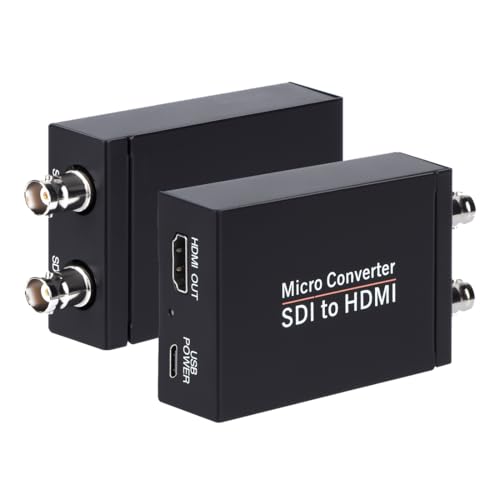
- Supports 3G, HD, and SD-SDI
- HDMI output plus SDI loopout
- Long-run support and audio de-embedding
Best For: SDI-based gaming and monitoring installations
Retro Console Pick
3-in-1 GameCube, N64 & SNES HDMI Adapter

- Converts S-Video from three retro consoles to HDMI
- 4:3/16:9 switch with low-latency operation
- Plug-and-play design with one-year warranty
Best For: GameCube, N64, and SNES owners using modern HDMI displays
SDI Display Adapter
SDI to HDMI Converter with Loop Out

- Accepts SD, HD, and 3G-SDI sources
- Outputs synchronized video and audio up to 1080p
- Includes SDI loop-out and metal housing
Best For: SDI-based setups feeding an HDMI display
HDMI-to-SDI Routing Pick

- Converts HDMI input to 3G-SDI or HD-SDI
- Sends one source to two SDI outputs
- Supports up to 1080p at 60Hz
Best For: Routing an HDMI console source into SDI displays or equipment
Professional Bidirectional Pick – Blackmagic Design 12G Micro Converter
For buyers comparing SDI converters for gaming consoles, this Blackmagic Design micro converter is a compact bidirectional option with SDI and HDMI connectivity. It is best suited to setups that need flexible signal conversion in a small, cable-mounted unit.
Best For: Compact SDI/HDMI conversion setups using compatible gaming, video, or camera equipment.
Pros:
- Supports bidirectional SDI and HDMI conversion.
- Compact 0.19 kg design with a stainless-steel material listing.
- Includes a 2-year warranty.
Cons:
- The supplied notes identify camera compatibility rather than specific gaming-console models.
- Only one channel is listed.
This is a strong choice when compact size and two-way SDI/HDMI flexibility matter more than console-specific features. Confirm your console, display, and signal standards before buying.
Multi-Console Switching Pick – Y.D.F HDMI and AV 2-in-1 Switcher
Among SDI converters for gaming consoles, this Y.D.F unit is better understood as a versatile HDMI and composite AV solution. It combines three HDMI 2.0 inputs with two RCA-to-HDMI paths, making it useful for modern and retro console collections.
Best For: Gamers switching between HDMI consoles and older RCA-based systems through one HDMI output.
Pros:
- Provides three HDMI 2.0 inputs with support listed up to 4K at 60Hz and 18Gbps.
- Supports two-way AV-to-HDMI conversion for numerous retro consoles.
- Offers 4:3/16:9 switching, one-key operation, and a durable aluminum build.
Cons:
- This is not an SDI converter; it uses HDMI and RCA connections.
- 4K at 60Hz requires total input and output HDMI cable length within 10 feet.
- Requires USB power.
If your priority is consolidating several current and legacy consoles, this combination switcher and converter is more practical than a dedicated SDI unit. It is especially appealing for mixed HDMI and composite setups.
Compact SDI/HDMI Pick – Blackmagic Micro Converter with PSU
For shoppers seeking SDI converters for gaming consoles and other video equipment, this Blackmagic Design model offers bidirectional SDI and HDMI connections in a portable metal enclosure. Its included universal power supply simplifies setup across locations.
Best For: Portable SD, HD, or 3G-SDI and HDMI conversion where an included power adapter is useful.
Pros:
- Accepts one SD, HD, or 3G-SDI input.
- SDI output automatically matches the SD, HD, or 3G-SDI HDMI input.
- Includes a 5V universal power supply with international socket adapters.
Cons:
- The supplied compatibility information lists projectors, not specific gaming consoles.
- Only one SDI input is listed.
- Its 5V power requirement must be accommodated in the setup.
This converter makes sense for users who need a small, portable bridge between SDI and HDMI equipment and want the power supply included. Verify the console output and display input standards before purchasing.
Retro Console Hub Pick – RuiPuo 4-Port AV-to-HDMI Switcher
For retro-focused buyers comparing SDI converters for gaming consoles, this RuiPuo device provides four RCA inputs and one HDMI output instead of SDI conversion. It lets you keep multiple composite systems connected and switch between them with an IR remote.
Best For: Retro console owners using Wii, N64, SNES, PlayStation, Xbox, or similar RCA-based devices.
Pros:
- Connects four RCA sources simultaneously to reduce cable swapping.
- Supports 16:9 and 4:3 output switching with quick selection.
- Compatible with multiple TV-format standards and includes a 5V1A charger.
Cons:
- This product is an AV-to-HDMI switcher, not an SDI converter.
- 4K is not supported.
- Requires an external DC power supply.
This is a convenient choice for a multi-console retro setup feeding an HDMI television or projector. Choose another product if your workflow specifically requires SDI inputs or outputs.
Best for Streaming – SDI Game Capture Card with Loopout
For gaming setups that need capture and streaming support, this SDI converter for gaming consoles combines SDI or HDMI input with USB 3.0 capture at up to 1080p60. It also includes SDI loopout, input switching, and audio mixing for microphone commentary.
Best For: Xbox One and PlayStation users who want to record or livestream gameplay through a Windows, Linux, or Mac computer.
Pros:
- Captures up to 1080p at 60fps through USB 3.0.
- Accepts SDI or HDMI input and provides SDI loopout.
- Supports microphone and line-audio mixing for voice commentary.
- Works without additional drivers on Windows, Linux, and macOS.
Cons:
- Designed around capture and streaming rather than standalone HDMI display conversion.
- Its maximum listed capture resolution is 1080p60.
Choose this model when low-latency capture, console streaming, and live voice mixing matter more than advanced display scaling. The included SDI cable and USB cable help get a compatible setup running quickly.
Best for Retro Consoles – N64 and SNES S-Video to HDMI Adapter
This compact option is aimed at classic-console owners seeking a cleaner connection to a modern HDMI display. It converts the S-Video signal from the AV Multi-Out port of compatible Nintendo systems without requiring an external power adapter in normal use.
Best For: N64, GameCube, SFC, and SNES players connecting original consoles to an HDMI television, monitor, or projector.
Pros:
- Uses S-Video for a cleaner image than RCA composite.
- Supports N64, GameCube, SFC, and SNES consoles.
- Plug-and-play operation with no normal external power requirement.
- Includes a 1.5-meter HDMI cable.
Cons:
- Does not upscale the original console resolution.
- It is designed for the listed Nintendo consoles, not general HDMI or SDI conversion.
- Micro USB backup power cable is not included.
For retro gaming, this is a straightforward alternative to composite-to-HDMI adapters. It prioritizes a cleaner S-Video path and simple installation, but it will not add HD upscaling to the original output.
Best for Long SDI Runs – 3G-SDI to HDMI Converter with Loopout
For setups using professional SDI cabling, this unidirectional SDI converter changes 3G-SDI, HD-SDI, or SD-SDI into HDMI while retaining an SDI loopout. Auto format detection and support for embedded digital audio make it useful when a console or production chain already relies on SDI equipment.
Best For: Gaming or broadcast environments that need SDI distribution to an HDMI monitor, television, or projector over longer cable runs.
Pros:
- Supports 3G-SDI, HD-SDI, and SD-SDI with automatic format detection.
- Provides both HDMI output and SDI loopout.
- Supports listed SDI runs up to 300 feet for 3G-SDI and 500 feet for HD-SDI.
- De-embeds up to eight channels of 48kHz digital audio.
Cons:
- It is not bidirectional and cannot convert HDMI to SDI.
- Requires the included power adapter for operation.
- Its listed formats and resolutions may not suit newer 4K gaming output.
This model is a better fit for SDI-based gaming installations than casual console setups. Confirm that your source provides a supported SDI format and that HDMI output at the original resolution meets your display requirements.
Retro Console Pick – 3-in-1 GameCube, N64 & SNES HDMI Adapter
For shoppers comparing sdi converters for gaming consoles, this 3-in-1 adapter is a retro-focused option for converting GameCube, N64, and SNES S-Video signals to HDMI. It includes 4:3 and 16:9 switching, plug-and-play cables, and a detachable design for flexible HDMI cable use.
Best For: Connecting compatible GameCube, N64, or SNES consoles to modern HDMI displays.
Pros:
- Supports three listed retro console platforms in one adapter.
- Upscales analog S-Video signals to digital HDMI.
- Offers selectable 4:3 or 16:9 output and low-latency operation.
- Includes a one-year warranty and prepared plug-and-play cables.
Cons:
- Designed for GameCube, N64, and SNES S-Video sources rather than general SDI equipment.
- Its output connection is HDMI, so an HDMI-compatible display is required.
This is the most directly gaming-oriented choice in the group, especially for retro-console setups. Verify your console’s signal connection and display requirements before buying.
SDI Display Adapter – SDI to HDMI Converter with Loop Out
Among sdi converters for gaming consoles, this model is primarily a professional video converter rather than a console-specific accessory. It accepts SD-SDI, HD-SDI, or 3G-SDI and sends synchronized audio and video to an HDMI television, monitor, or projector, with support up to 1080p.
Best For: Displaying an SDI source on an HDMI monitor, television, or projector.
Pros:
- Supports SD-SDI, HD-SDI, and 3G-SDI input formats.
- Provides up to 1920×1080 1080p output.
- Features an SDI loop-out connection for compatible signal routing.
- Uses a durable metal shell with heat dissipation and plug-and-play operation.
Cons:
- Does not support 4K output.
- Converts SDI to HDMI only; it cannot convert HDMI to SDI.
- Requires an SDI source and compatible BNC male coaxial cable, so it is not a direct HDMI-console adapter.
This converter makes sense when your setup already uses SDI equipment and you need HDMI display output. It is not the right match for a standard HDMI gaming console without additional compatible hardware.
HDMI-to-SDI Routing Pick – Dual-Output 3G-SDI Converter
For gaming setups that need to distribute an HDMI source into SDI equipment, this converter changes HDMI to 3G-SDI or HD-SDI and provides two SDI outputs. It supports common resolutions through 1080p at 60Hz, making it a routing-focused option rather than a direct SDI-to-HDMI display converter.
Best For: Sending an HDMI source to two SDI displays or downstream SDI devices.
Pros:
- Provides two SDI outputs from one HDMI input.
- Supports HDMI input resolutions from 480i through 1080p at 24/25/30/50/60Hz.
- Lists SDI transmission distances up to 100m for 3G-SDI, 200m for HD-SDI, and 300m for SD-SDI.
- Uses a metal housing with heat dissipation and plug-and-play operation.
Cons:
- Converts HDMI to SDI only; it does not convert SDI to HDMI.
- Requires SDI displays or compatible downstream equipment.
- Its supplied notes do not specify 4K support.
This is a practical choice when a console or other HDMI source must feed an SDI-based distribution chain. For direct play on an HDMI television, a conventional HDMI connection or an SDI-to-HDMI model is more suitable.
How We Picked the Best Sdi Converters for Gaming Consoles
We evaluated the selected products by looking at signal direction, supported video standards, connection types, audio handling, output resolution, and practical installation needs. The list includes bidirectional HDMI/SDI converters, SDI-to-HDMI units with loop-through, HDMI-to-SDI adapters, USB capture hardware, and retro-console converters that use composite or S-Video.
Because these products are not interchangeable, the most important criterion is compatibility with your complete chain: console, switcher or scaler, display, capture device, and audio equipment. Products with automatic format detection, reliable power options, loop output, or aspect-ratio controls received additional consideration where those features solve common gaming setups.
Quick Comparison
- For professional HDMI/SDI routing: Choose a Blackmagic Design bidirectional converter or an HDMI-to-SDI model.
- For SDI camera or console feeds to a display: Look for an SDI-to-HDMI converter with support for your SDI standard and desired resolution.
- For streaming or recording: Select a model with USB 3.0 capture and confirm its frame-rate limits before buying.
- For N64, SNES, or GameCube: Use a dedicated S-Video-to-HDMI adapter when the console output is not HDMI or SDI.
- For several legacy sources: An AV-to-HDMI switcher can be more convenient than using separate adapters.
Key Buying Factors for Sdi Converters for Gaming Consoles
Signal Direction and Connectors
Check whether you need HDMI-to-SDI, SDI-to-HDMI, or bidirectional conversion. HDMI and SDI use different connectors and signal paths, so a converter that accepts one direction may not work in reverse. Also verify whether your source uses BNC SDI, full-size HDMI, composite RCA, or S-Video.
Resolution, Frame Rate, and SDI Standard
Confirm support for the console or source output, especially 1080p at 60 frames per second. SDI models may list SD-SDI, HD-SDI, or 3G-SDI support; these standards are not identical. A converter can pass a signal only when its resolution and frame rate fall within the supported range.
Audio and Latency
Some converters embed HDMI audio into SDI, de-embed audio from SDI, or mix audio for capture. If you use headphones, a mixer, or a streaming computer, check the available audio outputs. For gaming, low processing latency is also important, particularly when the converted signal feeds a playable monitor rather than only a recording device.
Power, Loop-Through, and Aspect Ratio
Compact units often rely on USB power, while professional installations may benefit from a dedicated power supply. SDI loop-out is useful when sending the same signal to multiple devices. Retro systems may need 4:3 support to avoid stretched images, while newer displays typically use 16:9.
Who Should Buy Which Sdi Converters for Gaming Consoles?
Buy a bidirectional Blackmagic Design model if you need dependable HDMI/SDI conversion for a flexible studio, streaming, or broadcast-style setup. Choose an SDI-to-HDMI converter with loop-out when your main goal is monitoring an SDI source on an HDMI television or monitor.
Select an HDMI-to-SDI converter when your console or switcher outputs HDMI but the downstream hardware requires SDI. Choose a USB capture model for recording or live streaming, but confirm that its advertised 1080p60 capability matches your computer and software.
Choose a dedicated S-Video retro adapter for an N64, SNES, or GameCube, especially when cleaner analog output matters more than SDI connectivity. For multiple composite sources, an AV-to-HDMI switcher is the practical choice. Before ordering, map every connector in your setup and verify resolution, audio, power, and aspect-ratio requirements.