Phone-based virtual reality remains an affordable way to explore 3D movies, panoramic video, and simple mobile games without buying a standalone headset. The best VR headsets for Android combine broad phone compatibility with comfortable adjustment, clear lenses, and a secure fit.
This roundup compares 10 smartphone VR viewers, from feature-rich models with controllers or built-in headphones to simple Google Cardboard-style options. Check your phone’s dimensions and supported apps before choosing.
Best 10 Vr Headsets for Android Picks for 2026
Best Overall
TECKNET VR Headset with Bluetooth Controller

- Bluetooth controller included
- Fits 4.7- to 7.2-inch smartphones
- Lightweight design with adjustable optics
Best For: Android users seeking a comfortable, versatile phone VR starter kit
Best for Content Access
DESTEK V5 VR Headset with Free VR Movies

- Includes 50,000+ free VR movies
- Offers 128 curated VR apps
- Full controller features for Android
Best For: Families and Android users who prioritize built-in VR content
Best Lightweight Option
Rivonthex VR Headset for 4.0-6.0-Inch Phones

- Lightweight and portable design
- 100-degree wide viewing angle
- Adjustable optics for myopia support
Best For: Android users with smaller phones seeking occasional portable VR
Best Overall Value
CoCerKet Smartphone VR Headset
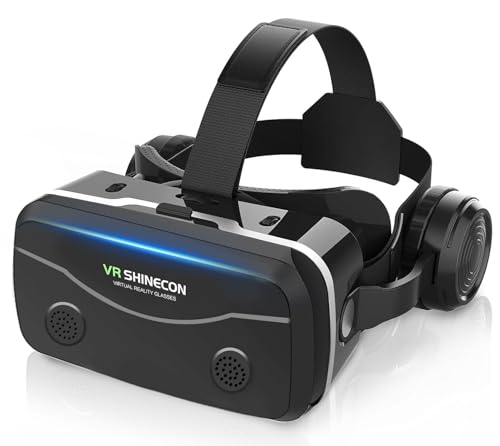
- Fits 4.7–7.2-inch Android and iOS phones
- Built-in 42mm stereo headphones
- 120° view with adjustable focus and pupil distance
Best For: Beginners seeking built-in audio and broad smartphone compatibility
Best for Adjustable Viewing

- Supports 5.0–7.0-inch smartphones
- FD and OD viewing adjustments
- Includes connected playback and volume controller
Best For: Mobile movies and games needing flexible visual alignment
Best for Kids and Beginners

- Works with iPhone and Android phones
- Includes remote, case, and cleaning cloth
- Comes with beginner app and video links
Best For: Families wanting a simple, gift-ready smartphone VR kit
Best Budget Cardboard Pick
Topmaxions Google Cardboard VR Headset
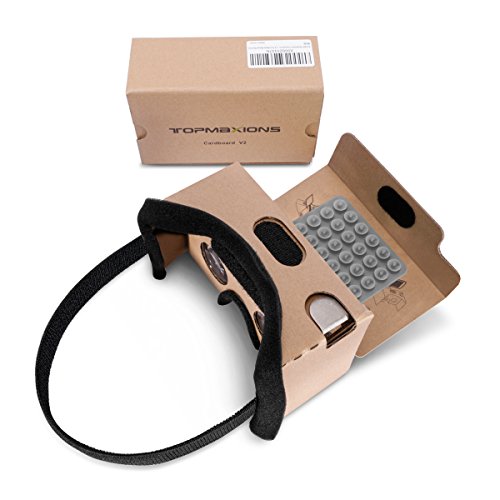
- Fits 3.5- to 6-inch smartphones
- Padded contact points and adjustable headband
- Simple option for 3D movies and mobile games
Best For: Budget Android users seeking casual smartphone VR
Best Adjustable Smartphone Viewer

- Supports 4.7- to 7-inch smartphones
- Adjustable interpupillary distance and anti-blue-light lenses
- Designed for panoramic video, movies, and games
Best For: Families sharing a larger-screen smartphone VR viewer
Best Feature-Rich Phone VR Set
Wennedalyn VR Headset with Controller

- Includes wireless remote control
- Adjustable focus and interpupillary distance
- Glasses-friendly anti-blue-light aspheric lenses
Best For: Family users wanting adjustable optics and hands-free control
Best Overall – TECKNET VR Headset with Bluetooth Controller
For shoppers comparing vr headsets for android, the TECKNET stands out as a versatile phone-based option with a bundled Bluetooth controller, adjustable optics, and broad 4.7- to 7.2-inch phone compatibility.
Best For: Android users who want a comfortable, controller-equipped headset for games, videos, and virtual tours.
Pros:
- Includes a Bluetooth controller for interactive apps and games.
- Supports phones from 4.7 to 7.2 inches, with adjustable pupil distance and focal length.
- Lightweight 268g design includes a soft nose rest, breathable foam, and adjustable headband.
- Offers blue-light protection and supports naked-eye viewing for myopia within 600°.
Cons:
- Requires compatible 3D or panoramic content; it does not convert ordinary images into 3D automatically.
- The phone frame may need to be removed for phones 6.2 inches or larger.
Its combination of wide compatibility, comfort features, optical adjustment, and a controller makes it a well-rounded pick for casual Android VR. The registered-user 36-month warranty is an additional advantage.
Best for Content Access – DESTEK V5 VR Headset with Free VR Movies
The DESTEK V5 is a content-focused choice among vr headsets for android. It combines a phone-based headset with a Bluetooth controller, touch buttons, a library of more than 50,000 free VR movies, and 128 selected apps.
Best For: Android households that want an easy way to discover VR movies, games, learning resources, and interactive content.
Pros:
- Includes access to more than 50,000 free VR movies with no subscription.
- Provides 128 hand-picked apps organized for viewing, gaming, teaching, and exploring.
- Android users get immersive navigation, motion control, and virtual interaction through the controller.
- Fits smartphones from 5.5 to 7.2 inches and includes 110-degree viewing with blue-light-blocking lenses.
Cons:
- Full controller interaction requires Android; iOS controller use is limited mainly to YouTube and music controls.
- The listed warranty is one year, shorter than some competing options.
For Android users, the main appeal is the ready-made content ecosystem rather than just the headset hardware. Its touch buttons, included controller, and family-oriented comfort features make it a convenient starter package.
Best Budget Gift – Haptique 3D VR Headset with Remote
This Haptique headset is a straightforward option for shoppers seeking vr headsets for android with a phone remote. It supports 4.5- to 6.7-inch smartphones and is designed for watching 3D content, playing games, and sharing VR experiences.
Best For: Kids, casual users, and gift buyers who want basic phone-based VR with remote controls.
Pros:
- Includes a remote for play/stop and volume control.
- Supports many common iPhone and Samsung Galaxy models from 4.5 to 6.7 inches.
- Uses double spherical optical lenses and offers a wide viewing angle for immersive content.
- Soft, breathable PU leather padding is easy to clean and comfortable to wear.
Cons:
- The remote’s listed controls focus on media functions rather than advanced VR interaction.
- Its narrower phone-size range may exclude some larger smartphones.
- The product notes recommend taking a break every half hour during use.
This is a simple, gift-friendly headset for phone-based 3D entertainment. It makes the most sense for casual Android viewing and basic media control rather than feature-rich VR gaming.
Best Lightweight Option – Rivonthex VR Headset for 4.0-6.0-Inch Phones
The Rivonthex is a compact, no-charging option for shoppers comparing vr headsets for android. It uses a smartphone as the display, offers a 100-degree viewing angle, and includes adjustable lens settings for movies, games, and other 3D content.
Best For: Android users with smaller phones who want portable VR for occasional entertainment.
Pros:
- Lightweight design is convenient to carry and use in different positions.
- Adjustable pupil and object distance settings support users with myopia up to 600 degrees.
- 100-degree viewing angle provides a panoramic phone-VR experience.
- Does not require charging and includes a cleaning cloth.
Cons:
- Compatibility is limited to phones measuring 4.0 to 6.0 inches.
- No warranty is listed in the supplied details.
- The notes describe knob control rather than a bundled Bluetooth game controller.
Its strongest advantages are portability, adjustable optics, and simple phone-based setup. Check your phone’s dimensions carefully, since this model is less suitable for users with larger-screen Android devices.
Best Overall Value – CoCerKet Smartphone VR Headset
For shoppers comparing VR headsets for Android, this CoCerKet model is a feature-rich smartphone option with built-in headphones, broad phone compatibility, and adjustable viewing controls. It supports phones from 4.7 to 7.2 inches and is designed for movies, games, and beginner-friendly VR exploration.
Best For: Android users who want built-in audio, a wide viewing angle, and adjustable fit at a beginner-friendly price.
Pros:
- Works with many Android and iOS smartphones measuring 4.7 to 7.2 inches.
- Built-in stereo headphones use 42mm drivers for immersive audio.
- Offers 120-degree viewing, 1080p support, and adjustable focus and pupil distance.
- Includes cushioning, an adjustable headband, and a ventilated magnetic front cover.
Cons:
- Requires a compatible smartphone to provide the display and VR content.
- Bluetooth controller is not included; control is handled through the headset button.
This is a strong all-around pick for first-time users who want more than basic phone goggles. Its built-in headphones and heat-dissipation design add convenience, while the wide compatibility makes it easier to use across multiple phones.
Best for Adjustable Viewing – Mryzzsf 3D VR Headset
This Mryzzsf headset is a practical choice among VR headsets for Android if you want viewing adjustments and a connected control accessory. It accommodates 5.0- to 7.0-inch smartphones and is intended for mobile games, movies, and other phone-based VR content.
Best For: Android phone users who prioritize focus, pupil-distance, and playback controls for movies and mobile games.
Pros:
- Supports smartphones with screens from 5.0 to 7.0 inches.
- FD and OD adjustments help align focal distance and viewing position.
- Included controller can manage playback and volume functions.
- Adjustable head strap and soft nose piece are designed to reduce pressure.
Cons:
- Its phone-size range is narrower than models supporting screens up to 7.2 inches.
- Requires placing and centering the phone manually before use.
The main advantage here is adjustability: FD and OD controls can help users refine the view for different viewing preferences. It is a straightforward option for shared movie nights or casual smartphone VR gaming.
Best for Kids and Beginners – REALITEX VR Headset
The REALITEX headset is one of the more approachable VR headsets for Android, pairing a simple smartphone viewer with an Android remote, beginner guidance, and links to VR apps and videos. Its padded face area and larger lenses are aimed at making casual entertainment more comfortable for kids and adults.
Best For: Families and first-time users looking for a giftable smartphone VR kit with included content resources.
Pros:
- Compatible with iPhone and Android smartphones.
- Includes an Android remote, cleaning cloth, and fabric case.
- Provides links to VR apps and videos for beginners.
- Features larger lenses, face padding, and a built-in button.
Cons:
- The supplied notes do not specify a supported phone-size range.
- It depends on a smartphone and downloaded content for VR experiences.
For families, the included remote and beginner content links make setup less intimidating than a bare headset. Its kid-focused positioning and accessories also make it a sensible introductory gift, provided the recipient has a compatible phone.
Best Budget Cardboard Pick – Topmaxions Google Cardboard VR Headset
If you want an inexpensive entry point into VR headsets for Android, this smartphone viewer offers a simple DIY-style setup for compatible phones from 3.5 to 6 inches. Its padded contact points and suction-cup phone holder make it a practical choice for casual 3D movies and mobile games.
Best For: Budget-conscious Android users who want a lightweight viewer for occasional home entertainment.
Pros:
- Fits smartphones between 3.5 and 6 inches, including many Android models.
- Sponge nose and forehead pads improve comfort during viewing.
- Lengthened headband accommodates different head sizes.
- Triangular wing controls and suction cups help with phone placement and screen interaction.
Cons:
- Uses the smartphone display, with a listed maximum resolution of 1280 × 720.
- The cardboard-style design is best suited to casual use rather than advanced VR.
This is a straightforward, low-cost option for exploring smartphone VR without a dedicated display. Choose it when broad phone compatibility and simple setup matter more than premium optics or advanced controls.
Best Adjustable Smartphone Viewer – Xiaokeis 360° VR Headset
For shoppers comparing VR headsets for Android, this Xiaokeis model emphasizes adjustable viewing and broad smartphone compatibility. It supports phones from 4.7 to 7 inches and includes adjustable interpupillary distance, anti-blue-light lenses, and a lightweight headband for movies and games.
Best For: Families and casual users who want a phone viewer with adjustable optics and support for larger screens.
Pros:
- Compatible with smartphones measuring 4.7 to 7 inches.
- Adjustable interpupillary distance helps users fine-tune image clarity.
- Anti-blue-light optical lenses are designed to reduce glare and visual fatigue.
- Supports 360-degree panoramic video, 3D movies, and virtual game scenes.
Cons:
- Its listed 90-degree field of view is narrower than some competing models.
- It relies on a compatible smartphone rather than having a built-in display.
The adjustable lens system makes this a flexible pick for shared household use, especially if different viewers or phone sizes are involved. It is a phone-based headset, so the experience will still depend on the inserted device and available VR content.
Best Feature-Rich Phone VR Set – Wennedalyn VR Headset with Controller
Among VR headsets for Android, the Wennedalyn model stands out for its focus adjustments, glasses-friendly space, and included wireless remote. It is designed for smartphone-based 360-degree video and VR games, with a wide listed field of view and comfort features for longer sessions.
Best For: Android and iPhone users who want adjustable optics, hands-free controls, and a headset suitable for family entertainment.
Pros:
- Includes a wireless remote for navigation and gameplay controls.
- Offers adjustable focus and interpupillary distance for a customized view.
- Aspheric anti-distortion lenses include anti-blue-light treatment.
- Glasses-friendly design and adjustable T-shaped headband support extended use.
Cons:
- The notes do not specify a supported phone-size range.
- The remote adds a separate accessory to manage and keep charged.
This is the most versatile choice of the three for users who want more than a basic phone holder. Its optical adjustments and remote can make smartphone VR more convenient, while the two-year manufacturer warranty adds reassurance for regular family use.
How We Picked the Best Vr Headsets for Android
We focused on the features that matter most for smartphone VR: phone-size compatibility, lens adjustability, field of view, comfort, controls, and ease of setup. We also considered whether each design suits movies, games, family use, or occasional experimentation. Because these are phone-powered viewers, your Android phone’s screen quality, sensors, battery, and app support will strongly affect the experience.
Quick Comparison
- Best for adjustable fit: Look for models supporting a wide range of phone sizes and offering adjustable focus, pupil distance, or lens spacing.
- Best for gaming: Choose a headset bundled with a Bluetooth or handheld controller, while confirming that your preferred games support controller input.
- Best for movies: Prioritize clear lenses, a wide field of view, comfortable padding, and enough room for your phone’s screen.
- Best for families: A simple phone-loading design with easy adjustments and a durable strap is generally easier to share.
- Best for low-cost testing: Cardboard-style viewers are inexpensive and portable, but they usually provide fewer comfort and adjustment features.
Key Buying Factors for Vr Headsets for Android
Phone Compatibility
Measure your phone, including its case if you plan to leave it on. Product listings often state a supported screen-size range, but physical dimensions and camera placement can matter just as much. A snug holder prevents the phone from shifting during use.
Lens Quality and Adjustment
Aspheric or HD lenses can improve clarity, while adjustable pupil distance and focus help accommodate different users. Anti-blue-light claims may be useful for comfort, but they do not eliminate eye strain or make extended viewing risk-free. Take regular breaks.
Comfort and Balance
Padding, ventilation, strap adjustment, and overall weight determine whether you can use a headset for more than a few minutes. Built-in headphones add convenience but can increase weight and limit compatibility with some phones.
Controls and Content
A bundled controller is useful only when Android apps support the relevant input method. Confirm Bluetooth requirements, Android compatibility, and whether the headset is intended for split-screen VR videos, 360-degree content, or interactive games.
Who Should Buy Which Vr Headsets for Android?
Choose a feature-rich adjustable viewer if multiple people will use it or you want better control over focus and fit. Choose a controller-equipped model for casual mobile games and interactive content, provided your phone and apps support it. Choose a headset with built-in headphones if you want an all-in-one movie setup and do not mind extra bulk. Choose a kids’ model when easy handling and a family-oriented fit matter more than advanced optics. Choose a Cardboard-style viewer if you are curious about VR and want the cheapest, lightest way to try compatible Android apps.
Before buying, verify the exact phone-size range, return policy, controller requirements, and app compatibility. No phone-based viewer matches the tracking, resolution, or comfort of a dedicated standalone headset, but the right model can still deliver an enjoyable introduction to mobile VR.