The right ceiling mount can improve sightlines, reclaim wall space, and make presentations easier to follow across a conference room. The challenge is matching your displays, ceiling structure, viewing angles, and control needs.
We selected 10 options spanning motorized and fixed designs, single- and dual-screen setups, compact displays, and large commercial-style TVs. Use the guide below to narrow the list by compatibility, adjustability, installation requirements, and everyday usability.
Best 10 TV Ceiling Mounts for Conference Rooms Picks for 2026
Best Dual-Screen Coverage

- Supports two 32–77-inch TVs
- Works on angled and vaulted ceilings
- 360-degree swivel with cable management
Best For: Conference rooms needing back-to-back displays
Best Smart Motorized Option

- Supports 37–70-inch TVs up to 99 pounds
- Remote, app, and voice control
- Folds down from flat or pitched ceilings
Best For: Smart conference rooms with retractable displays
Best Simple Large-Screen Lift
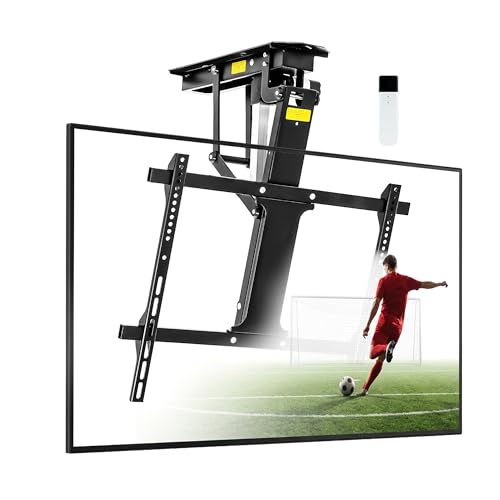
- Supports up to 88 pounds
- Remote-controlled 0–80-degree tilt
- Folds against the ceiling when stored
Best For: Fixed-view conference rooms with flat ceilings
Best Compact Conference-Room Fit

- Fits 23–55-inch TVs
- Supports up to 99 pounds
- Folds flat against the ceiling
Best For: Small rooms prioritizing a discreet display
Best Smart Drop-Down Pick

- 37-75-inch TV support up to 99 pounds
- 0-80° motorized tilt with app and voice control
- Folds flat to reclaim wall and floor space
Best For: Conference rooms needing a retractable, remotely controlled display
Best for Large Commercial Displays

- Supports up to 100-inch TVs and 176 pounds
- 42.9-82.8-inch adjustable pole for high ceilings
- 180° swivel and -25° to +3° tilt
Best For: Large commercial conference rooms with high or sloped ceilings
Best Heavy-Duty Full-Motion Option

- Supports 37-90-inch TVs up to 220 pounds
- 360° swivel with 18° tilt adjustment
- Cable management through the center tube
Best For: Commercial conference rooms needing high weight capacity and full motion
Best Heavy-Duty Pick
PEGZONE 43–86-Inch Full-Motion Ceiling Mount

- Supports TVs up to 86 inches and 155 pounds
- 43–66.5-inch height adjustment
- Works with flat and sloped ceilings
Best For: Large conference-room displays and commercial installations
Best Compact Commercial Option
PERLESMITH 26–65-Inch Ceiling TV Mount

- Fits 26–65-inch TVs up to 110 pounds
- 360° swivel with tilt and leveling adjustment
- Center-tube cable management and 10-year service
Best For: Small and midsize conference rooms
Best Flexible Midrange Pick
USX STAR 26–65-Inch Full-Motion Mount

- Supports 26–65-inch TVs up to 110 pounds
- 360° rotation with height and tilt adjustment
- Base swivels up to 90° for angled ceilings
Best For: Flexible viewing angles in offices and conference rooms
Best Dual-Screen Coverage – Angled-Ceiling Dual TV Mount
For conference rooms that need visibility from opposite sides, this dual TV ceiling mount supports two 32–77-inch screens on one telescoping pole. Its adjustable bracket works with flat, sloped, vaulted, and angled ceilings, making it a flexible option for presentation displays, signage, or room-wide information.
Best For: Conference rooms and commercial spaces needing back-to-back displays and broad viewing coverage.
Pros:
- Holds two TVs back-to-back for 360-degree viewing.
- Compatible with flat, sloped, vaulted, and angled ceilings.
- Each screen swivels 360 degrees and tilts independently.
- Routes cables through the hollow pole for a cleaner installation.
Cons:
- Installation requires two people and a ladder.
- Recommended for ceilings 9–12 feet high.
- Its dual-screen design may be more than a single-display room requires.
This is the most versatile choice when a conference room needs two screens or viewing from multiple directions. Verify ceiling structure, TV VESA patterns, and available height before installation.
Best Smart Motorized Option – Electric Flip-Down TV Mount
This VIVO electric ceiling mount is designed for conference rooms where the screen should fold away when not in use. It supports 37–70-inch TVs, offers remote-controlled height adjustment, and can also be operated through the Tuya app, Amazon Alexa, or Google Home.
Best For: Modern conference rooms that value motorized positioning, low visual clutter, and smart controls.
Pros:
- Supports TVs up to 99 pounds.
- Remote includes programmable height settings.
- Works with flat and pitched ceilings using suitable structural mounting points.
- Offers app and voice-control compatibility.
Cons:
- Manual tilt ranges from 0 to 80 degrees; it does not provide stated left-right swivel.
- TVs over 65 inches need centered VESA holes for clearance.
- Should not be installed into drywall alone.
With its wide screen-size range and smart-control features, this mount fits presentation rooms where quick deployment and discreet storage matter. Confirm the ceiling structure and TV mounting pattern before ordering.
Best Simple Large-Screen Lift – Motorized 32–70-Inch Mount
For conference rooms using a single display, the TOPSKY motorized ceiling mount provides remote-controlled drop-down positioning for 32–70-inch TVs. It supports up to 88 pounds, tilts up to 80 degrees, and folds against the ceiling to preserve wall and floor space.
Best For: Flat-ceiling conference rooms seeking an affordable motorized flip-down display without swivel functionality.
Pros:
- Supports 32–70-inch TVs up to 88 pounds.
- Remote control has a stated 98-foot range.
- Provides motorized 0–80-degree tilt and screen leveling.
- Fits VESA patterns from 200×100 to 600×400 mm.
Cons:
- Does not offer left-right swivel movement.
- Not compatible with vaulted ceilings.
- Remote and receiver pairing is required before use.
This mount is a practical fit when the screen faces a fixed seating area and the room benefits from a ceiling-saving design. Choose another model if presenters need to redirect the display across the room.
Best Compact Conference-Room Fit – Low-Profile Electric Mount
This compact VIVO ceiling mount is suited to smaller conference rooms and multipurpose spaces using 23–55-inch screens. Its motorized height adjustment lets the display fold against the ceiling, while support for flat and pitched ceilings expands installation flexibility.
Best For: Smaller conference rooms and offices where a low-profile, space-saving display is important.
Pros:
- Fits 23–55-inch TVs and supports up to 99 pounds.
- Remote-controlled height adjustment works throughout the room.
- Folds the screen against the ceiling to reclaim vertical space.
- Compatible with flat and pitched ceilings.
Cons:
- Its 55-inch maximum may be limiting for larger rooms.
- It provides tilt and leveling but no stated swivel movement.
- For TVs over 50 inches, centered VESA holes are recommended for clearance.
This is a sensible choice for rooms that need a discreet display without committing wall space. Check the TV’s VESA layout and ceiling structure, especially when using a larger supported screen.
Best Smart Drop-Down Pick – Motorized Ceiling TV Mount
For conference rooms that need a clean, flexible display setup, this motorized mount supports 37- to 75-inch TVs and folds the screen toward the ceiling when it is not in use. It is one of the more convenient tv ceiling mounts for conference rooms, with remote, app, and voice controls for quick position changes.
Best For: Conference rooms and multipurpose spaces using flat or pitched concrete, brick, or wood ceilings, provided the TV’s VESA pattern and ceiling structure are compatible.
Pros:
- Supports TVs from 37 to 75 inches and up to 99 pounds, with VESA compatibility from 200x100mm to 600x400mm.
- Offers motorized 0-80° tilt, ±2° leveling, and remote, Tuya app, Alexa, or Google Home control.
- Folds the TV flat against the ceiling to reclaim wall and floor space.
Cons:
- Not designed for wood studs, and the ceiling structure must be verified before installation.
- Larger TVs may require centered VESA holes or additional planks for clearance.
- Installation is recommended for two people, and the remote must be paired with the receiver first.
This is a strong choice when presentation convenience and a concealed, space-saving installation matter more than supporting extra-large displays. Confirm the ceiling material, TV weight, and VESA placement before ordering.
Best for Large Commercial Displays – Adjustable Hanging TV Mount
For large conference rooms and commercial interiors, this heavy-duty hanging mount supports TVs up to 100 inches and 176 pounds. Its long adjustable pole and broad VESA range make it a practical option among tv ceiling mounts for conference rooms with high, vaulted, or sloped ceilings.
Best For: Large conference rooms, hotel lobbies, fitness centers, retail spaces, and other commercial environments that need a high-capacity ceiling mount with flexible positioning.
Pros:
- Supports 50- to 100-inch flat or curved TVs weighing up to 176 pounds.
- Fits VESA patterns up to 800x600mm and works with LCD, LED, OLED, and 4K displays.
- Provides 180° swivel, -25° to +3° tilt, and a 42.9- to 82.8-inch adjustable pole.
Cons:
- Its large-TV capacity may be more than needed for smaller conference rooms.
- The supplied notes do not specify a warranty duration beyond a listed warranty description of 2.
This mount stands out when a conference room requires substantial load capacity and extended drop length. Check the display’s VESA layout, weight, ceiling type, and available vertical clearance before installation.
Best Heavy-Duty Full-Motion Option – WALI Long Arm Ceiling Mount
This WALI mount is suited to conference rooms that use large displays and need substantial load capacity. It supports 37- to 90-inch TVs up to 220 pounds, with 360° swivel, tilt adjustment, and a long telescoping arm that works on flat or sloped ceilings.
Best For: Business and institutional spaces such as conference rooms, schools, clinics, restaurants, gyms, and other locations requiring a heavy-duty, full-motion TV mount.
Pros:
- Supports most 37- to 90-inch TVs weighing up to 220 pounds.
- Offers 360° swivel, up to 18° tilt, and 48.43- to 59.06-inch height adjustment.
- Supports VESA patterns through 800x400mm and routes cables through the center tube for a cleaner installation.
Cons:
- Must not be mounted to drywall alone; suitable structural support is required.
- The tilt range is limited to 18°, which may be less flexible than motorized alternatives.
- The supplied height range is shorter than some mounts designed specifically for very high ceilings.
Choose this model when maximum weight capacity and broad swivel movement are priorities. Its cable-routing design also helps maintain a professional appearance, but structural ceiling support and VESA compatibility should be confirmed first.
Best Heavy-Duty Pick – PEGZONE 43–86-Inch Full-Motion Ceiling Mount
For conference rooms using a large display, the PEGZONE is one of the most capable tv ceiling mounts for conference rooms. Its steel construction supports TVs up to 155 pounds and accommodates screens from 43 to 86 inches, while the telescoping pole helps position the display for different room layouts.
Best For: Large conference-room TVs, commercial spaces, and installations requiring substantial weight capacity or sloped-ceiling compatibility.
Pros:
- Supports most 43–86-inch TVs up to 155 pounds.
- Offers ±180° swivel, 0° to -25° tilt, and ±3° leveling.
- Adjusts from 43 to 66.5 inches and supports flat or angled ceilings up to ±60°.
- Fits VESA patterns up to 600×400.
Cons:
- Its large-screen design may be more mount than needed for smaller displays.
- The longer adjustable pole may require careful planning around ceiling height and room sightlines.
Choose the PEGZONE when your conference room needs a sturdy, highly adjustable mount for a large or heavy screen. Its broad TV and ceiling compatibility makes it especially useful for demanding commercial installations.
Best Compact Commercial Option – PERLESMITH 26–65-Inch Ceiling TV Mount
The PERLESMITH is a practical choice among tv ceiling mounts for conference rooms where a 26- to 65-inch display is sufficient. It supports up to 110 pounds, provides 360° swivel and tilt adjustment, and includes cable management through the center tube for a cleaner presentation.
Best For: Small and midsize conference rooms, offices, and commercial spaces needing a space-saving display mount.
Pros:
- Fits most 26–65-inch TVs with VESA patterns from 100×100 to 400×400.
- Provides 360° swivel, +5°/-15° tilt, and ±3° leveling.
- Adjusts from 20.47 to 29.92 inches from the ceiling to the TV plate center.
- Supports wood studs, concrete, and brick mounting surfaces and includes a 10-year service warranty.
Cons:
- It is not designed to flip down or fold down.
- Its 65-inch maximum screen size and 110-pound capacity limit it compared with larger heavy-duty mounts.
- Drywall-only installation is not supported.
The PERLESMITH balances broad adjustment with a relatively compact hanging profile. It is a sensible fit when your room uses a midrange display and the installation surface can accept a properly secured ceiling mount.
Best Flexible Midrange Pick – USX STAR 26–65-Inch Full-Motion Mount
The USX STAR offers useful flexibility for tv ceiling mounts for conference rooms, with 360° rotation, height adjustment, and support for angled ceilings. It fits most 26- to 65-inch TVs up to 110 pounds and includes cable-management holes to help keep connections organized.
Best For: Offices, schools, hotels, and conference rooms that need flexible viewing angles or angled-ceiling installation.
Pros:
- Supports most 26–65-inch TVs up to 110 pounds.
- Fits VESA patterns from 50×50 to 400x400mm.
- Offers 21.14–29.02-inch height adjustment, 15° downward tilt, and 360° rotation.
- Base swivels up to 90° for angled or sloped ceilings and includes cable-management holes.
Cons:
- It supports smaller displays than the PEGZONE and has a lower weight limit.
- The listed tilt adjustment is downward only, up to 15°.
- TV size, weight, and VESA pattern must be verified before purchase.
The USX STAR is a versatile middle-ground option for rooms where the screen may need to face different seating areas. Its angled-ceiling support and broad VESA range add installation flexibility without targeting oversized displays.
How We Picked the Best TV Ceiling Mounts for Conference Rooms
We compared these mounts by the factors that matter most in shared meeting spaces: supported screen size and weight, VESA compatibility, height adjustment, tilt and swivel range, motorized operation, construction, and installation flexibility. We also considered whether a mount suits one display, a back-to-back setup, or a large screen positioned for a wide audience.
Before buying, verify the exact TV weight, mounting pattern, ceiling type, and the mount’s published limits. A mount should not be selected by screen size alone.
Quick Comparison
- Best for two displays: Mount-It! dual TV ceiling mount.
- Best for powered adjustment: VIVO, TOPSKY, and monTEK motorized models.
- Best for very large or heavy TVs: WALI Long Arm ceiling mount.
- Best for broad size flexibility: the adjustable 100-inch model.
- Best for smaller conference displays: VIVO’s 23- to 55-inch model or the PERLESMITH and USX STAR mounts.
Key Buying Factors for TV Ceiling Mounts for Conference Rooms
Screen Size, Weight, and VESA Pattern
Check the TV’s diagonal size, actual weight, and VESA bolt spacing against the mount specifications. Large commercial displays may need a heavy-duty bracket even when their screen size falls within a mount’s advertised range.
Ceiling Height and Drop Length
Measure from the structural ceiling to the desired screen center. Telescoping or height-adjustable poles help position displays below ductwork, lighting, and acoustic panels while keeping the screen visible from seated positions.
Viewing Angle and Room Coverage
Tilt is useful when the display hangs above eye level, while swivel helps accommodate side seating or changing room layouts. A dual-sided mount can serve audiences on opposite sides of a room, but it requires careful balance and cable planning.
Motorized Control and Power
Motorized mounts can simplify angle or height changes, particularly in flexible rooms. Confirm remote-control range, noise expectations, power access, and whether the ceiling installation can conceal or safely route cables.
Ceiling Structure and Installation
Mount only to suitable structural support, not unsupported drywall or a decorative ceiling tile. For heavier displays or motorized hardware, professional installation is often the safest choice. Leave clearance for sprinklers, lights, vents, doors, and movable partitions.
Who Should Buy Which TV Ceiling Mounts for Conference Rooms?
Choose a dual-screen mount when one installation must serve people on both sides of a room or hallway. Select a motorized model when presentations require frequent adjustments or the display must be stored higher between uses. A heavy-duty long-arm mount is the better fit for oversized TVs, while a compact adjustable mount works well for smaller meeting rooms and modest displays.
For a standard conference room, prioritize the closest match for your TV’s VESA pattern and weight, then choose the height, swivel, tilt, and control features that fit the room. If the ceiling structure or cable route is uncertain, have an installer confirm compatibility before purchase.